
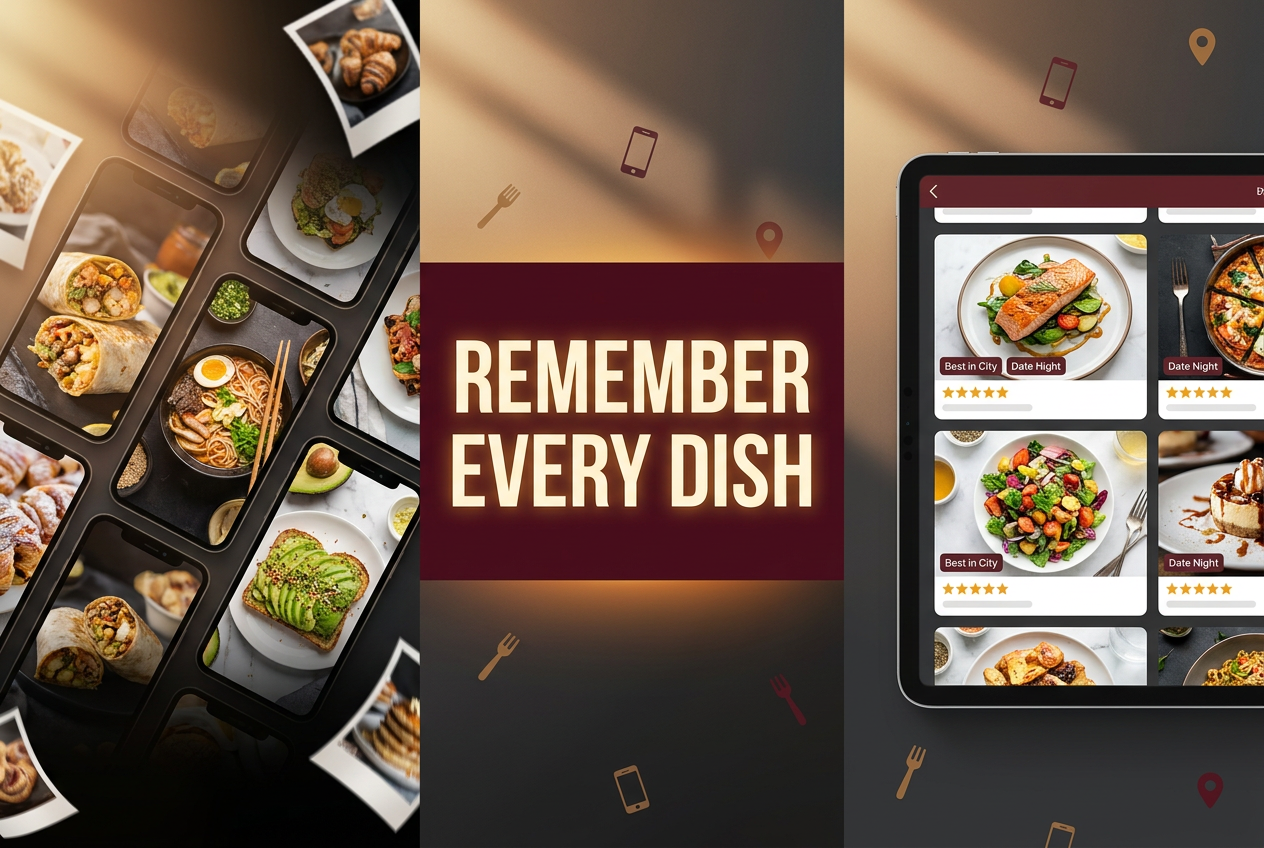
Best App to Rate Individual Dishes: Top 5 Picks (2026)
Alex the juice queen
Alex hunts for the best juice bars and presses. She rates every sip and saves her favorites in Savor.
Beyond the Camera Roll: The 5 Best Apps to Track Every Dish You Eat You have 3,000 food photos in your camera roll, yet you’re standing in a bistro in Paris...
Beyond the Camera Roll: The 5 Best Apps to Track Every Dish You Eat
You have 3,000 food photos in your camera roll, yet you’re standing in a bistro in Paris unable to remember which duck confit you liked best last year. The names have blurred. The locations have merged. That specific pasta that changed the way you think about carbonara? Lost somewhere between a hundred brunch shots and your kid’s soccer photos.
Here’s the uncomfortable truth: in 2026, the 5-star restaurant review is dead. The Serious Foodie knows that a 4-star restaurant can serve a 10/10 pasta and a 2/10 dessert. We don’t eat restaurants. We eat dishes. Yet most of us still track food the way our parents did - broad strokes, vague memories, and a camera roll that functions as a digital black hole.
The shift from restaurant-level tracking to dish-level granularity isn’t just a trend. It’s a fundamental recalibration of how we document our culinary lives. This guide will show you how to move from chaotic photo archives to searchable cultural assets, and which apps actually help you remember what matters.
Table of Contents
- The Evolution of the Foodie: Why Yelp Fails the 1%
- The Camera Roll Problem: 3,000 Photos, Zero Searchability
- Social vs. Private: The Two Paths of Dish Rating
- Deep Dive: Top 5 Apps That Actually Work
- The Data Portability Test: Who Owns Your Memories?
- How to Audit Your Camera Roll
- Frequently Asked Questions
The Evolution of the Foodie: Why Yelp Fails the 1%
The average Yelp review tells you almost nothing useful. "Great atmosphere, friendly service, 4 stars." Cool. What did you actually eat? Was the octopus tender or rubbery? Did the mole have enough depth, or was it just brown gravy with a hint of chocolate?
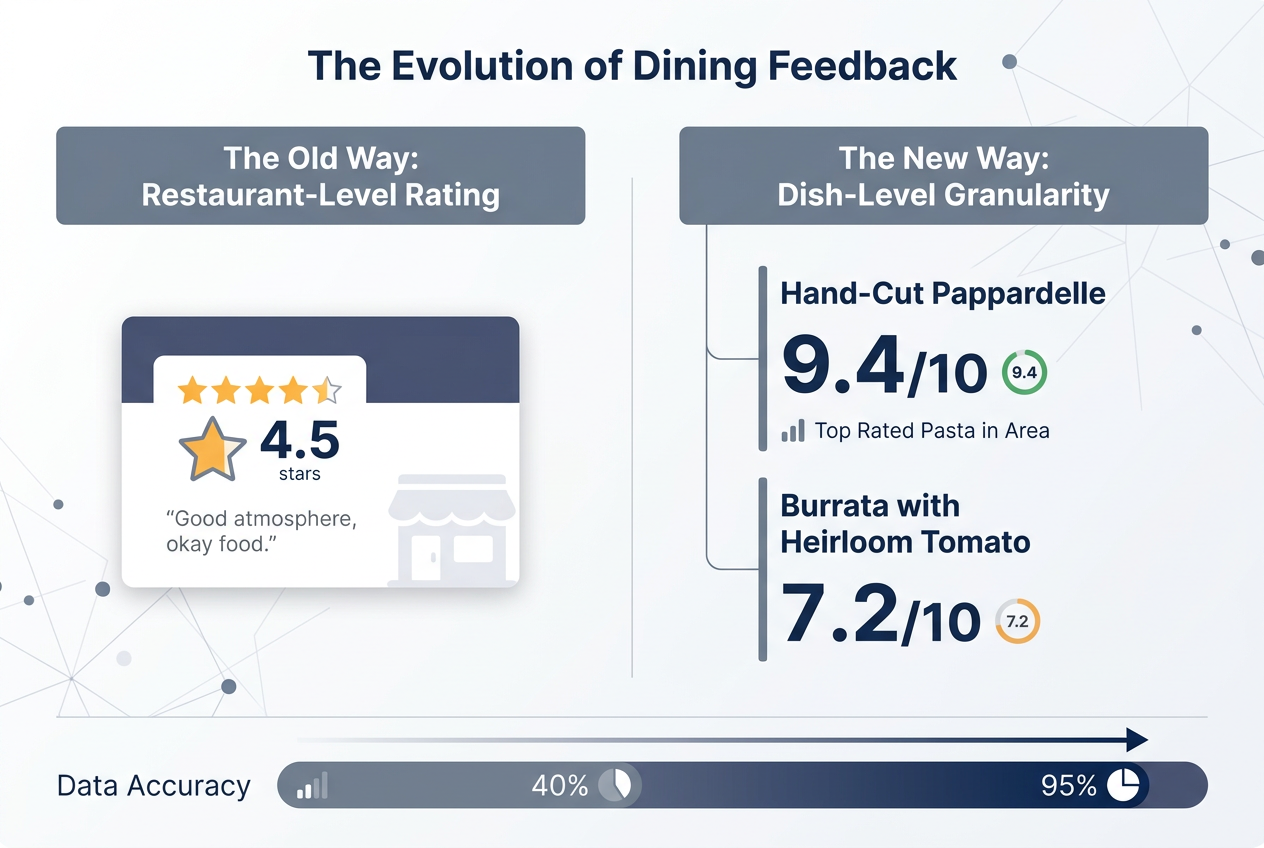
For the serious foodie - the person dining out 3-4 times a week, the traveler who plans trips around specific dishes, the home cook studying technique through restaurant meals - generic restaurant ratings are noise. You don’t need to know if a trattoria has "good Italian food." You need to know if their cacio e pepe is worth the 45-minute wait.
This isn’t snobbery. It’s precision. When you’re spending $200 on a tasting menu, you want to remember which courses justified the price and which ones were forgettable filler. When you discover a perfect xiao long bao in Flushing, you need a system that lets you find that exact stall again two years later.
The 1% of diners who treat food as culture, not just fuel, have different needs:
- Specificity over generality: The name of the dish, not just the restaurant
- Personal context: Why it worked for you, not crowd consensus
- Searchability: Find "best duck I’ve eaten" in three seconds
- Portability: Your data, exportable and yours forever
Most restaurant apps were built for the casual diner making Friday night plans. They fail spectacularly at helping you build a personal restaurant library that functions as your external culinary memory.
The Camera Roll Problem: 3,000 Photos, Zero Searchability
Let’s run an experiment. Open your photo app right now and try to find that incredible pasta dish you had in Rome eight months ago. Go ahead. I’ll wait.
Unless you’re exceptionally organized or have a photographic memory that extends to timestamps, you probably just scrolled past it twice without recognizing it. Or you gave up after 30 seconds of endless scrolling. Your camera roll is where food memories go to die.
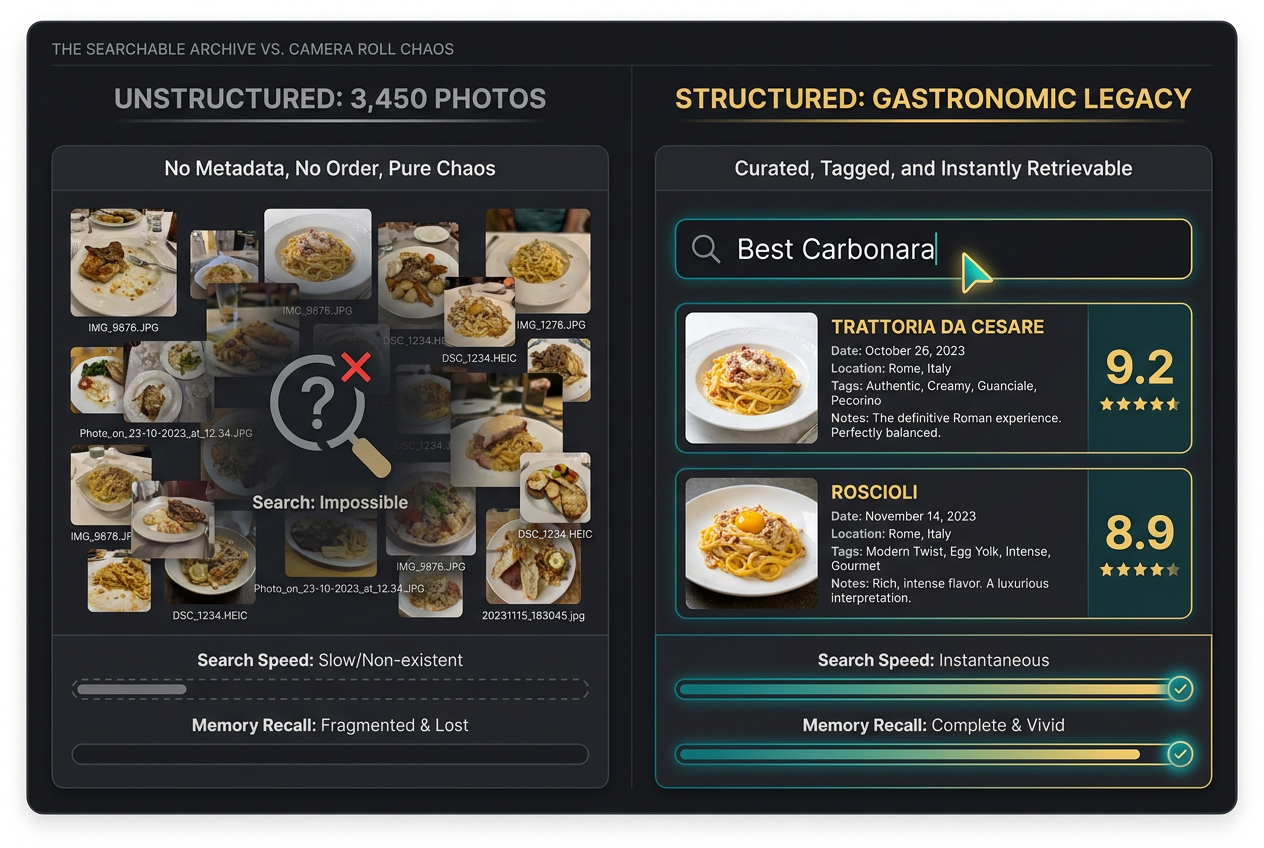
The camera roll wasn’t designed for curation. It’s a chronological dump of every moment you’ve photographed, with no hierarchy, no categorization, and no intelligence. That perfect shot of agnolotti sits between a parking receipt and your dog’s weird rash. The intimate multi-course kaiseki experience is scattered across 47 consecutive photos with no indication of which dish was actually memorable.
Here’s what you lose in the camera roll chaos:
The dish name vanishes. Six months later, was that handmade pappardelle or tagliatelle? You can see it in the photo, but you can’t search for it. The specific name - the thing that lets you order it again or recommend it accurately - is gone.
Context evaporates. Where were you? Who were you with? What was the occasion? The photo exists in a vacuum, stripped of the narrative that made the meal significant.
Ratings disappear. You remember it was good, but how good? Better than the version you had in Bologna? Worse than your friend’s dinner party attempt? Without a recorded score at the moment of tasting, you’re left with vague impressions that drift further from accuracy every day.
Comparison becomes impossible. You’ve eaten ramen in Tokyo, New York, and Los Angeles. Which bowl was actually the best? Your memory insists the Tokyo one was transcendent, but was it really, or are you just romanticizing the context?
The serious foodie’s camera roll contains hundreds of hours of research - dishes tasted, techniques observed, plating studied - rendered completely unsearchable. You’re sitting on a goldmine of culinary intelligence with no way to access it. If you’re ready to organize restaurant photos into a searchable library, you need a system that treats dishes as data, not just pretty pictures.
Social vs. Private: The Two Paths of Dish Rating
The fundamental question isn’t which app to use. It’s what you want from the experience. Are you building a public portfolio or a private archive? Do you want social validation or personal utility?
The Social Route: Performance and Community
Apps like Beli transformed food tracking into a social game. You don’t just log meals - you build a public persona. Your profile becomes a curated portfolio of taste, signaling to friends and strangers that you have discerning palate and adventurous dining habits.
The appeal is obvious. There’s something deeply satisfying about having your friend group discover that you’ve been to 47 ramen shops and can authoritatively declare which one serves the city’s best tonkotsu. Rankings turn eating into competition. ELO-style comparisons ("Which carbonara was better: Roscioli or Flavio?") gamify the experience.
But social food tracking comes with trade-offs:
Reviews become performances. When you know others will read your take, you edit yourself. The truly negative review gets softened. The embarrassingly enthusiastic rave about a chain restaurant gets left unposted. Your public feed becomes a highlights reel, not an honest record.
Privacy vanishes. Your dining patterns are visible. That 3 AM taco run after the bar? Logged and timestamped. The fact that you’ve eaten at the same poke spot seven times this month? Public record. For some people, that’s fine. For others, it’s intrusive.
Platform dependency grows. The more you invest in building your social presence on one platform, the more locked in you become. Your followers, your history, your carefully cultivated reputation - it’s all platform-specific and potentially temporary.
The Private Route: Utility and Ownership
The alternative path treats dish tracking as personal infrastructure. You’re not performing for an audience. You’re building a reference system - a searchable database of every significant meal you’ve eaten, optimized for retrieval and personal use.
Private tracking apps like Savor prioritize different values:
Honesty over curation. Your notes can be brutally honest because only you will read them. "Overpriced and underseasoned" goes into your log without social consequences. This raw honesty makes your database actually useful for future decisions.
Complete detail. You can record granular observations that would bore a public audience. The specific level of char on the crust. The ratio of filling to pasta in the ravioli. Technical details that help you understand why a dish worked or failed.
Data portability. The best private apps let you export your entire database. CSV files, JSON exports, full photo archives. Your data remains yours, independent of the app’s longevity or business model.
The private route requires discipline. Without social reinforcement, you need intrinsic motivation to maintain the habit. But the payoff is a tool built for your needs alone, not shaped by the demands of an audience or the constraints of a social algorithm.
Many serious foodies use both approaches. Social apps for restaurant discovery and community. Private apps for comprehensive personal archiving. The key is understanding which mode serves which purpose.
Deep Dive: Top 5 Apps That Actually Work
Let’s cut through the noise. These five apps represent genuinely different approaches to solving the dish-tracking problem. Each excels in specific scenarios. None is universally "best."
Savor: The Private Archive
Core philosophy: Dish-level tracking with zero social pressure
Savor treats every dish as a discrete entity worthy of its own detailed record. The interface is built around a simple question: three months from now, what will help you remember this meal?
The app uses a 10-point scoring system instead of stars. It sounds like a small detail, but it matters. Stars force you into broad categories (3 stars vs. 4 stars). A 10-point scale lets you make finer distinctions. That ramen was an 8.5, not a 9.0. The difference is real when you’re comparing three bowls from the same trip.
The AI dish recognition feature is legitimately useful. Point your camera at a menu item, and the app attempts to identify the dish type, suggest relevant tags, and even pull in similar dishes you’ve logged before. It’s not perfect - it once identified my duck confit as "roasted chicken" - but it’s right often enough to save significant time.
What makes Savor particularly valuable is the metadata structure. Every entry captures:
- Dish name and restaurant
- Date and dining companions
- Your 10-point rating
- Text notes with unlimited length
- Multiple photos per dish
- Custom tags (cuisine type, cooking method, specific ingredients)
- Price and value assessment
The search functionality actually works. Type "best pasta" and you get every pasta dish you’ve rated 8.5 or higher, sorted by score. Filter by location, date range, price point, or any combination of tags. This is the kind of utility that only becomes apparent after six months of consistent logging, when you suddenly have 200+ dishes in your database and need to remember where you had that excellent cacio e pepe.
Best for: Serious foodies building a personal reference system, people who value privacy, anyone who wants full data ownership
Limitations: No social features, requires self-discipline to maintain the habit
Beli: The Social Foodie Network
Core philosophy: Food as social currency
If Savor is a private journal, Beli is Instagram for foodies with better structure. The app’s entire design pushes you toward public sharing and social comparison. Your profile becomes a living portfolio of your taste.
The signature feature is the ELO comparison system. Instead of rating dishes on an absolute scale, you compare them head-to-head. "Which was better: the omakase at Sushi Nakazawa or the one at Tanoshi?" Over time, these binary choices build a ranked list of your top experiences in each category.
It’s addictive. Friends can challenge your rankings. You can see which restaurants your social circle rates highest. The competitive element drives engagement in a way that private logging never could.
The "Letterboxd of food" comparison is accurate. Just as film buffs on Letterboxd curate their viewing history as a form of cultural identity, Beli users build food profiles that signal their expertise and adventurousness. Your list of top-rated dishes becomes a conversation starter, a flex, and a recommendation engine all at once.
But the social nature cuts both ways. Some users report self-censoring their reviews to maintain social harmony. Others feel pressure to dine at trendy spots for the social proof rather than eating where they genuinely want to eat.
Best for: Social eaters who enjoy the community aspect, people who want restaurant discovery through trusted friend networks, anyone motivated by competition and public accountability
Limitations: Privacy concerns, potential for performative eating rather than genuine enjoyment
TasteRate: The Practical Middle Ground
Core philosophy: Utility-first design for decision-making
TasteRate feels less precious than either Savor or Beli. It’s a straightforward tool for a straightforward problem: you want to know what to order at every restaurant.
The interface is minimal. Log a dish, rate it with stars (1-5), add optional notes, done. The simplicity is intentional. TasteRate optimizes for speed of entry over depth of reflection. You can log a meal in under 30 seconds, which matters when you’re dining out frequently and don’t want documentation to become a burden.
The app shines in its practical features. When you’re looking at a restaurant page, TasteRate shows you what dishes other users rated highest, sorted by consensus score. It’s like having a knowledgeable friend tell you, "Skip the pad thai, but the drunken noodles are incredible."
The hybrid social model is smart. Your logs are private by default, but you can optionally share specific dishes with friends or contribute to the public recommendation pool. It’s less all-or-nothing than choosing between completely private (Savor) or fully public (Beli).
Best for: People who want quick, practical utility without social performance, diners who prioritize decision-making support over detailed archiving
Limitations: Less sophisticated than dedicated private or social apps, limited analytical features
PlateRate: The Flavor Matching System
Core philosophy: Personalized recommendations based on your actual taste preferences
PlateRate’s distinguishing feature is FlavorMatch, an algorithm that learns your palate and suggests dishes you’re likely to enjoy. You rate dishes using a 5-heart system that captures not just overall quality but specific attributes: spicy, salty, sweet, rich, light.
Over time, the app builds a flavor profile. If you consistently rate dishes with "bright acidity" highly and dishes with "heavy cream sauces" poorly, the algorithm learns. When browsing new restaurants, PlateRate highlights dishes that match your demonstrated preferences.
It’s an approach borrowed from music and streaming recommendations, applied to food. The accuracy improves the more you use it, making it particularly valuable for adventurous eaters who want to try new cuisines but don’t know which specific dishes within that cuisine will suit their palate.
The public/shared aspect is moderate. Your ratings contribute to aggregate scores, but your personal flavor profile remains private unless you choose to share it. It’s a reasonable middle ground.
Best for: Adventurous eaters exploring new cuisines, people with specific dietary preferences or restrictions, anyone who wants intelligent recommendations based on their proven taste patterns
Limitations: Requires substantial data entry before recommendations become accurate, the algorithm sometimes misses context (maybe you rate pasta highly because you only eat it on vacation, not because it’s your everyday preference)
Yummi: The Visual Timeline
Core philosophy: Food as life documentation
Yummi takes a different angle entirely. Instead of treating dishes as discrete data points to be rated and compared, it presents your eating history as a visual timeline - a "foodprint" that shows where you’ve been and what you’ve experienced.
The map view is genuinely beautiful. Your meals appear as pins on a geographical map, color-coded by rating or cuisine type. Zoom out and you see your culinary journey across cities and years. Zoom in and you see the cluster of ramen shops you systematically explored in a single neighborhood.
The timeline view works similarly. Scroll through your food history chronologically, seeing how your tastes evolved, what you ate during specific life periods, which restaurants you returned to repeatedly.
It’s less analytical than other apps, more emotional. Yummi is for people who want to preserve the memory of meals as part of their life story, not build a database for optimization and comparison.
Best for: Visual thinkers, travelers who want to map their culinary journeys, people who value emotional resonance over analytical utility
Limitations: Limited search and filtering capabilities, less useful for practical decision-making about what to order
The Data Portability Test: Who Owns Your Memories?
Here’s a question most people don’t ask until it’s too late: if the app shuts down tomorrow, can you keep your data?
You’ve spent two years meticulously documenting 500 meals. You have ratings, notes, photos, location data, timestamps. It’s a cultural asset, a record of your palate’s education. Then the startup runs out of funding, or gets acquired and sunsetted, or pivots to a business model you hate. What happens to your archive?
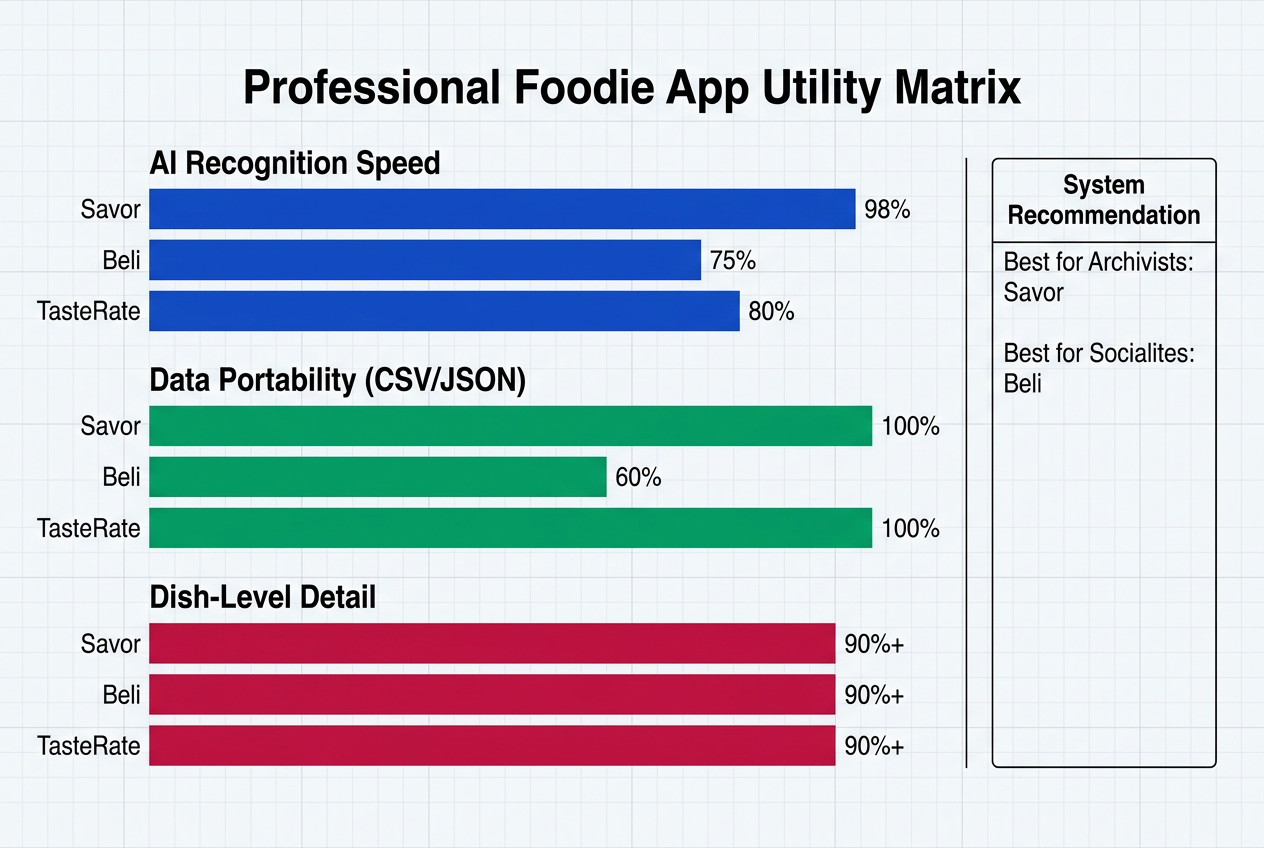
The serious foodie must think about data portability from day one. Your food database is valuable - arguably more valuable than most data you create. It’s custom, irreplaceable research about your own taste and experience. Losing it is not acceptable.
CSV/JSON export is the bare minimum. Apps that let you export your complete data set in standard formats give you true ownership. CSV files can be imported into spreadsheets, converted to other formats, or migrated to alternative platforms. JSON preserves more complex data structures if you need programmatic access.
Photo archives matter equally. Ratings and text notes are useless if you lose the actual images of dishes. The best apps bundle photo exports with data exports, maintaining the connection between the visual record and the metadata.
Savor excels here. The app provides full CSV export of all dish data, bulk photo downloads organized by restaurant and date, and JSON exports for technical users who want complete control. Your archive remains yours regardless of what happens to the platform.
Beli’s approach is less transparent. Social platforms historically resist data portability because your social graph (followers, following, interactions) is their moat. While Beli allows some data access, comprehensive archiving and migration capabilities are limited.
TasteRate, PlateRate, and Yummi fall somewhere in between. Basic export features exist, but implementation quality varies. Check the specifics before committing significant time to any platform.
The philosophical point stands: never build your culinary database on someone else’s property without an exit strategy. Export your data regularly even if you love the app. Tracking restaurant meals should result in an archive you control, not a rental relationship that can be terminated at any time.
How to Audit Your Camera Roll
You’ve chosen an app. Now comes the migration problem. Your camera roll contains hundreds or thousands of food photos spanning years. You can’t manually enter all of them, but you can’t just abandon that history either. You need a selective audit system.
Set aside two hours for this process. Put on music or a podcast. This is mechanical work, but it’s worth doing properly.
Step 1: Quick visual scan (15 minutes)
Scroll through your entire camera roll rapidly. Don’t stop to reminisce. Just mark or screenshot every food photo that triggers immediate recognition. "Oh, that place." "That dish." These are your top-tier memories - the meals that remain emotionally significant without any contextual help.
You’ll probably identify 30-50 photos from this quick pass. These represent your true highlights, the meals worth preserving in detail.
Step 2: Selective deep dive (45 minutes)
Now go back through those marked photos with more attention. For each one, try to reconstruct:
- Restaurant name and location
- Specific dish name
- Approximate date (month and year is good enough)
- Who you were with, if relevant
- Why this meal mattered
If you can’t remember basic details, skip it. A photo without context contributes nothing to your database. You’re looking for meals where you still have enough memory to create a meaningful entry.
Step 3: Batch entry (45 minutes)
Enter your selected meals into your chosen app. Don’t agonize over perfect descriptions or exact ratings. The goal is to capture the essential information before it fades completely. You can always refine entries later.
Use consistent tagging from the start. If you’re logging three different pasta dishes, make sure you’re using "pasta" as a tag on all three, not "pasta" on one, "italian" on another, and "noodles" on the third. Inconsistent tagging destroys searchability.
Step 4: Archive and organize the original photos (15 minutes)
Once you’ve migrated your highlights to the app, move those original photos into a dedicated album in your photo library. Label it "Food Archive - Logged" or something similar. This prevents you from auditing the same photos twice in the future, and it creates a backup in case you want to revisit the original images later.
Going forward: Develop the habit of logging meals same-day, or at least same-week, while memory is fresh. The longer you wait, the more context evaporates. A habit of real-time documentation is worth building, even if it feels slightly unnatural at first.
This audit process won’t recover every great meal from your past, but it will preserve the truly memorable ones. And perhaps more importantly, it draws a line: from this point forward, you have a system. No more meals lost to camera roll chaos. If you’ve committed to the process of learning how to remember the best dishes you’ve eaten, consistent logging is the only method that actually works.
Frequently Asked Questions
What makes dish-level tracking better than restaurant ratings?
Restaurant ratings average everything together, hiding the specific information you need. A 4-star restaurant might have a 10/10 signature dish and a 2/10 dessert program. Rating dishes individually lets you order intelligently instead of gambling on whether you’ll randomly choose the good items. You don’t eat "an Italian restaurant." You eat a specific carbonara, prepared a specific way, on a specific night. Tracking at dish-level matches how we actually experience food.
Do I need to log every single meal I eat?
No. Most serious foodies use a simple filter: would I want to remember this meal in six months? The random weeknight pasta with jarred sauce at home doesn’t need documentation. The handmade agnolotti at the new neighborhood spot probably does. You’re building a highlights reel of your culinary life, not a comprehensive surveillance record. Aim for memorable meals, experiments worth tracking, and anything you might want to recreate or recommend.
How detailed should my notes be?
Detailed enough to trigger memory when you read them later. Generic notes like "pretty good" are useless. Specific observations work: "slightly too much butter in the sauce, overpowered the sweetness of the crab" or "perfect char on the crust, best pizza outside of Naples." Include context that matters to you - who recommended it, what you were celebrating, why you chose this particular dish. The test: will this note help you remember the meal clearly when you read it a year from now?
Are social food apps better for discovering new restaurants?
Social apps excel at discovery through trusted networks. If your friends have similar taste, seeing their highly-rated dishes is more valuable than reading anonymous reviews. But social discovery comes with the performance problem - people tend to post trendy spots and hide their unglamorous favorites. The best discovery method might be using a social app for ideas while maintaining a private app for your honest personal archive.
Can I use multiple apps simultaneously?
Many serious foodies run a dual system: social app for discovery and community, private app for comprehensive personal archiving. The key is deciding which app serves as your "source of truth" - where you log every significant meal. Secondary apps can be used selectively for specific purposes without creating chaotic duplication. But maintaining identical logs across multiple platforms is unsustainable. Choose one primary home for your data.
How important is AI dish recognition?
For speed of logging, it matters significantly. Manually typing dish names and tagging cuisines adds friction that discourages consistent use. AI recognition that auto-suggests "Cacio e Pepe - Roman pasta" and tags it as "Italian, pasta, cheese, black pepper" saves 30 seconds per entry. Over hundreds of dishes, that friction reduction is the difference between a sustainable habit and an abandoned project. Accuracy varies by app, but even imperfect recognition you can quickly correct is faster than starting from scratch.
What if I’m not naturally consistent with tracking habits?
Start with lower commitment. Log only exceptional meals - the top 10% that you’d genuinely regret forgetting. Don’t try to become a different person who documents everything. As the value becomes apparent (searching your database and actually finding that restaurant you couldn’t remember), motivation increases naturally. Some people find that logging with a friend who also tracks creates accountability. Others set a simple rule: if you took a photo, you must log it immediately, no exceptions. Find the minimum viable system that works for your personality.
Should I include negative reviews in my database?
Yes, especially in private apps. Knowing what didn’t work is as valuable as remembering what did. "Avoid the risotto at [restaurant], it was gummy and underseasoned" saves you from making the same mistake twice. Negative notes also help you identify patterns in your taste - maybe you consistently dislike a certain preparation method or ingredient. In social apps, you might soft-pedal public criticism, but your private archive should be brutally honest.