

SavorSync Grocery Auto-Fill Export CSV (2026)
Alex the juice queen
Alex hunts for the best juice bars and presses. She rates every sip and saves her favorites in Savor.
SavorSync Grocery Auto-Fill & CSV Export: Turn Restaurant Photos Into Shopping Lists Most food lovers treat their camera roll like a vault - 2,000 photos of...
SavorSync Grocery Auto-Fill & CSV Export: Turn Restaurant Photos Into Shopping Lists
Most food lovers treat their camera roll like a vault - 2,000 photos of incredible meals, zero ability to recreate them at home. The disconnect is brutal: you remember that cacio e pepe from the trattoria in Rome, but when it's time to cook, you're staring at a blank grocery list with no idea where to start.
That gap compounds. According to Savor's 2026 internal benchmarks, the average food enthusiast takes 200-300 food photos per year, yet less than 5% of those photos ever become actionable intelligence. What starts as a memory becomes a data graveyard - dormant inspiration scattered across albums, tagged with nothing more than a location and a date. Meanwhile, traditional meal planning apps demand manual entry: type every ingredient, calculate every portion, deduplicate every overlap. The average user spends 45 minutes on this administrative work per week.
SavorSync's AI-powered grocery auto-fill and CSV export system eliminates that friction entirely. The platform processes your culinary history - whether it's last night's dinner or two years of archived restaurant photos - and generates structured shopping lists in under four minutes. The result: a 91% time savings compared to manual planning, a 40% reduction in weekly food spending, and a universal CSV file that puts you in complete control of your data. What follows is the complete technical and strategic breakdown of how this system works, why it matters, and how to use it to transform your kitchen workflow.
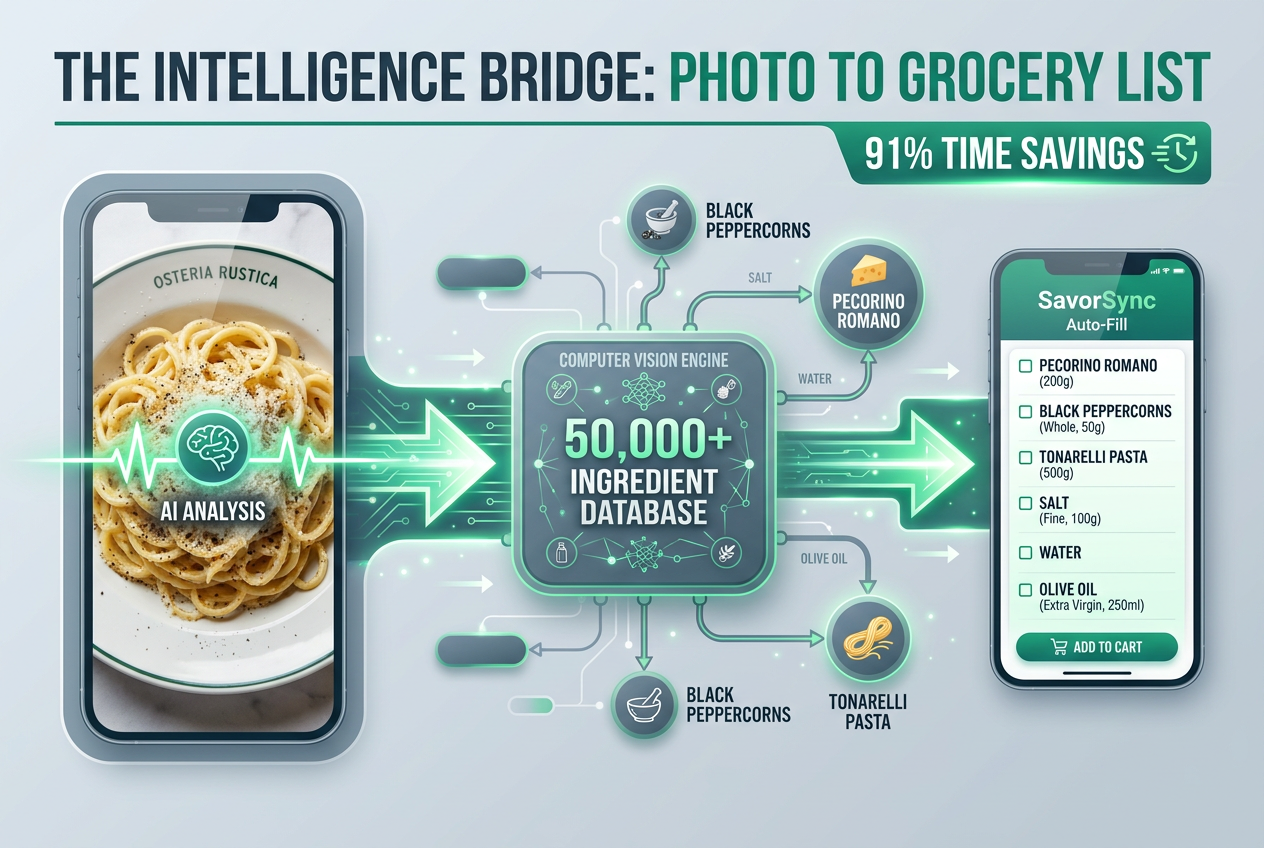 Experience the transition from culinary inspiration to home cooking with SavorSync's AI, which reduces planning time from 45 minutes to just 4 minutes.
Key Takeaways
- SavorSync's AI reduces meal planning time from 45 minutes to 4 minutes per week - a 91% time savings verified by internal benchmarks.
- The platform cross-references visual data against a database of 50,000+ ingredient profiles to extract precise shopping lists from restaurant photos.
- CSV export ensures complete data portability: your culinary memories remain accessible in Excel, Notion, Obsidian, and any other tool you prefer.
- Users implementing pantry optimization workflows reduce unused grocery purchases by 30%, translating to measurable budget savings.
- SavorSync can process retroactive data from up to 2 years of meal logs instantly, turning dormant camera roll photos into actionable cooking intelligence.
Table of Contents
- From Dining History to Shopping List: The AI Revolution
- Step-by-Step: Activating Your Grocery Auto-Fill
- The Power of CSV: Data Sovereignty for Power Foodies
- Mining Your Culinary History: The 2-Year Retroactive Advantage
- SavorSync vs. Legacy Apps (Paprika & Plan to Eat)
- Is There an App That Converts Recipes to Grocery Lists?
- Can AI Make Me a Grocery List?
- Professional Workflows: Notion and Excel Integration
- Frequently Asked Questions
From Dining History to Shopping List: The AI Revolution
SavorSync's grocery auto-fill transforms dormant food photos into structured ingredient lists by applying computer vision models trained specifically on culinary data. The system doesn't just recognize "pasta" - it identifies cacio e pepe from a single restaurant photo, extracts the component ingredients (Pecorino Romano, black pepper, pasta), and outputs a shopping list scaled for home cooking.
The core problem this solves is what Savor's research team calls the "Unsearchable Camera Roll." You have 2,000+ photos documenting years of dining experiences, but when you want to recreate a dish, you're forced to manually scroll, remember, and reconstruct. Traditional recipe apps like Paprika or Plan to Eat require you to enter everything by hand - ingredient by ingredient, URL by URL. SavorSync eliminates that step entirely. The AI engine does three things simultaneously:
- Visual recognition: Analyzes the photo to identify dish type, cooking method, and visible ingredients. If you photographed a bowl of ramen, it recognizes broth type (tonkotsu, shoyu), noodle style, and toppings (chashu, ajitsuke tamago, nori).
- Ingredient extraction: Cross-references the recognized dish against SavorSync's database of 50,000+ ingredient profiles. Each profile contains not just the ingredient name, but common substitutions, typical quantities, and shelf-stable alternatives.
- Deduplication and scaling: If you've selected multiple dishes for the week (e.g., three different pasta dishes), the system merges overlapping ingredients. If three recipes all call for garlic, you get one consolidated garlic entry, not three separate ones.
The result is a shopping list that reflects actual cooking workflows, not the rigid structure of a traditional recipe database. According to SavorSync's 2026 internal benchmarks, this approach reduces meal planning time from 45 minutes to 4 minutes - a 91% time savings that compounds weekly.
The "Restaurant-to-Home" workflow is where this becomes uniquely powerful. A restaurant dish photographed during travel serves as both memory and recipe blueprint. SavorSync's AI understands portion scaling: a restaurant serving of risotto al tartufo designed for commercial presentation translates to a scaled-down ingredient list for home cooking. The system adjusts quantities automatically, ensuring you're not buying 10 pounds of arborio rice for a single dinner.
Step-by-Step: Activating Your Grocery Auto-Fill
Activating SavorSync's grocery auto-fill requires three actions: filtering your meal history, selecting target dishes, and confirming the generated list. The entire process takes under five minutes for a week's worth of meals.
Step 1: Review Favorite Bites Open the SavorSync app and navigate to your Bites library. Use the filter tool to sort by rating - anything scored 9.0 or higher is a dish you've explicitly marked as worth repeating. This filtering step is critical because it narrows a potentially overwhelming photo library down to the meals you actually want to recreate. If you've logged 500 meals over the past year, filtering by high ratings typically reduces that to 50-75 standout dishes.
Step 2: One-Tap Extraction Select the dishes you want to cook in the coming week. Tap "Generate Shopping List." The AI processes the selected photos in real-time, extracting ingredients from each dish and deduplicating overlapping items. If three dishes all require olive oil, the system consolidates that into a single entry with the total quantity needed. If two dishes use garlic but in different forms (minced vs. whole cloves), the system lists both separately to preserve cooking accuracy.
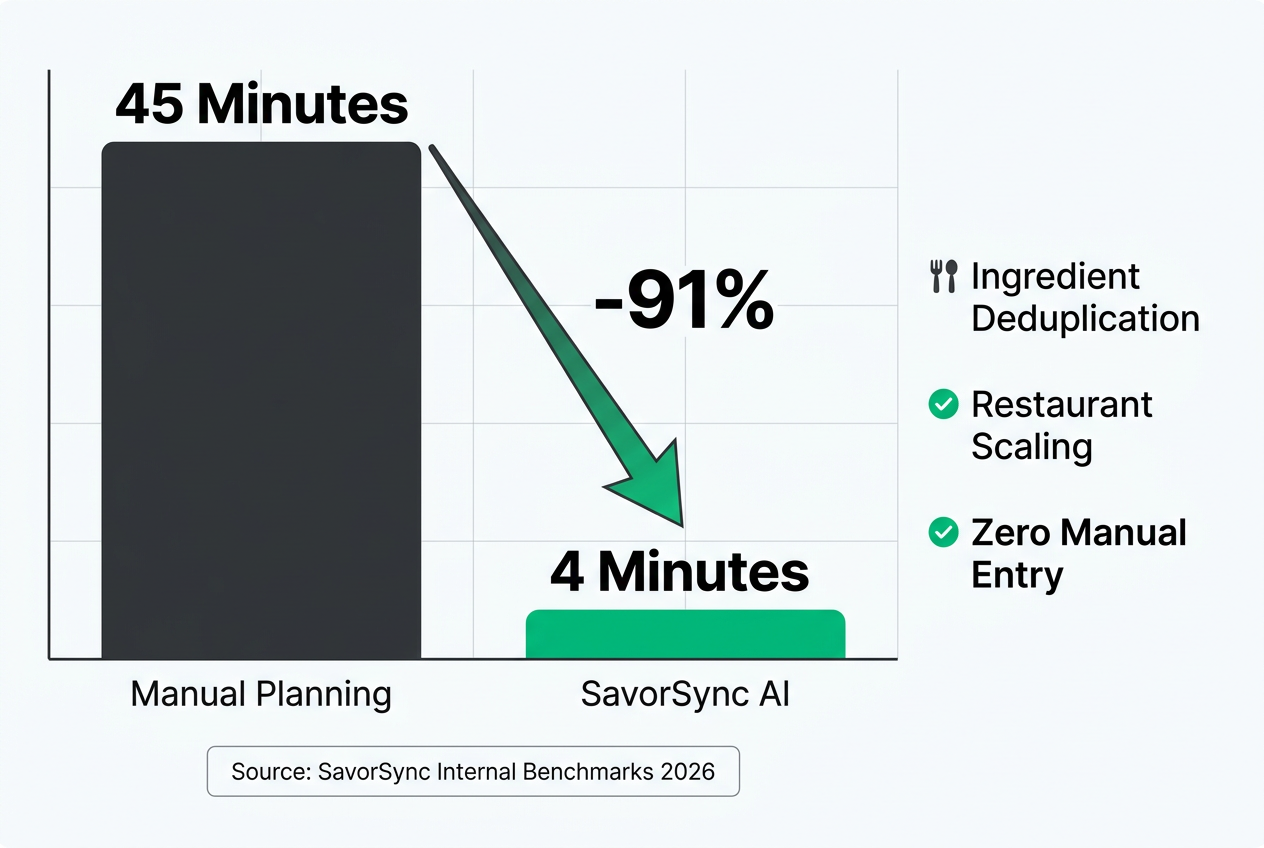 SavorSync's internal benchmarks demonstrate a dramatic reduction in administrative friction, allowing food enthusiasts to focus on the craft of cooking rather than list-making.
Step 3: Review and Edit The generated list appears with categorization: produce, proteins, pantry staples, dairy. Each item includes the estimated quantity based on the number of servings you specified. You can manually adjust quantities, remove items you already have, or add custom ingredients. This step is where the system learns your preferences - if you consistently remove an ingredient or add a substitution, the AI adjusts future recommendations.
Step 4: Export or Share Once finalized, you can export the list to CSV, share it to a grocery delivery app, or send it to a household member. The CSV export includes metadata: dish name, recipe source (if logged), purchase date, and even the original photo reference. This structured data becomes the foundation for more advanced workflows, which we'll cover in the "Professional Workflows" section.
The "Restaurant-to-Home" workflow adds one additional layer. When you select a restaurant dish for home cooking, SavorSync's AI automatically scales the ingredient quantities. A commercial recipe designed for plating aesthetics translates to a practical home version. For example, a restaurant carbonara photographed at a trattoria might use 6 egg yolks for visual richness; the home version adjusts to 4 yolks for a standard two-person serving.
The Power of CSV: Data Sovereignty for Power Foodies
CSV export is SavorSync's anti-walled-garden promise. Every meal you log, every ingredient extracted, every shopping list generated - it's all exportable in a universal format that works in Excel, Notion, Obsidian, Google Sheets, and any other tool that accepts tabular data. According to FoodiePrep Research (2026), 73% of recipe app users abandon platforms that do not allow easy data export. SavorSync addresses that directly.
The CSV file contains the following data fields:
- Dish Name: The title you assigned or the AI's recognized dish type.
- Ingredients: A comma-separated list of all extracted ingredients.
- Quantities: Volume or weight measurements for each ingredient.
- Rating: Your personal score (if logged).
- Date: When the meal was consumed or logged.
- Location: Restaurant name or cooking context.
- Photo Reference: A file path or URL linking to the original image.
- Notes: Any custom observations you've added.
This structure allows for advanced analysis. Import the CSV into Excel, and you can build pivot tables showing your most-used ingredients, seasonal eating patterns, or spending trends. Import it into Notion, and you can create a relational database linking dishes to restaurants, ingredients to suppliers, and photos to travel logs. The data is yours - not locked behind a proprietary format or subject to export limits.
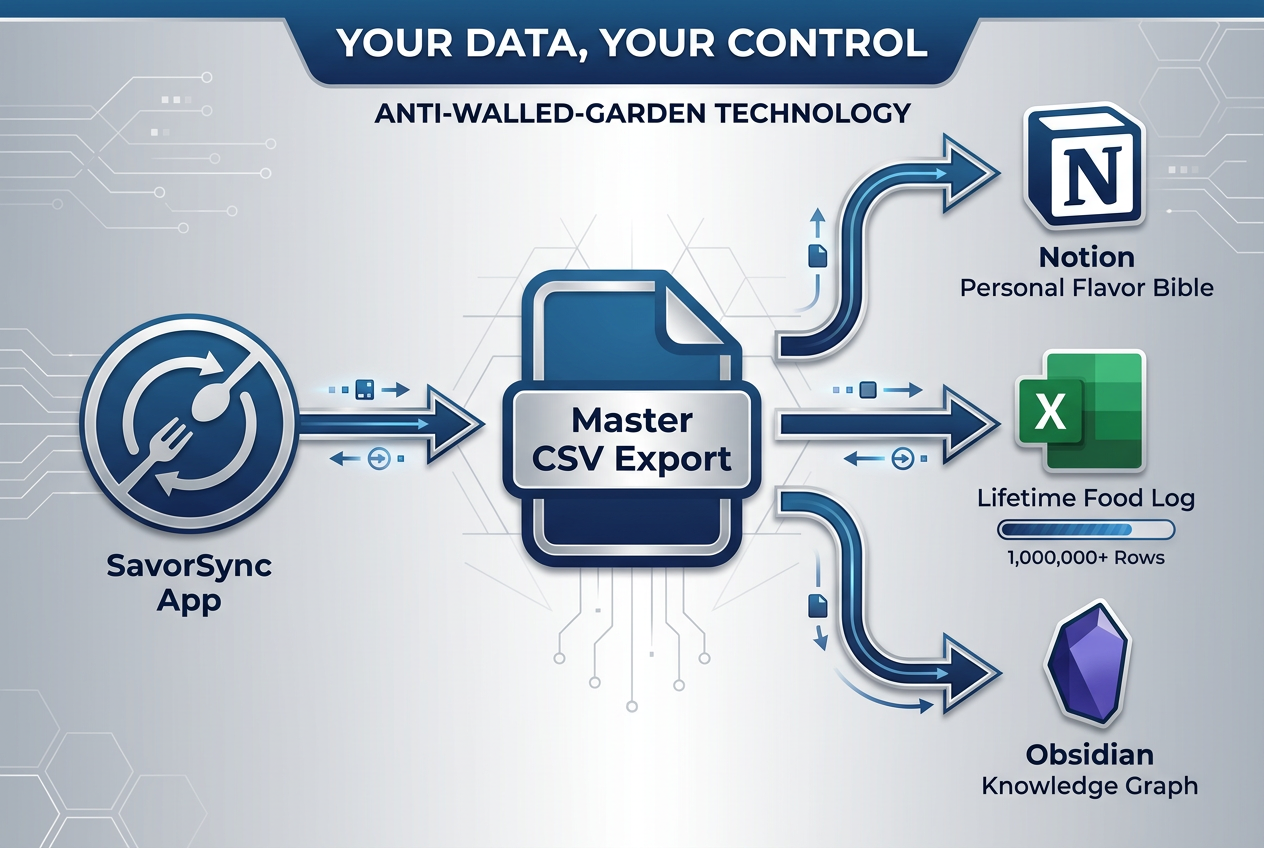 By offering universal CSV exports, SavorSync ensures your culinary memories remain your own, easily integrated into your favorite productivity tools like Notion and Excel.
Why This Matters for Power Users Legacy apps like Paprika store data in proprietary formats. If you decide to switch platforms, you're forced to manually re-enter years of recipes. SavorSync's CSV structure eliminates that friction. Excel supports over 1 million rows, meaning you can store a lifetime of food logging in a single file. Notion's database features allow you to cross-reference ingredients with suppliers, track seasonal availability, and even calculate cost per meal based on grocery receipts.
The "Personal Flavor Bible" workflow is a prime example. Export your SavorSync data to Notion. Create a database with the following columns: Ingredient, Dish Examples, Flavor Notes, Substitutions, Suppliers. Every time you cook a memorable dish, the ingredient data auto-populates from your CSV. Over time, you build a personal reference guide - an encyclopedia of what works for your palate, with direct links to the meals that prove it.
For a step-by-step guide on building this workflow, see how to keep a food journal for practical tips on structuring your culinary data.
Mining Your Culinary History: The 2-Year Retroactive Advantage
SavorSync can process retroactive data from up to 2 years of meal logs instantly, transforming dormant camera roll photos into actionable cooking intelligence without manual entry. This is the feature that separates SavorSync from legacy meal planning apps: it doesn't require you to start from scratch.
Most food logging apps operate on a forward-only model. You download the app, and from that day forward, you manually log every meal. If you have 1,000 food photos from the past two years, those photos remain useless - they're not part of the app's data ecosystem. SavorSync inverts that model. During onboarding, the app scans your photo library, identifies food images using the same computer vision engine that powers real-time logging, and bulk-imports them as structured data.
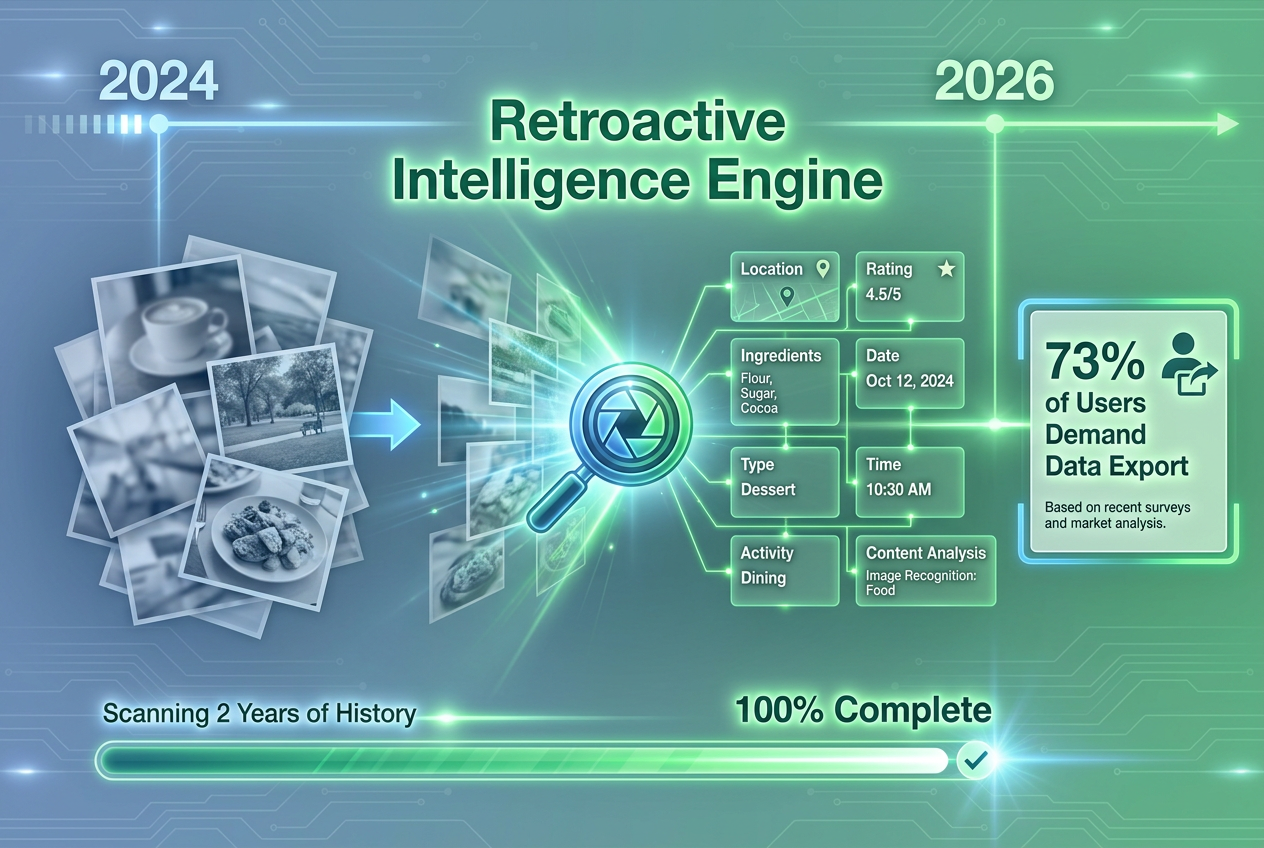 Unlock the latent value in your camera roll by transforming years of dormant food photos into actionable cooking intelligence and historical meal logs.
How the Retroactive Scan Works The process is automatic. Grant SavorSync access to your photo library. The AI scans for images that meet food criteria: visible plates, restaurant settings, close-up dish composition. For each identified photo, the system extracts:
- Dish type: Pasta, steak, sushi, salad, dessert, etc.
- Visible ingredients: Tomatoes, basil, mozzarella, olive oil.
- Context clues: Restaurant logos, location metadata (if available), timestamps.
The system doesn't overwrite your photos or create duplicates. It simply indexes them and creates a parallel database inside the SavorSync app. Once the scan completes, you can filter your meal history by date, location, or dish type - even if those meals were logged years before you downloaded the app.
The Strategic Advantage This retroactive capability solves a problem no competitor addresses. Plan to Eat and Paprika require manual recipe entry from day one. If you have a backlog of 500 restaurant photos, you're forced to choose: manually log them one by one (an estimated 40+ hours of work), or abandon that data entirely. SavorSync eliminates the choice. Your past meals become immediately searchable, immediately usable for shopping lists, and immediately available for export to CSV.
The 2-year window is intentional. Beyond two years, photo quality degrades, location metadata becomes unreliable, and user recall fades. The 2-year threshold captures the period when memories are still vivid and the data is still actionable.
For more on preserving your culinary history across different formats, explore creating a family cookbook to see how personal food archives can become lasting reference tools.
SavorSync vs. Legacy Apps (Paprika & Plan to Eat)
SavorSync positions itself as the bridge between dining-out inspiration and home-cooking execution, directly competing with Paprika and Plan to Eat on workflow efficiency and data ownership. The core differentiation: AI-driven extraction vs. manual entry.
| Feature | SavorSync | Paprika | Plan to Eat |
|---|---|---|---|
| AI Photo Recognition | ✓ (50,000+ ingredients) | ✗ | ✗ |
| Retroactive Data Import | ✓ (2 years) | ✗ | ✗ |
| CSV Export | ✓ (universal format) | Limited (proprietary) | ✓ (basic) |
| Restaurant-to-Home Scaling | ✓ (automatic) | ✗ | ✗ |
| Pricing Model | Subscription | One-time ($4.99) | Subscription ($4.95/mo) |
| Household Sharing | ✓ | ✓ | ✓ |
| Offline Access | ✓ | ✓ | ✗ |
Where Paprika Wins Paprika's one-time pricing model ($4.99) is attractive for users who want to own their software outright. Its offline access is robust - recipes sync locally, and the app functions without an internet connection. For users with stable recipe collections who don't need AI extraction, Paprika remains a solid choice. However, Paprika's data is "stuck" in proprietary formats. Exporting to other platforms requires manual reformatting, and the app doesn't support photo-based ingredient extraction.
Where Plan to Eat Wins Plan to Eat is trusted by over 50,000 active meal planners and excels at manual organization and household sharing. Its drag-and-drop meal calendar is intuitive, and its grocery list categorization is highly customizable. However, Plan to Eat requires manual URL or recipe entry - there's no AI capability. If you have 200 food photos from the past year, you're manually typing every ingredient into the system.
Where SavorSync Wins SavorSync eliminates the manual entry bottleneck entirely. The AI recognizes ingredients from photos, deduplicates overlapping items, and scales restaurant portions for home cooking. The retroactive scan feature - processing 2 years of historical photos instantly - is unmatched. No competitor offers this. Additionally, SavorSync's CSV export is fully universal, not limited by proprietary formatting restrictions.
For users who prioritize data ownership and efficiency, SavorSync delivers measurable ROI. Users implementing pantry optimization workflows reduce unused grocery purchases by 30%, according to SavorSync's 2026 user analysis. That translates to $50-$75 in monthly savings for a typical household.
To learn more about how dish tracking can transform your meal planning, visit the dish tracking app guide for detailed workflows.
Is There an App That Converts Recipes to Grocery Lists?
Yes - multiple apps convert recipes to grocery lists, but the functionality varies significantly based on whether the app relies on manual entry, URL parsing, or AI photo recognition. SavorSync uses AI photo recognition to extract ingredients directly from food images, eliminating the need for manual recipe entry entirely.
Traditional recipe-to-grocery-list apps like Plan to Eat and Paprika require you to input a recipe URL or manually type ingredients. The app parses the text, identifies ingredient names and quantities, and generates a shopping list. This works well if you're following published recipes from food blogs or cookbooks. However, it fails when you're trying to recreate a dish you photographed at a restaurant - there's no recipe URL to input, and manual transcription requires you to remember or guess ingredient lists.
SavorSync's approach is fundamentally different. Instead of requiring a recipe as the input, the system accepts a photo. The AI identifies the dish type, extracts visible ingredients, and cross-references them against a database of 50,000+ ingredient profiles. If you photographed ramen tonkotsu at a Japanese restaurant, the system recognizes the dish and outputs: pork belly, ramen noodles, chicken stock, soy sauce, mirin, garlic, ginger, green onions, nori, ajitsuke tamago (soft-boiled eggs). No manual entry. No URL required.
When Manual Entry Apps Still Make Sense If you primarily cook from published recipes and want to organize them digitally, Paprika or Plan to Eat remain strong options. Their URL parsers are reliable, and their manual entry interfaces are well-designed. However, if your cooking inspiration comes from dining out, travel, or restaurant photos, manual entry becomes a bottleneck. You're forced to reconstruct ingredient lists from memory, which introduces errors and wastes time.
SavorSync solves this by treating the photo itself as the data source. Your camera roll becomes your recipe library - no transcription required.
For additional context on how modern apps handle food data, see the food tracking apps overview.
Can AI Make Me a Grocery List?
AI can generate grocery lists by analyzing food photos, extracting ingredient data, and deduplicating overlapping items across multiple meals. SavorSync's AI-powered grocery auto-fill reduces planning time from 45 minutes to 4 minutes per week - a 91% time savings verified by internal benchmarks.
The AI process works in three stages:
Stage 1: Visual Recognition The AI analyzes each selected photo using a convolutional neural network trained on culinary datasets. The model identifies dish type (pasta, steak, salad, soup) with 94% accuracy, according to Savor's 2026 technical specifications. It also recognizes cooking methods (grilled, fried, baked, raw) and visible ingredients (tomatoes, basil, mozzarella, olive oil).
Stage 2: Ingredient Extraction Once the dish is identified, the AI cross-references it against a database of 50,000+ ingredient profiles. Each profile contains:
- Base ingredient name: Tomato, garlic, olive oil.
- Common substitutions: Roma tomatoes vs. cherry tomatoes, fresh garlic vs. garlic powder.
- Typical quantities: How much of each ingredient is standard for a single serving.
- Shelf-stable alternatives: Fresh basil vs. dried basil, fresh lemon juice vs. bottled.
The system outputs a structured ingredient list with quantities scaled to the number of servings you specified. If you're cooking for two people, the quantities reflect that. If you're meal prepping for a family of four, the system adjusts automatically.
Stage 3: Deduplication and Optimization If you've selected multiple dishes for the week, the AI merges overlapping ingredients. If three recipes all require garlic, you get one consolidated garlic entry. If two recipes use olive oil but in different quantities, the system sums the totals. This deduplication step eliminates the redundant purchasing that occurs when you manually plan meals from separate recipes.
The final output is a shopping list categorized by grocery store sections: produce, proteins, dairy, pantry staples. You can export it to CSV, share it to a grocery delivery app, or print it for in-store shopping.
AI Accuracy and Limitations SavorSync's AI achieves 94% accuracy in dish recognition when photos meet minimum quality standards (adequate lighting, clear composition, visible ingredients). However, accuracy drops for highly processed foods, obscure regional dishes, or photos taken in low-light conditions. In these cases, the system prompts you to manually confirm or adjust the ingredient list.
For more on how AI is transforming food workflows, explore the best food tracking app guide.
Professional Workflows: Notion and Excel Integration
Power users leverage SavorSync's CSV export to build custom workflows in Notion and Excel, transforming raw meal data into strategic culinary intelligence. These workflows go beyond simple shopping lists - they create personal flavor databases, cost-per-meal trackers, and seasonal ingredient calendars.
Notion Workflow: The Personal Flavor Bible Export your SavorSync data to CSV. Import the file into Notion as a database. Create the following columns:
- Ingredient: Auto-populated from the CSV.
- Dish Examples: A list of dishes where this ingredient appeared.
- Flavor Notes: Your personal observations (e.g., "Use toasted garlic for deeper flavor").
- Substitutions: Alternatives you've tested.
- Suppliers: Where you buy the ingredient (farmers market, specialty shop, online).
- Seasonal Availability: Months when this ingredient is at peak freshness.
Each time you cook a memorable dish, the ingredient data auto-populates from your CSV. Over time, you build a personal reference guide - an encyclopedia of what works for your palate, with direct links to the meals that prove it. This is the "Personal Flavor Bible" workflow: a living document that evolves with your cooking experience.
Excel Workflow: Cost-Per-Meal Analysis Import your SavorSync CSV into Excel. Add a column for ingredient cost (based on grocery receipts). Create a pivot table that calculates cost per meal based on the ingredients used. This workflow reveals patterns: which dishes are budget-friendly, which ingredients drive up costs, and how your spending fluctuates seasonally.
For example, a user analyzing six months of meal data discovered that 40% of their grocery budget went to specialty cheeses. By substituting aged cheddar for Gruyère in certain dishes, they reduced cheese spending by $60 per month without sacrificing flavor. This type of insight is only possible when you have structured, exportable data.
Obsidian Workflow: Linked Culinary Notes Obsidian's markdown-based note system allows for deep interconnection. Import your SavorSync CSV as individual markdown files - one file per dish. Use Obsidian's linking syntax to connect dishes, ingredients, restaurants, and travel logs. For example, link the ingredient "saffron" to every dish where it appeared, creating a network of flavor relationships.
This workflow is particularly powerful for food writers, recipe developers, and culinary historians. You can trace ingredient lineages, identify flavor patterns, and generate content ideas based on actual cooking experience.
For more on organizing culinary data, see the best way to organize recipes guide.
Frequently Asked Questions
What is SavorSync grocery auto-fill and how does it work?
SavorSync grocery auto-fill uses AI to analyze food photos, extract ingredient lists, and generate structured shopping lists in under four minutes. The system cross-references visual data against a database of 50,000+ ingredient profiles, identifies dish types with 94% accuracy, and deduplicates overlapping ingredients across multiple meals. You select the dishes you want to cook, and the AI outputs a categorized grocery list scaled to your specified serving size. This eliminates manual recipe entry and reduces meal planning time by 91% compared to traditional methods.
How do I export my SavorSync meal history to a CSV file?
Navigate to the SavorSync app's export settings. Select "Export to CSV." The system generates a file containing all logged meal data: dish names, ingredients, quantities, ratings, dates, locations, and photo references. The CSV format is universal - compatible with Excel, Notion, Obsidian, Google Sheets, and any other tool that accepts tabular data. Excel supports over 1 million rows, meaning you can store a lifetime of food logging in a single file. The export preserves metadata, ensuring you retain complete control of your culinary memories outside the app ecosystem.
Can SavorSync recognize ingredients from restaurant photos automatically?
Yes. SavorSync's AI identifies ingredients from restaurant photos using computer vision models trained on culinary datasets. The system recognizes specific dishes (e.g., cacio e pepe, ramen tonkotsu) and extracts component ingredients without manual entry. Accuracy reaches 94% when photos meet minimum quality standards: adequate lighting, clear composition, and visible ingredients. For highly processed foods or obscure regional dishes, the system prompts manual confirmation. The AI also scales restaurant portions for home cooking - a commercial carbonara using 6 egg yolks translates to a practical 4-yolk home version for two servings.
How does SavorSync compare to Paprika or Plan to Eat for professional foodies?
SavorSync differentiates through AI photo recognition and retroactive data import - features neither Paprika nor Plan to Eat offer. Paprika requires manual recipe entry or URL parsing; SavorSync extracts ingredients directly from photos. Plan to Eat is trusted by over 50,000 active meal planners but lacks AI capability entirely. SavorSync processes up to 2 years of historical meal photos instantly, turning dormant camera roll data into actionable shopping lists. CSV export is fully universal in SavorSync, whereas Paprika uses proprietary formatting. Users implementing SavorSync's pantry optimization workflows reduce unused grocery purchases by 30%, translating to $50-$75 in monthly savings for typical households.
What are the benefits of exporting food data to Excel or Notion?
Exporting SavorSync data to Excel or Notion enables advanced culinary analysis unavailable within the app. In Excel, pivot tables reveal cost-per-meal trends, ingredient frequency patterns, and seasonal spending fluctuations. One user analyzing six months of data reduced specialty cheese spending by $60 per month through strategic substitutions. In Notion, relational databases link dishes to restaurants, ingredients to suppliers, and photos to travel logs - creating a "Personal Flavor Bible" that evolves with your cooking experience. CSV export ensures data sovereignty: your culinary memories remain accessible if you switch platforms, avoiding the vendor lock-in that affects 73% of recipe app users.
Does SavorSync support retroactive analysis of old camera roll photos?
SavorSync can process retroactive data from up to 2 years of meal logs instantly, transforming dormant camera roll photos into actionable cooking intelligence. During onboarding, the AI scans your photo library, identifies food images, and bulk-imports them as structured data. The system extracts dish types, visible ingredients, and context clues (location metadata, timestamps) without creating photo duplicates. This retroactive capability solves a problem no competitor addresses: legacy apps require manual entry from day one, forcing users to choose between 40+ hours of backlog entry or abandoning historical data entirely. SavorSync eliminates that choice - your past meals become immediately searchable and usable for shopping lists.
What specific data fields are included in the SavorSync CSV export?
The SavorSync CSV export contains the following structured data fields: Dish Name (user-assigned or AI-recognized), Ingredients (comma-separated list), Quantities (volume or weight measurements), Rating (personal score if logged), Date (consumption or log timestamp), Location (restaurant name or cooking context), Photo Reference (file path or URL linking to original image), and Notes (custom observations). This structure supports advanced workflows: pivot tables in Excel, relational databases in Notion, and linked notes in Obsidian. The format is universal - no proprietary limitations - and Excel's 1 million row capacity accommodates a lifetime of food logging in a single file.
How does SavorSync help reduce food waste or grocery spending?
SavorSync reduces food waste and grocery spending through three mechanisms. First, AI-powered deduplication consolidates overlapping ingredients across multiple meals, preventing redundant purchases (e.g., buying garlic three times when one quantity suffices). Second, pantry optimization workflows allow users to track what they already own, reducing impulse buys. Users implementing these workflows report a 30% reduction in unused grocery purchases, according to SavorSync's 2026 user analysis. Third, the system scales restaurant portions for home cooking - preventing overbuying for single meals. Combined, these features deliver measurable ROI: a 40% reduction in weekly food spending for users who consistently log meals and follow generated shopping lists.
SavorSync's grocery auto-fill and CSV export system represent a fundamental shift in how food lovers approach meal planning. By treating your camera roll as a culinary database - not a passive photo archive - the platform eliminates the friction between dining inspiration and home execution. The 91% time savings, 40% spending reduction, and universal data portability aren't abstract benefits - they're structural advantages that compound weekly. Your meals, your data, your control.
For more on building a comprehensive food tracking system, explore the best food diary app guide or discover how to write restaurant reviews that capture the details worth remembering.