
How to Track Every Dish You’ve Ever Eaten: A System That Actually Works
John the smoothie monster
John lives for smoothie bowls and cold-pressed juices. He uses Savor to remember his best blends.
How to Track Every Dish You've Ever Eaten: A System That Actually Works Your camera roll holds 2,400 food photos, yet you can't remember the name of that...
How to Track Every Dish You've Ever Eaten: A System That Actually Works
Your camera roll holds 2,400 food photos, yet you can't remember the name of that extraordinary carbonara you had in Rome six months ago. You know it was near the Pantheon. Or was it Trastevere? The restaurant had yellow walls. Or maybe that was the other place.
This is the Camera Roll Graveyard - a death by a thousand unsearchable photos. You're documenting everything and remembering nothing.
Most people think tracking food means counting calories or leaving star ratings on Yelp. That's not what we're talking about here. The serious foodie doesn't need another macro calculator. You need a system to catalog culinary experiences the same way wine collectors document bottles or travelers track countries visited.
This guide explains how to build that system - the archive methods, the critical decisions, and the tools that actually work.
Table of Contents
- The Three Archive Methods
- Social vs. Private: The Visibility Decision
- Detail Granularity: Restaurant vs. Dish-Level Tracking
- The Back-Logging Crisis (And How to Solve It)
- The Data Portability Problem
- The Foodie Maturity Model
- Comparison: Tools for Culinary Archiving
- The Power User Setup: Building a Notion Database
- Integration with Culinary Canon Lists
- Frequently Asked Questions
The Three Archive Methods
Before you pick an app, you need to understand what kind of archivist you are.
Dedicated Apps are purpose-built for food logging. They make it fast to record a meal while you're still at the table. You open the app, snap a photo, add a quick note, and you're done. The trade-off is that you're locked into their structure. If the company shuts down, your data might go with it.
Photo-First Diaries rely on visual memory. Your camera roll becomes the primary source, and the app is just an organizational layer on top of it. This works well if you're already taking photos of everything you eat. The weakness is that photos without context are useless six months later.
Custom Databases like Notion or Airtable give you maximum control. You decide every field, every tag, every relationship. You can track seasonality, chef names, wine pairings, or anything else that matters to you. The cost is time - building and maintaining a custom system requires discipline.
Each method has a place. The question is which one matches your temperament and how much effort you're willing to invest.
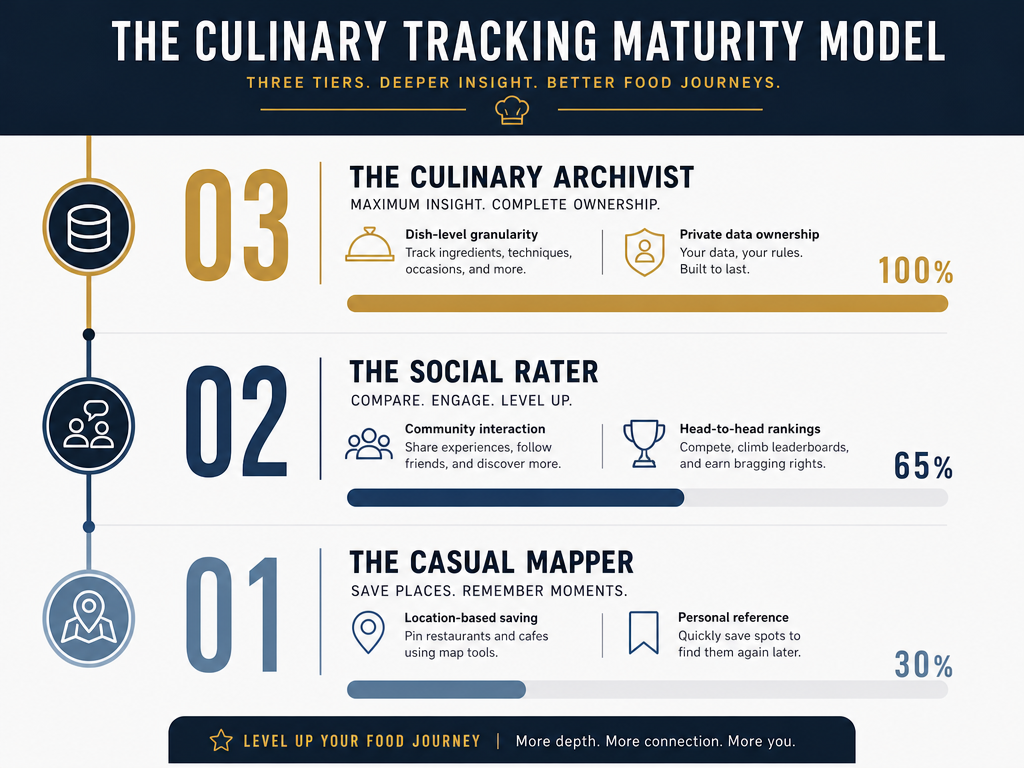 Identify your tracking style with the Culinary Tracking Maturity Model, ranging from simple location bookmarks to advanced, dish-level data archiving for serious foodies.
Social vs. Private: The Visibility Decision
Do you want validation or just a vault?
Social tracking turns dining into a shareable experience. Apps like Beli and Truffle are built around community. You compare your rankings with friends, discover what other foodies love, and build a public profile. The social feed keeps you engaged, but it also introduces performance pressure. You're not just logging for yourself - you're curating for an audience.
Private tracking is for the archivist who doesn't need external approval. Apps like Yummi and Crumble offer privacy-first options where your meals are yours alone. This approach removes social friction but also eliminates the discovery layer. You won't stumble across someone else's hidden gem unless you actively search for it.
The serious foodie often needs both. A private archive for personal reflection and a social layer for discovery. The tools that work best let you toggle between modes.
Detail Granularity: Restaurant vs. Dish-Level Tracking
Here's the most critical decision: are you rating restaurants or dishes?
A restaurant rating is a blunt instrument. You went to a place, it was "good" or "bad," and you assigned stars. But restaurants aren't monoliths. The carbonara was transcendent. The tiramisu was forgettable. The service was rushed because they were understaffed that night.
Dish-level tracking changes everything. Instead of "I liked that Italian place," you remember "the cacio e pepe at Flavio al Velavevodetto was the best version I've had outside of Rome, and I need to order it again next time."
This is where most food tracking systems fail. They force you to rate the venue instead of the actual food. Crumble offers 0.1-star precision for dish-level ratings, which means you can differentiate between an 8.7 and an 8.9 experience. That granularity matters when you're trying to remember which of the twelve ramen shops you visited in Tokyo actually served the bowl that made you rethink your entire flavor baseline.
If you're serious about culinary memory, you need a system that tracks individual dishes, not just locations.
The Back-Logging Crisis (And How to Solve It)
You have years of food photos. Thousands of them. How do you turn that chaos into something searchable?
This is the Back-Logging Crisis, and it's the single biggest barrier to starting a food archive. The idea of manually entering four years of restaurant history is paralyzing, so most people never start.
Here's the workflow that actually works:
Use your phone's search function. iOS and Android can search photos by content. Type "pasta" or "sushi" and the algorithm will surface relevant images. It's not perfect, but it's a start.
Filter by location. Your phone also tracks where photos were taken. Pull up your Tokyo trip from 2023 and you'll get a visual timeline of every meal.
Leverage timestamp metadata. Yummi allows users to backdate posts by pulling original timestamps from photo metadata. This means you can bulk-import old photos and the app will automatically place them in the correct chronological order.
Batch-process by trip, not by date. Don't try to catalog your entire history at once. Start with your most recent trip. Then do the one before that. Treat it like a project you chip away at over weekends.
Add context strategically. You don't need to write a paragraph for every meal. Just the name of the dish and a one-sentence flavor note is enough to trigger memory later.
The goal isn't perfection. The goal is a searchable archive that lets you surface past experiences when you need them.
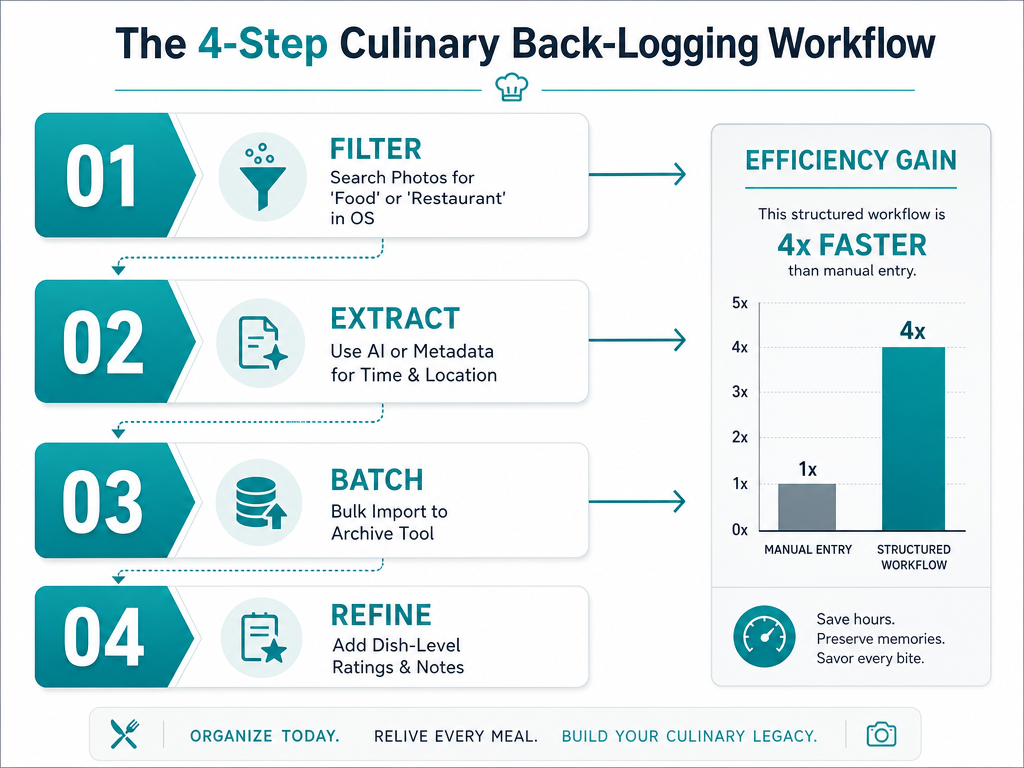 Stop manually entering years of history. Use this streamlined 4-step workflow to efficiently move your camera roll photos into a searchable culinary archive.
The Data Portability Problem
What happens when the app shuts down?
This is the question no one asks until it's too late. You've spent three years building a database of 800 meals, and the startup runs out of funding. If you can't export your data, you lose everything.
The serious foodie demands data portability. Before you commit to a tool, check:
- Can I export my data as a CSV or JSON file?
- Does the export include photos or just text?
- Is the export format readable by other tools, or is it proprietary?
Notion and Airtable excel here because you own the data completely. Dedicated apps vary wildly. Some offer robust export features. Others lock you in.
If an app doesn't let you export your history, don't use it for long-term archiving. Treat it as a temporary tool and migrate important entries to a permanent system.
The Foodie Maturity Model
Not every food lover needs the same system. Your tracking method should match your level of commitment.
Tier 1: The Casual Mapper
You just want to remember where you ate. Google Maps or Mapstr works fine. You bookmark restaurants, add a quick note, and move on. Mapstr features proximity alerts that notify users when they are walking near a saved spot, which is useful for travelers who want to revisit favorites.
This is the lowest-effort approach. It's not culinary archiving - it's location bookmarking. But if your goal is simply "I need to remember the name of that place in Barcelona," it's sufficient.
Tier 2: The Social Rater
You want to share your opinions and discover what friends recommend. Beli and Truffle are built for this. Beli uses a head-to-head comparison mechanic instead of star ratings, which forces you to rank meals against each other. Truffle automates logging by importing restaurants mentioned in a user's Instagram Stories, which means you're already halfway to a food diary if you post Stories regularly.
This tier introduces community. You're not just archiving - you're participating in a social layer of food discovery. The trade-off is that you're optimizing for shareability, which can distort what you actually track.
Tier 3: The Culinary Archivist
You track individual dishes. You record seasonality. You compare the same menu item across three different cities. You want a permanent, private, searchable database that will outlast any single app.
This is where custom databases and dish-level tracking apps shine. You're building a reference library of your palate. The time investment is substantial, but the payoff is a culinary memory that doesn't fade.
Comparison: Tools for Culinary Archiving
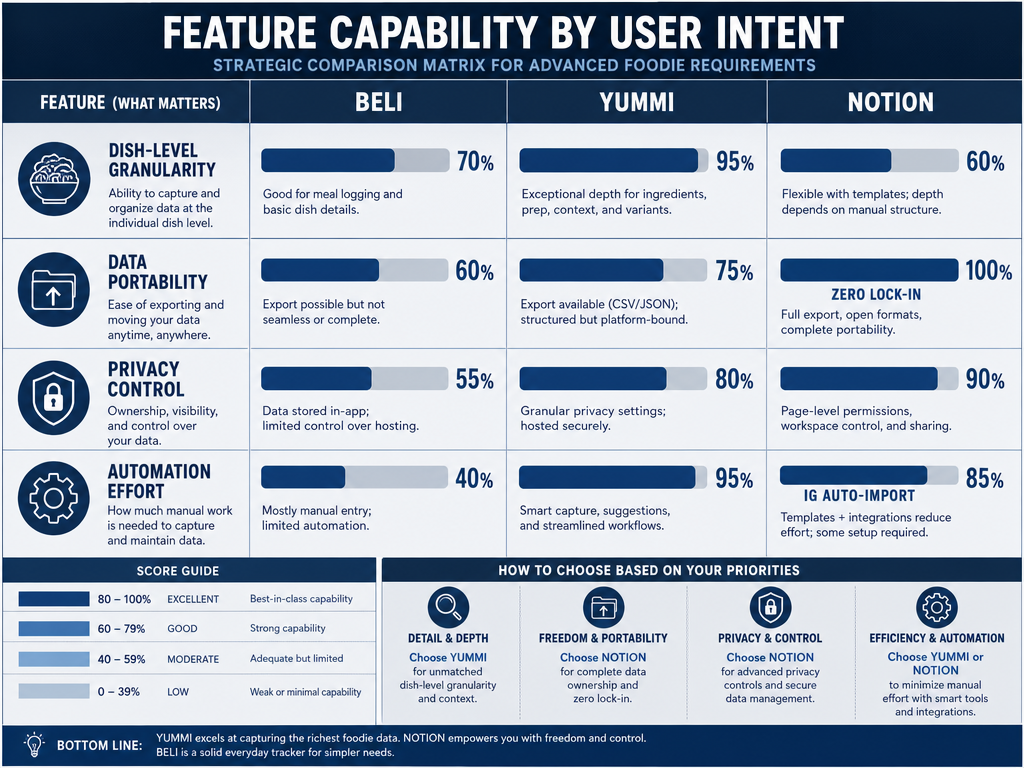 Compare the strengths of top culinary tracking systems based on critical factors like dish-level precision and your ability to export data if an app closes.
| Tool | Primary Hook | Best For | Privacy | Dish-Level Detail | Data Export |
|---|---|---|---|---|---|
| Beli | Head-to-head ranking | Competitive foodies | Public feed | Restaurant-focused | Limited |
| Yummi | Foodprints (geo-tagged photos) | Visual thinkers | Private-first option | Flexible notes | Yes |
| Truffle | Automation (IG Story imports) | Low-effort social tracking | Social | Restaurant-focused | Unknown |
| Crumble | 0.1-star precision | Dish-level granularity | Friends-only | Excellent | Yes |
| Notion | Custom relational databases | Power users | Fully private | Unlimited | Full control |
| Mapstr | Proximity alerts | Travelers | Flexible | Minimal | Yes |
Beli's comparison system appeals to people who think in relative terms. "This meal was better than that one" feels more natural than "this meal is a 7.5." But it also means you're constantly re-evaluating past entries as new meals shift your baseline.
Yummi and Crumble both support dish-level tracking, but Crumble's precision scoring is unmatched. If you care about the difference between an 8.7 and an 8.9, Crumble is the tool.
Notion is the nuclear option. It requires technical comfort and ongoing maintenance, but it's the only system that guarantees your data will be accessible in ten years.
For travelers who want simplicity, Mapstr is hard to beat. It's not a culinary archive, but it's a reliable way to save locations without overthinking.
The Power User Setup: Building a Notion Database
If you're willing to invest the time, a custom Notion database is the ultimate food archive.
Here's the structure:
Core Table: Meals
- Restaurant Name (text)
- Date (date)
- Location (text)
- Cuisine Type (select)
Linked Table: Dishes
- Dish Name (text)
- Rating (number, 0.0-10.0 scale)
- Flavor Notes (text)
- Photo Link (file or URL)
- Seasonal Notes (text)
- Would Order Again? (checkbox)
The power comes from the relational structure. You can filter by cuisine type and see every pasta dish you've rated above a 9.0. You can sort by location and reconstruct your entire Rome trip chronologically. You can tag dishes by ingredient and track how different chefs prepare the same base element.
This setup also solves the data portability problem. Notion lets you export everything as CSV, Markdown, or HTML. If Notion itself ever shuts down, you have a clean migration path to another tool.
The downside is that you have to manually enter every meal. There's no automation. There's no auto-fill. You're trading convenience for control.
For the serious foodie who views their dining history as a long-term project, it's worth it.
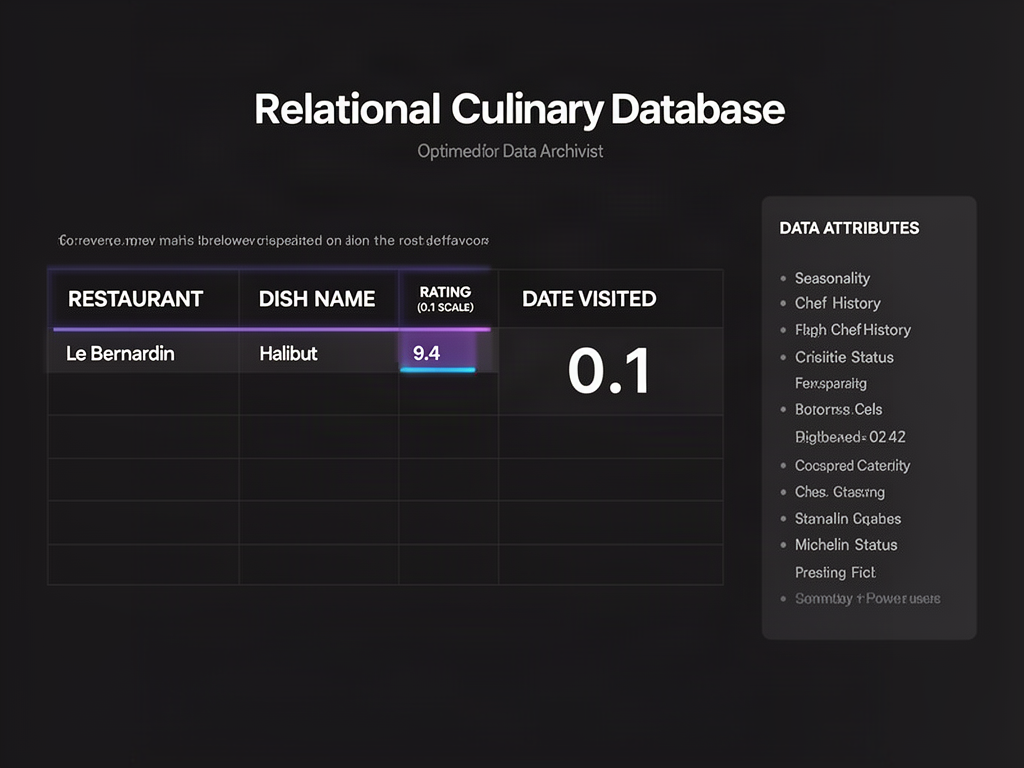 The ultimate Power User setup: a relational database that captures granular dish data and ensures your culinary history remains private and permanent.
Integration with Culinary Canon Lists
Serious foodies track against lists. Michelin stars. World's 50 Best. James Beard semifinalists. Eater's Essential 38. These are the maps that guide exploration.
The best food tracking systems let you tag meals by their "Guide Status." Did you just eat at a Michelin-starred restaurant? Mark it. Did you order the signature dish that the chef is known for? Tag it.
This creates a gamification layer that keeps you engaged. You're not just eating - you're checking boxes on culinary bucket lists. Over time, you build a personal record of which canonical experiences lived up to the hype and which ones disappointed.
Some tools offer this natively. Others require you to build it yourself with tags or custom fields. Either way, the integration matters. Your food archive shouldn't exist in isolation from the broader culinary conversation.
For more on how to organize your experiences by geography, see our guide on building a personal restaurant library.
Frequently Asked Questions
How to track everything you eat?
Start by choosing whether you want restaurant-level or dish-level tracking. Restaurant-level is faster but less useful for remembering specific meals. Dish-level takes more effort but creates a searchable memory of exactly what you ordered and whether you'd get it again. Use your phone's native search (by keyword or location) to filter old photos, then batch-import them into your chosen tool. Set a rule to log every meal within 24 hours so details don't fade.
Is there an app that tracks food but not calories?
Yes. Most culinary tracking apps focus on the experience, not the nutrition. Beli, Yummi, Crumble, and Truffle all let you document meals without any macro counting. These tools are designed for foodies who want to remember flavor, not manage weight. If you're looking for a system that prioritizes dish names and tasting notes over calorie totals, these apps deliver. For a deeper comparison, see our guide to the best food diary apps.
What is the best app for foodies?
It depends on your tracking style. Beli works best for social discovery and head-to-head comparisons. Crumble excels at dish-level precision with 0.1-star granularity. Yummi is ideal for visual thinkers who want geo-tagged photo logs. Notion offers maximum control for power users who demand full data ownership. The "best" app is the one you'll actually use at the table before the bill arrives. For more detailed app recommendations, check out our review of the best dining apps.
Is there a free app that can track my meals?
Yes. Yummi offers a free tier with basic logging features. Mapstr is free and works well for location bookmarking. Notion has a free plan that lets you build a custom food database. Truffle's free version allows Instagram Story imports. The free versions usually lack advanced features like unlimited photo storage or complex filtering, but they're sufficient for getting started. If you need more robust archiving, upgrading to a paid tier unlocks better export options and dish-level detail.
Does Apple have a food diary app?
No. Apple doesn't make a dedicated food diary app, but you can build one using the Notes app or Photos app with albums and captions. For a more structured system, use third-party apps like Yummi or Crumble, which integrate with your iPhone's Photos library and location data. Some people also use the Reminders app to create lists of restaurants they want to revisit. The native Apple ecosystem works for casual tracking, but serious foodies need a purpose-built tool. For a comparison of iPhone-friendly options, see our guide to the best food tracking apps for iPhone.
What is the best app to track what I'm eating?
For dish-level detail, Crumble and Savor are the top choices. For social discovery, Beli and Truffle work well. For visual organization, Yummi's geo-tagged photo logs are unmatched. For permanent data ownership, Notion is the gold standard. The best app depends on whether you prioritize speed, social features, or long-term archiving. Most serious foodies eventually use a combination - a fast app for logging on the go and a custom database for permanent records. For a broader comparison, see our review of the best food review apps.
The camera roll graveyard is a solvable problem. You don't need a better memory. You need a better system.
Choose your archive method. Decide whether you want social validation or private reflection. Commit to dish-level tracking if you're serious about remembering what you actually ate, not just where you went. Back-log strategically instead of trying to do it all at once. Demand data portability so your history outlasts any single app.
The best tool is the one you'll actually use. Pick something simple enough that you'll log meals in real time, but powerful enough that you can search and filter years later. Start today. Three years from now, you'll have a culinary archive that actually works.
For more on how to organize your experiences by specific dishes, see our guide on how to track your favorite dishes.