

The 10 Best Restaurant Tracking Apps for Foodies in 2025 | Savor
John the smoothie monster
John lives for smoothie bowls and cold-pressed juices. He uses Savor to remember his best blends.
11 Best Restaurant Tracking Apps for Foodies (2025 Guide) You've visited 47 restaurants this year, but can you remember which one served that perfect...
11 Best Restaurant Tracking Apps for Foodies (2025 Guide)
You've visited 47 restaurants this year, but can you remember which one served that perfect ramen? If you're relying on Google Maps stars or scrolling through hundreds of blurry iPhone photos at 11 PM, you're not alone. Most food lovers lose their best dining memories to time, forgetfulness, and disorganized camera rolls.
The solution isn't another notes app or spreadsheet. Dedicated restaurant tracking apps let you build a searchable, personal food archive that actually works. Whether you want to remember every exceptional dish you've tasted, share curated lists with friends, or track your dining adventures like Letterboxd tracks films, there's an app designed for exactly that purpose.
This guide covers the 11 best restaurant tracking apps for 2025, split into two categories: consumer apps for personal food journaling and professional inventory management tools for restaurant operators. We focus primarily on consumer-focused platforms because that's what most people searching "restaurant tracking app" actually need. If you run a restaurant and need inventory software, we've included a brief section on those tools at the end.
The apps we recommend range from privacy-first personal diaries to social platforms where your rankings become conversation starters. Some automate tracking through Instagram, others require manual curation. Some focus on entire restaurants, while others let you rate individual dishes. By the end, you'll know exactly which tool matches your dining habits.
What is a Restaurant Tracking App?
A restaurant tracking app helps you log, organize, and remember dining experiences. Think of it as a specialized tool that replaces scattered Google Maps saves, forgotten notes, and the eternal question: "Where was that place we went last summer?"
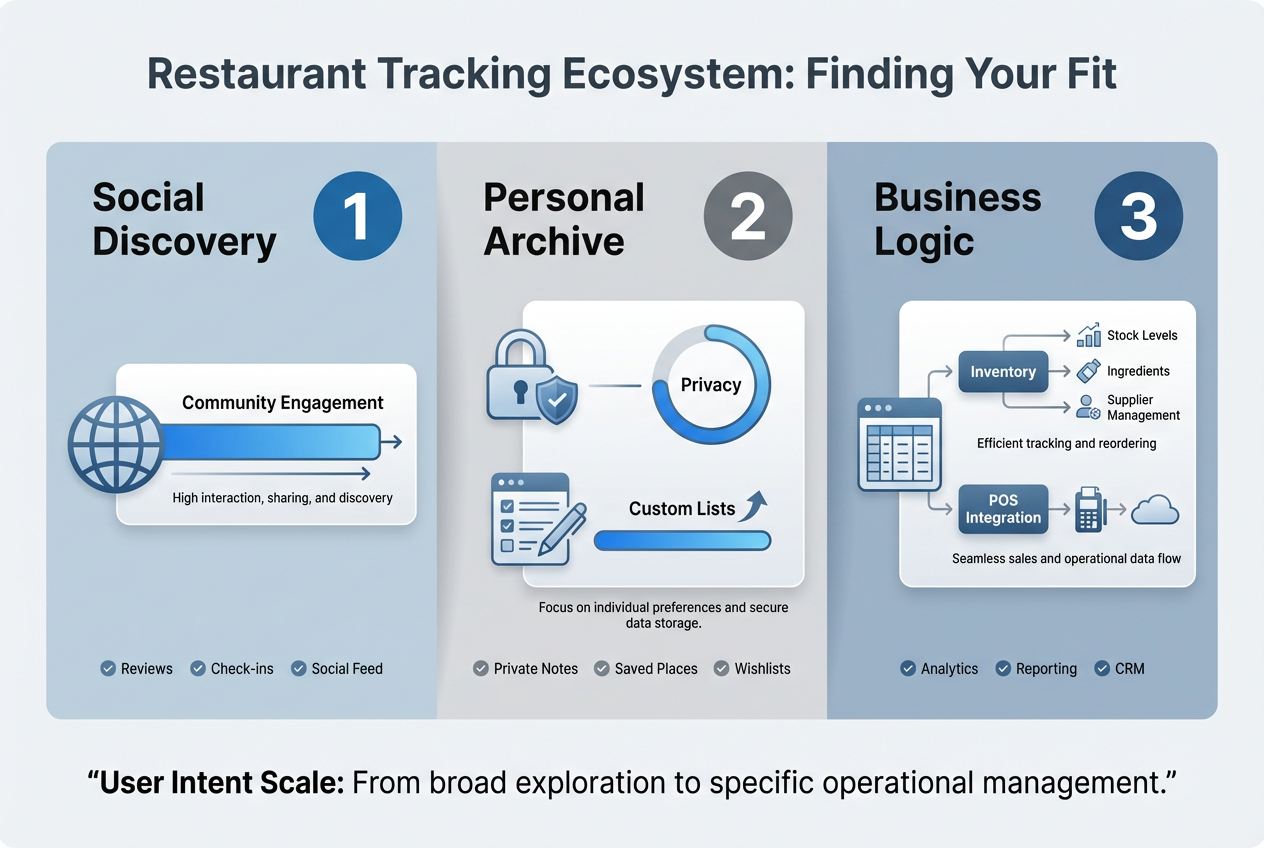
These apps fall into two distinct categories. Consumer apps focus on personal memory-keeping and social sharing. They're built for foodies, travelers, and anyone who wants to remember great meals without cluttering their photos app. Business apps focus on inventory management, cost tracking, and operational efficiency for restaurant owners and managers.
The best consumer restaurant tracking apps share common features: the ability to save restaurants to custom lists, write notes about specific dishes, rate your experiences, and search your history by cuisine type, location, or date. Some add social layers where you can follow friends and see their recommendations. Others prioritize privacy, keeping your honest opinions visible only to you.
This distinction matters because the tools serve fundamentally different needs. If you're a diner looking to build a personal food journal, you don't need invoice scanning or POS integration. If you're a restaurant manager tracking inventory costs, you don't need Instagram Story automation. This guide acknowledges both audiences but focuses heavily on consumer apps since that's the primary search intent.
Why Use a Dedicated App Instead of Google Maps?
Google Maps lets you save restaurants and leave reviews, so why bother with a specialized restaurant tracking app? The answer comes down to granularity, privacy, and organization.
Google Maps treats every restaurant as a single entity with one star rating. You can't distinguish between the incredible tacos and the disappointing enchiladas at the same place. Restaurant tracking apps like Savor let you rate individual dishes, creating a detailed taste archive that actually reflects your experience. When you search "tacos" six months later, you want to see which specific plate earned a 9/10, not just which restaurant got 4 stars overall.
Privacy matters too. Google Maps reviews are public by default. Your honest opinion that a hyped restaurant was mediocre becomes part of your public profile. Dedicated restaurant tracking apps give you control. Apps like Savor keep your ratings private unless you choose to share specific lists. You can be brutally honest about an overpriced tasting menu without worrying about the chef's cousin reading it.
Organization is the final advantage. Google Maps saves become a chaotic jumble. Dedicated apps let you create custom lists ("Date Night Spots," "Best Ramen in Tokyo," "Places to Take Visitors"), filter by cuisine or neighborhood, and search your entire dining history in seconds. When someone asks for a recommendation, you're three taps away from a curated answer instead of scrolling through pins on a map.
Here's how they compare:
| Feature | Google Maps | Savor | Beli |
|---|---|---|---|
| Individual dish tracking | No | Yes | No |
| Private ratings | No | Yes (default) | Yes (optional) |
| Custom list creation | Basic saves | Unlimited themed lists | Ranked lists |
| Search by cuisine | Limited | Yes | Yes |
| Social sharing | Public reviews only | Selective sharing | Full social feed |
| Offline access | Limited | Full | Limited |
How to Choose the Right Restaurant Tracking App for You
The best restaurant tracking app depends on what you actually want to do with your dining data. Here's how to decide:
Choose a privacy-first app (like Savor) if:
- You want brutally honest ratings without social pressure
- You're building a personal reference guide, not a public profile
- You need dish-level detail, not just restaurant ratings
- You value searchable archives over social discovery
Choose a social restaurant app (like Beli or Truffle) if:
- Recommendations from friends matter more than strangers' Yelp reviews
- You enjoy curating public lists and gaining followers
- You want to discover new restaurants through your network
- You're comfortable with your dining habits being somewhat public
Choose automation-focused apps (like Truffle) if:
- You already share restaurants on Instagram Stories
- Manual data entry feels like homework
- You want your social media posts to double as a restaurant log
- You prioritize convenience over detailed notes
Choose business management software (like Toast or MarketMan) if:
- You're a restaurant owner tracking inventory costs
- You need POS integration and invoice scanning
- Recipe costing and COGS analysis matter to you
- You're managing multi-location operations
Most people need one consumer app and don't need business software at all. If you're torn between privacy and social features, consider using two apps: a private journal for honest ratings and a social platform for public recommendations you're comfortable sharing.
Best Restaurant Tracking Apps for Personal Use
These consumer-focused apps help you remember great meals, build custom lists, and share recommendations with people you actually know. They're designed for food lovers, not restaurant managers.
1. Savor - Best for Private, Detailed Dish Reviews
✓ Best for: Food lovers who want honest, searchable dish-level ratings without social pressure
Savor takes a different approach than every other restaurant tracking app: it rates dishes, not restaurants. Instead of giving a generic 4-star rating to an entire venue, you photograph specific plates, score them on a 10-point scale, and build a searchable archive of every exceptional bite you've tasted.
This granularity matters. You can finally answer questions like "Which restaurant had better carbonara, the place in Rome or the one in New York?" by pulling up your actual ratings instead of vague memories. Food bloggers use Savor to create data-driven "best of" lists. Travelers use it to remember highlights from months of eating abroad. Critics use it to maintain honest records without public performance pressure.
The app keeps everything private by default. Your scores stay visible only to you unless you choose to share specific curated lists. This privacy-first design removes the social pressure that makes public platforms feel performative. You can give an honest 4/10 to a hyped restaurant without worrying about who sees it.
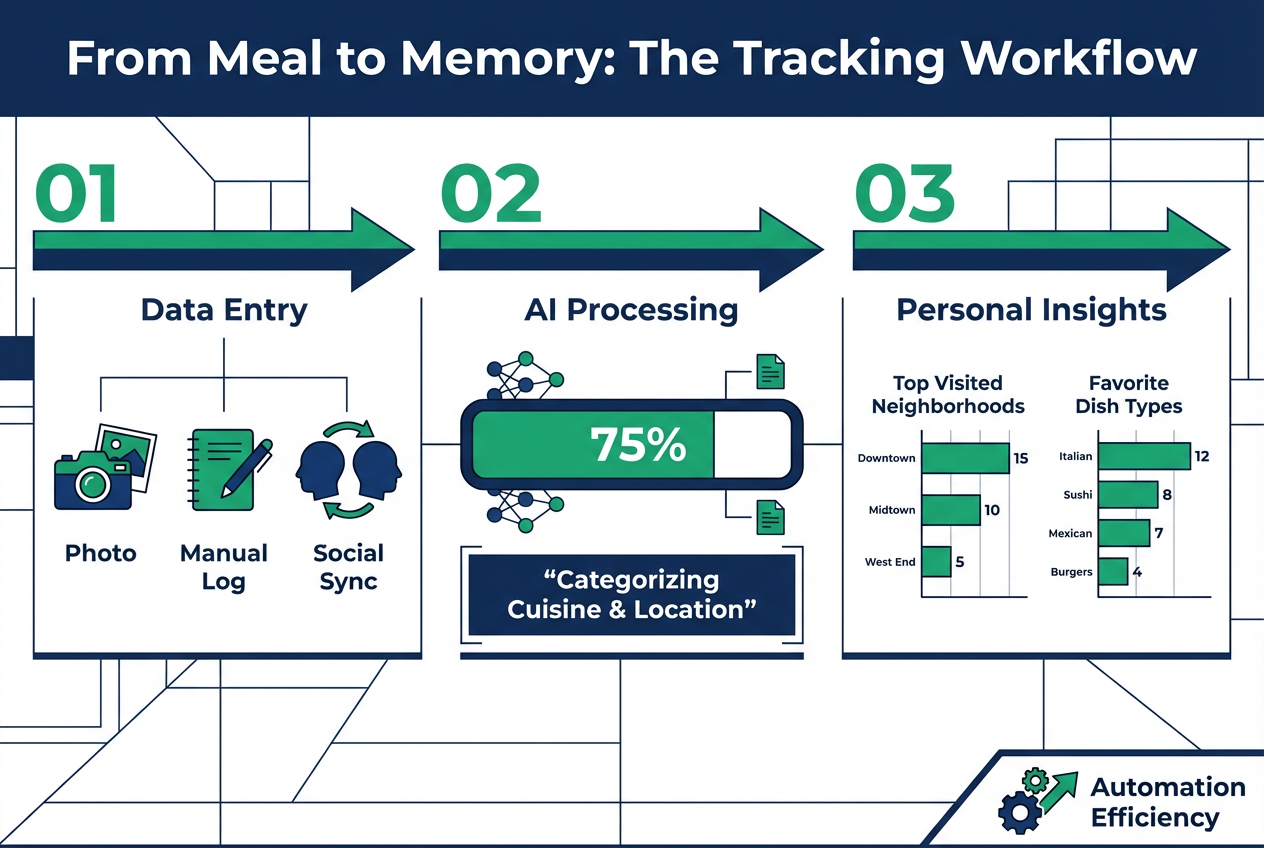
AI-powered dish recognition speeds up logging. Snap a photo, and Savor suggests what you're eating, saving you from typing "Orecchiette with sausage and broccoli rabe" into a search box. The app works fully offline, so you can log meals during international trips without burning through data or waiting for Wi-Fi.
Standout Features
- Dish-level precision: Rate the pasta 9/10 and the dessert 6/10 at the same restaurant
- 10-point scoring system: More nuanced than 5-star scales, letting you distinguish "great" from "perfect"
- AI dish recognition: Automatic tagging reduces manual data entry
- Custom list creation: Build themed collections like "Top Tacos in Austin" or "Dishes Worth Flying For"
- Search and filter: Pull up every ramen you've rated or every meal in Tokyo in seconds
- Offline functionality: Log meals without internet, sync later
- Privacy controls: Keep ratings private or share specific lists on demand
Key Details & Availability
| Feature | Details |
|---|---|
| Pricing | Free |
| Platforms | iOS (Android coming 2026) |
| Best Use Cases | Food bloggers building recommendation lists, travelers tracking meals abroad, critics maintaining honest archives |
| Pros | Dish-first design, AI automation, complete privacy, works offline, no ads |
| Cons | iOS only currently, smaller user base than social platforms |
For anyone who treats dining as something worth remembering in detail, Savor is the most precise restaurant tracking app available. It turns fleeting meals into a permanent, searchable taste archive.
Download Savor from the App Store: https://apps.apple.com/us/app/savor-remember-every-bite/id6745561315
2. Beli - Best for Social Status and Premium Rankings
✓ Best for: Foodies who want exclusive access to a curated social network of serious eaters
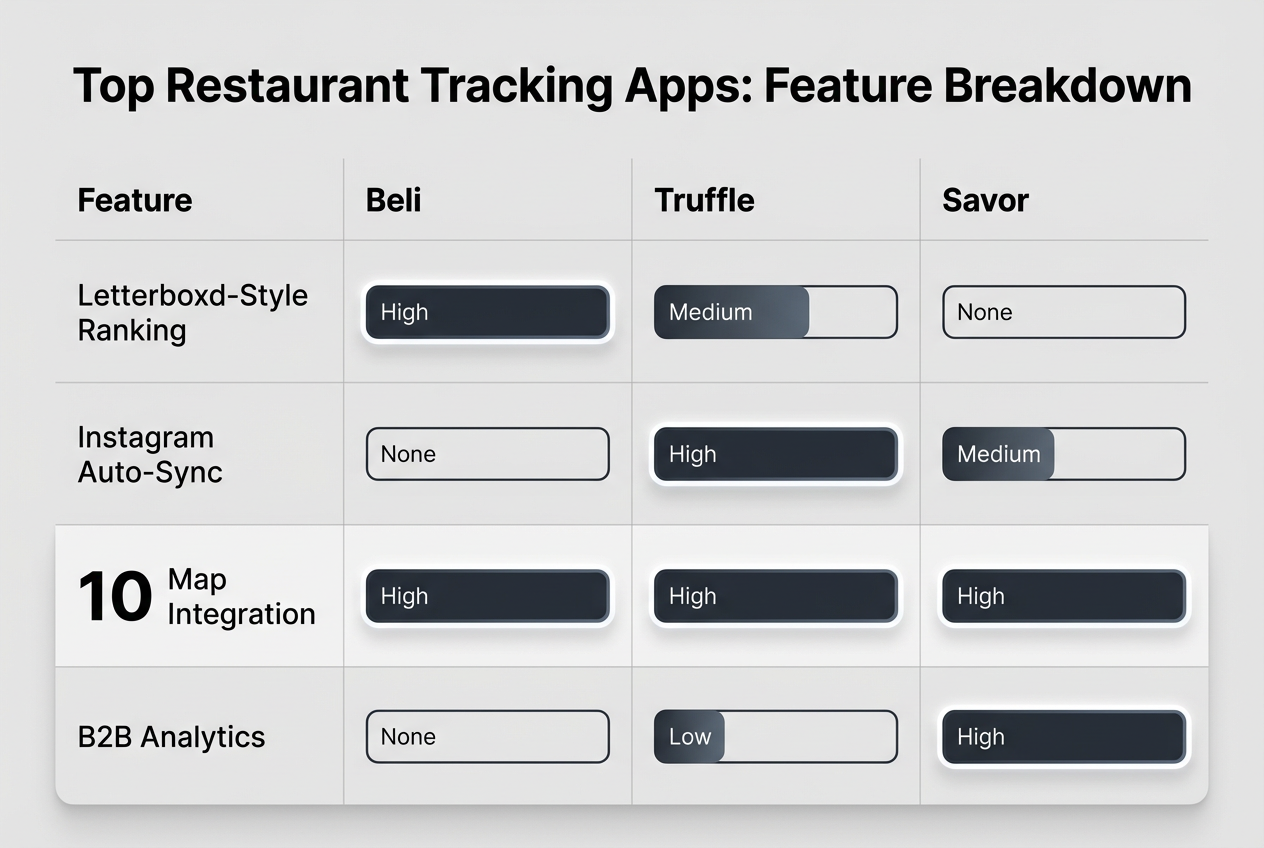
Beli positions itself as the premium social restaurant tracking app. It's often described as "the Letterboxd for food" because it combines personal list-making with social discovery through a carefully curated community. Unlike open platforms where anyone can join, Beli uses a waitlist system to maintain quality and exclusivity.
The app centers on ranked lists. You don't just save restaurants, you organize them into ordered hierarchies: your top 10 sushi spots, your ranked list of pizza places, your definitive taco tier. These rankings become social currency. Other users follow you to see how your tastes compare to theirs, creating a dining network built on trust rather than algorithmic recommendations from strangers.
Beli's map visualization turns your dining history into a geographic story. You can see clusters of restaurants you've tried in specific neighborhoods, identify gaps in your culinary exploration, and spot patterns in your preferences. The interface is polished and photo-forward, making your food archive feel more like a curated gallery than a utilitarian database.
The social feed shows what people in your network are trying, but it's not the chaotic fire hose of a public review platform. It's a filtered stream from users you've chosen to follow, creating a recommendation engine based on real relationships and shared taste.
Standout Features
- Ranked list system: Organize restaurants by explicit preference order, not just binary "liked/saved" categories
- Exclusive waitlist access: Smaller, more engaged community than open platforms
- Map visualization: See your dining history plotted geographically
- Follow and discover: Build a network of trusted food opinions
- High-quality interface: Polished design that makes curation feel rewarding
- Private and public options: Control what others see
Key Details & Availability
| Feature | Details |
|---|---|
| Pricing | Free (premium features planned) |
| Platforms | iOS only |
| Best Use Cases | Social foodies building reputation, travelers sharing curated city guides, groups planning dining adventures |
| Pros | Beautiful design, exclusive community, powerful ranking tools, map integration |
| Cons | Waitlist required, iOS only, smaller restaurant database than established platforms |
If you view dining as a social experience worth sharing with a trusted network, Beli offers the most elegant social restaurant tracking app available. It's for people who want their recommendations to carry weight because they've earned a reputation for good taste.
Join the Beli waitlist: https://www.beliapp.com
3. Truffle - Best for Automated Tracking via Instagram
✓ Best for: Social media users who want restaurant tracking to happen automatically
Truffle solves the biggest problem with restaurant tracking apps: the friction of manual data entry. Instead of forcing you to log every meal, it watches your Instagram Stories and automatically adds restaurants when you post about them. If you already share dining experiences on social media, Truffle turns those posts into a structured restaurant log without extra work.
The automation is genuinely smart. Truffle recognizes location tags in Stories and adds those restaurants to your profile. Over time, it builds a complete dining history by pulling data you were already creating. For users who live on Instagram, this eliminates the "I should open that food diary app" moment that derails most tracking habits.
Beyond automation, Truffle functions as a social discovery platform. You follow friends, see what they're eating, and get recommendations based on your network's activity. It positions itself as "Strava for dining" or "the Letterboxd for restaurants," emphasizing the social and competitive aspects of documenting your food journey.
The app includes standard features like custom lists (To-Try lists, Favorites) and map views showing restaurant clusters. But the Instagram integration is the real differentiator. If you're already documenting meals on social media, Truffle captures that data and makes it searchable.
Standout Features
- Instagram Story automation: Automatically log restaurants when you post about them
- Zero-friction tracking: No manual entry required if you're already active on Instagram
- Social feed: See where your friends are eating in real-time
- Custom lists: Build To-Try and Favorites collections
- Map integration: Visualize your dining history geographically
- "Strava for dining" positioning: Gamifies your restaurant exploration
Key Details & Availability
| Feature | Details |
|---|---|
| Pricing | Free with premium features |
| Platforms | iOS (Android availability unclear) |
| Best Use Cases | Instagram-active food lovers, social diners tracking group meals, travelers automating trip documentation |
| Pros | Requires zero manual effort if you use Instagram, social discovery, automated list building |
| Cons | Only tracks restaurants you post publicly, less control over privacy, requires active Instagram use |
For users who already share their dining adventures on Instagram, Truffle is the most effortless restaurant tracking app available. It turns social media behavior you're already doing into a structured food diary.
Download Truffle from the App Store: Search "Truffle restaurant app" or visit https://www.thetruffleapp.com
4. Google Maps Lists - Best Free Baseline Option
✓ Best for: Casual users who need basic restaurant saving without downloading another app
Google Maps Lists deserve mention as the default restaurant tracking app most people already use. While not purpose-built for foodies, the Lists feature offers basic functionality that covers casual needs without requiring a new app download.
You can create custom lists ("Date Night," "Lunch Spots," "Want to Try"), save restaurants to them, add brief notes, and access everything across devices. The integration with Google's massive restaurant database means almost every establishment is already in the system with addresses, hours, and phone numbers.
The limitations become obvious when you compare Maps to dedicated restaurant tracking apps. You can't rate individual dishes. Privacy controls are minimal. Organization is basic. There's no way to search your history by cuisine type or compare similar restaurants across different cities. But for someone who just wants to remember a handful of favorite places and restaurants they want to try, Maps gets the job done.
Think of Google Maps Lists as the starting point. When you find yourself wishing you could do more with your restaurant data, that's when to explore specialized apps like Savor, Beli, or Truffle.
Standout Features
- Already installed: No additional app download needed
- Universal database: Covers restaurants worldwide
- Basic list creation: Organize saves into categories
- Cross-device sync: Access lists on phone, computer, or tablet
- Navigation integration: Get directions directly from saved restaurants
Key Details & Availability
| Feature | Details |
|---|---|
| Pricing | Free |
| Platforms | iOS, Android, Web |
| Best Use Cases | Casual diners saving a few favorites, travelers building simple city guides, groups collaborating on shared lists |
| Pros | Free, universally accessible, comprehensive database, no learning curve |
| Cons | No dish-level tracking, limited privacy, basic organization, public reviews only |
If you're just starting to track restaurants and don't want to commit to a specialized app yet, Google Maps Lists provide a functional baseline. They're not powerful, but they're free and already in your pocket.
5. Yelp Collections - Best for Public Review Integration
✓ Best for: Users who write public reviews and want to organize restaurants into collections
Yelp Collections let you group restaurants into themed lists while maintaining your public review activity. Unlike purely private tracking apps, Yelp combines personal organization with community engagement. You can create a "Best Brunch" collection, write detailed reviews, and have both your lists and opinions contribute to the broader Yelp ecosystem.
The app's strength is its massive user base and comprehensive restaurant data. Nearly every restaurant has photos, hours, menus, and reviews from dozens or hundreds of people. When you save a place to a collection, you're also accessing this wealth of community knowledge.
Collections work for planning too. You can build "Want to Try" lists and share them with friends for group decision-making. The collaborative aspect makes Yelp more useful than purely personal tracking apps when dining involves coordinating with others.
The trade-off is privacy. Yelp's entire model centers on public contributions. Your reviews, photos, and even some collections are visible to the community. If you want honest ratings without social pressure, Yelp isn't the right tool. But if you're comfortable with public participation and want your restaurant tracking to also help other diners, Yelp Collections offer solid functionality.
Standout Features
- Collection creation: Organize restaurants into custom themed lists
- Public review platform: Contribute to and benefit from community reviews
- Comprehensive database: Extensive restaurant coverage in major cities
- Photo sharing: Upload and view hundreds of dish photos per restaurant
- Reservation integration: Book tables directly through the app
- Multi-platform access: Available on iOS, Android, and web
Key Details & Availability
| Feature | Details |
|---|---|
| Pricing | Free (with ads) |
| Platforms | iOS, Android, Web |
| Best Use Cases | Public reviewers, group dining organizers, users who value community knowledge over privacy |
| Pros | Massive restaurant database, strong community features, reservation booking, free to use |
| Cons | Primarily public platform, ads throughout experience, less precise than dish-focused apps |
If you're already writing Yelp reviews and want better organization tools, Collections are a natural fit. Just remember that Yelp prioritizes community contribution over private personal tracking.
Best Restaurant Management Apps for Business Owners
If you're a restaurant owner or manager, you need different tools than personal food diaries. These professional platforms focus on inventory tracking, cost control, POS integration, and operational efficiency. We're including brief coverage here since some searches for "restaurant tracking app" come from business contexts, but these are fundamentally different products than consumer apps.
6. Toast + xtraCHEF - Best for POS-Integrated Inventory Management
✓ Best for: Restaurant operators already using Toast POS who need seamless inventory and cost tracking
Toast POS combined with the xtraCHEF integration creates a unified system where sales data automatically updates inventory levels and cost calculations. This eliminates the disconnect between front-of-house transactions and back-of-house supplies.
The xtraCHEF module uses OCR to scan invoices, automatically entering vendor pricing into your system. When you sell a burger through Toast, the system depletes the ingredients (buns, patties, lettuce) from inventory and calculates real-time COGS. This level of integration is powerful for operators who need precise plate-level profitability data.
The downside is exclusivity. You must already be a Toast POS customer to access xtraCHEF inventory features. Setup requires significant time investment to configure recipes, set par levels, and map menu items to ingredients. For operations already committed to Toast, it's the most seamless option. For others, it's a non-starter.
Key Details
| Feature | Details |
|---|---|
| Pricing | Quote-based, add-on to Toast POS subscription |
| Best For | Existing Toast customers needing inventory automation |
| Platforms | Web dashboard, iOS and Android apps for counts |
| Pros | Deep POS integration, automated invoice scanning, real-time COGS tracking |
| Cons | Toast-only, complex setup, requires POS commitment |
Learn more: https://pos.toasttab.com/products/inventory-management
7. MarketMan - Best for Multi-Vendor Inventory Tracking
✓ Best for: Independent restaurants and small chains needing flexible, POS-agnostic inventory management
MarketMan offers cloud-based inventory and supplier management without forcing you into a specific POS system. It integrates with multiple POS platforms, giving you real-time inventory depletion while maintaining flexibility in your technology stack.
The platform excels at vendor management. Direct EDI connections with major suppliers like Sysco and US Foods let you transmit orders electronically and receive invoices automatically. AI-powered ordering suggests purchase quantities based on sales forecasts and current stock levels, reducing both waste and stockouts.
Recipe costing is granular. You can break down every menu item to ingredient level, track price fluctuations from vendors, and see exactly which dishes are most profitable. The mobile apps let staff perform inventory counts on tablets or phones, streamlining the typically tedious counting process.
Pricing is transparent compared to many competitors, with clear monthly tiers based on location count and features needed. The one-time setup fee helps with onboarding but adds to initial costs.
Key Details
| Feature | Details |
|---|---|
| Pricing | Tiered monthly subscriptions plus setup fee |
| Best For | Independent restaurants, small chains, multi-unit operators |
| Platforms | Web dashboard, iOS and Android apps |
| Pros | POS-agnostic, strong vendor integrations, transparent pricing, AI ordering assistance |
| Cons | Setup fee required, advanced features cost extra, learning curve for staff |
Learn more: https://www.marketman.com
8. Other Business Software Considerations
Several other platforms serve restaurant inventory and operations tracking needs, but they're outside the scope of this primarily consumer-focused guide. If you're researching business software specifically, explore:
- Lightspeed Restaurant: POS with built-in inventory management
- BevSpot / WISK: Specialized beverage inventory tracking for bars
- BlueCart: Supplier ordering and invoice management
- Craftable: Recipe costing and food cost control
For detailed comparisons of restaurant management software, check category pages on G2 or Capterra where you can filter by features, pricing, and user reviews.
Frequently Asked Questions About Restaurant Tracking Apps
Is there a Letterboxd for restaurants?
Yes, several apps position themselves as "the Letterboxd for food." Beli and Truffle both emphasize social curation, ranked lists, and discovery through friend networks similar to how Letterboxd approaches film tracking. Beli uses an exclusive waitlist model and ranked lists. Truffle focuses on Instagram automation and social feeds. Both apps let you document dining experiences and share curated recommendations with followers, creating a social layer around personal food tracking.
What's the best free restaurant tracking app?
Savor, Truffle, and Google Maps Lists are all free. Savor offers the most detailed tracking with dish-level ratings and AI recognition. Truffle provides the most automated tracking if you're active on Instagram. Google Maps Lists give basic functionality without downloading another app. Beli is free but uses a waitlist. If "best" means most detailed, choose Savor. If "best" means most effortless, choose Truffle.
Can I track restaurants on Google Maps?
Yes, Google Maps lets you save restaurants and organize them into lists. You can add notes and access saves across devices. However, Maps only tracks restaurants as single entities - you can't rate individual dishes, maintain private ratings separate from public reviews, or search by cuisine type. For casual tracking of a few favorite spots, Maps works. For serious food documentation, dedicated restaurant tracking apps offer significantly more functionality.
Do restaurant tracking apps work offline?
It depends on the app. Savor works fully offline, letting you log meals during international travel without internet and syncing later. Beli and Truffle require connectivity for social features but may cache some data. Google Maps lets you view saved lists offline if you've downloaded area maps. Business software like Toast and MarketMan generally requires internet for real-time inventory syncing. If offline functionality matters to you, prioritize apps like Savor that explicitly support it.
What's the difference between Beli and Truffle?
Beli focuses on ranked lists and exclusive community curation. You manually add restaurants and organize them into ordered hierarchies, building a curated profile. Truffle focuses on automation and ease, automatically tracking restaurants when you post Instagram Stories about them. Beli is for deliberate curators who enjoy the organizing process. Truffle is for casual users who want tracking to happen automatically through existing social media habits.
Are restaurant tracking apps better than spreadsheets?
For most people, yes. Spreadsheets require manual formatting, lack built-in search and filter functionality, don't integrate maps or photos easily, and become cumbersome as your restaurant count grows. Dedicated apps offer AI dish recognition, automatic location tagging, visual map interfaces, and instant filtering by cuisine, city, or rating. Spreadsheets work if you enjoy that level of manual control, but apps save time and offer better long-term usability for the vast majority of users.
Can I share my restaurant lists with friends?
All consumer restaurant tracking apps support some form of sharing. Savor lets you create shareable filtered lists on demand while keeping your main archive private. Beli and Truffle are built around social sharing and friend networks. Google Maps lets you share lists or make them collaborative. The key difference is default privacy: Savor keeps everything private unless you choose to share. Beli and Truffle emphasize social discovery from the start.
Do restaurant tracking apps cost money?
Most consumer apps are free with optional premium features. Savor is completely free. Beli is free with premium features planned. Truffle offers free and premium tiers. Google Maps and Yelp are free with ads. Business software like Toast and MarketMan charges monthly fees since they're operational tools for professional use. For personal food tracking, you can find excellent free options.
Ready to Start Tracking Your Food Journey?
The right restaurant tracking app depends on what you value: privacy or social sharing, automation or manual curation, dish-level detail or restaurant-level overview. Most people need one consumer app and don't need business software at all.
For food lovers who want honest, detailed records: Download Savor for dish-level tracking, AI recognition, and complete privacy. Your ratings stay yours until you choose to share specific lists.
For social foodies who love sharing recommendations: Try Beli for exclusive ranked lists and trusted network discovery, or Truffle for effortless Instagram automation.
For casual users who just need basic saving: Use Google Maps Lists. They're free, already installed, and cover essential functionality without learning a new app.
For restaurant owners tracking inventory: Explore Toast + xtraCHEF if you already use Toast POS, or MarketMan if you need POS-agnostic flexibility.
The food memories you're creating right now are worth preserving. Whether you're a meticulous cataloger documenting every dish or a casual diner who just wants to remember great spots, these restaurant tracking apps transform fleeting meals into a permanent, searchable archive you'll reference for years.
Start with one app this week. Log your next five meals. See which tool fits your habits. The perfect plate you eat tomorrow deserves better than a blurry phone photo that disappears into your camera roll. Give it a proper home in a restaurant tracking app built for exactly that purpose.
Download Savor from the App Store and start building your personal food archive today: https://apps.apple.com/us/app/savor-remember-every-bite/id6745561315