
How to Build a Personal Dish Tasting Database (2026)
John the smoothie monster
John lives for smoothie bowls and cold-pressed juices. He uses Savor to remember his best blends.
How to Build a Personal Dish Tasting Database: The Serious Foodie's Complete Guide You just had the best duck confit of your life at a tiny bistro in Paris....
How to Build a Personal Dish Tasting Database: The Serious Foodie's Complete Guide
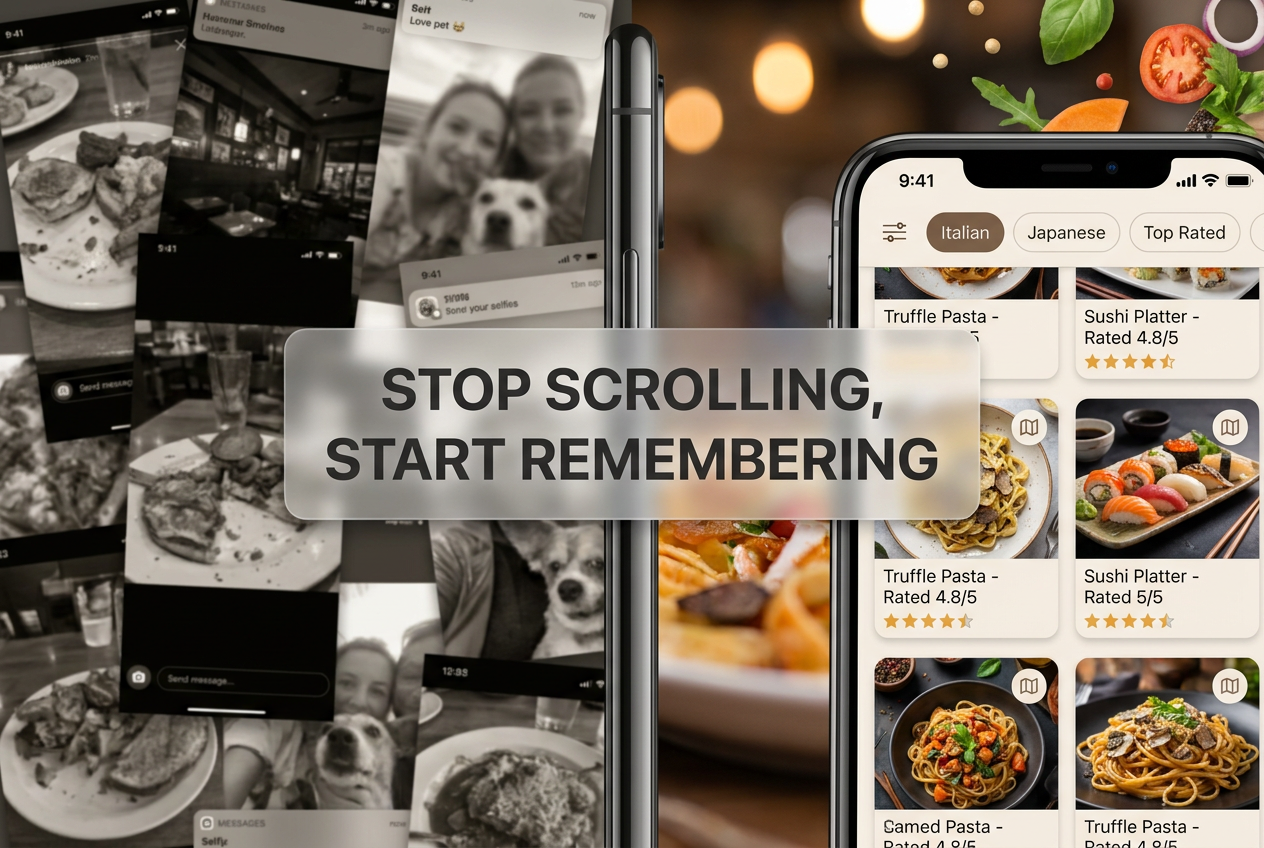
You just had the best duck confit of your life at a tiny bistro in Paris. The skin shattered like glass. The meat fell apart with the gentlest pressure from your fork. Three months later, you're trying to remember the name of the place, scrolling through 847 food photos in your camera roll, and coming up empty.
This is the modern foodie's curse. We photograph everything. We remember almost nothing.
A personal dish tasting database isn't just a fancy spreadsheet. It's a searchable archive of your palate history - a system that lets you search "duck" and instantly pull up every exceptional duck dish you've ever eaten, complete with the chef's name, your tasting notes, and the exact flavor profile that made it memorable.
This guide walks through the exact architecture, tools, and workflow you need to build a database that actually works.
Table of Contents
- Why Traditional Restaurant Tracking Fails
- The Architecture: Building Your Schema
- Platform Choice: Notion vs. Airtable vs. Low-Friction Systems
- The 100-Point Rating System
- The Chef Relational Problem
- Flavor Profile Taxonomy
- The Capture Workflow
- Search and Analysis
- Frequently Asked Questions
Why Traditional Restaurant Tracking Fails
Most restaurant tracking systems make a fundamental design error: they organize by venue, not by dish.
You end up with a note that says "Le Coucou - French - 4 stars - great!" That's useful if you're planning to return to Le Coucou. It's worthless if you're trying to remember where you had that life-changing quenelle three years ago.
The problem compounds when chefs move. Daniel Boulud has worked at multiple restaurants throughout his career. A venue-centric system loses that thread entirely. Your database should track talent, not just addresses.
Then there's the star rating problem. Restaurants sell out significantly more frequently when they see a half-star increase on Yelp, but the 5-star system creates what food critics call the "3.5 to 4.5 huddle" - a compressed middle where most of your ratings cluster together, making them functionally meaningless.
You need granularity. You need dish-level tracking. You need a system that scales with your palate.
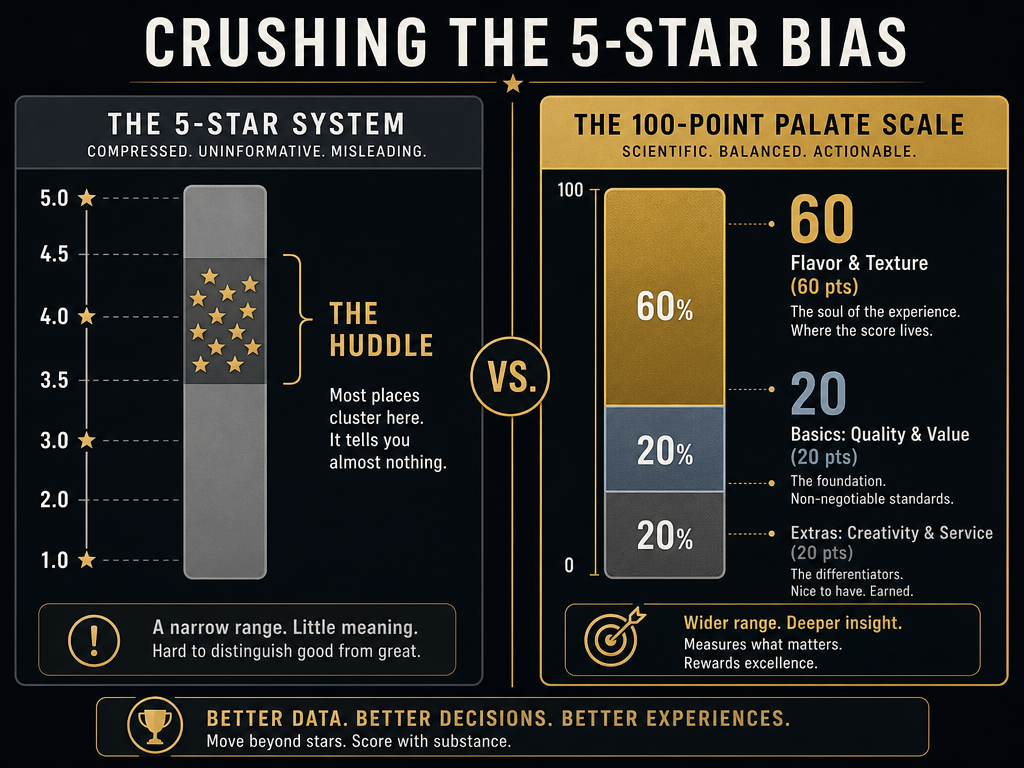 Moving beyond the 5-star trap allows for scientific precision in food logging, prioritizing flavor and texture over superficial metrics to create a meaningful palate history.
The Architecture: Building Your Schema
Your database needs four core tables, each serving a distinct function. Think of them as layers of a relational data model, not isolated lists.
Table 1: Dishes (The Core)
This is your primary table. Every entry represents a single dish at a specific moment in time.
Required fields:
- Dish Name (e.g., "Duck Confit")
- Restaurant Name
- Chef Name (critical - we'll come back to this)
- Date Eaten
- 100-Point Score (more on this below)
- Key Ingredient (for search)
- Photo (with automatic location metadata)
- Tasting Notes (free text)
- Price
Optional but powerful:
- Would Order Again? (yes/no)
- Dining Companions (social context matters)
- Menu Description (the actual text from the menu)
- Dish Category (starter/main/dessert)
Table 2: Restaurants
This table exists primarily to store venue metadata. It's linked to your Dishes table through the Restaurant Name field.
Required fields:
- Restaurant Name
- Address (or City if traveling)
- Cuisine Type (Italian, Japanese, Contemporary American)
- Vibe (Formal, Casual, Hidden Gem)
- Booking Difficulty (Easy, Moderate, Impossible)
- Still Open? (restaurants close - track this)
Table 3: Chefs
This is where serious databases diverge from amateur ones. You're tracking the people who made the food, not just the buildings where you ate it.
Required fields:
- Chef Name
- Current Restaurant
- Past Restaurants (list view)
- Signature Style (e.g., "Fermentation-forward Nordic," "Classical French technique with Japanese precision")
- Notable Dishes I've Tried (linked to your Dishes table)
If Daniel Humm leaves Eleven Madison Park tomorrow, your database should reflect that. When you search for his name, you should see every dish of his you've eaten, regardless of venue.
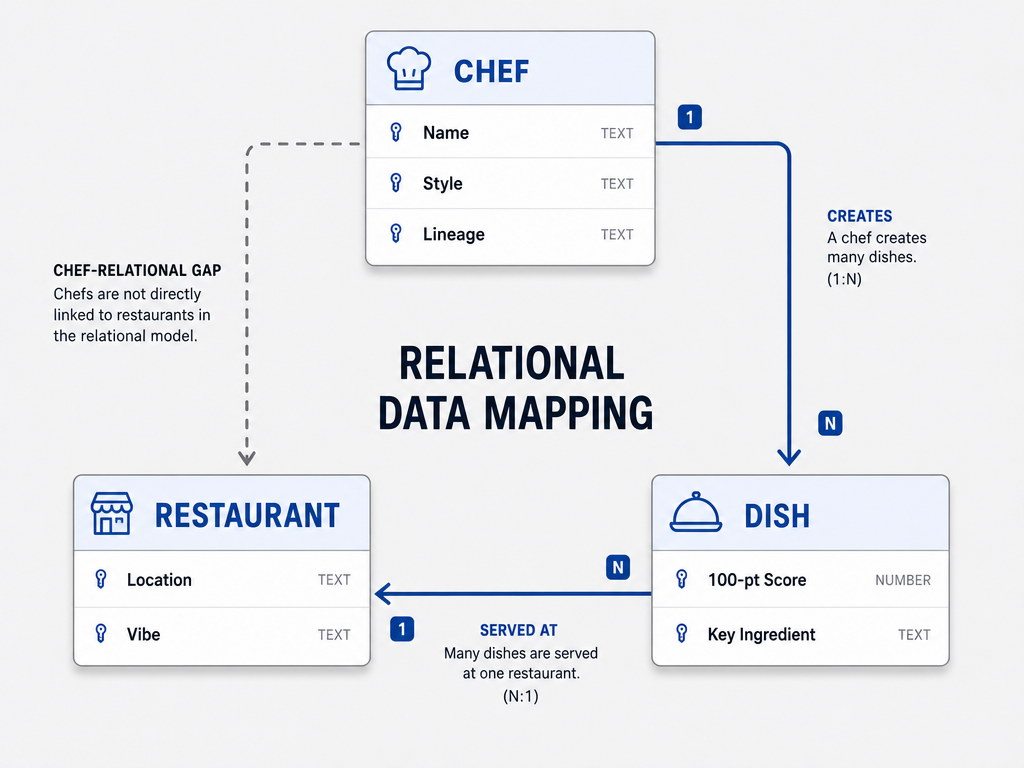 A relational schema ensures that your database tracks the talent behind the meal, allowing you to follow a chef's signature style regardless of which restaurant they currently lead.
Table 4: Flavor Notes
This table powers your most sophisticated searches. Instead of tagging a dish as "Italian," you're building a quantitative flavor profile.
Required fields:
- Dish Name (linked to Dishes table)
- Acidity (0-10 scale)
- Sweetness (0-10)
- Bitterness (0-10)
- Umami (0-10)
- Salt (0-10)
- Heat/Spice (0-10)
- Texture (Crispy, Creamy, Al Dente, etc.)
- Dominant Flavor (Fermentation, Smoke, Citrus, etc.)
This is advanced, but it's transformative. You can search for "high umami + crispy texture" and instantly surface every dish that matches that profile, regardless of cuisine or protein.
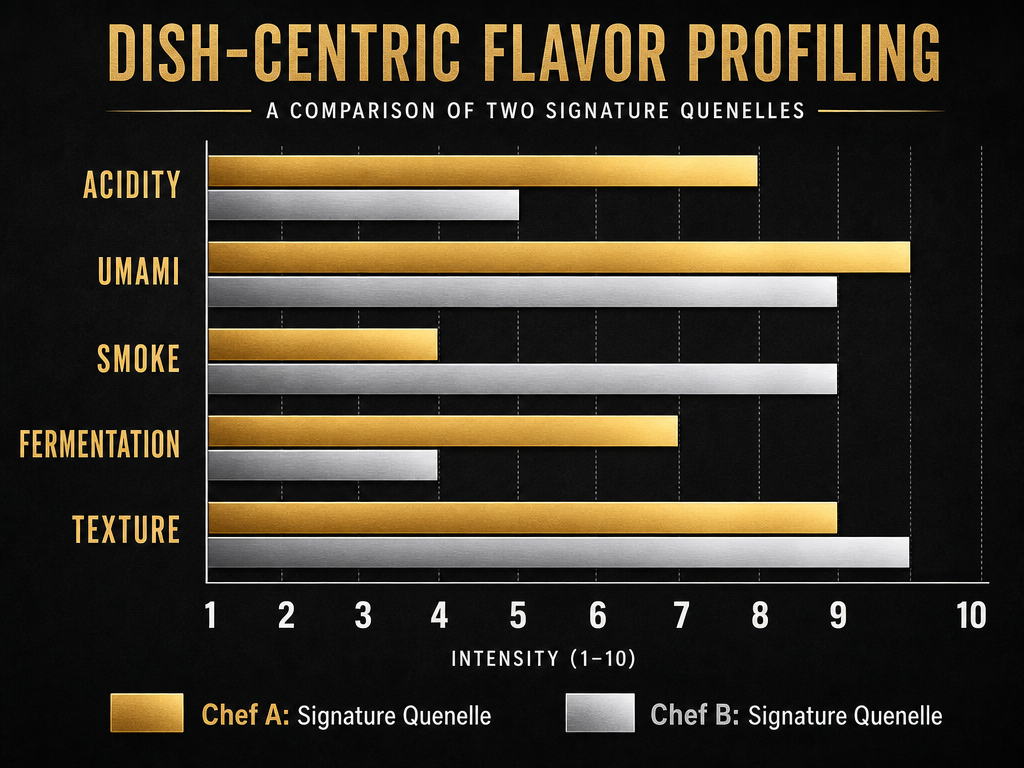 By using flavor profile tags instead of generic cuisine labels, you can quantitatively compare how different chefs execute specific elements like fermentation or smoke.
Platform Choice: Notion vs. Airtable vs. Low-Friction Systems
The best database is the one you'll actually use. Platform choice matters less than workflow friction.
Notion: Visual Gallery View
Best for: People who want a Pinterest-style visual interface.
Notion excels at gallery views. You can see thumbnail photos of every dish in a grid, toggle between different views (by cuisine, by rating, by city), and embed rich media like menu PDFs or voice memos.
The downside is speed. Creating a new entry in Notion requires multiple clicks. If you're trying to log a dish while still at the table, that friction adds up.
When to choose Notion: You primarily update your database during weekly reviews, not in real-time. You value aesthetics and want your database to feel like a curated magazine spread.
Airtable: Mobile Forms and Relational Power
Best for: Power users who want advanced filtering and mobile-first capture.
Airtable's killer feature is its form view. You can create a mobile-optimized form with just the essential fields (Dish Name, Restaurant, Photo, Quick Rating), then fill in the detailed flavor profiles later during your weekly review.
The relational database features are also more robust than Notion. Linking a Dish to a Chef to a Restaurant happens seamlessly, and you can create filtered views that show, for example, "All dishes by chefs who trained under Thomas Keller."
When to choose Airtable: You want industrial-strength database functionality. You plan to log hundreds of dishes per year. You need advanced search capabilities.
If you're serious about tracking your culinary journey, the best apps to track your favorite dishes can help you choose the right platform for your needs.
Apple Notes + Shortcuts: The Tactical Approach
Best for: People who refuse to interrupt their dining experience with technology.
This is the minimalist path. You snap a photo (which automatically records location and timestamp). You dictate a 10-second voice memo into your phone: "Duck confit. Le Coucou. Absolutely perfect skin, meat fell apart, best I've ever had."
Later - maybe that night, maybe during a Sunday review session - you transcribe that into your actual database.
The advantage is zero friction at the table. You're not typing. You're not breaking eye contact with your dining companion. You're capturing just enough information to trigger the full memory later.
When to choose this: You find apps distracting during meals. You trust yourself to do the admin work later. You prioritize experience over real-time data entry.
For more low-friction approaches, explore how to build a personal restaurant library that works with your natural habits.
The 100-Point Rating System
The 5-star system compresses too much nuance. A comprehensive food rating system balances "Basics" (Flavor, Quality, Value) with "Extras" (Service, Presentation, Creativity), with flavor and texture deserving the highest priority in any rating system.
Here's how to build your own scoring approach that emphasizes what matters most:
Flavor and Texture: The Foundation
This is the heart of the dish. Give this category the most weight in your scoring.
- Flavor Balance: Is the dish harmonious? Does one element overpower the others, or do they work in concert?
- Texture Execution: Is the crispy element actually crispy? Is the tender element genuinely tender? Texture failures are cardinal sins.
- Ingredient Quality: Can you taste the difference between commodity tomatoes and heirloom ones? Between factory-farmed chicken and pasture-raised?
Technical Execution
Give this moderate weight in your scoring.
- Cooking Technique: Was the protein cooked to the correct temperature? Is the sauce emulsified? Did the chef demonstrate mastery of fundamental techniques?
- Creativity: Does the dish say something new, or is it a competent but uninspired execution of a classic?
Value and Context
Give these factors lighter weight in your final score.
- Price-to-Quality Ratio: An exceptional taco can match or surpass an expensive tasting menu course if the execution is transcendent relative to expectations.
- Presentation: Does the plating enhance the dish or distract from it?
- Service Impact: Did the server's description or timing improve the experience?
This framework gives you a standardized way to compare a street taco in Mexico City to a Michelin-starred degustation in Copenhagen. The scores are meaningfully different. The methodology is consistent.
For a detailed look at professional scoring systems, read how to review and track meals like a serious foodie.
The Chef Relational Problem
Let's say you had an exceptional meal at Per Se in 2015, when Thomas Keller was at the height of his powers. You logged it in your database: "Per Se - 4 stars - incredible."
Five years later, you're in Yountville, standing outside The French Laundry. You vaguely remember that Thomas Keller is connected to both restaurants, but you can't remember the specifics of what you ate at Per Se, and you certainly can't search your old notes for "Thomas Keller" because you never recorded the chef's name - just the venue.
This is the chef relational problem, and it's pervasive in amateur food databases.
The solution is mandatory chef attribution. Every dish gets linked to a chef. Every chef entry includes a career history. Your database becomes a map of talent, not just geography.
Practical implementation:
When you create a new Dish entry, you select a Chef from a dropdown (or create a new Chef entry if it's your first time encountering them). That Chef entry links to a Restaurant, but it also maintains a historical record of past restaurants.
Now when you search for "Thomas Keller," you see:
- Duck foie gras terrine (The French Laundry, 2018) - 94 points
- Oysters and pearls (Per Se, 2015) - 92 points
- Roasted chicken (Bouchon, 2020) - 88 points
You can track a chef's evolution. You can see which dishes of theirs resonated most with your palate. If they open a new restaurant next year, you'll know it's worth visiting based on their historical performance in your personal dataset.
Flavor Profile Taxonomy
Generic cuisine tags (Italian, Japanese, French) are marketing categories, not useful flavor descriptors. A Neapolitan pizza and a Tuscan ribollita are both "Italian," but they share almost nothing in common at the molecular level.
Flavor profiling solves this. Instead of tagging a dish with its country of origin, you're quantifying its dominant sensory characteristics.
The 10-Point Intensity Scale
Rate each of these elements on a 0-10 scale, where 0 is "not detectable" and 10 is "dominant."
Acidity: Citrus, vinegar, fermented elements, tomatoes. A ceviche might score 9. A braised short rib might score 1.
Sweetness: Natural sugars, caramelization, reductions. A miso-glazed black cod might score 6. A dry-aged steak might score 0.
Bitterness: Radicchio, dark chocolate, charred elements, certain spices. A Negroni-inspired dessert might score 8. A butter-poached lobster might score 0.
Umami: Aged cheese, mushrooms, soy sauce, fish sauce, miso, anything with concentrated glutamates. A bowl of ramen might score 10. A green salad might score 1.
Salt: Not just sodium chloride, but cured meats, anchovies, anything with inherent salinity. A Spanish jamón might score 10. A poached pear might score 0.
Heat/Spice: Chili peppers, black pepper, horseradish, ginger. A Sichuan hot pot might score 10. A delicate sole meunière might score 0.
Texture Descriptors: This isn't a scale, just tags. Options include: crispy, crunchy, creamy, silky, chewy, tender, gelatinous, fluffy, dense, al dente, crumbly.
Dominant Technique/Flavor: Single-tag options like: fermentation, smoke, char, raw/fresh, pickled, braised, roasted, fried, sous vide.
Once you've profiled 50 dishes, you can run genuinely useful searches:
- "Show me all high-umami dishes with crispy texture" (every great fried chicken iteration you've logged)
- "Find low-acid, high-sweet dishes" (desserts and certain Asian glazes)
- "Which dishes scored 8+ on bitterness?" (that time in Copenhagen when you discovered you love bitter greens done right)
This is how professional food critics think. They're not categorizing by cuisine. They're mapping flavor architecture.
The Capture Workflow
The best database architecture in the world is worthless if you don't actually log your meals. Friction is the enemy.
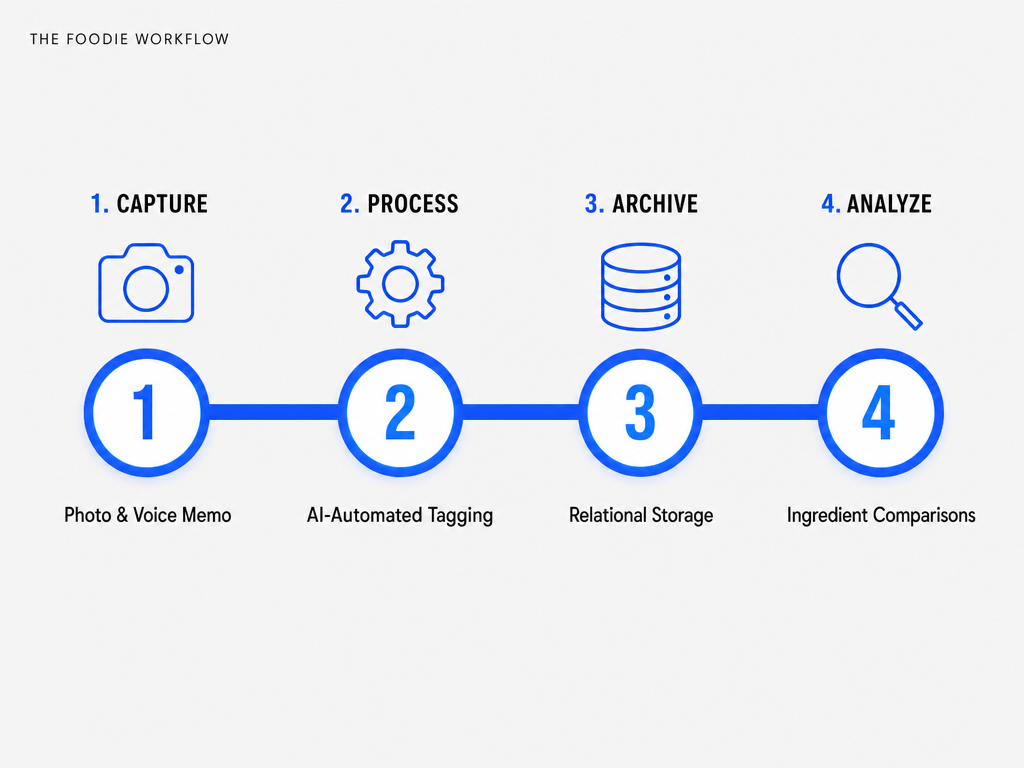 The 'Capture-First, Organize-Later' workflow minimizes table-side friction, allowing you to enjoy your meal while still gathering the high-quality data needed for your database.
Step 1: At the Table (30 seconds)
Photo: One good shot. Not Instagram composition - just a clear image that shows the dish's components. Your phone automatically embeds location and timestamp metadata.
Voice memo or 3-word vibe check: Dictate into your phone's voice memo app: "Pork belly. Crispy skin. Best I've had." Or just type three words into Apple Notes: "Transcendent. Fatty. Perfectly balanced."
That's it. Don't rate it. Don't fill out a form. Don't break the flow of your meal.
Step 2: Same Evening or Next Morning (3 minutes)
Open your database. Create a new Dish entry. Fill in:
- Dish name (look at the photo if you forgot)
- Restaurant name (your photo's location metadata will remind you)
- Date (autofill from photo timestamp)
- Quick 100-point score (just the gut number - you can refine it later)
- Upload the photo
You're done. The entry exists. It's searchable by basic parameters.
Step 3: Weekly Review (10-15 minutes for a week's worth of meals)
This is where serious foodies separate from casual loggers.
Sunday afternoon. Coffee. Your database. Go through the week's entries and add:
- Chef name (look it up if you don't know)
- Detailed tasting notes (the voice memo jogs your memory)
- Flavor profile scores (the photo lets you remember the texture, the glaze, the char)
- Link to the Chef table (if it's a new chef, create their entry)
- Refined 100-point score (now that you have distance, does that 88 hold up, or was it actually a 91?)
The weekly review is non-negotiable. It's when ephemeral dining experiences become permanent data points.
Step 4: The Analysis (Quarterly)
Every three months, run searches. This is where the database pays dividends:
- "What were my top 10 dishes this quarter?"
- "Which chefs appear most frequently in my 90+ point scores?"
- "How many high-umami, crispy-textured dishes have I logged? Which were best?"
- "If I'm going to Paris next month, which restaurants from my past trips had dishes I'd order again?"
You're not just remembering meals. You're identifying patterns in your taste. You're building a personalized flavor algorithm.
To see how others organize their culinary archives, check out the best food software guide.
Search and Analysis
A database that you can't search effectively is just a glorified photo album. The query layer is where your system proves its worth.
Basic Searches
These should be instantaneous:
- All dishes at Restaurant X
- All dishes by Chef Y
- All dishes eaten in City Z
- All dishes scored 90+ points
- All dishes I'd order again
If your platform can't do these without lag, your architecture is wrong.
Advanced Searches (Relational Queries)
These require properly linked tables:
- "Show me all dishes by chefs who trained under Alain Ducasse"
- "Find all high-umami dishes from Japanese restaurants where I scored the texture 8 or higher"
- "Which chefs have I eaten at multiple restaurants, and how did their dishes compare across venues?"
This is where Airtable significantly outperforms Notion. Airtable's filter and grouping logic is SQL-adjacent. Notion's is more limited.
Trend Analysis
After a year of logging:
- Which cuisine type appears most in your 90+ point scores?
- Do you prefer fried or braised proteins?
- Is there a correlation between price and your ratings, or are some of your highest-scored dishes from inexpensive spots?
- Which cities have the highest average dish scores in your database?
You're essentially running a quantified-self experiment on your palate. The insights are often surprising. You might discover patterns in your preferences that weren't apparent before you had the data.
For more on advanced tracking, read how to track restaurant meals.
Frequently Asked Questions
How do food critics take notes?
Professional critics use shorthand systems, often developed over years of practice. Many carry small notebooks with pre-printed templates - fields for flavor, texture, presentation, service timing. They write in fragmented sentences, focusing on unique descriptors rather than full prose. Some dictate voice memos immediately after the meal, then transcribe later. The key is speed and specificity: not "it was good," but "pork jowl - 72-hour cure - rendered fat pooled under the microgreens - overly salty by two grams, underseasoned acid component."
Critics also separate observation from judgment. First pass: what's on the plate, what techniques were used, what the textures and temperatures are. Second pass: how it compares to the canonical version of the dish, whether the flavors are balanced, if the creativity serves the diner or the chef's ego. The two-pass system prevents emotional first impressions from contaminating the technical analysis.
Is there an app to keep track of restaurants?
Yes, dozens. But most are built around venue-centric tracking, not dish-centric. Yelp, Google Maps, and Beli let you bookmark restaurants and leave venue-level reviews. They're useful for remembering "I liked this place," but they're terrible for answering "Where did I have that incredible duck dish?"
Dish-level apps like Savor, along with other restaurant tracking apps, flip the model: you track individual dishes, which happen to be associated with restaurants. The dish is the primary data point. The restaurant is context. This architectural difference is fundamental - you're building a taste memory, not a venue bookmark list.
What is the highest rated food tracking app?
"Highest rated" depends on what you're tracking. For calorie counting and nutritional macros, MyFitnessPal dominates with millions of users. For restaurant discovery and venue reviews, Yelp and Google Maps are ubiquitous. For dish-level memory and personal curation, niche apps like Savor and Beli serve a smaller but intensely engaged audience.
If you're a serious foodie who cares more about remembering that perfect bite than counting calories, the mass-market apps will frustrate you. Their feature sets prioritize the wrong things. You need a dedicated food review app built for taste memory, not calorie math. Check reviews on Product Hunt or specialized foodie forums rather than the App Store's generic ratings.
How do I track a specific chef's career across different restaurants?
Build a dedicated Chef table in your database with these fields: Chef Name, Current Restaurant, Past Restaurants (list or multi-select), Signature Style, and a linked field to your Dishes table. When you log a dish, you select the chef from a dropdown. If they move restaurants, you update their Chef entry once, and all historical dishes automatically reflect the new information because they're relationally linked.
This is impossible in a flat spreadsheet or a notes app. You need proper relational database architecture. Airtable and Notion both support this, though Airtable's implementation is more robust. The alternative is manual cross-referencing, which breaks down after you've logged dozens of dishes.
What's better than MyFitnessPal?
For calorie and macro tracking, MyFitnessPal remains dominant, but newer apps like MacroFactor and Cronometer offer superior interfaces and more accurate food databases. For food memory and qualitative tracking, the best food diary apps include Savor, Beli, and custom Notion databases. "Better" depends entirely on your goal: weight management versus taste curation are fundamentally different use cases that require different tools.
If your goal is to remember exceptional meals and build a searchable archive of your palate history, MyFitnessPal is the wrong tool entirely - it's designed for calorie math, not flavor memory.
How many courses should a tasting menu have?
There's no canonical number. Modern tasting menus range from a handful of courses to elaborate multi-course experiences. The progression and pacing matter more than sheer volume - enough to tell a culinary story without causing palate fatigue. Michelin three-star restaurants typically serve substantial multi-course menus. More isn't automatically better; editing matters more than quantity.
In your database, log each course as a separate dish entry if they're substantively different. If it's a "snack" or amuse-bouche (a single bite), consider grouping them under a single entry: "Opening snacks" with a combined score, unless one was so exceptional it deserves its own record.
How to judge a food tasting?
Professional judging uses blind evaluation whenever possible to eliminate bias. Judges assess each dish on standardized criteria: flavor balance, technical execution, ingredient quality, creativity, and presentation. Scoring is typically done independently, then averaged. The key is calibration - judges must agree on what standards mean before scoring begins.
For personal databases, you're not competing for objectivity. Your scores reflect your subjective palate, and that's fine. The value is consistency within your own system. A high score today should represent the same quality level as a high score six months from now. Regular recalibration helps - occasionally revisit old top-rated dishes and ask yourself if they still hold up.
How to make your own tasting menu?
Building a home tasting menu requires understanding progression: start light (raw, acidic, bright), move through richer courses, peak with a substantial main protein, then resolve with something sweet or palate-cleansing. Classic structure: amuse-bouche, cold appetizer, hot appetizer, fish course, meat course, pre-dessert, dessert, petit fours.
In your database, log home experiments the same way you log restaurant meals. You'll build a library of successful combinations and failed experiments. Over time, you'll identify which flavor progressions work for your palate. Consider creating a separate "Home Cooking" tag so you can filter restaurant dishes from home experiments.
What is the #1 food tracker app?
By user count, MyFitnessPal dominates calorie tracking. By venue reviews, Yelp and Google Maps dominate discovery. By dish-level memory for serious foodies, there's no clear market leader - it's a fragmented space with Savor, Beli, and DIY Notion/Airtable systems each serving different needs. The "#1" designation depends entirely on your definition of tracking: nutritional data versus taste memory are different categories.
For building a personal culinary archive, the best apps to track your favorite dishes prioritize search, relational data, and qualitative notes over calorie counts and macro splits.
Your camera roll holds thousands of food photos that you'll never look at again. Your memory holds dozens of exceptional meals that are slowly fading into "I think it was good?"
A personal dish tasting database fixes this. It's not about obsessive documentation for its own sake. It's about building a searchable, sortable, analyzable record of your palate history - a tool that lets you answer "Where did I have the best duck?" in three seconds instead of scrolling through thousands of photos for twenty minutes and coming up empty.
Start small. Log 10 dishes this week using whatever platform feels least painful. See if the process sticks. If it does, expand the schema. Add flavor profiles. Build the Chef table. Run your first advanced search.
Six months from now, you'll have a dataset that tells you things about your taste that you didn't know were knowable. You'll search "high umami + crispy texture" and realize you've been chasing the same flavor profile across three continents without consciously recognizing it.
That's when the database becomes more than a log. It becomes a map of who you are as an eater - and where to find your next great meal.