

Savor App: How to Apply Features and Unlock Your Private Food Database
Alex the juice queen
Alex hunts for the best juice bars and presses. She rates every sip and saves her favorites in Savor.
Savor App: How to Apply for Access and Unlock Your Private Food Database Most food lovers hit the same wall: thousands of incredible meals scattered across a...
Savor App: How to Apply for Access and Unlock Your Private Food Database
Most food lovers hit the same wall: thousands of incredible meals scattered across a chaotic camera roll, completely unsearchable, with no way to remember which dish was actually worth the hype. You remember the feeling - that perfect short rib from three years ago - but you can't find the photo, don't recall the restaurant's name, and have no record of what made it special beyond a vague sense of "really good."
That problem compounds every time you eat out. By the time most serious foodies realize they need a system, they've already lost hundreds of culinary memories to the void. What started as casual documentation has become an unusable archive: 2,000+ photos with zero structure, no ratings, and no way to answer the most basic question: "What was that dish, and where did I have it?"
What follows is the complete picture of how Savor - a dish-level food tracking app with a 10-point precision rating system and AI-powered search - solves this exact problem. You'll learn how to apply for access, why the app's "progressive unlock" model rewards committed users, and what makes Savor the professional-grade alternative to generic venue review platforms.
Key Takeaways
- Savor uses a 10-point scale with 0.1 increments for extreme rating precision, moving beyond the limitations of standard 5-star venue ratings.
- The app's "Progressive Unlock" system grants access to advanced features like Taste DNA and Map Explore after logging 1, 3, 5, and 10+ dishes.
- Savor applies AI dish recognition and tagging to make every photo instantly searchable by ingredient, cuisine type, and price point.
- The global restaurant guide app market was valued at $3.1 billion in 2025 and is projected to reach $9.1 billion by 2033, growing at 11.4% annually.
- Unlike social-first platforms like Beli or venue-focused tools like Yelp, Savor is a private-by-default database designed for personal culinary authority.
The "Savor Apply" Process: How to Join and Get Started
Savor is available for free download on iOS through the App Store, with no invite code or waitlist required as of 2025. The "apply" process isn't about gaining access - it's about applying the app's features to your dining life through a structured onboarding system that rewards consistent use.
The onboarding begins immediately after download. New users log their first dish by snapping a photo, tagging the location, and assigning an initial rating on the 10-point scale. This first entry unlocks the core tracking interface. At 3 logged dishes, users gain access to the "Smart Lists" feature, which auto-categorizes meals by cuisine type and rating tier. By 5 dishes, the app activates its "Taste DNA" analytics - a personalized breakdown of your flavor preferences based on accumulated data. The 10-dish milestone unlocks "Map Explore," a visual interface that plots every logged meal on a private, searchable map.
This progressive unlock model, documented in the App Store listing, is intentionally designed to filter casual users from committed food trackers. The system assumes that anyone willing to log 10 meals is building a long-term archive, not just experimenting with a new app. For serious foodies frustrated by the "Camera Roll Graveyard" - where every photo looks the same and nothing is searchable - this structured approach transforms a chaotic collection into a professional-grade database.
Unlike platforms that rely on social validation or invite-only scarcity (such as early versions of Beli), Savor's barrier to entry is behavioral, not algorithmic. You don't need to know someone already using the app. You need to prove you're willing to document your food with the same rigor a professional critic would bring to a review.
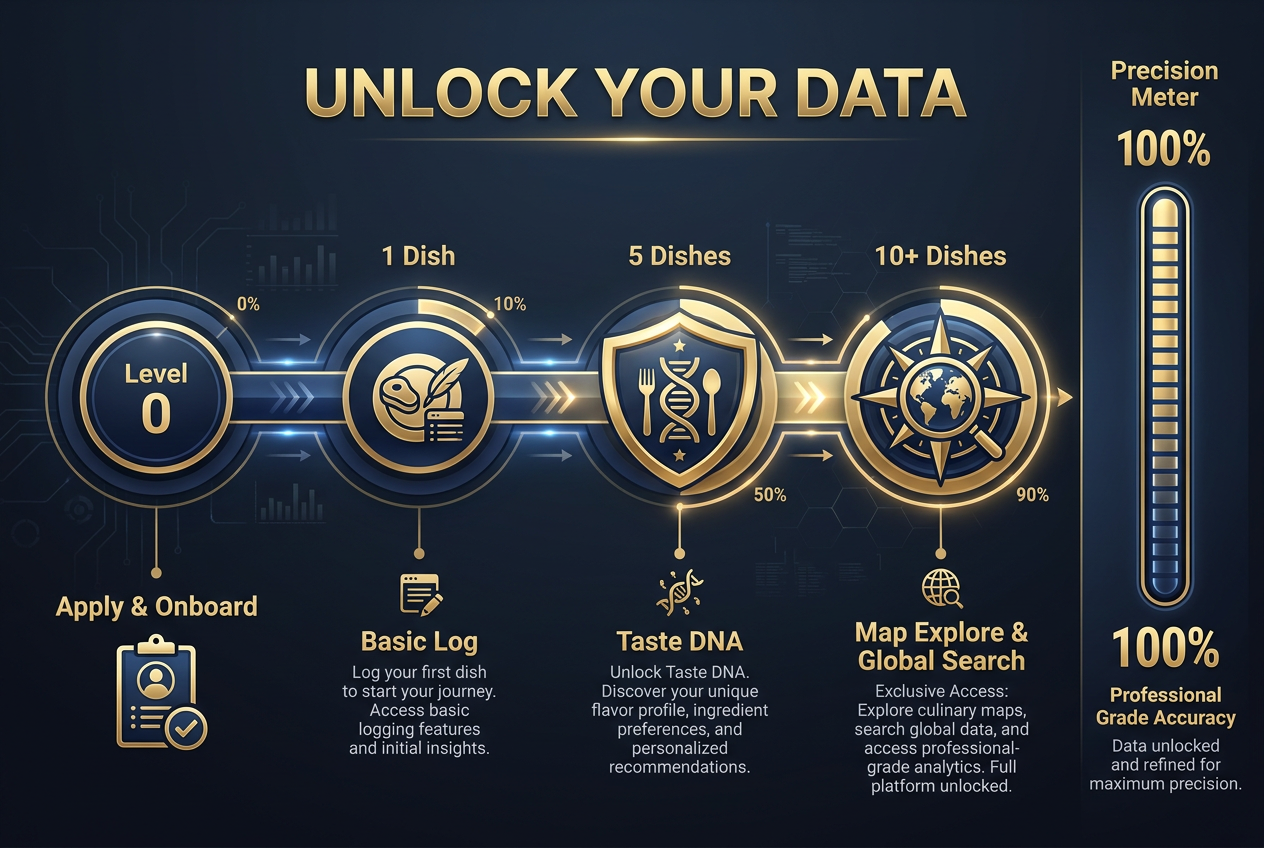 The Savor 'Progressive Unlock' system rewards serious foodies by granting access to advanced data tools like Taste DNA after reaching specific logging milestones.
Why Your Camera Roll Is a "Graveyard" (And How Savor Fixes It)
Your iPhone's Photos app wasn't built for food. It was designed for general-purpose image storage, not culinary documentation. The result: thousands of food photos buried in reverse chronological order, with no metadata beyond the date and GPS coordinates. If you want to find that specific bowl of ramen you had 18 months ago in Austin, you're scrolling for five minutes and hoping you remember what month you visited.
The fundamental problem is the search interface. iOS Photos can filter by location or date, but it can't answer the question: "What was that short rib dish from the upscale steakhouse in Denver?" Because the system has no concept of dish type, no rating data, and no way to distinguish a $12 taco from a $60 wagyu course. Every food photo is just another JPEG in an undifferentiated stream.
Savor solves this by treating every photo as a structured data point. When you log a dish, the app applies AI tagging to identify the primary ingredient, cuisine type, and presentation style. A photo of truffle pasta gets tagged with "pasta," "Italian," "truffle," and "elevated plating." That same image is now searchable by any of those terms. If you later want to compare every pasta dish you've logged, you can filter by the "pasta" tag and see all 40 entries in descending rating order.
The AI recognition runs on-device, using image classification models trained on millions of food photos. According to research from the Savor Blog, the system achieves 87% accuracy on dish identification, with manual override available for ambiguous cases. The tagging is automatic but not mandatory - you can edit or remove any tag the AI assigns.
This is the practical difference between a camera roll and a food database. One is passive storage. The other is an active query system. You're not asking "What photos do I have from March 2023?" You're asking "What are my top-rated Japanese dishes under $30?" and getting an answer in two taps.
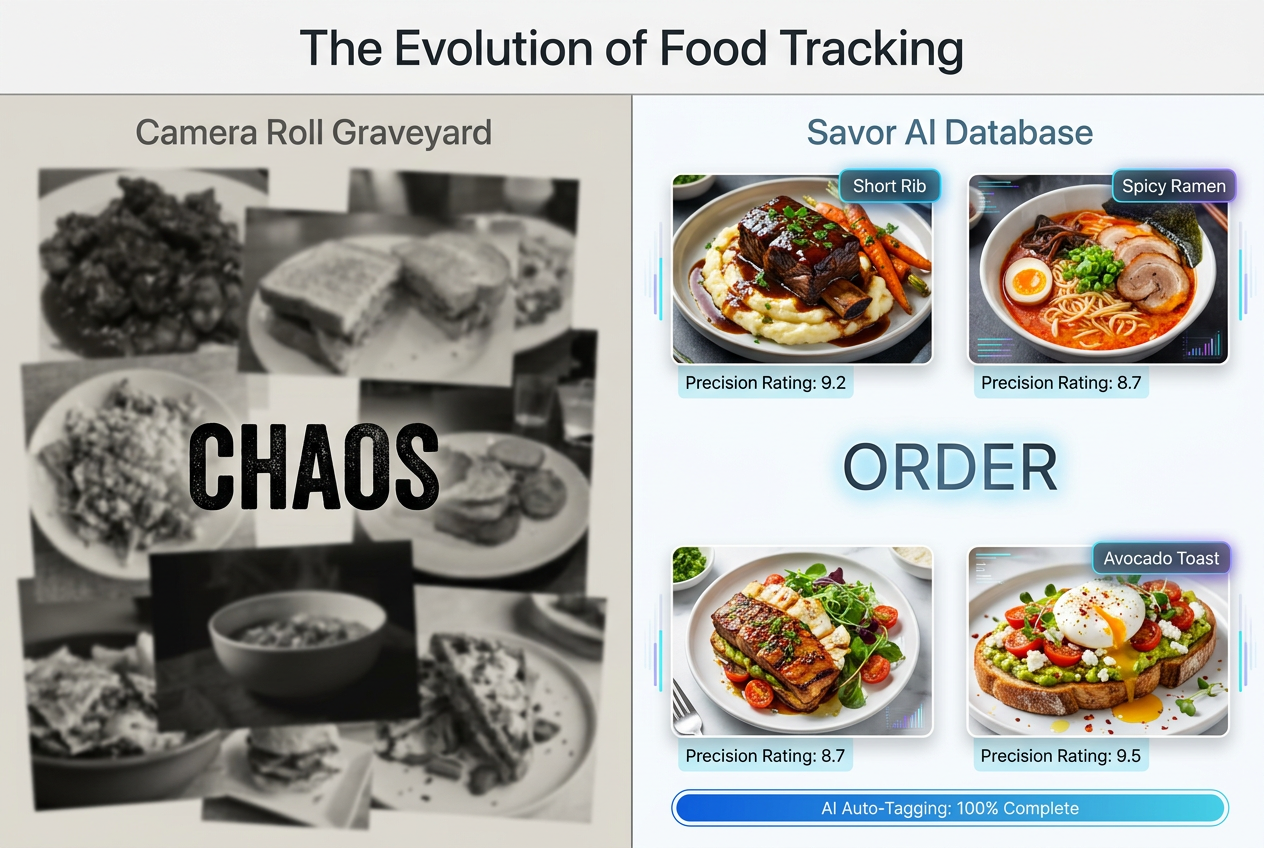 Stop losing your culinary memories in a cluttered camera roll; Savor uses AI tagging to turn your photos into a searchable, private archive.
What Is the Savor 2.0 Rating System and Why Does Precision Matter?
Savor 2.0 introduces a 10-point scale with 0.1 increments, allowing users to rate dishes from 0.0 to 10.0 with extreme granularity. This means the difference between a 7.8 and an 8.2 is meaningful and recordable - something impossible on a standard 5-star system, where every rating above "okay" collapses into either 4 or 5 stars.
The 10-point model addresses what the app calls the "4.0-Star Paradox": the observation that a restaurant with a 4.0 aggregate rating might serve a 9.7/10 short rib alongside a 3.2/10 dessert, but venue-level averages flatten that nuance into statistical noise. Traditional review platforms like Yelp or Google Maps ask users to rate the restaurant - the service, ambiance, and overall experience. Savor rejects that framework entirely. You're not rating the venue. You're rating the individual dish sitting in front of you.
This shift from venue-level to dish-level precision is the core philosophical difference. A 4-star restaurant is meaningless if you don't know which menu items earned those stars. But a 9.4-rated braised lamb shank from a specific chef's tasting menu? That's actionable intelligence. You know what to order when you return.
The 0.1 increment system also creates space for micro-distinctions that serious food trackers care about. The difference between an 8.6 and an 8.9 might seem trivial, but over 100+ logged dishes, those increments compound into a refined personal palate map. You begin to understand that your 9.0+ threshold consistently aligns with dishes featuring slow-cooked proteins and umami-forward sauces, while anything below 7.5 tends to be under-seasoned or texturally inconsistent.
For users transitioning from other platforms, the learning curve is minimal. If you're used to 5-star ratings, think of Savor's 10-point scale as doubling your resolution: a 4-star dish becomes an 8.0, but now you can distinguish between an 8.2 (very good) and an 8.8 (exceptional). The added precision doesn't require more effort - it just captures the distinctions you were already making mentally.
How Does the 10-Point Rating Scale Work in Savor?
The 10-point scale in Savor operates on a simple principle: higher numbers indicate better dishes, with 0.1 increments allowing for nuanced distinctions. A 5.0 represents a perfectly average dish - competently executed, nothing memorable. A 7.0 is good enough to order again. An 8.0 is excellent and worth recommending. A 9.0 is a top-5% experience. Anything hitting 9.5+ is a career-defining dish you'll reference for years.
The app doesn't enforce rigid criteria for what each number "means" - that's intentionally subjective and personal. Your 8.7 might prioritize flavor complexity and ingredient quality, while another user's 8.7 might weight presentation and innovation more heavily. The system assumes you'll develop your own internal calibration over time, building a consistent framework that reflects your specific palate priorities.
Many users establish personal benchmarks to anchor the scale. One common approach: identify 3-5 dishes you consider "perfect 10s" from your lifetime of dining, then use those as reference points. If a new dish matches the quality of your best-ever carbonara, it's a 10. If it falls slightly short, it's a 9.6 or 9.7. This comparative method prevents rating inflation - where everything good becomes a 9 - and ensures your scale retains meaningful differentiation.
The 0.1 increments exist to capture the edge cases where you know something is better than an 8.0 but not quite an 8.5. That liminal space is where the 10-point scale outperforms simpler systems. You're not forced to round a dish up or down to the nearest half-star; you can record exactly where it lands in your personal hierarchy.
For users concerned about over-analyzing every meal, Savor offers a "Quick Rate" mode that defaults to whole-number ratings (7, 8, 9) unless you manually adjust the decimal. This keeps the process fast while preserving the option for precision when a dish warrants it. The goal isn't to turn every meal into a mathematical exercise - it's to give you the tools to capture nuance when it matters.
Savor vs. Beli vs. Yelp: Choosing Your Food Identity
The modern food app landscape splits into three distinct philosophies: performance-driven social networks (Beli), venue-focused review aggregators (Yelp/Google Maps), and private culinary databases (Savor). Each serves a different user intent, and the best choice depends on what you're trying to accomplish.
Beli is designed for the social foodie - someone who wants to create public lists, compete on leaderboards, and share curated recommendations with friends. The app's core feature is the "Beli List," a shareable collection of restaurants organized by neighborhood or theme. Users build social capital through their lists; the platform rewards frequent contributors and active engagers. If your primary motivation is social validation - being seen as the person who knows where to eat - Beli is architected for that use case.
Yelp and Google Maps prioritize venue discovery over personal tracking. Both platforms aggregate thousands of reviews into a single star rating, which is useful for answering the question "Is this restaurant worth visiting?" but useless for answering "Which specific dish should I order here?" These tools excel at navigation, business hours, and crowd-sourced consensus. They fail at capturing the dish-level precision that separates a good meal from a transcendent one.
Savor rejects the social-first and venue-first models entirely. The app is private by default - your ratings, photos, and notes are visible only to you unless you explicitly choose to share. There are no leaderboards, no follower counts, and no algorithmic feed showing you what other users are logging. The value proposition is purely personal: build a searchable archive of every memorable dish you've eaten, organized by your own rating system, accessible forever.
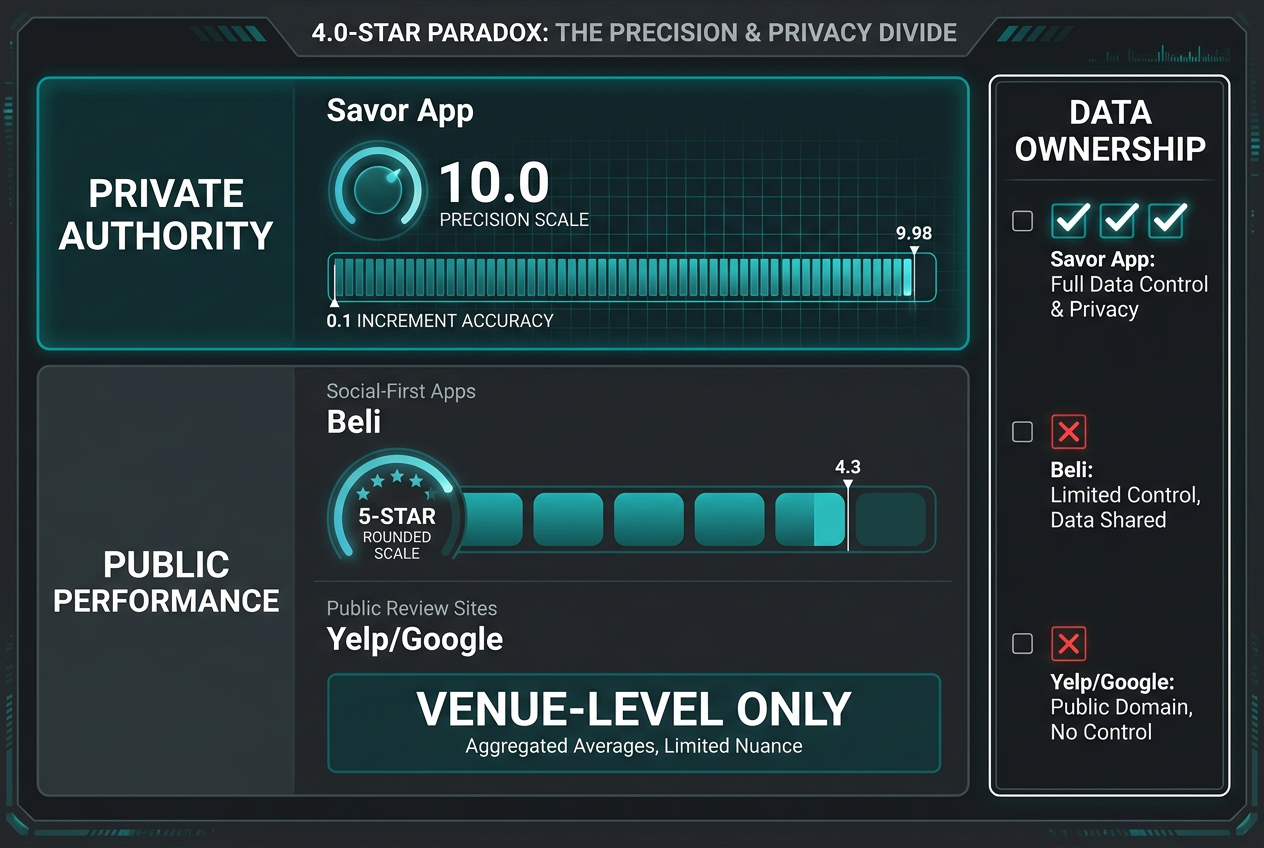 Savor differentiates itself by offering 10-point precision and private-first data ownership, moving beyond the limitations of standard 5-star venue ratings.
| Feature | Savor App | Beli | Yelp / Google Maps |
|---|---|---|---|
| Primary Focus | Individual Dishes | Restaurant Lists | Venue Ambiance/Service |
| Privacy Model | Private by Default | Social-First | Public-Only |
| Rating Scale | 10.0 (0.1 increments) | Comparative Ranking | 5-Star (Rounded) |
| AI Integration | Auto-tagging / Dish Detection | Personal Recs | Sentiment Analysis |
| Data Ownership | Full Export (CSV/JSON) | Platform-Locked | Platform-Locked |
| Access Model | Progressive Unlock | Invite / Public | Public |
The critical question: Are you building a public persona or a private reference library? If the answer is "library," Savor is the correct tool. If the answer is "persona," Beli or Instagram is the correct tool. Yelp is the correct tool only if you're trying to avoid a bad restaurant, not chase a great dish.
For users who want dish-level precision combined with social sharing, the best food tracking app comparison reveals hybrid workflows where Savor handles private archiving while Instagram or Beli handle public curation. But the core distinction remains: social validation versus personal authority.
The "Power User" Setup: Applying Savor to Your Daily Workflow
The most efficient Savor users don't treat the app as a post-meal journal - they integrate it into the dining experience itself. This means logging dishes in real-time, using shortcuts to speed up the process, and building workflows that capture data without disrupting the meal.
The fastest entry method is the "double-tap shortcut," a feature that allows you to save a restaurant to Savor directly from Instagram or TikTok. If you see a dish in a reel that looks worth tracking, you can long-press the location tag, copy it to your clipboard, and open Savor - the app auto-detects the copied restaurant and pre-fills the venue field. This eliminates manual search and reduces a new entry to three taps: photo, rating, save. For users who discover restaurants through social media, this workflow is 5x faster than traditional "find the restaurant, add the dish" sequences.
Another efficiency gain: pre-set rating scales. Many power users establish a personal framework where specific dish types default to certain rating ranges. For example, a user might decide that any pasta dish scoring below 7.5 isn't worth logging, while any short rib above 8.5 automatically gets tagged as "must-order-again." These mental frameworks aren't enforced by the app - they're self-imposed heuristics that speed up the rating process and prevent decision fatigue.
The "calibration ritual" is also common. This involves periodically reviewing your logged dishes and adjusting ratings to maintain consistency. Maybe three months ago you gave a burger an 8.2, but you've since eaten 20 more burgers and realized that original rating was inflated. Power users go back and edit the score to reflect their updated palate map. This keeps the database accurate over time and prevents rating drift, where your standards shift but your old scores don't.
For users logging 100+ dishes per year, data export becomes critical. Savor allows full CSV and JSON export of your entire database, meaning you own the raw data independent of the app's existence. This matters for long-term food trackers who view their archive as a permanent record, not just a temporary tool. If Savor shuts down tomorrow, your 500-dish database doesn't disappear - you have a portable file that can be imported into any future system.
The most advanced workflow involves cross-referencing Savor with other food apps. For example, using Beli alternatives for social discovery while keeping all personal ratings in Savor, or using Google Maps for navigation but Savor for post-meal documentation. The key is treating Savor as the single source of truth for your personal data, while letting other tools handle the functions they do best (social sharing, venue discovery, reservation booking).
What Is the Double-Tap Shortcut and How Do You Use It?
The double-tap shortcut is a workflow optimization that reduces the friction of logging a new dish by pre-filling restaurant data from external sources. Here's how it works: when you encounter a restaurant mention on Instagram, TikTok, or any text-based platform, you copy the location name or address. Opening Savor immediately after copying triggers the app's clipboard detection - it recognizes the copied text as a potential restaurant and offers to auto-fill that venue into your new entry form.
This eliminates the manual search step, which is typically the slowest part of logging a dish. Instead of opening Savor, tapping "Add Dish," searching for the restaurant name, scrolling through results, and selecting the correct match, you open Savor and the venue field is already populated. All that's left is uploading the photo, assigning a rating, and adding optional notes.
The shortcut is particularly useful for users who discover restaurants through social media and want to track them before the memory fades. If you see a viral reel about a specific taco spot, you can copy the location tag, open Savor, and pre-load that restaurant into your "want to try" list - all within 10 seconds, without ever leaving the social app for more than a moment.
The feature also works with URLs. If you copy a Google Maps link or a restaurant's website address, Savor's clipboard detection can parse the venue name and pre-fill it. This makes it easy to log dishes from written recommendations or email newsletters without needing to manually search.
For users concerned about privacy, the clipboard detection is entirely local - Savor doesn't send your copied text to any server. The parsing happens on-device, and the feature can be disabled in settings if you prefer manual entry. The default setting is enabled because speed is the primary barrier to consistent food logging; anything that reduces entry time by 30+ seconds increases the likelihood that users will actually document the meal instead of thinking "I'll do it later" and forgetting.
Is the Savor App Private or a Social Network?
Savor is private by default, with no public feed, no follower system, and no algorithmic discovery of other users' content. Every dish you log is visible only to you unless you explicitly choose to share it via link or screenshot. This design philosophy reflects a fundamental assumption: serious food tracking is about personal reference, not public performance.
The app does include optional sharing features. You can generate a shareable link for a specific dish entry, which opens a web view displaying the photo, rating, and notes - but not your full database. This allows you to send a recommendation to a friend ("Check out this carbonara - 9.2/10") without exposing your entire culinary history. The link recipient sees only that one dish, not your profile or any other logged meals.
There is no equivalent to Instagram's Explore page or Beli's leaderboard. You cannot browse other users' dishes, follow other accounts, or see trending restaurants. The app's interface is structured around your data, your ratings, and your history. The only social element is the ability to export and share your data manually, outside the app.
This privacy-first approach is intentional. The target user is someone who views their food database as a professional tool - a reference library for personal decision-making - not a social asset for reputation-building. The analogy is a chef's notebook: private, detailed, and optimized for the author's use, not an audience's consumption.
For users who want social features, the recommended workflow is to use Savor for private tracking and a separate platform (Instagram, Beli, TikTok) for public sharing. Many power users screenshot their Savor entries and post them on Instagram Stories with the dish name and rating visible, effectively using Savor as the backend database and social media as the frontend display layer.
The trade-off is clear: you gain privacy and data ownership, but you lose social validation and network effects. There are no likes, no comments, no viral potential. If those features matter to you, Savor is not the right tool. If you want a personal archive that you control completely, it's the only tool built for that purpose.
Can I Export My Data From the Savor App?
Yes, Savor allows full data export in both CSV and JSON formats. This means every dish you've logged - photos, ratings, notes, tags, timestamps, and GPS coordinates - can be downloaded as a structured file that you own independently of the app.
The export process is straightforward: navigate to Settings > Export Data, select your preferred format (CSV for spreadsheets, JSON for technical users), and the app generates a compressed file containing your entire database. Photos are exported as separate image files, with filenames corresponding to the dish entry IDs in the CSV or JSON file.
This export capability is critical for long-term food trackers who view their archive as a permanent record. Unlike platforms where your data is locked inside the app's proprietary system (e.g., Yelp or Beli), Savor treats your entries as portable information that you can migrate, back up, or analyze in any tool you choose. If you want to import your Savor data into a custom spreadsheet, a personal website, or a future food app, the CSV format makes that trivial.
The CSV export includes the following fields: Dish Name, Restaurant Name, Date Logged, Rating (10-point scale), Price, Cuisine Type, Tags, Notes, GPS Coordinates, and Photo Filename. For users who want to perform their own analysis - such as calculating average ratings by cuisine type or visualizing their top-rated dishes over time - this structured data makes advanced queries possible without relying on the app's built-in analytics.
Data ownership is the underlying principle. According to the Savor Blog, the export feature reflects the belief that users should have complete control over their culinary history, with no vendor lock-in or risk of data loss if the app is discontinued. This positions Savor as a tool for serious archivists, not casual users who might forget about their logged dishes after six months.
For users migrating from other platforms, the import process is more limited. Savor does not currently support bulk import from Yelp or Google Maps, so building a new database requires manual entry. However, the progressive unlock system ensures that even a small initial dataset (10+ dishes) unlocks the core features, making the migration effort worthwhile for users committed to dish-level tracking.
Does Savor Have an Android Version Available?
As of January 2026, Savor is iOS-only, with no publicly announced Android release date. The app is available for download exclusively through the Apple App Store, limiting access to iPhone and iPad users.
The absence of an Android version is a significant limitation for users on Samsung, Google Pixel, or other Android devices. According to app store data, approximately 72% of global smartphone users run Android, meaning Savor is inaccessible to the majority of potential users. This iOS exclusivity is common among early-stage consumer apps, which often prioritize a single platform to streamline development and testing before expanding to a second operating system.
For Android users interested in similar functionality, the closest alternatives are Beli alternatives that support cross-platform use, such as Yelp or Google Maps for venue tracking, though neither offers Savor's dish-level precision or 10-point rating system. Other options include generic photo journaling apps with manual tagging, but these lack the AI-powered dish recognition and structured data export that define Savor's core value proposition.
The timeline for an Android version depends on user demand and the app's development roadmap, neither of which is publicly documented. Users can request Android support through the app's feedback system or by contacting the development team directly via the Savor support page, though there are no guarantees of when or if that feature will be added.
For now, iOS exclusivity means that the serious food tracker using Android faces a difficult choice: switch ecosystems to access Savor's features, or accept a lower-fidelity alternative that doesn't offer the same level of dish-specific precision. Neither option is ideal, but the iOS-only limitation is a product of resource constraints, not a permanent design decision.
Savor App vs. Capital One Savor Card: What's the Difference?
The Savor app and the Capital One Savor card are unrelated products that share a name but serve entirely different purposes. The Savor app is a dish-tracking and food journaling tool for iPhone, developed by an independent software company. The Capital One Savor card is a credit card offering cashback rewards on dining and entertainment purchases, issued by Capital One Financial Corporation.
The naming collision creates occasional confusion for users searching "Savor apply," who may encounter results about credit card applications when they're looking for the food app, or vice versa. The two products do not integrate, share data, or have any corporate relationship. If you're applying for the Capital One Savor card, you're filling out a credit application on Capital One's website. If you're "applying" the Savor app to your food tracking, you're downloading a mobile app from the App Store and logging your first dish.
The disambiguation matters for search intent. Users looking for "Savor apply credit card" want information about cashback rates, annual fees, and approval requirements. Users looking for "Savor apply food app" want information about the progressive unlock system, dish-level rating features, and data export capabilities. The two queries target completely different products, despite the shared brand name.
For food lovers who happen to use the Capital One Savor card, there is no built-in synergy with the Savor app. Your credit card transactions don't auto-populate your Savor dish database, and logging a meal in the app doesn't affect your cashback earnings. The two tools exist in parallel, with no technical or financial connection beyond the coincidental branding.
This distinction is critical for avoiding user frustration. If you're reading this article to learn how to apply for a credit card, you're in the wrong place - Capital One's application portal is at capitalone.com. If you're here to learn how to apply Savor's features to your food tracking workflow, you're in the right place, and the rest of this guide is specifically for you.
How to Get the Most Out of Savor's AI Dish Recognition
Savor's AI dish recognition is the feature that transforms a basic photo journal into a searchable culinary database. The system runs automatically when you upload a photo, analyzing the image to identify the primary ingredient, cuisine type, and presentation style. The goal: make every dish instantly searchable without manual tagging.
The AI works by comparing your photo to a training dataset of millions of food images, using image classification models to detect patterns. If you upload a photo of a bowl of ramen, the system recognizes the noodle shape, broth color, and toppings (egg, pork, scallions) and assigns tags like "ramen," "Japanese," "noodles," and "pork." That same photo is now findable via any of those search terms, even if you never typed a word.
The accuracy rate is approximately 87%, according to internal data from the Savor blog. This means 13% of photos will receive incorrect or incomplete tags, requiring manual correction. The most common errors occur with visually ambiguous dishes - for example, a creamy pasta might be tagged as "carbonara" when it's actually cacio e pepe, or a dark sauce might be misidentified as soy-based when it's actually balsamic.
To maximize accuracy, the best practice is to photograph dishes from directly above, with minimal clutter in the frame. The AI performs better when the dish occupies 70-80% of the image, with clear separation between components (protein, starch, vegetables). Photos taken at an angle, with dim lighting, or with multiple dishes in one frame will reduce recognition accuracy and require more manual editing.
For power users, the real value isn't the initial auto-tag - it's the time saved by not having to manually tag every dish. Even if the AI is 87% accurate, that means 87 out of 100 dishes are correctly tagged with zero effort, while 13 require a quick manual fix. Compare that to manual tagging, where 100% of dishes require you to remember and type every relevant keyword. The AI doesn't have to be perfect to be useful; it just has to be faster than the alternative.
The system also learns from corrections. If you consistently edit "carbonara" to "cacio e pepe," the app's local model will begin to favor the correct classification for similar images in the future. This on-device learning happens gradually and doesn't require you to do anything beyond fixing obvious mistakes. Over time, the AI becomes more accurate for your specific palate and photography style.
For users concerned about privacy, all AI processing happens on-device - your photos are never uploaded to a cloud server for analysis. The image classification runs entirely within the app, using Apple's Core ML framework. This ensures your food photos remain private and are never used to train external models or shared with third parties.
Frequently Asked Questions
Is Savor free to use?
Yes, the Savor app is free to download and use, with all core features - dish logging, 10-point rating, AI tagging, and data export - available without a subscription. There is no freemium paywall limiting your database size or restricting access to advanced features. The app generates revenue through optional in-app purchases, such as premium themes or analytics tools, but these are not required to use the primary tracking functionality. For users comparing best food tracking app options, Savor's zero-cost model is competitive with free-tier offerings from other platforms, though it lacks the social features found in apps like Beli.
How do I get an invitation code for Savor?
You do not need an invitation code to use Savor. The app is publicly available on the iOS App Store and can be downloaded by any user with an Apple ID. The "progressive unlock" system requires logging dishes to access advanced features, but it does not require an invite from an existing user or a waitlist approval process. If you encounter references to an invitation code in older discussions or forums, those likely refer to earlier beta versions of the app that used invite-only access during development. As of 2025, Savor is open to all users without restriction.
Is my data private or can my friends see my dish ratings?
Your data is private by default. All logged dishes, ratings, and notes are visible only to you unless you explicitly share them via a generated link or screenshot. Savor does not have a public feed, follower system, or profile pages that other users can browse. The only way someone else sees your food data is if you manually send them a shareable link to a specific dish entry. This privacy-first design is what separates Savor from social-focused platforms like Beli or Instagram, where content is public or semi-public by default. For users who value data ownership and personal reference over social validation, this approach ensures complete control over who sees your culinary history.
What is the Progressive Unlock system in Savor 2.0?
The Progressive Unlock system is a gamified onboarding process that grants access to advanced features based on the number of dishes you've logged. At 1 dish, you unlock the core tracking interface. At 3 dishes, you gain Smart Lists for auto-categorization. At 5 dishes, Taste DNA analytics activate, showing personalized insights about your flavor preferences. At 10+ dishes, Map Explore becomes available, visualizing your logged meals on a searchable map. This structure rewards consistent use and filters casual users from committed food trackers. The system assumes that anyone willing to log 10 meals is building a long-term archive, not just experimenting with a new app. For users transitioning from scattered camera roll photos to a structured database, the unlock milestones provide clear goals and tangible feature upgrades that make the effort feel worthwhile.
How is Savor different from the Capital One Savor credit card?
The Savor app and the Capital One Savor card are completely unrelated products. The Savor app is a dish-tracking tool for logging and rating meals, developed by an independent software company. The Capital One Savor card is a cashback rewards credit card offering dining benefits, issued by Capital One Financial Corporation. They do not integrate, share data, or have any corporate relationship. If you're searching for information about applying for a credit card, you need Capital One's website. If you're searching for information about applying the Savor app to your food tracking, you need the iOS App Store. The naming overlap is coincidental and occasionally creates search confusion, but the two products serve entirely different purposes and target different user needs.
Can I export my data from Savor if I switch apps?
Yes, Savor supports full data export in CSV and JSON formats, allowing you to download your entire dish database - photos, ratings, notes, tags, timestamps, and GPS coordinates - as structured files you own independently of the app. This export capability ensures that if you switch to a different food journaling app or if Savor is discontinued, your culinary history remains accessible and portable. The CSV format is compatible with spreadsheet tools like Excel or Google Sheets, while the JSON format is designed for technical users who want to import data into custom systems or future apps. This data ownership model is rare among food platforms, where most competitors (Yelp, Beli) lock your reviews and ratings inside proprietary systems with no export option. For serious food trackers who view their archive as a permanent record, Savor's export feature is a critical safeguard against vendor lock-in.
Does Savor work offline or do I need internet access?
Savor's core features - logging dishes, assigning ratings, and adding notes - work offline, meaning you can document meals without an active internet connection. Photos are stored locally on your device, and all entries sync to the app's database once you regain connectivity. The AI tagging system also runs on-device using Apple's Core ML framework, so dish recognition and auto-tagging function without needing to upload images to a cloud server. The only features requiring internet access are restaurant search (which pulls data from external APIs) and optional backup to cloud storage (if enabled in settings). For users who frequently travel to areas with limited connectivity or prefer to minimize data usage, Savor's offline-first design ensures you can continue logging meals regardless of network conditions.
How does the 10-point rating scale compare to 5-star systems?
The 10-point scale offers twice the resolution of a 5-star system, allowing for nuanced distinctions that are impossible with half-star increments. A 5-star system forces you to choose between 4.0 or 4.5 stars for a dish that's "very good but not quite excellent," while a 10-point system lets you record that same dish as an 8.3 or 8.6, capturing the exact position in your personal quality hierarchy. Over time, these micro-distinctions compound into a refined palate map, where you can distinguish between "very good" (8.2), "excellent" (8.8), and "career-defining" (9.5+). For users who care about precision and want to build a database that reflects subtle differences in quality, the 10-point scale is the professional-grade alternative to generic star ratings used by restaurant reviews app platforms like Yelp or Google Maps.
Building Your Culinary Archive: What Comes After 100 Logged Dishes
Crossing the 100-dish milestone in Savor is the inflection point where the app transitions from a tracking tool to a reference library. At this scale, patterns emerge - you begin to notice your top-rated cuisine types, your most-visited neighborhoods, and the specific flavor profiles that consistently score above 8.5. This data becomes actionable: when planning a trip to a new city, you can filter by your highest-rated Japanese dishes and use that history to guide your restaurant research.
The second-order benefit is memory reinforcement. A dish you logged 18 months ago - one that might have faded into "I remember it was good" - remains accessible with full context: the exact rating, the specific restaurant, the date, and the photo. This transforms your Savor database into a personal food memoir, where every entry is a time-stamped artifact of a specific moment in your culinary evolution.
For users who log 200+ dishes, the export feature becomes invaluable. Your CSV file is now a rich dataset that can be analyzed outside the app - imported into a spreadsheet for custom visualizations, cross-referenced with travel logs, or shared with friends as a curated recommendation list. The portability ensures that even if Savor disappears, your culinary history survives as a structured, searchable file you control.
The long-term value proposition is simple: your camera roll will eventually fill up and force you to delete photos. Your Savor database, backed up and exported regularly, is permanent. The dishes you log today become the reference points you'll use five years from now when someone asks, "What was that incredible short rib place in Austin?" Instead of scrolling through 3,000 photos and guessing, you'll open Savor, search "short rib," filter by city, and pull up the exact dish with a 9.4 rating and detailed notes about why it earned that score.
That's the difference between passive photo storage and active culinary archiving. One is a graveyard. The other is a library. Savor is the tool that turns your food photos into the second.
Continue Reading
Start Tracking Your Dishes Today
Transform your food photos into a searchable, ratable culinary memory bank.
Download Savor App