
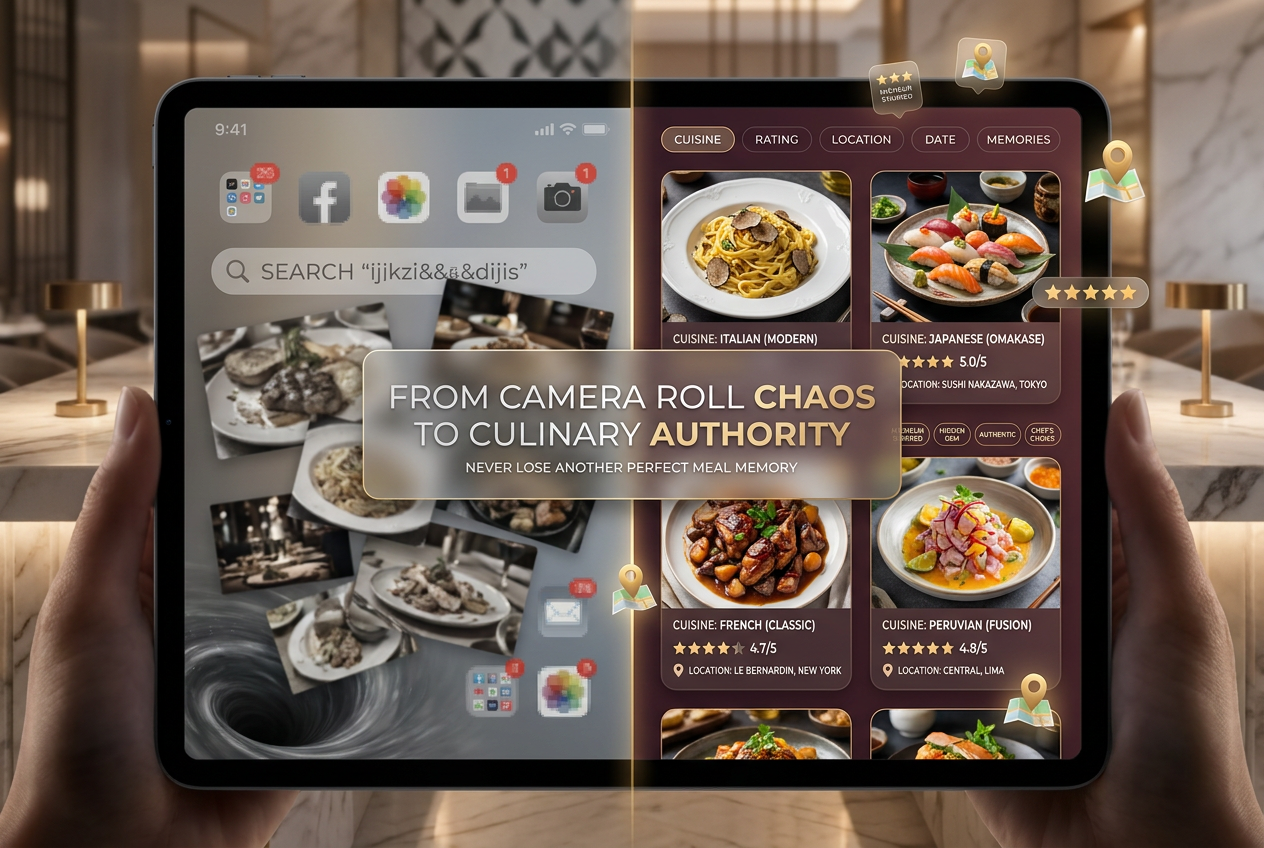
Yelp for Japan: Why You Need Tabelog to Eat Like a Local (2026)
John the smoothie monster
John lives for smoothie bowls and cold-pressed juices. He uses Savor to remember his best blends.
Beyond Yelp: The Serious Foodie’s Guide to Finding Japan’s Best Restaurants You’re standing outside a tiny eight-seat sushi counter in Tokyo’s Ginza district....
Beyond Yelp: The Serious Foodie’s Guide to Finding Japan’s Best Restaurants
You’re standing outside a tiny eight-seat sushi counter in Tokyo’s Ginza district. There’s no signage in English, no menu you can read, and the Google Maps rating is a modest 3.8 stars. But your local friend insists this is where you want to eat.
She pulls out her phone, shows you the restaurant’s Tabelog score: 3.6 out of 5.
"Trust me," she says. "This is world-class."
Welcome to the most confusing - and thrilling - paradox in global food culture. In Japan, a 3.5-star rating isn’t just good. It’s exceptional. Meanwhile, that 4.8-star ramen shop dominating your Google search results? Probably a tourist trap serving mediocre tonkotsu to travelers who don’t know better.
If you’re planning a serious food trip to Japan, here’s the uncomfortable truth: Yelp doesn’t work there. Neither does your default Google Maps strategy. The rating systems you’ve relied on for years are worse than useless - they’re actively misleading.
This guide will decode Japan’s real restaurant discovery ecosystem, show you exactly how to navigate Tabelog’s famously strict rating system, and help you build a personal archive of every incredible meal you eat. Because the worst thing about eating in Japan isn’t finding great food - it’s forgetting where you found it.
Table of Contents
- The Tourist Trap Warning: Why Your Default Apps Fail in Japan
- The Discovery Titan: Tabelog (食べログ)
- The Booking Architecture: Getting Tables Without Speaking Japanese
- Organizing the Experience: The Serious Foodie Special
- Cultural Fine Print for Urban Professionals
- Your Personal Food OS for Japan
- Frequently Asked Questions
The Tourist Trap Warning: Why Your Default Apps Fail in Japan
Here’s what happens when you rely on Yelp or Google Maps in Tokyo, Osaka, or Kyoto: you end up eating at restaurants optimized for foreign visitors, not local standards.
The problem is structural. Western review platforms suffer from what food researchers call "inbound bias" - ratings inflated by tourists comparing Japanese meals to their home country’s standards rather than Japan’s own culinary benchmark. That 4.8-star izakaya near your hotel? It’s probably "good enough" by international standards. In the context of Tokyo’s actual dining scene, it’s decidedly average.
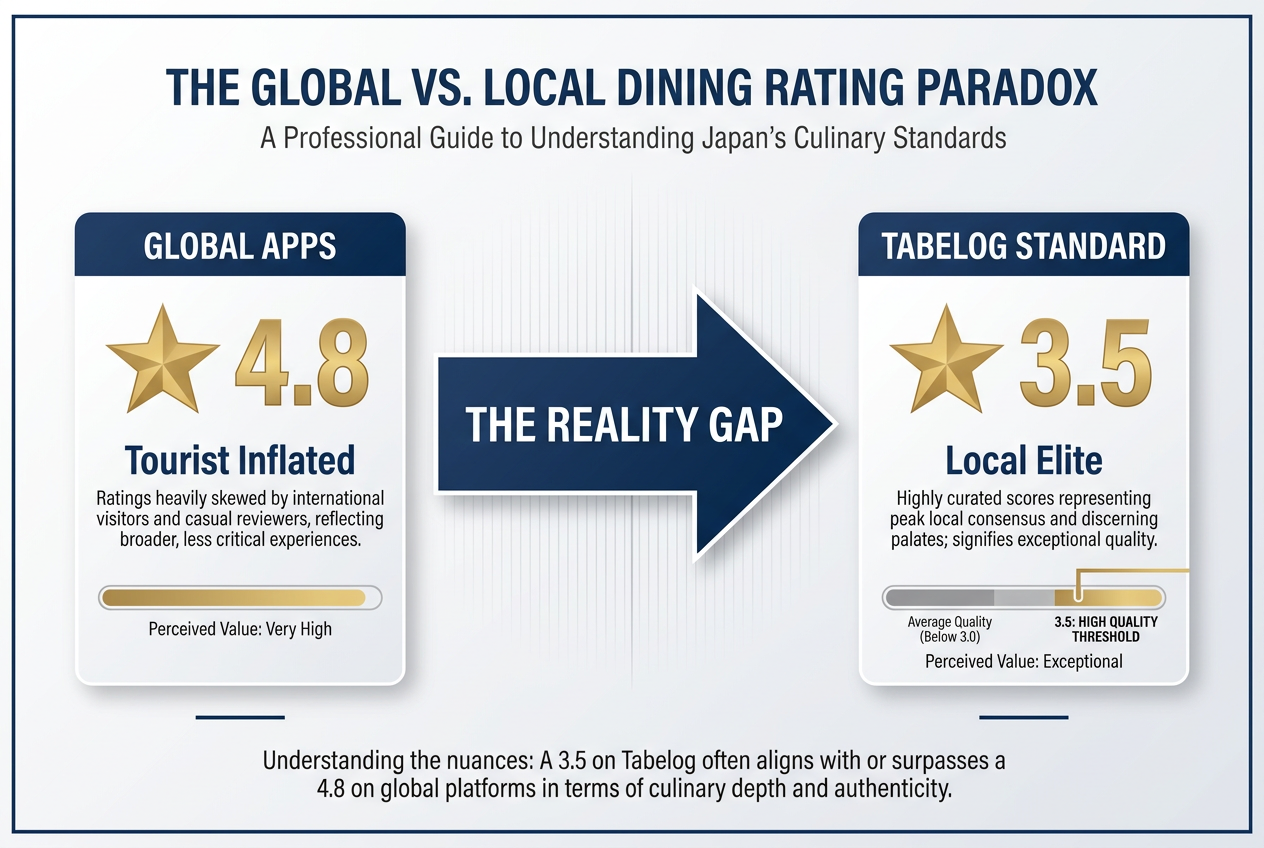 Understanding the rating gap: A 3.5 on Tabelog often indicates a higher quality culinary experience than a 4.8 on global apps like Yelp or Google.
Consider the math:
- A 4.5-star Google rating in Shibuya often represents 200+ reviews, 80% from international visitors
- The same restaurant might carry a 3.1 on Tabelog - rated by local diners with a lifetime of context
- Japanese reviewers grade on an absolute scale, not a relative one
This creates a dangerous inversion. The restaurants ranking highest on Google are often the ones Japanese food culture considers unremarkable. They’re accessible, English-friendly, and Instagram-ready. But they’re not where the magic happens.
The real insiders - Tokyo salarymen, Osaka grandmothers, Kyoto chefs on their nights off - use a completely different discovery system. One that grades a perfect bowl of ramen the same way Michelin evaluates a three-star kaiseki: ruthlessly, precisely, and without sentiment.
The Discovery Titan: Tabelog (食べログ)
Tabelog is Japan’s definitive restaurant discovery platform, with over 120 million monthly users and ratings for more than 800,000 establishments. If you’re serious about eating well in Japan, understanding Tabelog isn’t optional - it’s the entry point to the entire culinary underground.
The Rating Decoder: Why 3.5 Is the New 5 Stars
Tabelog uses a 5.0-point scale, but the distribution is nothing like what you’re used to. The platform’s algorithm is notoriously strict, weighing factors like reviewer credibility, review consistency, and rating patterns to prevent inflation. The result is a compressed rating curve where the difference between "solid" and "extraordinary" is measured in decimal points.
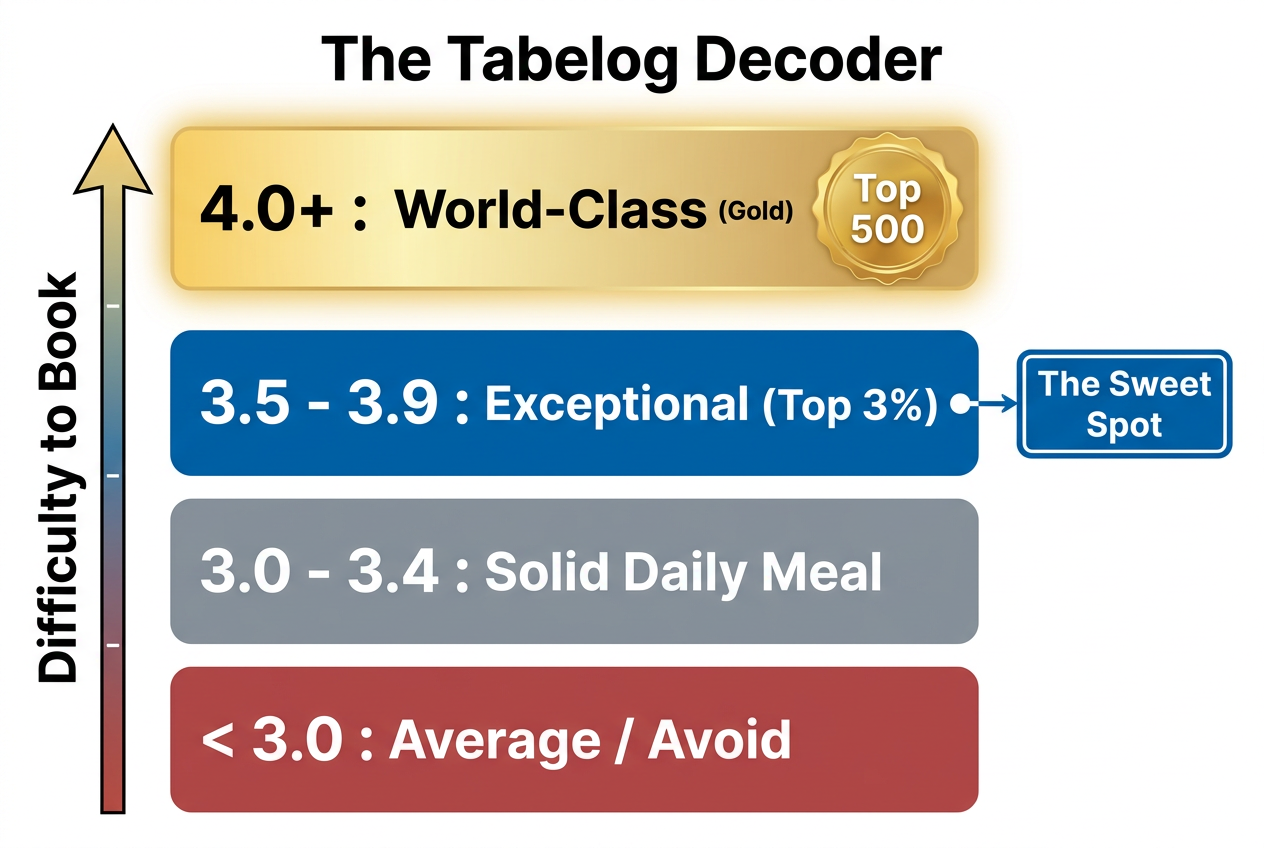 The Tabelog math decoded: In Japan, a 3.5 is the hallmark of excellence, while anything over 4.0 represents the absolute pinnacle of global gastronomy.
Here’s the breakdown:
Below 3.0: Actively avoid. These spots are either new with insufficient reviews, objectively poor, or cater exclusively to an undiscerning tourist audience.
3.0-3.4: Solid everyday meal. This is your reliable neighborhood ramen shop, the curry spot near the office, the yakitori joint where nothing’s transcendent but everything’s correct. For travelers, this tier offers consistent quality without drama.
3.5-3.9: Exceptional - the sweet spot. This is where the hunt gets serious. A 3.5 in Tokyo means you’re eating at a place locals respect, where technique and ingredients are carefully considered. A 3.7 or 3.8? You’re in rarified territory. Expect precision, subtlety, and the kind of flavors that redefine what you thought a dish could be.
4.0+: World-class (requires months of booking). There are fewer than 500 restaurants in all of Japan rated 4.0 or higher on Tabelog. Many require introductions. Some don’t accept reservations from first-time diners. A 4.0 score represents the absolute peak of Japanese culinary achievement - think three-Michelin-star sushi counters, century-old kaiseki houses, legendary tempura masters.
The New English App: Tabelog Goes Global
For years, Tabelog’s biggest barrier was language. The app and website were Japanese-only, forcing international travelers to rely on translation tools or local guides. That changed in late 2024 when Tabelog launched a comprehensive English interface.
The English app includes:
- Full restaurant listings with English translations of basic information
- Search filters for cuisine type, location, price range, and ratings
- User reviews translated into English (though nuance is sometimes lost)
- Integration with Google Maps for navigation
- The ability to save restaurants to personal lists
Critical caveat: Not all features translate perfectly. The most valuable insights - granular reviews from experienced Japanese food critics - are still best accessed in the original language. If you’re serious about mining Tabelog’s depth, pairing the English app with a browser-based translation tool gives you the best of both worlds.
How to Actually Use Tabelog for Trip Planning
Here’s the tactical workflow:
Start with location and cuisine. Filter by the specific Tokyo ward (Shibuya, Minato, Chiyoda) or Osaka neighborhood where you’ll be eating. Narrow by cuisine type - sushi, ramen, yakitori, tempura.
Set your rating floor at 3.5. This is the threshold where "good" becomes "worth traveling for." Anything below 3.5 is fine for convenience dining but won’t create lasting food memories.
Study the top 100 lists. Tabelog maintains ranked lists for every major category and region. The "Top 100 Ramen in Tokyo" or "Top 100 Sushi in Osaka" lists are curated gold. These aren’t algorithmic - they’re editorially selected based on sustained excellence.
Read the negative reviews. In Japan’s ultra-polite review culture, a 3-star review (out of 5) often highlights legitimate concerns. Look for patterns: mentions of rushed service, inconsistent quality, or pricing mismatches.
Cross-reference with booking availability. High scores with immediate availability can be a red flag (the restaurant hasn’t caught on yet, or there’s a reason locals aren’t flocking). Conversely, a 3.6 with a six-week waitlist tells you everything you need to know.
For serious foodies who want to document their journey, learning how to organize food photos by restaurant becomes essential when you’re eating at a dozen Tabelog-recommended spots in a single trip.
The Booking Architecture: Getting Tables Without Speaking Japanese
Finding great restaurants is one thing. Actually securing a reservation - especially at the high-end spots you discovered on Tabelog - is another battle entirely.
For Casual and Group Dining: Gurunavi and Hot Pepper Gourmet
If you’re looking for izakayas, casual ramen shops, or group-friendly yakiniku spots, two platforms dominate:
Gurunavi has been around since 1996 and offers English-language booking for thousands of restaurants across Japan. The platform skews toward tourist-accessible establishments, which means you’re more likely to find English menus and staff who can communicate with international diners. The trade-off? You’re also more likely to end up at places locals consider unremarkable.
Hot Pepper Gourmet is massive in the domestic market - think of it as Japan’s OpenTable equivalent. The platform offers coupons, last-minute deals, and extensive search filters. The catch: it’s almost entirely in Japanese. If you can navigate the language barrier (or pair it with translation tools), Hot Pepper surfaces deals and availability that don’t appear on English-language platforms.
Both platforms are best for:
- Same-day or next-day bookings
- Larger groups (4+ people)
- Mid-tier pricing (¥3,000-¥8,000 per person)
- Neighborhoods with high tourist traffic
For Fine Dining and Omakase: TableCheck and Omakase
Here’s where the ecosystem gets interesting. Japan’s top-tier restaurants - the 3.8+ Tabelog spots, the Michelin-starred kaiseki houses, the legendary sushi counters - often don’t appear on mass-market booking platforms.
Instead, they use specialized reservation systems designed to filter clientele and maintain exclusivity:
TableCheck is the premium reservation platform trusted by high-end establishments. If a restaurant uses TableCheck, it signals a certain level of seriousness. The system handles everything from deposits to dietary restrictions to multi-course tasting menus. The interface is clean, multilingual, and designed for the kind of diner who understands that a ¥30,000 omakase isn’t just dinner - it’s an investment.
Omakase.in is even more selective. The platform curates a portfolio of elite restaurants, many of which don’t accept walk-in reservations or first-time diners. Omakase.in acts as a trusted intermediary, essentially vouching for you. The trade-off for access? Higher service fees and stricter cancellation policies.
Critical insider tip: For restaurants that don’t use any booking platform, the traditional path is still your best option: ask your hotel concierge. High-end Tokyo and Kyoto hotels maintain relationships with restaurants that don’t advertise publicly. A concierge at a Park Hyatt or Aman can secure tables that would be impossible to book independently.
The "No-Call" Hack: Hotel Concierges vs. Online Portals
Many first-time visitors to Japan underestimate the power of the hotel concierge system. In a culture that values personal relationships and introductions, having a respected concierge make a reservation on your behalf isn’t just convenient - it’s often the only way in.
If you’re staying at a quality hotel:
- Provide your dining wish list 2-3 weeks before arrival
- Include specific restaurants, backup options, and your availability
- Be flexible on timing - a 5:30pm or 9:00pm slot is easier to secure than prime 7:00pm seating
- Respect the concierge’s recommendations when your first choice isn’t possible
The concierge route works especially well for kaiseki restaurants, high-end tempura spots, and sushi counters where relationships matter more than algorithms.
Organizing the Experience: The Serious Foodie Special
You’ve done the research. You’ve navigated Tabelog’s rating system, secured reservations at three different 3.7-rated spots, and you’re about to embark on the culinary trip of a lifetime. Now comes the question most travelers ignore until it’s too late: How do you actually remember it all?
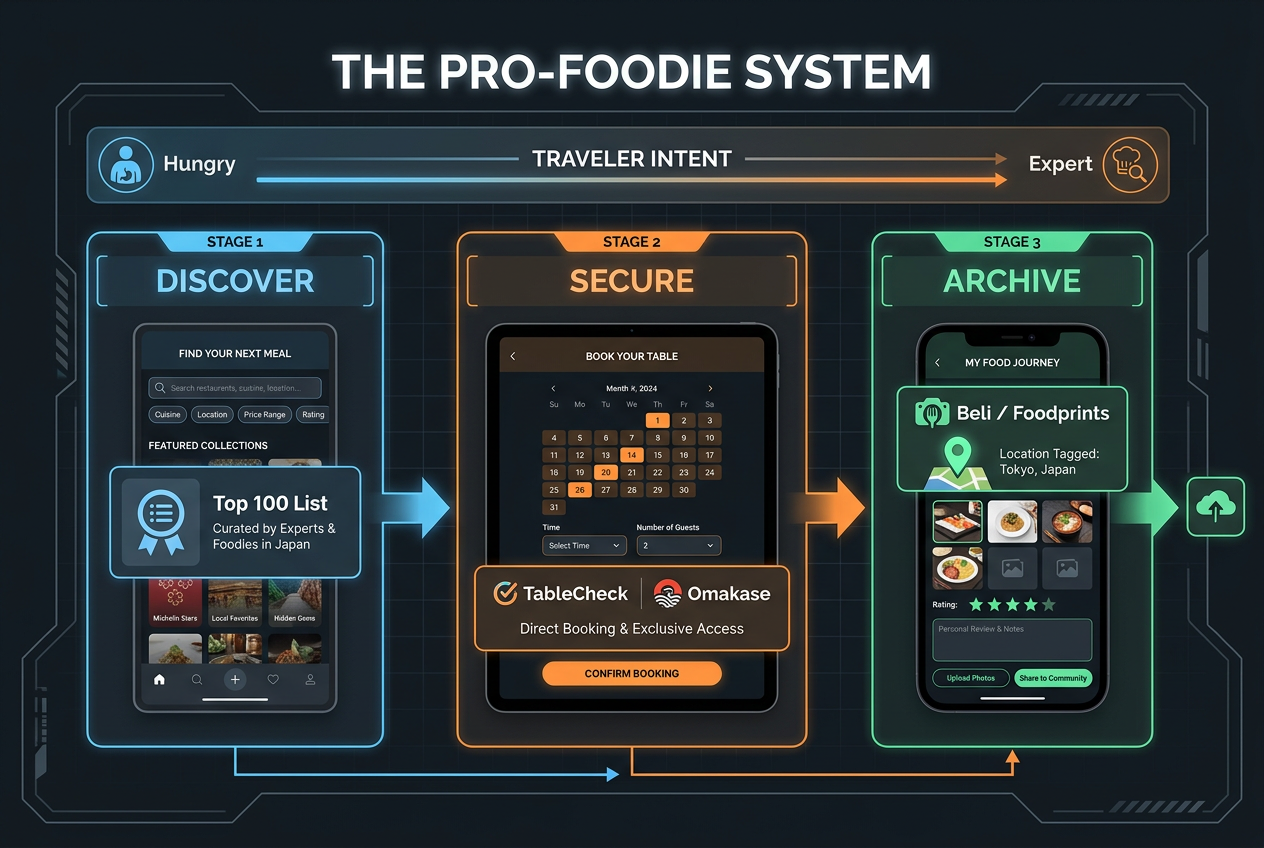 Move beyond simple searching with a professional workflow that ensures you find, book, and remember every world-class meal during your Japan trip.
This is the part where most food travelers fail. You’ll take 300 photos across a dozen restaurants. Six months later, you’ll stare at your camera roll trying to remember: Was that the life-changing tonkotsu in Hakata or Osaka? Which kaiseki spot served the uni that rewired your understanding of seafood?
The solution isn’t taking more photos. It’s building a system.
Address the "Unsearchable Camera Roll" Pain Point
Your phone’s photo library is a graveyard of culinary memories. Chronological order doesn’t help when you’re trying to recall which of the four sushi spots you visited served the chu-toro that justified the entire trip. Apple’s "search by food" feature might find every ramen bowl you photographed, but it can’t tell you which one was worth a two-hour wait.
This is where tracking apps for serious foodies become essential travel tools. The goal isn’t to log every meal for the sake of completeness. The goal is to capture the signal - the standout dishes, the unexpected discoveries, the moments that changed how you think about food - before they fade into the noise of your camera roll.
The Tech Stack: Your Personal Food Archive
The most effective food travelers use a three-layer system:
Layer 1: Discovery (Tabelog). This is your research phase. You’re identifying targets, reading reviews, understanding what makes each restaurant significant.
Layer 2: Booking (TableCheck/Concierge). You’re securing access to the places that matter.
Layer 3: Memory (Savor, Beli, or similar). This is where many travelers fall short. After you’ve eaten at a 3.8-rated sushi counter in Ginza, you need a way to:
- Log the specific restaurant and location
- Note which dishes were exceptional
- Record your personal rating for each course
- Add context (who you were with, what you discussed, why it mattered)
- Link everything to photos and geolocation data
Apps like Savor are built specifically for this workflow. Instead of writing generic restaurant reviews, you’re creating a personal dish memory vault - a searchable database of every significant meal you’ve eaten, organized by dish rather than venue.
The alternative - Beli - focuses on mapping your food experiences visually, creating a geographic record of everywhere you’ve eaten. Both approaches work. The key is picking one and using it consistently throughout your trip.
The Post-Meal Workflow: Five Minutes That Save the Memory
Here’s the exact process I follow after every significant meal in Japan:
Immediate photo triage (30 seconds). Delete the seven mediocre shots of the same dish. Keep the two that actually capture the moment.
Dish-level notes (2 minutes). Open your food tracking app. Log the restaurant, then rate each standout dish individually. A 10-course kaiseki might have three transcendent moments and seven solid-but-unremarkable courses. Rate them separately.
Context capture (1 minute). Add a single sentence of context. Not a full review - just enough to trigger the memory later. "The uni was room temperature and tasted like the ocean." "Chef explained this was his grandmother’s dashi recipe."
Geographic tagging (30 seconds). Ensure the location is accurate. A year from now, "somewhere in Shibuya" won’t help you find your way back.
Sync to your master list (1 minute). If you’re maintaining a broader collection of restaurant memories and favorite dishes, add this entry now while the details are fresh.
Five minutes per meal. That’s the investment required to ensure that six months from now, you can pull up exactly where you ate the best tempura of your life - and more importantly, which specific pieces made it unforgettable.
Cultural Fine Print for Urban Professionals
Japan’s dining culture operates on a set of unwritten rules that can make or break your high-end restaurant experience. Here’s what the guidebooks skip over.
Otoshi: The Table Charge You Didn’t Order
You sit down at an izakaya. Within minutes, the server brings a small appetizer you didn’t request - pickled vegetables, a tiny portion of tofu, maybe some edamame. Then your bill arrives with a ¥300-¥500 charge labeled "otoshi" or "tsukidashi."
This isn’t a scam. It’s standard practice at Japanese bars and casual dining spots. Think of it as a mandatory cover charge that comes with a small starter. The quality varies wildly - some restaurants serve thoughtful seasonal preparations, others offer forgettable nibbles - but refusing it isn’t an option. It’s baked into the dining culture.
Pro tip: At higher-end establishments, the otoshi is often a signal of the kitchen’s philosophy. If the "table charge" snack is meticulously prepared and perfectly seasoned, you’re in good hands.
The Cash Wall: Yes, Even in 2025
You’ve just finished an extraordinary meal at a 3.7-rated tempura spot in Kyoto. The bill arrives. You reach for your credit card. The server smiles apologetically and points to a small sign: "Cash only."
This happens more often than you’d expect. Despite Japan’s reputation for technological sophistication, many top-tier restaurants - especially small, family-run establishments and traditional kaiseki houses - don’t accept credit cards. Some don’t even have card readers.
The solution: Always carry more cash than you think you’ll need. If you’re eating at a restaurant where omakase runs ¥15,000-¥30,000 per person, assume you’ll need physical yen. Convenience store ATMs (7-Eleven and FamilyMart) accept international cards and are ubiquitous.
The Punctuality Penalty: 10 Minutes Late = Reservation Cancelled
In the United States, arriving 10-15 minutes late to a reservation is forgiven, especially if you call ahead. In Japan, it’s grounds for immediate cancellation - often with no opportunity to rebook.
Japanese restaurants operate on tight schedules. A sushi counter with eight seats might have three seatings per night. If you’re late, you’re not just inconveniencing the restaurant - you’re disrupting the entire evening’s rhythm.
The rule: Arrive exactly on time, or 2-3 minutes early. If you’re genuinely delayed (train issues, taxi trouble), call the restaurant immediately. Many will accommodate a 5-minute delay if you provide advance notice. Show up 15 minutes late without warning? Your table will be gone.
Tipping Culture: Don’t
Japan doesn’t have a tipping culture. Servers are paid fair wages, and adding a tip - even a generous one - creates confusion and discomfort. At best, it’s unnecessary. At worst, it’s mildly insulting, suggesting the staff aren’t already being compensated professionally.
The only exception: Some high-end hotels and Western-style restaurants add a 10% service charge to the bill. This is institutional, not personal. You don’t add anything beyond the printed total.
What to do instead: Express gratitude verbally. "Gochisousama deshita" (thank you for the meal) as you leave is the culturally appropriate way to show appreciation.
Your Personal Food OS for Japan
By now, you understand the ecosystem. Tabelog for discovery. TableCheck or concierge for booking. Cash in your wallet. Punctuality in your schedule. But the final piece - the one that separates food travelers from food archivists - is building a system that outlasts the trip itself.
Think of it as your Personal Food Operating System: a framework for capturing, organizing, and revisiting every significant meal you eat. Not just in Japan, but everywhere.
The components:
1. Real-time logging. Use apps designed for tracking individual dishes, not just restaurants. Rate the chu-toro separately from the anago. Note which yakitori skewer justified the line.
2. Visual indexing. Your photos need metadata. Location tags, timestamps, and dish names turn a camera roll graveyard into a searchable database. Tools like photo organization apps built for food handle this automatically.
3. Comparative memory. The value of a meal isn’t absolute - it’s relative to everything else you’ve eaten. A 3.6-rated ramen shop in Tokyo means nothing until you compare it to the 3.8 spot you tried in Fukuoka. Building a personal restaurant library lets you surface those comparisons on demand.
4. Export and share. Six months after your trip, a friend asks: "Where should I eat in Osaka?" If your system is just a collection of Instagram stories, you’re rebuilding your recommendations from memory. If you’ve maintained a structured archive, you can send a curated list in 30 seconds.
This isn’t about obsessive documentation for its own sake. It’s about respecting the effort you put into finding these restaurants, the money you spent eating there, and the experiences that made the trip memorable. Your camera roll will forget. A structured system won’t.
Frequently Asked Questions
What is the Japanese equivalent of Yelp?
Tabelog is Japan’s dominant restaurant discovery platform and the closest equivalent to Yelp. However, the comparison is imperfect. Tabelog’s rating system is significantly stricter - a 3.5 on Tabelog represents exceptional quality, while a 3.5 on Yelp might indicate "above average." Tabelog reviews also tend to be more detailed and technical, written by diners with extensive local context. While Yelp prioritizes accessibility and user-generated content volume, Tabelog emphasizes editorial curation and algorithmic credibility scoring.
How do I use Tabelog if I don’t speak Japanese?
Tabelog launched an English-language interface in late 2024, making the platform accessible to international travelers. The English app includes translated restaurant information, search filters, and user reviews. However, the most valuable content - in-depth reviews from experienced Japanese food critics - is still best accessed in the original language. A practical approach: use the English app for basic search and discovery, then pair it with browser-based translation tools (Google Translate’s camera feature works well) to access deeper review content and nuanced commentary.
Why are Tabelog ratings so much lower than Google ratings for the same restaurant?
Tabelog uses a compressed rating scale that reflects Japan’s high culinary standards and cultural tendency toward modesty. The platform’s algorithm weights reviewer credibility and historical accuracy, making it difficult for restaurants to game the system. Additionally, Japanese diners rate on an absolute scale (comparing a restaurant to the ideal version of its cuisine type) rather than a relative scale (comparing it to other nearby options). This creates an inversion where tourist-friendly restaurants rank highly on Google due to "inbound bias" - international visitors rating meals generously compared to their home country standards - while Tabelog reflects local expectations.
Can I book high-end Japanese restaurants without speaking Japanese?
Yes, but the method varies by restaurant tier. Mid-range and tourist-accessible spots can be booked through English-language platforms like Gurunavi or TableCheck. High-end establishments - especially those rated 3.8+ on Tabelog or holding Michelin stars - often require personal introductions or concierge assistance. If you’re staying at a quality hotel (Park Hyatt, Aman, Peninsula), the concierge service is your most reliable booking channel for elite restaurants. Provide your wish list 2-3 weeks before arrival and remain flexible on timing. Some top-tier spots also use Omakase.in, a curated booking platform that acts as a trusted intermediary.
What should I do immediately after eating at a great restaurant in Japan?
Spend five minutes capturing the memory before it fades. First, delete the redundant photos and keep only the best shots of each dish. Second, log the restaurant and rate standout dishes individually using a food tracking app - don’t just review the venue as a whole. Third, add a single sentence of context that will trigger the memory later (e.g., "the uni was room temperature and tasted like the ocean"). Fourth, verify the location is accurately tagged. Finally, sync this entry to your broader food archive so you can find it months later when the camera roll becomes unsearchable.
Do I need to tip at restaurants in Japan?
No. Japan does not have a tipping culture, and adding a gratuity creates confusion or discomfort. Service staff are compensated with fair wages, and the price on the menu or bill is the final amount expected. Some Western-style hotels or high-end restaurants may add a 10% service charge to the bill automatically - this is institutional, not personal, and you don’t add anything beyond that printed total. The culturally appropriate way to express gratitude is verbal: say "Gochisousama deshita" (thank you for the meal) as you leave.
How far in advance do I need to book top-rated restaurants in Japan?
For Tabelog-rated spots above 3.7 or Michelin-starred establishments, plan for 4-8 weeks of advance booking, especially during peak travel seasons (cherry blossom season in spring, fall foliage in November). Some legendary sushi counters and kaiseki houses require 2-3 months’ notice or personal introductions. Mid-tier restaurants (3.3-3.5 on Tabelog) often accept reservations 1-2 weeks out. Casual spots like ramen shops and izakayas typically don’t take reservations at all - expect to queue during peak lunch and dinner hours. If your first-choice restaurant is fully booked, ask your hotel concierge to check for cancellations or recommend comparable alternatives.
Should I use Google Maps or Tabelog for restaurant discovery in Japan?
Use both, but understand their different roles. Google Maps is useful for navigation, operating hours, and photos, but its ratings are unreliable due to tourist bias. Tabelog provides accurate quality signals - use it to identify which restaurants are worth visiting. A practical workflow: search Tabelog to discover high-rated spots in your target neighborhood, then switch to Google Maps for directions and real-time information like current wait times. Never rely solely on Google ratings for quality assessment in Japan’s major cities.