
Stop Losing Your Food Memories: How to Catalog Dishes Tried While Traveling
Harry the matcha king
Harry is our resident matcha obsessive. He’s tasted hundreds of bowls and tracks every cup in Savor.
How to Build a Personal System for Cataloging Dishes While Traveling Your camera roll is a graveyard. Somewhere between photo 847 and 1,203 is that...
How to Build a Personal System for Cataloging Dishes While Traveling
Your camera roll is a graveyard. Somewhere between photo 847 and 1,203 is that life-changing ramen you had in Osaka. You remember the depth of the broth, the perfect chew of the noodles, even the name of the neighborhood. But the restaurant? The exact dish? Gone. The average user spends approximately 3 minutes searching their camera roll for a specific meal from 6 months ago, and that's if they find it at all.
This isn't a memory problem. It's a system problem.
Table of Contents
- Why Dish-Level Tracking Beats Restaurant Reviews
- The Three-Tier Method Selection
- Critical Metadata: What to Record for Every Dish
- The Camera Roll Workflow
- AI Integration: The Modern Advantage
- Data Portability: Protecting Your Food Memory
- The Privacy Paradox
- Analog vs. Digital: When Paper Wins
- Frequently Asked Questions
Why Dish-Level Tracking Beats Restaurant Reviews
Here's the truth most food apps won't tell you: a five-star restaurant can serve a three-point duck. A mediocre bistro can produce the most transcendent tarte tatin of your life. Restaurant-level ratings flatten the complexity of actual dining into meaningless averages.
Think about your last truly memorable meal. Was every course equally extraordinary? Probably not. Maybe the appetizer was forgettable, but the main course rewired your understanding of what beef could taste like. A restaurant review captures none of that nuance. A dish-level catalog does.
The serious foodie tracks individual dishes because that's where the actual insight lives. When you return to a city three years later, you don't need to remember that a restaurant was "pretty good." You need to remember that the uni was a 9 and the duck was a 4, so order accordingly.
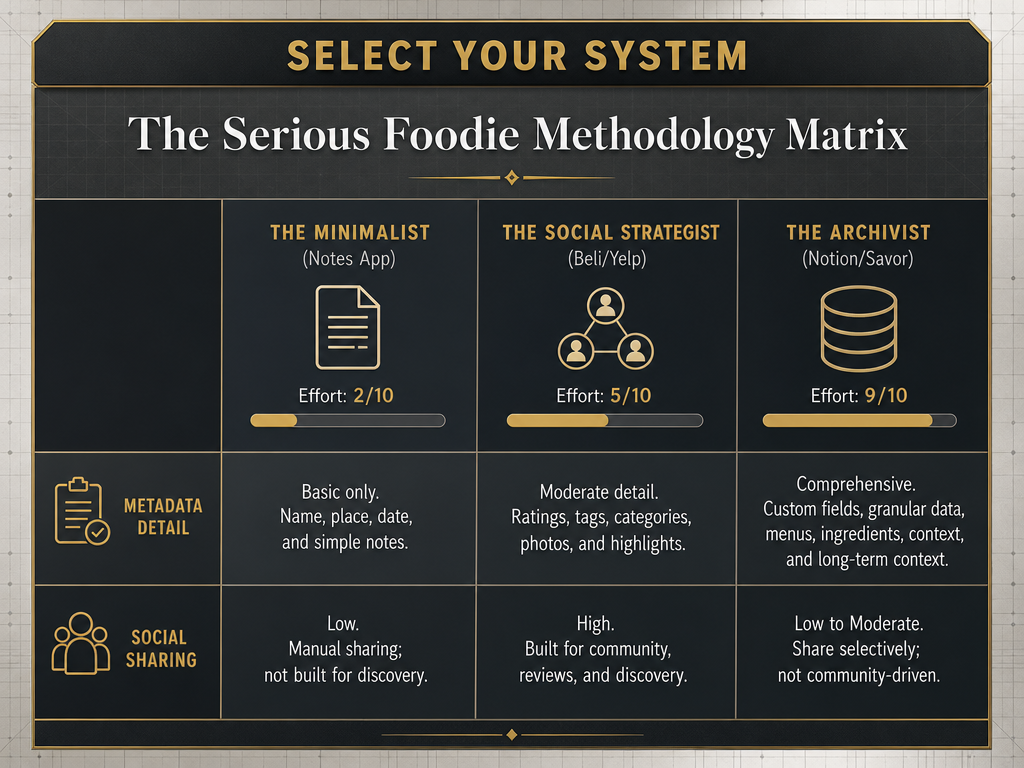 Choosing the right cataloging system depends on your balance of effort versus detail. This matrix helps you select a workflow that fits your travel style.
The Three-Tier Method Selection
Not everyone needs the same system. Your cataloging method should match your actual dining patterns and tolerance for documentation homework. Here are three proven approaches, arranged from simplest to most comprehensive.
The Minimalist (Notes App Method)
Time per entry: 30 seconds
Best for: Frequent travelers who value speed over detail
The Bon Appétit school of thought. Open your phone's native Notes app. Create a running list organized by city or date. For each meal, record three things only:
- Date and location
- The single best item you ordered
- One sensory detail that made it memorable
Example: "June 14, Rome - Carbonara at Flavio al Velavevodetto. Egg yolk was nearly orange, guanciale had actual char."
This method trades completeness for sustainability. You're not building a database. You're creating a chronological breadcrumb trail back to your most exceptional bites. The constraint is the point - it forces you to identify what actually mattered.
The Social Strategist (Beli Method)
Time per entry: 2-3 minutes
Best for: Those who want personal rankings with light social features
Beli has surpassed 75 million restaurant ratings and represents a middle path between minimalism and archival completeness. The app uses an ELO ranking system - instead of assigning arbitrary point values, you compare dishes head-to-head. "Was this pasta better than the tacos I had last week?" Over time, the system builds an objective hierarchy of everything you've eaten.
The genius is in the constraints. Beli pushes you to rate quickly, map your favorites geographically, and share curated lists with friends. It's designed for the foodie who wants a personal record without the overhead of a full database. The tradeoff: less room for detailed tasting notes, and your data lives inside their ecosystem.
The Archivist (Savor/Notion Method)
Time per entry: 5-8 minutes
Best for: Detail-obsessed foodies building a lifetime reference library
This is the deep end. Tools like Savor or custom Notion databases let you catalog every meaningful variable: primary ingredients, cooking method, flavor profile, price-to-value ratio, even the specific cut or preparation style. Modern AI features can scan your food photo and auto-populate dish names and ingredient lists, cutting the manual entry burden considerably.
The payoff comes years later. You're planning a return trip to Bangkok and can instantly surface every 9+ rated noodle dish you've had in Southeast Asia, filtered by specific neighborhoods. You can export everything as CSV if the platform disappears. This is culinary forensics - treating your taste memory as data worth preserving with rigor.
The question isn't which method is "best." It's which one you'll actually maintain while jet-lagged in a foreign city at 11 PM.
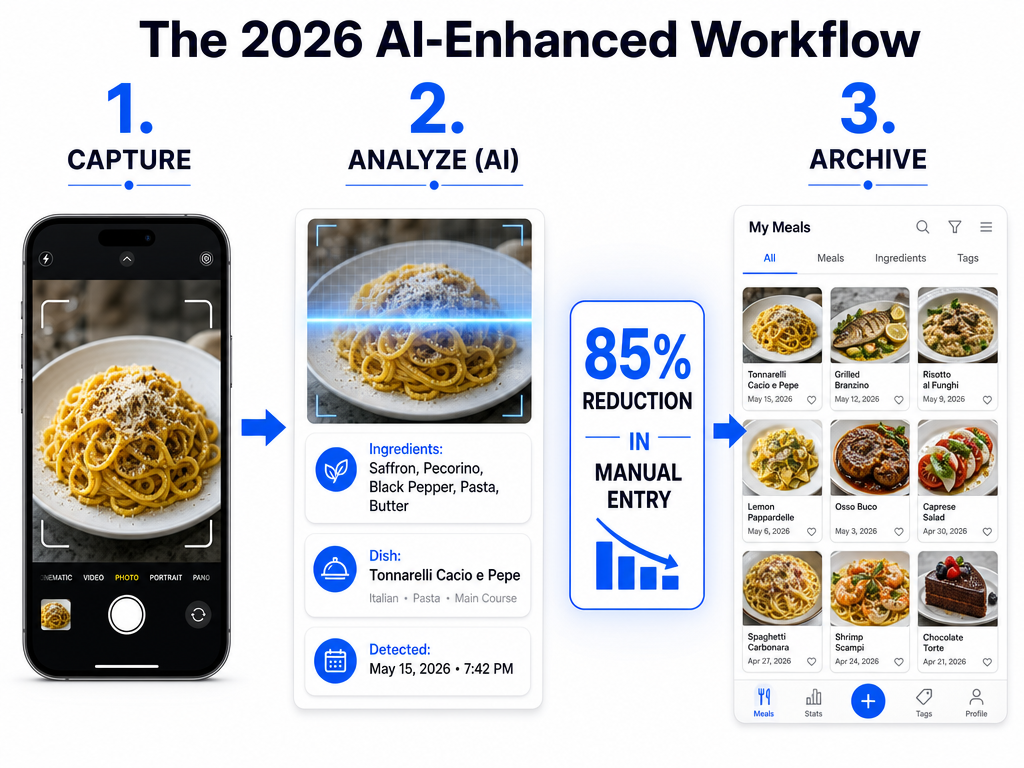 Effective cataloging goes beyond restaurant names. Focus on dish-level metadata like flavor profiles and value scores to create a searchable, high-utility food diary.
Critical Metadata: What to Record for Every Dish
Regardless of your chosen method, certain data points dramatically increase the future utility of your catalog. Here's the essential checklist, ordered by importance:
1. Dish name (the actual menu name, not your interpretation)
"Tonkotsu ramen" is generic. "Hakata-style tonkotsu with extra kikurage" is searchable and specific enough to reorder correctly three years from now.
2. Primary flavor profile
Use consistent tags: rich, acidic, funky, sweet, umami-forward, spicy, smoky. Your palate doesn't change much over time, so these tags become predictive. If you consistently rate umami-forward dishes highly, you've learned something about yourself.
3. The "Order Again?" boolean
This is the simplest and most actionable piece of metadata. Yes or no. Would you order this exact dish again if you returned tomorrow? Everything else is commentary. This single bit of information is what you'll actually reference when you're back in that city.
4. Price and value score
Not the total bill - the cost of this specific item, and whether it was worth it. An expensive taco can be a terrible value. A pricey pasta course can be a steal. Divorce cost from value, and you gain insight into where your money should actually go.
5. Location precision
"Paris" is useless. "11th arrondissement, Rue Oberkampf near Parmentier metro" is useful. If the restaurant closes or moves, this helps you find it or remember the neighborhood context when planning a return.
6. Date
Seasons matter. That transcendent tomato salad in Rome was extraordinary in August. It'll be mediocre in February. Date stamps let you identify seasonal patterns and optimal timing for return visits.
7. Vibe tags (optional but powerful)
"First date safe," "business lunch appropriate," "worth a 45-minute wait," "tourist trap." These contextual tags help you filter by social situation, not just taste.
The metadata you skip early is the metadata you'll wish you had later. It takes discipline, but the alternative is a chaotic pile of photos with no way to reconstruct the story.
The Camera Roll Workflow
Taking the photo is the easy part. Making it retrievable is where most systems break down. Here's a workflow that actually survives real-world travel conditions:
Immediately after the dish arrives, take two photos:
- A reference shot (straight down, good light, entire plate visible)
- A detail shot (close-up of the key element - the cross-section of that burger, the marbling in the beef)
The reference shot is for future reorders. The detail shot is for memory. Both matter.
Within 24 hours, either:
- Log the dish in your chosen app/system, or
- Star/favorite the photo in your camera roll as a placeholder
The 24-hour rule is critical. Wait three days and you'll forget the nuance. Was the sauce on the side or integrated? Which specific menu item was this? The memory becomes unreliable fast.
If you're using a dedicated food app, most now offer photo linking - snap the picture, immediately attach it to a new entry. The photo and metadata stay together. If you're in the Notes App camp, at minimum add the date and dish name to the photo's metadata or caption field before you leave the restaurant.
The worst scenario: 2,847 untagged photos. No names. No dates. No context. Pure chaos.
AI Integration: The Modern Advantage
As of 2026, the friction of cataloging has dropped significantly thanks to AI-assisted recognition. Tools like Savor can scan a food photo and automatically populate:
- Dish name (with reasonable accuracy for common preparations)
- Primary ingredients
- Probable cuisine type
- Suggested tags based on visual cues
Modern tools use AI to scan photos and automatically populate ingredient lists and dish names, drastically reducing the friction of maintaining a personal food catalog.
This isn't perfect - AI will mistake a porchetta for a roasted pork loin, or misidentify regional variations. But it cuts the manual entry burden in half. You're editing and confirming rather than typing from scratch.
The real breakthrough is searchability. Once your catalog reaches 200+ dishes, manual scrolling becomes impossible. AI-powered search lets you query by ingredient ("show me every dish with duck"), preparation method ("show me grilled items"), or even abstract concepts ("show me funky fermented things I rated highly"). This turns your catalog from a diary into a dynamic reference tool.
The catch: these features only exist in purpose-built food apps. Your Notes app can't do this. Neither can Instagram. You're trading convenience for platform dependence, which brings us to the next critical consideration.
Data Portability: Protecting Your Food Memory
Apps die. Startups get acqui-hired. Features get deprecated. If you're investing hundreds of hours cataloging dishes over a decade, you need an exit strategy.
Before committing to any platform, verify:
1. Can you export your entire catalog as CSV or JSON?
This is non-negotiable. If the app doesn't offer bulk export, you don't own your data - you're renting it. Walk away.
2. Are your photos stored locally or in the cloud?
Cloud storage is convenient until the service shuts down. Local storage (or automatic backup to your own cloud service) means you keep the photos even if the app vanishes.
3. Is the platform open to API access?
Advanced users can build their own backup scripts or migrate data to new systems if there's an API. This is rare but valuable insurance.
The best food tracking apps in 2026 all offer some form of export. Treat this as a baseline requirement, not a premium feature.
For the truly paranoid (or wise), maintain a parallel backup in a simple spreadsheet or Markdown file. It's tedious, but it's the only way to guarantee your food memory survives the inevitable tech graveyard.
The Privacy Paradox
Here's an uncomfortable truth: your public reviews are performances. Your private catalog is for honesty.
On Instagram or Yelp, you're optimizing for social capital. You soften criticism, inflate positives, and self-censor anything that might make you look snobby or ungrateful. That glowing five-star review you left? You actually thought it was a solid 7, but the chef followed you back and you didn't want to seem harsh.
A private catalog has no audience. It's just you and the truth. "Oversalted slop" can live in your notes without social consequences. "Overpriced tourist trap" doesn't need hedging language. This honesty is what makes the system useful - when you return to that city, you need the real assessment, not the polite one.
Beli's rise as a dominant contender to Yelp among younger diners is partly due to this dynamic. The platform emphasizes friend networks over public reviews, creating semi-private recommendation circles. You're sharing with people whose taste you trust, not performing for strangers. It's a middle ground between total privacy and public broadcasting.
The decision: Do you want social validation or personal utility? You probably can't optimize for both in the same system.
Analog vs. Digital: When Paper Wins
Digital tools dominate this guide because they scale better. But there's a case for the physical notebook, especially for a specific type of food traveler.
A Moleskine food journal has three advantages:
1. No interface friction
You're never fighting with app permissions, connectivity issues, or battery life. Pen and paper work in a remote Sicilian village with no cell service. They work when your phone battery is running low because you've been taking photos all day.
2. Transportive power through physical writing
There's actual research showing that handwriting creates stronger memory encoding than typing. The act of writing about a dish, in the moment, cements the sensory details in a way that tapping a screen doesn't. You're more likely to remember a handwritten entry years later.
3. Artifact value
A stained, worn notebook with wine splashes and olive oil thumbprints becomes a physical artifact of your travels. Digital catalogs are functional. Paper journals are heirlooms.
The tradeoff is brutal: no search, no filtering, no bulk export, no photo integration. You're trading power for romance. For most people, that's the wrong trade. But if you're a slow traveler who values the ritual of documentation as much as the data itself, paper still wins.
One hybrid approach: maintain a digital catalog for searchability, but keep a travel journal for the sensory prose that doesn't fit into metadata fields. The database holds the facts. The journal holds the story.
Frequently Asked Questions
Is there an app to keep track of restaurants?
Yes, but the better question is whether you want to track restaurants or dishes. Apps like Beli, Yelp, and Google Maps focus on venue-level ratings. Purpose-built food memory apps like Savor focus on dish-level tracking, which provides more actionable intelligence for future visits. If a restaurant serves 40 dishes and only three are worth reordering, venue ratings won't tell you which three.
What is the highest rated food tracking app?
There's no objective "highest rated" because use cases vary. Beli dominates for social ranking and map-based discovery. MyFitnessPal and Cronometer lead for nutritional tracking. Savor and similar apps serve the niche of dish-level memory and catalog building. Your "best" app depends on whether you're optimizing for nutrition data, social sharing, or personal culinary memory.
How do food critics take notes?
Professional critics use variations of the same core system: structured tasting notes captured in real-time or immediately after the meal. Most use a scoring rubric covering technique, seasoning, presentation, and originality. Some dictate notes into voice memos to avoid disrupting the meal. The key difference from casual diners: critics record every course, not just highlights, and they're assessing against objective culinary standards rather than personal preference. Their notes are formatted for publication, not personal memory.
Is Beli still invite only?
No. Beli moved to open registration after its initial invite-only phase. The early exclusivity helped build a curated community, but as of 2026, anyone can download the app and start rating. The friend-network model remains central to its design - you're primarily seeing recommendations from people you follow, not anonymous crowds.
Does Beli have a map?
Yes. Beli's map feature is one of its core strengths. You can visualize all your rated restaurants geographically, filter by rating or cuisine type, and export personalized city guides. This makes it particularly useful for travel planning - you can instantly see which neighborhoods in a new city contain your highest-rated past meals or recommendations from trusted friends.
Is there an app for foodies?
Dozens, but they serve different needs. Food review apps range from social platforms like Beli to private catalog tools like Savor to discovery engines like Resy and OpenTable. The serious foodie's toolkit usually includes 2-3 apps: one for discovery and reservations, one for personal documentation, and possibly one for nutrition tracking if that's relevant to your goals.
Your food memory is too valuable to trust to a chaotic camera roll. Pick a system - any system - and commit to it for the next 90 days. Catalog 30 dishes. See what patterns emerge. Notice which metadata you reference most often and which fields you ignore.
The system that survives is the one you'll actually use at 11 PM when you're exhausted and just want to collapse into bed. Start simple. Refine over time. The goal isn't perfection. It's having something to show for all those extraordinary meals you'll eat over the next decade.
Because here's the thing: you're going to forget. The question is whether you'll have a map back to the memories that matter.