
Easiest Restaurant Inventory App for Busy Chefs (2026)
Harry the matcha king
Harry is our resident matcha obsessive. He’s tasted hundreds of bowls and tracks every cup in Savor.
The Spreadsheet Intervention: Finding the Easiest Restaurant Inventory App for Chefs Who Hate Excel You've just finished an 11-hour shift. Line's down....
The Spreadsheet Intervention: Finding the Easiest Restaurant Inventory App for Chefs Who Hate Excel
You've just finished an 11-hour shift. Line's down. Kitchen's cleaned. Staff's gone home. And now you're staring at a spreadsheet that hasn't been updated in three weeks, trying to remember how many cases of San Marzanos you actually used versus what the theoretical numbers say you should have used. The cursor blinks. The formulas are broken. And somewhere between rows 47 and 53, you've lost the will to live.
This isn't a time management problem. According to Research and Markets, the global restaurant inventory management software market hit $5.26 billion in 2026 and is projected to reach $12.69 billion by 2032 - a 15.7% annual growth rate driven almost entirely by chefs trying to escape this exact moment. The software exists. But most of it is built by tech companies who've never run a walk-in at 2 AM or tried to count bottles during a Saturday rush.
The answer isn't better spreadsheets. It's understanding which tools were actually designed for the kitchen floor - and how to choose one that works with your brain, not against it.
Key Takeaways
- Sortly leads on pure ease-of-use with its visual, photo-first interface requiring zero training for line staff, though it lacks deep restaurant-specific metrics like recipe costing.
- MarketMan's AI-driven reordering and mobile-first design make it the automation leader, with users reporting setup completed in under 48 hours for single-location operations.
- Invoice OCR (optical character recognition) is the non-negotiable feature for spreadsheet haters - xtraCHEF by Toast and MarginEdge both scan paper invoices and auto-populate inventory in under 30 seconds.
- Felipe's Mexican Taqueria reduced COGS from 28% to 23% (a 5% swing) using Restaurant365's variance reporting, recovering approximately $75,000 annually on $1.5M in food costs.
- Free tiers exist but hit walls fast - MarketMan caps at 200 items and Sortly at 100 items with single-user access, making them starter tools, not long-term solutions.
- POS integration is what separates "inventory apps" from actual management systems - tools that sync with Toast, Square, or Clover eliminate the need to manually record every sale.
Table of Contents
- Why "Spreadsheet Inventory" is Killing Your Kitchen Culture
- What Is the Best Restaurant Inventory Software?
- The Top 5 "No-Spreadsheet" Apps for Chefs (Ranked by UX)
- 3 Non-Negotiable Features for Spreadsheet Haters
- The Hidden ROI: Turning "Trash to Cash"
- The 48-Hour Pivot: Moving from Excel to App without Closing Your Kitchen
- What Is the AI Inventory App for Restaurants?
- Is There a Free App for Kitchen Inventory?
- Frequently Asked Questions
Why "Spreadsheet Inventory" is Killing Your Kitchen Culture
The real cost of Excel isn't the software. It's the 90 minutes you spend every Tuesday night manually typing in invoice line items while your sous is prepping tomorrow's specials alone. It's the fact that your best line cook can perfectly execute a 12-component dish but freezes when you ask them to "update the protein counts in column J."
Spreadsheets weren't designed for kitchens. They were designed for accountants in quiet offices with two monitors and uninterrupted focus time. The moment you introduce flour dust, grease-slicked fingers, and the cognitive load of a Saturday dinner rush, the system collapses.
Here's what actually happens: You start with good intentions. You build a template. You train the team. And within two weeks, someone overwrites a formula, the version control breaks, and you're back to guessing whether you have enough brisket for the weekend. The National Restaurant Association projects industry sales will hit $1.55 trillion nationwide in 2026 - an ecosystem where the difference between a 28% and a 23% food cost can mean the difference between profit and closure. You can't run those margins on memory and hope.
The psychological drain is worse than the financial one. Chefs got into this business to cook, not to manage databases. Every hour spent fighting with VLOOKUP functions is an hour not spent on menu development, staff training, or the kind of obsessive ingredient sourcing that separates good restaurants from great ones. The spreadsheet becomes the job you dread, the task you procrastinate, the reason you're still in the office at midnight.
Modern inventory apps solve this by meeting chefs where they actually are: on the floor, phone in hand, moving fast. They replace typing with scanning. They replace formulas with automation. And critically, they replace the weekly admin nightmare with a system that runs in the background, surfacing only the information you actually need to make decisions.
What Is the Best Restaurant Inventory Software?
The best restaurant inventory software depends entirely on what "best" means to your operation - but for chefs who hate spreadsheets, the answer comes down to three criteria: speed of setup, elimination of manual data entry, and whether the app feels more like using Instagram than operating Excel.
Sortly wins on pure intuitiveness. It's a visual inventory system built around photos and QR codes, designed for people who think in images rather than rows and columns. You snap a picture of the item, scan its barcode or QR code, and the system tracks it. There's no learning curve. Your newest line cook can start using it in under five minutes. The trade-off is that Sortly lacks restaurant-specific depth - it won't calculate recipe costs or integrate with your POS to auto-deplete stock based on sales. It's perfect for tracking physical inventory; it's not built to manage the financial side of food cost.
MarketMan is the automation champion. It's specifically designed for restaurants and built around the assumption that you want to spend as little time as possible thinking about inventory. The app uses AI to predict reorder points based on your usage patterns, integrates with over 60 POS systems (including Toast, Square, and Clover), and connects directly to more than 1,000 vendors for one-click ordering. According to Forbes Advisor's 2026 analysis, Craftable's vendor network (which MarketMan rivals) includes over 1,000 suppliers, making automated reordering a reality rather than a fantasy. The mobile interface is clean, fast, and designed for chefs who are counting stock while standing in a walk-in, not sitting at a desk.
xtraCHEF by Toast is the invoice-scanning specialist. If your primary pain point is manually entering invoice data, this is the tool built to eliminate it. You photograph a paper invoice with your phone, and xtraCHEF's OCR engine extracts every line item, cross-references it with your existing inventory database, and updates stock levels automatically. The catch is that it's tightly integrated with the Toast POS ecosystem - if you're running Square or Clover, you'll hit friction. But for Toast users, it's the closest thing to magic: the app does the data entry you hate.
MarginEdge is the bar and liquor specialist. While it handles full restaurant inventory, its standout feature is "Freepour," a tool designed for high-volume beverage programs. According to Forbes, specialists using Freepour can count up to 20 bottles per minute - a critical feature for operations where liquor variance is a bigger concern than produce waste. The downside is cost: setup fees typically start at $250 per location, making it a better fit for established multi-unit operators than single-location independents.
Restaurant365 is the enterprise-grade option. It's an all-in-one accounting and inventory platform, which means it's more powerful - and more overwhelming - than dedicated inventory apps. Felipe's Mexican Taqueria used R365 to achieve a 5% reduction in COGS (dropping from 28% to 23%), which translated to approximately $75,000 in annual savings on $1.5 million in food costs. But that power comes with complexity. The interface is dense, the setup is intensive, and it's best suited for multi-location groups with dedicated back-office staff. For a single-location chef who just wants to stop using Excel, it's overkill.
The clearest answer: if ease-of-use is the only criterion, Sortly is the fastest path out of spreadsheet hell. If automation and restaurant-specific workflows matter, MarketMan is the better long-term choice.
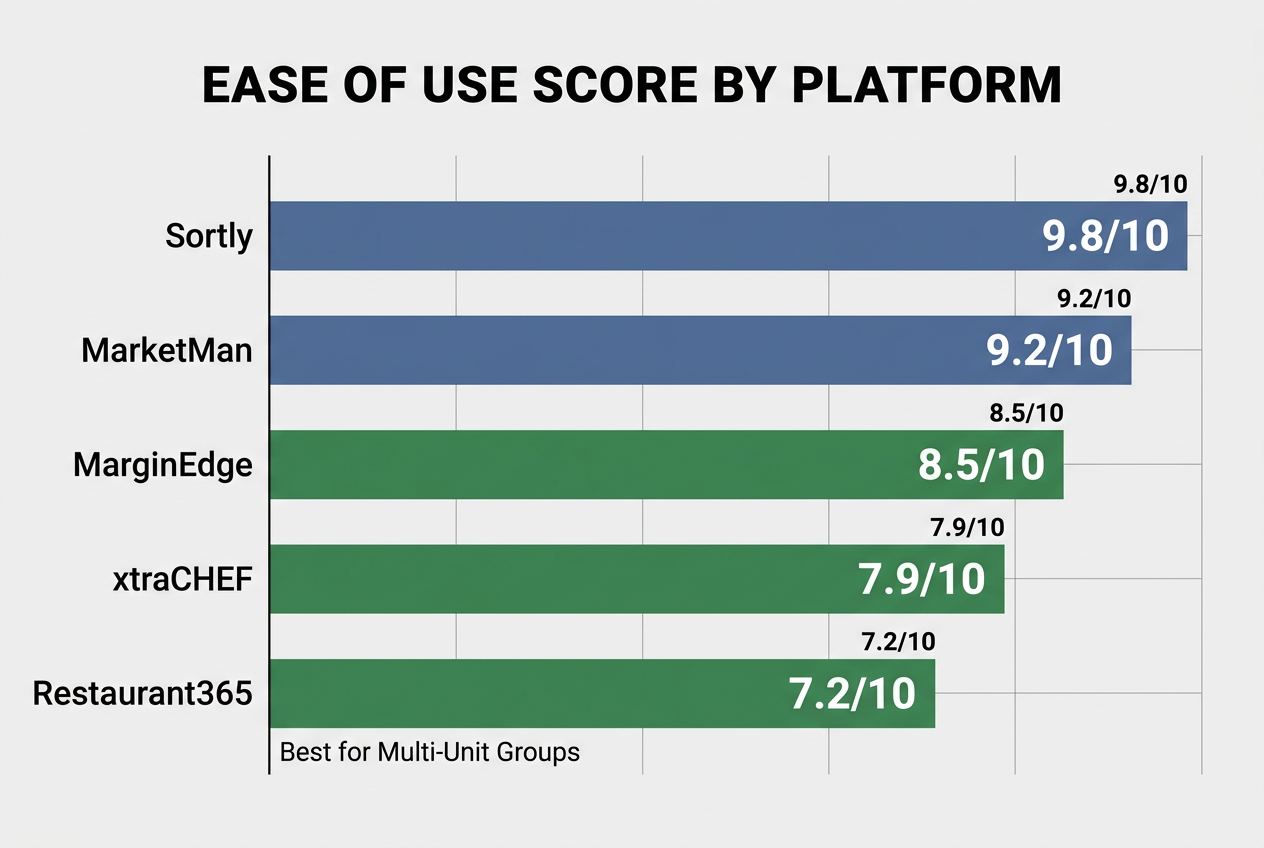 Not all inventory tools are built for the kitchen floor. This comparison ranks the leading apps based on user experience and the learning curve for non-technical staff.
The Top 5 "No-Spreadsheet" Apps for Chefs (Ranked by UX)
This ranking prioritizes one thing: how quickly you can get your team using the system without training sessions, manuals, or IT support. These are tools designed for chefs who want to spend 10 minutes learning the app and zero hours maintaining it.
| App | Best For | Setup Time | Key UX Feature | Monthly Cost | POS Integration |
|---|---|---|---|---|---|
| Sortly | Visual thinkers who hate grids | 15 minutes | Photo-first interface with QR code scanning | $49 (Pro) | None |
| MarketMan | Chefs who want full automation | 48 hours | AI-driven reorder suggestions + vendor ordering | $249+ | Toast, Square, Clover |
| xtraCHEF | Toast users drowning in invoices | 2 hours | Invoice OCR + automatic stock updates | $199+ | Toast only |
| MarginEdge | High-volume bar programs | 4 hours | Freepour bottle scanning (20/min) | $289+ | Most major POS |
| Restaurant365 | Multi-unit operations | 1-2 weeks | All-in-one accounting + inventory | $450+ | All major POS |
1. Sortly: The Visual Leader
Sortly is designed for people who organize their thoughts in pictures, not lists. The app is built around a photo-based tagging system - every item in your inventory is represented by an image, which you can group into custom folders (walk-in, dry storage, bar, etc.). You add items by snapping a photo and scanning a barcode or QR code. The app tracks quantities and locations, and you can set low-stock alerts.
What makes Sortly the easiest? It requires zero training. If your team can use a smartphone camera, they can use Sortly. There are no complicated fields to fill out, no recipe costing modules to set up, no integrations to configure. The free plan caps at 100 items and one user, which is fine for a small café or food truck but hits a wall fast for full-service restaurants. The Pro plan ($49/month) removes those limits.
The limitation is that Sortly is a pure inventory tracker. It won't connect to your POS, won't calculate theoretical usage against actual sales, and won't help with recipe costing or variance reporting. It's the perfect tool for the physical task of knowing what's in stock and where it is. It's not a financial management system.
2. MarketMan: The Automation King
MarketMan is what happens when a software company actually listens to chefs. The app is built on the assumption that you want the system to do the thinking for you. It learns your usage patterns, predicts when you'll run low on items, and generates suggested purchase orders automatically. You can send those orders directly to vendors with one tap, and the system updates your inventory when deliveries arrive.
The mobile app is fast and intuitive. Counting inventory is done via barcode scanning or voice input. The interface is clean, with large buttons designed for use in a walk-in with gloves on. The AI reorder feature is the standout - after two weeks of use, the app starts suggesting orders based on historical usage, upcoming reservations (if you use a reservation system that integrates), and seasonal trends.
MarketMan integrates with most major POS systems, which means it can auto-deplete inventory based on actual sales. If someone orders the ribeye, the system automatically adjusts your beef inventory by the portion size defined in your recipes. This is the feature that eliminates the "theoretical vs. actual" guesswork that makes spreadsheet inventory so painful.
Cost is the barrier. MarketMan starts at $249/month for single-location operations, with pricing scaling up for multi-unit groups. The free tier caps at 200 items, which is enough to test the system but not enough to run a full kitchen.
3. xtraCHEF by Toast: The Data Entry Destroyer
If you're running Toast POS, xtraCHEF is the single biggest time-saver available. The app's core feature is invoice OCR: you photograph a paper invoice, and the app reads it, extracts every line item, matches products to your existing inventory database, and updates stock levels automatically. According to Forbes, the scanning process takes under 30 seconds per invoice.
The app also handles recipe costing and plate costing, though the interface for those features is less intuitive than the invoice scanning. The real value is in the elimination of manual data entry - the task that makes spreadsheet inventory feel like a second job. If you get 15 deliveries a week, xtraCHEF saves you roughly 90 minutes of typing per week.
The catch is Toast exclusivity. If you're running Square, Clover, or an independent POS, xtraCHEF won't integrate, and the value proposition collapses. It's also a more complex setup than Sortly or MarketMan - you'll spend 2-3 hours on the initial configuration, mapping your existing inventory to the app's database.
4. MarginEdge: The Bar Specialist
MarginEdge handles full restaurant inventory, but its real strength is beverage programs. The Freepour tool is a bottle-scanning system that uses your phone's camera to identify bottles and log their quantities. Trained staff can count up to 20 bottles per minute, according to Forbes - fast enough to make pre-shift or post-shift bar inventory a 5-minute task instead of a 30-minute ordeal.
The app also includes invoice scanning, POS integration, and variance reporting. The interface is more polished than xtraCHEF but less intuitive than MarketMan. Where MarginEdge shines is in liquor cost control - a critical feature for high-volume bars where pour accuracy and theft are ongoing concerns.
The setup fee (starting at $250 per location) and the monthly cost ($289+) make this a better fit for established operations with significant beverage revenue. For a small restaurant where liquor is 15% of sales, it's overkill. For a cocktail bar or high-volume nightclub, it's a necessity.
5. Restaurant365: The Enterprise Choice
Restaurant365 is less an "inventory app" and more a complete back-office management system. It combines inventory, recipe costing, accounts payable, general ledger accounting, and financial reporting into a single platform. Felipe's Mexican Taqueria's 5% COGS reduction was achieved through R365's variance reporting, which compared theoretical food costs (based on sales and recipes) against actual costs (based on invoices and physical counts), surfacing exactly where the losses were happening.
The power is undeniable. The complexity is the trade-off. Setting up R365 typically takes 1-2 weeks of dedicated work, often with the help of a consultant or dedicated onboarding team. The interface is dense, with dozens of modules and settings that make sense for a multi-unit operator with a CFO but can overwhelm a single-location chef who just wants to stop using Excel.
R365 is the right choice when you're ready to treat your restaurant like a serious business with full financial controls. It's the wrong choice if you're looking for the fastest path away from spreadsheets.
3 Non-Negotiable Features for Spreadsheet Haters
If you hate spreadsheets, it's because spreadsheets require manual work, deep focus, and a tolerance for repetitive tasks. The apps that succeed in replacing them do so by eliminating those exact pain points. These three features are the difference between "a slightly better spreadsheet" and "a system that actually removes the spreadsheet from your life."
Invoice OCR: Taking a Photo Instead of Typing
Invoice OCR (optical character recognition) is the technology that lets you photograph a paper invoice and have the app automatically extract every line item, price, and quantity. xtraCHEF and MarginEdge both offer this feature, and it's the single most impactful time-saver for chefs who process multiple deliveries per day.
Here's the workflow: vendor drops off an order. You pull out your phone, open the app, and take a photo of the invoice. The app reads it in under 30 seconds, matches each product to your existing inventory database (or prompts you to add it if it's a new item), and updates your stock levels. You approve the changes with one tap. Done.
Without OCR, the process is: vendor drops off an order. You set the invoice aside. Later, when you have time (which is never), you sit down at a computer, open your spreadsheet or app, and manually type in every line item. It's the administrative equivalent of peeling 50 pounds of potatoes - necessary, tedious, and soul-crushing.
The limitation is accuracy. OCR works best with clean, standard invoices from major distributors. Handwritten invoices, poorly formatted documents, or invoices with unusual layouts can confuse the system, requiring manual correction. But even with a 10% error rate, OCR still saves 90% of the data entry time.
POS Syncing: Real-Time Depletion
POS integration is what separates "inventory tracking" from "inventory management." When your inventory app is synced with your POS, every sale automatically adjusts your stock levels based on the recipes you've defined. If a customer orders the burger, the system deducts 6 ounces of ground beef, one bun, two ounces of lettuce, and so on.
This is the feature that eliminates the "theoretical vs. actual" problem. With spreadsheets, you're always guessing: Did we really use 40 pounds of chicken this week, or was that a mistake in the count? With POS syncing, you know exactly what the theoretical usage should be, and you can compare it against the physical count to identify waste, theft, or over-portioning.
MarketMan, MarginEdge, and Restaurant365 all offer POS integration with most major systems. xtraCHEF integrates tightly with Toast. Sortly does not integrate with any POS, which is why it remains a pure tracking tool rather than a management system.
The setup requires defining recipes - a one-time task that's tedious but essential. You enter each menu item and specify the exact quantities of each ingredient. Once that's done, the system handles the rest automatically. For a 30-item menu, expect to spend 3-4 hours on recipe setup. For a 100-item menu, plan for a full day.
Barcode/Bottle Scanning: Turning the Phone into a Tool
Barcode and bottle scanning turns inventory counts from a pen-and-clipboard task into a phone-based workflow. You walk through the walk-in, scan each item's barcode (or photograph each bottle), and the app logs the quantities. The physical act of counting still happens, but the data entry is instant.
Sortly uses QR codes that you print and attach to shelves or storage containers. MarketMan and xtraCHEF use standard product barcodes. MarginEdge's Freepour uses image recognition to identify bottles without barcodes.
The speed gain is significant. Forbes reports that trained staff using Freepour can count up to 20 bottles per minute. Even with basic barcode scanning, you can count 50-75 items in the time it would take to count and record 20 items with a clipboard.
The limitation is barcode availability. Not all products have scannable barcodes, especially produce, proteins, and items purchased from small local vendors. For those items, you'll still need manual entry. But for packaged goods, dry storage, and bar inventory, scanning eliminates the most tedious part of the process.
The Hidden ROI: Turning "Trash to Cash"
Most chefs focus on the time saved by switching from spreadsheets to apps. The real financial impact is in the food cost reductions driven by precision tracking. When you know exactly what's being used, where it's being wasted, and whether theft is happening, you can act on those insights.
The "actual vs. theoretical" variance is the key metric. Theoretical food cost is what your costs should be based on your sales and recipes. Actual food cost is what you spent based on your invoices. The gap between the two is variance - and it represents waste, theft, over-portioning, spoilage, or poor rotation.
Restaurant365's case study with Felipe's Mexican Taqueria is the clearest example. The restaurant group reduced COGS from 28% to 23% - a 5% swing - by using R365's variance reporting to identify where the losses were happening. On $1.5 million in annual food costs, a 5% reduction equals $75,000 in recovered margin. California Fish Grill achieved a 1% food cost reduction across 30+ locations using the same system, which, at scale, translates to hundreds of thousands of dollars in annual savings.
The mechanism is simple: you set par levels for every item, defining how much you should have on hand at any given time. The app tracks actual usage against sales. If your ribeye usage is 15% higher than your sales would suggest, you have a problem - either portions are too large, the kitchen is over-prepping, or steaks are being stolen. Without the data, you'd never know. With the data, you can act immediately.
Spoilage reduction is the second-largest savings driver. Apps with expiration date tracking (including MarketMan and xtraCHEF) alert you when items are approaching their use-by dates, allowing you to move them to specials or prep them into components before they spoil. For produce-heavy operations, this feature alone can reduce waste by 10-15%.
The upfront cost of these apps - ranging from $49/month (Sortly) to $450+/month (Restaurant365) - is recovered quickly when measured against the cost of untracked variance. Even a 1% reduction in a $50,000/month food cost budget equals $500/month in savings, covering the cost of most mid-tier apps.
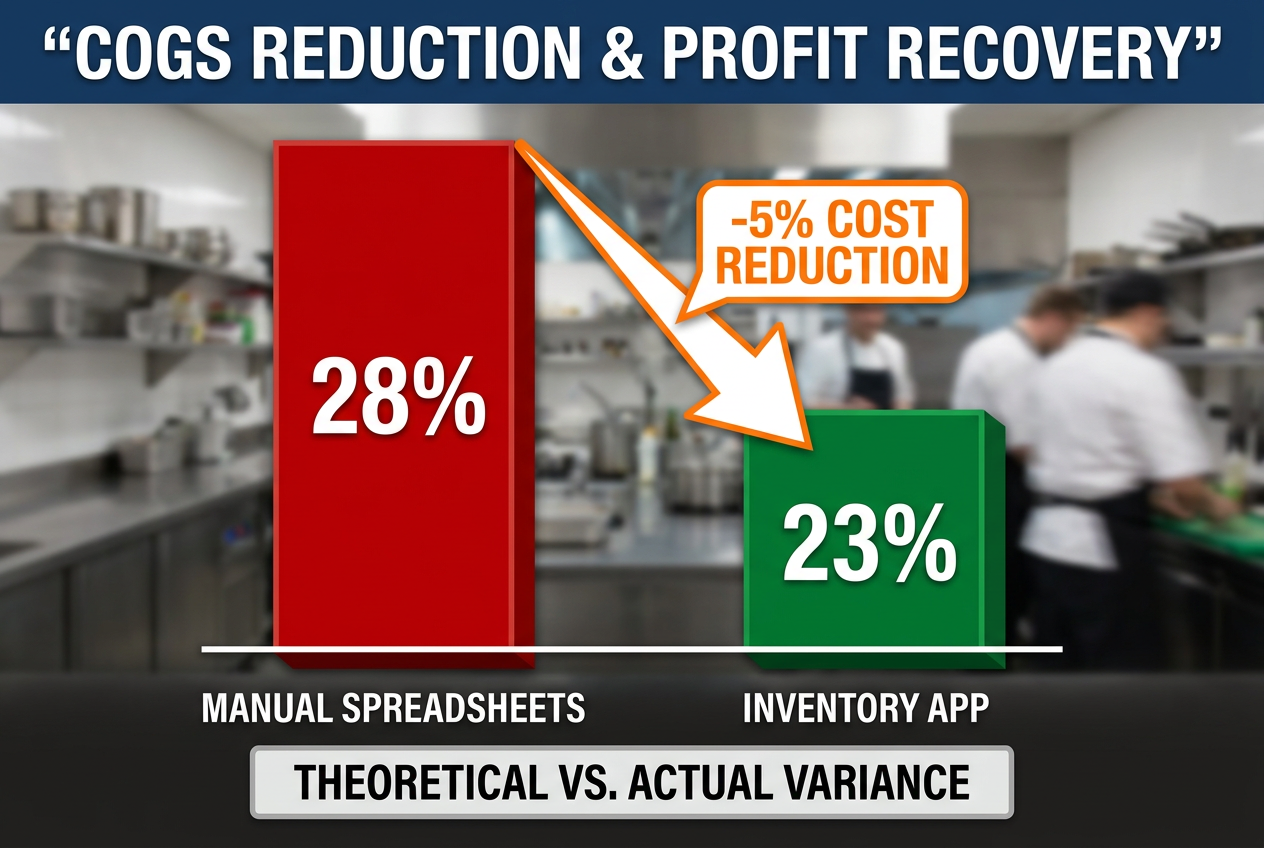 Precision tracking directly impacts your bottom line. Reducing the variance between theoretical and actual stock can recover up to 5% of your total food costs.
The 48-Hour Pivot: Moving from Excel to App without Closing Your Kitchen
The fear of switching systems is legitimate. You're running a restaurant, not an IT department. The idea of migrating data, training staff, and changing workflows while maintaining daily operations feels impossible. It's not. The key is treating the transition as a staged rollout rather than a full cutover.
Hour 0-4: Choose the App and Do the Setup
Pick your app based on the criteria above. Download it. Create an account. Spend the first two hours doing the initial configuration: set up your storage locations (walk-in, dry storage, bar, freezer), define your units of measurement (cases, pounds, bottles), and establish your vendor list.
If you're using a system with POS integration, this is when you'll connect the two platforms. Most apps have step-by-step integration guides for major POS systems. Budget 30 minutes for this if you're on Toast, Square, or Clover.
Do not try to input your entire existing inventory at this stage. Start with your top 50 items - the products that represent 80% of your volume. For most restaurants, this is proteins, core produce, and high-volume dry goods. Use the barcode scanner or manual entry to add these items to the app.
Hour 4-24: Run a Parallel System
For the first day, run both the spreadsheet and the app. Continue your normal workflow with the spreadsheet, but also log everything in the app. This gives you a safety net and allows your team to get familiar with the new tool without the pressure of it being the "live" system.
During this period, train your key staff - sous chefs, lead line cooks, and bar managers - on how to use the app. The training should take 10 minutes per person: show them how to scan items, how to adjust quantities, and how to submit counts. Emphasize that the app is designed to make their lives easier, not to surveil their work.
If you're using invoice OCR, this is when you'll test it. Take photos of incoming invoices and compare the app's output to the actual document. Correct any errors and note which vendors' invoices work well with OCR and which need manual adjustment.
Hour 24-48: Go Live and Drop the Spreadsheet
On day two, switch fully to the app. Stop updating the spreadsheet. Make the app the single source of truth. Do a full physical inventory count using the app to establish your baseline stock levels. This count doesn't need to be perfect - you're establishing a starting point, and the system will refine accuracy over time.
Communicate the change to the entire team. Post a simple one-page guide in the kitchen showing how to use the app for the three most common tasks: logging a delivery, checking stock levels, and submitting a count. Make yourself (or your designated point person) available for questions during the first week.
The first week will feel clunky. People will forget to log things. Counts will be off. The system will surface questions you didn't anticipate. That's normal. By week two, the workflow will feel natural. By week three, you'll wonder how you ever managed inventory with a spreadsheet.
The critical rule: do not try to achieve perfection before going live. You will never have every item entered, every recipe defined, or every process documented. Launch with the core system in place, and refine as you go. The app is designed to improve over time as it learns your patterns.
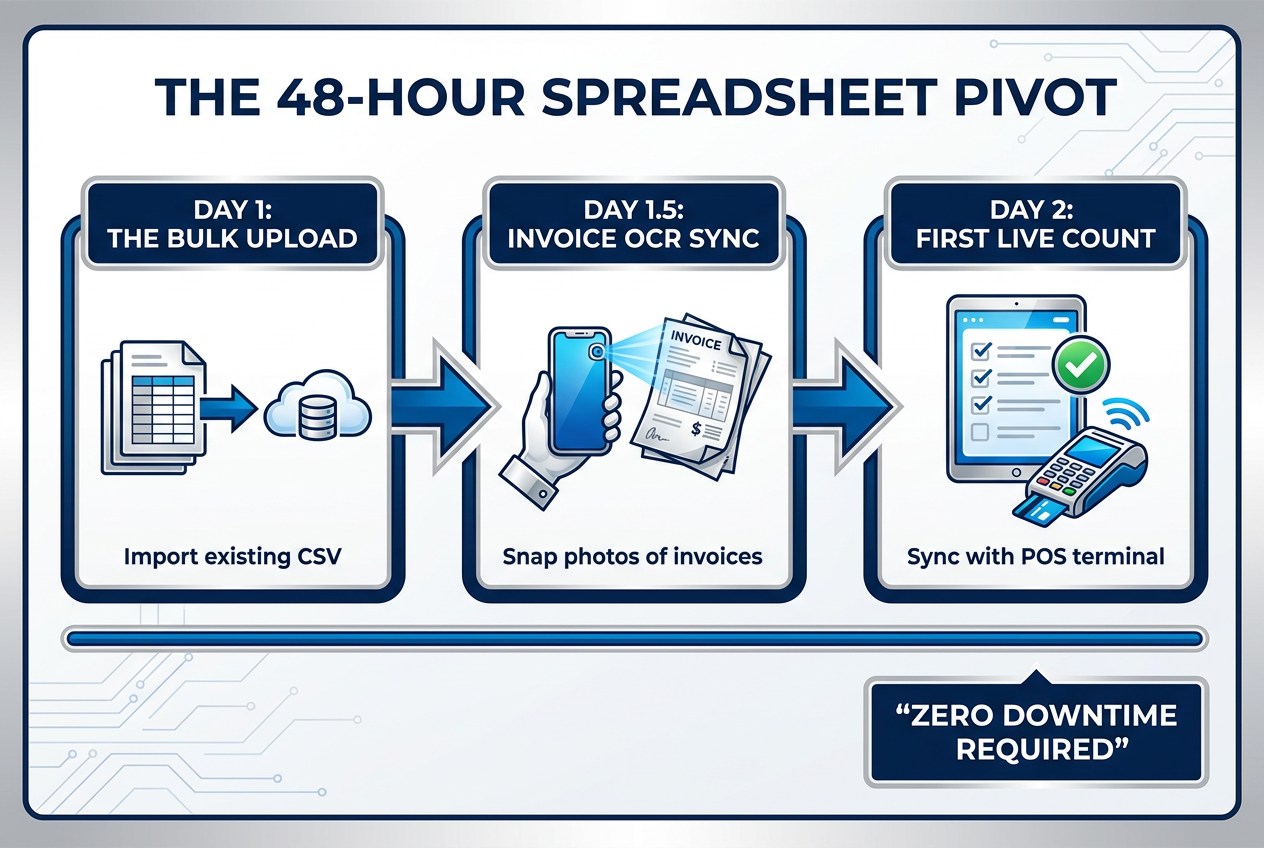 Switching systems doesn't have to be a headache. This 48-hour framework allows you to migrate your data and train your team without disrupting daily service.
What Is the AI Inventory App for Restaurants?
The "AI inventory app" label is marketing shorthand for apps that use machine learning to predict reorder points, suggest purchase orders, and identify usage patterns without requiring manual input. The term is overused, but the technology behind it - when implemented well - is genuinely useful.
MarketMan is the clearest example of functional AI in restaurant inventory. After two weeks of tracking your usage, the app starts generating suggested purchase orders based on your historical consumption, upcoming reservations (if integrated with a booking system), and seasonal trends. The system learns which items you use more of on Fridays, which vendors you order from, and what your typical lead times are. Over time, the suggestions get more accurate.
Restaurant365 uses predictive analytics for food cost forecasting, identifying when your costs are likely to spike based on market trends and usage patterns. The system flags items where you're spending more than historical averages and suggests alternatives. This isn't "AI" in the sense of generative models like ChatGPT - it's data analysis and pattern recognition - but the effect is that the system does the thinking you would otherwise do manually.
The limitation is that AI features require data. If you're a brand-new restaurant or switching from a zero-data system (like a paper clipboard), the AI won't have anything to learn from. You'll need to use the app for at least two full inventory cycles (typically two weeks for most restaurants) before the predictive features become useful.
The value is in removing the mental load of reordering. Instead of needing to remember that you go through 12 cases of tomatoes every week and you need to order on Tuesdays for Thursday delivery, the app just tells you "Order 12 cases of tomatoes from Sysco by Tuesday 5 PM." You review it, adjust if needed, and submit. The administrative decision-making - the part that eats up mental bandwidth - is handled by the system.
For chefs who hate spreadsheets specifically because they hate the planning and forecasting part of inventory, AI-driven apps are the closest thing to a solution. You're not eliminating the task of inventory management, but you're shifting it from active planning to passive review.
Is There a Free App for Kitchen Inventory?
Yes. But free apps hit walls fast, and those walls usually appear exactly when you start to rely on the system. The free versions are best understood as extended trials rather than permanent solutions.
Sortly's free plan allows one user and 100 items. That's enough for a small café, a food truck, or a boutique catering operation with a limited menu. For a full-service restaurant with 500+ items in inventory, you'll hit the 100-item cap within the first week. At that point, you either upgrade to the Pro plan ($49/month) or you're stuck.
MarketMan's free tier caps at 200 items, according to Getply's 2026 analysis. That's more generous than Sortly but still restrictive for most operations. The free version also lacks POS integration, vendor ordering, and the AI reorder features that make MarketMan powerful. It's a good way to test the interface and see if the app fits your workflow, but it's not a long-term solution.
Most free apps also limit user access, which is a problem for kitchens where multiple people need to log counts, receive deliveries, or check stock levels. If only the head chef has access, the app becomes a bottleneck rather than a tool.
The hidden cost of free apps is the lack of support. When something breaks or you can't figure out how to configure a feature, you're on your own. Paid plans typically include customer support, onboarding assistance, and troubleshooting - critical resources when you're trying to migrate away from a broken system.
The best use of free apps is as a testing ground. Sign up for the free versions of Sortly and MarketMan, spend a week using each, and determine which interface feels more natural for your team. Then upgrade to the paid version of whichever one you choose. Trying to run a professional kitchen on a permanently free inventory app is like trying to run a restaurant with a home-grade oven - technically possible, but you'll hit the limits of the tool before you hit the limits of your needs.
For operations that genuinely need a free solution long-term, the reality is that you're probably better off with a well-maintained spreadsheet. Free apps are designed to convert you to paid plans, and they're built with that constraint in mind. They're not charity projects - they're marketing funnels.
Frequently Asked Questions
What is the most user-friendly restaurant inventory software?
Sortly is the most user-friendly restaurant inventory software for chefs who prioritize simplicity over depth, based on its photo-first interface and zero-training-required design. The app is built around visual organization - every item is represented by a photo, which you group into custom folders for different storage areas. Adding items is as simple as snapping a picture and scanning a barcode. The free version caps at 100 items with single-user access, but the Pro plan ($49/month) removes those limits. The trade-off is that Sortly doesn't include restaurant-specific features like recipe costing, POS integration, or variance reporting, making it best for physical inventory tracking rather than financial management.
Which inventory app has the best mobile barcode scanning?
MarginEdge has the best mobile barcode scanning for restaurant inventory, specifically through its Freepour tool designed for high-volume beverage programs. According to Forbes Advisor's 2026 review, trained staff using Freepour can count up to 20 bottles per minute using image recognition technology that identifies bottles without requiring manual barcode scanning. For general inventory, MarketMan and xtraCHEF both offer robust barcode scanning with clean mobile interfaces designed for use in walk-ins and storage areas. The key is speed and accuracy - all three apps allow you to walk through your storage areas with a phone and log items faster than pen-and-clipboard methods, eliminating the manual data entry that makes spreadsheet inventory painful.
How do I switch from Excel inventory to an app without closing the restaurant?
The 48-hour migration method allows you to switch from Excel to an inventory app without disrupting service by running both systems in parallel for the first 24 hours. Hour 0-4: Choose your app (Sortly for simplicity, MarketMan for automation, xtraCHEF if you're on Toast) and complete the initial setup by inputting your top 50 high-volume items. Hour 4-24: Run both Excel and the app simultaneously, training key staff for 10 minutes each on basic functions like scanning items and adjusting quantities. Hour 24-48: Go live with the app, drop the spreadsheet, and conduct a full physical count using the new system to establish baseline stock levels. The critical rule is launching with an imperfect system rather than waiting for perfection - the app will refine accuracy as you use it.
What is the best inventory app for small independent restaurants?
MarketMan is the best all-around inventory app for small independent restaurants that need automation without enterprise complexity, offering AI-driven reorder suggestions, vendor integrations with 1,000+ suppliers, and POS syncing with major systems like Toast, Square, and Clover. The mobile-first design and 48-hour setup time make it accessible for single-location operations. At $249/month, it's mid-range in pricing but delivers features that eliminate the manual work spreadsheets require. For ultra-lean budgets, Sortly's Pro plan at $49/month provides strong visual tracking without the advanced automation or POS integration. The deciding factor is whether you want a tool that tracks inventory (Sortly) or a system that manages your entire ordering and costing workflow (MarketMan).
Can inventory apps scan paper invoices automatically?
Yes, xtraCHEF by Toast and MarginEdge both offer automatic paper invoice scanning through OCR (optical character recognition) technology that extracts line items, prices, and quantities in under 30 seconds per invoice. You photograph the invoice with your phone, and the app reads it, matches products to your inventory database, and updates stock levels automatically. This feature eliminates the 90 minutes per week most chefs spend manually typing invoice data. The limitation is accuracy - OCR works best with clean, standard invoices from major distributors. Handwritten or poorly formatted invoices may require manual correction, but even with a 10% error rate, OCR still saves 90% of data entry time compared to spreadsheets.
How much does restaurant inventory software cost per month?
Restaurant inventory software costs range from $49/month (Sortly Pro) for basic visual tracking to $450+/month (Restaurant365) for enterprise-grade systems combining inventory, accounting, and financial reporting. Mid-tier options like MarketMan ($249/month) and xtraCHEF ($199/month) offer strong automation, POS integration, and invoice scanning without the complexity of all-in-one platforms. MarginEdge typically starts at $289/month plus a $250 per location setup fee. Free tiers exist but cap inventory at 100-200 items with limited features, making them testing grounds rather than long-term solutions. The cost is typically recovered quickly - even a 1% food cost reduction on a $50,000/month food budget equals $500 in monthly savings, covering most mid-tier apps.
What is the 80/20 rule for inventory?
The 80/20 rule for restaurant inventory states that approximately 80% of your food costs come from 20% of your inventory items - typically your core proteins, produce, and high-volume dry goods. This principle is critical when setting up an inventory app because it allows you to focus your initial effort on the items that matter most financially. Start by tracking your top 50 items (the 20%) rather than trying to input every single product in your kitchen at once. Apps like MarketMan and Restaurant365 use this concept in their reporting, highlighting high-impact items where small improvements in waste or portioning create significant cost reductions. This is why Felipe's 5% COGS reduction was possible - by focusing precision tracking on high-cost items.
What is the best inventory method for restaurants?
The best inventory method for restaurants is perpetual inventory combined with regular physical counts, which modern apps like MarketMan and xtraCHEF automate through POS integration and mobile scanning. Perpetual inventory means your stock levels update automatically with every sale (through POS syncing) and every delivery (through invoice scanning), giving you real-time visibility into what you have on hand. Physical counts - typically done weekly for high-value items and monthly for everything else - verify the system's accuracy and surface variance (the difference between theoretical and actual usage, which indicates waste, theft, or over-portioning). This hybrid approach eliminates the blind spots of spreadsheet-based periodic inventory while maintaining the accountability of regular manual verification.
If you're serious about moving beyond spreadsheets and building a real system for tracking what you cook and where you source it, understanding how chefs approach food documentation can help. Building a personal restaurant library isn't just about saving links - it's about creating a culinary archive that grows with your experience.
For more tools to help organize your food life beyond just inventory, explore how serious food lovers are tracking individual dishes, not just restaurants, in our guide to the best apps to remember every dish you've eaten. The same principles that make inventory apps powerful - visual organization, mobile-first design, and eliminating manual entry - apply to personal food tracking too.