
How to Create a Private Food Rating System: Build Your Personal Memory Architecture
John the smoothie monster
John lives for smoothie bowls and cold-pressed juices. He uses Savor to remember his best blends.
How to Create a Private Food Rating System: A Personal Memory Architecture for Serious Foodies You've taken 2,400 food photos this year. You can recall exactly...
How to Create a Private Food Rating System: A Personal Memory Architecture for Serious Foodies
You've taken 2,400 food photos this year. You can recall exactly three of them.
That's the paradox most serious food lovers face: you're documenting every meal, but when someone asks "where should I go for ramen in Tokyo?" you're scrolling through a graveyard of unlabeled images, desperately trying to remember which bowl made you actually stop mid-conversation.
The problem isn't that you need better taste. It's that you've been using the wrong tools for the wrong job. Yelp was built for venting about parking. Google reviews reward mediocrity with rounding errors. Instagram is a performance, not a record.
A private food rating system is something else entirely. It's a personal memory architecture - a structured way to capture not just where you ate, but what you ordered, why it mattered, and how it compares to everything else you've ever tasted. It's the difference between a phone full of forgotten photos and a searchable database of your culinary life.
This guide will show you how to build one that actually works.
Table of Contents
- What Is a Private Food Rating System?
- Why Public Platforms Fail Serious Foodies
- The Big Three Methods
- Platform Choice: Apps vs. DIY Systems
- Step-by-Step: Building Your DIY Rating System
- The Contextual Rating Gap: Normalizing Across Price Points
- Workflow Integration: When and How to Log
- Advanced Integration: Reducing Friction
- Frequently Asked Questions
What Is a Private Food Rating System?
A private food rating system is a structured method for recording, evaluating, and retrieving your dining experiences - built for your eyes only (or your inner circle). Unlike public review platforms, it prioritizes personal memory over crowd consensus.
The mechanism is simple: you log what you ate, assign it a score based on criteria that matter to you, and build a searchable archive that answers questions like "where was that perfect carbonara?" or "what should I order when I go back to that place in Rome?"
The real value isn't the score itself - it's the retrieval architecture. Three months from now, when you're planning a trip to Bangkok, you won't remember which of the 47 restaurants you visited served the best pad thai. But your system will.
Here's what it solves:
- The "where was that place?" problem: You remember the dish, not the restaurant name
- The "what did we order?" problem: You remember liking something, but not what it was
- The noise problem: Public reviews are diluted by complaints about service, parking, and ambience when you only care about the food
- The rounding problem: Half-star increments on Yelp can't distinguish between an 8.2 and an 8.7
Material limitation: No system works if you don't use it. The best private rating system is the one you'll actually maintain - whether that's a 100-point rubric in Notion or a simple "loved it / didn't love it" flag in your camera roll.
Why Public Platforms Fail Serious Foodies
Public review platforms weren't designed for memory - they were designed for reputation management and local search. That creates three fundamental problems for anyone trying to build a personal taste archive.
Problem one: Service noise drowns out food quality. Restaurants sell out up to 34% more frequently when they see a half-star increase on Yelp, but that increase often reflects parking convenience or whether the host smiled, not whether the duck confit was properly rendered.
Problem two: Coarse rounding erases nuance. Half-star increments can't capture the difference between "very good" and "transcendent." A 4-star rating on Google could mean anything from a 7.0 to a 9.4 on a more granular scale.
Problem three: You're rating the wrong unit. Most platforms ask you to rate the restaurant. But you don't care about the restaurant as a whole - you care about the specific dish you ordered. The pasta might be a 9.2 while the risotto is a 6.4, and a single aggregate score hides that entirely.
For anyone who takes food seriously, these aren't minor annoyances - they're deal-breakers. Public platforms optimize for the crowd. Private systems optimize for you.
If you're looking to move beyond generic star ratings, consider exploring the best food review apps that prioritize dish-level tracking over venue-level noise.
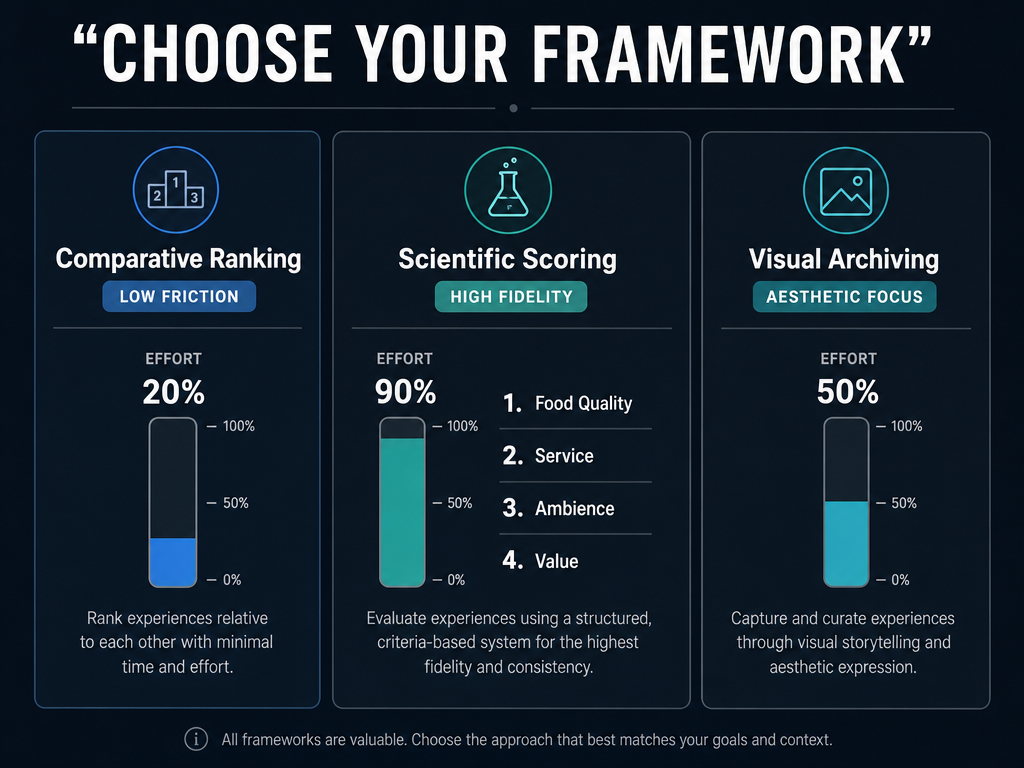 Choosing the right system depends on your balance of friction versus fidelity. Use this framework to decide if you prefer quick rankings or data-heavy scientific scoring.
The Big Three Methods
There are three primary approaches to private food rating, each optimized for a different personality type and tolerance for friction. Most serious foodies eventually pick one as their primary method and use another as a backup.
The Comparative Ranker (Low Friction, High Social Value)
This method treats rating as relative rather than absolute. Instead of asking "is this a 7.4 or a 7.5?" you ask "was this better than the ramen I had last week?"
How it works: You maintain a ranked list of dishes or restaurants. When you try something new, you slot it into the hierarchy. The best bowl of ramen you've ever had sits at the top; everything else is measured against it.
Best for: Competitive types who think in terms of bests and worsts. People who enjoy the social aspect of food and want to share ranked lists with friends.
Key app: Beli uses a "head-to-head" ranking system that forces you to compare new experiences against existing entries. The interface is simple: "Was this better than X?" The app builds a ranked list automatically.
Limitation: Rankings are context-dependent. Your "best ramen" list conflates an inexpensive bowl from a Tokyo street stall with an expensive bowl from a Michelin-starred restaurant. Without additional metadata, you lose the ability to filter by price point or occasion.
The Scientific Scorer (High Friction, High Precision)
This method assigns absolute numerical scores based on consistent criteria. Think wine critics, not Instagram influencers.
How it works: You break each dish down into component scores - food quality, presentation, value, ambience - then calculate a weighted final score. A 100-point scale offers the most granularity, but even a 20-point scale (1-10 in 0.5 increments) captures far more nuance than a five-star system.
Best for: Data-driven people who want to understand not just what they liked, but why. Anyone building a long-term taste archive that can be analyzed and filtered.
Key framework: Many food critics prioritize food quality heavily over other factors. This prevents a perfect dining room from compensating for mediocre food.
Limitation: High friction. Spending five minutes per meal on a detailed breakdown requires discipline. Most people start with enthusiasm and abandon the system after three weeks.
The Visual Archivist (Low Friction, Memory-First)
This method prioritizes capturing the moment over quantifying the experience. The core unit is the photo, not the score.
How it works: You take a photo of every dish, add a brief caption or voice note, and tag it with location and cuisine type. The system is searchable by image, not by number.
Best for: Visual thinkers who remember meals by how they looked. Anyone who already takes food photos compulsively and wants to make them actually useful.
Key apps: Yummi focuses on a photo-first "Foodprints" timeline that includes both restaurant meals and home cooking. Mapstr uses tag-based map bookmarks with photo attachments, optimized for retrieval by location.
Limitation: Weak on structured comparison. You can find that photo of the duck confit from last year, but you can't easily answer "what was better - the duck in Paris or the duck in Lyon?"
For a deeper look at how these visual systems work in practice, read our guide on how to organize food photos to build a searchable archive.
Platform Choice: Apps vs. DIY Systems
The choice between a dedicated app and a custom-built system comes down to three factors: control, longevity, and integration.
Dedicated Apps: Beli, Crumble, Yummi
Advantages:
- Purpose-built for food tracking - no configuration required
- Social features let you share lists with trusted friends
- Often include discovery tools to help you find restaurants based on your history
Disadvantages:
- Platform risk: If the company shuts down, your data goes with it (unless you export regularly)
- Limited customization: You're locked into their rating schema and categories
- Subscription costs: Most food apps have moved to paid tiers
Best for: People who want to start immediately without setup overhead. Anyone who values the social layer and wants to compare notes with foodie friends.
Beli uses a comparative ranking system where you build leaderboards by answering "was this better than X?" It's low-friction but high-engagement - the gamification makes you want to keep logging.
Crumble focuses on per-dish ratings with tenth-of-a-star precision. The interface is private-first, but you can share specific lists with friends. The community is smaller than Beli's, which means less discovery serendipity but also less social noise.
If you're considering the Beli ecosystem but want alternatives, check out the best Beli alternatives for detailed comparisons.
DIY Systems: Notion, Google Sheets, Airtable
Advantages:
- Complete control over your data structure and rating criteria
- No platform risk: Your database lives in a tool you already use
- Free (or covered by existing subscriptions)
- Infinitely customizable: Add fields for wine pairings, dining companions, time of day, whatever matters to you
Disadvantages:
- Setup overhead: You need to design the schema yourself
- No native discovery features
- Manual logging feels more like work than play
Best for: Data-driven types who want full ownership and customization. Anyone who already lives in Notion or Airtable and wants to integrate food tracking with travel planning, recipe collections, or meal prep calendars.
The sweet spot is often a hybrid approach: use a dedicated app for quick logging while traveling, then export to a DIY system for long-term analysis and backup.
Automation-First: Truffle
Truffle represents a third category: automated logging via credit card integration. The app syncs with your bank, automatically detects restaurant transactions, and logs them with minimal manual input.
Advantage: Near-zero friction. You literally don't have to do anything except occasionally confirm the dish.
Limitation: Less control over specific dish notes. The system knows you spent money at Via Carota, but not whether you ordered the cacio e pepe or the roasted chicken.
Best for: People who value completeness over detail. Anyone who wants a comprehensive log of every restaurant they've visited without the overhead of manual entry.
Step-by-Step: Building Your DIY Rating System
If you're going the custom route, here's the essential architecture. This assumes you're using Notion or Airtable, but the logic translates to any database tool.
Essential Fields (The Minimum Viable System)
- Restaurant Name (text): The venue
- Date (date): When you ate there
- Cuisine Type (select): Japanese, Italian, Thai, etc.
- Price Tier (select): $, $$, $$$, $$$$ - this is critical for contextual scoring
- Dish Ordered (text): "Tonkotsu ramen with soft-boiled egg and extra chashu"
- Food Score (number, 1-10 or 1-100): The food quality itself
- Final Weighted Score (formula): Food score + optional modifiers for ambience, value, service
- Photo (file): Visual reference
- Notes (text): Free-form memory capture - "the broth was intensely pork-forward, almost creamy"
Optional But Powerful Fields
- Location (text or map pin): Helps with retrieval when planning trips
- Dining Companion (text): Context matters; some meals are memorable because of who you shared them with
- Would Order Again? (checkbox): Binary filter for quick retrieval
- Value Score (number): Separate from food quality - was it worth the price?
- Tags (multi-select): "Date night," "Business lunch," "Hangover cure"
The Weighted Score Formula
This is where it gets personal. A simple version:
Final Score = (Food Score × weight) + (Ambience Score × weight) + (Value Score × weight)
You can adjust the weights. Some people give food quality the dominant share; others balance it more evenly across factors. The point is to be consistent so your scores are comparable over time.
The One-Month Habit: Commit to Logging Before You Leave
The system only works if you actually use it. The single biggest predictor of success: log the meal while you're still at the table, before the check arrives.
Not when you get home. Not the next morning. Right then.
It takes 90 seconds. Pull out your phone, add a database entry, type three sentences about what made the dish memorable (or forgettable), and snap a photo if you haven't already. The sensory memory is fresh; you can still taste the black garlic oil in the ramen broth.
If 90 seconds feels like too much friction, you're probably using the wrong method. Drop down to the Visual Archivist approach or switch to an app like Beli that makes logging feel like a game instead of homework.
For a practical workflow on logging efficiently, see our guide on how to track restaurant meals with minimal effort.
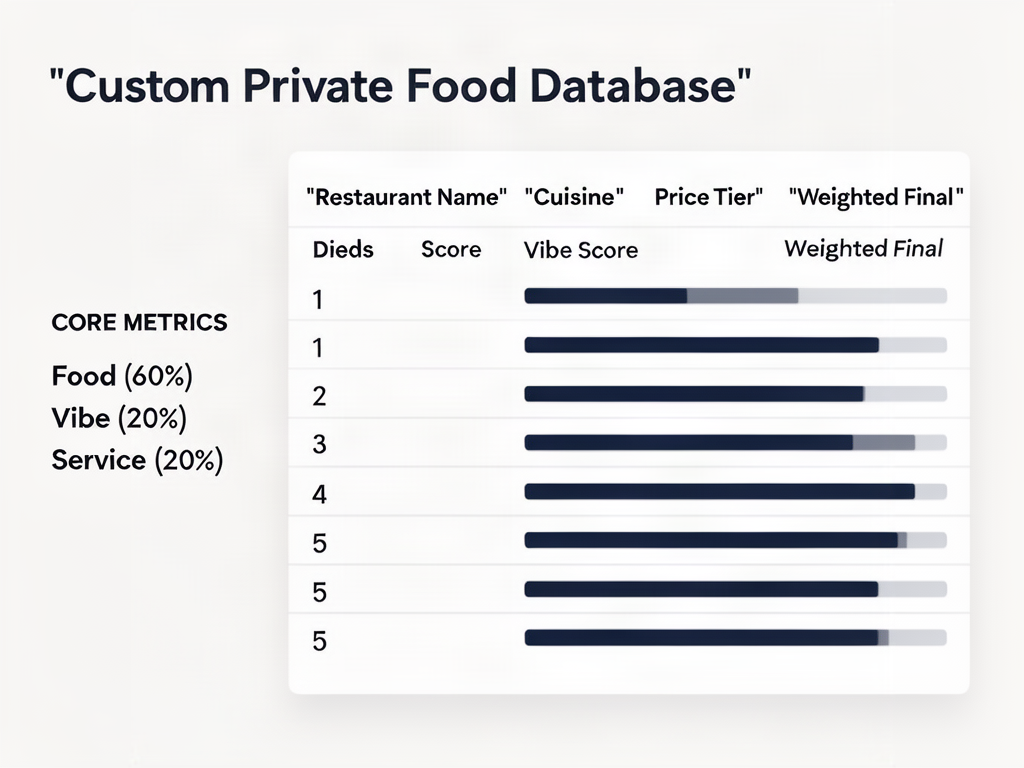 Building your own system in Notion or Sheets requires a structured schema. This architecture prioritizes food quality while leaving room for vibe and service weightings.
The Contextual Rating Gap: Normalizing Across Price Points
Here's the trap most rating systems fall into: you give an inexpensive street taco the same score as an expensive omakase experience, and three months later you can't remember which one was actually transcendent.
The solution is contextual normalization - rating each dish against the best possible version of itself within its price tier, not against every meal you've ever eaten.
The Value Metric
This is why the "Price Tier" field is essential, not optional. A perfect street taco - the kind where the tortilla is hand-pressed and still steaming, the al pastor has the right char-to-juice ratio, the pineapple is grilled just enough - can legitimately score highly. But it's a high score within the budget tier.
When you filter your database by "best dishes I've ever eaten," you want the ability to see both the budget taco and the expensive omakase, each understood in its proper context.
The Scoring Framework
One approach:
- Absolute Food Quality (1-10): Rate the dish against the Platonic ideal of that dish, regardless of price. The taco gets a high score because it's nearly flawless execution.
- Value Score (1-10): Rate whether the dish was worth its price. The taco might excel here (extraordinary for the price), while the omakase gets a moderate score (excellent, but you've had better for the same price).
- Final Score: Use the weighted formula to combine them.
This way, you're not just tracking "what was good" - you're tracking "what was good relative to what I paid, where I was, and what I was expecting."
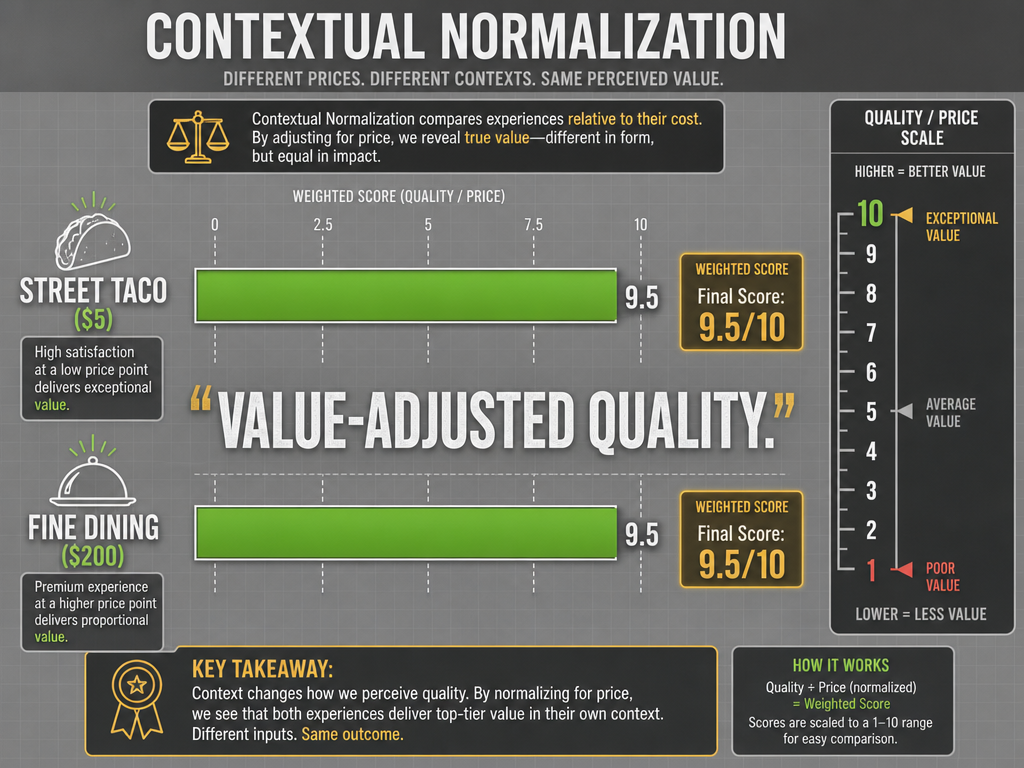 True food rating systems normalize scores across price points. This visual demonstrates how a value-first metric allows street food to compete fairly with high-end dining.
The "Off Night" Problem
Even great restaurants have bad nights. The question is: do you log the failure, or give the place a second chance and overwrite the entry?
Most serious foodies log everything and add a note: "Returned after initial disappointment - much better on second visit." The first entry stays in the database with a lower score, the second entry gets the higher score, and now you have context: this place has variability, but the ceiling is high.
This is also why the "Date" field matters. If you see two entries for the same dish with wildly different scores, the dates tell you whether it's inconsistency or whether your palate has evolved.
Workflow Integration: When and How to Log
The best rating system is useless if you don't log consistently. The workflow problem is real: if it feels like homework, you'll quit. If it feels like part of the experience, you'll keep going.
Timing: The Three Windows
Option 1: At the table (recommended) - Log while waiting for the check. The sensory memory is fresh. You can still recall the exact texture of the squid ink pasta, the way the broth's richness built over each spoonful. This is when you write notes that actually mean something three months later.
Option 2: End of the day - Sit down with your photos before bed and retroactively log everything. This works better for trips where you're eating multiple meals per day and don't want to pull out your phone at every table. The trade-off: your notes will be less specific.
Option 3: Post-trip batch processing - Wait until you're home from a week-long trip, then dump all the photos into your database at once. This is the lowest-friction option, but also the least useful. You'll remember which restaurants were good and which were forgettable, but you won't remember why.
Most people start with Option 3, realize they're losing too much detail, move to Option 2, and eventually settle into Option 1 for meals that matter.
The Quick-Log Template
If you're logging at the table and don't want to look antisocial, use a template that takes 60 seconds:
- Restaurant name
- Dish name
- One-sentence note: "The crust had the right char-to-chew ratio; the nduja added enough heat without overwhelming the ricotta"
- Quick score (1-10)
- Photo (if you haven't already taken one)
Done. Everything else - cuisine type, location, price tier - you can fill in later when you're batch-cleaning your database.
The Camera Roll Migration
If you've already got thousands of food photos buried in your phone, here's the workflow for moving them into a structured system without losing your mind:
Step 1: Export photos with metadata - Use a tool like Google Photos or Apple Photos to export images with their original timestamps and location data intact.
Step 2: Batch import to your database - Notion and Airtable both support bulk image uploads. Create entries with just the photo and date to start.
Step 3: Retroactive annotation - Go through the entries chronologically. For recent meals, you'll still remember details. For older meals, write whatever you can recall - even "this was from the Tokyo trip, some kind of ramen, can't remember the name" is better than nothing.
Step 4: Progressive cleanup - Don't try to annotate thousands of photos in one sitting. Set a daily target: a manageable number of entries per day while watching TV or on your commute. Over time, you'll have a complete archive.
For specific techniques on organizing existing photos, see our detailed guide on how to organize restaurant photos.
Advanced Integration: Reducing Friction
Once your system is running, the next step is reducing the overhead of manual logging. Here are three automation techniques that actually work.
Apple Shortcuts for Quick-Add
If you're using Notion or Airtable, you can create an Apple Shortcut that pre-fills a database entry with a single tap. The shortcut asks for:
- Restaurant name (voice input)
- Dish name (voice input)
- Quick score (1-10)
It auto-fills the current date and location, snaps a photo, and creates the entry. Total time: 30 seconds. No typing required.
Google Maps Export for Location Seeding
If you've been "starring" places in Google Maps, you can export that list and use it to seed your database with restaurant names and locations. This gives you a starting point - now you just need to add the dishes you ordered and the scores.
The export process isn't native to Google Maps, but third-party tools like Mapstr or even simple browser extensions can pull your saved places into a CSV file.
Credit Card Auto-Logging (With Manual Confirmation)
Truffle pioneered this: sync your credit card, let the app detect restaurant charges, and manually confirm which dish you ordered. It's a hybrid of automation and manual logging.
The advantage: you never forget to log a meal because the transaction creates a placeholder entry. The disadvantage: you still need to confirm the dish, and if you pay cash or split the bill, the system misses it.
For deeper automation strategies and app comparisons, read our analysis of the best food tracking apps for different workflow preferences.
Frequently Asked Questions
Is there an app that can track restaurants I've visited?
Yes - several. Beli, Crumble, Yummi, and Mapstr all offer location-based tracking that logs restaurants you've visited. The key difference is granularity: some focus on venue-level tracking (you visited this restaurant), while others go deeper into dish-level tracking (you ordered the duck confit at this restaurant, and here's your score).
For serious foodies, dish-level tracking matters more than venue-level. You don't care that you went to Via Carota - you care that you ordered the cacio e pepe and it was a 9.2.
What is the best travel app for finding restaurants?
That depends on whether you want discovery or memory. For discovery - finding new places while traveling - Google Maps and The Fork still dominate outside the US, while Resy and OpenTable handle reservations domestically.
But if you mean "finding restaurants I've already logged and loved," the answer is a private rating system with location filters. When you land in Tokyo and want to remember which ramen shop you loved three years ago, your personal database beats any public platform.
How do I import my existing "starred places" from Google Maps into a rating system?
Google Maps doesn't offer a native export, but you can use third-party tools like Mapstr or browser extensions that scrape your saved places into a CSV file. Once you have the CSV, import it into Notion, Airtable, or Google Sheets as the foundation of your database.
The limitation: Google Maps exports restaurant names and locations, not the specific dishes you ordered. You'll need to manually annotate each entry with dish details and scores.
How can I automate my restaurant logs using my credit card or photo metadata?
Credit card automation works through apps like Truffle that sync with your bank and detect restaurant transactions. The app creates placeholder entries, and you manually confirm the dish.
Photo metadata automation is trickier. Your iPhone embeds location and timestamp data in every photo, but extracting it requires third-party tools. Apps like Google Photos can search by location ("show me all photos taken in Rome"), but they can't automatically create database entries. You'll need to export the photos and manually import them into your rating system.
The most practical hybrid: use an app like Yummi that imports photos from your camera roll and prompts you to add captions and tags. It's not fully automated, but it's lower-friction than starting from scratch.
How do I handle "off nights" - give the place a second chance or log the failure?
Log everything. A single bad meal might be an off night, or it might be a genuine red flag. The only way to know is to return and compare.
The cleanest approach: keep both entries in your database. Add a note to the first entry: "Returned [date] - much better on second visit, see updated entry." Now you have the full story: this place has variability, but the ceiling is high.
If you only log the second visit and delete the first, you lose context. Three years later, you'll remember the place as "consistently great" when the reality was "inconsistent but redeemable."
Do I need a 100-point scale, or is a 10-point scale enough?
It depends on how much precision you want. A 10-point scale (or 20-point if you use half-increments) is enough for most people - it captures the difference between "good," "very good," and "transcendent" without forcing you to agonize over whether something is an 8.3 or an 8.4.
A 100-point scale makes sense if you're logging dozens of dishes per month and want maximum granularity for filtering. Wine critics use 100-point scales because they're tasting many wines per year and need to rank them precisely. If you're only logging a moderate number of meals per year, a 10-point scale is plenty.
The real question isn't precision - it's consistency. Whatever scale you pick, use it the same way every time. A consistent 10-point scale beats an inconsistent 100-point scale.
The right system is the one you'll actually use. If you're drowning in food photos and can't remember which meals were worth repeating, start simple: pick a dedicated app like Beli or Crumble and commit to logging for one month. If you hit 50 entries and want more control, migrate to a custom Notion database.
But start. Your camera roll is a graveyard. Turn it into an archive.