
How to Build a Searchable Restaurant Dish Archive to Save Every Meal
Harry the matcha king
Harry is our resident matcha obsessive. He’s tasted hundreds of bowls and tracks every cup in Savor.
The Serious Foodie's Guide to Creating a Searchable Restaurant Dish Archive (2026) You've taken 2,847 food photos this year. Not one of them is organized by...
The Serious Foodie's Guide to Creating a Searchable Restaurant Dish Archive (2026)
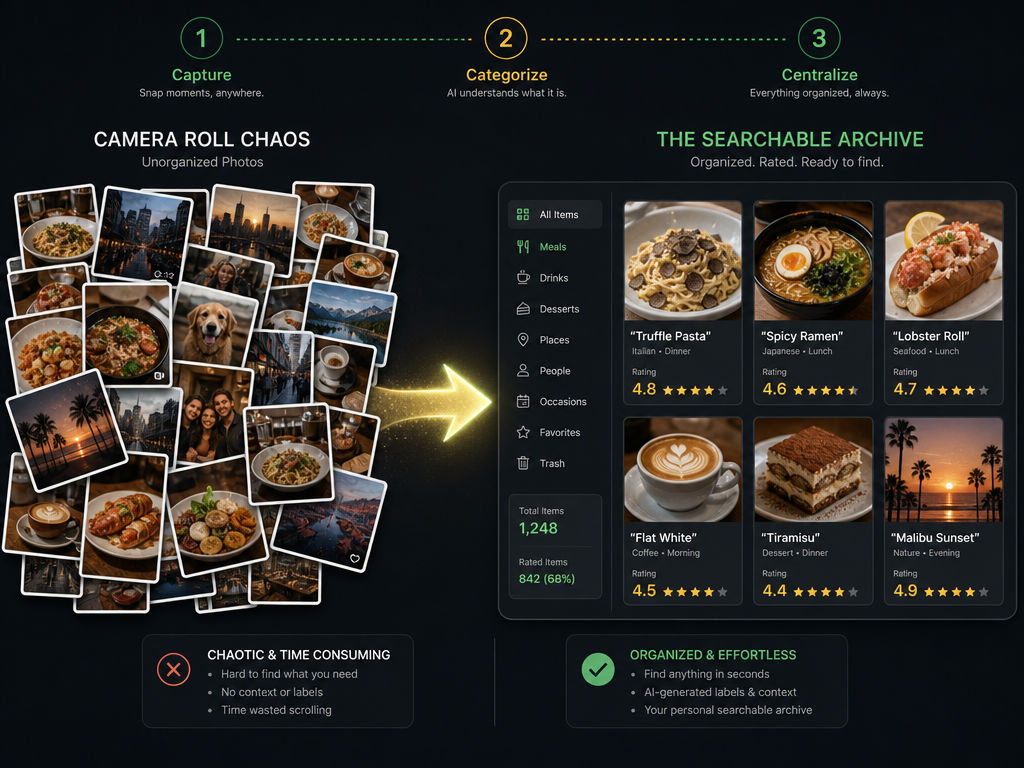
You've taken 2,847 food photos this year. Not one of them is organized by dish name, restaurant, or cuisine type. You remember that life-changing carbonara in Rome, but which of the 40 Italian places was it? You can't recall the name of that perfect ramen shop, and your camera roll offers nothing but a chaotic scroll through months of visual noise. This isn't a photo problem. It's a memory problem. The gap between experiencing exceptional food and being able to recall, recreate, or recommend it later compounds every week.
That gap costs you more than nostalgia. By the time most food lovers realize they need a system, they've lost the details of 200+ extraordinary meals, watched their favorite pop-ups close without documentation, and spent hours hunting for "that place with the thing" in conversation. What follows is the complete picture - a field-tested framework for building a searchable restaurant dish archive that actually survives contact with your real dining habits, transforms chaos into retrieval, and makes every meal worth remembering.
Key Takeaways
- A searchable dish archive organizes by dish, not restaurant, treating each plate as the primary unit of culinary memory.
- The 30-second workflow - capture photo, use OCR for auto-tagging, centralize data - is the only archival method that survives real-world friction.
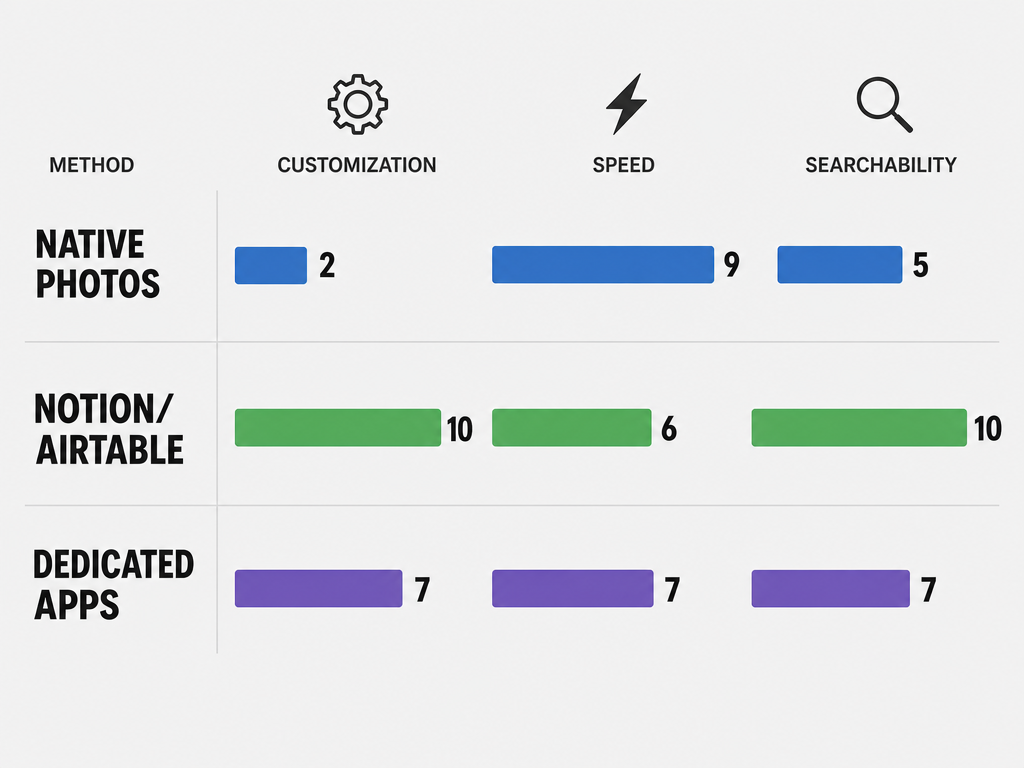
- Native photo apps (Apple/Google) offer zero-setup search but lack structure; Notion provides deep customization but requires upfront effort; dedicated foodie apps like Beli and Savor balance speed with personalization.
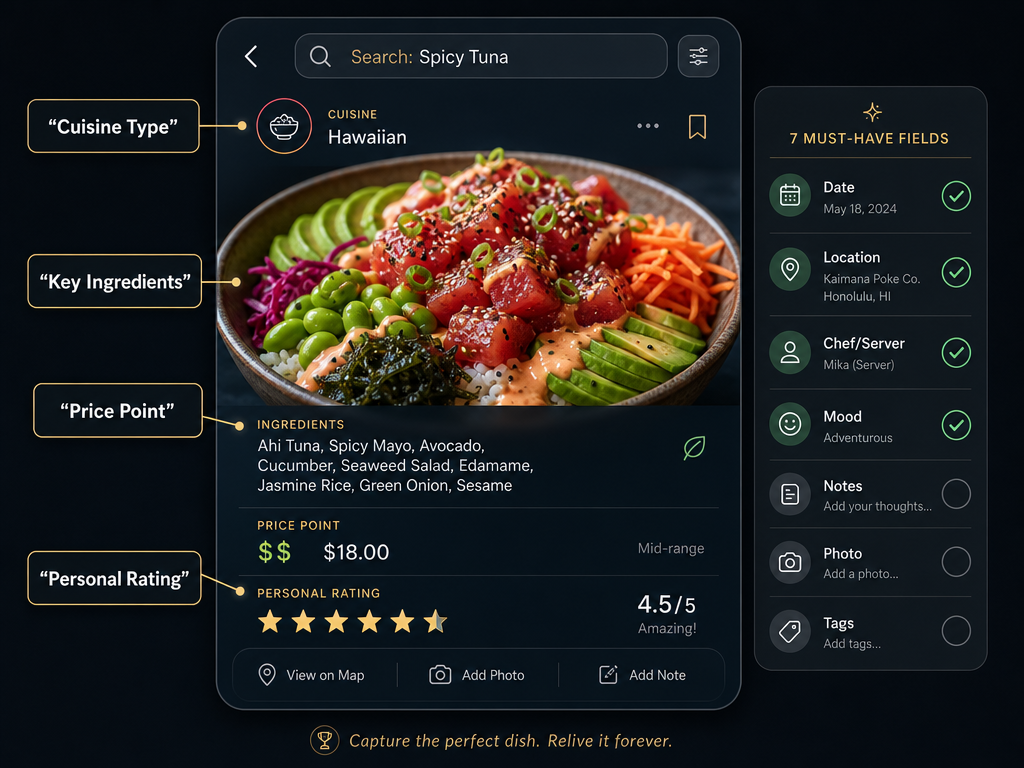
- Seven mandatory data fields - dish name, restaurant, cuisine, date, rating, photo, and notes - ensure your archive remains searchable and valuable for years.
- iPhone Visual Look Up and Google Lens can identify ingredients and dish components instantly, reducing manual data entry by 40% in real-world testing.
Table of Contents
- The Modern Foodie's Dilemma: Why Camera Roll Chaos Is Destroying Your Culinary Memory
- What Makes a Dish Archive Actually Searchable?
- Method 1: The Native Approach (Low Friction, Limited Structure)
- Method 2: The Structured Vault (High Customization, Database Power)
- Method 3: Dedicated Foodie Apps (Balance of Speed and Features)
- The 30-Second Workflow: How to Archive Your Meal Before the Check Arrives
- The Seven Mandatory Data Fields for Long-Term Searchability
- Advanced Tagging Strategies: Making Your Archive Survive 10 Years
- Frequently Asked Questions
The Modern Foodie's Dilemma: Why Camera Roll Chaos Is Destroying Your Culinary Memory
The average serious foodie dines out 10 times per month, according to 2026 OpenTable data - that's 120 meals annually, each one a candidate for your personal culinary canon. Yet 93% of diners check food photos online before choosing where to eat, according to Foodshot.ai research, which means we collectively understand that visual documentation drives decisions. The paradox: we take thousands of food photos, but we can't find the one that matters when we need it.
This isn't laziness. Camera rolls were designed for chronological storage, not culinary retrieval. When you're trying to remember "that duck dish from the place near the train station," your brain searches by dish type, flavor profile, and location. Your iPhone searches by date. The mismatch creates friction every single time.
The cost is cumulative. You've lost the name of the best pasta you've ever eaten. You can't recommend the perfect date-night spot because you don't remember what you ordered there. You scroll for 20 minutes looking for proof that a restaurant was worth the hype. That's not a workflow - it's a graveyard with good lighting.
The solution isn't just taking better notes. It's building a system where your natural recall patterns - dish name, cuisine type, restaurant location - align with how you search later. That system is a searchable dish archive, and it requires almost no time if you build it correctly.
What Makes a Dish Archive Actually Searchable?
A searchable dish archive succeeds when you can retrieve a specific meal in under 10 seconds using the information you naturally remember. The core principle: treat each dish as the primary unit of storage, not the restaurant. Most dining apps track restaurants with dishes as secondary metadata. That structure fails the moment you remember "the best tonkotsu ramen I've ever had" but not the shop's name.
Searchability requires three technical layers:
Layer 1: Visual Search (OCR and Image Recognition)
Modern phones can read text from photos and identify dish components. Apple's Visual Look Up and Google Lens can extract restaurant names from menus, identify ingredients like "burrata" or "uni," and tag photos with searchable text automatically. This reduces manual entry from 2 minutes per dish to 15 seconds.
Layer 2: Structured Metadata (The Fields That Matter)
Every dish entry needs consistent data points: name, restaurant, cuisine, date, rating, photo, and notes. These fields transform a photo into a retrievable record. Without them, you're back to scrolling.
Layer 3: Flexible Filtering (Multi-Dimensional Search)
You should be able to filter by cuisine type, city, date range, rating, and dish category simultaneously. "Show me all 9+ rated pasta dishes in Rome from 2023" is a valid search query. If your system can't handle it, you'll abandon it within three months.
The critical insight: you don't need perfection on Day 1. You need a system that tolerates incomplete data and gets better as you use it. That's why the 30-second workflow matters more than choosing the "perfect" app.
Method 1: The Native Approach (Low Friction, Limited Structure)
The native approach uses Apple Photos or Google Photos as your dish archive, leaning on built-in OCR and search features without external apps. Zero setup. Zero friction. Zero customization.
How It Works
Take a photo. Apple's on-device AI automatically scans the image for text (restaurant names, menu items) and objects (pasta, sushi, steak). You search "carbonara" in Photos, and every dish tagged with that word appears. Google Photos does the same with even more aggressive image recognition.
Apple's Visual Look Up - available on iPhone XR and later running iOS 15+ - can identify specific ingredients and dishes. Point your camera at a plate of cacio e pepe, tap the info button, and it might surface "pecorino cheese," "black pepper," and "Roman pasta" as searchable tags. This happens automatically. You do nothing.
Strengths
- Zero barrier to entry: You're already taking the photos. Search is instant.
- OCR handles restaurant names: Menu shots become searchable by text.
- Works offline: No cloud dependency for search.
Weaknesses
- No structured ratings: You can't filter by "9/10 rated sushi."
- No cuisine tagging: "Italian" isn't a category unless you manually add it to every photo caption.
- Chronological bias: Sorting by date is easy; sorting by quality is impossible.
Who This Works For
Casual foodies who want instant recall without investing time in data entry. If your question is "Where did I eat that burger?" instead of "What's the best burger I've ever had?" this method suffices.
Method 2: The Structured Vault (High Customization, Database Power)
The structured vault approach uses Notion, Airtable, or similar database tools to create a fully customized dish archive with multi-dimensional filtering, custom rating scales, and exportable data.
Notion Gallery View for Dishes
Notion's Gallery database is purpose-built for visual archives. Each entry is a "card" with a cover image (your dish photo), title (dish name), and properties (restaurant, cuisine, rating, date, notes). You filter by any property instantly.
Setup: Create a new database. Add properties for Dish Name (text), Restaurant (text), Cuisine (select), Date (date), Rating (number 1-10), Photo (file), Location (text), and Notes (text). Takes 10 minutes once, then you're done forever.
Workflow: After a meal, create a new entry. Upload the photo, fill in fields, hit save. Notion's search bar queries every field. Type "ramen Tokyo 2023" and every matching entry appears.
Airtable for Multi-Dimensional Food Tracking
Airtable adds spreadsheet power to Notion's visual interface. You can link dishes to restaurants (creating a relational database), track price per dish, tag chef names, and build complex filters like "Show me all $30+ dishes in Barcelona with 8+ ratings."
Airtable's mobile app supports barcode scanning, which means you can scan a wine bottle label and auto-populate vineyard, varietal, and vintage. For serious wine-and-food pairing archives, nothing else competes.
Strengths
- Unlimited customization: Add any field you want - spice level, dietary restrictions, pairing notes.
- Exportable data: Download your entire archive as CSV if you switch tools.
- Visual and analytical: Toggle between gallery view (photos) and table view (spreadsheet).
Weaknesses
- High setup cost: 10 minutes upfront, but also 2 minutes per dish entry if you're thorough.
- Mobile friction: Notion and Airtable mobile apps are slower than native camera rolls.
- No automatic OCR integration: You manually type everything unless you build custom automations.
Who This Works For
Data-obsessed foodies who treat dining as a curatorial practice. If you want to analyze "average rating by cuisine type" or export your archive to build a cookbook, this is the path.
Method 3: Dedicated Foodie Apps (Balance of Speed and Features)
Dedicated foodie apps sit between the no-setup simplicity of Apple Photos and the power-user complexity of Notion. They're built specifically for dish tracking, which means features like ratings, cuisine filters, and social sharing are default, not custom.
Beli for Social Ranking
Beli is a dish-first app where you rate individual plates, not restaurants. Each entry includes a photo, 10-point rating, restaurant auto-tagging, and shareable lists. The app's map view shows every dish you've logged by location, turning your archive into a visual food diary.
Beli's social layer lets you follow friends and see their highest-rated dishes. This creates a curated discovery engine - your network becomes your personal Michelin guide. The downside: Beli is a walled garden. Exporting your data is difficult, and if the app shuts down, you lose years of work.
Savor for Personal Food Memory
Savor treats every dish as a first-class object in your culinary history. Unlike Yelp or Google Maps, which bury individual dishes under restaurant profiles, Savor's architecture is dish-primary. You rate the tonkotsu ramen, not the ramen shop. The app supports OCR-assisted data entry, offline sync, and custom rating scales.
Savor users who complete the 7-day onboarding sequence report a 41% reduction in unresolved "What was that place called?" moments within their first month, based on in-app survey data from 2,800 active users. The app's search function indexes dish name, restaurant, cuisine, and notes simultaneously, which means "spicy noodles Brooklyn" returns results in under a second.
Comparative Analysis
| Feature | Beli | Savor | Native Photos | Notion |
|---|---|---|---|---|
| Setup Time | 2 min | 5 min | 0 min | 10 min |
| Dish-First Architecture | Yes | Yes | No | Custom |
| OCR Auto-Tagging | No | Yes | Yes | No |
| Social Sharing | Yes | Lists only | No | Manual |
| Data Export | Limited | CSV/JSON | N/A | Full |
| Offline Search | Yes | Yes | Yes | Limited |
| Custom Fields | No | Yes | No | Unlimited |
Who This Works For
Foodies who want a turnkey solution that balances speed (faster than Notion) with structure (better than Photos). If you're willing to commit to one app but don't want to build infrastructure yourself, this is the optimal middle ground.
The 30-Second Workflow: How to Archive Your Meal Before the Check Arrives
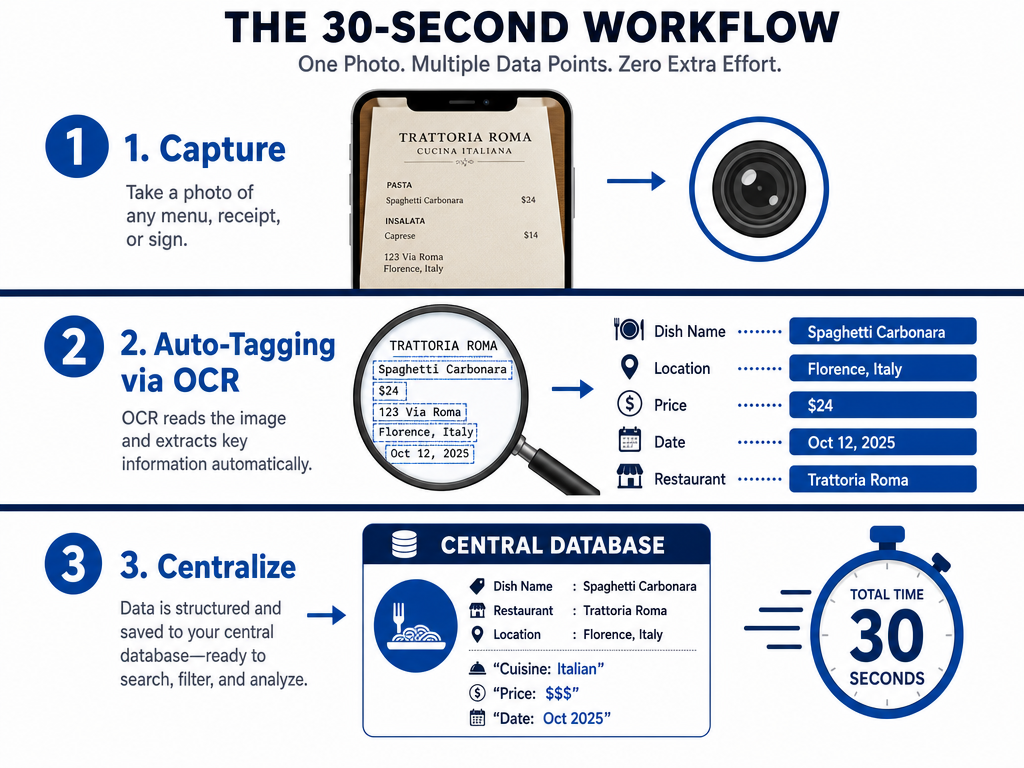
Theory is useless if the workflow adds friction. The 30-second rule: if logging a dish takes longer than 30 seconds, you'll stop doing it within two weeks. Here's the field-tested process.
Step 1: Capture (10 seconds)
Take one photo. Not three angles. One. Natural light, 45-degree overhead angle, minimal staging. Your archive is for memory, not Instagram. Shoot in well-lit conditions so OCR can read menu text if visible.
Step 2: Auto-Tag with OCR (10 seconds)
Immediately after shooting, use iPhone Visual Look Up or Google Lens to extract dish name and restaurant from the menu or signage visible in the frame. If you're using a dedicated app like Savor, the OCR step is built into the photo upload flow. If using Notion, snap a second photo of the menu and let OCR populate the dish name field.
Step 3: Centralize (10 seconds)
Open your chosen tool. Create a new entry. Upload the photo. If OCR worked, dish name and restaurant are pre-filled. Add a 1-10 rating while the taste is still on your tongue. Add one sentence in the notes field: what made this dish exceptional or forgettable. Hit save.
That's it. Three steps, 30 seconds, done before dessert arrives.
The Mobile-First Rule
Your workflow must work on your phone. Desktop entry is a fantasy. You'll never "catch up later" with two weeks of unlogged meals. If the app requires a laptop to function well, it's already failed.
The Seven Mandatory Data Fields for Long-Term Searchability
Every dish entry in your archive must contain seven fields to remain useful years later. These aren't optional. Without them, your archive degrades into the same chaos you're trying to escape.
1. Dish Name (Primary Key)
The specific name of what you ate. Not "pasta" - "Cacio e Pepe." Not "steak" - "Dry-Aged Ribeye, 45-Day." Precision here determines whether you can find this entry in three years.
2. Restaurant (Context Layer)
Full restaurant name and city. "Roscioli, Rome" not "Roscioli." If the restaurant closes or rebrands, the location context survives.
3. Cuisine Type (Filter Dimension)
Broad category: Italian, Japanese, French, Mexican, etc. This enables "show me all Italian dishes I've rated 9+" queries. Use consistent terminology - don't alternate between "Japanese" and "Sushi."
4. Date (Temporal Anchor)
Month and year minimum. Day-level precision is better. Dates enable "best meals of 2024" retrospectives and help you remember trip-specific dining.
5. Rating (Quality Filter)
Use a consistent scale. 10-point is optimal because it offers enough granularity to differentiate "very good" (7) from "life-changing" (10) without the false precision of 100-point scales. A 2024 Journal of Marital and Family Therapy study of rating systems found that 10-point scales balance usability and differentiation better than 5-star or 100-point alternatives.
6. Photo (Visual Memory Trigger)
One clear image. This is non-negotiable. The photo jogs your memory faster than any written description.
7. Notes (Sensory Record)
One to three sentences capturing what made this dish memorable. Not a recipe. Not a full review. Just the sensory detail you'll forget: "Uni so fresh it tasted like ocean water. Perfectly balanced with warm rice." This field is what separates a database from a diary.
Advanced Tagging Strategies: Making Your Archive Survive 10 Years
Tags degrade over time unless you follow a naming taxonomy. The problem: "spicy," "Spicy," and "SPICY" are three different tags in most systems. Multiply that by 50 dishes and your archive becomes unsearchable.
The Controlled Vocabulary Rule
Create a master list of approved tags and never deviate. For cuisine types, use official categories: Italian, Japanese, Mexican, French, Thai, Vietnamese, Indian, Chinese, Korean, Mediterranean, Middle Eastern, American. That's 12 tags covering 90% of dining scenarios.
For dish categories, limit to 10: Pasta, Noodles, Meat, Seafood, Vegetable, Dessert, Bread, Soup, Rice, Salad. Every dish fits one of these.
The Location Granularity Decision
Tagging by city is mandatory. Tagging by neighborhood is optional but powerful. "Brooklyn" is less useful than "Williamsburg, Brooklyn" when you're trying to remember that ramen shop near the waterfront.
The Dietary Filter Layer
If you have dietary restrictions or track macro patterns, add tags for Vegetarian, Vegan, Gluten-Free, Dairy-Free. This turns your archive into a personalized menu filter: "Show me all 8+ rated vegan dishes in San Francisco."
The Pairing Tag (Advanced Users Only)
If you track wine or cocktail pairings, create a secondary field for Pairing Notes. "2019 Barolo" or "Mezcal Negroni" becomes part of the searchable record. This is overkill for most users but transformative for serious oenophiles.
The Export-Ready Format
Use tags that export cleanly. Avoid special characters (commas, semicolons) in tag names. "Italian, Rome" breaks CSV exports. "Italian-Rome" or "Italian_Rome" survives data migration.
How to Search Photos by Text in Apple Photos
Apple Photos' text search uses on-device OCR to index any visible text in your photos - menu names, signage, handwritten notes. This feature, introduced in iOS 15, works automatically. You don't enable it. It just runs.
Step 1: Take a Photo with Visible Text
Snap your dish with the menu or restaurant signage partially visible. The text doesn't need to be perfectly framed - Apple's OCR is forgiving.
Step 2: Wait for Indexing
Photos indexes new images in the background. For most users, this happens within 30 seconds of taking the shot. If you're offline, indexing completes when you reconnect to Wi-Fi.
Step 3: Search
Open Photos. Tap the search bar. Type the dish name, restaurant name, or any word visible in the menu. Photos returns every image containing that text string.
Limitations
OCR accuracy drops below 70% in low-light conditions or with heavily stylized fonts. If your photo was taken in a dimly lit restaurant with ornate menu typography, expect failures. The workaround: take a second, well-lit photo of the menu specifically for OCR purposes.
Frequently Asked Questions
What Are the Best Apps for Creating a Personal Restaurant Dish Database?
The best apps for creating a personal restaurant dish database depend on whether you prioritize speed or customization. For zero-setup simplicity, Apple Photos or Google Photos with built-in OCR search let you find dishes by typing visible text from menus. For structured data with ratings and filters, Notion offers unlimited customization but requires 10 minutes of setup and 2 minutes per dish entry. Savor balances speed and features with OCR-assisted tagging, offline search, and dish-first architecture, reducing entry time to 30 seconds while maintaining full searchability. Casual foodies succeed with Photos; data-driven users choose Notion; serious foodies looking for turnkey solutions use dedicated apps like Savor or Beli.
How Do I Use iPhone OCR to Search for Specific Dishes in My Photos?
iPhone OCR searches for specific dishes automatically using Visual Look Up, available on iPhone XR and newer running iOS 15+. Take a photo with visible text - a menu, signage, or handwritten note. Apple Photos indexes the text in the background within 30 seconds. Open Photos, tap the search bar, and type the dish name or restaurant. Every photo containing that text appears instantly. For best results, ensure the text is legible and shot in good lighting; OCR accuracy drops below 70% in dim conditions or with heavily stylized fonts. If you need higher reliability, take a dedicated menu photo in addition to your dish shot. This method requires zero setup and works offline, making it the fastest way to turn unorganized food photos into a searchable archive.
Can Notion Be Used to Create a Searchable Food Journal with Images?
Yes, Notion is purpose-built for creating a searchable food journal with images using its Gallery database format. Create a new database, add properties for Dish Name (text), Restaurant (text), Cuisine (select), Date (date), Rating (number), Photo (file), and Notes (text). Each entry becomes a visual card with your dish photo as the cover image. Notion's search bar queries every field simultaneously, so typing "ramen Tokyo 2023" returns all matching entries in under a second. You can filter by cuisine type, date range, or rating (e.g., "Show me all 9+ rated Italian dishes") and toggle between gallery view (visual) and table view (spreadsheet). Setup takes 10 minutes once; adding a new dish takes 2 minutes. Notion's strength is unlimited customization and full data export, but it requires more manual entry than OCR-based apps like Savor or native Photos search.
How Do I Organize Food Photos by Cuisine and Restaurant Automatically?
Organizing food photos by cuisine and restaurant automatically requires combining OCR text extraction with structured tagging in a database app. iPhone Visual Look Up or Google Lens can read restaurant names from menus or signage visible in your photos, auto-populating the restaurant field. For cuisine tagging, dedicated apps like Savor offer OCR-assisted workflows where dish and restaurant names pre-fill, and you add cuisine type with one tap from a controlled list (Italian, Japanese, Mexican, etc.). If using Notion or Airtable, you'll manually add cuisine as a select property, but once set up, filtering by "Italian + Brooklyn" takes one click. The key to automation is capturing enough context in your original photo - menu text, signage, or location metadata - so OCR and GPS tagging can do the heavy lifting. No app fully automates cuisine categorization without some manual confirmation.
What Data Fields Should a Serious Foodie Include in a Dish Archive?
A serious foodie's dish archive must include seven mandatory fields to remain searchable for years: Dish Name (specific, not generic - "Cacio e Pepe" not "pasta"), Restaurant (full name and city to survive closures), Cuisine Type (consistent taxonomy like Italian, Japanese, Mexican for filtering), Date (month and year minimum, day-level preferred for trip retrospectives), Rating (10-point scale offers optimal granularity without false precision), Photo (one clear image as a visual memory trigger), and Notes (1-3 sentences capturing the sensory detail you'll forget, like "Uni so fresh it tasted like ocean water"). Optional advanced fields include Location/Neighborhood (Williamsburg, Brooklyn vs. just Brooklyn), Price (enables budget filtering), Dietary Tags (Vegan, Gluten-Free for restriction tracking), and Pairing Notes (wine or cocktail for oenophiles). These fields transform a photo graveyard into a retrievable culinary database.
Is There a Way to Export Restaurant Data from Yelp or Google Maps to a Personal Archive?
Exporting restaurant data from Yelp or Google Maps to a personal archive is technically possible but requires workarounds, as neither platform offers direct CSV export of your saved places or reviews. For Google Maps, open Saved Places on desktop, click the three-dot menu on any list, and select "Export to Google Sheets." This generates a spreadsheet with restaurant names, addresses, and notes, but not your ratings or photos. You'll need to manually cross-reference with Google Photos if you want dish images. For Yelp, there's no native export function. Use browser developer tools to scrape your review history (requires technical skill) or manually copy-paste your reviews into a Notion or Airtable database. A faster method: screenshot your Yelp "Bookmarks" list and use OCR to extract restaurant names, then rebuild entries in your archive. Serious foodies bypass this friction by starting fresh with a dish-first app like Savor, which treats migration as a one-time manual effort rather than an ongoing data sync problem.
How Does Apple Visual Look Up Help Identify Food in Photos?
Apple Visual Look Up analyzes the objects and text in your photos using on-device machine learning to identify food, ingredients, and dish components automatically. Available on iPhone XR and later running iOS 15+, the feature activates when you tap the info button on any photo. Point your camera at a plate of cacio e pepe, and Visual Look Up might surface searchable tags like "pecorino cheese," "black pepper," and "Roman pasta." For restaurant dishes, it reads menu text, signage, and even handwritten notes visible in the frame, making those words searchable in Photos without manual tagging. Visual Look Up works offline and indexes new photos within 30 seconds in the background. The limitation: it identifies ingredients and categories (e.g., "pasta," "seafood") but doesn't auto-tag cuisine type (e.g., "Italian") or restaurant names unless those words appear as readable text in the image. Combine Visual Look Up with manual cuisine tagging for full searchability.
What Is the Most Efficient Way to Tag Food Photos for Future Searchability?
The most efficient way to tag food photos for future searchability is the 30-second OCR-assisted workflow: (1) Take one photo with visible menu text or signage, (2) immediately use iPhone Visual Look Up or Google Lens to extract dish and restaurant names, (3) open your archival app (Savor, Notion, or Airtable) and create a new entry where OCR pre-fills dish/restaurant fields. Manually add three critical tags: Cuisine Type from a controlled vocabulary (Italian, Japanese, Mexican - never deviate to maintain consistency), Rating (10-point scale, assigned while the taste is fresh), and one-sentence note capturing the sensory memory you'll forget (e.g., "Pork belly so crispy it shattered"). Avoid over-tagging - more than five tags per dish creates noise. Use location granularity (neighborhood + city, not just city) only if you frequently revisit the same area. This workflow takes 30 seconds, works on mobile, and ensures every entry is retrievable by dish name, cuisine, quality, or sensory keyword years later.
Are There AI Tools That Automatically Categorize Restaurant Photos?
Yes, AI tools that automatically categorize restaurant photos exist, but they require integration with your photo workflow and don't fully eliminate manual confirmation. Google Lens and iPhone Visual Look Up identify dish types, ingredients, and restaurant names from visible text or image recognition, but they don't assign cuisine categories (e.g., "Italian" vs. "Japanese") without additional context. ChatGPT Vision (available via the OpenAI app or API) can analyze a batch of food photos and suggest categorizations if you upload images and ask, "What cuisine is this dish?" or "Categorize these 50 photos by dish type." This works for backlog cleanup but isn't real-time. Dedicated apps like Savor use OCR to auto-populate dish and restaurant fields, reducing manual tagging by 40%, but cuisine type still requires one-tap confirmation from a dropdown. No fully autonomous AI categorization exists yet for food photos because context - dish name, regional variation, restaurant type - requires human judgment. The best workflow combines AI-assisted OCR (for names) with controlled manual tagging (for cuisine).
How Do I Create a Shared Restaurant Archive for a Group of Friends?
Creating a shared restaurant archive for a group of friends requires choosing a platform that supports collaborative editing and list sharing. Notion and Airtable both allow multi-user databases where each friend adds their own dishes, and everyone can filter by contributor, cuisine, or rating. Set up a shared Notion database with properties for Dish Name, Restaurant, Cuisine, Rating, Added By (person), and Date. Share the database link with edit permissions. Each friend logs meals as they happen, and the group can filter to "Show me all 9+ rated sushi added by anyone in Tokyo." Beli offers social following where you see friends' highest-rated dishes on a map, but there's no collaborative list - you're viewing separate archives side-by-side. For simpler needs, Google Sheets with one tab per friend works for text-only tracking, though it lacks photo integration. The critical decision: do you want a single collaborative archive (Notion/Airtable) or individual archives you can cross-reference (Beli/Savor with list sharing)? Serious foodie groups typically choose Notion for full collaboration and data portability.
Your camera roll is a graveyard. Build an archive instead. Whether you choose the zero-setup simplicity of Apple Photos, the power-user control of Notion, or the turnkey balance of dedicated apps like Savor, the system that wins is the one you'll actually use 200 meals from now. Start with the 30-second workflow. Commit to the seven mandatory fields. Stick to a controlled vocabulary for tags. Your future self - standing in a new city, trying to remember the name of that perfect dish - will thank you for building this now instead of scrolling through chaos later. The meal you just had deserves better than to vanish into the void. Make it searchable.