
How to Remember Restaurants by Best Dish: The Ultimate Tracking System
John the smoothie monster
John lives for smoothie bowls and cold-pressed juices. He uses Savor to remember his best blends.
How to Remember Restaurants by Best Dish: The Complete System for Serious Foodies You had an extraordinary bowl of ramen in Tokyo three months ago. It changed...
How to Remember Restaurants by Best Dish: The Complete System for Serious Foodies
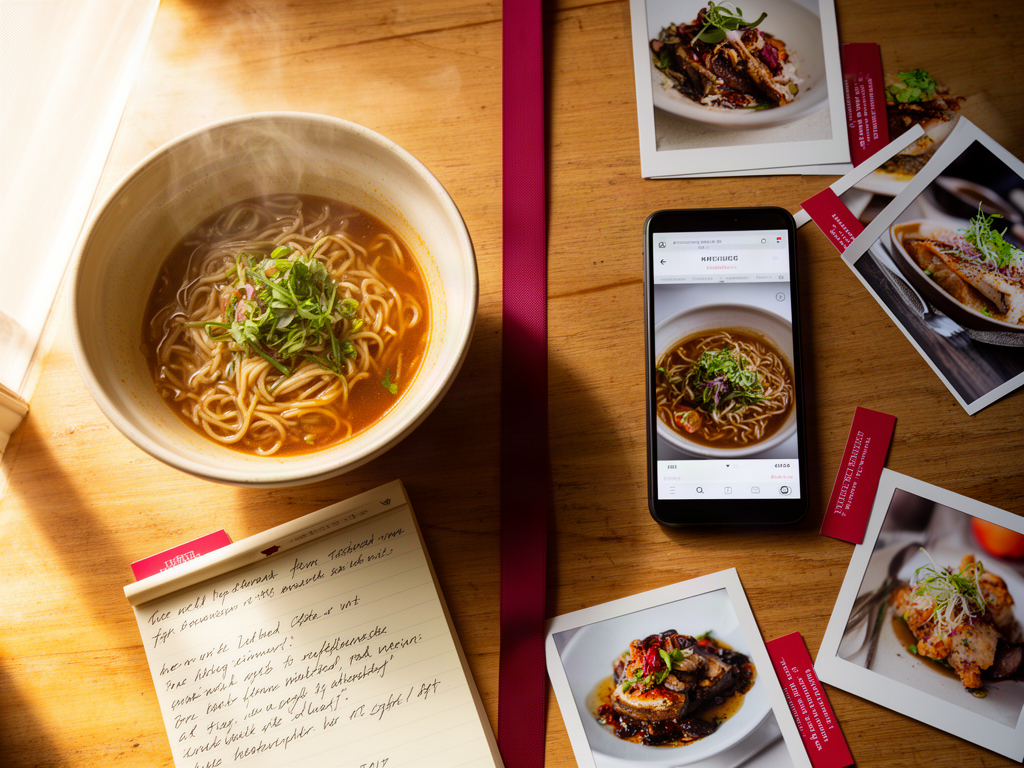
You had an extraordinary bowl of ramen in Tokyo three months ago. It changed how you think about umami. You remember the moment, the texture, even the temperature of the broth hitting your tongue. But you can't remember the name of the restaurant, what neighborhood it was in, or which specific dish you ordered.
This isn't a memory problem. It's a system problem.
Average time spent searching a camera roll for a specific food photo is 3 minutes. Three minutes of scrolling through 2,000 unorganized images just to answer the question "What was that place called?" Meanwhile, dedicated tracking apps reduce photo search time from minutes to 3 seconds with metadata tags.
The gap between those two numbers is the difference between treating your dining history like a chaotic camera roll and treating it like a searchable culinary database. This guide shows you how to build that database using three distinct systems: native phone features most people ignore, dedicated dish-tracking apps, and custom-built archives for those who want total control.
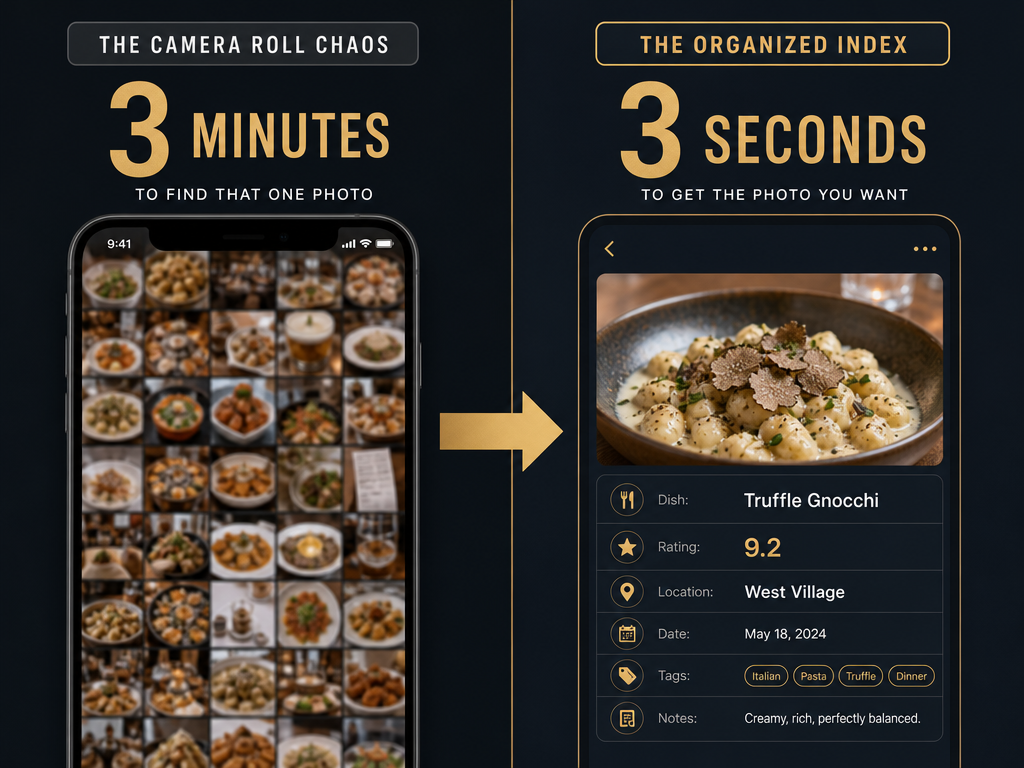
Table of Contents
- The Camera Roll Graveyard Problem
- Why Dish-Level Memory Matters More Than Restaurant Ratings
- System 1: The Native Power User Method
- System 2: Dedicated Dish-Tracking Apps
- System 3: The Custom Builder Approach
- How to Rate Dishes Like a Professional Critic
- Which System Is Right for You
- Frequently Asked Questions
The Camera Roll Graveyard Problem
Your camera roll isn't a filing system. It's a chronological stream of everything you've photographed: street signs, receipts, screenshots, and somewhere in there, the best duck confit you've ever tasted.
The fundamental problem isn't that you forgot to take a photo. You took the photo. The problem is retrieval. When you're planning a return trip to Paris in six months, you need to answer specific questions:
- Which bistro had the perfect steak frites?
- What was the name of that dessert with the burnt sugar crust?
- Did I like the duck better at the Marais spot or the one near Notre-Dame?
Your camera roll can't answer these questions without a manual archaeological dig. A 4-star Yelp review of the restaurant doesn't help either, because it averages everyone's experience across every dish. The carbonara might be a 10 while the chicken parm is a 2, but that single star rating tells you nothing useful.
Building a searchable personal restaurant library isn't about nostalgia or Instagram curation. It's about creating a decision-making tool that saves you from ever ordering the wrong dish twice.
Why Dish-Level Memory Matters More Than Restaurant Ratings
Restaurant reviews operate at the wrong level of granularity. A 4.5-star rating tells you the crowd liked the place, but crowds don't have your palate. They don't know you hate cilantro or that you're chasing the specific texture of hand-pulled noodles from that one night in Xi'an.
The unit of culinary memory isn't the restaurant. It's the dish.
Consider two identical scenarios:
- You visit a highly-rated Italian restaurant. The cacio e pepe is transcendent. The saltimbocca is aggressively mediocre.
- You visit a 3-star diner. The pancakes are forgettable. The corned beef hash is the best thing you've eaten all month.
Generic restaurant ratings flatten both experiences into noise. A dish-first system captures signal: "Order the cacio e pepe at Restaurant X. Skip everything else." That specificity is the difference between a useful memory and a vague impression.
Professional food critics don't review restaurants as monoliths. They dissect menus dish by dish, evaluating technique, ingredient quality, and execution independently. You can apply the same framework to your personal dining history without the formal training or the 2,000-word essays. You just need the right scaffolding.
System 1: The Native Power User Method
Most people treat their iPhone like a point-and-shoot camera from 2008. They don't realize iOS has built-in text recognition, location tagging, and album organization that can transform photos into searchable records without downloading a single app.
Step 1: Enable Location Services for Photos
Open Settings > Privacy & Security > Location Services > Camera. Set it to "While Using the App." Every photo you take now carries GPS coordinates. That means every dish photo is automatically tagged with the restaurant's location, which makes filtering by city or neighborhood trivial later.
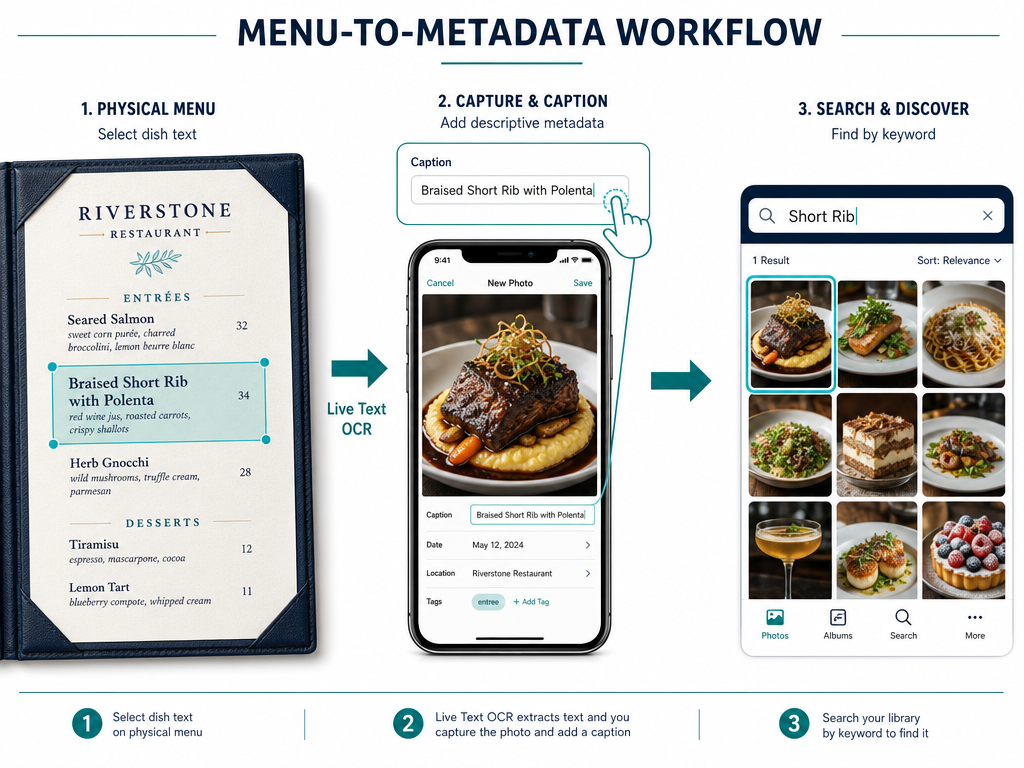
Step 2: Use Live Text to Digitize Menu Descriptions
This is the move most people miss. When you're about to photograph a dish, first photograph the menu description. Then:
- Open the photo of the menu in your Photos app
- Tap and hold on any text in the image
- iOS will highlight the text automatically
- Tap "Copy" to grab the dish name and description
Now swipe up on your dish photo and paste that text into the caption field. You've just embedded the restaurant's own description directly into your photo's metadata. When you search your photos for "duck confit" or "miso glaze" six months from now, iOS will surface that image instantly.
Step 3: Create a Smart Album for Restaurant Dishes
Go to Albums > See All > New Album. Name it "Best Meals" or "Dishes to Remember." Manually add your favorite dish photos as you take them. This gives you a curated collection separate from the chaos of your main camera roll.
For power users who want automation, create a Shortcut that triggers when you arrive at a restaurant (using location-based automation). The Shortcut can prompt you to log the dish name, add a quick rating, and automatically save the photo to your Best Meals album with timestamped metadata.
Limitations of the Native Method
This system works beautifully if you're disciplined about tagging photos in the moment. It falls apart if you forget to add captions or if you're trying to compare dishes across multiple restaurants retroactively. There's no built-in way to score dishes numerically, and you can't share your archive with friends who want your recommendations before their own trips.
The native method is best for solo diners who want a private system and don't mind manual data entry. If you dine out more than three times per week, you'll likely want something more automated.
System 2: Dedicated Dish-Tracking Apps
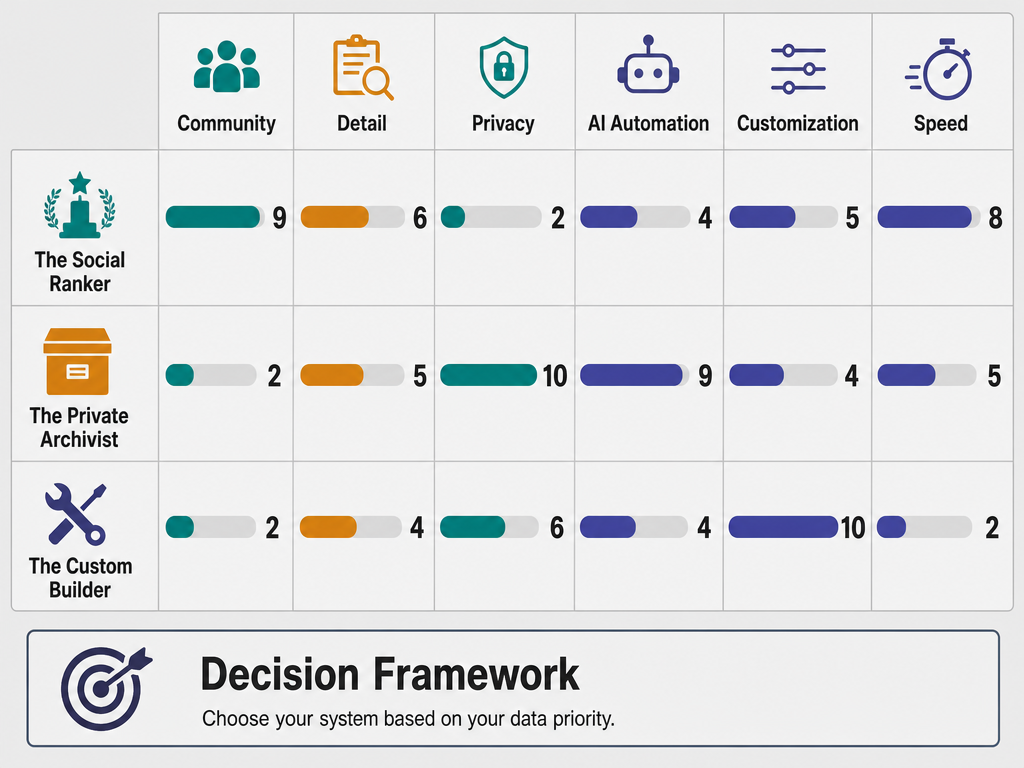
This is where the ecosystem gets interesting. A new category of apps has emerged in the past two years specifically designed to track dishes, not restaurants. They treat individual plates as the primary unit of record, with features like AI dish recognition, ELO-based ranking systems, and friend networks built around specific menu items.
Savor: The Private Archivist
Savor is an iOS-exclusive dish-tracking app that launched in 2026 with a privacy-first philosophy and AI-powered dish recognition. You photograph a plate, and the app attempts to identify what you're eating using computer vision trained on restaurant menus.
Core workflow:
- Take a photo of your dish
- The app auto-detects the dish type (e.g., "Cacio e Pepe")
- Add location, price, and a quick rating
- Write private tasting notes if you want more detail
Everything is stored locally on your device by default. Your dining history isn't used to train algorithms or sold to third parties, which makes it appealing to people who don't want their food preferences monetized.
The app's search is genuinely useful. You can filter by dish category ("Show me every ramen I've rated above 8"), by city ("What did I eat in Tokyo last year?"), or by ingredient ("Find all dishes with uni"). This is the kind of query a camera roll can't answer without hours of manual scrolling.
One limitation: the AI recognition sometimes misidentifies dishes, especially fusion or regional variations. If you order a Korean-Mexican bibimbap taco, the app might tag it as "bibimbap" or "taco" but miss the fusion element entirely. You'll need to manually correct the tag, which adds friction.
For more on how to track your favorite dishes using dedicated apps, including detailed app comparisons, see our full guide.
Beli: The Social Ranker
Beli takes a completely different approach. Instead of private archiving, it's built around social discovery and a gamified ranking system called ELO scoring, borrowed from chess.
How ELO works in Beli: The app shows you two dishes you've tried and asks, "Which was better?" You pick one. Over time, the algorithm builds a ranked list of every dish you've eaten, with the highest-rated items surfacing at the top. You're not scoring on an absolute scale (8/10, 7/10). You're making relative comparisons, which many people find easier and more honest.
Beli is public by default. Your profile shows your top-rated dishes, and your friends can see what you loved in any given city. This makes it powerful for collaborative trip planning. If five of your friends have been to Rome, you can aggregate their top pasta dishes and build a hit list before you go.
The downside is exactly what you'd expect from a social platform: score inflation. People hesitate to rank a dish poorly if they know their network will see it, especially if they're at a friend's restaurant. Privacy advocates also dislike that your entire dining history becomes a public portfolio unless you manually adjust settings.
Phissy: AI-Generated Reviews
Phissy sits somewhere between a dish tracker and a ghostwriter. You take a photo, add a quick star rating, and the app uses AI to write a full paragraph review in your voice. Over time, it learns your vocabulary and style, so the generated reviews sound more personalized.
Phissy Pro premium subscription pricing ranges from $1.99 to $49.99 depending on the tier, with higher tiers unlocking features like unlimited photo storage and advanced search filters.
The concept is clever for people who want the depth of written reviews without the time investment. The AI can surface patterns you didn't notice consciously ("You've mentioned 'perfectly crispy skin' in eight different duck dishes this year").
The limitation is obvious: these aren't your words. They're approximations. If you're building a personal taste archive you'll reference for years, you might want the actual memory of what you thought, not a language model's interpretation of what you probably thought.
Yummi: The Map-First Traveler
Yummi organizes your dining history as a visual "Foodprint" on a map. Every meal becomes a pin. Zoom into Tokyo, and you see clusters of ramen shops you've visited. Zoom into Paris, and your bistro trail across the Marais appears.
This spatial approach is particularly useful for frequent travelers who think in terms of neighborhoods rather than dish categories. When you're planning a return trip to Barcelona, you can see exactly which blocks you've already covered and which you haven't explored.
Yummi's weakness is that it emphasizes visits over dish quality. You might have eaten at 50 restaurants in a city, but the app doesn't prominently surface which specific dishes were actually worth remembering. It's better as a breadth tracker than a depth tracker.
Memolli: The Offline Minimalist
Memolli markets itself as a "No AI" food journal. Everything is manual. You photograph a dish, type the name, add custom fields for wine pairings or beer selections, and write freeform notes. The app works entirely offline, with no cloud sync unless you explicitly enable it.
This appeals to people who want total control and distrust automated systems. There's no algorithm trying to guess what you ate or suggest what you should try next. It's just a structured notepad with good photo organization.
The tradeoff is speed. Manual entry takes longer, and you can't leverage AI shortcuts. If you're logging 4-5 meals per week, the time cost adds up. Memolli works best for people who dine out less frequently but want to document each meal with care.
For a comprehensive comparison of the best apps to organize food photos by restaurant, including detailed feature breakdowns, see our dedicated guide.
System 3: The Custom Builder Approach
If you've read this far and thought "None of these apps do exactly what I need," you're ready for the custom builder route. This is the option for people who want complete flexibility, even if it requires more setup time.
Notion: The Database Maximalist
Notion is a blank canvas. You can build a restaurant database with any structure you want:
- Tables with columns for dish name, restaurant, city, date, rating, price
- Linked databases that connect dishes to restaurants to cities
- Gallery views that show all your dish photos in a grid
- Filtered views like "Show me only 9/10 or higher dishes" or "Show me everything I ate in Japan"
The advantage is infinite customization. If you want to track which dishes pair well with specific wines, you can add a wine column. If you want to rank dishes by texture separately from flavor, you can add texture and flavor columns and sort independently.
The disadvantage is that Notion wasn't designed for rapid mobile input. If you're standing in a restaurant trying to log a dish while it's still hot, opening Notion, navigating to your database, creating a new entry, and uploading a photo feels cumbersome compared to a purpose-built app.
Notion works best as a desktop-first system where you batch-input meals at the end of each week, or for people who genuinely enjoy database design and want to build something hyper-specific to their needs.
Airtable: The Relational Data Nerd
Airtable is what you use if Notion feels too simple. It's a proper relational database disguised as a spreadsheet. You can create one table for dishes, another for restaurants, another for cities, and link them with foreign keys so every dish automatically inherits its restaurant's location data.
This is overkill for most people. But if you're logging hundreds of meals per year and want to run queries like "Show me all pasta dishes I've rated above 8 in Italian cities with Michelin stars," Airtable can do it.
The mobile app is clunky for photo input, which is a recurring problem with custom builders. You'll end up using a dedicated food photography app to capture images, then manually importing them into Airtable later. That friction is acceptable if you care more about data integrity than speed, but it's a real cost.
Google Sheets + Google Photos: The Scrappy Minimalist
This is the lowest-tech custom solution. Create a Google Sheet with columns for dish name, restaurant, city, date, and rating. Take photos with your phone's native camera app (with location services enabled). Manually enter each dish into the spreadsheet with a link to the photo in Google Photos.
It's tedious. It's inelegant. But it works, it's free, and you have complete control over your data. You can export the sheet as a CSV at any time and move it to a different system if you want. Nothing is locked into a proprietary app that might shut down in three years.
The real question with custom builders is whether you're building a system or procrastinating by designing one. If you spend more time tweaking your database schema than actually logging meals, you've optimized the wrong thing.
For additional context on building a personal restaurant library using flexible tools, see our advanced guide.
How to Rate Dishes Like a Professional Critic
Remembering which dishes you loved is only useful if you can articulate why you loved them. A numerical rating without context degrades into meaningless noise over time. Did you give that ramen an 8/10 because the broth was exceptional, or because you were starving and anything warm would've tasted good?
Professional critics use structured evaluation frameworks. You don't need to adopt their exact criteria, but borrowing the structure makes your ratings more consistent and useful.
The Five-Point Sensory Framework
Break each dish into five sensory dimensions:
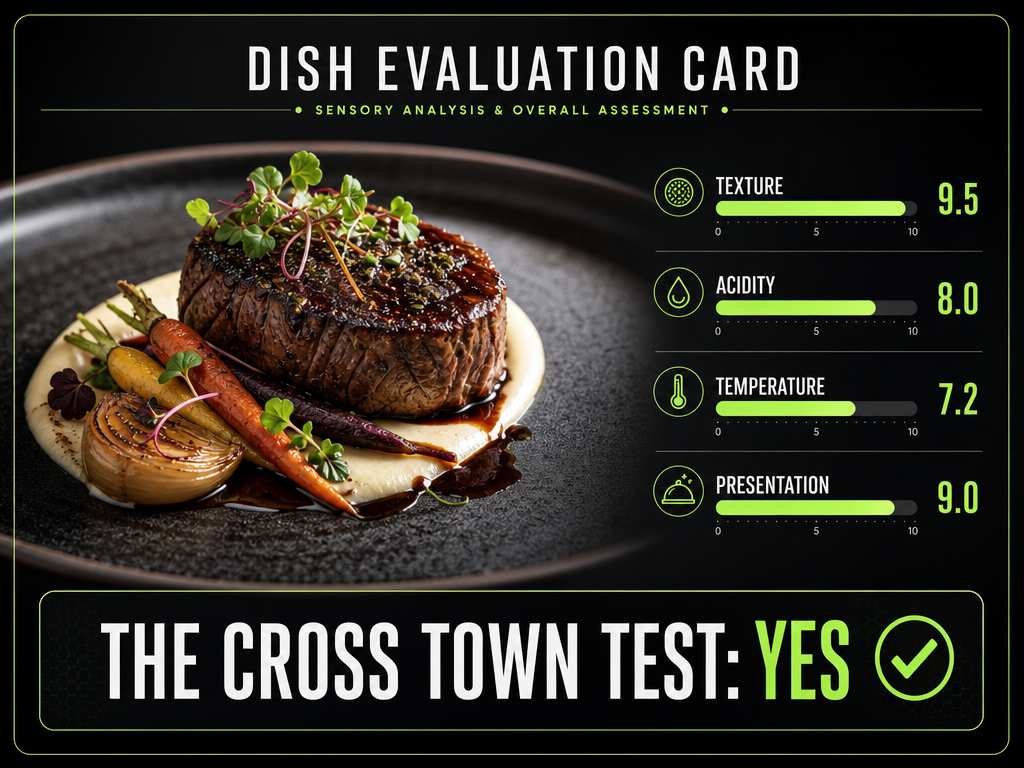
- Flavor: Is it balanced? Does it have depth? Are there distinct layers, or is it one-note?
- Texture: Is there contrast? Does it match the intended style (e.g., crispy skin on duck, silky texture in panna cotta)?
- Temperature: Is it served at the right temperature for the dish type? Does temperature shift as you eat?
- Presentation: Does it make sense visually? Is it distracting or does it support the eating experience?
- Aroma: Does the smell add to the dish, or is it neutral/off-putting?
Score each dimension independently on a 1-10 scale, then average them for a composite score. This prevents a single strong element (incredible flavor) from masking a weak element (terrible texture).
The Cross-Town Test
Here's the simplest evaluative heuristic: Would you cross town in traffic specifically to order this dish again?
This cuts through all the noise. You're not comparing it to an abstract standard or to other dishes. You're asking whether this specific plate justifies real inconvenience. If the answer is yes, it's a keeper. If the answer is "maybe if I'm already in the neighborhood," it's not.
This test also forces you to differentiate between dishes you enjoyed in the moment versus dishes with lasting appeal. The pasta you had on a perfect evening in Rome might score high emotionally, but would you seek it out again, or was the context doing half the work?
Avoid Comparative Inflation
When you first start rating dishes, you'll probably hand out 9s and 10s generously. Everything good feels like a 9. After logging 50 meals, you'll realize your scale has inflated and the ratings are meaningless.
Calibrate early. Decide what a 10/10 represents in your personal system. Is it the single best version of a dish you've ever had? Is it the best you expect to have in the next five years? Lock in that definition and stick to it. Reserve 10s for dishes that genuinely belong in your lifetime top 20.
Similarly, don't avoid the low end of the scale. If a dish was genuinely bad, rate it a 3 or 4. Those data points are just as valuable as the 9s, because they prevent you from wasting time and money on repeat mistakes.
For a deeper dive into scoring systems used by food critics, including a 100-point protocol for pizza, see our professional framework guide.
Which System Is Right for You
The best system is the one you'll actually use. That sounds like useless advice, but it's the most important filter. A theoretically perfect Notion database that you abandon after two weeks is worse than a simple iPhone photo album you maintain for years.
Use the Native Power User method if:
- You're already disciplined about organizing photos
- You want zero learning curve and no new apps
- You dine out 1-2 times per week and manual tagging feels manageable
- Privacy is non-negotiable and you don't want data in third-party servers
Use a dedicated dish-tracking app if:
- You dine out 3+ times per week and need automation
- You want AI-assisted features like dish recognition or smart search
- You value a polished mobile experience over raw customization
- You're willing to trust a third-party app with your dining data (check their privacy policy carefully)
Use a custom builder if:
- You have specific data needs that off-the-shelf apps don't address
- You genuinely enjoy designing systems and don't mind upfront setup time
- You want to run complex queries across your dining history
- You plan to maintain this system for 10+ years and want full data portability
Most people will land somewhere between the Native method and a dedicated app. The custom builder route is really for database enthusiasts or people with professional reasons to track meals at scale (food writers, recipe developers, nutrition coaches).
The worst outcome is analysis paralysis: spending three months researching the perfect system while your camera roll accumulates another 500 unsearchable food photos. Pick something, start logging meals, and adjust later if it doesn't fit. You can always migrate data between systems. You can't recover lost time.
Frequently Asked Questions
Can I track meals on my iPhone without downloading an app?
Yes. Use the native Photos app with location services enabled, manually add captions to dish photos using Live Text to copy menu descriptions, and create a dedicated album for your best meals. This gives you searchable, location-tagged records without third-party software. The tradeoff is manual effort: you'll need to add captions and organize photos consistently.
What is the best app for tracking specific dishes I've eaten?
It depends on your priorities. Savor offers private, AI-powered dish recognition with searchable metadata. Beli uses a social ELO ranking system to compare dishes you've tried. Phissy generates AI-written reviews from your photos and ratings. Yummi organizes meals as a visual map by location. Each app optimizes for different use cases: privacy, social discovery, automated writing, or geographic tracking.
How do I use iPhone Live Text to copy menu descriptions into my photo metadata?
Open Settings > Privacy & Security > Location Services > Camera and enable location tagging. When dining, photograph the menu first. Open that photo in your Photos app, tap and hold on the text in the image, select "Copy," then swipe up on your dish photo and paste the text into the caption field. iOS will now find that image when you search for keywords from the menu description.
What's the difference between rating restaurants and rating individual dishes?
Restaurant ratings average experiences across an entire menu, which obscures useful information. A 4-star restaurant might have one exceptional dish and three mediocre ones. Dish-level ratings let you record that the cacio e pepe is a 10/10 while the chicken parm is a 5/10, so you know exactly what to order (and what to skip) on your next visit.
How do I organize food photos by restaurant without losing them in my camera roll?
Create a dedicated album in your Photos app specifically for restaurant dishes. Enable location services so every photo auto-tags with GPS coordinates. For more structure, use a dedicated dish-tracking app that automatically organizes photos by restaurant, dish type, city, and rating, making retrieval nearly instantaneous compared to scrolling through thousands of unsorted images.
Can AI recognize what dish is in my photo?
Some apps like Savor use computer vision trained on restaurant menus to identify common dishes from photos. Accuracy varies: standard dishes like sushi or pasta are recognized reliably, but fusion cuisine, regional variations, or plated presentations that obscure key ingredients often require manual correction. AI recognition works best as a starting point, not a fully automated solution.
Does Apple have its own food tracker?
No. Apple doesn't make a dedicated food tracking app, but iOS includes features you can repurpose: location-tagged photos, Live Text for digitizing menu descriptions, and manual album organization. Third-party apps integrate with Apple Health to sync meal data, but you'll need to choose a dedicated app if you want structured dish tracking beyond basic photo organization.
What is the easiest food tracking app to use?
For pure simplicity, Savor and Beli have the lowest friction: photograph a dish, add a quick rating, and the app handles the rest. For people who want zero new software, the native iPhone Photos app with manual captions is technically simpler but requires more discipline. Ease depends on whether you value speed of input or depth of tracking.
How can I organize food photos by restaurant?
Use location services to auto-tag photos with GPS data, then search by restaurant name or neighborhood in your Photos app. Dedicated apps like Savor, Beli, or Yummi automatically group photos by restaurant and let you filter by name, cuisine type, city, or date. If you're using a custom system like Notion, you'll need to manually link each dish entry to its corresponding restaurant record.
How do I remember what my friends ordered at a restaurant?
Social dish-tracking apps like Beli let friends tag each other in meals and share their ratings. If you're using a private system, photograph your friends' dishes alongside your own and add their names to the photo captions. Some apps like Phissy allow collaborative meal logs where multiple people contribute notes to the same dining experience.
What are some good meal tracking apps?
For serious foodies: Savor (private, AI-powered), Beli (social, ELO ranking), Phissy (AI-generated reviews), Yummi (map-based), and Memolli (offline, no AI). For nutrition tracking: MyFitnessPal and apps using the Nutritionix database, which includes verified nutrition data for 1,000+ chain restaurants and 800+ brands. The best choice depends on whether you're tracking for memory, social discovery, or dietary goals.
Is MyFitnessPal still the best food tracker?
MyFitnessPal remains strong for calorie counting and macro tracking with its extensive database, but it's optimized for nutrition goals, not culinary memory. If your goal is to remember which dishes you loved and where you had them, dedicated dish-tracking apps like Savor or Beli are better suited. MyFitnessPal is best for people who need to log nutrients, not savor experiences.
Your dining history is one of the richest data sets you'll generate in your life. The difference between a camera roll graveyard and a searchable culinary archive is just a system. Pick one that matches how you actually eat, not how you imagine you'll eat. Start logging today, and in six months when someone asks "Where should I eat in Tokyo?", you'll have an answer backed by your own documented experience, not crowd-sourced noise.