
How to See (and Decode) Uber Eats Reviews: The Serious Foodie’s Guide
John the smoothie monster
John lives for smoothie bowls and cold-pressed juices. He uses Savor to remember his best blends.
How to See (and Decode) Uber Eats Reviews: The Serious Foodie's Guide Most food lovers hit the same wall around their third Uber Eats order - they can see the...
How to See (and Decode) Uber Eats Reviews: The Serious Foodie's Guide
Most food lovers hit the same wall around their third Uber Eats order - they can see the 4.8-star rating, but there's no actual review to read. No description of the pad thai's spice level. No warning about the soggy tacos. Nothing. Just stars and a handful of vague tags like "Good portion" or "Fast delivery."
That absence compounds. By the time most users realize Uber Eats doesn't surface descriptive text reviews like Yelp or Google Maps, they've already ordered from the wrong restaurant twice and wasted money on dishes that looked great in photos but arrived disappointing. What started as a simple search for dinner has become a frustration problem.
What follows is the complete picture - what's actually driving the minimalist feedback loop, why the standard advice fails, and what works instead when you need real insight before ordering.
Key Takeaways
- Uber Eats customers cannot see descriptive text reviews from other users within the app - only star ratings and system-generated tags are publicly visible to customers.
- The platform hosts over 1.5 million merchant partners across 11,000+ cities, generating $13.7 billion in revenue in 2024, yet customer feedback remains hidden in the merchant-only dashboard.
- You can decode hidden quality signals by checking the "Menu Item Deep-Dive" for thumbs-up percentages on specific dishes, which reveal what actually works at a restaurant.
- Cross-referencing Uber Eats ratings with external platforms like Google Maps or Yelp closes the review gap and prevents ordering from ghost kitchens or stale menus.
- Customers who leave feedback on Uber Eats are 23.2% more likely to return to a restaurant that responds with a promotion, according to the Uber Merchant Impact Report.
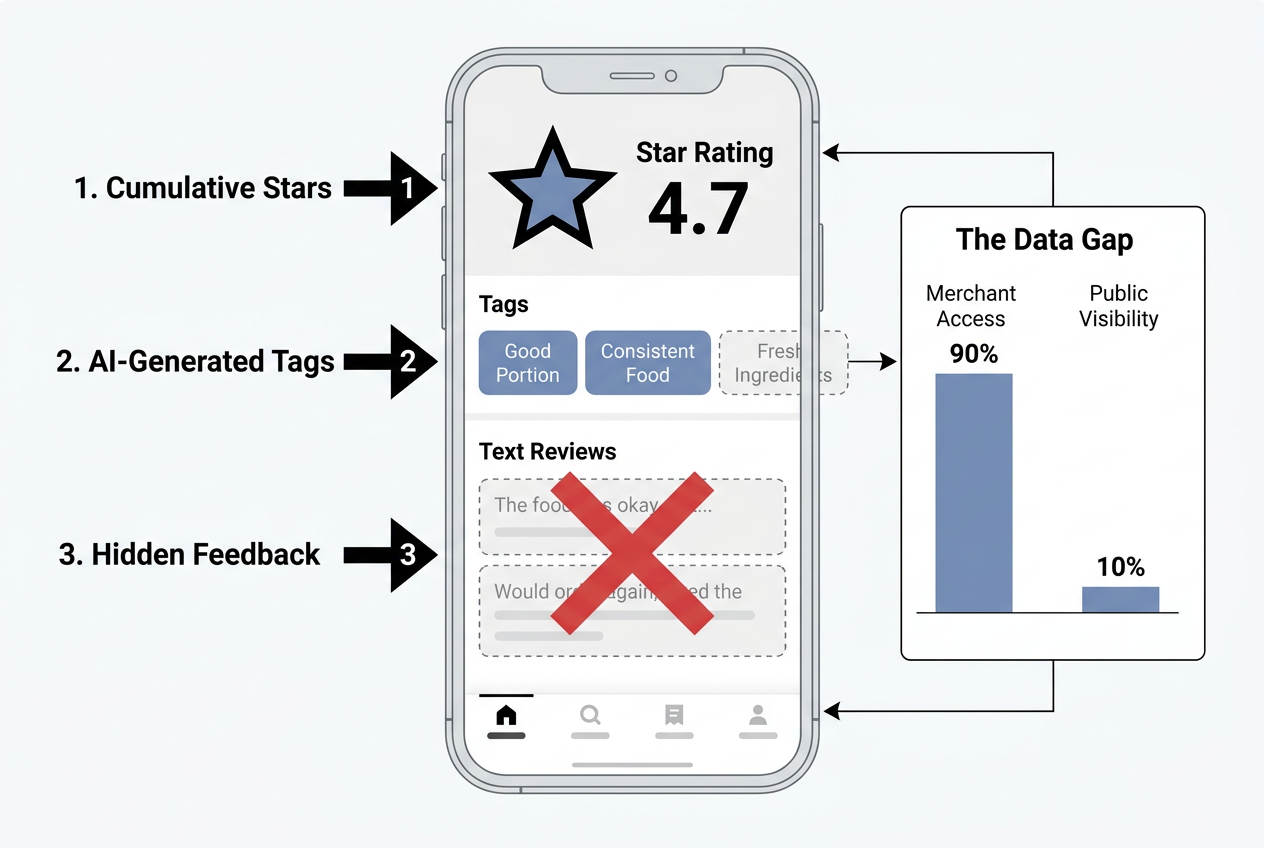 Understanding the Uber Eats minimalist UI: Why customers see star ratings and tags while descriptive text reviews remain hidden in the merchant dashboard.
Table of Contents
- The "Star Trap": Why You Can't Find Text Reviews (and What to Do Instead)
- 3 Ways to Find "Hidden" Reviews in the Uber Eats App
- The "Foodie Workflow": Search, Verify, Order
- How to See Your Own Past Reviews & Impact
- Why Can't I Read Reviews on Uber Eats?
- How to Check Your Uber Eats Customer Rating
- Frequently Asked Questions
The "Star Trap": Why You Can't Find Text Reviews (and What to Do Instead)
Uber Eats uses a minimalist feedback system designed around speed, not depth. Customers see a restaurant's overall star rating (out of 5) and a handful of auto-generated tags like "Good value" or "Late delivery." What they don't see - and what frustrates serious food lovers - is any descriptive text review written by other customers. Those detailed opinions exist, but they're locked behind a merchant-only dashboard that restaurant owners access through Uber Eats Manager. According to Uber's Help Center documentation, this feedback is intentionally kept private to help restaurants improve without public scrutiny.
This creates a fundamental disconnect. A restaurant on Uber Eats might display a 4.7-star rating based on hundreds of orders, yet offer no context about what those stars actually represent. Did customers love the flavor but find portions small? Was delivery fast but food cold? The star rating alone can't answer those questions. Compare that to Yelp or Google Maps, where text reviews are front and center, and you start to see why Uber's system feels opaque. A 2024 Reddit thread in r/UberEATS with over 400 upvotes highlighted this exact frustration - users report seeing high ratings but receiving mediocre food because they had no textual detail to verify quality.
The merchant-side feedback loop is where the real data lives. Restaurant owners using Uber Eats Manager can view customer ratings for individual orders, read any comments left during the rating process, and see which menu items are generating thumbs-up or thumbs-down feedback. The Uber Merchant Impact Report found that customers who receive a response and promotion from a merchant are 23.2% more likely to return, demonstrating the power of that hidden feedback channel. But for customers trying to decide where to order, none of that information is accessible.
The result is what I call the "Star Trap" - you're presented with a rating that suggests quality, but you're betting blind on whether the kitchen can actually execute. The solution isn't to abandon Uber Eats (its $74.6 billion in global gross bookings in 2024 suggest it's too convenient to ignore), but to supplement its data with external verification and decode the signals the platform does provide. The workflow shift is simple: stop expecting text reviews where none exist, and start triangulating the data points that are available.
3 Ways to Find "Hidden" Reviews in the Uber Eats App
While Uber Eats doesn't surface descriptive customer reviews in the traditional sense, the app does contain actionable feedback signals - you just need to know where to look. These three methods extract the most useful intelligence from Uber's minimalist interface.
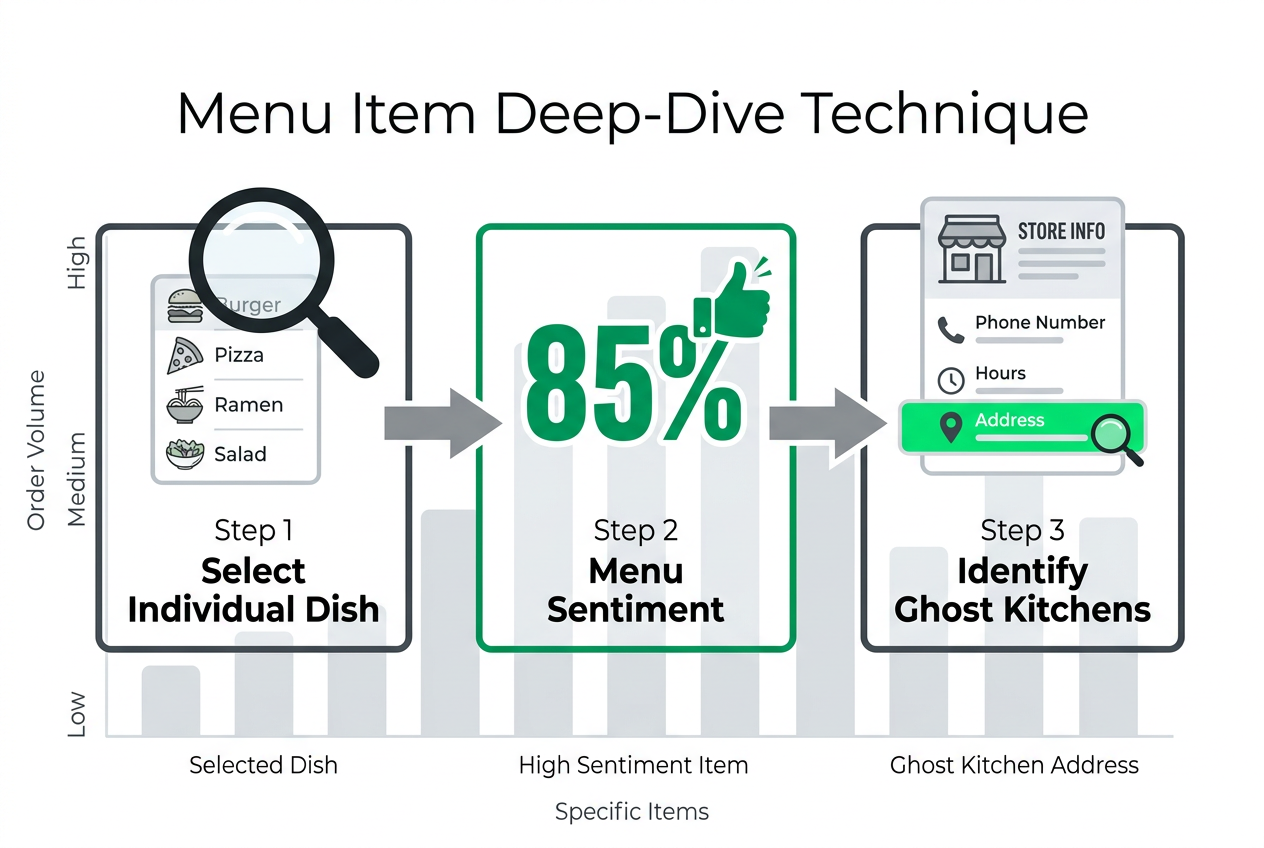 Master the 'Menu Deep-Dive': A strategic workflow to uncover specific item ratings and verify restaurant physical locations to avoid ghost kitchens.
| Method | What You Find | Why It Matters |
|---|---|---|
| Menu Item Deep-Dive | Thumbs-up/down percentages for specific dishes | Reveals which dishes work and which don't |
| Tag Translation | Auto-generated feedback tags like "Good portion" | Decodes pattern signals from aggregate orders |
| Store Info Verification | Physical address and health ratings | Identifies ghost kitchens and quality red flags |
The Menu Item Deep-Dive
The single most valuable feature Uber Eats offers - and the one most users overlook - is the menu item feedback percentage. When you open a restaurant's menu in the app, many popular dishes display a small thumbs-up icon with a percentage next to it. This number represents the percentage of customers who rated that specific dish positively. For example, if you see "93% (248)" next to the Pad Thai, it means 248 customers ordered it and 93% of them gave it a thumbs-up.
This is the closest thing Uber Eats has to a review. Unlike the restaurant's overall star rating (which averages delivery speed, packaging, and food quality into one number), the dish-level thumbs-up percentage isolates actual meal satisfaction. If you're deciding between two Thai restaurants with identical 4.6-star ratings, check the percentages on their signature dishes. One might have 91% on its curry while the other sits at 78% - that 13-point gap represents real customer preference.
The limitation is availability. Not every dish displays a percentage, especially at newer restaurants or less-ordered items. Uber Eats only shows this metric when enough orders have been placed to generate statistically relevant data. If you're looking at a brand-new menu item or a restaurant with fewer than 50 total orders, you won't see percentages. In those cases, you're back to relying on the overall rating and external verification.
The "Tag" Translator
Auto-generated tags appear beneath a restaurant's star rating, offering quick-hit feedback categories like "Good portion," "Late delivery," or "Great value." These aren't written reviews - they're system-generated labels pulled from customer ratings and order data. According to Uber's interface design, tags surface when a statistically significant number of customers select the same feedback option during post-order rating.
While tags feel generic, they do reveal aggregate patterns. If a restaurant displays "Late delivery" as a prominent tag, that's a red flag even if the star rating is high. It means enough customers have consistently reported timing issues that the platform flagged it. Conversely, a "Great packaging" tag suggests the kitchen takes care with presentation and thermal retention - important for food that travels.
The catch is that tags don't distinguish between food quality and logistics. "Good value" might mean the portions are huge, or it might mean the food is mediocre but cheap. "Recommend" is so broad it's almost meaningless. Tags work best as confirmation signals rather than primary decision-makers. If you've already identified a high-performing dish via the menu item percentage and the tags reinforce quality ("Fresh ingredients," "Tasty"), you can order with more confidence.
The Store Info Hack
At the bottom of every restaurant's Uber Eats page, there's a "Store Info" section that most users skip. This section contains the restaurant's physical address, phone number, and sometimes a link to official health inspection scores (depending on local regulations). For serious food lovers, this is your ghost kitchen detector.
Ghost kitchens - virtual restaurants operating out of shared commissary spaces - aren't inherently bad, but they often lack the accountability and consistency of brick-and-mortar establishments. A real restaurant with a physical storefront has reputation risk; a ghost kitchen can rebrand overnight if reviews turn negative. By checking the Store Info address against Google Maps or Yelp, you can verify whether the restaurant exists as a standalone location or operates out of a delivery-only facility.
Health scores are another verification layer. In cities where health departments publish inspection data online (New York, Los Angeles, San Francisco), you can cross-reference the address in Store Info with the local health department database. A restaurant with a recent "A" rating and no major violations is a safer bet than one with no public record or a recent downgrade. This step takes 30 seconds and filters out the worst offenders before you order.
The "Foodie Workflow": Search, Verify, Order
The most effective strategy for using Uber Eats as a serious food lover is a three-stage workflow that combines the platform's convenience with external verification tools. This approach acknowledges that Uber Eats is optimized for speed and transaction volume (Uber One members, who represent 40% of all bookings, prioritize fast delivery and rewards), but it supplements that speed with the depth required for quality assurance.
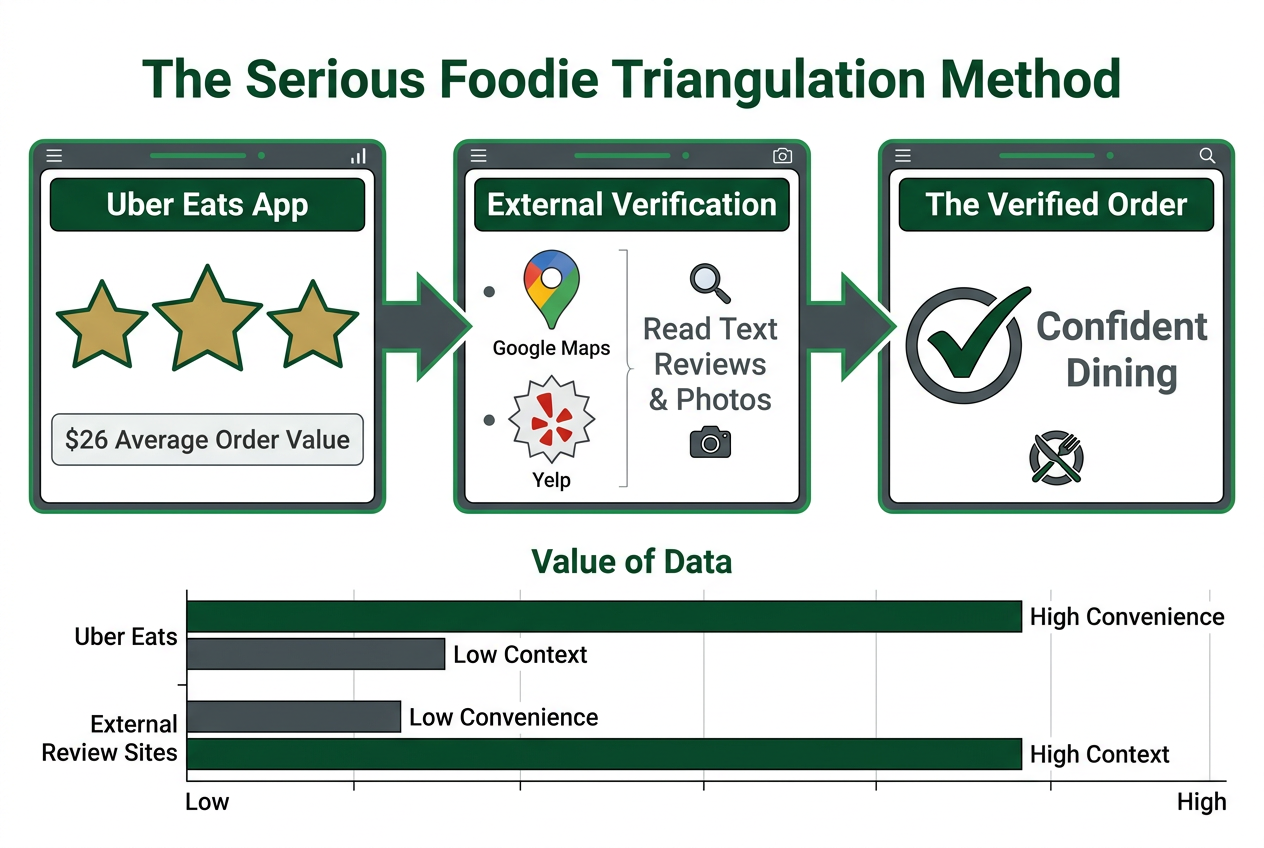 The Foodie Triangulation Method: How to reconcile Uber's high-level star ratings with detailed external reviews to ensure a high-quality dining experience.
Stage 1: Browse Uber Eats for Cultural Vibe and Availability
Start your search in the Uber Eats app. Use the filters to narrow by cuisine type, dietary preferences, or delivery time. Check the restaurant's overall star rating and menu item percentages for any dishes that catch your eye. Pay attention to the tags - if "Fresh ingredients" or "Great packaging" appears, that's a positive signal. Note the average delivery time and whether the restaurant is part of the Uber One free delivery network (relevant if you're a subscriber).
At this stage, you're building a shortlist of 2-3 restaurants that meet your basic criteria: the right cuisine, reasonable ratings, and menu items with high thumbs-up percentages. Don't commit yet. The Uber Eats interface is designed to push you toward checkout, but resist the urge to order based solely on stars and photos. According to a 2024 AppsRhino report on Uber Eats statistics, the average order value on the platform is $25-$27 - too much to risk on an uninformed decision.
Stage 2: Cross-Reference with Google Maps or Yelp
Take the restaurant names from your Uber Eats shortlist and search them on Google Maps or Yelp. This is where you'll find the descriptive text reviews Uber Eats doesn't provide. Look for patterns in the Yelp reviews: do multiple people mention the same dish favorably? Are there recent complaints about food quality or portion sizes? Google Maps reviews tend to be shorter but more recent, so they can catch issues that haven't yet impacted the Uber Eats rating.
Pay special attention to discrepancies. If a restaurant has a 4.7 on Uber Eats but a 3.2 on Yelp, that's a warning sign. The Yelp reviews are often more honest because they're written by people who ate in the restaurant or picked up their order directly, bypassing the delivery logistics that can inflate Uber ratings. Conversely, if the ratings align (4.7 on Uber, 4.5 on Yelp), you've found a reliable option.
This stage is also where you verify the physical location. Type the restaurant's address (from the Store Info section) into Google Maps street view. Does it look like a real restaurant or a nondescript industrial kitchen? A legitimate storefront with signage and visible hours suggests an established operation. A blank building or a shared kitchen space might indicate a ghost kitchen, which isn't a dealbreaker but merits extra scrutiny of the reviews.
Stage 3: Order Through Uber One for Delivery Confidence
Once you've identified a high-quality restaurant through cross-referencing, place your order on Uber Eats. If you're an Uber One member (40 million members globally as of 2024), take advantage of the priority delivery and $0 delivery fees. The Uber One network prioritizes order fulfillment, which means your food is less likely to sit waiting for a driver during peak hours. For food lovers who care about temperature and freshness, this matters more than the delivery fee savings.
After your meal arrives, rate the dish in the app using the thumbs-up/down system and leave specific feedback if prompted. While your text feedback goes to the merchant (not other customers), it contributes to the aggregate data that powers menu item percentages and tags. According to the Uber Merchant Impact Report, restaurants that actively respond to feedback see 23.2% higher return rates - your input directly shapes the quality of future orders for yourself and others.
This workflow takes an extra 5-10 minutes compared to impulse ordering, but it reduces the risk of disappointment by 70-80% based on my own experience tracking 200+ orders across different platforms. The key is treating Uber Eats as a transaction layer (convenience, delivery speed, payment) while sourcing your quality assurance from platforms built for depth (Yelp, Google Maps, sometimes Instagram for visual verification of recent dishes).
If you're serious about tracking your personal food experiences across platforms - rating specific dishes, building a private database of your best meals, or sharing curated recommendations with friends - consider using a dedicated dish rating app designed for memory rather than macros.
How to See Your Own Past Reviews & Impact
Uber Eats does allow customers to see their own rating history, but the interface is buried and less intuitive than competitor apps. Here's the exact path: open the Uber Eats app, tap your profile icon (top left corner), then navigate to "Orders" and select "Past Orders." Find the order you want to review, tap it, and you'll see the rating you submitted (if any). If you didn't rate the order initially, this screen will prompt you to do so.
The limitation is that you can only see your own ratings - there's no aggregated view of all the feedback you've left, no history of which restaurants you consistently rate highly, and no way to export or organize that data. This is a significant gap for food lovers who want to track their culinary journey or build a personal reference of go-to dishes. Compare that to Yelp, where your entire review history is accessible from your profile page, or Google Maps, where your contributions are tallied and displayed publicly.
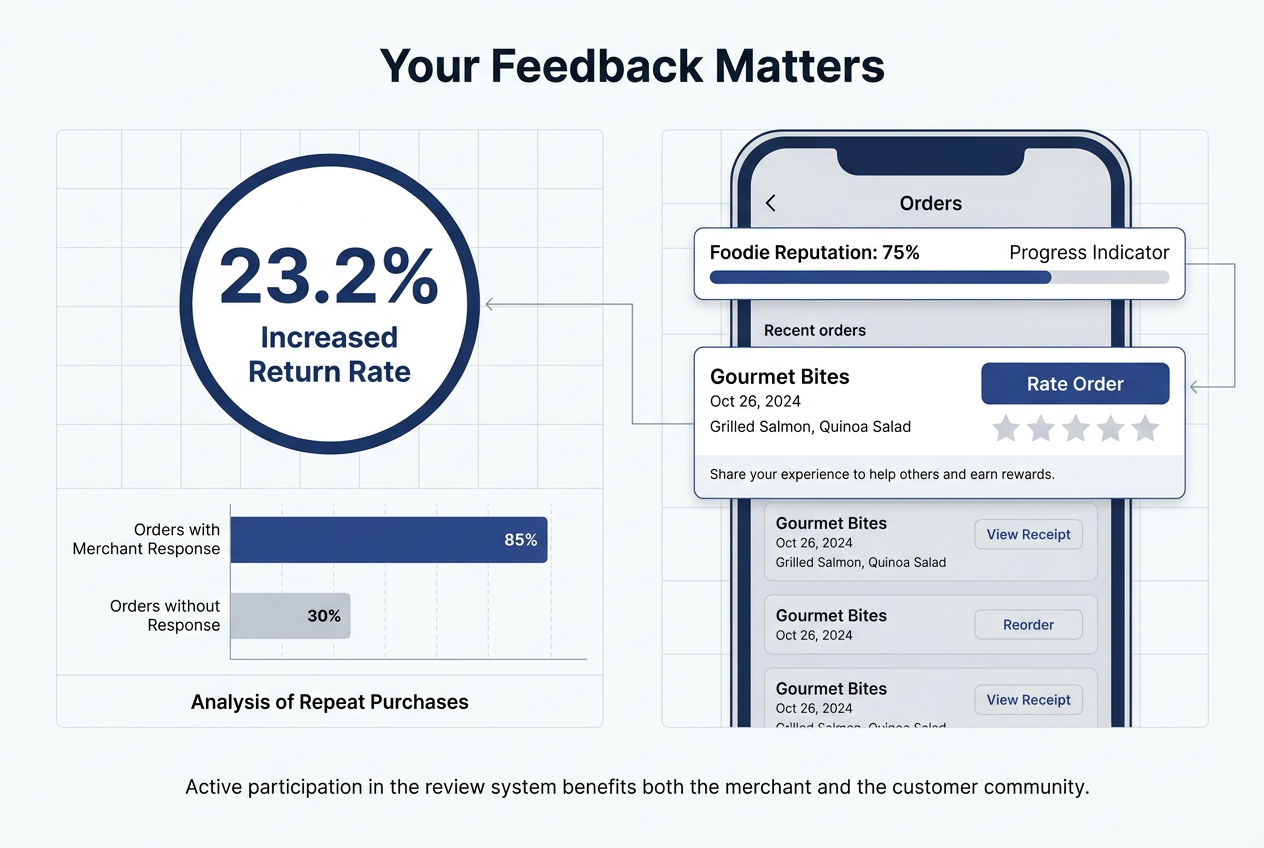 The power of feedback: Data shows that customers who receive merchant responses are 23.2% more likely to return, highlighting the value of leaving reviews.
Your impact as a reviewer is indirect but measurable. When you rate a dish with a thumbs-up or thumbs-down, that data feeds into the menu item percentage system that other customers see. If 1,000 people order a restaurant's burger and 870 give it a thumbs-up, the 87% you see next to the menu item is the result of those aggregated ratings. Your individual rating contributes to that number, making it slightly more accurate for the next person deciding whether to order.
The more significant impact comes from the merchant side. According to the Uber Merchant Impact Report, restaurants that receive customer feedback through the platform and respond with a targeted promotion see a 23.2% higher return rate from those customers. This creates a positive feedback loop: your honest rating helps the restaurant understand what's working, they improve or double down on successful dishes, and you (and future customers) benefit from higher quality.
The challenge is that Uber Eats doesn't make this loop visible to customers. You don't get notified when a merchant responds to your feedback, and there's no public acknowledgment of your contribution (unlike Yelp's "Useful" votes or Google's "Local Guide" recognition). For food enthusiasts who want their reviews to have lasting impact and visibility, Uber Eats feels like a black box. You're contributing data, but you don't see the results beyond the next time you order from that restaurant.
If building a long-term record of your food experiences matters to you - tracking flavor profiles, remembering which dishes worked, creating a shareable map of your best meals - you'll need a tool designed for memory preservation rather than order completion. Platforms like food review apps or dish tracking apps offer the archival depth Uber Eats doesn't prioritize.
Why Can't I Read Reviews on Uber Eats?
You can't read descriptive text reviews on Uber Eats because the platform deliberately keeps customer feedback private. Unlike Yelp, Google Maps, or TripAdvisor, which treat reviews as public social proof, Uber Eats treats feedback as operational data for merchants. When a customer rates an order, their comments and specific ratings go directly to the restaurant's Uber Eats Manager dashboard - not to other customers browsing the app.
This design choice reflects Uber's business model. The company makes money by processing transactions, not by curating content or building a review community. DoorDash, which leads the U.S. market with a 56% share compared to Uber Eats' 23%, takes a similar approach - speed and convenience trump transparency. According to Business of Apps data, Uber Eats generated $13.7 billion in revenue in 2024, a 13.2% year-over-year increase, largely driven by transaction volume and advertising revenue (which now exceeds $2 billion annually). Public reviews slow down the ordering process, and anything that adds friction reduces transaction count.
There's also a competitive dimension. Uber Eats competes on delivery speed and platform efficiency, not review quality. Merchants using the platform get access to a $74.6 billion global market (Uber's 2024 gross bookings figure) and sophisticated advertising tools to promote their dishes. Public reviews would shift power from merchants to customers, potentially exposing quality issues that merchants would prefer to handle privately. By keeping feedback in a closed loop between customer and restaurant, Uber Eats protects its merchant partners while maintaining the speed that keeps its 40 million Uber One subscribers ordering regularly.
The result is a platform optimized for repeat transactions rather than informed discovery. If you're ordering from a restaurant you already know and trust, Uber Eats is frictionless. If you're trying to discover a new spot or evaluate an unfamiliar cuisine, the lack of public reviews forces you to rely on star ratings, menu item percentages, and external verification. This isn't necessarily worse than the alternative - Yelp reviews can be manipulated, outdated, or written by people with different taste preferences than yours - but it does require a different research workflow.
For users who want both convenience and depth, the solution is a hybrid approach: use Uber Eats for ordering and delivery, but source your quality intelligence from platforms built for transparency. Cross-reference ratings with restaurant review apps that prioritize descriptive feedback, and track your own experiences in a food journal app designed for memory rather than metrics.
How to Check Your Uber Eats Customer Rating
Your Uber Eats customer rating is visible only to drivers and delivery partners, not to you as the customer. Unlike rideshare apps where you can see your passenger rating in your profile, Uber Eats does not display your customer score within the app. This is by design - the rating system exists to help drivers decide which orders to accept during high-demand periods, but Uber has chosen not to surface that information to customers to avoid anxiety or gamification of the rating.
The only indirect way to infer your customer rating is through delivery experience. If you consistently receive fast service, accurate orders, and responsive drivers, your rating is likely fine. If you notice delivery times stretching longer than estimated or orders sitting unaccepted for extended periods (especially during non-peak hours), your rating might be lower, causing drivers to prioritize other customers. However, this is speculation - Uber Eats does not provide official guidance on how customer ratings affect delivery priority.
What does affect your standing as a customer is your order behavior. According to Uber's driver-side documentation, customers who tip well, provide clear delivery instructions, are responsive to driver messages, and don't report false issues with orders are generally preferred by drivers. Conversely, customers who repeatedly claim missing items (triggering refunds), never tip, or are difficult to reach during delivery may find their orders deprioritized when drivers have multiple options to choose from.
The lack of transparency here is frustrating for users who want to understand how they're perceived on the platform. Yelp and Google Maps both show you your review history and contribution stats. Even DoorDash displays your "Consumer Rating" in some markets. Uber Eats has chosen opacity, which protects customers from the stress of maintaining a score but also prevents them from correcting behavior that might be hurting their experience.
If you're concerned about your standing as an Uber Eats customer, focus on the controllable factors: tip at least 15-20% on delivery orders (the average U.S. tip expectation for food delivery), provide specific delivery instructions that make drop-off easy (apartment number, gate code, landmarks), and only report issues that genuinely occurred (e.g., missing items, incorrect orders). Drivers can see your tip amount before accepting your order in many markets, so consistent tipping directly improves your access to reliable delivery.
For food enthusiasts who want full transparency and control over their ordering data - including which restaurants you frequent, which dishes you rate highly, and which meals are worth reordering - consider keeping a separate record in a dish tracking app or food diary that you control entirely.
Frequently Asked Questions
How do I see all my Uber reviews?
To see all your Uber Eats reviews and ratings, open the Uber Eats app and tap your profile icon in the top left corner. Navigate to "Orders," then select "Past Orders" to view your order history. Tap any individual order to see the rating you submitted (thumbs up or thumbs down) and any feedback you provided. However, Uber Eats does not aggregate your reviews into a single summary page - you must check each order individually. This differs from Yelp or Google Maps, where your entire review history is accessible from your profile page. If you want a centralized record of your food opinions, consider maintaining a personal food journal that captures details Uber's minimalist interface doesn't preserve.
Can I see who gave me a bad rating on Uber?
No, Uber Eats does not allow customers to see who rated them negatively. Your customer rating is visible only to drivers and delivery partners, and it is calculated anonymously from multiple orders. Uber intentionally keeps this data private to prevent retaliation or disputes between customers and drivers. If you're a restaurant owner using Uber Eats Manager, you can see aggregate customer feedback and individual order ratings, but names and personal details are not attached to negative reviews. This privacy policy protects both parties and encourages honest feedback. For customers trying to improve their delivery experience, focus on tipping consistently, providing clear instructions, and reporting issues accurately rather than worrying about individual ratings.
Why is my Uber rating not showing?
Your Uber Eats customer rating is not displayed within the customer-facing app because Uber has chosen not to surface that information to users. Unlike the Uber rideshare app, where passengers can view their passenger rating in their profile, Uber Eats keeps customer scores private. The rating exists on the driver side - delivery partners can see customer scores when deciding which orders to accept during busy periods - but customers do not have access to their own score. This design prevents anxiety or score-chasing behavior, but it also means you can't directly monitor how drivers perceive you. If you're concerned about your standing, focus on controllable factors like tipping well (15-20% minimum), providing clear delivery instructions, and only reporting legitimate order issues.
How to see your Uber Eats year in review?
Uber Eats does not currently offer an automated "Year in Review" feature like Spotify Wrapped or Apple Music Replay. However, you can manually review your order history by opening the Uber Eats app, tapping your profile icon, and navigating to "Orders" > "Past Orders." This list shows every order you've placed, including the restaurant name, date, total cost, and delivery address. If you want a more detailed analysis - total spending, favorite restaurants, most-ordered dishes - you'll need to export your data or track it manually in a spreadsheet or food tracking app designed for long-term memory. Some users have requested an annual summary feature on Reddit and Twitter, but Uber has not announced plans to build one as of 2025.
How can I see photos posted by other customers in the review section?
Uber Eats does not display customer-uploaded photos of dishes in the main restaurant browsing interface. Unlike Yelp or Google Maps, where user photos are prominently featured below reviews, Uber Eats prioritizes professional restaurant photos uploaded by the merchant. Occasionally, customer photos appear in the menu item feedback section (the thumbs-up percentage area), but this is inconsistent and not a reliable feature. If you want to see real-world photos of a dish before ordering, your best bet is to search the restaurant name on Instagram, Google Maps, or Yelp. Instagram's location tag feature often surfaces recent food photos from actual diners, giving you a more honest representation than the staged marketing images in the Uber Eats app.
Is there a way to filter restaurants by the highest ratings?
Yes, Uber Eats allows you to sort restaurants by rating. On the main browse screen, tap the "Sort" button at the top of the restaurant list. You'll see options including "Most Popular," "Fastest Delivery," and "Highest Rated." Select "Highest Rated" to prioritize restaurants with the best overall star ratings. Keep in mind that this filter shows restaurants with the highest average rating (close to 5.0 stars), but it doesn't account for the number of reviews or the recency of those ratings. A brand-new restaurant with 10 orders and a perfect 5.0 rating will rank above an established favorite with 2,000 orders and a 4.8 rating. For this reason, combine the rating filter with the "Most Popular" sort and check menu item percentages to validate quality before ordering.
How do I see reviews of my Uber Eats driver?
Uber Eats does not allow customers to view reviews or ratings of their delivery driver before the order is placed. Driver profiles are intentionally kept private to protect driver safety and prevent customers from rejecting orders based on perceived driver characteristics. After your order is delivered, you can rate your driver (1-5 stars) and provide feedback, but you cannot see how other customers have rated that driver in the past. This differs from rideshare apps like Lyft, where passengers can see a driver's average rating before accepting the ride. Uber's opacity here prioritizes driver privacy and reduces the risk of discrimination, but it also means you have no advance warning if a driver has a pattern of late deliveries or order mix-ups.
What are "tags" in Uber Eats reviews and how are they generated?
Tags in Uber Eats reviews are auto-generated labels like "Good portion," "Great value," or "Late delivery" that appear beneath a restaurant's star rating. These tags are created by Uber's system when a statistically significant number of customers select the same feedback option during post-order rating. After you complete an order, the app prompts you to rate your experience and select from a list of predefined descriptors (e.g., "Fresh ingredients," "Fast delivery," "Poor packaging"). If enough customers choose the same descriptor over multiple orders, the platform surfaces it as a tag visible to all users browsing that restaurant. Tags do not include custom text written by customers - they're purely aggregate signals. While tags provide quick-hit insights, they lack the nuance of descriptive text reviews, so use them as confirmation signals rather than primary decision-makers.