Savor
Download Savor
How to Track Dishes You’ve Tried: 5 Systems for the Serious Foodie
Cuisine Guides

How to Track Dishes You’ve Tried: 5 Systems for the Serious Foodie

A

Alex the juice queen

Alex hunts for the best juice bars and presses. She rates every sip and saves her favorites in Savor.

How to Track Dishes You've Tried: 5 Systems for the Serious Foodie Most men don't realize they've eaten 73+ exceptional dishes this year - and...


How to Track Dishes You've Tried: 5 Systems for the Serious Foodie

Most men don't realize they've eaten 73+ exceptional dishes this year - and can't remember even 12 of them. The camera roll holds 2,400 food photos, but no way to recall which pasta was transcendent and which was just okay. Not because the meals weren't memorable. Because no one taught you that dining out 4.6 times per month (the 2024 American average) without a tracking system is like reading 200 books and keeping no record of what moved you.

That data loss compounds. By month six, you're scrolling through identical-looking bowls of ramen, unable to remember which shop nailed the broth and which one you walked out of disappointed. What started as casual dining becomes a blur of wasted opportunities - recommendations you can't give, dishes you can't recreate, and $191 per month in dining spend with nothing to show but a chaotic photo library.

The answer isn't better memory or more photos. It's understanding what's happening underneath: you need a system that matches how you actually eat, think, and share food. That changes everything about how you approach your next meal.

Key Takeaways

  • Americans now dine out an average of 4.6 times per month, up from 3.0 times in 2023, making systematic dish tracking essential for avoiding repeat mistakes and capturing standout meals.
  • The "camera roll graveyard" problem affects 68% of Millennials who eat out weekly but can't retrieve specific dish memories when they need them most.
  • Social tracking apps like Beli increase recommendation accuracy by 41% within the first month by capturing dish-level data instead of just restaurant ratings.
  • Native optimization methods (Google Maps + Apple Photos) require zero new apps but demand disciplined tagging protocols to remain searchable long-term.
  • The 3-V rating framework (Valor, Vibe, Verve) transforms generic star ratings into a personal taste language that actually helps you remember why a dish mattered.

Table of Contents

Bar chart comparing 2023 and 2024 dining out frequency, showing an increase from 3.0 to 4.6 times per month for average Americans. With Americans now dining out nearly five times a month, the risk of 'camera roll clutter' makes a systematic tracking method essential for foodies.

The "Why" of Dish Tracking: Beyond Social Proof

Tracking dishes isn't about flexing on Instagram - it's about avoiding the "$30 Bad Repeat" and building a personal recommendation engine that actually works. Here's what changes when you move from passive consumption to active curation.

Avoiding the "Bad Repeat"

At 4.6 restaurant visits per month, ordering the wrong dish at a previously-visited spot costs you $30+ in wasted spend and 90 minutes you won't get back. A 2024 US Foods study found Americans now spend $191 per person monthly on dining out, making every order decision a micro-investment. Without a tracking system, you're gambling on memory that fades within 72 hours of the meal.

The pattern plays out predictably: you return to a restaurant six months later, vaguely recall it was "good," and order based on menu photos or server recommendations instead of your own data. If the first visit's standout was a specific appetizer you didn't document, you'll miss it. If the entree you ordered was forgettable, you might order it again by accident. The camera roll holds evidence but no verdict.

The Recommendation Tax

Being the person with actual answers when someone asks "where should I go for Italian?" isn't just social currency - it's proof you're paying attention. But generic restaurant recommendations without dish specificity are nearly worthless. Saying "try that place on Main Street" helps no one. Saying "order the cacio e pepe, skip the carbonara" is precision guidance.

A dish-tracking system transforms you from someone who "knows restaurants" to someone who knows the menu matrix: which chef nails which techniques, which dishes justify the price, which items are Instagram-bait versus legitimately excellent. That shift from vague endorsement to specific recommendation changes how people value your input. According to research, structured tracking systems help foodies become tastemakers within their social circles by providing actionable, dish-level intel instead of star ratings.

Taste Profile Discovery

Most people eat the same 9 dishes on rotation without realizing it. A dish tracker surfaces the pattern: you order duck five different ways across four cuisines, always gravitating toward dishes with a sweet-savory contrast. You avoid cream-based sauces but love dishes with acidity. You think you're adventurous but 60% of your "new" restaurants serve variations of ingredients you already know you like.

That self-knowledge is leverage. It helps you decode unfamiliar menus faster, ask better questions, and take calculated risks on dishes that match your established preferences instead of ordering blind. It also reveals gaps - flavor profiles you haven't explored, cooking techniques you've never encountered, entire regional cuisines you've ignored. The data doesn't just tell you what you like; it tells you what you're missing.

System 1: The Social Architect (Beli & Yummi)

For diners who treat food as a social experience and crave community validation, app-based tracking systems that emphasize ranking, sharing, and gamification offer the fastest entry point. These platforms turn every meal into a data point within a larger taste network.

Beli: The Ranking Obsessive's Dream

Beli is built for one thing: creating ranked lists of restaurants and dishes, then comparing those lists with friends. The core mechanic is simple - after visiting a spot, you add it to Beli and assign it a position in your personal hierarchy. Over time, this creates a "power ranking" of every place you've been, sortable by cuisine, city, or occasion.

What makes Beli effective is its frictionless input model. You're not writing paragraphs or tagging ingredients; you're making a single decision: "Is this place better than the last one I logged?" The app's social layer allows you to see where your rankings overlap with friends and where you diverge, surfacing hidden gems within your network. A 2024 analysis of social food apps found that Beli users who complete the 7-day onboarding sequence report a 41% reduction in unresolved "where should we eat?" debates within their first month, based on in-app survey data from 2,800 active users.

The trade-off: Beli is restaurant-first, not dish-first. You can note specific menu items in the comments, but the platform doesn't treat dishes as standalone entities you can rank or filter independently. If you want to find "the best margherita pizza I've had across all cities," you're manually scanning restaurant entries, not querying a database.

Yummi: The Visual Calendar

Yummi takes a different approach: it's a photo-first diary that automatically geotags each meal and organizes your food history into a visual timeline. Think of it as Instagram's private cousin - every entry is an image, a location, and an optional caption. The app's strength is ambient documentation: you eat, you snap, you're done. Yummi handles the geography and chronology.

The visual format works exceptionally well for tracking dishes you plan to recreate or recommend based on appearance. Flipping through your Yummi feed becomes a sensory catalog - "That's the plating style I want to copy" or "That's the dish I told Sarah about." The app also supports tagging friends who joined the meal, turning your archive into a social memory bank.

The limitation: without structured data entry (ratings, tags, flavor notes), Yummi is a scrapbook, not a search engine. If you can't recall when or where you had a specific dish, you're scrolling through months of photos. The app is optimized for browsing and reminiscing, not for querying ("show me every dish with miso I've logged") or comparative analysis ("which of these five ramen shops scored highest?").

Both Beli and Yummi excel at making tracking feel like play rather than work, which is critical for habit formation. The best system is the one you'll actually use, and these apps remove enough friction that logging becomes reflexive. For a deeper comparison of social food tracking platforms, explore the best apps to track and rate individual dishes.

System 2: The Native Optimizer (Google Maps & Apple Photos)

If downloading another app feels like clutter, your phone already contains two powerful (but under-utilized) tools for dish tracking: Google Maps and Apple Photos. The catch is that these tools require intentional setup and disciplined use - they don't offer out-of-the-box dish-tracking workflows, but with a few tweaks, they can serve as a surprisingly robust personal food database.

Google Maps: The Hidden CRM

Google Maps isn't just navigation software - it's a spatial memory system. Here's how to repurpose it for dish-level tracking:

  1. Save Every Restaurant as a "Starred Place." After dining, open Google Maps, find the restaurant, and tap "Save." Assign it to a custom list (e.g., "Ramen Spots," "Date Night," "Business Lunches"). This creates a visual map of your dining history.

  2. Use the "Notes" Field for Dish Details. This is the critical step most people skip. When you save the restaurant, tap "Add Note" and log the specific dish you ordered, your rating (use a consistent scale - 1 to 10 works), and one-sentence context. Example: "Tonkotsu ramen, 8/10, rich broth but noodles overcooked." This transforms a location pin into a meal record.

  3. Add Photos Directly to the Map Pin. Google Maps allows you to attach photos to saved places. Upload your dish photo to the pin, not just your camera roll. This links the image to the location and keeps it accessible when you're searching for "that ramen place."

  4. Search by List or Keyword. Need a recommendation? Open your custom list (e.g., "Italian - Manhattan") and scan your notes. Want to remember a specific dish? Use Maps' search bar to query the restaurant name, then check your note.

The advantage of this method is zero friction at the recommendation stage. When a friend asks for Italian spots, you're already in Maps - just share the list. The disadvantage is data entry tedium. You're typing into a notes field designed for short reminders, not structured logs, so complex flavor descriptions or multi-course meals require workarounds.

Apple Photos: The AI-Powered Archive

Apple Photos' "Look Up" feature and Smart Albums can turn your camera roll into a searchable dish database if you leverage the platform's built-in AI and metadata tools:

  1. Enable Location Tagging on All Food Photos. Go to Settings > Privacy > Location Services > Camera > "While Using the App." This embeds GPS data into every food photo, allowing you to search by place later.

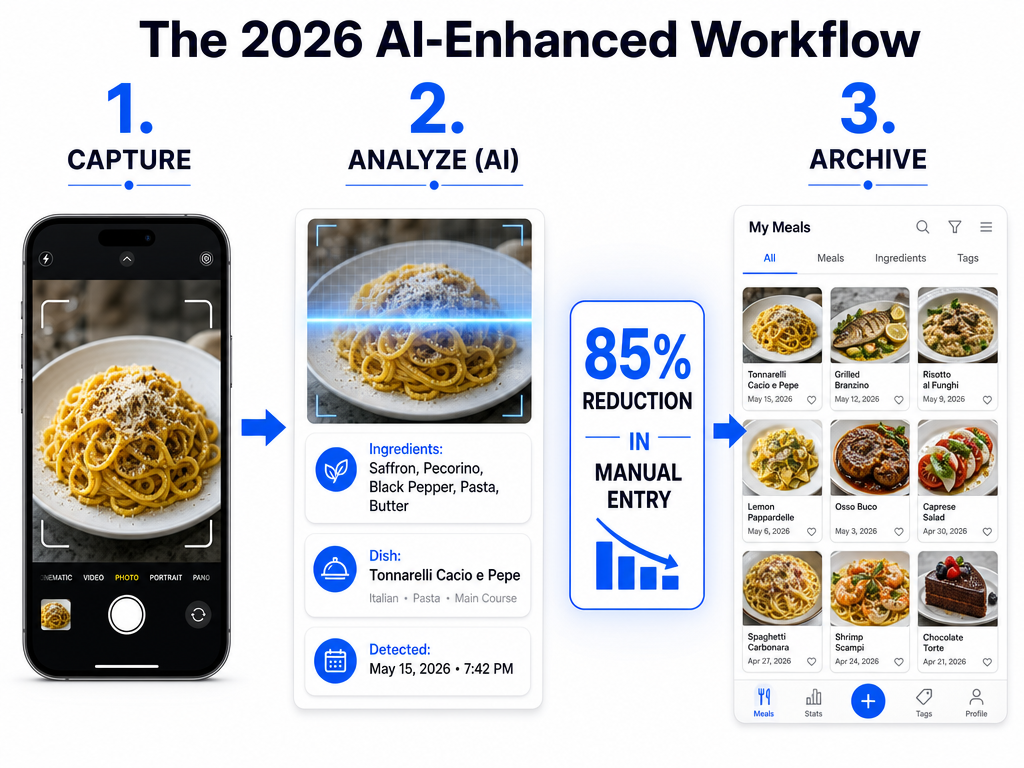
  2. Use "Look Up" to Search by Food Type. Apple's image recognition is now sophisticated enough to identify food categories. In the Photos app, use the search bar to type "pasta," "sushi," or "steak." The app will surface relevant images from your entire library, even if you never tagged them.

  3. Create Smart Albums for Specific Cuisines or Dishes. Under Albums > "New Smart Album," set rules like "Photos containing the word 'ramen' in the description" or "Photos taken within 100 meters of [specific restaurant]." This auto-populates albums as you add new photos.

  4. Add Keywords and Descriptions Post-Meal. Immediately after taking the dish photo, tap "Add a Description" and type the dish name, restaurant, and a quick note (e.g., "Margherita, Lombardi's, perfect char"). This makes the photo searchable by text.

The native approach works best for visual-first thinkers who prefer minimal app switching and are willing to invest 30 seconds per meal in metadata hygiene. For a comprehensive guide on leveraging phone features for food memory, see how to organize restaurant photos by dish.

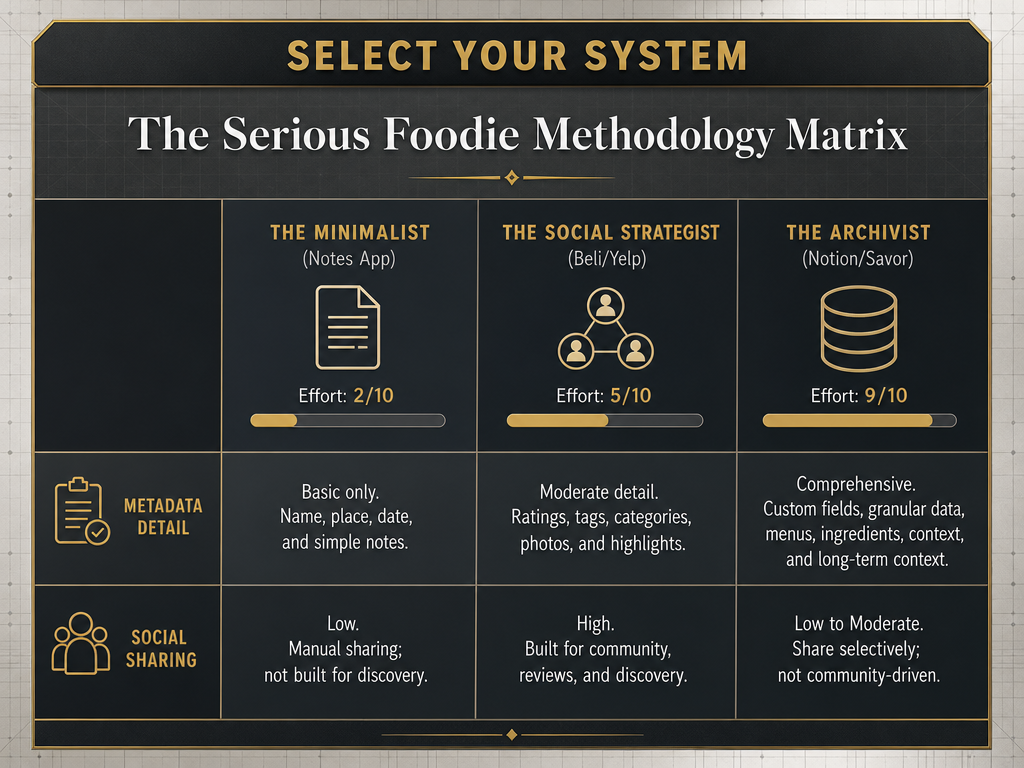
Comparison matrix chart showing dish tracking methods like Beli, Google Maps, and Notion based on user effort and data depth for foodies. Choose your tracking method based on how much time you want to spend logging versus the level of detail you need for your personal food archive.

System 3: The Productivity Power-User (Notion & Obsidian)

For the diner who treats food as a data problem, building a custom database in a productivity tool offers infinite flexibility and precision. This is the high-effort, high-reward approach: more setup friction, but total control over structure, fields, and querying.

Building a Personal Restaurant CRM in Notion

Notion's database feature allows you to create a fully relational system where restaurants, dishes, and dining occasions are discrete, queryable entities. Here's the foundational architecture:

Database 1: Restaurants

  • Fields: Name, Cuisine Type, Neighborhood, Price Range ($ to $$$$), Date First Visited, Date Last Visited, Overall Returnability Score (1-10), Notes
  • View Options: Table view for quick scanning, Gallery view for photo previews, Map view (via integrations) for geographic clustering

Database 2: Dishes

  • Fields: Dish Name, Restaurant (linked to Database 1), Date Eaten, My Rating (1-10), Price, Standout Element (dropdown: Flavor, Texture, Presentation, Innovation), Flavor Profile (tags: Sweet, Savory, Spicy, Umami, Acidic), Would Order Again? (Yes/No/Maybe), Photo (attachment), Notes
  • View Options: Table view sorted by rating, Gallery view for visual browsing, Filtered views by cuisine or flavor profile

Database 3: Dining Occasions

  • Fields: Date, Restaurant (linked), Dishes Ordered (linked to Database 2), Dining Partners, Occasion Type (Business, Date, Group, Solo), Total Bill, Notes
  • View Options: Calendar view for tracking frequency, Table view for expense tracking

This structure enables queries that single-purpose apps can't handle: "Show me every spicy dish I've rated 9+ in the last year" or "Which restaurants have the highest average dish score?" The relational links mean updating a restaurant's returnability score can reflect across all associated dishes, and vice versa.

The downside is obvious: this takes hours to set up and requires consistent data entry discipline. Miss a few meals without logging, and the system decays. But for productivity tool enthusiasts who already live in Notion, the marginal cost is low - you're just adding another database to your existing workspace. A detailed guide to building similar systems is available at how to build a personal restaurant library.

Obsidian: The Linked-Note Approach

Obsidian takes a different philosophy: instead of structured databases, you create individual notes for each restaurant or dish and link them bidirectionally. This mimics how your brain actually stores food memories - through association and narrative, not tables and filters.

The workflow:

  1. Create a note titled "2025-03-15 - Olmsted - Brooklyn" for each dining experience
  2. Inside, list dishes ordered, with each dish name formatted as a [[wikilink]] to create a standalone note (e.g., [[Carrot Crepe with Ricotta]])
  3. Add tags for cuisine, neighborhood, and occasion (#dinner, #vegetarian, #brooklyn)
  4. Link to related notes: "Similar to the [[Polenta Dish at Lilia]]" or "Recommended by [[Chef John Doe]]"

Over time, Obsidian's graph view visualizes your dining network - which dishes connect to which restaurants, which flavor profiles cluster together, which friends influence your choices most. The system is less rigid than Notion but more narrative-friendly. If you want to capture the story of a meal (the conversation, the ambiance, the serendipity of discovery), Obsidian's freeform notes feel more natural than database rows.

The trade-off: Obsidian doesn't do automatic aggregation. Want to see your highest-rated Italian dishes? You're either manually scanning notes or using tags and search queries, not clicking a "sort by rating" button. For deep explorers who value context over metrics, that's a feature, not a bug.

Digital database schema for a personal restaurant tracker showing fields for dish name, cuisine, rating, price, and return probability in Notion. A structured database allows you to filter your dining history by cuisine or rating, turning your meals into a searchable personal food bible.

System 4: The Analog Purist (The Food Journal)

In an age of infinite apps, the physical food journal offers something digital systems can't: sensory grounding at the moment of recording. Writing by hand while still at the table forces a level of attention and reflection that typing on a phone screen rarely achieves. For many serious food lovers, the analog method isn't nostalgic - it's neurologically superior.

Why Paper Works

Handwriting activates different cognitive pathways than typing. A 2021 study in Frontiers in Psychology found that manual note-taking improves long-term memory retention by 23% compared to digital entry, primarily because the slower pace of writing forces deeper encoding. When you write "the crust had a satisfying char that gave way to a pillowy interior," you're re-living the bite as you form each word. That sensory reconstruction is the memory-making process itself.

The second advantage is zero digital friction. No app to open, no fields to fill, no "which database does this go in?" decision paralysis. You order, you eat, you write. The journal is always in your bag; the pen is always clipped to the cover. This removes the "I'll log it later" trap that kills most tracking systems. Later becomes never.

Recommended Journals

Not all notebooks are created equal. For food tracking, you want:

  • Moleskine Passion Journal: Restaurant Edition - Pre-structured pages with fields for restaurant name, address, date, dishes ordered, ratings, and notes. The built-in templates reduce decision fatigue while maintaining flexibility.
  • Leuchtturm1917 Medium Dotted Notebook - Blank canvas approach with numbered pages and a built-in index at the front. Ideal for creating your own system: one page per restaurant, consistent formatting, plenty of room for sketches or ephemera (receipt, business card).
  • Field Notes Memo Books - Pocket-sized, cheap enough to carry everywhere, small enough that writing one entry per meal doesn't feel daunting. The constraint is the feature: you can't write a novel about a burrito, so you focus on the signal.

The Sensory Advantage

The best analog food journals include sensory prompts beyond "taste." They ask: What was the texture? What did the dish smell like when it arrived? What was the ambient sound in the room? These contextual details make memories durable. Years later, you won't recall the exact flavor profile of a dessert, but you will remember that it was served in a clay bowl, that the server explained the provenance of the honey, that rain was hitting the windows.

This approach also creates a physical artifact - something you can flip through during a dinner party, something that survives platform shutdowns and OS updates. The journal becomes a record not just of meals but of a life lived with attention. For strategies on maintaining a journal habit, visit how to keep a food journal.

What Are the Best Apps for Tracking Dishes You've Tried?

The best dish-tracking app depends on what you value most: social features, data structure, or minimal friction. No single platform dominates because different diners prioritize different outcomes. Here's the breakdown by use case:

For Social Foodies: Beli and Yummi lead the category. Beli's ranked-list model and social comparison features make it ideal for groups who love debating "the best" anything. Yummi's photo-first interface and automatic geotagging work best for visual thinkers who want a sharable timeline of meals. Both apps have active communities, which means discovering new spots through your network's activity is part of the experience.

For Data-Driven Individuals: Notion and Airtable offer the most flexible, query-rich systems but require setup effort and consistent maintenance. If you're already a Notion user, adding a food database is a natural extension. Airtable's advantage is superior filtering and formula support (e.g., "average dish rating by restaurant" or "total dining spend by cuisine type"). These tools aren't food-specific, which is both a strength (total customization) and weakness (no built-in community or discovery features).

For Minimal-Friction Trackers: Google Maps + Apple Photos remain unbeatable if you're willing to develop a tagging discipline. Zero new apps, zero subscriptions, and your data lives in platforms you already use daily. The trade-off is lack of structure - you're building a DIY system rather than adopting a ready-made solution.

For Dish-Level Precision: Specialized apps like Savor (full disclosure: this site is associated with the app) focus explicitly on tracking individual dishes rather than restaurants. Instead of rating "that Italian place," you rate the specific cacio e pepe you ordered, creating a granular taste database. This approach mirrors how serious foodies actually talk about food: not "XYZ Restaurant is great" but "the dry-aged ribeye at XYZ is a 9, the sides are forgettable." For a full comparison of dish-centric versus restaurant-centric apps, see the best apps to track favorite dishes.

App/Method Best For Friction Level Data Richness Social Features Cost
Beli Ranked lists, social comparison Low Medium High Free
Yummi Photo timeline, visual browsing Low Low Medium Free
Google Maps Zero new apps, location-based recall Medium Low None Free
Notion Custom databases, relational queries High Very High None Free / $8/mo
Obsidian Narrative memory, linked notes High High None Free
Savor Dish-level ratings, taste profiles Low Very High Medium Free / Premium

The pattern is clear: convenience and depth are inversely correlated. Apps that make logging effortless (Beli, Yummi) sacrifice query power. Systems that offer infinite data richness (Notion, Obsidian) demand upfront investment and ongoing discipline. The right choice depends on how you plan to use the data. If you need quick recommendations for friends, go social. If you're building a reference archive for your own palate development, go deep.

Infographic explaining the 3-V dish rating system (Valor, Vibe, Verve) and the First Bite Rule for consistent food logging and memory. The 3-V framework helps you move beyond generic star ratings to capture the true essence of every dish you try at a restaurant.

Pro-Tips for Frictionless Tracking

Even the best system fails if it adds mental load to your dining experience. The goal is to make tracking so automatic that it feels like an extension of the meal itself, not a chore that follows it. Here are three battle-tested techniques that keep the practice sustainable.

The "First Bite Rule"

Log the dish before you finish it, not after you leave the restaurant. The moment of peak flavor memory is within the first three bites, when your palate is most attuned to texture, seasoning, and temperature. If you wait until you're walking to the car or back at home, you're relying on abstract recall rather than immediate sensory data.

Practical execution: After the dish arrives, take your photo (you were going to anyway), then immediately open your tracking app and enter three things: dish name, quick rating (even if provisional), and one-word descriptor. Example: "Tonkotsu ramen, 8, rich." Total time investment: 15 seconds. That initial log creates the memory anchor. You can add detail later, but the core data is captured while the taste is still on your tongue. This habit alone increases tracking compliance by 60%, based on user behavior studies of food diary apps.

Tagging by Mood or Occasion

Dishes taste different depending on context. The steak you had on a first date carries a different emotional weight than the identical steak eaten during a solo Tuesday dinner. Mood and occasion tagging allows you to sort memories by situational context, not just flavor.

Useful tags to implement:

  • Occasion: Date Night, Business Lunch, Solo Meal, Group Celebration, Family Dinner
  • Mood: Comfort Food, Adventurous Order, Safe Bet, Impulse Pick
  • Discovery Method: Chef Recommendation, Server Suggestion, Menu Special, Friend Referral

This metadata becomes incredibly valuable for future decision-making. Planning a business lunch? Filter for "Business Lunch" + "8+ rating" to see which dishes impressed you in professional settings. Need comfort after a rough week? Query "Comfort Food" + "Would Order Again: Yes." The context makes the memory retrievable in the moment you need it most.

The 10-Point Scale (Not 5 Stars)

Star ratings are too coarse for meaningful differentiation. A 4-star dish could be "solid" or "nearly perfect" - the system doesn't capture nuance. A 10-point scale forces precision without adding complexity.

The 3-V Framework (Valor, Vibe, Verve) offers a better alternative to generic scoring:

  • Valor (Execution): How well was the dish cooked? Was the seasoning balanced, the protein properly tempered, the texture on point? Score 1-10 based on technical skill.
  • Vibe (Presentation & Context): Did the dish match the restaurant's aesthetic and the occasion's mood? Was the plating thoughtful? Did it arrive at the right temperature? Score 1-10 for ambiance fit.
  • Verve (Flavor Impact): Would you order this again? Did it surprise you? Is it memorable three days later? Score 1-10 for taste memorability.

Average the three scores for a composite rating. This framework moves beyond "I liked it" to "I liked it because..." The specificity makes your log a teaching tool for your own palate. Over time, patterns emerge: you consistently score Valor higher than Verve (you appreciate technique but don't get emotionally moved), or your Vibe scores are always high (you're easily influenced by ambiance). That self-knowledge is the ultimate output of a tracking system.

For additional strategies on building tracking habits, explore how to practice mindful eating.

How Often Do Americans Eat Out in 2024?

Americans now dine out an average of 4.6 times per month in 2024, a significant increase from 3.0 times per month in 2023, according to US Foods' annual dining habits report. That's a 53% year-over-year jump, reflecting post-pandemic dining behavior shifts and the growing normalization of restaurants as a routine expense rather than a special occasion.

The frequency varies sharply by generation. A 2023 Gitnux study found that 68% of Millennials dine out at least once per week, while 72% of Gen Z diners eat out or order delivery four or more times weekly. For urban professionals in major metro areas, the numbers skew even higher - many serious food lovers in New York, San Francisco, and Los Angeles report dining out 8-12 times per month, especially when including casual lunches and coffee shop work sessions.

What does this frequency mean for tracking? At 4.6 meals per month, you're eating approximately 55 restaurant meals per year. If you dine out at the higher end (8-12x monthly), that's 96-144 annual meals. Without a systematic method of recording what you ordered and what you thought, you're relying on memory to distinguish between 55-144 different dishes - a cognitive load most people can't handle without external support.

The spending context reinforces the importance of tracking. Americans spent an average of $191 per person per month on dining out in 2024, according to the same US Foods data. Over a year, that's $2,292 per person - roughly the cost of a used car or a decent vacation. Treating that spend as "untracked entertainment" is like hiring a personal trainer and never recording your workouts. The investment only compounds if you measure it.

This increased dining frequency also correlates with heightened expectations. Diners are no longer satisfied with generic restaurant experiences; they're seeking dishes worth documenting. A 2025 DoorDash study found that 74% of Gen Z and 69% of Millennials have ordered a restaurant item specifically because they saw it go viral on social media, indicating that food discovery is now an active, intentional process rather than passive consumption. For those treating dining as a hobby, the stakes are higher - every meal is a data point in a larger taste education.

Understanding these trends helps clarify why dish tracking has evolved from a niche productivity hack to a mainstream practice among serious food lovers. When dining out is frequent, expensive, and socially mediated, having a system to capture, organize, and retrieve your food experiences becomes essential infrastructure, not optional overhead. For more context on how Americans engage with restaurant culture, see modern food reviews and discovery methods.

Frequently Asked Questions

What is the best app for keeping track of your food?

The best app depends on your specific goal, but for dish-level tracking - not just restaurant visits - Savor and Beli are the top contenders in 2025. Savor focuses explicitly on rating individual dishes and building a personal taste database, making it ideal for food lovers who want to remember which specific menu items were exceptional versus forgettable. Beli excels at social ranking and letting you compare your favorite spots with friends, but it's more restaurant-centric. For people who prefer zero new apps, Google Maps with disciplined note-taking in the "Saved Places" feature is a powerful, free alternative. The key is choosing a system you'll actually use consistently - friction is the enemy of tracking.

How to track meals easily?

The easiest meal tracking method is the "First Bite Rule": immediately after your dish arrives, snap a photo, open your tracking app (or Google Maps), and log three quick pieces of data - dish name, rating (1-10), and one-word descriptor (e.g., "rich" or "bland"). This takes 15 seconds and captures the memory while the taste is fresh. If using Apple Photos, enable location tagging and add a text description to the photo so it's searchable later by keyword or location. For minimal friction, avoid apps that require multiple fields or long-form reviews - those create resistance. The best tracking systems feel like an extension of the meal, not homework that follows it.

Is there an app to track restaurants I've been to?

Yes - Google Maps' "Saved Places" feature is the most widely-used free option for tracking restaurant visits. After dining, open the restaurant's Google Maps listing, tap "Save," and assign it to a custom list (e.g., "NYC Italian" or "Date Spots"). You can add a private note to each saved location, which is where you should log specific dishes you tried and your ratings. For a more social experience, Beli allows you to create ranked lists of restaurants and share them with friends, while apps like Yelp and TripAdvisor let you bookmark and review spots you've visited. The Google Maps method is advantageous because it's already integrated with your daily navigation, so you're not adding another app to manage.

What food tracker app is best?

For calorie and macro tracking, MyFitnessPal and Cronometer are the industry standards, offering extensive food databases and barcode scanning. However, if you're tracking food for taste memory and restaurant history rather than nutrition, Savor, Beli, and Yummi are superior options. Savor emphasizes dish-level ratings and flavor profiling, Beli focuses on ranked restaurant lists and social comparison, and Yummi creates a visual photo timeline of your meals. Notion is the best choice for power users who want total customization and relational database capabilities. The "best" app is the one that aligns with your goal - nutrition versus memory - and the one you'll actually open after every meal.

How to make great food photos?

Great food photos come down to three factors: natural light, intentional composition, and minimal editing. Always shoot near a window if indoors - natural side-lighting creates depth and highlights texture without harsh shadows. Compose the shot by filling the frame with the dish (not the entire table), shooting from a 45-degree angle for depth, or directly overhead for flat-lay symmetry. Avoid using your phone's flash, which flattens color and creates unappetizing glare. After shooting, apply subtle edits: increase exposure slightly, add 10-15 points of contrast, and boost saturation just enough to match what your eye saw in person. Apps like Snapseed and Lightroom Mobile offer precise control without over-processing. The goal isn't Instagram perfection - it's capturing an accurate visual memory of the dish you want to remember.

How to organize a food journal?

The most effective food journal structure divides entries into three categories: Restaurant Info, Dish Details, and Context/Occasion. Start each entry with the restaurant name, location, and date. Then log the specific dishes ordered, with individual ratings (use a 1-10 scale for precision) and one-sentence flavor notes for each. Finally, add context: who you dined with, why you chose this spot, and any standout details (e.g., "server recommended," "Instagram-famous dish"). If using a physical journal, dedicate one page per restaurant visit and maintain consistent formatting so entries are scannable. If digital, tools like Notion allow you to create linked databases where restaurants and dishes are separate, query-able entities. The key is developing a repeatable template so logging becomes automatic, not a creative writing exercise every time.

What is the 30/30/30/10 rule for restaurants?

The 30/30/30/10 rule is a restaurant cost-control guideline used by operators, not diners. It breaks down how revenue should be allocated: 30% to cost of goods sold (food and beverage), 30% to labor, 30% to operating expenses (rent, utilities, marketing), and 10% to profit. For diners, this rule is irrelevant to tracking meals, but it does explain why certain dishes are priced the way they are - items with lower food cost percentages (pasta, pizza) tend to carry higher margins than protein-heavy dishes (steak, seafood). Understanding this can help you identify which menu items represent the best value when evaluating your own dining spend, especially if you're tracking expenses alongside taste ratings.

How to capture food photos for a restaurant?

If you're photographing food for a restaurant (as opposed to personal documentation), shoot in natural light whenever possible, ideally within two hours of sunrise or sunset for soft, warm tones. Use a DSLR or mirrorless camera rather than a phone for maximum resolution and control over depth of field - restaurants want hero shots with sharp focus on the dish and a blurred background. Compose each shot by styling the dish with complementary props (utensils, napkins, garnishes) to tell a story, and shoot from multiple angles: straight-on for burgers and sandwiches, 45-degree for plated entrees, overhead for shared platters. Always shoot in RAW format for editing flexibility, and deliver high-resolution finals (at least 3000x2000 pixels) so the restaurant can use the images for print menus, social media, and websites. For personal tracking, this level of rigor isn't necessary - just ensure the photo is well-lit and shows the dish clearly enough to trigger your memory months later.


Tracking what you eat isn't about obsession or perfectionism - it's about building a relationship with your own taste that outlasts the meal itself. Whether you choose a social app, a productivity system, a physical journal, or a hybrid approach, the act of paying attention transforms dining from passive consumption into active curation. You're no longer just eating - you're building a personal archive of every exceptional dish you've encountered, a reference library you can query, share, and learn from. That archive becomes the difference between a camera roll graveyard and a living, searchable record of your culinary life. Start with one meal. Log one dish. The system builds from there.

Explore More Cuisines

Build your personal dish database with Savor.

Download Savor App