
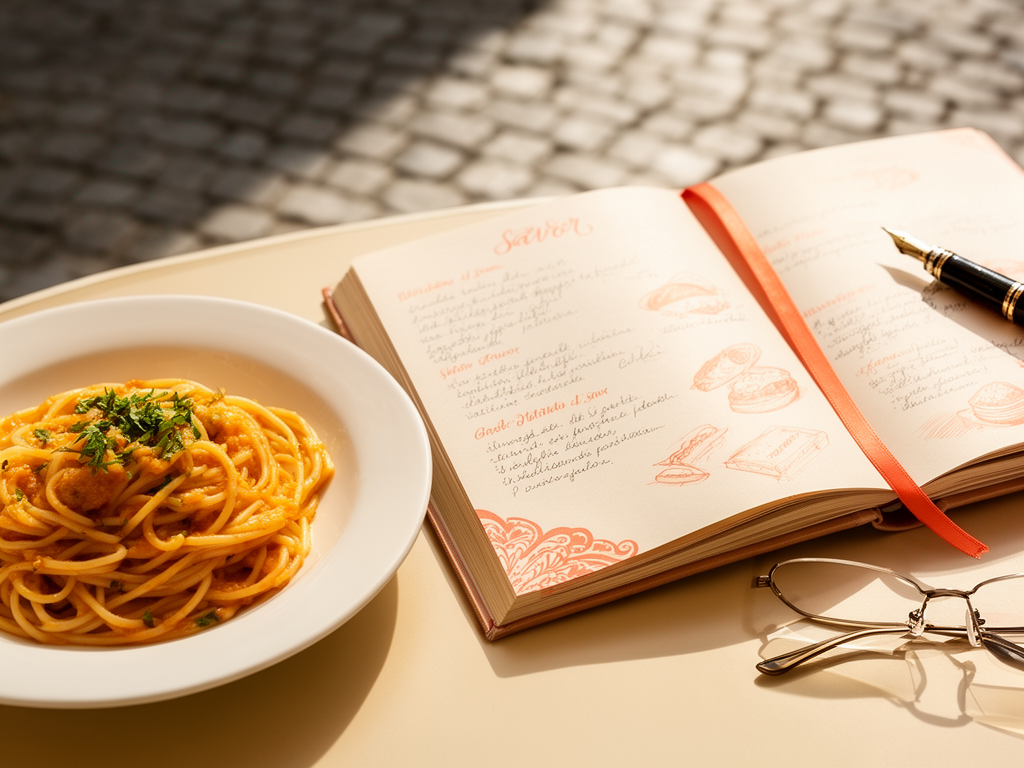
The Foodie’s Guide to Tracking What You Ate on Vacation
Alex the juice queen
Alex hunts for the best juice bars and presses. She rates every sip and saves her favorites in Savor.
The Serious Foodie's Guide to Tracking What You Ate on Vacation Three weeks after Rome, you're trying to remember the name of that perfect carbonara. Not the...
The Serious Foodie's Guide to Tracking What You Ate on Vacation
Three weeks after Rome, you're trying to remember the name of that perfect carbonara. Not the restaurant - the exact dish, the specific version that made you understand what Roman pasta is supposed to taste like. You scroll through 400 nearly identical food photos. Nothing. The memory is already fading.
Most travelers return from food-focused trips with thousands of photos and zero searchable data. By the time you want to recreate that meal or recommend it to a friend, the details have dissolved into a vague sense of "it was really good." Meanwhile, the global culinary tourism market hit $1.24 trillion in 2025 and is projected to reach $4.25 trillion by 2034, driven by travelers who prioritize food experiences above everything else. Yet the vast majority of these meals vanish into unsearchable camera rolls within weeks.
The solution isn't better memory. It's a tracking system that works while you're traveling - one that captures the dish itself, not just the restaurant, and organizes it in a way you can actually use later.
Key Takeaways
- Most food memories vanish because we track restaurants instead of individual dishes - the carbonara matters more than the trattoria's name.
- The "Snap Now, Tag Later" method lets you capture meals in 30 seconds without disrupting the experience, then organize them after the trip when you have time.
- Apps with offline capability and map-based organization solve the two biggest tracking failures on vacation: lost data connections and geographic chaos.
- A structured post-trip "Food Audit" turns scattered vacation photos into a permanent, searchable archive organized by city, cuisine type, and specific dishes.
- The binary "Worth a Detour?" rating system works better for travel meals than traditional star ratings because it answers the only question that matters: would you go back?
Table of Contents
- The Foodie's Dilemma: Why Your Camera Roll Is Where Memories Go to Die
- The Snap Now, Tag Later Method
- The Best Tools for the Serious Foodie
- How to Track Food Offline While Traveling
- The Tasting Menu Protocol
- How to Organize a Post-Trip Food Audit
- Building Your Private Restaurant Map
- What to Do With All This Data
- Frequently Asked Questions
The Foodie's Dilemma: Why Your Camera Roll Is Where Memories Go to Die
Your phone's camera roll holds 2,847 food photos from the last three years. You can find maybe twelve of them on demand. The rest exist in a searchable void - undated, untagged, unlabeled beyond "IMG_4738.jpg." When someone asks for your Paris recommendations, you scroll for twenty minutes and give up, defaulting to the same three places everyone already knows about.
The problem isn't volume. It's architecture. Most people treat vacation food tracking like taking notes in a lecture: frantic capture during the moment, zero organization afterward. They photograph the menu, the dish, sometimes the restaurant facade, then move on. Three months later, those images are archaeological fragments requiring forensic reconstruction to decode.
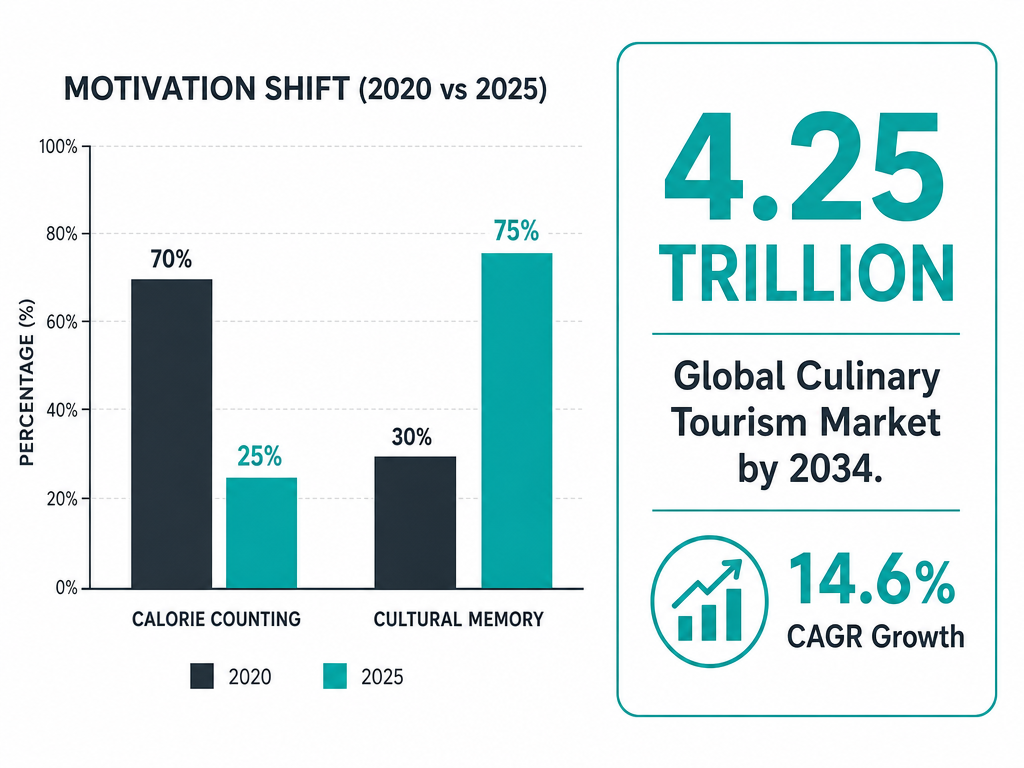 As the culinary tourism market approaches 4.25 trillion dollars, the focus of food tracking has shifted decisively from restrictive calorie counting to immersive cultural preservation.
Hilton's 2025 Trends Report found that a notable majority of global travelers now prioritize culinary experiences over other vacation activities. Yet the infrastructure for capturing those experiences lags decades behind. We have apps that count every calorie in a bowl of cereal but nothing that efficiently answers "What was that incredible octopus dish I had in Lisbon?"
The shift matters because food is increasingly how travelers understand culture. You don't visit Rome for the Colosseum anymore - you visit for the carbonara made with guanciale from a specific farm in Lazio. That specificity is what vanishes when you treat your camera roll like a filing system.
The Snap Now, Tag Later Method
The single biggest tracking mistake foodie travelers make is trying to log everything in real time. You're at dinner. The food arrives. You want to capture it properly, so you open an app, take a photo, add tags, rate the experience, write notes. By the time you finish, the pasta's cold and your dining companion is checking their watch.
The "Snap Now, Tag Later" method solves this by separating capture from organization. During the meal, you do one thing: take a clear photo. Not an Instagram shot - a documentation photo. The plate, centered, well-lit, with enough context to identify it later. Twenty seconds. Then you eat.
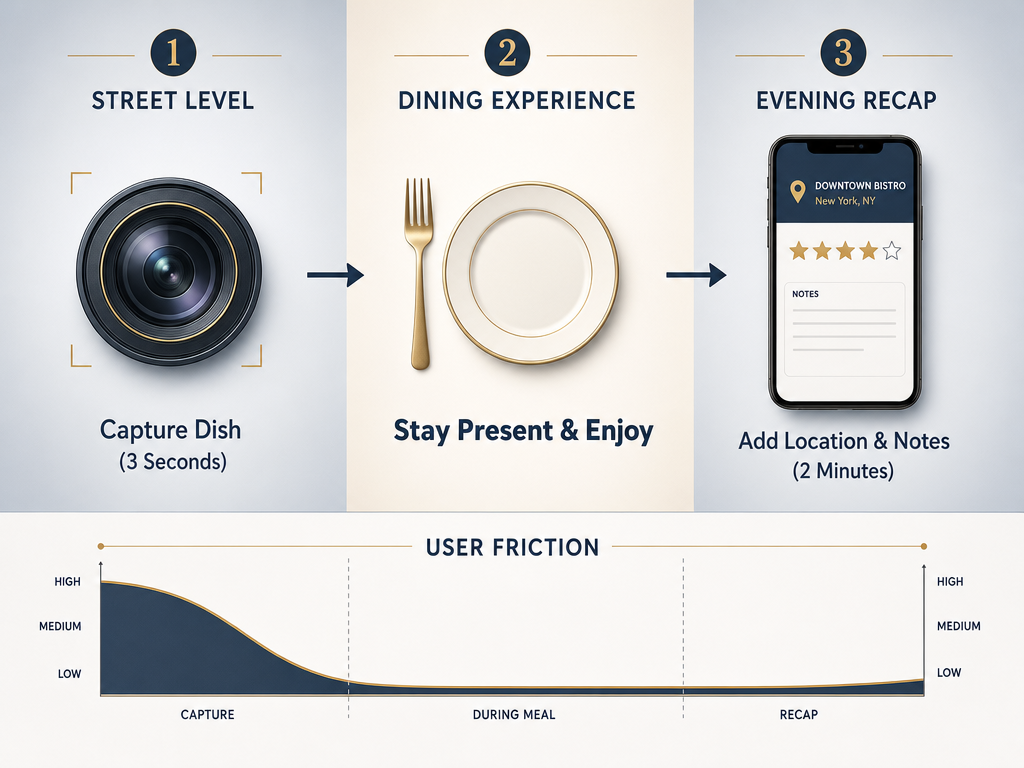 Master the art of 'Snap Now, Tag Later' to ensure your culinary memories are preserved without letting technology overshadow the flavors and company of the moment.
The organization happens later - that evening back at the hotel, or on the flight home, or during the first weekend after you return. You batch-process the entire trip's photos in one focused session. This approach has three advantages traditional real-time logging doesn't:
Speed during the meal. You're present for the food, not the app. Studies of meal tracking behavior show that systems requiring more than 30 seconds of logging per dish see 60% abandonment rates by day three of a trip.
Better memory triggers. When you review photos hours or days later, your memory of the experience is actually sharper than in the moment. You know whether the dish was worth it, whether you'd order it again, what made it special.
Batch efficiency. Tagging ten meals at once is faster than tagging them individually because you're already in "organizing mode." You develop a rhythm. The context of the trip is fresh, so you remember which restaurant was which even if the photos don't show the facade.
The system requires only two tools: your phone's camera and something to organize the photos later (more on that in the next section). No special equipment. No elaborate workflows. Just disciplined capture and deferred organization.
The Best Tools for the Serious Foodie
Not all tracking apps are built for travel. Most food logging tools optimize for calorie counting or macro tracking - features that actively get in the way when you're trying to remember a specific lamb tagine in Marrakech. The tools that work for serious foodie travelers share three characteristics: they prioritize dishes over restaurants, they work offline, and they organize by geography.
Here's how the major players stack up:
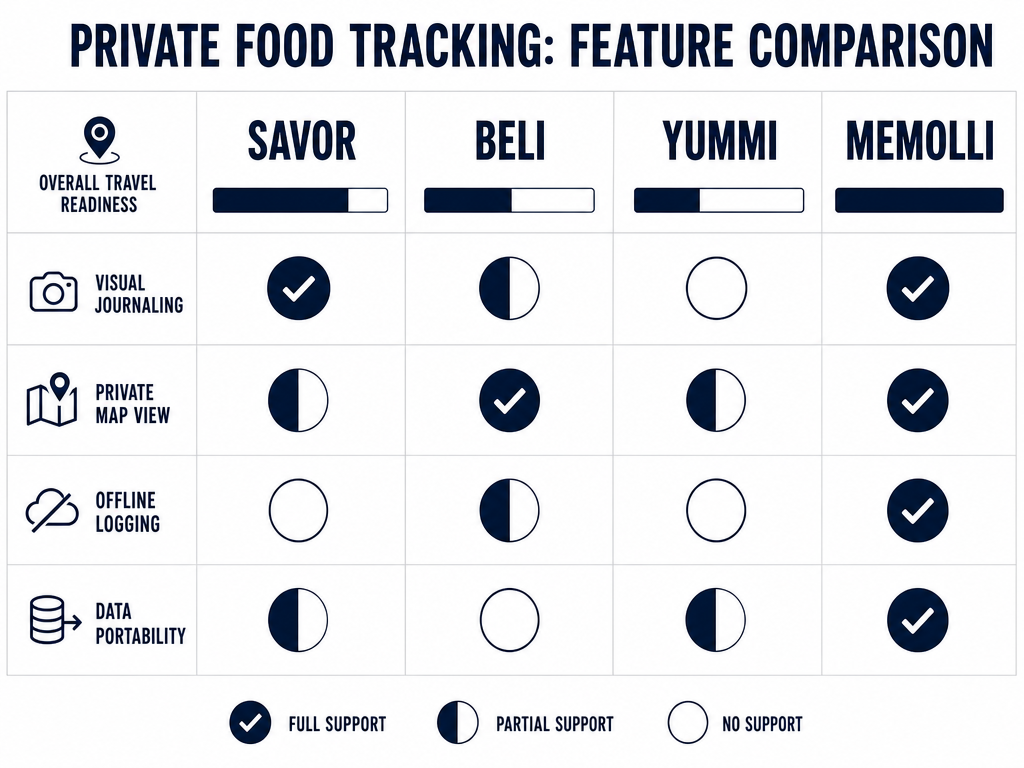 Not all tracking apps are built for travel; use this matrix to select the tool that aligns with your specific needs for offline access and visual organization.
| Tool | Best For | Standout Feature | Limitation |
|---|---|---|---|
| Savor | Dish-level memory archiving | Private ratings with no social pressure | iOS only; minimal social sharing |
| Yummi | Visual "Foodprint" calendars | Auto-organizes photos into timeline maps | Interface can feel cluttered |
| Beli | Ranking your personal favorites | Elo-style comparison system | Heavy social focus may not fit private journaling |
| Memolli | Offline-first travelers | Works completely offline with map pins | Newer platform with smaller feature set |
Savor takes a "food memories, not food diary" approach that rejects calorie counting entirely. You photograph dishes, rate them privately, and the app builds a searchable archive organized by cuisine type, location, and your personal ratings. The interface is minimal - no social features, no points, no gamification. Just a clean record of what you ate and whether it was worth it. Apps with this "private map" approach see higher retention among travelers compared to simple list-based journals, according to Memolli's internal retention data from 2026.
Yummi excels at visual organization. Its "Foodprint" feature automatically arranges your food photos into a calendar-based map, showing you what you ate where and when. The strength is passive organization - you don't actively tag locations; the app reads photo metadata and builds the map for you. The weakness is reliance on that metadata; if your phone's GPS is off or you're using a camera without location services, the system breaks down.
Beli uses an Elo ranking system (the same algorithm behind chess ratings) to help you figure out your actual favorite dishes through head-to-head comparisons. The app asks "Which was better: the ramen in Tokyo or the pho in Hanoi?" and over time builds a ranked list of every dish you've eaten. It's powerful for identifying your true top-tier meals, but the emphasis on sharing and social comparison makes it less suited to pure personal archiving.
Memolli is built explicitly for travelers who spend time in low-connectivity environments. The app works completely offline, stores all data locally, and syncs when you reconnect. You can pin restaurants and dishes to a private map without ever needing a data connection. The tradeoff is a more limited feature set - no automatic photo organization, no fancy ranking systems, just solid offline map-based tracking.
For travelers focused on building a dish archive rather than a restaurant list, Savor offers the most direct path - the app is designed around the specific problem of remembering individual dishes, not aggregating restaurant opinions. For those who want automatic organization with minimal effort, Yummi's Foodprint delivers a beautiful visual timeline without requiring manual tagging. For offline reliability, Memolli is the only tool that fully functions without connectivity.
How to Track Food Offline While Traveling
The second-biggest tracking failure on vacation happens when you lose connectivity. You're in a basement trattoria in Bologna with no WiFi and intermittent cell service. You open your tracking app. It stalls. You close it. The meal goes undocumented.
Offline tracking requires preparation, not luck. The strategy has three layers: pre-trip setup, offline capture workflow, and post-reconnection sync.
Pre-Trip Setup
Before you leave, download offline maps for every city you're visiting. Google Maps, Apple Maps, and most dedicated food apps allow this. The maps themselves don't track your meals, but they provide the geographic context your photos need for later organization.
Second, configure your phone's camera to embed location data in every photo. On iPhone: Settings → Privacy → Location Services → Camera → "While Using the App." On Android: Open Camera → Settings → Enable "Save Location." This embeds GPS coordinates into each image file's metadata, which means even if you never open a tracking app, your photos still carry searchable location data.
Third, create a dedicated album in your phone's Photos app called "Vacation Food." During the trip, manually add every food photo to this album immediately after taking it. This takes five seconds and guarantees you can find the food photos later even if everything else about your organizational system fails.
Offline Capture Workflow
When you're offline, your workflow simplifies to: photograph, add to album, move on. Don't try to rate, tag, or organize. Just capture the image with accurate location metadata and keep eating.
If you're using an app like Memolli that works offline, you can add basic information like the restaurant name or dish type in the moment. The app stores this data locally and syncs it later. If you're relying only on your camera, Apple Notes works as a low-tech backup - create a note titled with the restaurant name and paste the photo in. The note itself is searchable later, and because it's offline-first by design, it never requires connectivity.
Post-Reconnection Sync
Once you're back online, batch-process everything. Open your dedicated food album and review every image. For each one:
- Verify the location data is correct (some restaurants are in GPS dead zones and report the wrong coordinates)
- Add the restaurant name and dish name in your tracking app
- Rate the dish using whatever system you've chosen (more on rating systems below)
- Tag cuisine type and any standout characteristics (spicy, recommended by a local, would order again)
This sync session for a week-long trip typically takes 30-45 minutes - far less time than real-time logging would have required, and dramatically more accurate because you're reviewing the entire experience as a coherent whole rather than fragmenting it across seven dinners.
The Tasting Menu Protocol: How to Track Multi-Course Meals Without Becoming That Person
A twelve-course tasting menu presents a tracking problem that breaks most systems. You're there for three hours. The dishes arrive every ten minutes. Each one deserves documentation, but pulling out your phone twelve times makes you "the person who won't stop photographing their food."
The Tasting Menu Protocol solves this with a three-step strategy designed for efficiency and discretion:
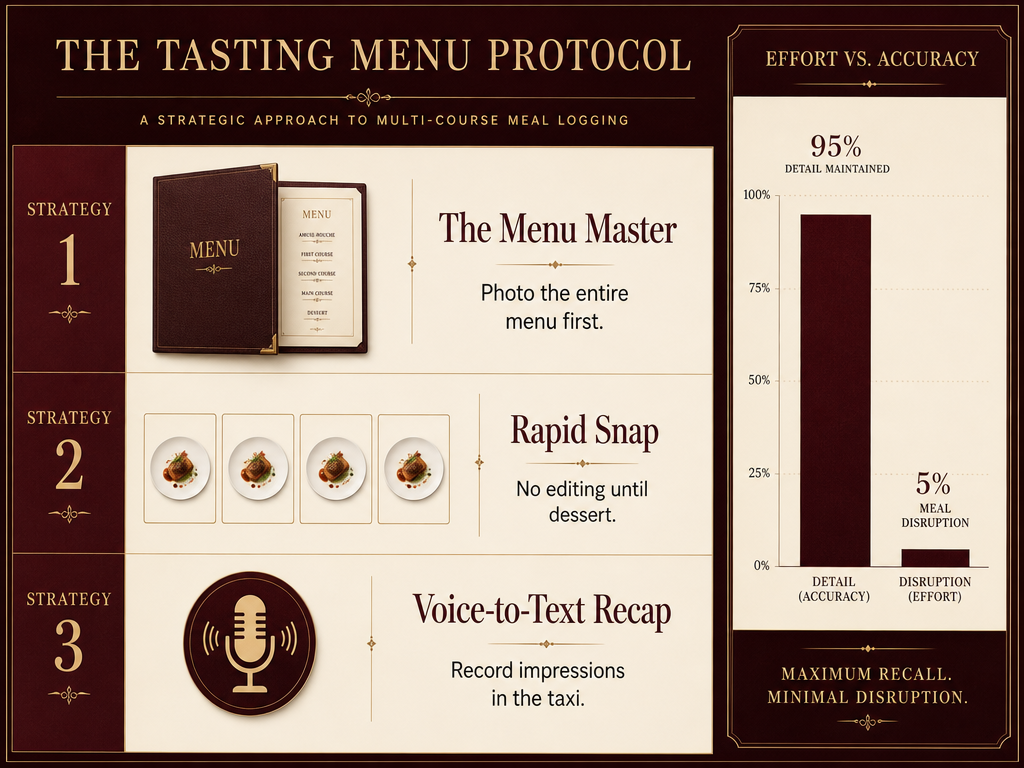 Capture every nuance of a 12-course tasting menu without being 'the person on their phone' by following this three-step high-efficiency logging protocol.
Step 1: The Menu Reference Shot
At the beginning of the meal, photograph the full menu. If they don't provide printed menus, photograph the server's verbal description as notes on your phone or ask for an email copy. This single reference image becomes your index for the entire evening. Later, when you're organizing photos, the menu tells you what each unmarked plate actually was.
Step 2: The Rapid Snap
When each dish arrives, take one photo - no adjustments, no repositioning, no second angle. Plate lands, phone out, click, phone away. This should take literally five seconds. You're not creating content; you're creating a bookmark. The photo exists to remind you which dish this was when you review the menu shot later.
Step 3: The Voice Memo Recap
After the meal ends - in the car, back at the hotel, while waiting for the valet - record a three-minute voice memo recapping the standouts. "Course four, the scallop with yuzu, that was the star. Course seven didn't work. Course ten, the duck, would order that again as a standalone if they offered it." This audio file captures your immediate reaction before it fades and takes zero time during the meal itself.
The next day, you combine the three elements: the menu photo identifies what each dish was, the plate photos jog your visual memory, and the voice memo captures your honest reaction. Together, they reconstruct the meal with 90% of the detail you'd get from compulsive real-time note-taking, but with zero dining disruption.
This method works because it respects the difference between documentation and experience. You're at a tasting menu to experience the food, not to build a database. The Protocol lets you have both without compromising either.
How to Organize a Post-Trip Food Audit
You've returned from a week in Spain with 300 food photos. Now what? The post-trip Food Audit is where scattered documentation becomes a permanent, searchable archive. This is the step most travelers skip, which is why their vacation photos remain unusable forever.
A proper Food Audit follows a four-phase structure:
Phase 1: The Triage (20 minutes)
Open your camera roll. Scroll through all food photos from the trip. Delete the obvious failures - blurry images, accidental duplicates, dishes that weren't worth documenting. You're looking to cut 20-30% of the volume. The goal is a curated set where every photo represents something you might actually want to remember or reference later.
Phase 2: The Batch Tag (45 minutes)
This is the organizational core. For every remaining photo, add four data points:
- Restaurant/Vendor Name - Where you ate it (even "street cart near Plaza Mayor" counts)
- Dish Name - What the dish actually was (not "pasta" - "cacio e pepe with pecorino romano")
- City/Neighborhood - Geographic specificity matters later when someone asks for Barcelona recommendations
- Cuisine Type - Broader category for searchability (Spanish, Italian, tapas, street food)
If you're using a dedicated tracking app, these fields are usually built in. If you're working with photos alone, most modern photo apps (Google Photos, Apple Photos) allow you to add this information as image titles and tags.
The batch approach is critical. Don't do this one meal at a time over weeks - do it all at once while the trip is still coherent in your memory. You remember which restaurant was which when you process them as a set. That memory dissolves if you wait.
Phase 3: The Rating Pass (30 minutes)
Now that everything is tagged, go back through and rate each dish. The rating system you use matters less than using one consistently. The binary "Worth a Detour?" system works well for travel: Would you make an effort to eat this specific dish again if you returned to this city? Yes or no. That single question captures 80% of what matters about a dish's quality.
For travelers who want more granularity, the 10-point Professional Pizza Protocol offers a detailed rubric that can adapt to any dish type, scoring on crust/base, topping quality, flavor balance, and technique execution.
Phase 4: The Export (15 minutes)
Finally, export your organized data somewhere permanent. If you're using an app, this might mean downloading a CSV file or PDF report. If you're working with photos, create a shared album or folder structure organized by city. The key is getting the data out of the single-device silo and into a format you can access from anywhere, share with friends, or reference years later without needing to dig through your old phone.
A properly executed Food Audit for a week-long trip takes about two hours total. That's less time than you spent planning the trip and infinitely less time than you spent actually eating. The payoff is permanent: six months later, when someone asks for your Spain recommendations, you open your organized archive and give them ten specific dishes with restaurant names, locations, and exactly why each one matters.
Building Your Private Restaurant Map
A list of great meals is useful. A map of great meals is transformative. The difference is searchability by location - the ability to ask "What should I eat when I'm near the Trastevere neighborhood in Rome?" and get an instant, personalized answer based on what you've already tested and loved.
Most professional food apps now include map views, but they bury your personal data under thousands of crowd-sourced recommendations you don't care about. The goal is a private map - a geographic layer showing only your verified experiences, organized by how much you actually enjoyed them.
Building this requires two elements: comprehensive location data and visual organization by rating.
Comprehensive Location Data
Every dish you track needs precise coordinates, not just a city name. "Paris" tells you nothing useful when you're actually in Paris deciding what to eat. "47 Rue Saint-Antoine, 4th arrondissement" tells you exactly whether the restaurant is worth the detour from wherever you currently are.
The fastest way to ensure this data exists is enabling location services for your camera app (covered in the offline section above). If you're adding dishes manually to a tracking app, always use the app's location autocomplete rather than typing restaurant names freehand - autocomplete links to a specific address, while freehand text creates unsearchable labels.
For street food and markets, drop a manual pin at the approximate location. Most mapping tools let you long-press to place a custom marker. This matters because the specific corner of a food market where you found that incredible banh mi will matter later when you're trying to find it again.
Visual Organization by Rating
Your map should show, at a glance, which places are mandatory and which are optional. The easiest way to do this is color-coding by your rating system. If you're using the binary "Worth a Detour?" method, that's two colors: red pins for absolute must-visits, gray pins for everything else. If you're using a 10-point scale, use a gradient - dark green for 9-10, light green for 7-8, yellow for 5-6, red for below 5.
Most food tracking apps handle this automatically if you've rated the dishes. If you're building the map manually in Google Maps or Apple Maps, you'll need to create multiple lists (one per rating tier) and assign colors to each list.
The long-term value of a private restaurant map compounds. After five years of travel, you have a personalized guide to dozens of cities, searchable by "show me everything I rated 9+ in Tokyo" or "what's within walking distance of my hotel that I've actually eaten." That capability is worth infinitely more than the two hours it took to build the underlying database.
What to Do With All This Data
You've tracked everything. You've organized it. You have a searchable archive of every memorable dish from three years of travel. Now what?
The most common failure mode at this stage is doing nothing. People build elaborate food databases and never actually use them. The data sits in an app, aging like wine nobody drinks. Here are four high-value use cases that justify the organizational effort:
The Friend Recommendation Engine
Someone mentions they're visiting Barcelona. Instead of saying "There are some good places," you pull up your private map, filter to Barcelona, sort by your personal ratings, and send them five specific dishes with restaurant names and exact addresses. This takes thirty seconds and delivers more value than an hour of "I think there was this place near the cathedral..." recall-based advice.
The Return Trip Planning Tool
You're heading back to a city you visited three years ago. What should you revisit? What did you miss? Pull up your archive for that city, sort by date, and immediately see what you ate last time. The dishes you rated 9+ are obvious revisit targets. The restaurants you wanted to try but didn't get to are now easy to prioritize because you wrote them down. The meals you rated below 7 are skippable.
The Personal Cookbook Index
That octopus dish in Lisbon - what made it work? You pull up the photo and your notes: "Grilled over charcoal, not too much char, finished with olive oil and sea salt, served barely warm not hot." Six months later, when you're cooking octopus at home, you have a concrete reference point for what great execution looks like. Building a searchable dish archive transforms your travel experiences into a de facto culinary education you can reference forever.
The Taste Pattern Analysis
After tracking 200+ dishes, patterns emerge. You realize you've never rated a ceviche below 8. You consistently rate elaborate presentation below simpler plating. Your top ten dishes are split evenly between street food and fine dining, but nothing in between. These patterns are invisible until you have enough data to see them. Once you do, they become powerful tools for choosing restaurants and dishes in new cities - you know what you like at a granular level most people never articulate.
The point of tracking isn't the tracking itself. It's turning ephemeral experiences into permanent, searchable knowledge. Every hour you invest in the organizational system returns years of value through better decisions, better recommendations, and an actual answer to "What was that incredible thing you ate in...?"
Frequently Asked Questions
What is the best app for tracking food on vacation without calorie counting?
Savor and Memolli are the strongest options for tracking food memories rather than nutritional data. Savor is explicitly built around dish-level memory archiving with private ratings, map-based organization, and zero emphasis on calories or macros - it treats food as culture rather than fuel. Memolli excels for travelers who need offline functionality, allowing you to pin dishes and restaurants to a private map without any internet connection, then sync later when you reconnect. Both apps reject the dietary tracking model entirely. If you need automatic photo organization with minimal manual tagging, Yummi's "Foodprint" feature builds a visual timeline of your meals using photo metadata, though it requires online connectivity to function fully.
How do I organize my restaurant photos after a trip?
The most effective method is a structured post-trip "Food Audit" conducted in a single focused session while the trip is still fresh in memory. First, delete obvious failures - blurry photos, accidental duplicates, dishes not worth remembering. Then batch-tag the remaining photos with four data points: restaurant/vendor name, specific dish name, city/neighborhood, and cuisine type. Next, rate each dish using a consistent system (the binary "Worth a Detour?" question works well: would you make an effort to eat this again?). Finally, export the organized data to a permanent location - a dedicated food tracking app like Savor, a shared photo album, or a map-based tool like Memolli. Processing a week-long trip typically requires 90-120 minutes total, dramatically less time than real-time logging during meals would consume. The key is doing it all at once rather than fragmenting the work over weeks when memory has already faded.
Is there a way to track what I ate offline while traveling?
Yes, and it requires pre-trip preparation in three areas. First, enable location services for your phone's camera so every photo embeds GPS coordinates automatically, which preserves location data even when you never open a tracking app. Second, download offline maps for every city you're visiting - Google Maps and Apple Maps both support this, giving you geographic context later. Third, create a dedicated photo album called "Vacation Food" and manually add every food photo to it immediately after taking the shot. During offline meals, your workflow simplifies to: photograph the dish, add to album, move on. When you reconnect, batch-process everything using the embedded location data and your memory of the recent experiences. Memolli is the only major food tracking app built to work completely offline, storing all data locally and syncing when connectivity returns, making it the ideal choice for travelers spending significant time in low-connectivity environments like rural areas or basement restaurants in older European cities.
Should I use Apple Notes or a dedicated app for food journaling?
Apple Notes works as a functional fallback for basic text and photo capture, especially when you're offline or need something immediately available without installing new software. Its strength is universal availability, offline-first design, and simple searchability within the Notes app itself. However, Notes fails at structured organization - you can't filter by location, sort by rating, or build a map view of your dining history. For travelers who want to remember more than a few dozen meals or need to search their food history by city, cuisine type, or personal rating, a dedicated food memory app like Savor or Memolli provides vastly superior long-term value. These apps are purpose-built to answer questions Notes can't, like "What were my top-rated Italian dishes in Rome?" or "Show me everything I ate within walking distance of this hotel." Use Notes for immediate capture if necessary, but transfer the data to a dedicated tool during your post-trip Food Audit for permanent, searchable archiving.
How do I track specific dishes (not just restaurants) for future reference?
Tracking at the dish level rather than restaurant level requires recording the specific dish name and your subjective rating for each item, not just the venue. When photographing food, create a clear documentation shot centered on the plate, then immediately log both the restaurant name and the exact dish name ("cacio e pepe with pecorino romano from Flavio al Velavevodetto," not "pasta from that place in Testaccio"). Apps like Savor are specifically designed for dish-level tracking, allowing you to rate individual items and search your history by the specific dish rather than the restaurant. This granularity matters because most memorable meals are defined by one or two standout dishes, not the overall restaurant experience. Six months later, you remember "that transcendent carbonara" more clearly than "that restaurant near the Colosseum." Tracking favorite dishes rather than entire restaurants gives you the precision necessary for meaningful recommendations and repeat visits.
How do I export my food journal data if the app shuts down?
Data portability is a critical consideration when choosing any food tracking app, as culinary apps have a shorter average lifespan than general-purpose tools. Before committing to a platform, verify it offers CSV or JSON export functionality - these universal formats let you migrate data to another tool or archive it permanently outside the app. Memolli explicitly emphasizes data ownership and export capabilities as a core feature. For apps without native export, your photos themselves are the permanent backup: as long as you've enabled location services and added basic text descriptions, your photo library with embedded metadata becomes a portable, app-independent archive. Some apps also support integration with Apple Health or Google Fit, which provides an additional backup layer, though these platforms prioritize nutritional data over memory archiving. The safest approach is periodic manual exports every 3-6 months, storing the files in cloud storage like Dropbox or iCloud Drive where they remain accessible regardless of which apps survive long-term.
What are the pros and cons of Beli vs Savor vs Yummi for foodies?
Beli excels at helping you rank your true favorite dishes through an Elo-style comparison system - it repeatedly asks "Which was better: dish A or dish B?" and builds a ranked list of everything you've eaten, making it powerful for identifying your top-tier meals. However, Beli's heavy emphasis on social sharing and public lists makes it less suited to purely private journaling, and the constant comparison prompts can feel tedious for casual tracking. Savor prioritizes private, memory-focused archiving with no social features, no calorie counting, and straightforward dish ratings, making it ideal for travelers who want a searchable database without performance pressure or social comparison. Its limitation is iOS-only availability and minimal sharing functionality if you do want to send recommendations to friends. Yummi's standout feature is automatic organization through its "Foodprint" timeline, which uses photo metadata to build a visual map of your meals without manual tagging, though the interface can feel cluttered and the system breaks down if your phone's location services are disabled. For purely private memory archiving, Savor offers the cleanest experience. For competitive ranking of favorites, Beli is unmatched. For passive, automatic organization, Yummi wins on convenience.
How can I create a private map of all the restaurants I've visited?
Creating a private restaurant map requires comprehensive location data for every meal and a tool that visualizes that data geographically. The fastest method is using an app specifically designed for this - Savor and Memolli both include map views showing pins for every dish you've tracked, color-coded by your personal rating (making it trivial to see at a glance which places are mandatory revisits and which are optional). If you prefer building the map manually, Google Maps allows you to create custom lists of saved places with personal notes and star ratings, though this requires manual entry and lacks the automatic organization a dedicated food app provides. The key technical requirement is ensuring every tracked meal includes precise GPS coordinates, not just a city name - "47 Rue Saint-Antoine, 4th arrondissement" gives you actionable information when you're walking through Paris; "Paris" does not. After several years of tracking, a private restaurant map becomes a personalized guide searchable by "show me everything I rated 9+ in Tokyo" or "what's within walking distance of my current location that I've actually tested."