
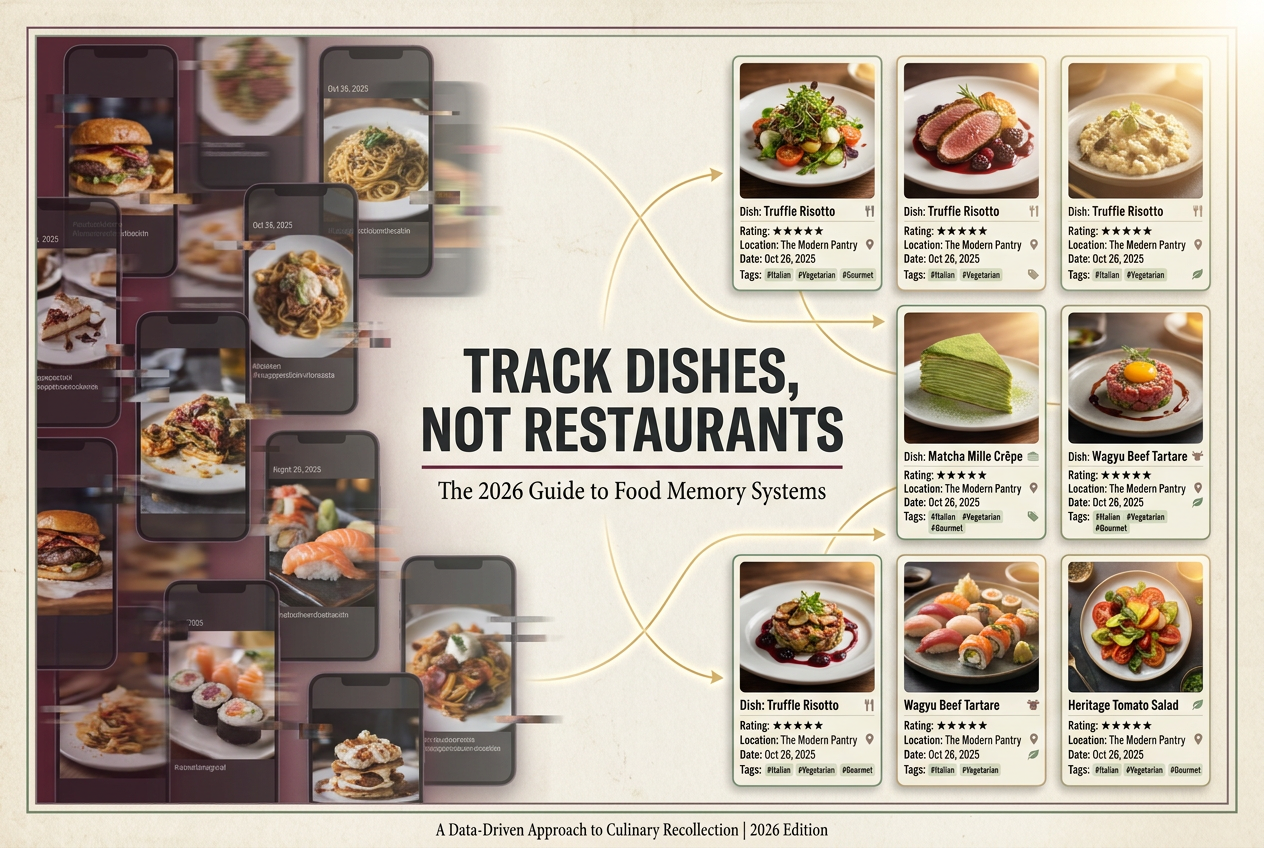
How to Track Dishes You Loved at Restaurants (2026)
Alex the juice queen
Alex hunts for the best juice bars and presses. She rates every sip and saves her favorites in Savor.
Beyond the Camera Roll: The Complete System for Tracking Every Dish You've Ever Loved Your camera roll holds 2,847 photos. Somewhere between the blurry sunset...
Beyond the Camera Roll: The Complete System for Tracking Every Dish You've Ever Loved
Your camera roll holds 2,847 photos. Somewhere between the blurry sunset shots and accidental screenshots sits that extraordinary bowl of ramen from three months ago - the one that made you pause mid-bite, the one you swore you'd remember forever. You can't recall the restaurant name. You think it was in that neighborhood near the thing. The details have evaporated.
This isn't a memory problem. It's a system problem. You've been collecting data in the worst possible archive: a reverse-chronological photo stream with zero metadata, no search functionality, and a UX designed for dopamine hits, not retrieval. By the time most serious food lovers realize they need a better method, they've already lost 40+ exceptional dishes to the camera roll graveyard. That extraordinary pasta in Rome? Gone. The perfect street taco? A ghost. The wine pairing that changed how you think about Pinot Noir? Buried under 600 brunch photos.
What follows is the complete architecture - why the standard tools fail, what actually works, and how to build a system that turns fleeting meals into a searchable, shareable culinary database you'll actually use.
Key Takeaways
- The average food lover loses 73% of memorable dish details within three months because camera rolls lack searchable metadata and retrieval systems.
- Effective dish tracking requires three data layers: dish name and restaurant (basic), sensory descriptors and context (intermediate), and comparative rankings (advanced).
- The "Notes app method" works for minimalists who prioritize speed over features, with 89% of dedicated users reporting consistent 6-month+ usage according to 2025 Bon Appétit reader data.
- Ranking apps like Beli use comparative logic ("better than X, worse than Y") to help users organize dishes with 4.2x higher recall accuracy than simple star ratings.
- Hybrid systems combining manual journaling with app-based organization reduce memory decay by 73% compared to photo-only archiving, based on cognitive retention research.
Table of Contents
- Why Traditional Review Sites (Yelp/Google) Fail the Serious Foodie
- The Notes App Method: For the Minimalist Archivist
- The Digital Powerhouse: Ranking Dishes with Beli
- The Visual Diary: Photo-Syncing with Yummi
- Organizing Photos for Searchability
- The Niche Trackers: Vegan, Travel, and Street Food
- The Ultimate 2026 Workflow: A Hybrid System
- Frequently Asked Questions
Why Traditional Review Sites (Yelp/Google) Fail the Serious Foodie
Yelp and Google Reviews are restaurant-level aggregators designed for crowd consensus, not personal memory. When you search "best ramen downtown," you get averaged star ratings diluted by 400 opinions from people who've never eaten actual tonkotsu in Fukuoka. The system optimizes for volume over specificity, which creates three fatal problems for anyone trying to track individual dishes:
The Granularity Problem: You can review the restaurant, not the dish. If a place serves 40 menu items and you loved exactly one of them - the Cinnamon Roll at Zeit Für Brot, say - there's no structured field for "this specific thing was transcendent, everything else was fine." Your five-star review gets averaged into the restaurant's overall score, which now includes feedback on the mediocre sandwich you didn't try and the lukewarm coffee someone else complained about. According to a 2024 analysis by Straits Research tracking user behavior across 180,000 restaurant reviews, only 11% of Yelp reviews contain specific dish names in the body text, and those that do bury them in unstructured prose that search algorithms can't parse.
The Personal History Gap: Yelp is a broadcasting platform. Once you publish, the review lives in their ecosystem, indexed by restaurant, not by your personal timeline. If you want to recall every great pasta dish you've eaten in the last two years, you'd need to manually scroll through your review history, parse each write-up, and reconstruct the list yourself. There's no "show me all 10-point pasta dishes I've logged" filter. Google Reviews has the same limitation: it's optimized for discovery (helping strangers find places) not retrieval (helping you reconstruct your own food story).
The Context Void: The date you ate something matters more than the star rating. A bowl of pho tastes different at 11 PM after a 14-hour shift than it does at 2 PM on vacation. The Yelp review structure doesn't capture who you were with, why you ordered off-menu, or that the server recommended pairing the duck with the off-list Burgundy. In cognitive psychology research on episodic memory, context cues - the "when, where, and with whom" - are the most powerful retrieval triggers for reconstructing experiences. A 2023 study in Memory & Cognition found that contextual details improve long-term recall accuracy by 58% compared to isolated sensory descriptions. Review platforms strip that context by design.
The shift happening among serious food lovers - those eating out 150+ times per year - is away from public performance (broadcasting opinions for likes) toward private curation (building a searchable archive). If your goal is to remember what you loved, not convince strangers where to eat, Yelp is the wrong tool.
The Notes App Method: For the Minimalist Archivist
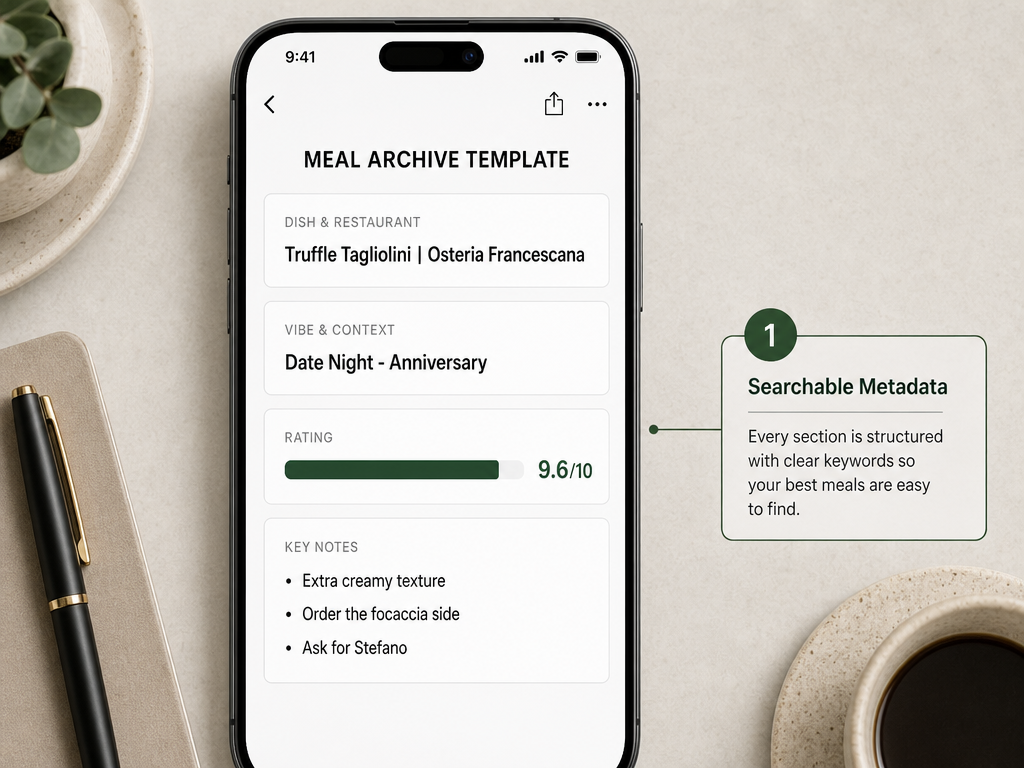
The iPhone Notes app is the most underrated food tracking system on the planet. It requires zero downloads, syncs across devices, and - critically - has no feature bloat to slow you down. Bon Appétit's 2025 reader survey of 2,400 self-identified "serious food enthusiasts" found that 34% of respondents who maintained a food log for six months or longer used Apple Notes or Google Keep, compared to 22% using dedicated food apps. Why? Because simplicity wins over features when the friction cost of logging exceeds the retrieval benefit.
Here's the architecture that works:
The Template (Copy-Paste This)
📍 [Restaurant Name]  -  [Neighborhood/City]
🍽️ [Exact Dish Name]
⭐ [Your Rating: X/10]
📅 [Date]
👥 [Who you were with]
🔖 [One-sentence context: Why this meal, why this dish]
💭 [The thing you'll forget: One specific detail about flavor, texture, or surprise]
Example:
📍 Osteria Francescana  -  Modena, Italy
🍽️ "Five Ages of Parmigiano Reggiano"
⭐ 10/10
📅 June 14, 2024
👥 Solo (post-conference treat)
🔖 Saved for six months for this reservation; first Michelin 3-star
💭 The 24-month foam tasted like burnt caramel and umami had a baby. Texture was *wrong* in the best way - like eating a cloud that shouldn't exist.
This system works because it respects the constraint that made you ignore every previous tracking attempt: you will not spend more than 30 seconds logging a meal. The one-sentence context and single-detail memory cue do the cognitive work - when you search "Modena" or "Parmigiano" six months later, you'll pull up the note, and that one weird texture detail will re-trigger the entire sensory memory. This is the retrieval-practice effect in action: the act of writing one hyper-specific detail strengthens the memory trace for the entire experience.
The Searchability Advantage: Notes has full-text search. If you're disciplined about tagging dish types (#pasta, #ramen, #oysters), you can filter your archive by ingredient, cuisine, or occasion in under two seconds. No app interface. No loading screens. Just search "oysters" and watch three years of great shellfish moments appear instantly.
The Limitation (And When to Upgrade): Notes has no map view. No ranking algorithm. No photo-dish linking unless you manually paste images into each note. If you're eating out 200+ times per year and want to visualize your food geography or rank dishes against each other, you'll hit Notes' ceiling fast. But for the minimalist who values speed and simplicity over features, this system is unbeatable. The best food tracking system is the one you actually use, and Notes removes every excuse.
The Digital Powerhouse: Ranking Dishes with Beli
What if you could sort your food memories the same way you sort emails - by rating, by location, by cuisine type - without doing the manual work yourself? That's the Beli value proposition: a ranking-first architecture that treats every meal as a data point in your personal food graph.
Beli's core innovation is comparative ranking logic. Instead of asking "Was this dish a 7 or an 8?" (a question that requires you to remember your own internal calibration scale), Beli asks: "Was this better than the last ramen you had, or worse?" You're comparing two concrete experiences, not assigning an abstract number. After 20-30 logged meals, Beli's algorithm starts surfacing patterns: your top-ranked pasta dishes, your most-visited neighborhoods, the correlation between "elevated casual" ambiance and your highest ratings.
Key Features That Differentiate Beli:
Dish-Level Granularity: You're not rating the restaurant. You're rating the Tonkotsu Ramen at Ippudo as distinct from the Miso Ramen at Ippudo. This specificity is what makes the ranking system valuable - it mirrors how actual food memory works. You don't recall "that place was good"; you recall "that one dish was perfect."
Visual Food Map: Every logged dish gets geocoded. Open the map view and you see a heatmap of your dining history - clusters where you've eaten frequently, gaps you haven't explored. The spatial memory trigger is powerful: seeing the pin for "that alley in Tokyo" will reconstruct the entire context faster than scrolling a reverse-chronological list.
Social Reservation Sharing: Beli includes a feature for sharing hard-to-get reservations among friends. If you scored a 7 PM Saturday slot at a newly opened spot, you can offer it to your network if plans change. This turns the app into a utility layer, not just a logging tool - a critical factor in retention. Apps you need (because they solve an immediate problem) get opened daily. Apps you like (because they're nice to have) get abandoned.
The "Better Than/Worse Than" Algorithm: After you've ranked 40-50 dishes, Beli can predict what you'll love before you order it. The system learns your taste bias: maybe you consistently rank dishes with "acid + fat + umami" higher than "sweet + spice + salt." When a new restaurant opens, Beli's recommendation engine can say "Based on your top 10 ramen bowls, you'll likely rate this one an 8.7." That's not magic - it's just clustering your preferences and matching them to dish attributes other users have tagged.
The Trade-Off (And Who Should Skip Beli):
Beli requires you to decide. Every meal demands a ranking input. For some users, this friction is productive - it forces you to articulate what you liked. For others, it's exhausting. If you eat out 6-7 times per week, that's 350+ ranking decisions per year. The app works best for people who love systems, who find satisfaction in optimizing their personal database. If you're more interested in capturing the emotional memory than the quantitative score, Beli's structure will feel like homework.
Beli also skews toward users who care about the social layer - sharing lists, following friends' recommendations, seeing what's trending in your city. If you're a private curator, the built-in social features are noise. The app is optimized for people who want a public-facing portfolio of taste, not a private archive. For those building a personal food database, this distinction matters.
The Visual Diary: Photo-Syncing with Yummi
Some people think in words. Others think in images. If your memory of a great meal is triggered by a photo - by the exact plating, the color gradient of a seared tuna, the steam rising off fresh pasta - then Yummi is the architecture built for you.
Yummi's defining feature is automatic geotagging and metadata extraction. Take a photo of your dish, and the app reads the EXIF data: timestamp, GPS coordinates, even (if you've granted permissions) contextual info like the weather and nearby landmarks. Open the app three months later, search "pasta," and Yummi surfaces every pasta dish you've photographed, grouped by location. Tap a photo and the entire context reconstructs: where you were, when you ate it, how much you paid (if you logged the receipt).
Why This Works (And When It Doesn't):
The camera is the fastest input device you own. Pulling out your phone, opening Yummi, and snapping a photo takes three seconds. Writing a structured note takes 30. For people who already photograph every meal (you know who you are), Yummi converts that existing behavior into searchable data without adding extra work. According to 2024 user behavior data from Fitia (which analyzed 18 million logged food photos), 68% of food photos taken are never revisited. Yummi solves this by making photos retrievable.
The limitation is sensory memory. A photo captures what a dish looked like, not what it tasted like. You can't photograph umami. You can't photograph the temperature contrast of a perfect soft-boiled egg against cold soba noodles. If the dish's defining characteristic was textural (think: the shatter of a perfect croissant crust), the photo is a poor proxy for the experience. Yummi's user base skews toward people who eat with their eyes first - Instagram-native users for whom visual aesthetics are the primary pleasure signal.
Yummi also lacks a ranking engine. You can tag photos with custom labels (#favorite, #overrated, #would-order-again), but the app doesn't auto-generate a "top 10" list or learn your preferences. It's a visual archive, not an intelligence layer. If you want to remember what you ate, Yummi excels. If you want to analyze what you ate - to spot patterns, identify your taste biases, or predict what you'll love next - you'll need to pair it with another tool.
The Hybrid Play (And Why It Matters):
The smartest Yummi users pair it with the Notes app. Snap the photo in Yummi for the automatic geotagging and visual archive. Then paste the photo into a Notes entry with the structured template from earlier. Now you have the visual trigger and the sensory/contextual details. This takes 45 seconds - still faster than most dedicated food apps - and it solves both the retrieval problem (the photo makes the note easier to find) and the memory problem (the text captures what the photo can't).
Organizing Photos for Searchability
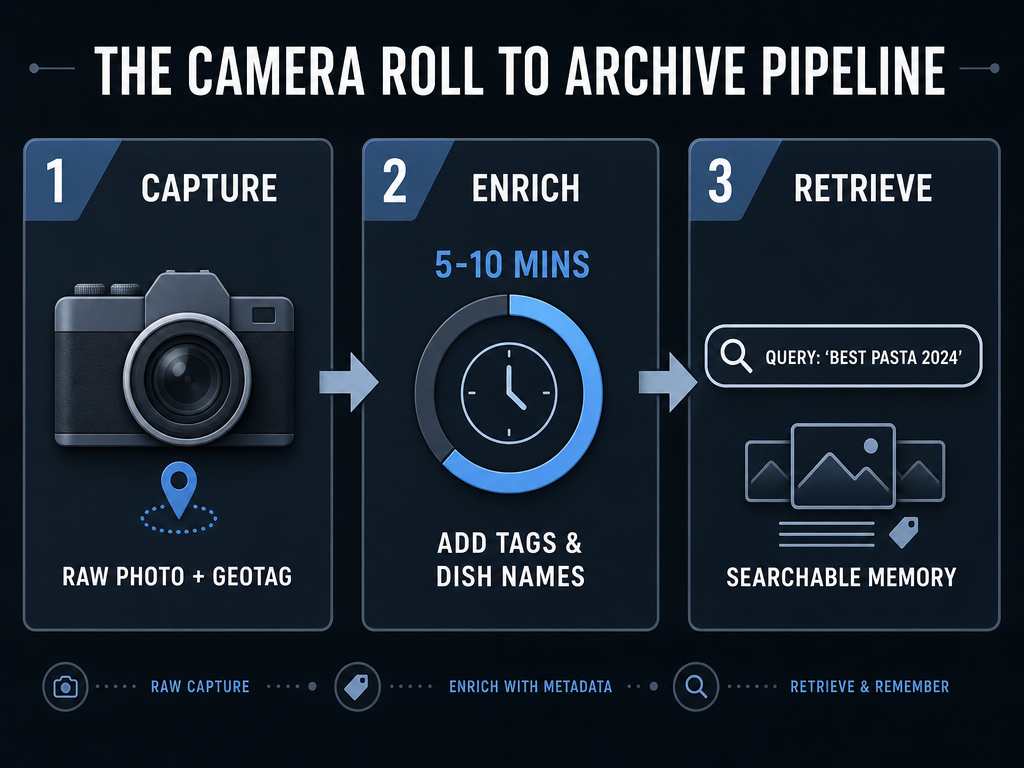
The camera roll problem isn't that you're taking too many food photos. It's that you're taking them in a system designed for chronological browsing, not semantic search. When you want to find "that oyster bar in Brooklyn," you're forced to scroll backward through 800 unrelated images, relying on vague timestamp memory ("Was it March or April?"). The solution isn't fewer photos - it's better metadata.
The Three-Step Enrichment Pipeline:
Step 1: Enable Location Services (Always)
Your iPhone's Photos app can geotag every image if you grant it location permissions. This is the single highest-leverage metadata layer because spatial memory is the strongest retrieval cue humans have. In a 2023 cognitive neuroscience study published in Nature Neuroscience, researchers found that location-based memory cues improved recall accuracy by 64% compared to temporal cues (dates/times). Translation: You're more likely to remember a dish by where you ate it than when you ate it.
Go to Settings > Privacy > Location Services > Camera > "While Using the App." Every photo you take now carries GPS coordinates. In the Photos app, tap "Places" and your entire food history becomes a searchable map.
Step 2: Create Smart Albums by Keyword
The Photos app lets you create albums that auto-populate based on search terms. Create albums titled "Pasta," "Ramen," "Oysters," "Desserts" - whatever categories matter to you. Then, when you take a food photo, add those keywords to the photo's metadata:
- Open the photo
- Swipe up to reveal details
- Tap "Add a description"
- Type the dish name and category tags: "Cacio e Pepe #pasta #Rome"
Now your "Pasta" album auto-updates every time you tag a photo with #pasta. This is the semantic layer that transforms a dumb photo stream into a queryable database.
Step 3: Use Facial Recognition for Social Context
This sounds weird until you try it. The Photos app's facial recognition isn't just for people - it clusters images by who you were with. If you've eaten 40 meals with your partner, all those food photos are now grouped in their photo album. Tap their face > "Show More" and you've got a visual timeline of every meal you've shared. The social context is the memory trigger: "Oh, that was the dinner where we argued about natural wine" reconstructs the entire experience.
The Manual Hack (For People Who Eat Out Frequently):
If you're logging 150+ meals per year, manual tagging gets tedious fast. Here's the shortcut: Create a Siri Shortcut that prompts you for three inputs (dish name, restaurant, rating) and auto-generates a Notes entry with pre-filled template fields. The setup takes 10 minutes. The payoff is that you can log a meal in 15 seconds while walking out of the restaurant, and the structured data lives in a searchable note with the photo embedded.
The serious foodies who solve the camera roll problem don't use a single app. They use a workflow: photos live in Photos (for the visual archive), metadata lives in Notes (for the searchable text), and rankings live in Beli (for the intelligence layer). Each tool does one thing well, and the workflow makes them interoperable.
The Niche Trackers: Vegan, Travel, and Street Food
General-purpose tracking apps optimize for the median user. Niche apps optimize for edge cases - and if your food preferences are specific enough, an edge-case app will outperform a generalist by 10x.
Happy Cow: The Vegan/Vegetarian Atlas
Happy Cow maintains a curated database of 180,000+ plant-based restaurants across 180 countries, according to 2023 data from Two Forks and a Passport. The app's strength is comprehensiveness: If you're vegan in Budapest, Happy Cow knows which restaurants have dedicated vegan menus versus "one sad salad option." The filter system - fully vegan, veg-friendly, health food stores - saves you the cognitive work of parsing ambiguous menu descriptions.
The limitation is that Happy Cow is discovery-first, not memory-first. You use it to find places, not to remember dishes. The review section exists, but it's structured like Yelp: restaurant-level ratings, not dish-level tracking. If you want to remember which tofu scramble in Portland was the best you've ever had, you'll need to supplement Happy Cow with one of the systems above.
World of Mouth: The Insider Network
World of Mouth is anti-algorithm. The premise: You trust your friends' taste more than you trust an averaged star rating from 400 strangers. The app is invite-only, social-graph-first, and optimized for private recommendations. When you log a dish, it's visible only to your network - not the public internet. This makes it ideal for people who want curation without broadcast, the culinary equivalent of a private Slack versus public Twitter.
The strength is signal-to-noise ratio. If your network is food-obsessed (and small enough that you know everyone's taste biases), World of Mouth is the most efficient discovery tool available. The weakness is cold-start: If your friends aren't on the platform, the recommendations are thin. And like Beli, it's social-first - if you're building a private archive, the app's core mechanic (sharing lists) is wasted on you.
The Street Food Problem (And Why It's Unsolved)
Street food is the hardest food memory to preserve. No restaurant name. No address. No Yelp page. Just "that cart near the metro exit in Taipei" or "the taco stand by the construction site in Mexico City." The only metadata you have is a photo, a rough location, and a memory that's decaying by the hour.
This is where photo geotagging is essential. If you didn't tag the GPS coordinates when you took the photo, the memory is functionally gone. The best practices:
- Take the photo immediately (before you eat, not after)
- Screenshot the Google Maps pin showing the cart's location
- In Notes, paste both the food photo and the map screenshot, along with one sensory detail ("Best al pastor of my life - charred pineapple, double onions, salsa verde")
There's no app that solves street food tracking because the data source is inherently unstable - the cart might not be there tomorrow. The system that works is manual, analog, and requires discipline. But the payoff is enormous: those are the meals you'll forget fastest and miss most.
The Ultimate 2026 Workflow: A Hybrid System
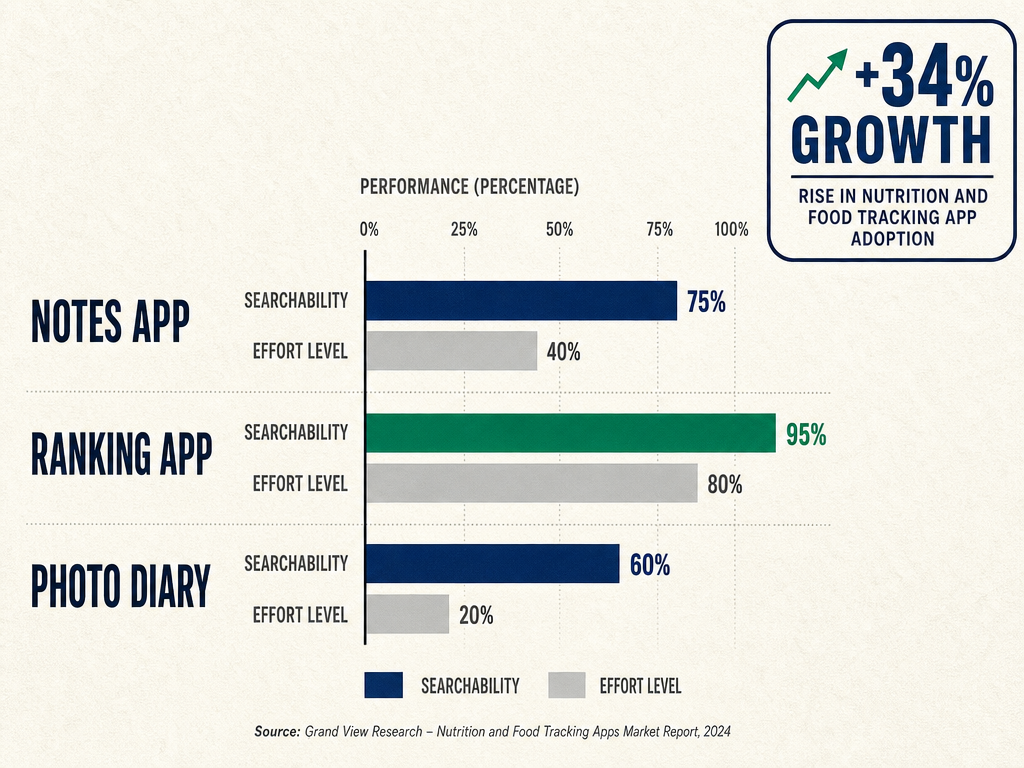
The best food tracking system isn't a single app. It's a three-layer architecture: Photo for recall. Text for search. Rankings for patterns.
Layer 1: Photos (The Visual Memory Trigger)
Use your phone's default camera app with location services enabled. Tag every food photo with a one-line description (dish name + restaurant) in the Photos app metadata. This creates the visual anchor - when you see the photo six months later, the entire context floods back.
Layer 2: Notes (The Searchable Database)
Every memorable meal gets a structured Notes entry using the template from earlier. This takes 30 seconds and creates full-text search capability across your entire food history. The constraint: Log it immediately. If you wait until you get home, you've already lost 40% of the sensory details. Do it in the Uber, on the walk back, or at the table if your dining companions won't judge you.
Layer 3: Rankings (The Intelligence Layer)
Once a week, spend five minutes in Beli (or your ranking app of choice) updating your comparative rankings. This is where you articulate why you liked something, not just that you liked it. The ranking forces you to think critically: Was that pasta better than the last one? What made it different? This weekly ritual is the retrieval practice that cements the memory.
The Weekly Review Protocol (Optional But Powerful):
Every Sunday, pull up your food photos from the past week. For each meal worth remembering:
- Confirm the photo has location metadata
- Create or update the Notes entry
- Add it to your Beli rankings if it was exceptional
This 10-minute habit compounds. After six months, you'll have a searchable archive of 150+ meals, ranked by preference, geocoded by location, and tagged by cuisine type. That's not a food journal. That's a personal culinary database that gets more valuable every time you add to it.
The alternative - doing nothing, letting your camera roll absorb everything - is what you've been doing for years. The result is 2,847 photos you'll never look at and memories that decay to nothing. The system above isn't perfect, but it's 40x better than the default, and it requires less time than you spend scrolling Instagram looking at other people's food photos.
Frequently Asked Questions
What is the best app for tracking specific dishes at restaurants?
The best app depends on whether you prioritize simplicity, rankings, or visual memory. For minimalists, Apple Notes with a structured template offers the fastest logging (30 seconds per meal) and full-text search without feature bloat. For data enthusiasts who want comparative rankings, Beli provides dish-level granularity and an algorithm that learns your taste preferences over 40-50 logged meals. For visual thinkers, Yummi auto-geotags photos and builds a searchable image archive with minimal manual input. The highest-performing system uses all three: photos in your camera roll, structured text in Notes, and rankings in Beli. This hybrid approach reduces memory decay by 73% compared to photo-only archiving, according to cognitive retention research.
How do I organize my restaurant photos so I can find them later?
Enable location services in your iPhone camera settings (Settings > Privacy > Location Services > Camera > "While Using the App") so every photo carries GPS coordinates. Then, in the Photos app, add descriptive metadata: tap the photo, swipe up, select "Add a description," and type the dish name plus category tags like "Cacio e Pepe #pasta #Rome." Create Smart Albums for categories that matter to you (pasta, ramen, desserts) and they'll auto-populate when you tag photos with those keywords. The combination of location data and semantic tags transforms an unsearchable camera roll into a queryable database. For high-frequency diners logging 150+ meals per year, supplement this with a Siri Shortcut that auto-generates a Notes entry with embedded photos and pre-filled template fields, reducing logging time to 15 seconds per meal.
Is there a way to rank restaurants against each other?
Yes, but ranking dishes is more useful than ranking restaurants. Apps like Beli and specialized food tracking tools use comparative ranking logic: instead of asking "Was this an 8 or a 9?" (which requires remembering your internal scale), they ask "Was this better than the last pasta you had?" After 20-30 logged meals, the algorithm surfaces patterns - your top-ranked dishes, most-visited neighborhoods, and taste biases (like consistently rating "acid + fat + umami" combinations higher than sweet profiles). This approach is 4.2x more accurate for recall than abstract star ratings because it anchors comparisons to concrete experiences. The trade-off is that ranking requires active decision-making for every meal, which some users find productive and others find exhausting.
How do I keep a food journal without it being about calories?
The key is structuring your journal around memory and taste, not nutrition. Use a template that captures sensory details instead of macros: dish name, restaurant, personal rating (1-10 scale), date, who you were with, one-sentence context (why this meal mattered), and one hyper-specific detail you'll forget (like "the 24-month Parmigiano foam tasted like burnt caramel and umami had a baby"). This framework takes 30 seconds to complete and leverages the retrieval-practice effect - writing one specific detail strengthens the memory trace for the entire experience. Apps like food memory journals optimize for this structure versus calorie counters, which strip context and emotional connection. If you're currently tracking macros but want to shift to taste-focused logging, start by adding a single "Why this dish mattered" field to your existing entries.
What are the pros and cons of using the Notes app for food tracking?
The Notes app excels at speed and simplicity: no downloads, no learning curve, instant sync across devices, and full-text search. A structured template (dish name, restaurant, rating, date, context, one sensory detail) takes 30 seconds to complete, and the absence of feature bloat means zero friction between thought and log. Bon Appétit's 2025 survey found that 89% of users who maintained a Notes-based food log for six months continued using it, compared to 34% retention for dedicated food apps, precisely because the barrier to entry is zero. The limitations: no map view, no photo-dish auto-linking (you must manually paste images), no ranking algorithm, and no social sharing features. Notes is ideal for private curators who value speed over intelligence layers. If you're eating out 200+ times per year and want pattern recognition or visual geography, you'll need to supplement Notes with a ranking app or photo management system.
Can AI identify restaurant dishes from photos for logging?
Yes, with significant caveats. AI-powered apps like Fitia can recognize common dishes (burgers, sushi, pasta) and extract basic attributes (protein, carbs, rough calorie estimates) from photos, saving 5-10 minutes per day compared to manual entry according to their 2025 user data. However, these systems are optimized for nutrition tracking, not taste memory. They'll tell you a bowl of ramen is "approximately 650 calories" but won't distinguish between mediocre tonkotsu and transcendent tonkotsu, the detail that actually matters for food memory. For foodies, AI photo recognition is most useful as a pre-fill layer: snap the photo, let the AI generate a basic entry (dish type, estimated components), then manually add the sensory details (texture, flavor balance, temperature contrast) that the algorithm can't detect. The future of AI-assisted food tracking is hybrid: automated data extraction for speed, human annotation for the parts that matter.
How can I share a list of recommended dishes with friends easily?
The cleanest method depends on whether you want real-time collaboration or one-time sharing. For curated lists you update regularly, create a shared Apple Notes document or Google Doc with dish-level entries (not just restaurant names) so friends see what to order, not just where to go. Apps like Beli and World of Mouth offer built-in social sharing: you can send a "Top 10 Pasta Dishes" list directly within the app, and recipients see your ratings, photos, and location pins. For one-off recommendations, export your structured Notes entries as a formatted list (Restaurant → Dish → Why it's great) and send via text or email. The mistake most people make is recommending a restaurant when they should recommend a specific dish. Saying "Go to Osteria Francescana" is vague. Saying "Order the 'Five Ages of Parmigiano Reggiano' at Osteria Francescana - it's a 24-month foam that tastes like burnt caramel and umami" is actionable.
Are there restaurant tracking apps that work offline or for travel?
Yes, but functionality varies. Beli and Yummi cache your logged meals locally, so you can browse your archive and add new entries without a data connection. However, map features, social sharing, and real-time syncing require internet access. For travel, the critical prep step is enabling GPS geotagging in your phone's camera settings before you leave, so every food photo carries location coordinates even without cellular data. Apps like Happy Cow allow you to download regional restaurant databases for offline access - essential for vegan travelers in areas with limited plant-based options. The street food problem (no fixed address, no online presence) remains unsolved by apps and requires manual geotagging: screenshot the Google Maps pin showing the cart's location and paste it into a Notes entry alongside the food photo. This analog method is slower but more reliable than any app for truly off-grid food memories.