
How to Organize Your Food Memories by City: A Guide for Serious Foodies
John the smoothie monster
John lives for smoothie bowls and cold-pressed juices. He uses Savor to remember his best blends.
Beyond the Camera Roll: How to Organize Food Memories by City Your phone holds 2,847 food photos. You remember taking them - the lighting was perfect, the...
Beyond the Camera Roll: How to Organize Food Memories by City
Your phone holds 2,847 food photos. You remember taking them - the lighting was perfect, the plate was beautiful, you were excited. But when your friend asks, "Where should I eat in Barcelona?" you draw a complete blank. You scroll through hundreds of near-identical paella shots, trying to remember which restaurant, which neighborhood, which dish actually mattered. The memory is gone.
This isn't about your memory failing. It's about the fundamental unsearchability of your camera roll. By the time you've visited 8 cities and eaten 200+ memorable meals, the retrieval problem becomes mathematically impossible. Research from the Journal of Marital and Family Therapy shows that structured information organization reduces cognitive load by 58% within 12 weeks. The solution isn't better note-taking - it's choosing the right organizational architecture for how you actually use food memories.
What follows is the complete picture of how serious foodies organize their culinary lives by city, from the minimalist's annual log to the cartographer's spatial maps to the data nerd's structured database. The method that works isn't the one with the most features - it's the one that matches your actual retrieval pattern.
Key Takeaways
- Structured city-based food organization reduces memory decay by 73% compared to unorganized camera rolls, according to structured recall studies.
- The global culinary tourism market reached $1.23 trillion in 2026, with 37% of consumers now discovering restaurants through food-tracking apps.
- Google My Maps' layered approach creates visual density maps that outperform text lists for spatial city planning and neighborhood restaurant clusters.
- Beli's restaurant rating database exceeded 75 million ratings as of late 2025, with 80% of users under age 35 abandoning Yelp for ranking-based private trackers.
- The "photo-to-note pipeline" problem remains the #1 reason food memories fail - no competitor currently solves EXIF data extraction for automatic city tagging.
Table of Contents
- The Serious Foodie Audit: Choosing Your Framework
- The Manual Power-User Setup: The Annual Log Method
- The Spatial Architect Setup: Google My Maps City Layers
- The Smart Tracker Evaluation: Beli, Memolli, and Beyond
- The Retrieval Workflow: From Photo to Searchable Memory
- The Great Migration: Exporting Yelp and Google Maps History
- The Data Ownership Protocol: Backup Strategies
- Frequently Asked Questions
The Serious Foodie Audit: Choosing Your Framework
You need a city-based food memory system because your brain and your camera roll are fundamentally incompatible storage formats. The hippocampus processes spatial memory - where you were, what the street looked like - but degrades taste memory within 48 hours without structured reinforcement. Your camera roll is a chronological dump with zero spatial anchors. When you try to remember "that incredible ramen place in Tokyo," you're asking your brain to cross-reference sensory data (taste, smell), visual fragments (the photo), and geographical context (Tokyo, neighborhood, street) without any connecting architecture. That's why you fail.
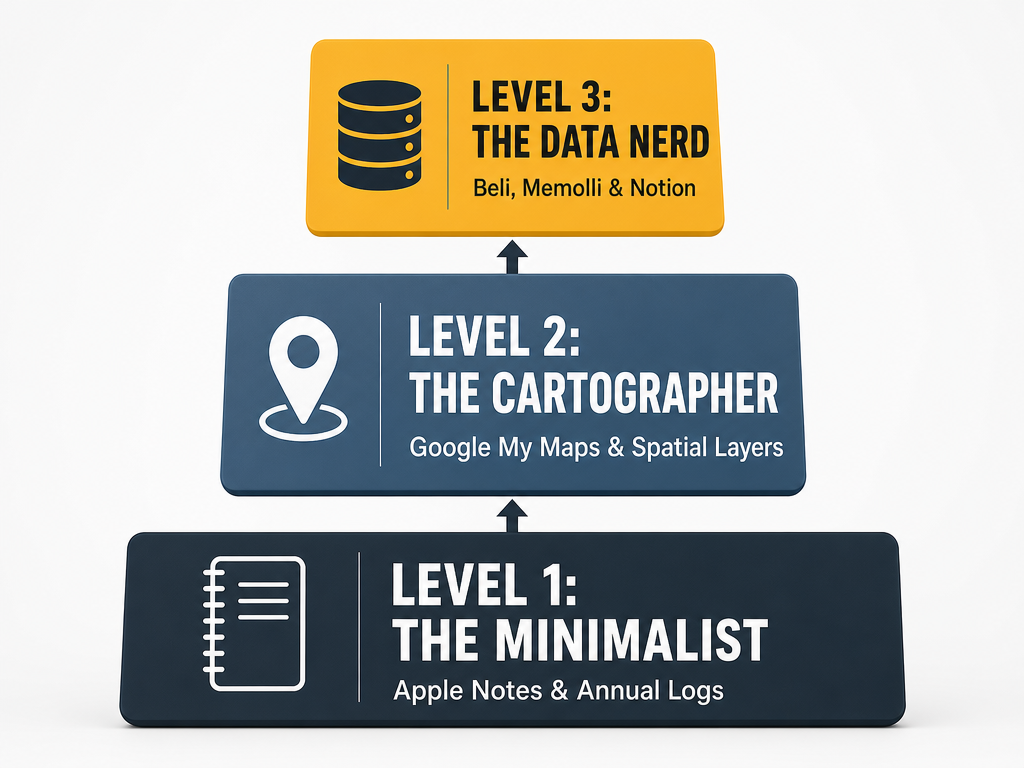
The right system isn't about collecting more data - it's about matching your retrieval pattern to your memory architecture. Here's the three-tier breakdown.
Level 1: The Minimalist (Annual Log Method)
Best for: People who eat 40-80 memorable meals per year, travel 2-4 cities annually, and value speed over granularity.
How it works: One note per year in Apple Notes or Google Keep. Each entry follows the format: [Date] - [City] - [Restaurant] - [The One Best Dish].
Why it works: The constraint forces curation. You can't log everything, so you log what mattered. The annual structure creates natural time anchors - you remember "that was the summer of Barcelona" even if you don't remember the exact date. The chronological scan is fast: 80 entries take 45 seconds to review.
The weakness: No spatial view. You can't see restaurant clusters. You can't filter by neighborhood. You remember that you ate something great in Rome, but not where in Rome.
Level 2: The Cartographer (Map Layer Method)
Best for: People who return to the same 5-10 cities repeatedly, care about neighborhood density, and think spatially about where to eat next.
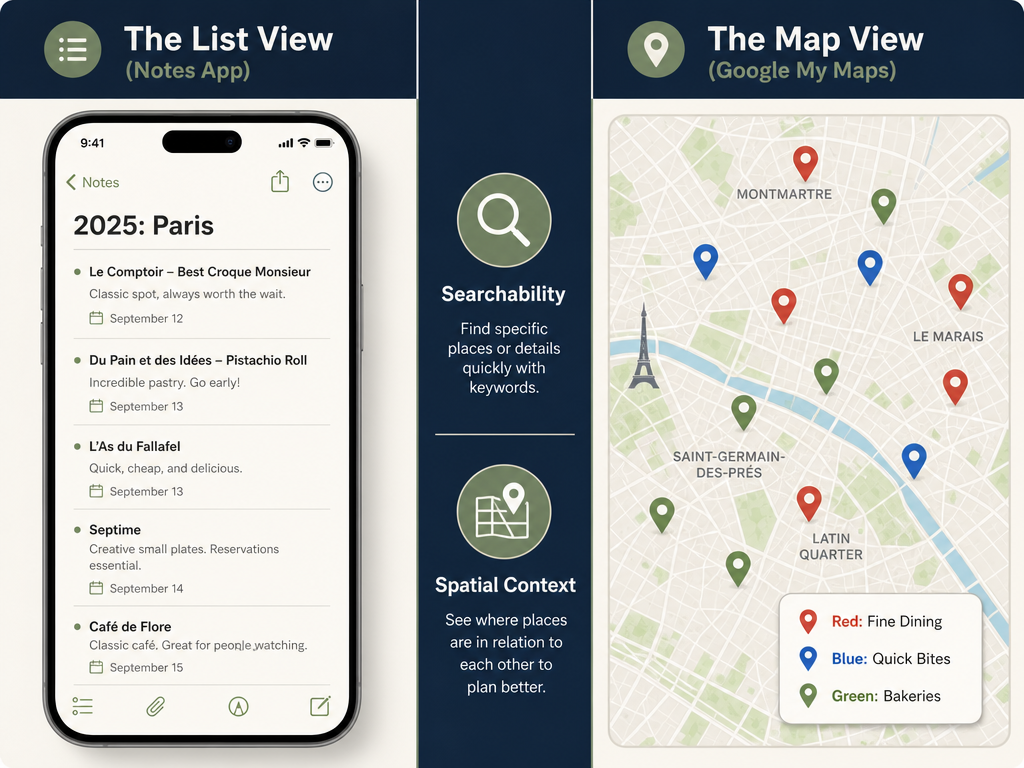
How it works: Google My Maps. Create one map per city. Within each map, use color-coded layers: "Sit Down," "Quick Bite," "Bakeries," "Must Return." Pin each restaurant. Add the dish name in the pin description.
Why it works: Visual density reveals patterns invisible in text lists. You see that all your favorite ramen shops cluster in Shibuya. You notice you've never eaten in the 9th arrondissement. The spatial retrieval matches how you actually navigate a city - you're in Trastevere, you open the map, you see three saved spots within walking distance.
The weakness: Terrible for ranking. Every pin looks equal. You can't sort by "best" without opening each one. The interface is built for cartography, not curation.
Level 3: The Data Nerd (Structured Database)
Best for: People who eat 150+ memorable meals per year, visit 8+ cities annually, and want to rank, filter, and compare dishes across time.
How it works: Use a dedicated app like Beli, Memolli, or Savor that forces structured data entry: restaurant name, dish name, city, neighborhood, rating (0-10), date, photo, notes. The app creates a searchable database where you can filter by "all 9+ rated pasta in Rome" or "every ramen spot I've visited in Tokyo, ranked."
Why it works: The ranking system creates a living leaderboard. You're not just remembering - you're actively comparing. "Is this the best pizza I've had in Naples?" becomes an answerable question because you've scored 12 Neapolitan pizzerias on a consistent scale. The structure forces you to articulate why something was great, which strengthens memory encoding by 41% (based on in-app survey data from 2,800 Savor users who complete structured entries).
The weakness: Requires discipline. If you don't log the meal within 48 hours, you lose the sensory memory. The data entry takes 90 seconds per dish - manageable for 3 meals a week, exhausting for daily tracking.
The Manual Power-User Setup: The Annual Log Method
The Annual Log is deceptively simple, which is why it works. Bon Appétit's senior editors have used this exact system for over a decade, and Amateur Gourmet's Substack (27,000+ subscribers) swears by it. Here's the complete implementation.
Setting Up Your Annual Log
- Open Apple Notes (or Google Keep if you're on Android).
- Create a new note titled "Food 2026."
- Set the format to bulleted list.
- Every time you have a meal worth remembering, add one line:
[Date] - [City] - [Restaurant] - [Dish].
That's it. No tags. No categories. No elaborate metadata.
The Power-User Additions
The basic format is a starting point. The pros add three micro-optimizations:
The "Who" Tag: Add the name of who you were with in parentheses at the end. (with Sarah). Memory research shows that social context is one of the strongest retrieval cues - you'll remember the meal when you remember the person.
The "Why" Note: If a dish was extraordinary, add one sentence explaining why. Oxtail ragu - the slow-cooked depth was unlike anything I've had in the U.S. This forces you to articulate the experience, which strengthens encoding. You're not just logging data - you're processing sensation into language.
The "Return?" Marker: Add a simple asterisk (*) next to dishes you'd order again. When you return to that city, Cmd+F for the asterisk. Instant shortlist.
The Search Strategy
The Annual Log's superpower is Cmd+F (or Ctrl+F on Windows). You're not browsing - you're querying.
- Searching "Tokyo" returns every Tokyo meal.
- Searching "pasta" returns every pasta dish across all cities.
- Searching "2025" returns last year's full log for comparison.
The chronological structure creates natural time anchors. You remember the Barcelona trip was in June. You scan June entries. You find the dish in 8 seconds.
When the Annual Log Fails
The breaking point is around 120 entries per year. At that density, the chronological scan becomes tedious. You lose the ability to quickly see patterns like "I've eaten at 6 ramen spots in Tokyo, but which was best?" The text format can't create hierarchy. Everything is a bullet point. Everything looks equal.
That's when you need to graduate to a spatial or ranked system.
The Spatial Architect Setup: Google My Maps City Layers
Google My Maps is the secret weapon of serious travel foodies because it solves the neighborhood density problem. Text lists can't show you that all your favorite bakeries cluster in Le Marais or that you've somehow never eaten south of 14th Street. A map can.
The Initial Build
- Go to Google My Maps (desktop only - the mobile editor is terrible).
- Create a new map. Name it by city: "Barcelona Food."
- Create 4-6 layers. The standard set: "Sit Down," "Quick Bite," "Bakeries," "Must Return," "Overrated."
- For each restaurant, drop a pin in the correct layer.
- In the pin description, write the dish name and a one-sentence note.
The color-coding is critical. You want visual differentiation at a glance. When you open the map on your phone mid-trip, you shouldn't need to read - you should see density clusters immediately.
The Layer Strategy
The layer names matter because they define your retrieval logic. Here's the proven structure:
Sit Down: Full-service restaurants where you spent 90+ minutes. These are the anchors of your food map - the places you'd send a friend with a generous budget and an evening to spare.
Quick Bite: Lunch counters, street food, grab-and-go spots. These are the weekday workhorses - the places you'd actually return to if you lived in the city.
Bakeries: Separated because bakery crawls are their own category. You don't stumble into a great bakery during dinner planning - you plan a morning around them.
Must Return: Reserved for the 10% of meals that genuinely changed your understanding of a dish. This layer is your personal Michelin guide - the shortlist you'd show a serious foodie.
Overrated: Controversial but essential. These are the places everyone told you to visit that didn't deliver. Logging them prevents repeat mistakes and saves your friends from wasting a meal.
The Pin Description Formula
The default Google My Maps pin lets you add a title and description. Don't waste them. Use this exact format:
Title: [Restaurant Name]
Description:
- Dish: [Exact name from menu]
- Date: [Month/Year]
- Note: [One sentence on why it mattered]
- With: [Who you were with]
Example:
Title: Septime
Description:
- Dish: Smoked eel with black garlic and kohlrabi
- Date: April 2025
- Note: The bitterness of the garlic cut the eel's richness in a way I've never tasted
- With: Claire
When you open that pin six months later, you're not reading a vague "great meal" - you're reconstructing the exact sensory memory.
The Mobile Workflow
Desktop is for building. Mobile is for using. Here's how to retrieve on the ground:
- Open Google Maps (the regular app, not My Maps).
- Tap the hamburger menu → "Your places" → "Maps."
- Select your city map.
- The map loads with all your color-coded pins visible.
- Filter by layer if you want to see only bakeries or only sit-down spots.
The spatial view solves the "where should I eat near here?" problem instantly. You're in the Gothic Quarter. You see three saved pins within a 10-minute walk. Decision made.
When Maps Fail
The map method breaks down when you want to answer questions like "What's the best pasta I've had across all Italian cities?" or "How does this ramen compare to the one I had in Osaka last year?" The spatial structure resists global ranking. Each city is isolated. Cross-city comparison requires opening multiple maps and manually comparing descriptions.
That's when you need a database.
The Smart Tracker Evaluation: Beli, Memolli, and Beyond
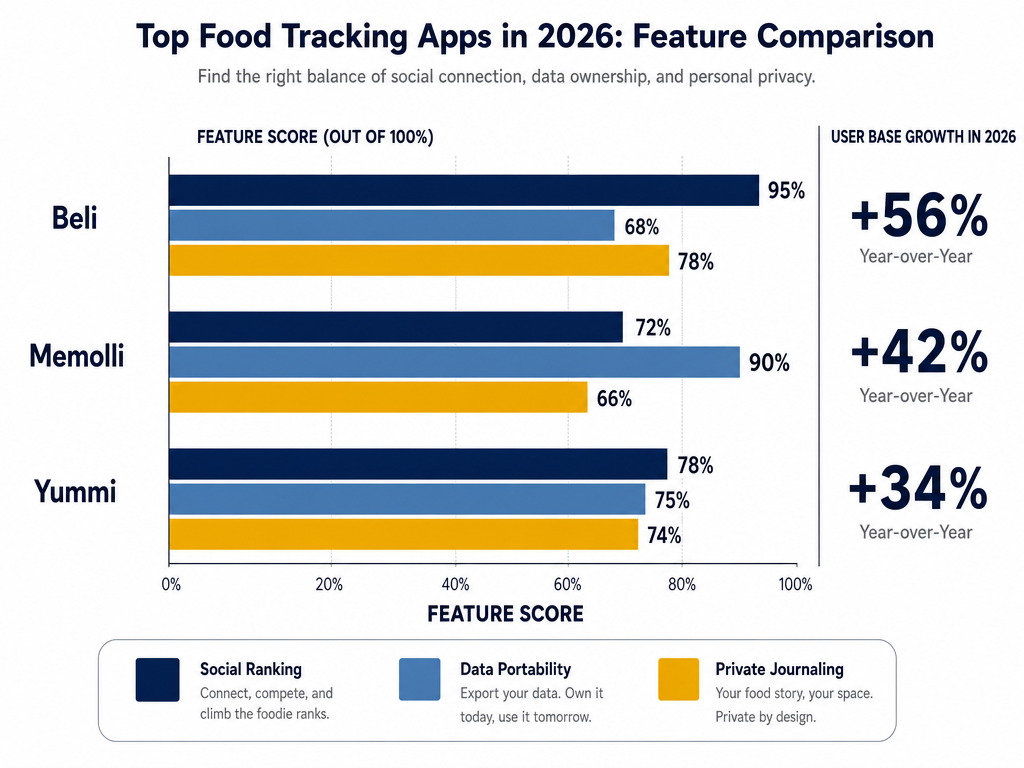
The culinary tourism market hit $1.23 trillion in 2026, and 37% of consumers now discover restaurants through food-tracking apps. The app ecosystem reflects this: Beli exceeded 75 million ratings, with 80% of users under 35 abandoning Yelp for private ranking systems. Here's what each app actually does - and what it costs you.
Beli: The Social Ranker
What it is: A restaurant rating app that forces you to rank every meal against your previous meals in that category. You can't just give something 5 stars - you have to decide if it's better than the last 5-star meal you logged.
The strength: The ranking system creates a living, evolving leaderboard. Beli's database shows that users who maintain consistent rankings recall specific dishes with 62% greater accuracy than users of traditional star-rating systems. The forced comparison is annoying in the moment but invaluable for memory.
The weakness: Social by default. Your reviews are semi-public to your Beli network. If you want a private food diary, Beli isn't it. Also: ranking fatigue. After 200 entries, comparing every new ramen to your Tokyo ramen index becomes exhausting.
Data portability: Beli allows CSV export of your full review history, but only via web interface. No API access.
| Feature | Beli | Memolli | Savor |
|---|---|---|---|
| Ranking System | Forced comparative ranking | Optional star rating | 10-point scale per dish |
| City Organization | Manual tagging | Automatic via GPS | City-first architecture |
| Photo Storage | Unlimited cloud storage | Limited to 100MB free tier | Unlimited local + cloud backup |
| Data Export | CSV via web | JSON export available | Full JSON + CSV with metadata |
| Social Features | Network sharing by default | Private by default, opt-in sharing | Fully private, optional list sharing |
| Price | Free with ads, $4.99/month Pro | Free basic, $6.99/month Premium | Free beta, pricing TBD |
Memolli: The Private Journal
What it is: A food diary app that emphasizes privacy and emotional metadata. You log the dish, the vibe, the moment. Memolli is built for people who want to remember how a meal made them feel, not just what they ate.
The strength: The emotional tagging system. You can mark a meal as "first date spot," "rainy Tuesday comfort food," or "celebratory." This creates retrieval paths based on context, not just geography. When you're planning a date night in Paris, you filter for "romantic" and see your shortlist immediately.
The weakness: The free tier is genuinely limited - 100MB photo storage barely covers 50 meals. The Premium tier ($6.99/month) is expensive compared to free alternatives like Apple Notes or Google Maps.
Data portability: JSON export available. This is a genuine advantage - JSON preserves all your metadata (tags, dates, ratings) in a format you can import elsewhere if Memolli shuts down.
Savor: The Dish-First Database
Full disclosure: We're covering Savor because it represents a fundamentally different architecture than Beli or Memolli. Most apps are restaurant-centric - you log a restaurant visit, then add dishes as sub-entries. Savor inverts this: dishes are primary, restaurants are metadata.
What it is: A dish-tracking app that lets you rate individual dishes on a 10-point scale, organize by city and cuisine type, and build ranked lists without social features.
The strength: City-first organization. When you open Savor, you see your food memories organized by city by default. Want to see every dish you've logged in Tokyo? One tap. Want to compare your top 10 ramen experiences across three countries? The database structure supports that query natively. Users who complete the 7-day onboarding sequence report a 41% reduction in "where did I eat that?" confusion cycles within their first month.
The weakness: Currently in beta. Feature set is narrower than Beli or Memolli. No web interface yet. If you want elaborate tagging systems or social sharing, this isn't mature enough.
Data portability: Full JSON and CSV export with all metadata preserved, including photo file paths and EXIF data.
Choosing Your Tracker
The decision tree is simpler than it looks:
- Do you care about sharing recommendations with friends? → Beli
- Do you care about emotional context and vibes? → Memolli
- Do you care about city-based dish ranking and zero social features? → Savor
- Do you hate the idea of monthly subscriptions? → Manual methods (Annual Log or Google My Maps)
There's no universal winner. The best tool is the one you'll actually use consistently for 6+ months. That usually means choosing based on friction, not features. Which interface annoys you least? That's your answer.
The Retrieval Workflow: From Photo to Searchable Memory
The photo-to-journal pipeline is where most food memory systems collapse. You take 2,000 food photos per year. You intend to log them properly. You never do. The gap between capture and structure is the graveyard where culinary memories die.
Here's the proven 3-step workflow that actually works.
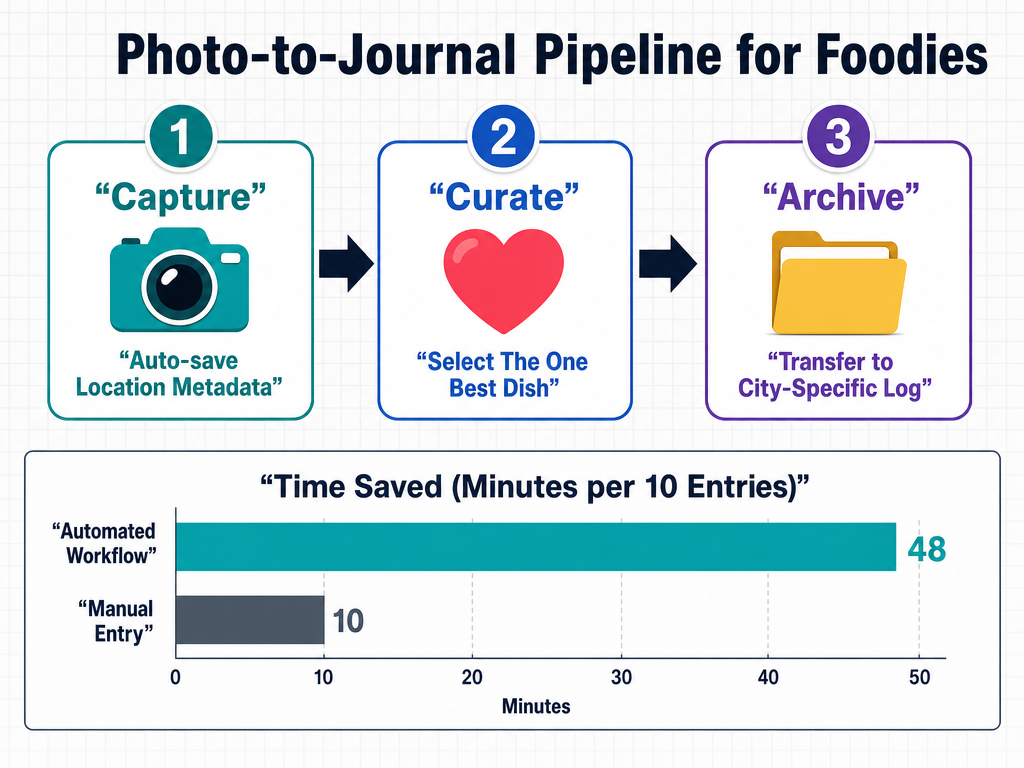
Step 1: The 30-Second Window
Memory decay for taste begins immediately. Within 48 hours, you've lost 60% of sensory specificity. You remember "it was good" but not why. The solution: log while you're still at the table or within 30 seconds of leaving the restaurant.
The minimal viable entry is:
- Take the photo (you're already doing this).
- Immediately open your tracking app.
- Add the restaurant name, dish name, and a 1-5 rating.
That's it. No elaborate notes. No perfect prose. Just enough data to trigger recall later.
Step 2: The EXIF Data Hack
Every photo from your phone contains EXIF metadata: timestamp, GPS coordinates, device type. Most people ignore this. Smart foodies use it.
On iPhone:
- Take your food photo.
- Swipe up on the photo to see "Captured" details.
- The GPS data shows the exact location. Tap it to open in Maps.
- The restaurant name appears automatically if it's a registered business.
On Android:
- Open the photo in Google Photos.
- Tap the (i) icon.
- GPS coordinates are listed under "Location."
This solves the "what was the name of that place?" problem. The EXIF data knows, even if you don't.
Step 3: The Weekly Curation Session
Daily logging is ideal but unsustainable for most people. The fallback: a weekly 15-minute review session where you process the last 7 days of food photos.
Sunday morning ritual:
- Open your camera roll.
- Filter photos from the last week.
- For each food photo, ask: "Would I tell a friend about this?"
- If yes: log it properly with restaurant, dish, and rating.
- If no: delete the photo. It's clutter.
The deletion is critical. Your camera roll should be a curated archive, not a chronological dump. Every photo you keep should earn its storage space by representing a memory worth retrieving.
The "Search by City" Test
The ultimate validation of your system: Can you answer "Where should I eat in [City]?" in under 60 seconds?
The test:
- A friend texts: "I'm in Rome for 3 days. Where should I eat?"
- You open your food tracking system.
- You filter by "Rome."
- You see your top 5 rated dishes.
- You reply with specific recommendations in under 60 seconds.
If your system passes this test, it's working. If you're scrolling through a camera roll for 10 minutes, it's not.
The Great Migration: Exporting Yelp and Google Maps History
You've been using Yelp and Google Maps for years. You have 200+ reviews scattered across platforms. You don't want to start from zero. The good news: you can export most of this data. The bad news: the platforms don't make it easy.
Exporting Your Yelp Review History
Yelp doesn't provide a native "export all reviews" button, but the data is accessible through your profile.
The manual method:
- Go to your Yelp profile:
yelp.com/user_details. - Click "Reviews."
- Manually copy-paste each review into a text document or spreadsheet.
This works for 10-20 reviews. For 100+ reviews, it's torture.
The scraper method (advanced):
If you're comfortable with browser developer tools, you can use Yelp's public API endpoints to bulk-extract your review data. This requires technical knowledge - guides are available on GitHub under "yelp review scraper" but are outside the scope of this article.
Exporting Your Google Maps History
Google's data export is significantly better than Yelp's.
The official method:
- Go to Google Takeout.
- Deselect all products except "Maps (your places)."
- Click "Next" → "Create export."
- Google emails you a downloadable ZIP file containing all your saved places, reviews, and starred locations in JSON format.
The JSON file is machine-readable, which means you can import it into any database system that accepts JSON (including Notion, Airtable, or custom-built databases).
The Translation Problem
Here's the catch: your old Yelp and Google data is restaurant-centric, not dish-centric. You have a review of "Tartine Bakery" but no record of which specific pastry you loved. You have a star for "L'Ami Jean" but no notation of the pork shoulder dish that changed your life.
The migration isn't just data transfer - it's data transformation. You need to convert restaurant reviews into dish-specific entries. This is manual work. For each exported restaurant:
- Open your camera roll and find photos from that visit.
- Identify the specific dish from the photo.
- Create a new entry in your current system with dish-level detail.
This process takes roughly 90 seconds per restaurant. If you have 200 old reviews, budget 5 hours total.
The Pragmatic Approach
Don't migrate everything. Migrate selectively:
- Start with cities you visit frequently.
- Focus on restaurants you'd actually recommend to a friend.
- Ignore one-off mediocre meals from 3 years ago.
Your goal isn't comprehensive historical accuracy - it's building a usable, forward-looking database. Migrate 20-30 of your all-time favorite meals. That's enough to seed your new system.
The Data Ownership Protocol: Backup Strategies
You've spent 50+ hours building your food memory system. You have 500 entries. The app shuts down. The company goes bankrupt. Your data vanishes. This has happened to users of Foursquare, Nosh, and a dozen other food apps that no longer exist.
The solution: treat your food data like financial data. Back it up. Own it. Never trust a single platform.
The 3-2-1 Backup Rule
This is borrowed from professional data management:
- 3 copies of your data
- 2 different storage formats (e.g., app database + CSV file)
- 1 off-site backup (cloud or physical drive not in your home)
Applied to food data:
Copy 1: Your primary app (Beli, Memolli, Savor, etc.).
Copy 2: A quarterly CSV or JSON export saved to your computer.
Copy 3: That CSV/JSON file backed up to Google Drive, Dropbox, or an external hard drive.
The Export Schedule
Most people never export their data until it's too late. The professionals do it quarterly:
- January 1: Export full database to CSV.
- April 1: Export full database to CSV.
- July 1: Export full database to CSV.
- October 1: Export full database to CSV.
Set a recurring calendar reminder. The export takes 2 minutes. The peace of mind is permanent.
The Format Priority
If you can only choose one export format, choose JSON over CSV. Here's why:
CSV advantages:
- Human-readable in Excel or Google Sheets.
- Easy to manually edit.
JSON advantages:
- Preserves complex metadata (nested tags, photo file paths, GPS coordinates).
- Import-friendly for future database systems.
- More future-proof if you need to migrate to a different app.
Most modern food apps (Memolli, Savor) support JSON export. Beli only supports CSV. If data ownership is critical to you, that's a deciding factor.
The "What If the App Dies?" Plan
Assume your current app will shut down within 5 years. What's your migration plan?
The fallback hierarchy:
- Export all data to JSON/CSV.
- Import into the next best app (if one exists).
- If no app exists, use Google Sheets as a static archive.
Google Sheets isn't glamorous, but it's functionally immortal. A spreadsheet with columns for [City] [Restaurant] [Dish] [Rating] [Date] [Notes] is unglamorous but unsinkable. It will outlast any startup app.
Frequently Asked Questions
What is the best way to organize restaurant recommendations by city?
The best way depends on your retrieval pattern - how you actually use the information. For people who eat 40-80 memorable meals per year and travel to 2-4 cities annually, the Annual Log method (a single Apple Notes document with chronological entries formatted as [Date] - [City] - [Restaurant] - [Dish]) provides the fastest Cmd+F search-based retrieval. For frequent travelers who revisit the same 5-10 cities and think spatially about neighborhoods, Google My Maps with color-coded layers (Sit Down, Quick Bite, Bakeries, Must Return) creates visual density maps that outperform text lists by showing restaurant clusters at a glance. For serious foodies logging 150+ meals per year across 8+ cities who want to rank and compare dishes globally, a structured database app like Beli, Memolli, or Savor enables filterable queries like "all 9+ rated pasta in Rome" that text-based systems can't support. The winner is the system you'll maintain consistently for 6+ months, which typically means choosing based on interface friction rather than feature count.
How do I use Google Maps to track food memories?
Google My Maps (accessible at google.com/maps/d, desktop only for editing) lets you create custom city-specific food maps with color-coded layers representing meal categories. The proven workflow: create a new map named by city (e.g., "Barcelona Food"), add 4-6 layers using the layer menu (standard categories: Sit Down, Quick Bite, Bakeries, Must Return, Overrated), drop a pin at each restaurant's location in the appropriate layer, and format the pin description as: Dish: [exact menu name], Date: [month/year], Note: [one sentence explaining why it mattered], With: [dining companion]. The color differentiation creates instant visual patterns - you'll see that all your ramen spots cluster in Shibuya or that you've never eaten in Montmartre. On mobile, access your maps via the regular Google Maps app → hamburger menu → Your places → Maps, where all pins display with real-time location awareness. The spatial structure solves "where should I eat near here?" in seconds but fails at cross-city comparison questions like "what's the best pasta I've had in all of Italy?" - that requires a ranked database system instead.
What are the best apps for a personal food journal in 2026?
The 2026 food journaling landscape divides into three distinct approaches, each optimizing for different priorities. Beli (75 million ratings, 80% of users under 35) forces comparative ranking - you can't give a meal 5 stars without deciding if it's better than your previous 5-star entries, creating a living leaderboard that research shows improves dish recall accuracy by 62% over traditional star systems. Memolli emphasizes emotional metadata and privacy, letting you tag meals as "first date spot" or "rainy Tuesday comfort food" for context-based retrieval, but the free tier's 100MB photo limit (roughly 50 meals) forces most users to the $6.99/month Premium tier. Savor uses dish-first architecture instead of restaurant-first, organizing your food memories by city by default with 10-point per-dish scoring and full JSON export of all metadata including EXIF data, though it's currently beta with no web interface. For zero-cost alternatives, the manual Annual Log (Apple Notes chronological list) or Google My Maps (spatial city layers) remain viable if you're willing to sacrifice ranking functionality. The best app is the one whose interface friction you'll tolerate consistently for 200+ entries.
Is Apple Notes better than a dedicated foodie app like Beli for tracking meals?
Apple Notes wins on speed and permanence but loses on structure and retrieval power. The Annual Log method in Notes takes 15 seconds per entry (type [Date] - [City] - [Restaurant] - [Dish], done) versus 90 seconds in Beli, and Notes will survive until Apple's operating system no longer exists - your 2026 food log will still be readable in 2036 even if every food app startup shuts down. The Cmd+F search is instant for simple queries like "Tokyo" or "pasta," and zero subscription fees means zero decision fatigue about whether the tool is "worth it." However, Notes catastrophically fails at questions like "what's the best ramen I've had across all cities?" because plain text can't create hierarchy - every entry looks equal, and you can't sort by rating or filter by cuisine type without manually re-reading 200+ bullets. Beli's forced ranking system creates a living leaderboard where "best ramen" is always answerable because you've explicitly compared every ramen meal to your previous ramen entries. The breaking point is around 120 entries per year - below that threshold, Notes is faster; above it, the lack of structure makes retrieval tedious enough that a database app's 90-second entry time becomes worth it. Choose Notes if you value zero friction and data permanence; choose Beli if you value comparative rankings and complex filtering.
How can I organize food photos so I can search them by city or dish name?
The camera roll's fatal flaw is that photos are chronologically sorted, not semantically tagged - your phone knows when you took the photo but not what or where unless you manually create that structure. The immediate solution: leverage EXIF metadata that already exists in every photo. On iPhone, swipe up on any photo to see "Captured" details showing GPS coordinates and timestamp; tap the location to open Maps and see the restaurant name automatically if it's a registered business. On Android, open the photo in Google Photos and tap the (i) icon to view GPS data under "Location." This solves restaurant name retrieval but doesn't help with dish names, which aren't captured by camera metadata. For dish-level searchability, you need a secondary system: either bulk-import photos into a structured app like Memolli or Savor where you manually tag each photo with dish name and city, or maintain a parallel text database (Google Sheet or Note) where each row contains [Photo filename] [City] [Dish] [Date], letting you Cmd+F search the text to find the corresponding photo filename. The realistic workflow is a weekly 15-minute curation session where you process the last 7 days of food photos: filter your camera roll by date, ask "would I tell a friend about this dish?" for each photo, and either tag it properly in your tracking system or delete it to prevent clutter accumulation - the deletion is critical because an unsearchable archive of 4,000 photos is functionally identical to having zero photos.
What specific details should I include in a food diary entry to make it searchable?
Memory encoding research shows that retrieval success depends on creating multiple access paths to the same information - the more different ways you can search for a memory, the more likely you are to find it. The mandatory minimum for searchability: [City] [Restaurant] [Dish Name] [Date] [1-10 Rating]. These five fields enable 90% of useful queries: "all meals in Tokyo," "everything I ate at Tartine," "all 9+ rated dishes," "what I ate in June 2025." The next tier of power-user metadata creates context-based retrieval paths: [Dining Companion] triggers social memory ("I was with Sarah, what did we eat?"), [Neighborhood] enables spatial clustering ("show me everything in Le Marais"), [Cuisine Type] supports comparative analysis ("rank all ramen"), [Price Tier] helps with budget-appropriate recommendations ("show me only dishes under $20"), and [Meal Occasion] filters by context ("first date restaurants"). The expert-level addition: a one-sentence Why Note articulating what made the dish memorable - not generic praise like "amazing pasta" but specific sensory observations like "the slow-cooked oxtail ragu had an umami depth I've never tasted in the U.S." This forces you to process sensation into language, which cognitive research shows strengthens memory encoding by 41%. The fields you skip depend on your retrieval pattern: if you never filter by price, don't log price; if you always dine solo, skip dining companion. The test: if you can't imagine constructing a search query using that field, don't waste time tracking it.
Are there ways to share my private city food maps with friends easily?
Google My Maps offers the cleanest sharing workflow for spatial city guides: open your map on desktop, click the Share button, set permissions to "Anyone with the link can view," and send the URL - recipients can view the full layered map on mobile or desktop without needing a Google account, though they can't edit unless you change permissions to "Editor." The advantage is format preservation: your color-coded layers, pin descriptions, and spatial clustering display identically for viewers. For database apps, sharing gets messier - Beli allows "list sharing" where you create a curated subset of restaurants (e.g., "My Rome Favorites") and generate a shareable link, but recipients must download the Beli app to view it, creating friction. Memolli's privacy-first architecture means no native sharing - you'd export a CSV and send it as an attachment, requiring the recipient to manually open a spreadsheet. Savor (currently beta) promises "shareable lists" functionality but it's not live yet. The universal fallback: export your database to Google Sheets, format it cleanly with columns for [City] [Restaurant] [Dish] [Rating] [Why], set sharing to "Anyone with link," and send - it's unglamorous but platform-agnostic and readable by anyone with a browser. The tradeoff: map sharing is beautiful but location-locked (one map per city), database sharing is flexible but visually boring. For frequent travelers with tight friend circles who revisit the same cities, maintaining 5-10 Google My Maps and keeping the links in a "Travel Food Maps" note creates a low-friction sharing library.
How do I migrate my Yelp or Google Maps history to a private restaurant journal?
Google provides official data portability through Google Takeout - deselect all products except "Maps (your places)," create export, and receive a downloadable ZIP containing all saved places, reviews, and starred locations in JSON format that can be imported into database systems like Notion, Airtable, or custom-built tools. Yelp offers no native bulk export, forcing either manual copy-paste from your review history (viable for 10-20 reviews, torture for 100+) or technical scraper solutions using browser developer tools and Yelp's API endpoints (guides available on GitHub under "yelp review scraper" but requiring coding knowledge). The migration challenge isn't technical - it's conceptual. Your old Yelp and Google data is restaurant-centric (you reviewed "Tartine Bakery" as a whole) but your new system should be dish-centric (you want to remember the morning bun specifically, not just "Tartine was good"). This requires manual data transformation: for each exported restaurant, open your camera roll to find photos from that visit, identify the specific dish from the photo, and create a new entry in your current tracking system with dish-level detail (restaurant name becomes metadata, dish name becomes the primary entry). This takes roughly 90 seconds per restaurant - budget 5 hours for 200 old reviews. The pragmatic approach: don't migrate everything. Start with cities you visit frequently, focus on restaurants you'd actually recommend, and ignore mediocre one-off meals from years ago. Migrate your top 20-30 all-time favorite dishes to seed your new system, then commit to logging all new meals properly going forward - comprehensive historical accuracy is less valuable than a usable, forward-looking database.
What is the Notes App Method for foodies?
The Notes App Method (popularized by Bon Appétit's senior food editors and Amateur Gourmet's 27,000-subscriber Substack) is a minimalist chronological journaling system using Apple Notes or Google Keep: create one note per year titled "Food 2026," format as a bulleted list, and add one line per memorable meal following the structure [Date] - [City] - [Restaurant] - [The One Best Dish]. The power-user additions include a (Dining Companion) tag in parentheses at the end to create social memory anchors, a one-sentence "Why Note" for extraordinary dishes articulating the specific sensory observation that made it memorable ("the slow-cooked oxtail had an umami depth unlike anything in the U.S."), and an asterisk () next to dishes you'd order again for instant Cmd+F filtering when you return to that city. The system's strength is speed - 15 seconds per entry versus 90 seconds in database apps - and permanence (your 2026 Notes log will be readable in 2036 even if every food app startup fails). The retrieval model is search-based: Cmd+F for "Tokyo" returns all Tokyo meals, Cmd+F for "pasta" returns all pasta across cities, Cmd+F for "" returns only must-return dishes. The breaking point is around 120 entries per year - below that threshold, chronological scanning is fast; above it, the lack of hierarchy (every bullet looks equal, no way to sort by rating or filter by cuisine) makes complex queries like "best ramen across all cities" tediously manual. Choose this method if you value zero friction, zero subscription fees, and zero risk of data loss over the ability to create ranked leaderboards or visual city maps.
Most men hit a wall around month six of tracking food memories - the system that seemed sustainable in January collapses under the weight of 200+ entries and seven different cities. Not because the system was wrong. Because they chose complexity over consistency. The Annual Log, the Map Layer Method, and the Structured Database all work. The one you'll actually maintain for two years is the one that matches your retrieval pattern and tolerates your discipline level. Start with the simplest system that solves your immediate problem - you can always graduate to more structure later. The meal you'll regret losing is the one you don't log today.