
How to Build a Searchable Dining History Database Without Losing Your Mind
Harry the matcha king
Harry is our resident matcha obsessive. He’s tasted hundreds of bowls and tracks every cup in Savor.
How to Build a Searchable Dining History Database (Without Losing Your Mind) You've taken 2,847 food photos. You remember that life-changing pasta in Rome, the...
How to Build a Searchable Dining History Database (Without Losing Your Mind)
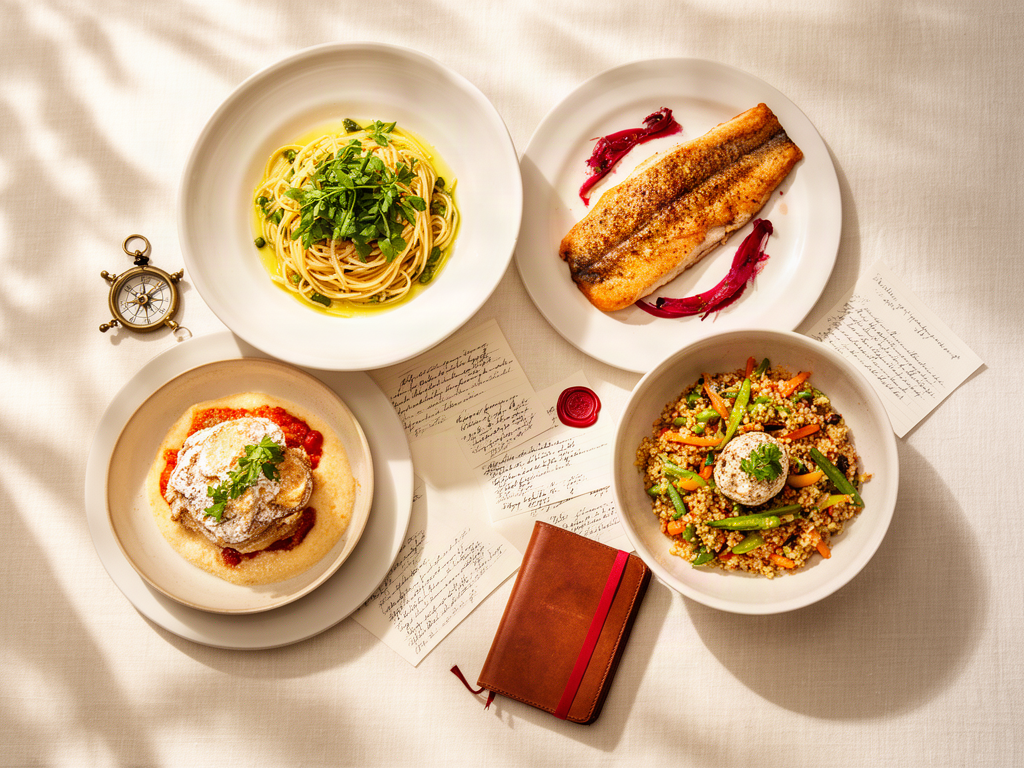
You've taken 2,847 food photos. You remember that life-changing pasta in Rome, the perfect street taco in Mexico City, the duck confit that changed everything. But when a friend asks "where should I eat in Paris?" you're scrolling through an unsearchable camera roll, desperately trying to remember which blurry photo was the transcendent moment and which was Tuesday's lunch.
This isn't a memory problem. It's an architecture problem.
Building a searchable dining history database means creating a system where multiple criteria - cuisine, occasion, budget, and location - return an instant answer. It's about transforming your chaotic food photos into a queryable personal archive that actually serves you when it matters.
Table of Contents
- The Universal Foodie Schema: What Data Points Actually Matter
- The Buy vs. Build Decision Matrix
- Dedicated Apps: When Someone Else Built Your Database
- DIY Platforms: Building Your Custom Food Archive
- The Migration Protocol: Extracting Value from Your Camera Roll
- Search Architecture: Making Your Database Actually Useful
- The Workflow Question: At the Table vs. Sunday Review
- Frequently Asked Questions
The Universal Foodie Schema: What Data Points Actually Matter
Before choosing a platform, understand what you're actually trying to capture. Most dining databases fail because they track too much or too little.
A functional foodie schema needs seven core fields:
Restaurant Name & Location - Not just "Osteria Francescana" but "Osteria Francescana, Modena, Italy." Three years from now, you won't remember which city.
Date - Essential for tracking progression. Your palate in 2023 isn't your palate in 2026.
Cuisine Type - Broad categories work better than granular ones. "Japanese" beats "Edomae-style sushi" for searchability.
Price Tier - Use the classic $ to $$$$ scale. "Under $50 per person" is less useful than "$$$" when you're filtering.
The Top Hit - This is the difference between a restaurant log and a dish database. Not "the food was good" but "order the duck leg confit, specifically."
Vibe Tag - Create your own vocabulary. "Loud," "Business Lunch Safe," "Date Night," "Secret Spot." These become your most powerful filters.
Rating or Ranking - Whether you use a 10-point scale or comparative ranking ("better than X, worse than Y"), you need a way to sort by quality. Professional critics use structured frameworks for a reason.
Everything else is optional decoration.
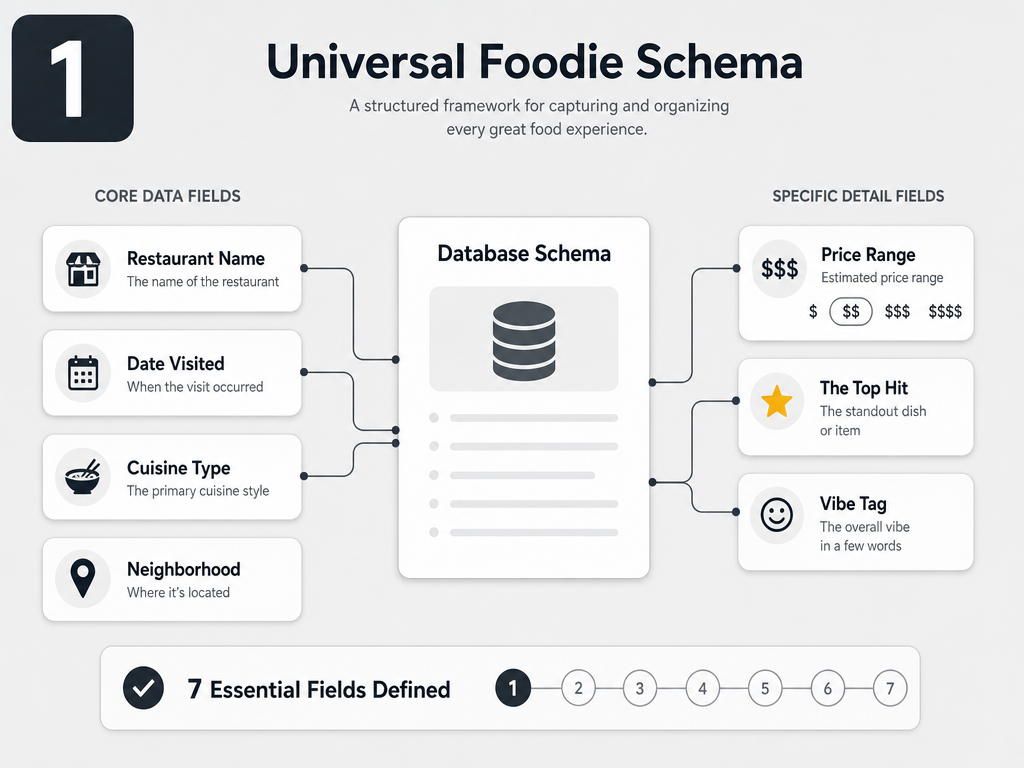 Mastering your dining history begins with a structured schema. These seven core fields ensure every entry is searchable and provides high-value recommendations for later.
The Buy vs. Build Decision Matrix
The central question isn't which platform is "best." It's which trade-off you're willing to accept.
Dedicated apps (Beli, Memolli) offer low setup friction and social features. You're logging meals in under 60 seconds, and the comparative ranking system handles the hard work of memory. The cost: your data lives in their ecosystem. If they shut down or pivot, your archive vanishes.
As of September 2025, Beli users have logged more than 75 million restaurant ratings, with roughly 80% of its user base under 35. Beli's user base reached 10% of its total in just a few key metro areas like New York, showing strong urban adoption but limited utility if you dine in smaller markets.
DIY platforms (Notion, Airtable) give you infinite flexibility and true data ownership. You can add custom fields, build views optimized for your exact query patterns, and export everything if you switch systems. The cost: meaningful setup time and a mobile experience that's clunky for quick logs.
The spreadsheet approach (Apple Notes, Google Sheets) is the lowest friction option. Zero learning curve, instant logging. But after 100 entries, you've built an unusable list. No filtering, no tagging, no way to answer "show me all the Italian spots under $$$ that I rated above 8."
Dedicated Apps: When Someone Else Built Your Database
If you value speed over control, dedicated apps solve the "what should I track?" problem by making those decisions for you.
Beli uses comparative ranking instead of static ratings. You don't assign a duck confit a "9 out of 10." You decide: was it better than the one at Bistrot Paul Bert or worse than the one at Le Comptoir? Over time, this builds a personal hierarchy that's more nuanced than star ratings. The app automatically captures location data, pulls in your photos, and makes logging nearly frictionless.
The limitation: Beli's social layer means your archive isn't purely private. You're building a public-facing reputation system, which changes how you log. The "business lunch I need to attend but wouldn't recommend" entry doesn't fit cleanly.
Memolli focuses on private, custom-field journals. You can track anything: the server's name, the wine pairing, whether you'd bring your parents. The interface prioritizes rich note-taking over speed, making it better for "Sunday review" workflows than "at the table" logging.
The challenge with all dedicated apps: feature lock-in. If the platform doesn't support filtering by "Vibe" or searching by "Neighborhood," you can't add it yourself. You're renting database architecture, not owning it.
DIY Platforms: Building Your Custom Food Archive
When you need control, build it yourself using database tools designed for flexibility.
Notion: The Gallery View Approach
Notion excels at visual organization. Create a database with your seven core fields, then build a "Gallery View" where each entry shows the food photo as a card. Tag entries with properties like "Cuisine," "City," and "Price Tier," then create filtered views: "Paris $$ French," "All 9+ Ratings," "Dishes to Recreate at Home."
The setup process takes about 90 minutes if you're starting from scratch. Create a template with pre-filled property options (your standard vibe tags, price tiers, cuisine types) so new entries are fast. Notion's mobile app is functional but not optimized for speed logging, so this works best if you batch-enter meals during a weekly review session.
A powerful Notion feature for serious foodies: relation databases. Create a separate "Restaurants" database and link individual dishes to their parent location. Now you can track: "How many dishes have I tried at this restaurant? Which was best?"
Airtable: The Filtering Powerhouse
Airtable is Notion's more technical sibling. It looks like a spreadsheet but functions like a database, with notably stronger filtering and view-building capabilities.
Build your base with the same seven core fields. Where Airtable shines: complex filters. Create a view that shows "All Italian dishes, in cities I've visited more than once, rated 8 or higher, under $$$." This level of query sophistication is difficult in Notion and impossible in most dedicated apps.
Airtable's mobile app is similarly clunky for quick logging. The trade-off: you get true data portability. Export to CSV, connect to other tools via API, or migrate to a new system without losing your archive.
For foodies who treat their dining history like a research project, Airtable's grid view makes pattern analysis easier. Sort by rating to see your top 50 dishes. Group by cuisine to understand your palate biases. Filter by date to track how your taste evolved.
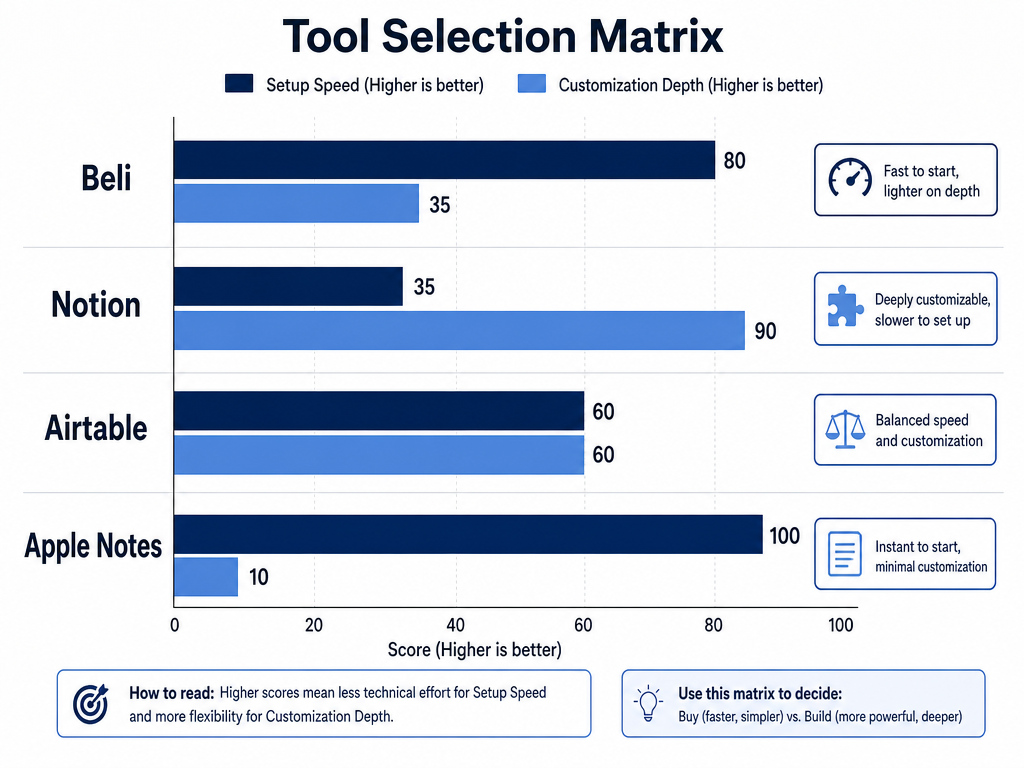 Choosing the right platform depends on your priorities. Whether you value the social features of Beli or the infinite customization of Notion, this matrix simplifies your decision.
The Migration Protocol: Extracting Value from Your Camera Roll
You have 2,847 existing food photos. The question isn't whether to backfill your database, but how to do it without losing your sanity.
Step 1: Use Native Photo Search as a Pre-Filter
iOS and Google Photos now use OCR and location data to make older photos searchable. Search for city names ("Tokyo," "Rome," "Barcelona") or food keywords ("pasta," "ramen," "steak") to surface clusters of related meals. This is faster than chronological scrolling.
Step 2: Batch Process by Trip or Time Period
Don't migrate your entire archive linearly. Process in meaningful chunks: "Italy 2024," "Best of 2025," "All Sushi." This makes the work feel less overwhelming and lets you test your database structure before committing to full migration.
Step 3: Accept Incompleteness
You won't remember every detail about a meal from 2019. Log what you can: restaurant name, city, date, rough rating. An incomplete entry is better than no entry. Your database's value comes from recent, detailed logs and high-impact historical meals, not comprehensive coverage of every lunch.
For meals you genuinely can't remember, ask: "Would I recommend this to someone?" If the answer is no or "I have no idea," skip it. Your database is a curation tool, not an archive of every calorie consumed.
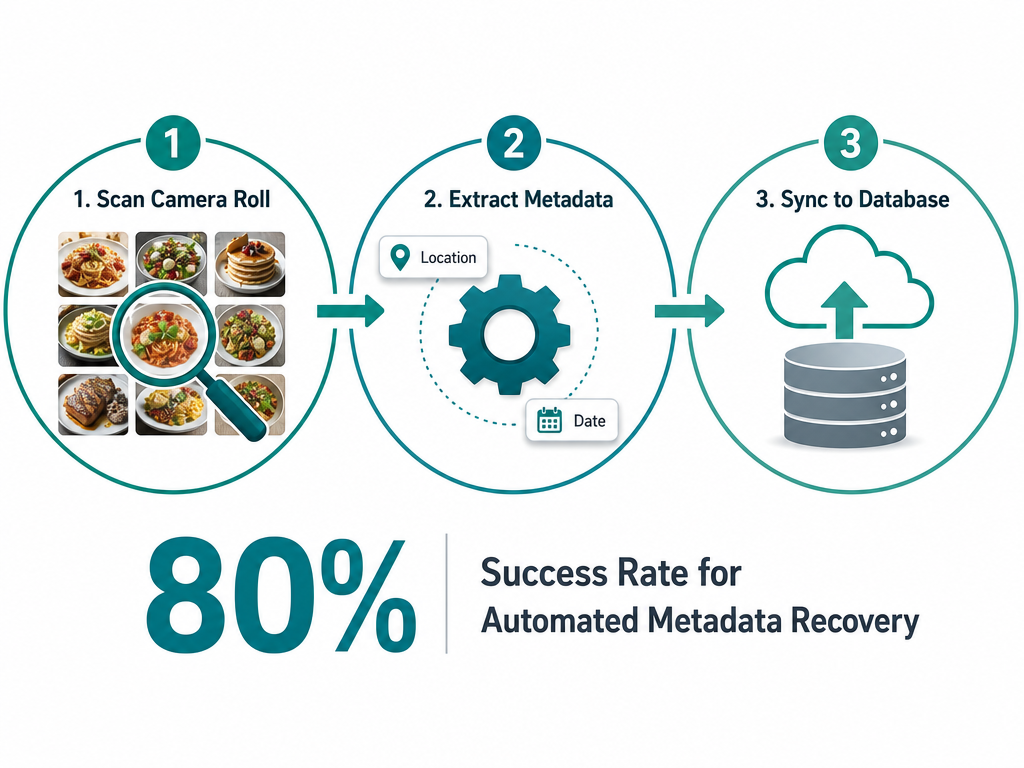 Don't leave your past meals behind. Use this three-step migration workflow to extract location and date data from your existing photos and backfill your new database.
Search Architecture: Making Your Database Actually Useful
A database is only valuable if you can query it instantly when standing on a street corner in a foreign city.
Tag Hierarchies
Create parent and child tags. "Italian" is the parent, "Pasta," "Pizza," and "Secondi" are children. This lets you search broadly ("all Italian") or narrowly ("just pasta").
Multi-Filter Queries
The power move: combining filters. Multiple criteria working together - cuisine type, occasion, neighborhood, price range, and rating - should return a focused set of options, not an overwhelming list. If your system can't handle this level of specificity, you've chosen the wrong platform or need better tagging discipline.
Location Granularity
Track at the neighborhood level, not just city. "West Village" is more useful than "New York" when you're actually navigating. But don't over-index: "Within 3 blocks of Washington Square Park" is too granular to be searchable later.
The Best-Of Views
Pre-build filtered views for your most common queries. "Top Rated by City," "Best Dishes Under $50," "Date Night Safe Options." These become your personal recommendation engine.
If you're using a DIY platform, organize your database around searchability from day one. Tag discipline in month one saves hours of re-organization in month twelve.
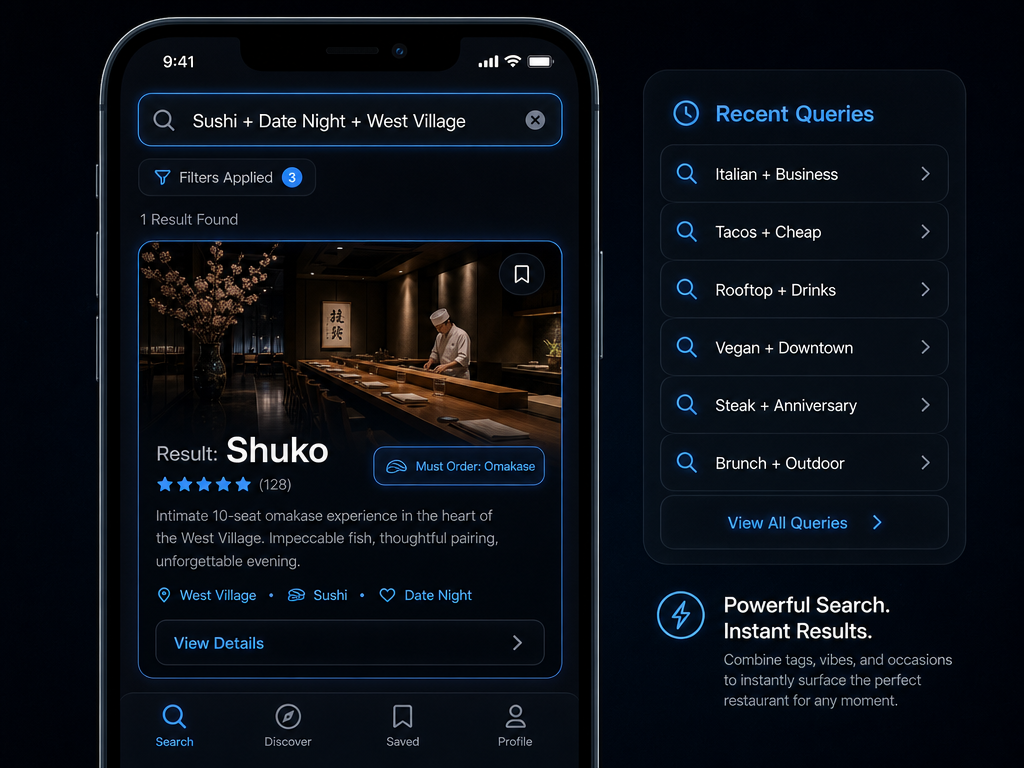 A well-built database transforms a chaotic camera roll into an instant recommendation engine. Filter by vibe, cuisine, and neighborhood to find the perfect spot in seconds.
The Workflow Question: At the Table vs. Sunday Review
The difference between a database you actually use and one that dies after three weeks often comes down to workflow design.
At the Table Logging (30-Second Protocol)
Optimized for speed. Take the photo, open your app, fill in only the essential fields: Restaurant, Dish Name, Quick Rating (1-10 or emoji scale), one Vibe Tag. Everything else happens later or not at all. This works best with dedicated apps like Beli or a stripped-down Notion template.
The advantage: you capture the moment when memory is fresh. The dish name is still visible on the menu, the rating reflects real-time emotion, not reconstructed sentiment.
The limitation: shallow detail. No tasting notes, no context about why the rating is what it is, no comparison to similar dishes.
Sunday Review Logging (Deep Archive Protocol)
Batch-process your week's meals during a dedicated session. Pull up your photos, reconstruct the experience, write detailed tasting notes, add comparison references ("better than the one at X, but the sauce was too salty compared to Y"). This is where DIY platforms shine, since you're not constrained by mobile UI limitations.
The advantage: rich, searchable detail. Six months later, you'll remember not just that you liked something, but specifically why.
The limitation: requires discipline. If you skip two weeks, backfilling becomes overwhelming and accuracy suffers as memories fade.
The Hybrid Approach
The system most serious foodies converge on: quick logging at the table (name, rating, photo), deep annotation during Sunday review for only the meals that matter. Not every Tuesday lunch needs tasting notes. The transcendent experiences do.
If you're tracking multiple cities, a hybrid workflow helps you organize memories by location without losing detail on standout dishes.
Frequently Asked Questions
Is there an app that can track restaurants I've visited?
Yes, several apps specialize in tracking dining history. Dedicated restaurant tracking apps like Beli, Memolli, and Savor let you log visits, rate dishes, and build a searchable archive. Beli focuses on comparative rankings and social sharing, while Memolli emphasizes private journaling with custom fields. General-purpose database tools like Notion and Airtable also work, giving you more customization at the cost of setup time.
Can I create my own database for free?
Absolutely. Notion offers a free personal plan with unlimited blocks, making it viable for a comprehensive dining database. Airtable's free tier supports up to 1,000 records per base, enough for years of serious food logging. Even simpler tools like Google Sheets or Apple Numbers cost nothing and handle basic tracking, though they lack the filtering power of purpose-built database platforms. The real cost is time, not money.
How do I organize my 30 years of digital photos for food tracking?
Start with native search tools in iOS Photos or Google Photos, which use location data and OCR to surface food photos by city or keyword. Process in chunks by trip or time period rather than chronologically. Focus on migrating only high-impact meals, not every photograph. Organizing food photos by restaurant and dish becomes manageable when you accept that incomplete data is better than no data.
What is a good app for tracking food intake?
If you're asking about dining experiences rather than nutrition logging, apps like Beli, Savor, and Memolli focus on tracking which dishes you've eaten and how you rated them. They're designed for building a personal restaurant archive, not counting macros. If you need calorie tracking, that's a different category entirely, though some platforms like MyFitnessPal try to do both and end up serving neither audience particularly well.
Can Airtable be used as a database?
Yes, Airtable is a fully functional relational database disguised as a spreadsheet. It supports multiple linked tables, complex filtering, different view types (grid, gallery, calendar), and API access for connecting to other tools. For a dining history database, Airtable's filtering capabilities outperform Notion, making it ideal for power users who want to query by multiple criteria simultaneously. The trade-off is a steeper learning curve and less elegant mobile experience.
Is the Beli app down?
Beli's availability depends on regional rollout and server status, which can vary. If you're experiencing issues, check their social media channels or website for outage notifications. Dedicated food apps sometimes face scaling challenges during high-traffic periods. This is one reason some foodies prefer DIY solutions like Notion, where uptime depends on a major platform rather than a startup's infrastructure.
How to make a searchable database?
A searchable database requires consistent tagging and well-defined fields. Use categorical tags (cuisine type, price tier, neighborhood) rather than free-form text. Build filtered views for common queries. In Notion, use the "Filter" and "Sort" functions on database properties. In Airtable, create multiple views with pre-configured filters. The key: tag discipline from day one beats trying to clean up messy data later.
Your dining history is valuable. Not in a precious, Instagram-aesthetic way, but in a practical, "what should I eat in Tokyo next week?" way. The difference between remembering an extraordinary meal and losing it to your camera roll graveyard is architecture, not memory.
Build the system. Use it for three months. When a friend asks for a recommendation and you deliver the perfect answer in 15 seconds, you'll understand why serious foodies stopped trusting their camera rolls years ago.