
How to Catalog Dining Experiences by Location: The Serious Foodie’s Complete Guide
Alex the juice queen
Alex hunts for the best juice bars and presses. She rates every sip and saves her favorites in Savor.
How to Catalog Dining Experiences by Location: The Serious Foodie's Complete Guide You're scrolling through your camera roll at 11 PM, trying to remember the...
How to Catalog Dining Experiences by Location: The Serious Foodie's Complete Guide
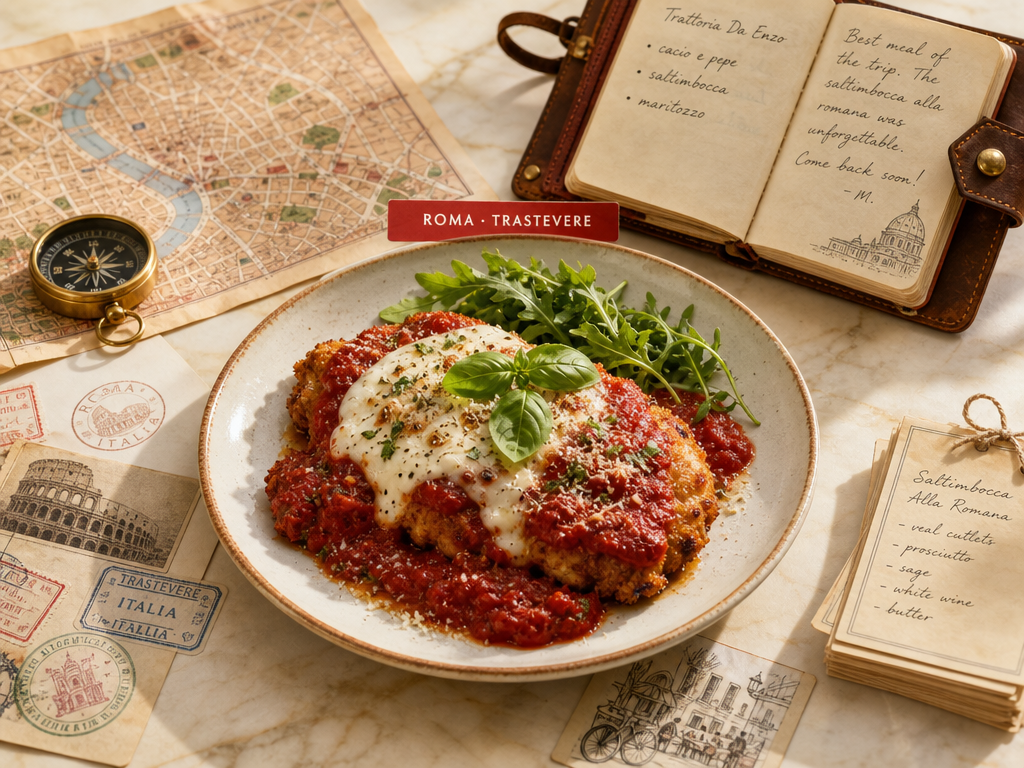
You're scrolling through your camera roll at 11 PM, trying to remember the name of that perfect carbonara you had in Rome three months ago. You know it's in there somewhere, buried between 2,400 other food photos you've never organized. The restaurant name? Gone. The neighborhood? Maybe Trastevere? The specific dish that made you want to weep with joy? Lost to the void.
This is the cataloging crisis every serious foodie faces. You're not looking for another app to review restaurants. You need a system to archive your personal dining history by location so you can actually retrieve it when it matters.
Table of Contents
- What Does It Mean to Catalog Dining Experiences by Location?
- Why Location-Based Organization Matters More Than You Think
- The Three Diner Archetypes: Which System Fits Your Style?
- Google Maps Power Users: The Zero-Barrier Entry Point
- Notion Architects: Building a Professional-Grade Database
- The App Landscape: Beli, Savor, and the Social vs. Private Divide
- The 30-Second Workflow: When and How to Log
- Metadata Minimums: What You Actually Need to Track
- The Cleanup Protocol: Managing Your Backlog
- Data Portability: Protecting Your Food Legacy
- Frequently Asked Questions
What Does It Mean to Catalog Dining Experiences by Location?
Cataloging dining experiences by location means creating a searchable archive of every memorable dish you've eaten, organized primarily by where you ate it. It's not just pinning restaurants on a map or saving Instagram posts. It's building a personal database that lets you answer questions like "What was that incredible pasta I had in Bologna?" or "Which Tokyo ramen shops blew my mind?" three years after the fact.
The core mechanism is simple: you pair each dish with its geographic coordinates (city, neighborhood, or exact address) and enough metadata to make it retrievable. A professional system captures the restaurant name, the specific dish, your rating, the date, and a one-sentence memory trigger. The key limitation is that this requires discipline. Unlike your camera roll, which grows automatically, a catalog only works if you actually feed it.
 Identify your diner archetype based on your preference for social sharing versus data granularity to choose the right cataloging tool for your needs.
The uncertainty here is real: there's no one "right" way to do this. Your ideal system depends on how you think about food, how much effort you're willing to invest, and whether you want a private archive or a social feed.
Why Location-Based Organization Matters More Than You Think
Most food apps organize around restaurants. You can see all your visits to a single place, but you can't easily answer "What did I eat in Paris?" or "Which cities have my highest-rated pasta dishes?" Location-based cataloging solves this by making geography the primary organizing principle.
This approach serves three critical use cases:
Travel planning. When you return to a city, you want to know which neighborhoods delivered your best meals. A location-first system lets you filter your archive by city and sort by rating, giving you an instant hit list of places worth revisiting.
Pattern recognition. You might discover that your favorite meals always happen in specific neighborhoods or that certain cities consistently deliver exceptional versions of a particular dish. This insight is invisible in restaurant-centric apps.
Memory retrieval. Our brains naturally associate meals with places. You remember the general location before you remember the restaurant name. A location-based catalog mirrors how your memory actually works.
The best apps to organize food photos by restaurant often fail precisely because they don't prioritize geographic organization.
The Three Diner Archetypes: Which System Fits Your Style?
Before choosing a tool, identify your archetype. This isn't a personality quiz, it's a practical framework for matching your cataloging needs to the right platform.
The Minimalist just wants to remember where they ate without drowning in complexity. They're happy using Google Maps labels and saved lists. They don't need dish-level granularity or detailed ratings. For them, a simple pin with a note like "Amazing cacio e pepe" is enough. The tradeoff: you sacrifice searchability and nuance.
The Critic needs dish-level precision and wants to build a private archive of their personal taste. They care about recording exactly which items to order and which to skip. They're willing to invest time in structured data entry. Apps like Savor serve this persona by treating dishes, not restaurants, as the primary unit. The tradeoff: this requires more upfront effort and ongoing discipline.
The Socialite wants their food catalog to double as a social feed. They're motivated by sharing recommendations and seeing what friends are eating. Beli has surpassed 60 million global reviews, reportedly exceeding Yelp's active review velocity, and roughly 80% of Beli's users are under 35. The platform's ELO ranking system forces you to choose whether A is better than B, creating a personal hierarchy that's more meaningful than generic star ratings. The tradeoff: social pressure can make your reviews less honest, and you're building value for someone else's platform.
Most serious foodies are either Critics or hybrid Critic-Socialites. Pure Minimalists don't usually need a guide like this.
Google Maps Power Users: The Zero-Barrier Entry Point
If you're not ready to commit to a dedicated food app, Google Maps offers a surprisingly capable cataloging system with zero setup cost. You're probably already using it to save restaurants. The question is whether you're using it effectively.
The Label Hack. Google Maps' most underutilized feature is the label system. You can attach private, searchable labels to any location. Instead of just saving a restaurant, label it with emojis and keywords that make it instantly recognizable on the map. Use patterns like:
- 🍕 Pizza - Date Night
- 🍜 Ramen - Solo Lunch
- 🥩 Steakhouse - Client Dinner
This transforms your map from a cluttered mess into a visual catalog where you can instantly identify cuisines and contexts. Labels are private, so they don't appear in public reviews.
The List Strategy. Use Google Maps lists to organize by city or trip. Create a "Rome 2024" list and add every restaurant you visited. You can share these lists with travel companions or keep them private. The limitation is that lists are restaurant-level, not dish-level. You can add notes to each saved place, but there's no structured way to rate individual dishes.
The Note Template. Develop a consistent format for your restaurant notes. Something like:
Dish: Carbonara
Rating: 9/10
Notes: Perfect egg-to-cheese ratio. Order the house wine.
This gives you searchable text you can scan later. The downside is that Google Maps' note field isn't built for this, so you're fighting the interface.
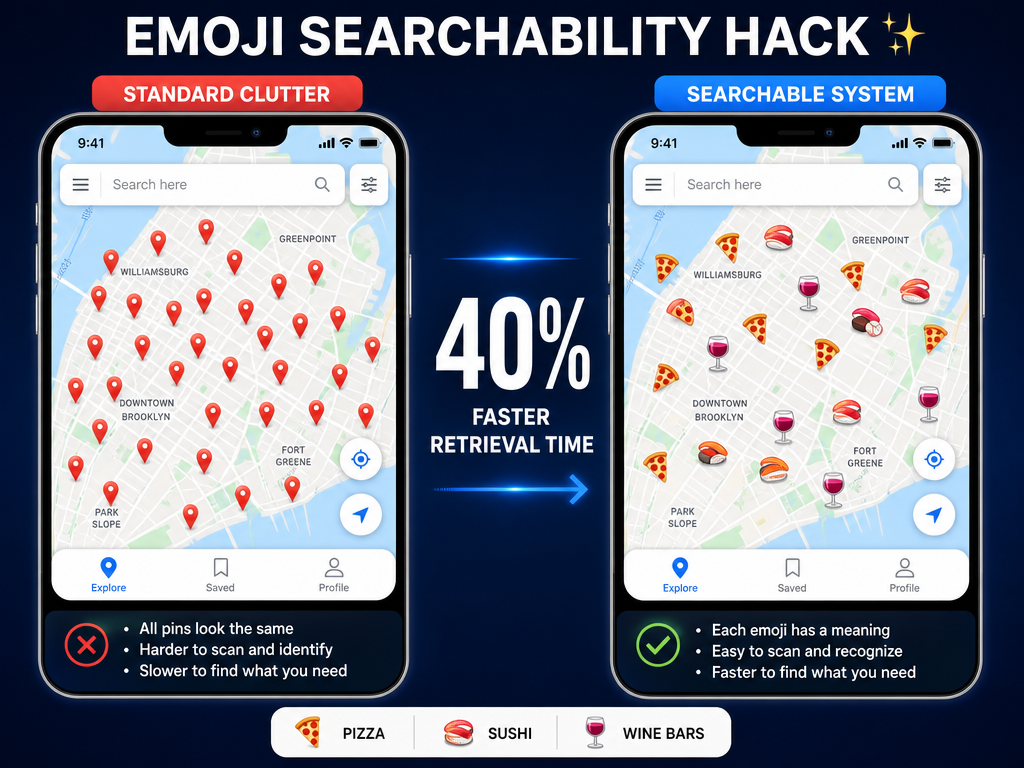 Transform a cluttered map into a searchable archive by using emojis in your list titles to instantly identify cuisines and vibes at a glance.
For more advanced strategies, see our guide on how to organize restaurant photos library.
Notion Architects: Building a Professional-Grade Database
If you're comfortable with Notion or Airtable, you can build a custom location-first database that gives you complete control over your food archive. This is the most powerful option but requires the most setup time.
The Four-Database Structure. Create four related databases:
- Cities (one record per city you've dined in)
- Restaurants (linked to Cities)
- Dishes (linked to Restaurants)
- Visits (linked to Dishes, with date and rating)
This relational structure lets you view your data from multiple angles. You can see all dishes in a city, all visits to a restaurant, or all instances where you've eaten a specific dish type across different locations.
Essential Properties for the Dishes Database:
- Dish Name (text)
- Restaurant (relation to Restaurants database)
- City (rollup from Restaurants)
- Cuisine Type (multi-select: Italian, Japanese, French, etc.)
- Rating (0-10 scale, use 0.1 precision for granularity)
- Date (date field)
- One-Sentence Memory (text field for the detail that makes it memorable)
- Photo (file upload)
The View Setup. Create filtered views for common queries:
- "Best of Paris" (filter: City = Paris, sort: Rating descending)
- "Pasta Archive" (filter: Cuisine Type contains Italian + Dish Name contains pasta)
- "Last 30 Days" (filter: Date within last 30 days)
The limitation of Notion is mobile friction. Entering data on your phone mid-meal is clunky compared to a dedicated app. Most Notion users either batch-log at the end of the day or accept that they'll miss some meals.
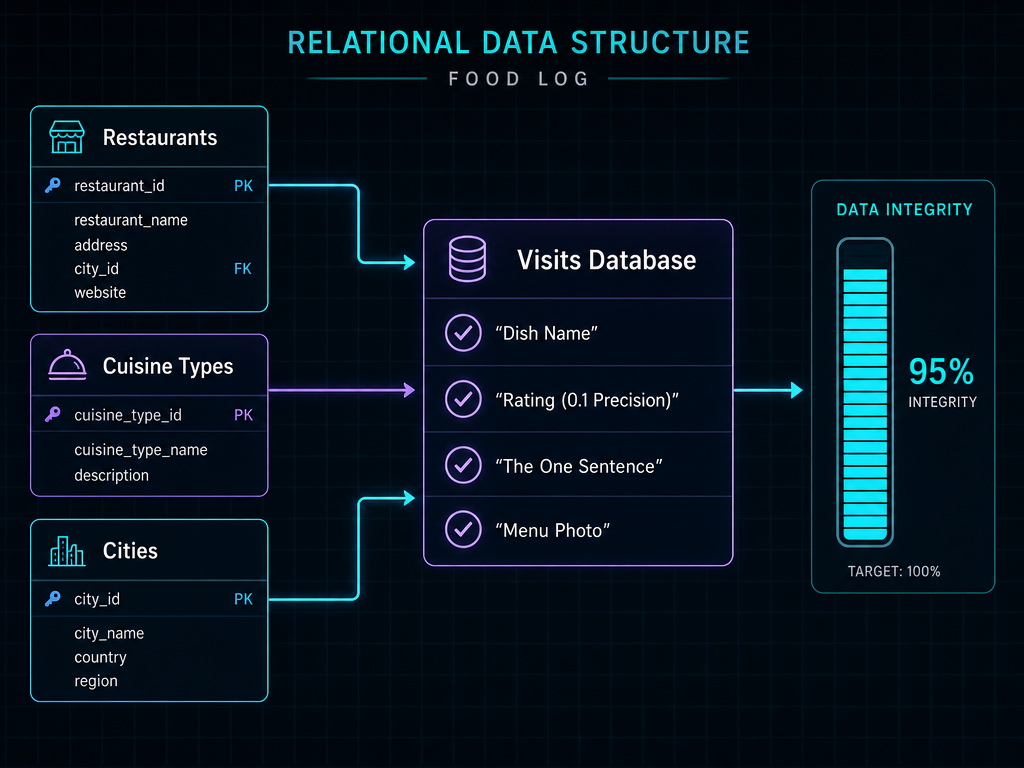 A professional-grade database structure ensures your food memories are searchable, organized, and scalable as your personal restaurant history grows over time.
For templates and workflows, check out best apps for recipe organization.
The App Landscape: Beli, Savor, and the Social vs. Private Divide
The 2026 food app landscape splits into two philosophical camps: social-competitive platforms and private memory tools. Understanding this divide is essential to choosing the right system.
Beli: The Social-Competitive Model. Beli has become a phenomenon among younger foodies. Beli boasts over 75 million restaurant ratings as of September 2025. The platform uses an ELO ranking system borrowed from chess: instead of giving star ratings, you repeatedly answer "Is A better than B?" until the app builds a ranked list of your favorite places.
The appeal is compelling. Social pressure keeps you logging meals. You can see where your friends are eating. The rankings feel more meaningful than arbitrary stars. The downside is performance anxiety. Every meal becomes a public statement. And you're building your entire food legacy inside someone else's proprietary system with limited export options.
Savor: The Private Memory Archive. Savor takes the opposite approach. It's built around dishes, not restaurants, and treats your food history as a private database. The core insight is that most serious foodies care more about remembering "that incredible uni toast at XYZ" than rating XYZ as a whole.
The app uses AI to help identify dishes from photos and auto-fill restaurant details, but you maintain complete control over your data. You can export your entire archive as CSV. The tradeoff is isolation: there's no social discovery, no friend activity, no competitive ranking. It's a personal memory tool, not a social network.
The Hybrid Approach. Many serious foodies use both. They maintain a private Savor archive for their personal taste database while also keeping a Beli profile for social discovery and sharing top recommendations. This dual-system approach acknowledges that different tools serve different needs.
For a broader comparison, see best food review apps.
The 30-Second Workflow: When and How to Log
The biggest obstacle to maintaining any cataloging system is friction. If logging a meal takes more than 30 seconds, you won't do it consistently. Here's the streamlined workflow that actually works.
The Bill Moment. Log dishes when the plates are cleared but before the check arrives. This is the natural pause in the meal when you're not actively eating but still present. You're mentally reviewing what worked and what didn't. Don't wait until you leave the restaurant. Don't tell yourself you'll remember later. You won't.
The Menu Photo Hack. Always photograph the menu before ordering. This serves two purposes: it gives you the correct dish names (not your memory of them), and it provides context for future searches. When you're trying to remember "that fish thing in Lisbon," the menu photo will show you it was called Bacalhau à Brás.
The One-Sentence Rule. Don't write paragraphs. Capture one specific sensory detail that makes the dish memorable. Examples:
- "Sauce had that perfect butter-acid balance"
- "Crust was somehow both crispy and chewy"
- "Skip the dessert, double the apps"
This is infinitely more useful than generic notes like "really good" or "amazing." A year from now, "really good" means nothing. "The fat from the duck confit soaked into the potato like a savory custard" brings the memory back instantly.
The Photo-First Approach. Take the photo. Add the rating. Everything else is optional. If you only do those two things, you've created a searchable visual archive organized by time and location. The metadata can come later if you're batch-processing your backlog.
Metadata Minimums: What You Actually Need to Track
Professional food critics track dozens of data points per dish. You're not a professional critic. Here are the minimum fields you need to make your catalog actually useful:
Required Fields:
- Dish Name - Be specific. "Pasta" is useless. "Cacio e pepe with tonnarelli, not spaghetti" is gold.
- Restaurant Name - Include the full name, not your shorthand.
- City - Neighborhood optional but valuable for large cities.
- Rating - Use a 10-point scale with 0.1 precision (6.7, 8.3, 9.2). This gives you enough granularity to distinguish between "great" and "transcendent" without the false precision of a 100-point system.
- Date - Auto-populated by most apps, but essential for tracking seasonal dishes.
High-Value Optional Fields:
- Cuisine Type - Enables searches like "best Japanese dishes I've eaten"
- One-Sentence Memory - The sensory detail that makes it memorable
- Price Point - Useful for filtering by budget or tracking value
- Who You Ate With - Surprisingly powerful for triggering memories
Low-Value Fields You Can Skip:
- Ambiance ratings (you're cataloging dishes, not venues)
- Service quality (changes with every visit)
- Detailed ingredient lists (the menu photo covers this)
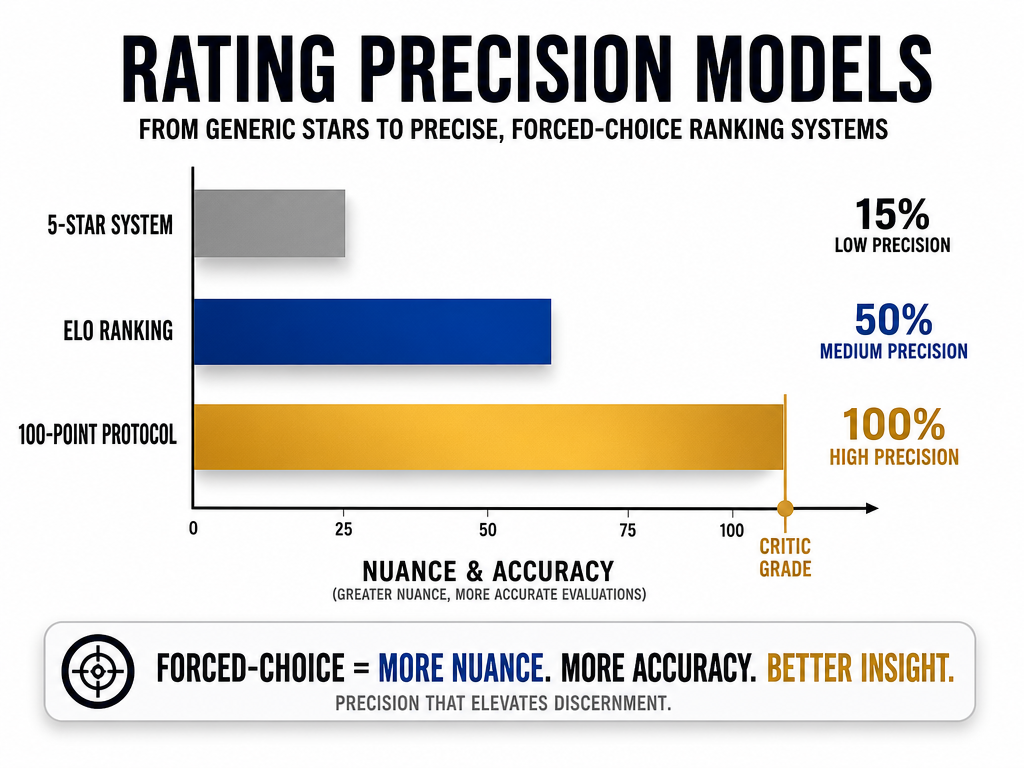 Modern food cataloging is moving away from generic 5-star ratings toward high-precision ELO rankings and 100-point protocols for better comparative accuracy.
The insight here is that less is more. Five well-chosen fields you actually maintain beats twenty comprehensive fields you abandon after two weeks. For rating methodology, see our professional 100-point pizza scoring protocol guide.
The Cleanup Protocol: Managing Your Backlog
Let's address the elephant in the room: you already have 2,000 unsorted food photos in your camera roll. The cleanup protocol is simple but requires ruthless prioritization.
Don't Import Everything. This is the most important rule. You're not building the Library of Congress. You're building a personal greatest-hits archive. Trying to log every meal you've ever photographed is a recipe for burnout and abandonment.
The Top 50 Strategy. Start by identifying your 50 all-time favorite dishes from memory. These are the meals you still think about months or years later. Log those first. This seeds your new system with your actual taste preferences, not an exhaustive catalog of mediocrity.
Use AI-Assisted Apps. Tools like Savor can analyze old photos and suggest dish names and restaurant details. This cuts the manual work of identifying "What the hell was that?" from photos taken two years ago. The AI isn't perfect, but it's a starting point that beats staring at an unlabeled photo.
Batch Process by Trip. If you took a food-focused trip to Tokyo or Paris, process that entire trip in one sitting while the memories are still connected. Use your flight dates to filter photos. Process the entire set in chronological order. This is faster than random sampling because the context is consistent.
Accept the Loss. Some meals are gone. You can't remember the restaurant. The photo is blurry. You have no idea what you ordered. That's fine. Let them go. Your catalog will be more valuable with 200 well-documented dishes than 2,000 half-remembered ones.
For more on organizing existing photos, see best apps to organize food photos.
Data Portability: Protecting Your Food Legacy
Here's an uncomfortable question almost no one asks: what happens to your food archive if the app shuts down? If you've spent years building a catalog inside a proprietary system with no export function, you're one acquisition or pivot away from losing everything.
The CSV Standard. Insist on apps that let you export your complete data as CSV (comma-separated values). This is a universal format that any spreadsheet program can open. Google Maps doesn't offer this for saved places. Beli's export options are limited. Notion and Airtable give you complete CSV export. Savor provides full data export as a core feature.
The Annual Backup Ritual. Once a year, export your entire catalog and save it in three places: your computer, a cloud service, and an external drive. This sounds paranoid until you've seen someone lose years of documentation because a startup went out of business.
The Photo Backup. Your photos should live outside the app. Use iCloud, Google Photos, or a dedicated photo backup service. Apps that require you to store photos exclusively on their servers are holding your memories hostage.
The Platform-Agnostic Structure. Even if you use a dedicated app, keep your data in a structure that could be migrated to another system. This means consistent field names, standardized formats (always use YYYY-MM-DD for dates), and avoiding platform-specific features you can't replicate elsewhere.
The philosophical point here is ownership. Your food memories are too valuable to exist solely inside someone else's database. Build your catalog in a way that gives you exit options.
Frequently Asked Questions
Is Beli still invite only?
No, Beli is no longer invite-only as of 2026. Anyone can download the app and create an account. The invite-only phase was part of the early growth strategy to create exclusivity and manage server load. The platform is now openly available on both iOS and Android.
Is there a Letterboxd for restaurants?
Not exactly. Letterboxd works because every user is reviewing the same finite catalog of films. Restaurants are local, and the good ones change constantly. The closest equivalent is Beli, which creates ranked lists of your favorite places, or Savor, which catalogs individual dishes. The fundamental difference is that film is a shared catalog, while restaurants are a fragmented, location-dependent landscape.
How do I check restaurants I visited on Google Maps?
Open Google Maps, tap your profile icon, then select "Your places." Under the "Saved" tab, you'll see all lists and saved locations. Under "Visited," you can see places where you've left reviews or used location history. The limitation is that "visited" only shows places where you've actively engaged, not everywhere you've been.
What is the best way to track restaurants in Notion?
Create a database with properties for Restaurant Name, City, Cuisine Type, Date Visited, Rating, and Notes. Use relations to link to a separate Dishes database if you want dish-level tracking. Create filtered views for each city or cuisine type. The key is keeping the structure simple enough that you'll actually use it. Most people over-engineer their Notion setup and then abandon it.
How to set labels in Google Maps?
Open Google Maps, search for a location, tap the place name to open the details page, scroll down and tap "Label," then enter your custom label text. Labels are private and appear only on your personal map. Use emojis and keywords to make them instantly recognizable.
What is the 30/30/30 rule for restaurants?
The 30/30/30 rule doesn't appear to be an established standard in culinary literature or professional restaurant evaluation. If you've encountered this term, it may refer to a specific critic's personal framework or a social media trend. Be cautious about rules that sound official but lack verifiable sources. In cataloging your own dining experiences, you're better off developing a consistent personal system than adopting unnamed frameworks.
How to organize lists in Google Maps?
Tap your profile icon, select "Your places," then "Saved." Create a new list by tapping the plus icon. Name your list descriptively (use emojis for visual organization), set it to private or shared, then add restaurants by searching for them and selecting "Save" with your chosen list. You can have multiple lists (Tokyo 2024, Best Pizza, Date Night Spots) and add the same restaurant to multiple lists.
The serious foodie's path isn't about finding the perfect app. It's about building a retrieval system that matches how you actually think about food. Start with your archetype. Choose tools that fit your effort budget. Log consistently using the 30-second workflow. Protect your data with exports and backups.
Your camera roll doesn't have to be a graveyard. Every extraordinary dish you eat can become a searchable memory instead of a forgotten photo. The question isn't whether you should catalog your dining experiences by location. It's whether you're ready to stop losing them.
For more advanced strategies on how to catalog dining experiences by location and transform your approach to food documentation, explore our complete guide to modern food reviews.