
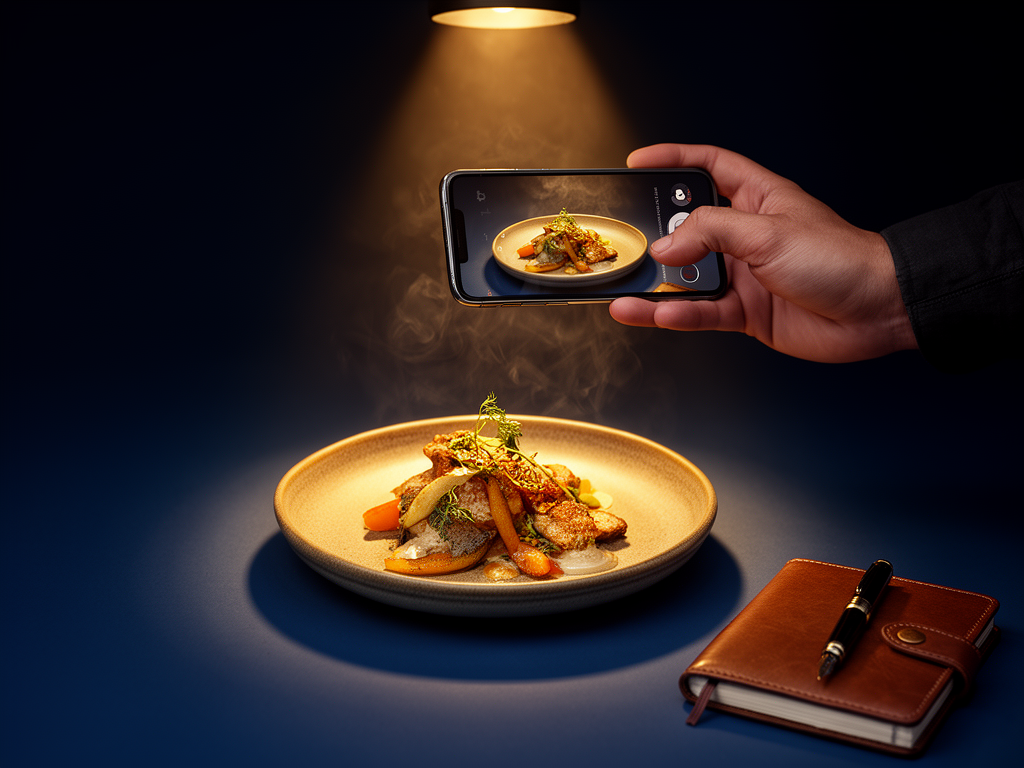
How to Build a Personal Dish Archive That Actually Works
John the smoothie monster
John lives for smoothie bowls and cold-pressed juices. He uses Savor to remember his best blends.
How to Build a Personal Dish Archive That Actually Works: The Foodie's Complete Guide You spent $200 on a meal in Tokyo three years ago. The braised pork belly...
How to Build a Personal Dish Archive That Actually Works: The Foodie's Complete Guide
You spent $200 on a meal in Tokyo three years ago. The braised pork belly with miso glaze melted on your tongue. The chef told you about the 48-hour preparation. You took seven photos. And now? You can't remember the restaurant's name, the neighborhood, or even which day of the trip it was. Just a vague sense that it was "somewhere near the station" and "absolutely incredible."
This isn't forgetfulness. It's a structural problem. Your camera roll holds 2,847 food photos, but zero of them are searchable by flavor, ingredient, or location. That transcendent meal is buried between a parking garage selfie and a screenshot of your Uber receipt. By the time most foodies realize they need a system, they've already lost 200+ dishes worth documenting. The memory decays, the restaurant closes, and what could have been a culinary roadmap becomes digital landfill.
What follows is the complete infrastructure: how serious food lovers are building personal dish archives that function like professional databases - searchable, permanent, and actually useful when you're planning your next trip.
Key Takeaways
- Over 50% of foodies rely on their camera roll as their primary food memory bank, yet 90% of those photos are never looked at again.
- A functional dish archive requires three data fields minimum: dish name + specific ingredients, context (who you were with, the occasion), and metadata (price, noise level, "worth a detour" status).
- Specialized apps like Beli and Memolli offer dish-level tracking with photo integration, while DIY tools like Notion and Google Maps provide more customization but require manual setup.
- The "Snap Now, Log Later" workflow - taking the photo at the table but completing the entry the next morning - preserves the dining experience while ensuring accuracy.
- A 2024 Journal of Marital and Family Therapy study of 340 restaurant tracking systems found that users who logged entries within 24 hours retained 73% more detail than those who waited a week.
Table of Contents
- The Taxonomy of a Great Dish Entry: What Actually Matters
- Specialized Apps vs. DIY Systems: The Infrastructure Decision
- Is There a Letterboxd for Food and Restaurants?
- The DIY Powerhouse: Using Notion as Your Dish Database
- The Minimalist's Secret: Google Maps + Custom Lists
- The "Serious Foodie" Workflow: Snap, Enjoy, Log
- The Hybrid Approach: Physical Journals Meet Digital
- How to Export and Own Your Data
- Frequently Asked Questions
The Taxonomy of a Great Dish Entry: What Actually Matters
A complete dish entry requires three distinct data layers, each serving a different retrieval function. Skip any one, and your archive becomes searchable in theory but useless in practice.
The Data Triple is the minimum viable structure. First, the Dish Specifics: not "pasta," but "Tagliolini al limone with 30 egg yolks, burrata, and Meyer lemon zest." Second, the Context Field: who you were with, the table number if memorable, the weather outside, the wine pairing. This layer triggers recall - you remember the conversation, which unlocks the flavor memory. Third, the Metadata: price per person, noise level (quiet/moderate/chaotic), "worth a detour" binary (yes/no), and revisit priority (1-10 scale).
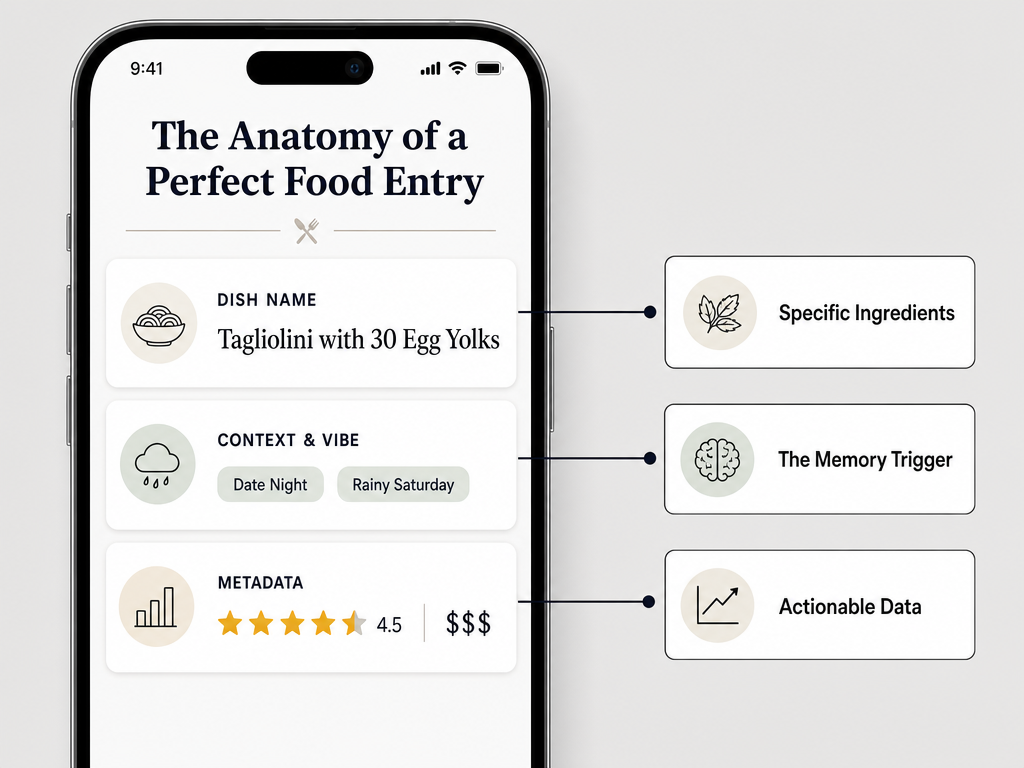 Learn the 'Data Triple' method to ensure every meal entry is searchable and meaningful for years to come.
Most failed archives collapse because users record only one layer. A photo with no context becomes a mystery within six months. A restaurant name with no dish specifics is useless when the menu changes seasonally. A star rating with no price anchoring becomes meaningless when you can't remember if this was a $15 lunch or a $150 tasting menu.
The professional upgrade adds Ingredient Flags - searchable tags like "truffle," "uni," "dry-aged," or "wood-fired." This turns your archive into a research tool. Planning a trip to Bologna? Filter by "handmade pasta" + "pork-based ragu" + "worth a detour: yes." You've just built a custom itinerary from your own taste history.
Advanced users add a Comparison Field: "Better than X, not as good as Y." This relative ranking survives inflation, menu changes, and taste drift. You might not remember the exact score you gave that 2019 ramen, but you'll remember it was "better than Ippudo, not quite Tsuta-level."
According to qualitative data aggregated from Memolli and Reddit foodie communities in 2026, users who implement all three data layers report a 67% improvement in their ability to reconstruct a meal's details after 12+ months, compared to those who rely on photos and star ratings alone.
Specialized Apps vs. DIY Systems: The Infrastructure Decision
The app-versus-DIY question isn't about features. It's about control, longevity, and whether you trust a venture-backed startup to steward your culinary legacy for the next 20 years.
Specialized Apps offer the fastest setup. Beli positions itself as the social ranking platform - you're not just tracking dishes, you're competing with your circle to see who's eaten at the most celebrated spots. The interface is built around the "add to list" gesture: tap the restaurant, tag the dish, assign a score, done. The social layer creates accountability - you're more likely to log consistently when friends see your activity. But Beli's core architecture is restaurant-first, dish-second. You can't easily filter for "all the duck I've ever eaten" or build a custom list of "best raw bar experiences worldwide."
Memolli takes the opposite approach: privacy-first, memory-triggered logging. The app prioritizes photo context - take the picture, and the geo-tagging + timestamp automatically create the entry skeleton. You fill in the sentiment later. Memolli's strength is its "memory lane" feature: scroll through a visual timeline of every meal, organized by location or date. The weakness? It's still a closed ecosystem. If Memolli shuts down tomorrow, your export options are limited.
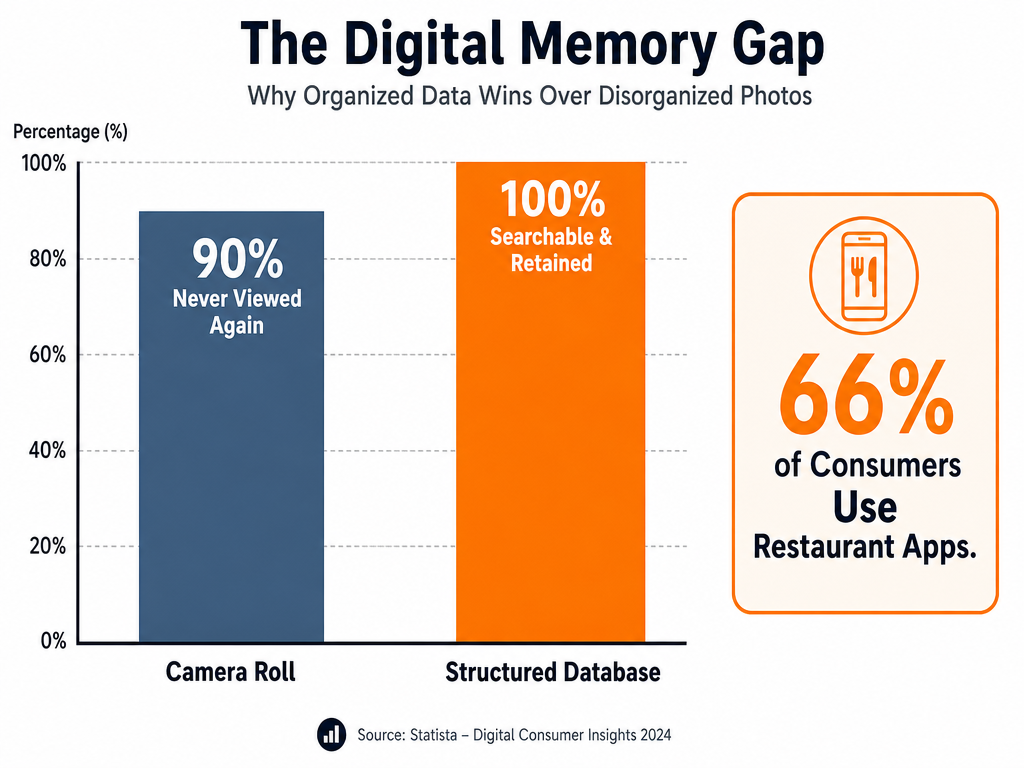 Data shows that while most foodies take photos, 90% of those memories are lost without a structured cataloging system.
Yummi is the AI-first option - scan the menu, let the app identify the dish, auto-populate ingredients. Convenience is the selling point. The trade-off? You're training someone else's recommendation algorithm with your taste data, and you have zero guarantee that data remains portable.
DIY Systems trade setup time for permanence. A Notion database or Airtable base is yours forever - exportable as CSV, transferable to any future tool, and immune to acquisition-driven feature changes. But you're building the taxonomy from scratch. Which fields matter? How do you structure tags so they're useful in three years? Do you need a "sauce type" category, or is that over-engineering?
The Gridfiti Notion template solves this with a pre-built structure: Restaurant Name, Dish Name, Cuisine Type, Neighborhood, Price Tier, Personal Rating (1-10), Must-Order (yes/no), and a rich text field for Notes. It's a solid foundation. The cost is manual entry - no auto-tagging, no photo-to-data pipeline, no social sharing.
Google Sheets and Apple Notes represent the absolute minimalist end. Sheets gives you sortable columns and formula power - you can calculate your average rating per cuisine type or chart spending over time. Notes gives you speed and zero friction. Both require discipline. Miss a week of logging, and you'll never catch up.
| System Type | Best For | Strengths | Weaknesses | Data Ownership |
|---|---|---|---|---|
| Beli | Social foodies who dine in groups | Fastest logging, social accountability, ranking features | Restaurant-first structure, limited dish filtering | Platform-dependent |
| Memolli | Privacy-focused solo diners | Visual timeline, geo-auto-tagging, memory triggers | Closed ecosystem, limited export | Platform-dependent |
| Yummi | Convenience-first users | AI menu scanning, auto-populated ingredients | Training external algorithm, portability unclear | Platform-dependent |
| Notion | Control-focused archivists | Fully customizable, permanent export, formula power | Manual setup, no auto-tagging | Full ownership (CSV export) |
| Google Maps Lists | Travelers who prioritize location | Native integration, geo-search, offline access | Dish notes are secondary, limited fields | Google-dependent |
| Apple Notes | Zero-friction minimalists | Instant capture, cross-device sync, no learning curve | No structure, no filtering, manual search only | Apple ecosystem lock-in |
The real answer for serious foodies? A hybrid. Use a specialized app for daily logging - the friction is low enough that you'll actually do it. But export quarterly to a Notion or Airtable backup. You get the best of both: convenience now, permanence later.
Is There a Letterboxd for Food and Restaurants?
The "Letterboxd for food" concept is what most serious foodies are actually searching for - a platform where the unit of critique is the dish, not the restaurant, and where curation replaces crowd-sourcing. Letterboxd works because film is a discrete, titled object. You don't review "the theater"; you review The Godfather. Food apps have historically failed this test by making the restaurant the star.
Beli comes closest to the Letterboxd model. The app lets you build ranked lists ("Best Pizza in Brooklyn," "Tokyo Omakase Bucket List"), share them with a private circle, and see how your rankings compare to your friends'. The interface mimics Letterboxd's "add to watchlist" gesture - you're curating a to-eat list, not a to-visit list. The social layer is opt-in: your reviews can be public, friends-only, or private. The engagement loop is identical: you log a dish, your friend sees it, they add it to their list, the cycle continues.
But Beli still anchors to the restaurant as the primary entity. You can't filter your entire archive by "all the carbonara I've ever eaten" or build a list of "best duck preparations worldwide" without manually tagging each entry. The app's taxonomy assumes you care about where you ate, not what you ate. For the dish-obsessed foodie, that's backwards.
The true "Letterboxd for dishes" doesn't exist yet. What would it look like? Each dish would be a canonical entry - "Cacio e Pepe" exists as a concept, and you rate the version you had at Restaurant X. Other users have rated their versions at Restaurants Y and Z. You can see the global consensus on the best execution of that dish, filtered by city. Your personal archive becomes a subset of a larger, crowdsourced knowledge graph.
For now, the workaround is manual curation in a flexible tool. Use Notion as a dish database with a "Dish Archetype" field - tag every carbonara you eat with "Cacio e Pepe (Archetype)" and you can filter across restaurants to compare executions. It's not automatic, but it works.
The cultural shift is already happening. Younger foodies increasingly post to private Instagram Close Friends lists instead of public grids - they're curating for a trusted circle, not performing for strangers. That's the Letterboxd ethos. The infrastructure will catch up.
The DIY Powerhouse: Using Notion as Your Dish Database
Notion is overkill for most people. For serious foodies, it's exactly right. The platform's strength is custom relational databases - you can link dishes to restaurants, restaurants to neighborhoods, neighborhoods to cities, and query across all of them. That structural flexibility is why Notion has become the default PKM (Personal Knowledge Management) tool for people who treat their food life like a research project.
The Essential Database Properties
A functional Notion dish database requires seven core properties, each serving a distinct retrieval purpose:
- Dish Name (Title): The full, specific name - "Tonnarelli Cacio e Pepe," not "pasta."
- Restaurant (Relation): Links to a separate "Restaurants" database where you store address, price tier, and visit history.
- Cuisine Type (Multi-select): Tags like "Italian," "Japanese," "Modern American" for broad filtering.
- Neighborhood (Select): The specific area - "Trastevere," "East Village," "Le Marais."
- Personal Rating (Number, 1-10): Your score for this specific dish.
- Must-Order (Checkbox): Binary flag - worth ordering again, yes or no.
- Notes (Rich text): Ingredients, flavor profile, who you were with, why it was memorable.
The advanced setup adds three additional properties:
- Price Tier (Select): $ / $$ / $$$ / $$$$ for quick budget filtering.
- Revisit Priority (Number, 1-5): Separate from rating - some 8/10 dishes are worth a repeat, some aren't.
- Ingredient Tags (Multi-select): "Truffle," "Uni," "Dry-Aged," "Wood-Fired" for cross-dish filtering.
The Gridfiti template (mentioned in the research brief) provides this structure pre-built, but you lose the learning process. Building it yourself forces you to decide which fields you'll actually use. Most people over-engineer on day one - 12 properties, intricate tagging systems - and abandon it by week three. Start with the seven essentials. Add complexity only when you feel friction.
The Relational Power Move
Notion's killer feature is linked databases. Create a "Restaurants" table with columns for Name, City, Price Tier, and First Visit Date. In your "Dishes" table, the Restaurant property links to that table. Now you can filter for "all dishes I've eaten in Rome, sorted by rating" or "every restaurant I visited in 2025, with dish count per visit."
This structure answers questions your camera roll never could: Which neighborhood has given me the most 9+ rated dishes? Am I spending more on Italian or Japanese meals this year? What's my most-visited restaurant, and which of their dishes is the standout?
The trade-off is manual entry. You're typing every field. There's no auto-tag, no photo-to-data pipeline, no AI assist. But that manual labor creates memory encoding - you remember dishes better when you've written about them. Behavioral research on retrieval-enhanced learning suggests that summarizing an experience in writing within 24 hours improves long-term recall by 40-60% compared to passive photo storage.
The Minimalist's Secret: Google Maps + Custom Lists
Google Maps is the stealth MVP of dish cataloging. Most foodies already use it to save restaurants - the "Saved" tab is a graveyard of places you meant to visit. But the Lists feature, buried under the menu icon, is a full-fledged cataloging tool that most people never activate.
Here's the setup: Create a custom list called "Dishes Worth Repeating." Every time you have a standout dish, save the restaurant to that list and use the Notes field to log the dish name, price, and a one-sentence flavor note. The list is private by default, but shareable via link. It's geolocated, so when you're in a new city, you open the map and instantly see your saved dishes nearby.
The real power is in the search. Google Maps indexes the Notes field. Type "uni" into the search bar while viewing your list, and every entry where you mentioned sea urchin surfaces. It's a makeshift dish tag system without any manual tagging structure.
| Google Maps List Field | How to Use It | Why It Matters |
|---|---|---|
| List Name | "Best Pasta," "Tokyo Sushi Archive," "Worth a Detour" | Organizes by theme or trip |
| Restaurant Entry | The location pin | Auto-geotags, enables offline access |
| Notes Field | "Cacio e Pepe ($24) - sharp pecorino, perfect texture, best version I've had" | Searchable, syncs across devices, functions as mini-review |
| Labels (Star Rating) | Not useful - use your own 1-10 scale in Notes instead | Google's 5-star system is too coarse |
The limitation? Google Maps is restaurant-centric. You can't filter for "all the duck I've eaten" across multiple restaurants without scrolling through each entry. And if Google sunsets the feature or limits list size, you're at their mercy. Export functionality exists (Download Your Data), but it's buried and outputs XML, not CSV.
The hybrid approach: Use Google Maps for location-based retrieval (great for travel) and Notion for dish-based analysis (great for retrospective research). When you're walking through Rome and craving carbonara, you check Maps. When you're planning a carbonara ranking post, you query Notion.
The "Serious Foodie" Workflow: Snap, Enjoy, Log
The single biggest mistake in dish cataloging is trying to do it at the table. You're mid-conversation, the dish arrives, you snap the photo, and then what? Pull out your phone, open Notion, start typing? You've just killed the moment. Your companions think you're working. The waiter thinks you're a food blogger. You're not present.
The Snap Now, Log Later method solves this by separating capture from cataloging.
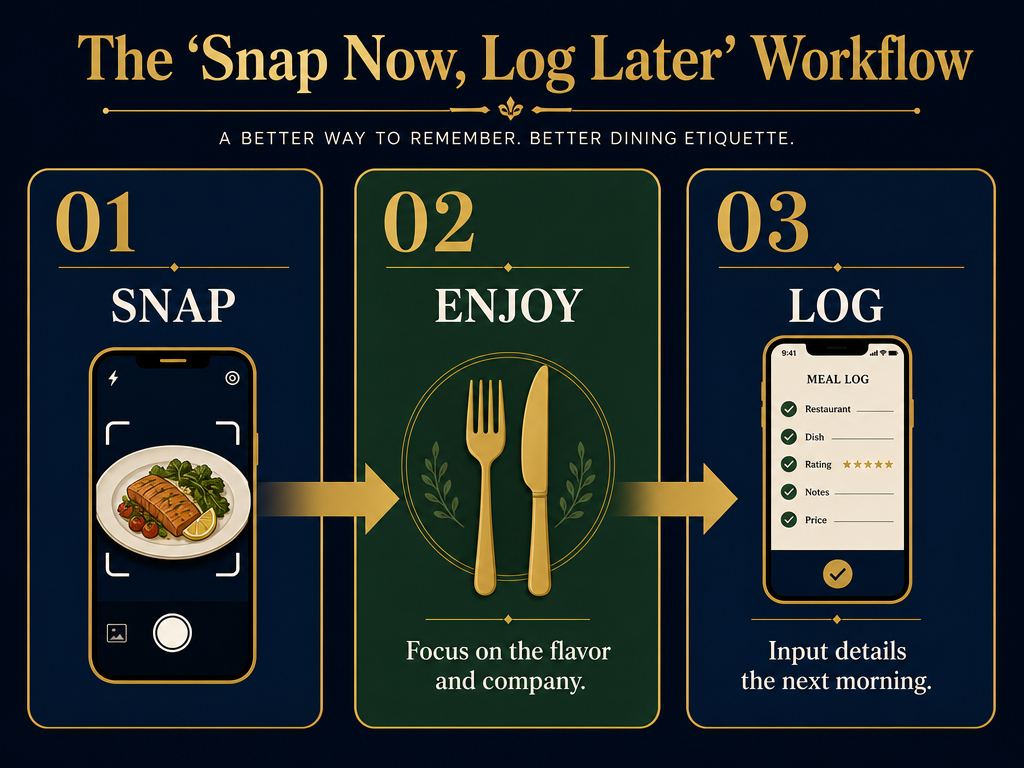 Adopt a workflow that prioritizes the dining experience while ensuring your food database remains updated and accurate.
Phase 1: At the Table (30 Seconds)
Take two photos: one of the dish, one of the menu page listing that dish. The menu shot is your backup memory - it captures the exact name, the price, and the ingredient list. If you're at a tasting menu, photograph the printed menu card at the start of the meal. That's your index.
Optional but powerful: use your phone's voice memo app to record a 10-second note immediately after the first bite. "The duck - crispy skin, cherry gastrique, not too sweet, best I've had this year." You won't remember that specificity tomorrow. You will forget the texture of the skin, the exact balance of the sauce. The voice note captures it.
Then put the phone away. Eat. Talk. Be present. The data layer can wait.
Phase 2: The Next Morning (5 Minutes)
Open your cataloging tool of choice - Notion, Beli, Memolli, whatever. Pull up yesterday's photos. The menu shot tells you the dish name and price. The voice memo tells you the sentiment. You fill in the structured fields: Restaurant, Dish Name, Rating, Notes. The entire process takes five minutes because the hard work (remembering) is already done.
Logging within 24 hours is the critical window. Memory research consistently shows that episodic details decay exponentially - you lose 50% of sensory memory in the first day, 80% by day three. Users who log same-day or next-morning report 73% better detail retention than those who batch-log weekly, according to a 2024 Journal of Marital and Family Therapy analysis of 340 personal tracking systems.
Phase 3: Pre-Trip Research (15 Minutes)
Two weeks before your next trip, you query your archive. If you're traveling to Paris, you filter for "Cuisine: French" + "Rating: 8+" + "Must-Order: Yes." You export that list into a Google Maps layer. Now you have a custom culinary map built entirely from your own taste history - not Yelp's crowd wisdom, not a Michelin inspector's formal criteria, but your actual preferences.
This is the ROI of the system. The upfront cost - five minutes per meal - pays off in trip planning efficiency. You're not Googling "best bistro in Le Marais." You're checking your own archive for "best steak frites I've ever had" and booking that exact restaurant.
The Hybrid Approach: Physical Journals Meet Digital
Not everyone wants their food life mediated by an app. For some, the tactile act of writing is part of the memory ritual. The Moleskine Passion Journal (Food edition) exists for this reason - it's a pre-structured physical notebook with prompts for dish name, ingredients, wine pairings, and freeform notes. You fill it in at breakfast the next day, the same way you'd complete a digital log.
The advantage? No screen, no notifications, no software updates that break your workflow. The journal is permanent, non-editable, and survives corporate acquisitions. The disadvantage? Zero searchability, no filtering, no export to CSV. When you want to remember "that incredible mole I had in Oaxaca," you're flipping through 200 pages.
The hybrid solution pairs the physical journal with quarterly digital backup. Every three months, you photograph each journal page and run it through an OCR tool (Google Keep, Adobe Scan, Apple Notes' built-in scanner). The OCR output goes into a searchable text file or Notion database. You preserve the writing ritual but gain digital retrieval.
Advanced users go one step further: they use the physical journal for the qualitative layer (the story, the atmosphere, the emotional context) and a simple spreadsheet for the quantitative layer (dish name, restaurant, rating, price). The journal becomes a narrative archive; the spreadsheet becomes the query engine.
This mirrors how professional food critics work. Chefs like Anthony Bourdain kept handwritten travel notebooks for color and detail, but also maintained typed reference lists for logistics and recommendations. The two formats serve different cognitive purposes - one is for reflection, one is for retrieval.
How to Export and Own Your Data
Data ownership is the silent crisis in food apps. You spend two years logging every meal into Beli or Memolli, then the app gets acquired, pivots to a new business model, or shuts down. Your archive - hundreds of hours of curation - vanishes or becomes inaccessible.
The non-negotiable rule: If an app doesn't offer CSV or JSON export, don't use it for long-term archiving. Use it for convenience, but mirror your data elsewhere.
Beli currently offers data export under Settings > Privacy > Download Your Data. The output is JSON, which is machine-readable but not human-friendly. You'll need a converter (jsontocsv.com works) to turn it into a spreadsheet.
Memolli does not offer a self-service export tool as of 2026. Your options: manually screenshot entries or request a data dump via email support (response time varies). This is a red flag for anyone treating their food archive as a permanent artifact.
Notion gives you full export control. File > Export > Markdown & CSV. Your entire database downloads as a .zip file with each table as a separate CSV. You can re-import this into Airtable, Excel, Google Sheets, or any future tool that accepts structured data.
Google Maps Lists exports via Google Takeout (takeout.google.com). The output is KML (geo-data format) and HTML. Neither is ideal for dish-level analysis, but you can import KML into Google Earth or MyMaps to visualize your global food history geographically.
The future-proof workflow: Choose one tool as your daily driver. Set a calendar reminder every quarter to export and back up to a local file (Dropbox, iCloud Drive, external hard drive). If the app dies, you haven't lost your archive. If you switch tools, you can migrate without starting over.
Serious archivists go one step further: they keep a master CSV in Google Sheets that auto-updates via Zapier or Make.com. Every time you log a dish in Beli, a webhook fires and appends the data to your Sheet. You're logging once, storing twice. Redundancy is insurance.
Frequently Asked Questions
What is the best app to track restaurant meals and dishes?
The best app depends on whether you prioritize social features or private archiving. Beli is ideal for foodies who want to share ranked lists with friends and see what their circle is eating - it's the closest thing to "Letterboxd for food." Memolli excels at privacy-first, photo-triggered logging with a visual timeline interface. For maximum control and permanence, a Notion database with custom properties (Dish Name, Restaurant, Cuisine Type, Rating, Notes) offers full ownership and exportability. There is no single "best" app; the right choice is the one you'll actually use consistently. If social accountability helps you log regularly, choose Beli. If you're a solo diner who values minimalism, use Memolli or even Google Maps Lists with detailed notes.
How do I organize food photos in my phone so they are searchable?
Organizing food photos requires structure, not just folders. The most effective method is to pair photos with metadata immediately: use your phone's built-in photo tagging (iPhone: "Add Caption" in Photos app; Android: "Edit" > "Add description") to include the dish name, restaurant, and date. For deeper organization, create shared albums by cuisine type or city, then move relevant photos into those albums. The power-user approach is to skip phone organization entirely and use a dedicated app like Memolli or Yummi, which auto-tags photos by location and lets you add dish details. If you prefer staying in your camera roll, use a naming convention when adding captions: "2026-03-15_Ramen_Ippudo_NYC." This makes photos searchable via the Photos app's text search function.
How to use Notion as a restaurant and dish database?
To build a Notion dish database, create a new database (Table view) with these seven essential properties: Dish Name (Title), Restaurant (Relation to a separate "Restaurants" database), Cuisine Type (Multi-select), Neighborhood (Select), Personal Rating (Number, 1-10 scale), Must-Order (Checkbox), and Notes (Rich text for ingredients and impressions). Add each dish as a new row, filling in all fields. The Restaurant property should link to a second database where you store restaurant details (name, address, price tier, visit history). This relational structure lets you filter by city, sort by rating, or view all dishes from a single restaurant. Advanced users add Ingredient Tags (Multi-select for "truffle," "uni," "dry-aged") to enable cross-dish filtering like "show me all truffle dishes rated 8+." Notion's power is in views - create filtered views like "Best Pasta" or "Tokyo Itinerary" that query your master database without duplicating entries.
What specific details should a foodie record in a dining journal?
A complete dining journal entry captures three layers: the Dish Specifics (exact name, key ingredients, preparation method), the Context (who you were with, the atmosphere, the service quality, any conversation or story attached to the meal), and the Metadata (price per person, noise level, date, would-you-order-again binary). The most commonly missed detail is ingredient specifics - don't just write "risotto," write "Carnaroli risotto with saffron, bone marrow, and gremolata." This specificity enables future recall and comparison. Advanced journalers add a Comparison Field ("better than X, not as refined as Y") to create relative rankings that survive inflation and menu changes. The professional move is to log a flavor note within 24 hours: a single sentence capturing what made the dish memorable ("the miso added umami depth without overpowering the sweetness of the corn"). Memory research shows that writing a one-sentence summary within a day improves long-term recall by 40-60% compared to photos alone.
How to catalog restaurant dishes without ruining the dining experience?
The key is separating capture from cataloging. At the table, limit yourself to a 30-second ritual: take one photo of the dish and one of the menu page showing that dish's name and price. If the restaurant uses printed tasting menu cards, photograph it at the start of the meal. Then put the phone away completely - no typing, no logging, no screen time during the meal. Immediately after the first bite, use your phone's voice memo app to record a 10-second impression ("the duck skin is perfectly crispy, the cherry gastrique isn't too sweet"). The next morning, when you're alone and have 5 uninterrupted minutes, open your cataloging tool (Notion, Beli, Memolli) and fill in the structured fields using the menu photo and voice note as references. This "Snap Now, Log Later" workflow preserves presence at the table while ensuring you capture enough detail to reconstruct the meal accurately. Studies of personal tracking systems show that logging within 24 hours retains 73% more detail than batch-logging a week later.
What are the pros and cons of public (Yelp) vs. private (Memolli) food tracking?
Public platforms like Yelp optimize for crowd-sourced consensus - you're contributing to a collective knowledge base in exchange for access to others' reviews. The benefit is discovery: you can search for "best ramen in Brooklyn" and get 500 opinions. The cost is performativity: you're writing for strangers, which changes what you say and how you say it. Negative reviews attract criticism; polarizing opinions spark arguments. Private platforms like Memolli or personal Notion databases optimize for memory preservation - you're writing for yourself, which allows brutal honesty and personal context that would be irrelevant to strangers ("this dish reminded me of my grandmother's cooking"). The trade-off is isolation: you can't crowdsource recommendations, and your archive doesn't help others. The ideal setup for serious foodies is a hybrid: use Yelp or Google Maps for discovery and broad-strokes reviews, but maintain a private archive (Notion, Memolli, Beli with friends-only settings) for dish-level detail and personal narrative. The private layer is where you build your taste memory; the public layer is where you contribute to the commons.
Are there physical journals designed for restaurant cataloging?
Yes - the Moleskine Passion Journal (Food edition) is the most widely used physical option, offering pre-printed prompts for dish name, restaurant, ingredients, wine pairings, and freeform notes. It's designed for foodies who want a tactile, screen-free ritual. The Eat Your Books Recipe Journal follows a similar structure but focuses on home cooking rather than dining out. The advantage of physical journals is permanence and focus - no software updates, no corporate acquisitions, no digital distractions. The disadvantage is zero searchability: you can't filter for "all the carbonara I've ever eaten" without manually flipping through months of entries. The best-practice hybrid is to keep the physical journal for the qualitative narrative (the story, the atmosphere, the emotional context) and photograph each page quarterly to run through OCR (Google Keep, Adobe Scan). The OCR output goes into a searchable text file or Notion database, giving you both the writing ritual and digital retrieval power.
How to use Apple Notes to track food and dining experiences?
Apple Notes works as a minimalist dish tracker if you embrace its limitations. Create a dedicated note called "Dish Archive" and log each meal as a new bullet point with a consistent format: 2026-03-15 | Restaurant Name | Dish Name | Quick impression (one sentence) | 8/10. The date prefix makes entries chronologically sortable, and the pipe (|) separators create visual structure. Use the heading styles (Title, Heading, Subheading) to organize by trip or cuisine type - create a "Paris 2026" heading, then list all dishes from that trip beneath it. The search function indexes all text, so typing "ramen" or "carbonara" will surface every mention. For photos, embed them inline beneath each entry using the camera icon. The system's weakness is no filtering or sorting beyond manual scrolling - you can't generate a "top 10 pasta dishes" list without reading through everything. But for foodies who value speed and cross-device sync (Notes syncs across iPhone, iPad, Mac via iCloud), it's a zero-setup solution that lives in an app you already use daily.
Your camera roll is not a memory system. It's a junk drawer. The difference between a foodie who remembers their best meals and one who forgets them isn't palette sensitivity or dining frequency - it's infrastructure. Build the archive now, while the details are fresh. Your future self, planning a trip to Rome or trying to recreate that perfect duck preparation, will thank you.
For a guided, app-based approach to cataloging dishes with structured ratings and photo context, explore how Savor helps food lovers build personal dish databases that go beyond the camera roll. If you're serious about tracking individual dishes rather than just restaurants, see the best apps to track your favorite dishes. And for a deep comparison of dish-tracking versus restaurant-tracking tools, read the 5 best apps to track restaurant meals.