
How to Organize Dining Memories by Dish: A System for Serious Foodies
Alex the juice queen
Alex hunts for the best juice bars and presses. She rates every sip and saves her favorites in Savor.
How to Organize Dining Memories by Dish: A Complete System for Serious Foodies You're scrolling through your camera roll at 11 PM, trying to find that...
How to Organize Dining Memories by Dish: A Complete System for Serious Foodies
You're scrolling through your camera roll at 11 PM, trying to find that incredible pasta you had three months ago. Was it the place in Brooklyn? Or the one in SoHo? You remember the taste - perfectly al dente, an umami-rich sauce that lingered - but the photo is buried somewhere between 2,400 other food shots, each one equally unlabeled and impossible to search.
This isn't a storage problem. It's a retrieval problem. And the solution isn't taking fewer photos. It's building a dish-first organizational system that lets you search by what actually matters: the specific plate, the hero ingredient, the flavor you can't stop thinking about.
Table of Contents
- Why Dish-Level Organization Changes Everything
- The Three-Tier System: Minimalist, Socialite, Archivist
- Phase 1: The Live Logging Habit
- Phase 2: Choosing Your Stack
- Phase 3: The Dish-First Organization Method
- Phase 4: Retrieval - Making Your Archive Searchable
- How to Search Food Photos by Ingredient
- What Is the Best App for Keeping Track of Restaurants?
- Frequently Asked Questions
Why Dish-Level Organization Changes Everything
Most restaurant tracking systems organize by venue. You remember where you ate, but not what made the meal memorable. A dish-first system flips this logic. Instead of asking "Where did I go in July?" you ask "What was that spicy rigatoni I had with the 'nduja?"
This shift matters because memory works through specificity. You don't remember "Italian food." You remember the exact texture of hand-rolled orecchiette, the way the sauce pooled in each dimple, the faint bitterness of charred broccolini on the side.
Food photography influences 57% of dining decisions according to consumer surveys, and 40% of consumers visited a restaurant specifically because of a food photo they saw on social media. But those same photos become useless if you can't find them again. An estimated 175 to 200 million people worldwide actively use food or nutrition tracking apps in 2026, yet most of these tools focus on calories, not culinary memory.
A proper dish-level system creates three immediate benefits:
Searchability: You can find that exact rigatoni in under ten seconds, even if you ate it eighteen months ago.
Quality Control: You know exactly what to order (and what to skip) on return visits. No more repeating disappointments or missing the best item on the menu.
Personal Heritage: You're building a private archive of your taste evolution, uncontaminated by influencer hype or algorithmic bias.
This isn't about becoming a food blogger or performing for social media. It's about respecting your own experience enough to remember it.
The Three-Tier System: Minimalist, Socialite, Archivist
There's no universal "best" way to organize dining memories. The right system depends on how much friction you're willing to accept in exchange for searchability.
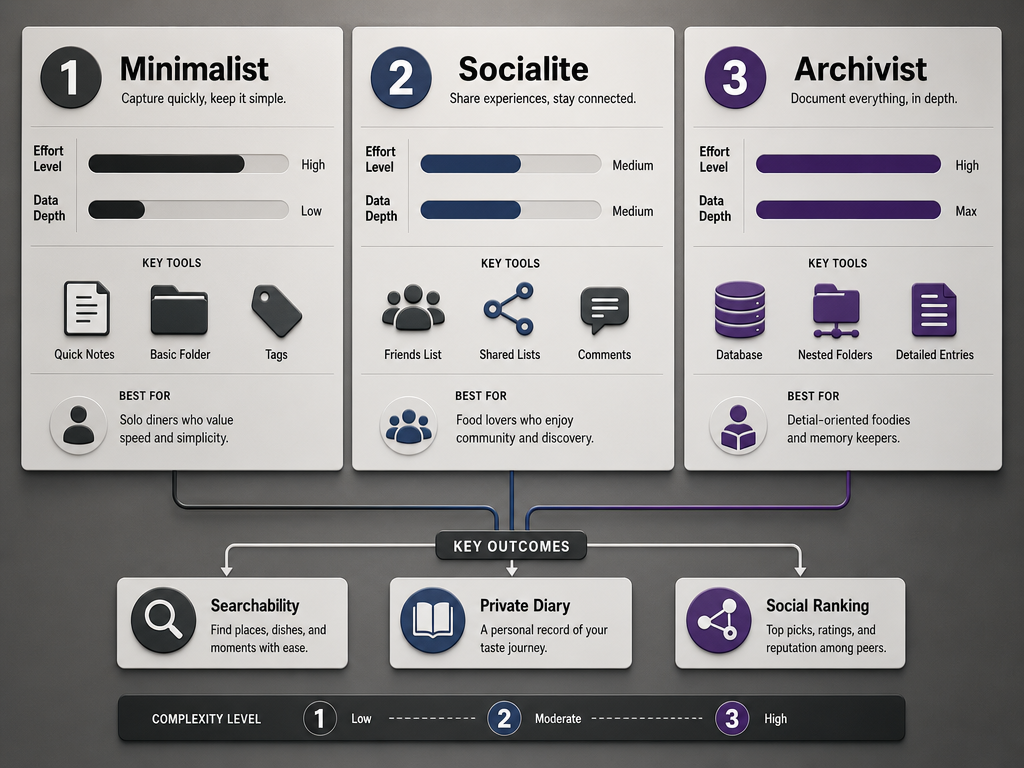 Compare the three primary food organization workflows based on your desired effort and the level of dish-specific detail you want to maintain.
The Minimalist uses native phone features - Apple Photos or Google Photos - with a disciplined tagging habit. Effort is low. Searchability is moderate. Privacy is absolute.
The Socialite embraces community-driven apps like Beli or Crumble, where your dining history becomes a shareable map of recommendations. Effort is medium. Searchability is high within those platforms. Privacy is optional.
The Archivist builds a custom database - usually in Notion or a similar tool - with full control over taxonomy, rating scales, and long-form notes. Effort is high. Searchability is total. Privacy is non-negotiable.
Most serious foodies end up somewhere between Socialite and Archivist. You want the convenience of an app but refuse to lose control of your data. Our guide to tracking favorite dishes explores this tension in depth.
Phase 1: The Live Logging Habit
The only system that works is the one you'll actually use. That means logging your meal while you're still at the table, not three days later when you've forgotten the details.
The Bill Wait Workflow is your friend. You've finished eating. The server asks if you want dessert. You decline. Now you're sitting there for three to seven minutes waiting for the check. This is your window. Pull out your phone and do the work.
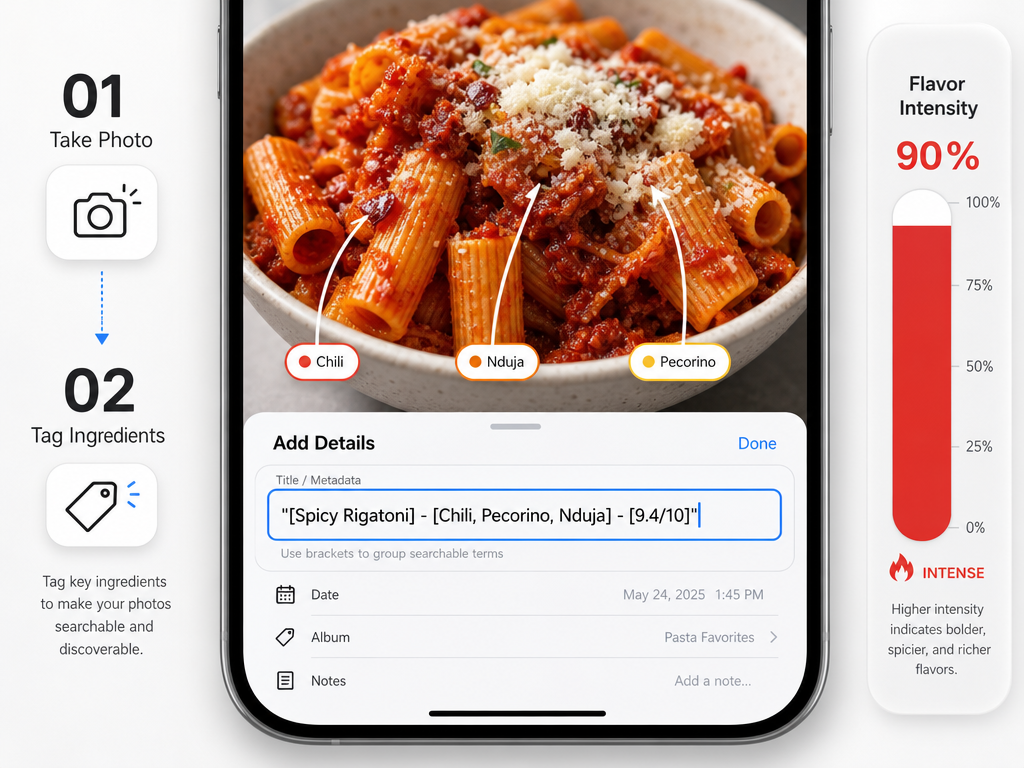 Maximize your phone's native search capabilities by using the caption field to log specific ingredients and personal ratings during your meal.
Here's the step-by-step:
Take the photo immediately, before you start eating. Natural light is better than overhead restaurant lighting. No filters. Just the dish.
Swipe up on the photo (iOS) or tap the three-dot menu (Android) to access the caption or description field.
Type the structure:
[Dish Name] - [Key Ingredient] - [Score/Note]. For example:Cacio e Pepe - Pecorino Romano - 8.5/10 - perfect texture, slight oversalt.Add a location tag if your phone doesn't do it automatically. This links the dish to the restaurant without you having to remember the venue name later.
Mark as Favorite if the dish is genuinely exceptional. This creates a secondary filter for your highest-rated meals.
The entire process takes under two minutes. That's faster than arguing about who's picking up the check.
One critical rule: Photo-First, Note-Second. If you wait to take the photo, the lighting will change, the plate will be half-eaten, or the server will clear it. Capture the visual first. Add the metadata while you're digesting.
This habit is the foundation. Everything else builds on it. If you're tracking restaurant meals more broadly, these same principles apply.
Phase 2: Choosing Your Stack
Your stack is the combination of tools you use to capture, organize, and retrieve dining memories. There's no one-size-fits-all answer, but there are clear best-fit scenarios.
For the Minimalist: Native Phone Tags + Favorites Folder
If you're disciplined about captions and location tags, Apple Photos or Google Photos can be surprisingly powerful. Both platforms now include AI-powered search that recognizes food categories ("pasta," "sushi," "tacos"). Combined with manual captions, you get a free, zero-friction system.
Pros: No additional apps. No monthly fees. Total privacy. Works offline.
Cons: Limited filtering. No rating scales. Search is only as good as your tagging discipline.
Best for: People who dine out occasionally (under 50 meals per year) and don't need complex sorting.
For the Socialite: Crumble or Beli
These apps are built around the social foodie experience. You're not just logging meals - you're building a public map of recommendations that your friends (and strangers) can follow.
Crumble uses a decimal rating system (0.0 to 10.0) and emphasizes per-dish scoring. The interface is Instagram-adjacent: clean photos, short captions, shareable lists.
Beli uses relative ranking instead of numeric scores. You're constantly re-sorting your restaurants and dishes based on direct comparisons ("Was the pasta at Restaurant A better than Restaurant B?"). It's a cognitive model borrowed from sports rankings.
Pros: Purpose-built for food. Active communities. Beautiful interfaces. Automatic restaurant lookup.
Cons: Your data lives inside their ecosystem. Social pressure to post. Discovery features can be distracting if you just want a personal archive.
Best for: People who want to share recommendations and don't mind the public/semi-public nature of the platform. Our comparison of the best food review apps covers these options thoroughly.
For the Archivist: Notion or Airtable
If you want total control - custom fields, multi-layered taxonomies, long-form tasting notes - you're building a database from scratch.
A typical Notion template includes:
- Dish Name (text field)
- Restaurant (linked database)
- Cuisine Type (dropdown: Italian, Thai, Mexican, etc.)
- Dish Category (dropdown: Pasta, Crudo, Small Plate, etc.)
- Hero Ingredient (multi-select: Truffle, Uni, Chili, etc.)
- Score (number, 0.0 to 10.0)
- Price (currency)
- Date (date field)
- Photo (file upload)
- Tasting Notes (long-form text)
Notion lets you filter by any combination of fields. Show me every pasta dish I've scored above 8.5. Show me every meal in Tokyo. Show me every dish with bottarga. This is the gold standard for searchability.
Pros: Unlimited customization. Offline access. Your data stays yours. You can export everything as CSV.
Cons: High setup cost. No automatic restaurant lookup. You're manually typing everything.
Best for: People who dine out frequently (100+ meals per year) and treat their dining history as a serious archive. Building a personal restaurant library explains the full process.
Phase 3: The Dish-First Organization Method
This is where most systems fail. They organize by restaurant, not by dish. You end up with folders like "Tokyo 2024" or "Italian Spots," which are useless when you're trying to remember that one specific tonkotsu ramen with the sesame oil finish.
A dish-first taxonomy has three layers:
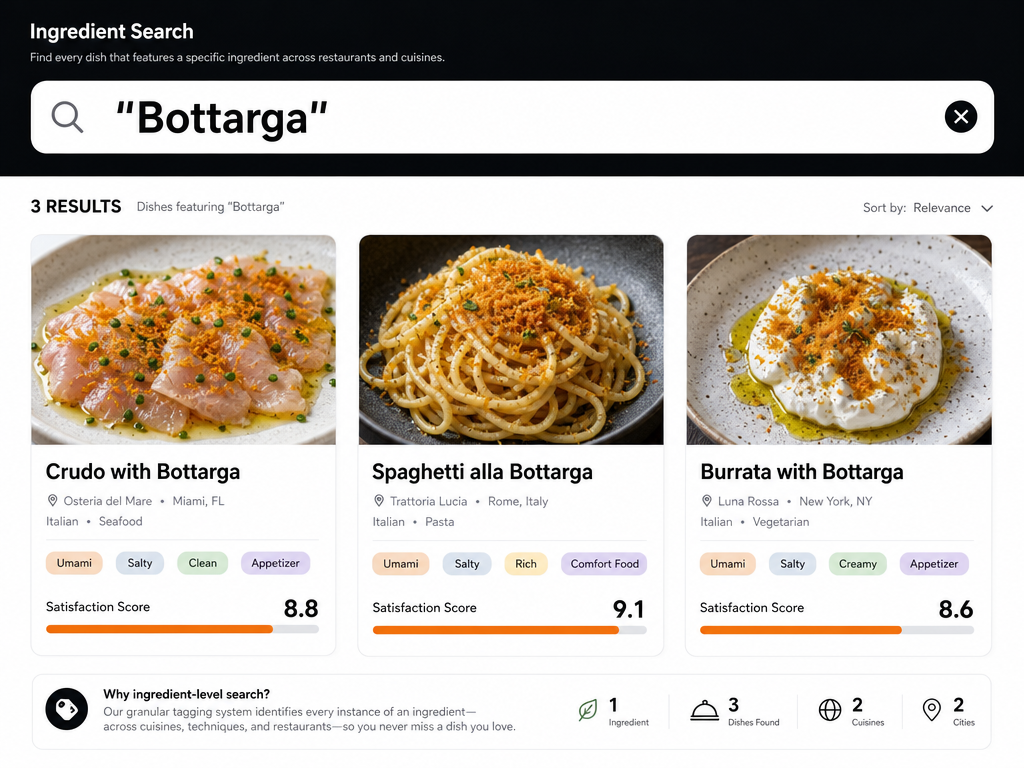 Move beyond restaurant names by organizing your culinary memories by hero ingredients, allowing for granular searches like finding every dish featuring Bottarga.
Layer 1: Cuisine Type
Broad categories that reflect cooking tradition and flavor philosophy. Italian. Thai. Japanese. Mexican. French. Middle Eastern. American. These are your top-level filters.
This isn't about geography - it's about culinary DNA. Szechuan and Cantonese both fall under "Chinese," but they're so different in technique and flavor profile that you might want to separate them. Your system, your rules.
Layer 2: Dish Category
Within each cuisine, you sort by dish type. For Italian, that might be Pasta, Risotto, Crudo, Secondi, Antipasti. For Japanese, it might be Sushi, Ramen, Izakaya Small Plates, Donburi.
This layer is where most of the organizational heavy lifting happens. When you're searching for "that incredible pasta dish," you're already narrowing the field substantially.
Layer 3: Hero Ingredient
This is the original-value layer. Most restaurant apps don't let you filter by ingredient, which means you can't answer the question "Where have I had the best bottarga?"
Your hero ingredient is the one thing that defined the dish. It might be a protein (Wagyu, Uni, Duck), a spice (Sichuan Peppercorn, Saffron), a cheese (Pecorino, Burrata), or a vegetable (Ramps, Heirloom Tomato).
You're not cataloging every ingredient - just the one that made the dish memorable. If you ate a carbonara where the guanciale was transcendent, the hero ingredient is "Guanciale," not "Pasta" or "Egg."
This three-layer system lets you search with precision. Show me every Thai dish I've rated above 9.0. Show me every pasta with truffles. Show me every Izakaya small plate I tried in Osaka.
The search bar becomes a time machine.
Phase 4: Retrieval - Making Your Archive Searchable
You've taken the photos. You've logged the dishes. You've built the taxonomy. Now comes the real test: can you find anything?
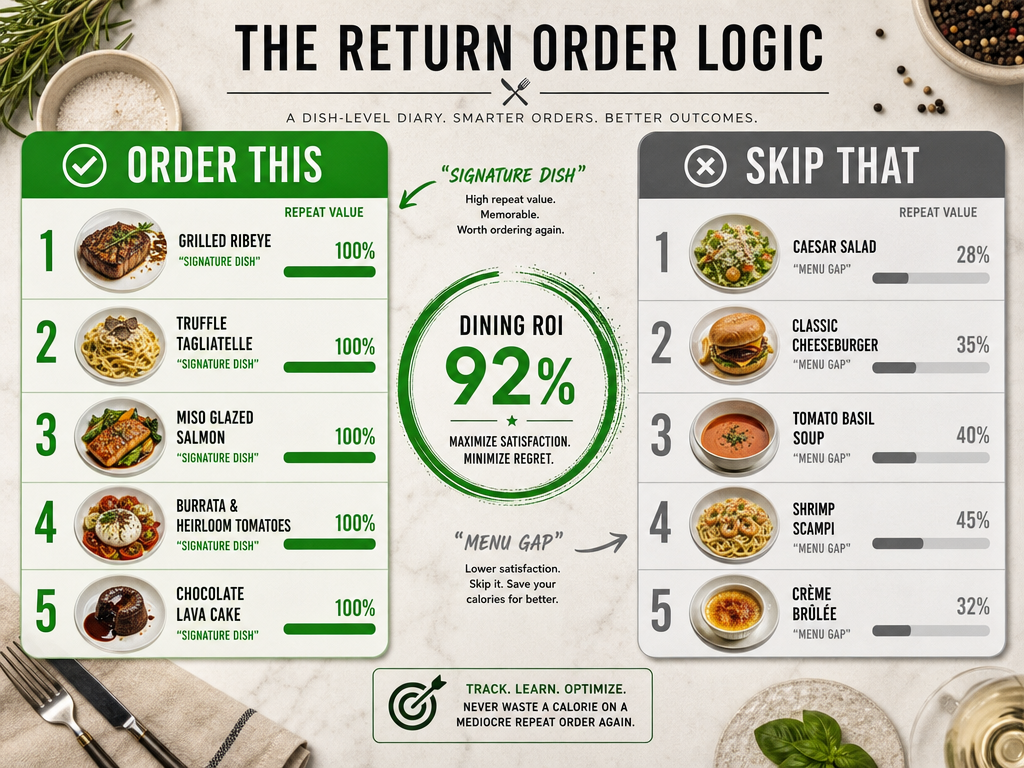 Use your dish-level database to create a definitive 'Order vs. Skip' guide for your favorite restaurants, ensuring every return visit is optimized.
For Native Photo Users:
Open the search bar in Apple Photos or Google Photos. Type the dish name. If you've been disciplined about captions, it should appear immediately. If not, try searching by location ("Brooklyn pasta") or cuisine type. The AI search isn't perfect, but it's better than scrolling.
Pro tip: Use the "Favorites" album as a shortcut. If you only favorite dishes you'd order again, you've created a curated highlight reel of your best meals.
For App Users:
Crumble and Beli both include filtering by rating, cuisine type, and date. Beli's ranked-list format means your top dishes automatically float to the top. Crumble lets you create custom lists ("Best Pasta in NYC," "Tokyo Must-Return") that function as personal guides.
For Database Users:
Notion's filtering is where the system shines. Create saved views like:
- 9.0+ Club: Every dish you've rated 9.0 or higher, sorted by date.
- Repeat Orders: Dishes you've had more than once, with notes on consistency.
- City Guides: All meals in a specific location, sorted by rating.
- Ingredient Deep Dive: Every dish featuring a hero ingredient (e.g., "Show me every dish with uni").
The goal is to reduce search time from three minutes (scrolling through your camera roll) to three seconds (typing a keyword and seeing the result).
How to Search Food Photos by Ingredient
This is the killer feature most people don't realize they need until they try it.
You're planning a dinner party. You remember having an incredible burrata appetizer - creamy, topped with something citrusy and herbal, maybe blood orange? - but you can't remember where. If you've tagged dishes by hero ingredient, you search "Burrata" and see every instance you've photographed it.
Or you're in Rome and you want to compare every cacio e pepe you've tried. Search "Pecorino Romano" (the defining ingredient) and your archive shows you the Tokyo version, the New York version, and the Rome version, side by side with ratings and notes.
Here's how to set it up:
In Native Photos: Add the ingredient to your caption. "Cacio e Pepe - Pecorino Romano - 8.5/10." When you search "Pecorino," the photo appears.
In Apps: Most food apps don't support ingredient tagging yet, which is a massive gap. Crumble and Beli let you add text notes, but there's no structured ingredient field. This is where database users have a significant advantage.
In Notion/Airtable: Create a multi-select field called "Hero Ingredient." Add entries like "Truffle," "Uni," "Wagyu," "Bottarga," "Ramps." Tag each dish. Now you can filter by ingredient and see your entire history with that flavor.
This feature turns your dining history into a reference library. Serious foodies who organize by dish use this method constantly.
What Is the Best App for Keeping Track of Restaurants?
The best app depends on whether you want to track restaurants or dishes. Most "restaurant apps" are venue-centric: they store the name, location, and a generic rating. But they don't help you remember which specific dishes were worth ordering.
For dish-level tracking, the standout options are:
Savor: A newer app built specifically for dish-first memory. You photograph each plate, rate it on a 10-point scale, and add tasting notes. The app automatically organizes by cuisine, dish type, and location. It's designed for people who treat dining as a craft, not a social performance.
Crumble: The friendliest social option. Great interface, decimal ratings, easy sharing. Best for people who want a public-facing dining diary.
Notion: The most powerful but requires manual setup. Best for people who want a fully custom system and don't mind typing everything.
If you're asking "What's the best app for remembering restaurants?" - the answer is probably Beli or Google Maps saved lists. But if you're asking "What's the best app for remembering which dishes I loved?" - that's a different question, and the answer is a dish-first system like Savor or a custom Notion database.
Our complete guide to restaurant tracking apps covers this in more depth.
Frequently Asked Questions
How do I tag food photos with dish names and key ingredients?
Use your phone's native caption or description field immediately after taking the photo. The format is simple: [Dish Name] - [Key Ingredient] - [Personal Rating/Note]. For example: Tonkotsu Ramen - Chashu Pork - 9/10 - perfect broth richness. This makes the photo searchable later. If you're using a database like Notion, create dedicated fields for Dish Name, Hero Ingredient, and Rating instead of cramming everything into a single text field.
What are the best per-dish rating systems?
Most professionals use a 10-point decimal scale (0.0 to 10.0) because it provides enough granularity to distinguish between "very good" (8.0-8.5) and "exceptional" (9.0+) without the false precision of a 100-point scale. Some people prefer a simpler 5-star system, but it collapses too many distinctions - there's a huge difference between a 3-star dish and a 4-star dish. Avoid binary systems (like/dislike) unless you're only tracking extremes. The key is consistency: pick a scale and stick to it so your archive remains comparable over time. Learn more about rating food like a professional.
How do I use iOS 'Look up food' to catalog restaurant dishes?
iOS 17 and later include a Visual Look Up feature that can identify food in photos. After taking a photo, tap and hold on the dish, then tap "Look Up." The phone will attempt to identify the dish type ("pasta carbonara," "sushi roll," etc.). This works better for common dishes than obscure regional specialties. The feature is useful for quick tagging, but it won't capture personal details like the restaurant name, your rating, or tasting notes - you still need to add those manually via caption or a dedicated app.
Is there a way to search my dining history by flavor profile?
Yes, but only if you've tagged dishes with flavor descriptors from the start. In a database system like Notion, create a multi-select field called "Flavor Profile" with options like "Smoky," "Umami," "Spicy," "Tangy," "Herbaceous," "Sweet-Savory." Tag each dish during logging. Later, you can filter to show every "Smoky" dish you've rated above 8.0, or compare all "Umami-forward" meals. Native photo apps don't support this level of filtering - it's one of the main reasons serious foodies eventually migrate to custom databases.
Can metadata on photos be wrong?
Absolutely. Location metadata depends on GPS accuracy at the time the photo was taken. If you're indoors with poor signal, your phone might place you two blocks away from the actual restaurant. Date stamps can also be incorrect if your phone's clock is out of sync. This is why manual verification matters - always double-check that the location tag matches the restaurant before you rely on it for search. In apps like Notion, you're entering location data manually, which eliminates GPS errors but introduces the risk of typos.
How do I identify a dish from an image?
Modern AI tools like Google Lens or the iOS Visual Look Up feature can identify common dishes from photos with decent accuracy. Open the photo, activate the visual search tool, and the system will suggest dish names based on image recognition. For more obscure or regional dishes, these tools often fail - a hand-rolled pasta from Puglia might get tagged as "generic pasta." In those cases, you're better off manually noting the dish name based on the menu or asking the server. Apps like Crumble and Beli handle this automatically when you check in at a restaurant, pulling dish names from their database if available.
What is the best recipe organizer app in 2026?
If you're tracking dishes you've eaten (rather than dishes you're cooking), Savor and Crumble are top choices. But if you're organizing recipes you plan to cook at home, Paprika and Whisk are strong contenders. Paprika lets you save recipes from any website, strip out the ads and life stories, and organize them by meal type or cuisine. Whisk integrates with grocery delivery services. Neither is purpose-built for restaurant dining memory - they're kitchen tools, not dining archives. The best choice depends on whether you're documenting meals you've eaten out or meals you're planning to recreate at home. Check our full comparison of recipe organization apps.
Does storing plates vertically save space?
This question usually comes up in the context of kitchen organization, not digital dining memory. If you're asking about photo storage, orientation doesn't matter - images take up the same amount of disk space whether they're horizontal or vertical. If you're asking about physical plate storage in a kitchen, yes, vertical plate racks can save counter or cabinet space by reducing the footprint compared to stacking plates horizontally. But that's a different topic than organizing dining memories by dish.