
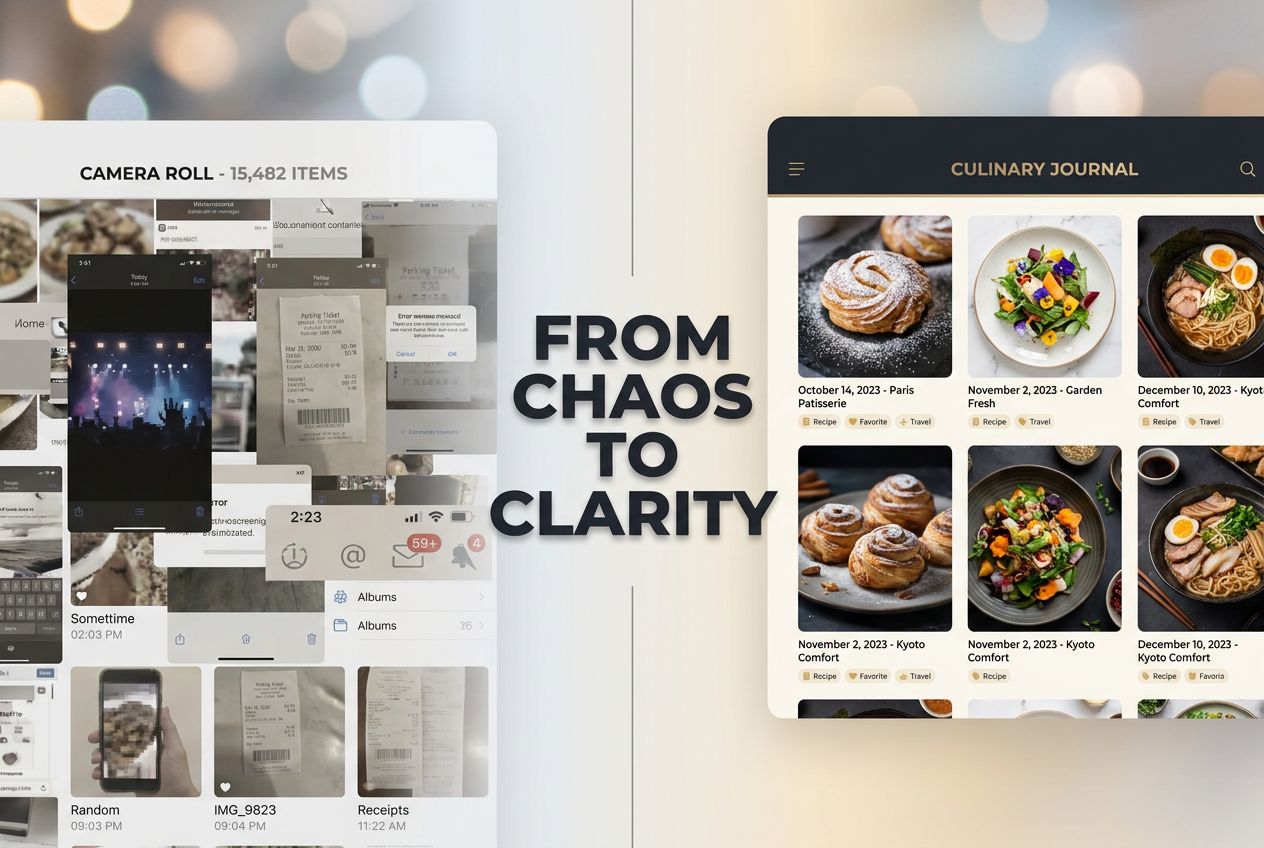
Your Camera Roll is a Graveyard: It’s Time for a Personal Food OS
John the smoothie monster
John lives for smoothie bowls and cold-pressed juices. He uses Savor to remember his best blends.
Your Camera Roll is a Graveyard. It’s Time for a Personal Food OS. You had an extraordinary crudo in June - pristine fluke with citrus and chili oil, served on...
Your Camera Roll is a Graveyard. It’s Time for a Personal Food OS.
You had an extraordinary crudo in June - pristine fluke with citrus and chili oil, served on a polished marble slab at a minimalist place you found via a group text. You took three photos. Now it’s November. You’re scrolling through 2,400 images trying to remember the name of that restaurant, the exact seasoning that made the fish sing, or even what neighborhood it was in. The photo sits somewhere between a blurry concert shot and a screenshot of a parking ticket. The memory has evaporated.
If you dine out four times a week, you’re spending thousands of dollars a year on culture. Yet your archive is a chaotic camera roll that can’t answer basic questions: What was that dish? Where did I have it? Would I order it again?
The "Serious Archivist" doesn’t need another social network where strangers argue about service or gamified ranking systems that turn meals into competitive sport. What you need is something quieter, more functional, more yours: a Personal Food OS. A private, searchable system that transforms your camera roll graveyard into a living, breathing archive of your palate.

Transform your disorganized photo gallery into a searchable Personal Food OS, moving from a ’Camera Roll Graveyard’ to a structured archival system.
Table of Contents
- The "Noise" Crisis: Why Yelp and Google Are Failing You
- The Three Types of Foodies
- What the Serious Archivist Actually Needs
- The Personal Food OS: A New Category
- Feature 1: The Auto-Log
- Feature 2: The Personal Map
- Feature 3: Zero-Performance Sharing
- Why a Private-First Archive Changes Everything
- Building Your Food OS: Getting Started
- Frequently Asked Questions
The "Noise" Crisis: Why Yelp and Google Are Failing You
Open Yelp. Search for a restaurant. What do you find? A one-star review from someone who’s upset the host didn’t seat their party of eight without a reservation. A three-star review focused entirely on parking availability. A five-star review that reads like bot-generated enthusiasm: "Great place! Food was good! Will come back!"
Yelp and Google Reviews have become digital complaint boxes. They’re crowdsourced repositories where anonymous voices argue about everything except what actually matters to someone who treats dining as a cultural pursuit: the food itself.
The platform economics explain why. Yelp makes money when businesses pay to respond to bad reviews or promote their listings. Google makes money when you click ads for delivery services. Neither platform is designed to help you remember that perfect bite of uni you had in March or compare how two different chefs approach hamachi crudo.
The result? Low-trust data. A restaurant with 4.2 stars could be serving transcendent natural wines and impeccable bistro fare, or it could be a tourist trap with good lighting. The aggregate score tells you nothing about whether you’ll actually love it.
For serious food lovers, this creates a paradox: we have access to more information than ever, yet we can’t answer simple questions about our own dining history. The tools built for the masses don’t serve people who care deeply about flavor, technique, and culinary memory.
The Three Types of Foodies
Not everyone who eats out four times a week wants the same thing from a food app. Understanding the landscape helps clarify what you actually need.
The Social Diner uses apps like Beli. They love the gamification - ranking restaurants in head-to-head Elo matchups, seeing what friends are eating, building a public "Top 10" list. For them, dining is inherently social, and the app becomes an extension of group chat culture. The newsfeed matters. The global leaderboard matters. It’s addictive and fun, especially for Gen Z users who grew up with TikTok’s dopamine-driven interface.
But it can feel noisy. The social pressure to post means you’re not just documenting for yourself - you’re performing for an audience. And the competitive ranking mechanic, while clever, reduces nuanced meals to binary choices: this versus that.
The Expert Follower subscribes to platforms like World of Mouth. They value curation by people with real authority - chefs, critics, food writers. They’re willing to pay for gated access to insider recommendations and hidden gems in cities around the world. The content is premium, the aesthetic sophisticated, the trust level high.
The limitation? It’s a one-way street. You’re consuming someone else’s expertise, but there’s no mechanism to track your own discoveries or build a personal reference library. What happens when you find a fantastic neighborhood spot that isn’t on any expert’s radar? It stays trapped in your camera roll.
The Serious Archivist is you. You don’t need social validation or celebrity recommendations. You need utility. You want a system that remembers everything - the restaurant, the dish, the date, the context - so you can search, compare, and revisit your own culinary history. You want the "Obsidian for food" or the "Notion for your palate."
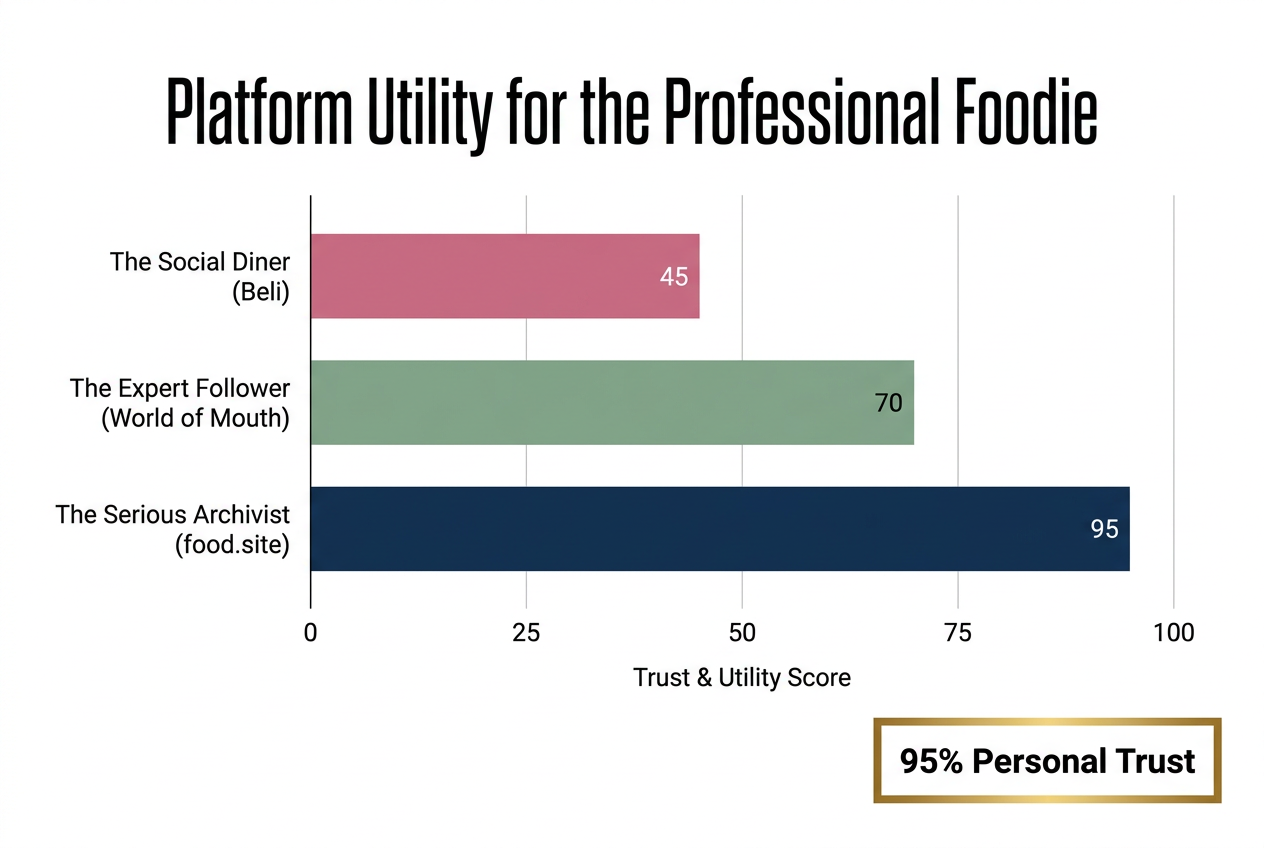
While social apps focus on performance, the Serious Archivist prioritizes personal utility and high-trust data, making a private OS the superior choice for professionals.
This isn’t about rejecting other tools outright. Some people happily use multiple apps. But if you’ve been frustrated by social feeds that prioritize engagement over memory or generic review platforms that bury useful information under noise, you’re likely an Archivist at heart.
What the Serious Archivist Actually Needs
Think about what currently works for you. Many people default to the Notes app on their iPhone - simple, private, always accessible. You’ve probably got a note titled "Restaurants" with a running list of names, maybe a few bulleted observations: "The duck confit at X was incredible. Natural wine selection. Go back for the tasting menu."
It’s a start. But it breaks down quickly.
There’s no map functionality. You can’t filter by neighborhood or cuisine. You can’t attach photos in a meaningful way. Search is primitive - good luck finding that place you went to "sometime last spring" when you’ve got fifty entries. And if you want to share a curated list with a friend visiting your city, you’re copying and pasting fragments into a text message.
What you need instead:
- Effortless capture that pulls details automatically from photos (geotag, timestamp, dish identification)
- Searchable tags for cuisine type, neighborhood, price point, dietary preferences, or custom categories like "natural wine" or "perfect for first dates"
- Visual memory where the photo isn’t just decoration - it’s the primary artifact
- Context notes where you can record not just what you ate but why it mattered, who you were with, what you ordered next time
- Zero social pressure because this archive is for you, not for likes or comments
- Shareable utility when you do want to send a friend your "48 Hours in Tokyo" list without making it a public performance
No existing platform combines all of these. Yelp can’t do it because it’s built for crowd-sourced business reviews. Beli can’t do it because it’s fundamentally social. Google Photos can do some of it, but it’s not designed around food and lacks the structured tagging and contextual notes that turn data into knowledge.
The Personal Food OS: A New Category
What if your phone could be more than a passive storage device? What if it functioned like a personal knowledge management system specifically designed for your palate?
A Personal Food OS isn’t trying to compete with Yelp’s business directory or Beli’s social network. It’s trying to solve a different problem entirely: making your personal dining history searchable, shareable, and genuinely useful.
Think of it like this. If you’re a serious reader, you probably use Goodreads or a similar tool to track books. You rate them, tag them, write notes about what resonated. Over time, you build a library of your own taste. You can look back and see patterns - genres you gravitate toward, authors you trust, books you need to revisit.
A Personal Food OS does the same thing for meals. It’s your library, your archive, your evolving map of what you love.
The core insight: the meal is the unit of memory, not the restaurant. You don’t remember restaurants in the abstract. You remember specific dishes. That hamachi crudo. That perfectly charred sourdough crust. The way a natural wine paired with roasted chicken in a way that elevated both.
Traditional review apps force you to rate the entire restaurant as a single entity, which flattens nuance. A Personal Food OS lets you track individual dishes, compare them across restaurants, and build a vocabulary for your own preferences.
Feature 1: The Auto-Log
Manual data entry is where good intentions die. You’re tired after dinner. You’ve had two glasses of wine. The idea of typing out the restaurant name, address, dish description, and tags feels like homework. So you don’t. The photo sits in your camera roll, another orphaned memory.
This is where AI-enhanced capture changes the game.
The Auto-Log works like this: You take a photo of your meal. The system scans the image and extracts the restaurant name from the photo’s geotag. It identifies the dish based on visual recognition trained on thousands of menu photos and culinary databases. It pulls in metadata: the chef’s name, the menu description, even recent reviews from trusted sources.
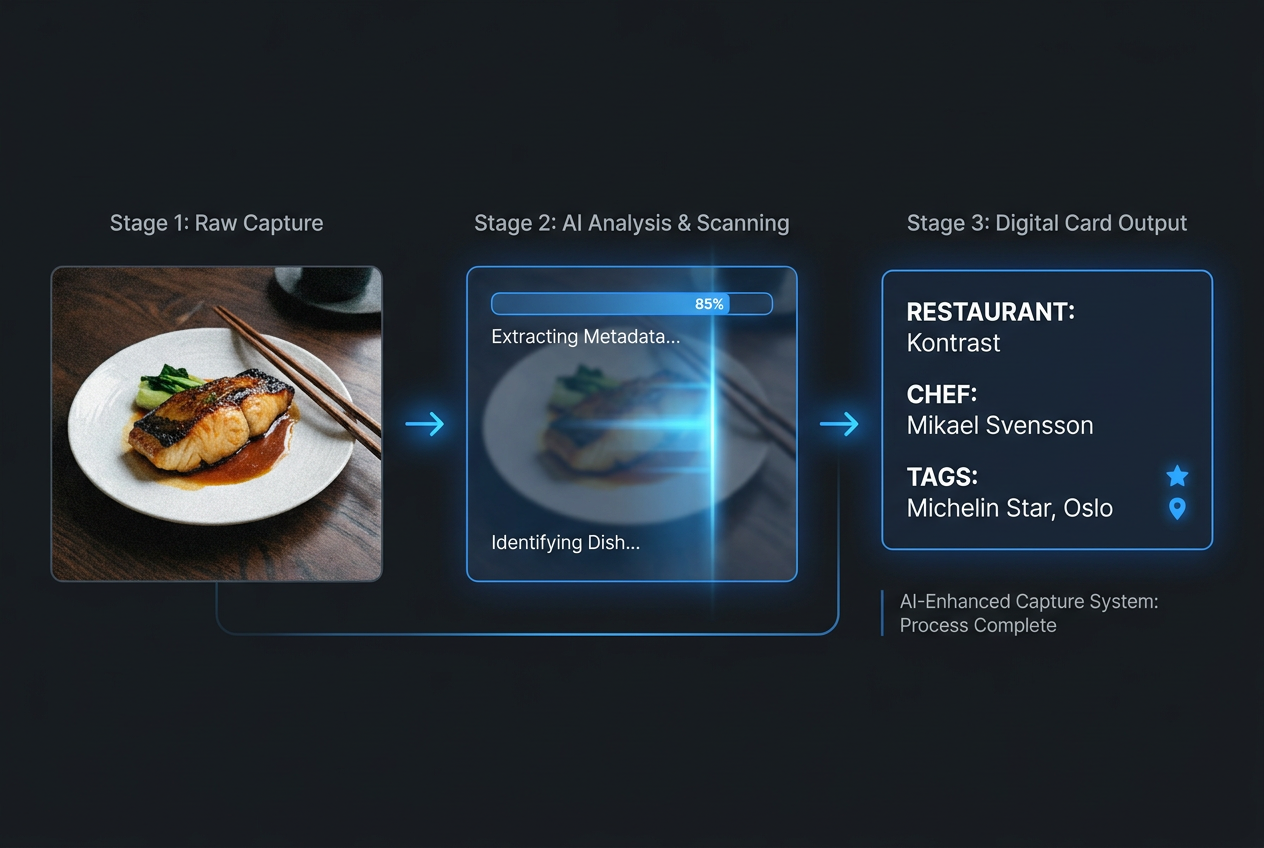
Our AI-enhanced capture system eliminates manual entry by automatically pulling restaurant details, menus, and chef info directly from your meal photos.
You review the auto-populated entry, add a quick rating or note if you want, and save. Total time: 15 seconds.
This isn’t science fiction. Visual recognition models can already distinguish between ramen and pho, identify regional pasta shapes, and recognize plating styles. Geolocation data is built into every smartphone photo. The missing piece hasn’t been the technology - it’s been designing a tool that prioritizes private utility over public engagement.
For the Serious Archivist, the Auto-Log eliminates friction. You’re no longer deciding whether a meal is "worth logging." Everything gets captured. Over time, this creates a comprehensive archive - not just your greatest hits, but a complete record of your dining life.
And because the system learns from your behavior, it gets smarter. After you’ve logged fifty ramen bowls, it can distinguish between tonkotsu and shoyu styles without prompting. After you’ve tagged twenty natural wine bars, it recognizes similar spots automatically.
This is how serious foodies organize their restaurant photos in 2026 - not by manually sorting through thousands of images, but by building a system that does the heavy lifting for them.
Feature 2: The Personal Map
Imagine opening an app and seeing a map of your city - not cluttered with every restaurant listed on Google, but filtered by your personal history. Every pin represents a meal you’ve logged. The color coding shows your ratings. Tap a neighborhood and see your favorite dishes there. Filter by cuisine, date, price point, or custom tags like "perfect for parents visiting" or "low-intervention wine."
This is the Personal Map. It’s your city, seen through the lens of your palate.
The power isn’t in discovering new places (though serendipity happens - you notice clusters of great meals in neighborhoods you don’t visit often). The power is in remembering where you’ve been and why it mattered.
You’re planning dinner with friends. Someone asks, "Where should we go for pasta?" Instead of scrolling through Yelp or texting five different group chats, you open your map, filter by "pasta," sort by rating, and immediately see three options you loved. You can pull up your notes: "The cacio e pepe here uses Pecorino Romano aged 18 months - sharp, funky, perfect. Order the carbonara only if they have guanciale that day."
Context matters. Generic reviews tell you a restaurant is "good." Your personal archive tells you what to order, what to skip, and what makes it special to you.
For travelers, the Personal Map becomes even more valuable. Before a trip to Paris, you export your "To-Try" list - places recommended by friends, dishes mentioned in articles, natural wine bars flagged by sommeliers you trust. During the trip, you log everything. After, you’ve got a permanent record you can revisit or share with the next friend who asks for Paris recommendations.
This approach mirrors how professional foodies build their restaurant library - not as a social performance, but as a living, searchable archive of personal taste.
Feature 3: Zero-Performance Sharing
Social media has conditioned us to think sharing food content requires a public profile, a follower count, and the performance of curation. But that’s not how you actually share recommendations with people you care about.
When a friend asks for restaurant suggestions, you don’t post on Instagram. You text them. You send a specific, contextualized list: "Here’s where I’d go for natural wine in the Lower East Side" or "These are the three ramen spots I trust in Shibuya."
Zero-Performance Sharing means building that functionality directly into the tool. You create a "Private Concierge Link" - a curated, shareable URL that contains exactly the information your friend needs. No public comments. No likes. No follow requests. Just a clean, beautifully designed guide that you can text or email.
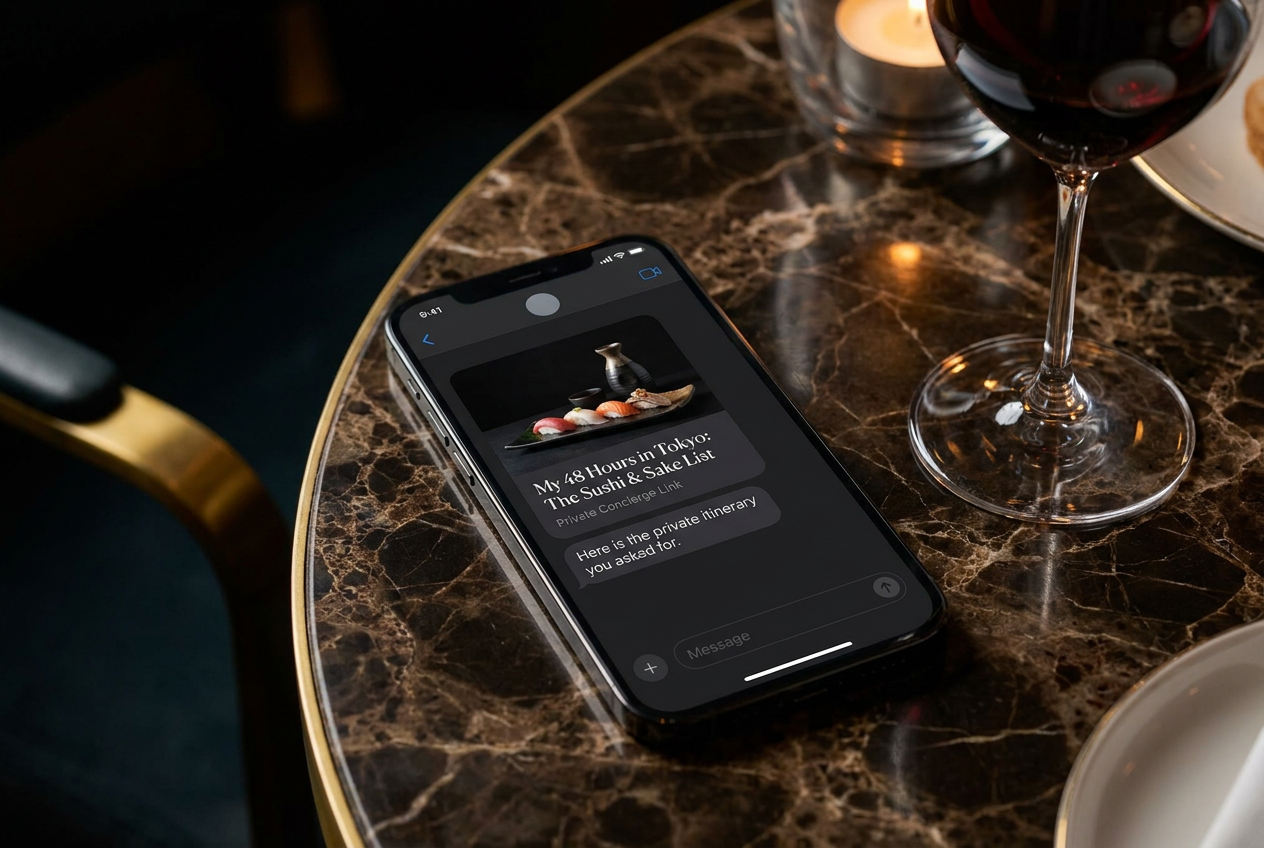
Replace public posting with private utility. Send curated, high-end itineraries to friends via ’Private Concierge Links’ that focus on information, not social validation.
The recipient doesn’t need to download an app or create an account. They open the link and see your recommendations - photos, notes, addresses, your personal ratings. It’s useful without being performative.
This matters because the Serious Archivist isn’t trying to build a brand or grow an audience. You’re trying to remember meals and share knowledge with people you trust. The tool should support that, not force you into a social media model designed for engagement metrics.
Compare this to how the best apps for sharing lists currently work - most still prioritize public profiles over private utility, which creates friction for people who just want to help a friend plan a trip.
Why a Private-First Archive Changes Everything
The default assumption in consumer tech is that social = better. More users, more engagement, more network effects. But for certain use cases, that logic breaks down.
Consider your banking app. Would it be better if it was social? If you could see your friends’ transactions, comment on their spending habits, compare savings accounts? Obviously not. Financial data is private by default, and that privacy is what makes the tool useful.
Your culinary history deserves the same treatment.
A private-first architecture changes how you use the tool. You log everything - the mediocre meals, the experiments that didn’t work, the expensive disappointments. Why? Because there’s no social cost. You’re not curating a highlight reel for strangers. You’re building a reference library for yourself.
Over time, this creates a richer, more honest archive. You can see patterns in your own taste. You realize you’ve been to the same ramen shop eight times in two years - why? What keeps drawing you back? Is it consistency, or is it something specific about their broth technique? You notice that meals with a certain sommelier are consistently rated higher. You discover that you almost never enjoy restaurants with "elevated comfort food" in the description, even though you keep trying them.
This kind of self-knowledge only emerges when the archive is private. The moment you’re performing for an audience - even a small one - you edit. You highlight the successes, downplay the failures, curate a persona. The data becomes less useful because it’s less honest.
Privacy also enables experimentation. You can try rating systems, tagging schemes, or note-taking formats without worrying about whether they "make sense" to anyone else. Your archive is a working document, not a published portfolio.
And crucially, privacy means ownership. The data is yours. You’re not contributing to a corporate database that gets monetized through ads or sold to third parties. Your archive can be exported, backed up, or migrated if you ever switch tools. The knowledge you’ve built stays with you.
This is why dish tracking apps that prioritize privacy are gaining traction among serious food lovers - they understand that not every experience needs to be broadcasted.
Building Your Food OS: Getting Started
Shifting from a camera roll graveyard to a structured Personal Food OS doesn’t require starting from scratch. You’ve already captured the raw material - thousands of photos, scattered notes, vague memories. The challenge is organizing them into a system that works.
Start with a pilot project. Don’t try to retroactively log every meal you’ve ever eaten. Instead, pick a specific category or timeframe. Log everything you eat this month. Or focus on a single cuisine: build a comprehensive archive of every sushi meal you’ve had in the past year. Starting small makes the system feel manageable and helps you develop habits.
Develop a consistent rating framework. Decide what matters to you. Is it a 5-point scale focused purely on flavor? A 10-point system that weighs technique, creativity, and value? Some people rate dishes on multiple dimensions - taste, presentation, portion size - and average the results. The specific framework matters less than consistency. Once you pick a system, stick with it long enough to generate comparable data.
If you’re tracking dishes individually rather than restaurants, you might adapt professional pizza scoring protocols to your chosen cuisine - breaking meals down by components (sauce, protein, sides) rather than holistic impressions.
Build a tagging taxonomy. Tags are what make an archive searchable. Start with obvious categories (cuisine type, neighborhood, price range) and gradually add custom tags that reflect your priorities. Examples: "natural wine," "omakase," "vegetarian-friendly," "outdoor seating," "Michelin-starred but affordable," "perfect for dates," "loud," "quiet," "tasting menu," "a la carte."
The beauty of custom tags is that they capture distinctions review platforms miss. Yelp will tell you a restaurant is "Japanese." Your tags tell you it’s "kaiseki-style, seasonal menu, chef’s choice, intimate counter seating, expensive but worth it."
Write context, not reviews. The most valuable notes aren’t the ones that sound like they belong in a guidebook. They’re the specific, personal observations that jog your memory months later. "Sat at the bar. The chef explained the fish came in that morning from Toyosu. The pickled ginger was homemade - less sweet than commercial stuff. Would order the kinmedai again but skip the tamago."
Context also means tracking who you were with, why you chose the place, what else you ordered. These details transform data points into stories.
Use photos as primary artifacts. A photo triggers memory more effectively than text. When you log a meal, attach the photo you took. When you’re browsing your archive later, the visual memory will pull up associated details you’d forgotten - the ambient lighting, the presentation style, the portion size.
Photos also let you compare dishes across restaurants. You can pull up every ramen bowl you’ve photographed and see how broth color, noodle thickness, and topping arrangement vary by region and restaurant. It’s a form of visual learning that text alone can’t provide.
Set a monthly review ritual. Once a month, sit down with your archive. Look back at the meals you logged. What surprised you? What patterns emerged? Did you try new cuisines or stick to familiar favorites? Were there any meals you want to replicate at home? This reflective practice turns raw data into insight.
For more tactical advice on capturing great food photos that actually enhance your memory, check out this guide on how to take better food photos.
Frequently Asked Questions
What makes a Personal Food OS different from Instagram or other social platforms?
Instagram is designed for broadcasting. You post photos to build an audience, generate engagement, and participate in visual culture. A Personal Food OS is designed for memory and retrieval. It’s private by default, searchable by meaningful criteria (cuisine, location, rating, custom tags), and optimized for helping you remember and revisit meals - not for collecting likes. The focus is utility, not performance.
How much time does it take to maintain a food archive?
With AI-enhanced Auto-Log features, capturing a meal takes 10-15 seconds. You snap a photo, the system pulls details automatically, you add a quick rating or note, done. Reviewing your archive monthly might take 15-20 minutes. The time investment is minimal compared to the value - never forgetting a great meal, being able to recommend specific dishes to friends, building a searchable library of your palate.
Can I migrate data from other apps or my camera roll?
Ideally, yes. A well-designed Personal Food OS should support bulk import from your camera roll, pulling geotag and timestamp data to organize photos chronologically and geographically. Export functionality is equally important - you should be able to download your entire archive as structured data (CSV, JSON, or PDF) so you own your culinary history regardless of which tool you use.
What if I don’t want to rate every meal numerically?
Ratings are optional. Some people prefer binary tags ("would order again" vs. "skip"), written notes without scores, or visual-only archives. The key is consistency within your own system. If you do use numeric ratings, pick a scale (5-point, 10-point, 100-point) and apply it uniformly so your archive becomes a useful reference over time.
How do I avoid overwhelming myself with too much detail?
Start minimal. Capture the basics: photo, restaurant name, dish name, date. Add ratings and notes only when they matter. Over time, you’ll develop intuition for which meals deserve detailed logging and which are fine with just a photo and location. The goal isn’t to create perfect entries every time - it’s to build a system you’ll actually use long-term.
Is this only useful for people who eat out constantly?
Not at all. The Serious Archivist mindset applies whether you dine out four times a week or four times a month. If you cook at home frequently, you can log recipes you’ve tried, ingredient sources, adaptations you made, and results. The Personal Food OS concept works for any culinary pursuit where memory and pattern recognition add value.
How does this compare to apps like Beli or World of Mouth?
Beli is social-first, built around ranking and sharing with friends. World of Mouth is expert-first, curated by chefs and critics. A Personal Food OS is archive-first - private, searchable, optimized for remembering your own meals. You can use multiple tools for different purposes, but if your primary goal is never forgetting a great dish and building a personal reference library, the archive model serves that better.
What about privacy and data security?
Private-first architecture means your data isn’t mined for ads or sold to third parties. Ideally, the system should support local-first storage (data lives on your device, not just in the cloud) with optional encrypted cloud backup. You should be able to delete your account and export all data at any time. Transparency about how data is used builds trust with users who treat their culinary history as personal information.
Your camera roll is a graveyard because the tools you’re using were designed for different purposes - social validation, crowd-sourced reviews, influencer culture. A Personal Food OS solves a different problem: turning your dining life into a searchable, private, endlessly useful archive.
Stop scrolling. Start curating. Get early access to your Food Life OS.