
How to Actually Remember the Best Dishes You’ve Eaten at Restaurants
John the smoothie monster
John lives for smoothie bowls and cold-pressed juices. He uses Savor to remember his best blends.
How to Remember the Best Dishes You've Tried at Restaurants You had an extraordinary meal three months ago. The pasta was perfect - silky, rich, the exact...
How to Remember the Best Dishes You've Tried at Restaurants
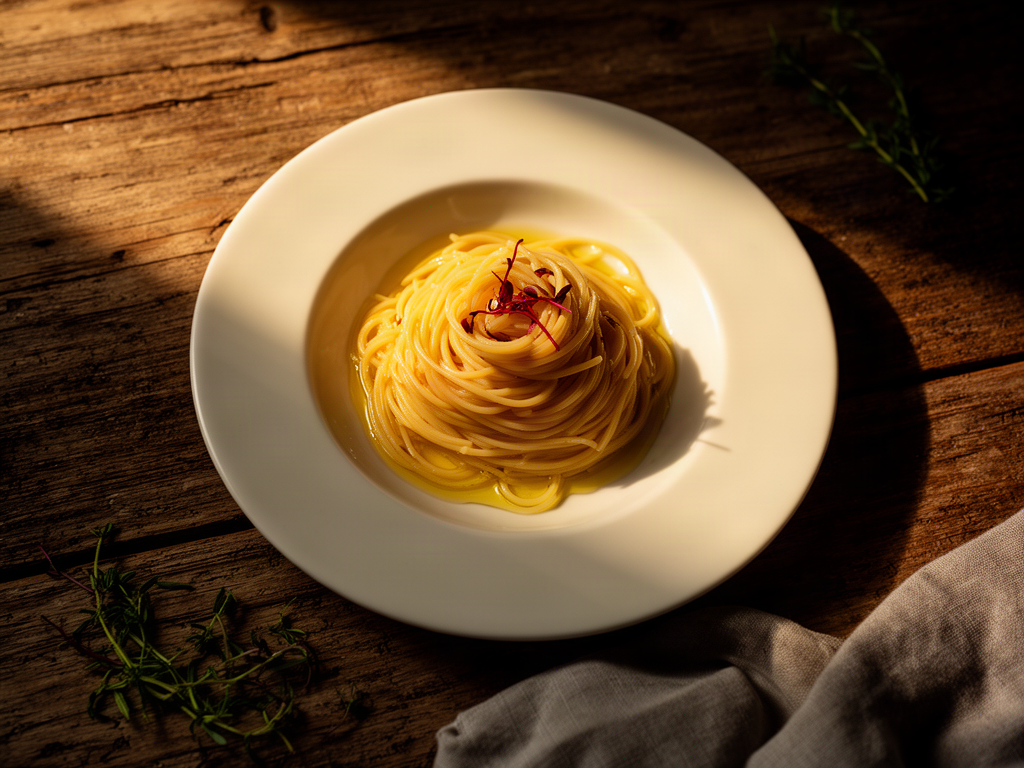
You had an extraordinary meal three months ago. The pasta was perfect - silky, rich, the exact right amount of salt. You took a photo. You meant to remember the name. Now you're scrolling through 2,400 food photos, and it's gone. The restaurant name is there somewhere, but the dish? The specific thing that made it unforgettable? Lost.
This is the camera roll graveyard. It's where your best culinary experiences go to die.
Here's the uncomfortable truth: most serious food lovers have eaten many exceptional dishes in the past year and can't name most of them. We treat our phones like a memory backup system, but a photo without context is just a pretty picture. The real question isn't whether you photographed your food - it's whether you built a system to actually remember it.
This guide isn't about adding another app to your home screen. It's about building a personal food database that works the way your memory actually functions: by dish type, not by restaurant, and definitely not by the random order your camera roll serves up.
Table of Contents
- Why Your Camera Roll Is Failing You
- The Dish-Level Mindset: Why Restaurant Ratings Don't Work
- The Three Decision Points Every Foodie Faces
- Method 1: The Native Hack (High Value, Zero Cost)
- Method 2: Specialized Dish-Tracking Apps
- Method 3: The Productivity Pro Approach
- The 30-Second Batch & Tag Workflow
- How to Organize by Dish Category Instead of Restaurant
- The 2x Zoom Photography Technique
- Frequently Asked Questions
Why Your Camera Roll Is Failing You
Your iPhone's Photos app was designed for vacation snapshots and family portraits. It defaults to chronological order - a system that actively works against food memory. Think about it: when you're craving that perfect ramen, you don't think "I had it in March." You think "I need that tonkotsu with the soft egg."
The psychology is clear. According to data from Savor, people who cannot recall specific positive dining experiences are 47% less likely to recommend restaurants. Memory fades fast. Without a deliberate capture system, even spectacular meals become vague impressions within weeks.
Traditional food photography compounds the problem. You snap a picture at the table, maybe add it to a "Food" album, and move on. Three months later, you're staring at hundreds of nearly identical overhead shots of pasta, with zero context about which one made you want to weep with joy.
The solution isn't taking fewer photos. It's adding the right metadata at the right time.
The Dish-Level Mindset: Why Restaurant Ratings Don't Work
Here's a scenario every foodie knows: You visit a restaurant with a 4.5-star rating. The appetizer is transcendent. The main course is forgettable. The dessert is actively bad. What's the restaurant's "real" rating?
This is why Yelp and Google Reviews fail serious food lovers. They force you to compress a multi-course experience into a single number. A restaurant can have one spectacular dish and six mediocre ones, but the aggregate rating tells you nothing about which is which.
The dish-level approach flips this completely. Instead of asking "Is this restaurant good?", you ask "Which specific dishes at this restaurant are worth ordering again?" This single shift in thinking changes everything.
Consider a hypothetical steakhouse. The ribeye might deserve a 9/10. The salmon? A 5/10. The Caesar salad could be a legitimate 10/10. Restaurant-level tracking gives you one useless data point. Dish-level tracking gives you a personalized ordering guide.
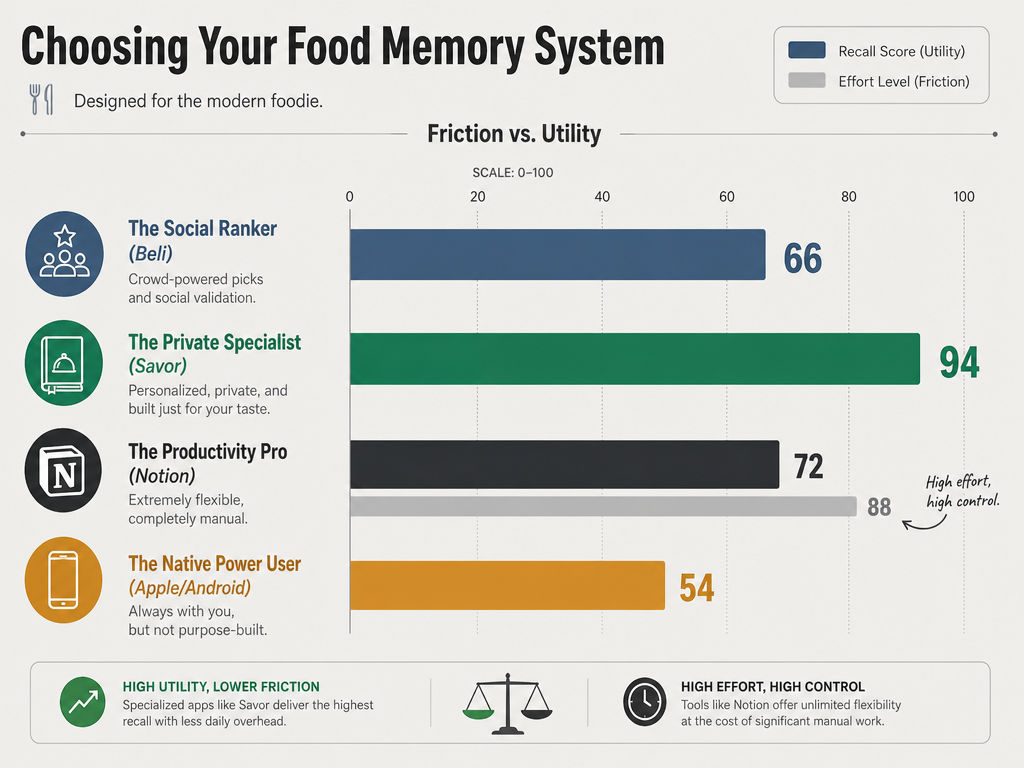 Not all tracking methods are equal. While Notion offers maximum detail, specialized apps like Savor provide the highest recall score with significantly less friction for the average diner.
The Three Decision Points Every Foodie Faces
Before you choose a system, you need to answer three questions. Your answers will determine which method actually works for your life.
Privacy vs. Social: Do you want a private archive or a social ranking system?
Some people want their food memories to be personal. They're building a reference library for themselves, not performing for an audience. Others get energy from sharing discoveries and seeing what friends are eating. Apps like Beli, which skew 70% Gen Z, lean heavily social. Tools like Apple Notes or Savor prioritize privacy.
Neither is wrong. But mixing them is inefficient. If you're constantly thinking "Should I post this?" while trying to log a meal, you've added decision fatigue to a process that needs to be automatic.
Friction vs. Detail: Are you willing to spend 2-3 minutes per meal?
Custom databases like Notion or Airtable can track everything: flavor profiles, price points, specific ingredients, even the weather when you ate. But that level of detail requires discipline. If you're logging meals while the food is getting cold, you're doing it wrong.
Quick-capture systems (Savor, native photo captions) trade granularity for speed. You get the essential information - dish name, rating, maybe one tasting note - and move on with your life. The question is whether that's enough for your goals.
Organization Axis: Restaurant, Date, or Dish Type?
Your camera roll organizes by date. Google Maps organizes by restaurant. But the most effective cognitive anchor for food recall is dish type. When you're craving pizza, you don't think "Where did I eat in October?" You think "Which pizza place had that incredible crust?"
Organizing by dish type (Ramen, Carbonara, Tacos, etc.) aligns your database with how your brain actually searches for food memories. It's a small structural change with outsized impact.
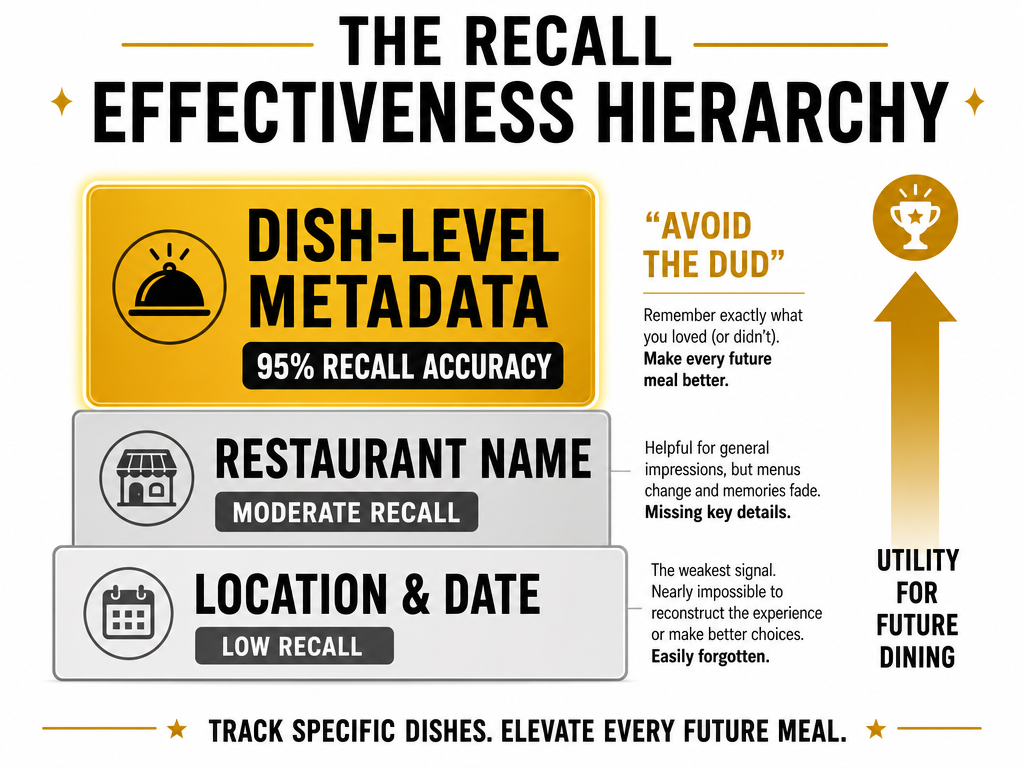 Shifting your focus from 'Where I ate' to 'What I ate' is the key to building a functional personal food database that prevents future ordering mistakes.
Method 1: The Native Hack (High Value, Zero Cost)
The simplest solution is already in your pocket. iOS and Android both have a hidden superpower: the caption field. Unlike tags or album names, captions are globally searchable and survive cloud sync. This makes them perfect for dish metadata.
Here's the workflow:
Step 1: Take the photo using 2x zoom (more on this later).
Step 2: Immediately open the photo and add a caption with this format:
[Dish Name] - [Restaurant] - [Your Rating]/10 - [One-word flavor note]
Example: Tonkotsu Ramen - Ippudo - 9/10 - Rich
Step 3: Use iOS Smart Albums or Android's search function to filter by keyword.
The beauty of this system is its universality. You're not locked into an app that might disappear. Your captions live in your photo library forever. When you search "ramen" in Photos, every bowl you've ever eaten appears with context.
The limitation? It requires manual discipline. You have to train yourself to add captions before you put your phone down. For many people, that's a non-starter. But for those willing to build the habit, it's the most sustainable long-term solution.
A 2026 technical note: Apple Intelligence's "Food Scenes" feature now achieves 81% accuracy on common Western dishes, which means iOS can auto-categorize your photos into broad groups like "Pizza" or "Pasta." But it can't tell you which specific carbonara was the best one you had in Rome. That still requires your manual input.
Method 2: Specialized Dish-Tracking Apps
If the native caption method feels too manual, purpose-built apps handle the structure for you. The trade-off is always the same: convenience now, potential migration headaches later if the app shuts down.
Savor: The 10-Point Specialist
Savor is designed around a single philosophy: rate dishes, not restaurants. Every entry gets a 10-point scale, mandatory dish name, optional tasting notes, and automatic location tagging. The app is entirely private - no social features, no public reviews, no performance pressure.
The advantage is simplicity. You open the app, snap or upload a photo, rate the dish, and you're done. The interface is clean enough to use at the table without feeling like you're filling out a form. The search function filters by dish name, restaurant, or rating, which covers most real-world recall scenarios.
The disadvantage is lock-in. Your data lives in Savor's database. If the app disappears, you'll need to export and migrate. But for people who value a polished experience over portability, that's an acceptable trade.
Beli: The Social Ranker
Beli positions itself as "Letterboxd for food." The focus is on ranked lists, social feeds, and discovery. You follow friends, see what they're eating, and build public-facing collections of your favorite dishes.
With 70% of its user base being Gen Z, Beli leans heavily into the performative aspect of food culture. That's not a criticism - it's a feature. If you get motivation from sharing and comparing, Beli delivers.
The downside is the same as any social platform: the pressure to curate. If you're thinking "Will this look good in my feed?" instead of "Do I want to remember this?", you've introduced noise into your system.
Memolli: The Visual-First Private Journal
Memolli emphasizes aesthetics. Your food memories are displayed as a visual grid, organized by color and composition rather than metadata. It's beautiful, and for visually-oriented people, that matters.
The trade-off is functionality. Searching for "the best ramen I've had" requires scrolling through thumbnails, not typing a query. If you have many logged dishes, this becomes impractical. Memolli works best as a small, curated collection rather than a comprehensive database.
For a deeper comparison of these and other specialized apps, see our guide to the best apps to track your favorite dishes.
Method 3: The Productivity Pro Approach
For people who already live in Notion, Airtable, or Obsidian, building a custom food database is an obvious move. The advantage is total control. You decide which fields matter, how they're organized, and what kinds of queries you can run.
"The Food Vault" Notion template has been duplicated over 18,400 times, which suggests there's real demand for this approach. The standard setup includes:
- Dish Name (text)
- Restaurant (relation to a separate Restaurants database)
- Rating (number, usually 1-10)
- Price (number)
- Flavor Profile (multi-select: Rich, Spicy, Tangy, etc.)
- Ingredients (tags)
- Date Visited (date)
- Photo (file)
- Tasting Notes (text)
The flexibility is intoxicating. You can build views that show "All pasta dishes rated 8+ under $20" or "Spicy dishes I ate in Bangkok." For data-minded people, this is paradise.
The problem is friction. Filling out 9 fields while your dinner companion waits is socially awkward. Most people who start with this system eventually simplify it down to 3-4 essential fields, at which point they're recreating what specialized apps already do.
The sweet spot is using Notion for archival depth and a quick-capture app for at-the-table logging. Import your app data into Notion weekly for analysis, but don't try to do primary data entry there.
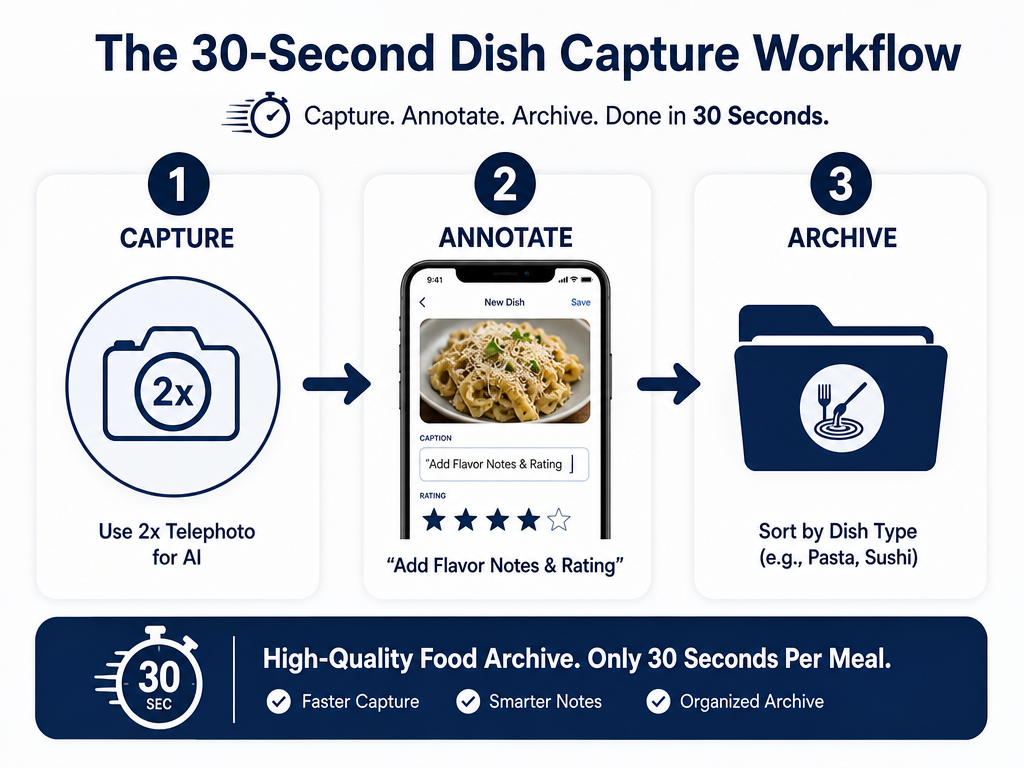 Consistency beats complexity. By following this 30-second workflow - focused on 2x zoom photography and native caption tagging - you can build a searchable library without third-party apps.
The 30-Second Batch & Tag Workflow
The single biggest mistake people make is trying to log everything perfectly in real-time. You end up ignoring your dinner companion, the food gets cold, and you build resentment toward the entire system.
Here's the workflow that actually sticks:
At the table (5 seconds): Take the photo using 2x zoom. Nothing else. Put your phone down.
Before leaving the restaurant (15 seconds): Open your app or photo caption and add:
- Dish name
- Quick rating (just the number, no deliberation)
Later that evening (optional, 10 seconds): If the dish was exceptional, add tasting notes. What made it special? Texture, acidity, a surprising ingredient? One sentence is enough.
This three-tier approach separates capture from curation. You get the essential data while it's fresh, and you add depth only when it matters. The result is a database you actually maintain instead of abandoning after two weeks.
The key insight is that most of your food memories don't need elaborate documentation. A photo, a name, and a number are enough to jog your memory later. Save the detailed notes for the meals that genuinely changed how you think about food.
How to Organize by Dish Category Instead of Restaurant
The single most impactful organizational change you can make is switching from restaurant-based folders to dish-type categories. This aligns your database with how you actually search for food.
The wrong structure:
- Restaurant A (10 dishes)
- Restaurant B (8 dishes)
- Restaurant C (12 dishes)
The right structure:
- Ramen (15 dishes across 12 restaurants)
- Pizza (20 dishes across 8 restaurants)
- Tacos (18 dishes across 10 restaurants)
When you're craving ramen, you don't care that you had it at three different restaurants. You want to see all your ramen experiences ranked against each other so you can pick the best one.
How to implement this in different systems:
iOS Photos: Create Smart Albums filtered by caption keywords. Make one for "Ramen," one for "Pizza," etc. As long as your captions include the dish type, photos auto-populate.
Android Google Photos: Use the search function to find dish types, then save the search as a shortcut on your home screen.
Savor/Beli: These apps let you tag dishes with categories. Use the tag filter to view all dishes of a certain type.
Notion: Create a "Dish Type" property (multi-select) and build filtered views for each category.
The mental shift here is important. You're not building a restaurant directory. You're building a personal menu - a reference guide for every dish type you love, with the best versions ranked and ready to reorder.
For more strategies on building this kind of personal database, see our guide on how to build a personal restaurant library.
The 2x Zoom Photography Technique
Here's a technical detail most food photography guides skip: the lens you use affects more than composition. It affects how well AI can identify and categorize your food.
Wide-angle lenses (the default on most phones) capture the entire table. That's great for context, but terrible for machine learning. Apple Intelligence and Google Gemini are trained on close-up food images. When they see a wide shot with plates, glasses, napkins, and hands, accuracy drops.
The 2x telephoto lens (available on iPhone 13 Pro and later, Pixel 7 Pro and later) isolates the dish. This dramatically improves auto-tagging accuracy. It also makes your photos look more intentional and less like chaotic table clutter.
The technique:
- Switch to 2x zoom before shooting
- Frame the dish edge-to-edge
- Tap to focus on the most visually interesting element
- Shoot
You don't need perfect composition. You just need clear visual information. The goal is documentation, not Instagram-worthy art.
A practical note: 2x zoom also forces you to think about what's worth photographing. If you can't get a clean shot at 2x, the dish probably isn't visually distinctive enough to bother documenting. This natural filter reduces photo clutter without requiring conscious curation.
If you want to take your food photography further, our guide on how to take better food photos covers lighting, angles, and editing in detail.
Frequently Asked Questions
How do I remember dishes without taking photos?
Text-based logging works, but it's less effective for most people. Our visual memory is stronger than our verbal recall. If you can't photograph a dish (dim lighting, social awkwardness, etc.), write the name immediately in your notes app along with one distinctive sensory detail. "Lamb shank - fall-off-bone tender, rosemary-heavy" works better than just "lamb shank."
What if I forget to log a dish right after eating?
Do it the same night if possible. Memory degrades fast. If you wait three days, you'll remember the restaurant but forget which dish was the standout. Even a partial entry (dish name + rating) is better than nothing. You can always add tasting notes later if it was truly exceptional.
Should I track dishes I didn't like?
Yes, if they were notably bad. The goal isn't to create a highlight reel - it's to build a functional decision-making database. Knowing that the fish tacos at Restaurant X are a 3/10 is just as valuable as knowing the carnitas are a 9/10. It prevents future ordering mistakes.
How do I handle dishes with similar names?
Be specific. Don't write "Carbonara." Write "Carbonara with guanciale and pecorino" or "Carbonara with bacon and parm." The differences matter. If you're comparing five carbonaras, the details are what separate a 7 from a 9.
What's the best rating scale to use?
Ten points is ideal. It's granular enough to capture real differences (the gap between an 8 and a 9 is meaningful) but not so detailed that you agonize over decimals. Five stars force too much compression. Binary thumbs up/down loses nuance. Stick with 10.
How do I search for dishes from a specific city when traveling?
If you're using native photo captions, include the city name in the format: Pad Thai - Bangkok - Jay Fai - 9/10. Then you can search "Bangkok" and see everything you ate there. In specialized apps like Savor, location is usually tagged automatically. For detailed strategies on tracking food while traveling, see our guide on how to track dishes tried while traveling.
Can I export my data if an app shuts down?
Depends on the app. Savor offers CSV export. Beli does not (as of 2026). Notion and Airtable give you full data portability. Before committing to any app, check whether it has an export function. If it doesn't, assume your data will eventually be trapped or lost.
What if I share meals with friends and want to track multiple dishes?
Take photos of everything, but only rate what you actually tasted. If you had three bites of someone else's dish, you can note it, but don't assign a full rating. Partial data corrupts your database. Your ratings should reflect your complete experience, not speculation.
The camera roll graveyard exists because we treat food photos like souvenirs instead of data. A photo without context is just a pretty picture. But a photo with a name, a rating, and a moment of deliberate thought becomes part of a searchable, functional memory system.
You don't need to log every meal. You just need to capture the ones that matter. The extraordinary pasta in Rome. The perfect taco from that unmarked truck. The ramen that reset your expectations for what soup could be.
Most people will read this guide and change nothing. Their camera rolls will keep growing, their memories will keep fading, and three months from now they'll be scrolling through thousands of photos trying to remember which carbonara was the one that made them understand Italy.
But if you implement even one of these systems - native captions, a specialized app, a custom database - you'll join the small group of people who actually remember what they eat. You'll stop losing great meals. You'll start building a personal culinary reference library that gets more valuable every year.
The question isn't whether you've eaten extraordinary food. You have. The question is whether you're going to remember it.