
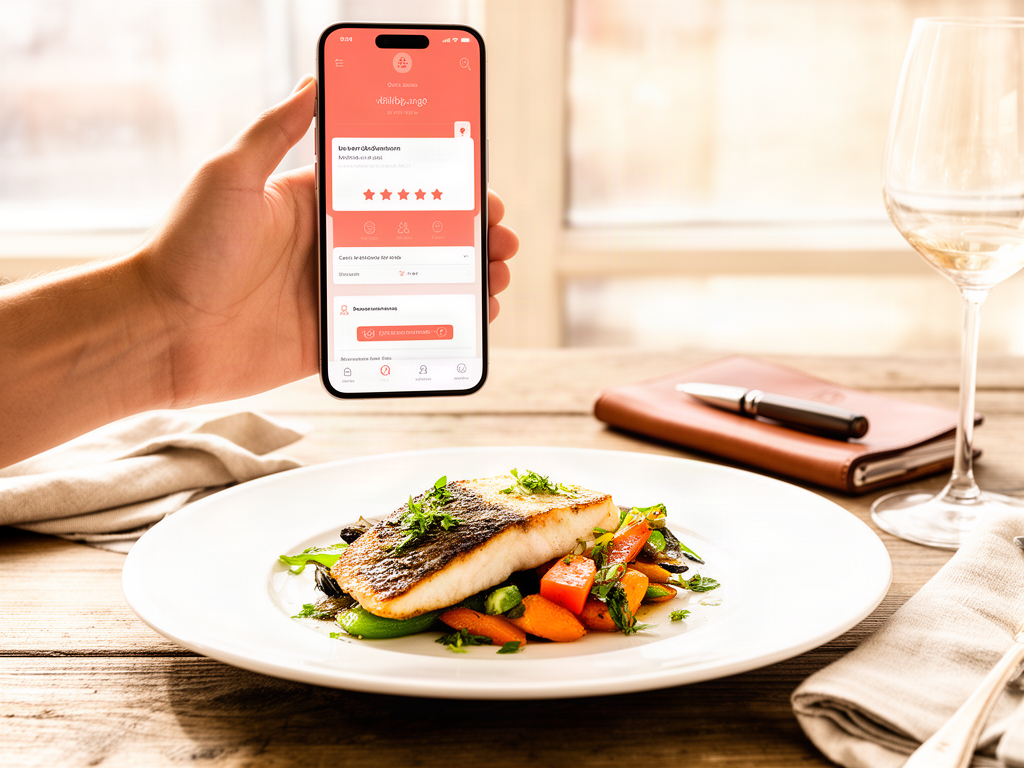
How to Track the Best Dishes at Every Restaurant You Visit
John the smoothie monster
John lives for smoothie bowls and cold-pressed juices. He uses Savor to remember his best blends.
How to Track the Best Dishes at Every Restaurant You Visit Your camera roll holds 2,847 food photos. Somewhere between photo #412 and #1,891 is that...
How to Track the Best Dishes at Every Restaurant You Visit
Your camera roll holds 2,847 food photos. Somewhere between photo #412 and #1,891 is that transcendent cacio e pepe from Rome, but you can't remember the restaurant's name, the neighborhood, or even which trip it was from. You just remember it was perfect.
This is the foodie's version of losing your keys - except you've lost dozens of keys, and each one unlocks a memory worth reliving.
Rating a restaurant "4 stars" tells you almost nothing useful six months later. What you actually need to remember is which dish at that restaurant deserves a return visit, what made it exceptional, and what to order next time. The solution isn't a better camera roll or more Yelp reviews - it's a complete shift from restaurant-first thinking to dish-first documentation.
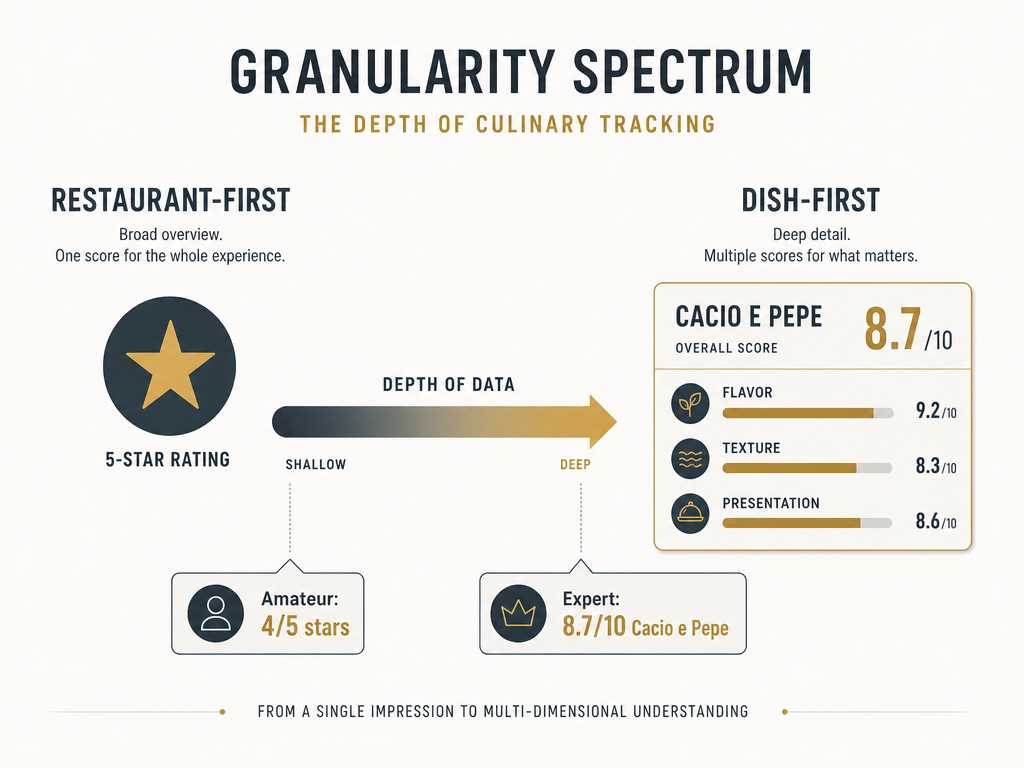 Moving from general restaurant ratings to dish-specific data allows foodies to build a precise culinary catalog rather than a vague list of locations.
Table of Contents
- Why Restaurant Ratings Fail the Serious Foodie
- The Dish-First Framework
- Choosing Your Tool: Privacy, Social Proof, or Data Sovereignty
- The Private Critic: Savor
- The Social Powerhouse: Beli
- The Data Archivist: Memolli
- The Low-Friction Minimalist: Yummi
- The Precision Scorer: Moodle
- The Dish Discovery Specialist: 8it
- The Shared Journal: Crumble
- The 30-Second Logging Protocol
- The "Next Time" Note: Your Most Valuable Data Point
- Solving the Camera Roll Problem
- Building a Custom System with Notion
- Frequently Asked Questions
Why Restaurant Ratings Fail the Serious Foodie
The problem with rating a restaurant is that restaurants aren't monolithic experiences. A venue can serve an extraordinary duck confit alongside a forgettable dessert, feature impeccable service but mediocre wine selection, or offer a transcendent lunch menu that completely differs from dinner.
When you assign a single rating to an entire establishment, you're collapsing dozens of distinct experiences into one unhelpful number. Six months later, that "4-star" rating tells you nothing about what you should order or avoid.
The hidden cost of this system is massive. You've likely forgotten:
- The name of that perfect pasta dish you had in Brooklyn
- Which tapas bar served the life-changing octopus (versus the three mediocre versions you tried elsewhere)
- The specific ramen shop where the broth made you understand umami for the first time
Restaurant-first thinking optimizes for the wrong outcome. It helps you remember where you've been, but not what was worth the trip.
The Dish-First Framework
Dish-first documentation starts from a different question: "What specific plates would I order again, and what made them exceptional?"
This approach treats each menu item as an independent memory worth cataloging. Instead of "Marea was great," you remember "Marea's fusilli with red wine braised octopus and bone marrow was an 8.7/10 - the pasta texture was perfect, and the dish needs no modifications."
The framework requires three core elements:
Granular ratings. A 1-5 star system lacks the precision to distinguish between "solid" and "remarkable." You need enough resolution to separate the good from the transcendent. According to Best Restaurant Rating Apps, Beli uses an ELO ranking algorithm to create personalized restaurant leaderboards, while Savor offers 10-point precision ratings that allow for scores like 8.2 or 9.1.
Contextual notes. The rating alone doesn't capture why a dish succeeded or what made it distinctive. A single-sentence note - "the miso tare had a subtle sweetness that balanced the pork fat" - preserves the sensory memory that justifies the score.
Actionable instructions for your future self. The most valuable piece of information is the tactical guidance: "Order the special, skip the dessert, ask for the pasta al dente."
This system transforms dining documentation from passive photography into an active knowledge base. You're not collecting pictures - you're building a searchable index of your taste history.
If you're ready to explore dish-level tracking systems that work alongside this framework, this guide to apps that track your favorite dishes provides detailed comparisons.
Choosing Your Tool: Privacy, Social Proof, or Data Sovereignty
The right dish-tracking tool depends on three fundamental decisions about how you want to interact with your food memories.
The Privacy Question. Do you want a private diary that's yours alone, or do you value social validation and shared recommendations? Private tools like Savor and Memolli offer complete control with zero pressure to share. Social platforms like Beli turn your food history into a public leaderboard visible to friends and followers.
The Friction Tolerance. Are you willing to spend 60 seconds logging detailed notes after each dish, or do you need something that works in under 10 seconds? High-precision apps like Savor require manual entry of ratings, photos, and notes. Low-friction tools like Yummi automatically geotag and timestamp your food photos without any additional input.
Data Sovereignty. Can you export your data if the app shuts down or changes ownership? According to Restaurant Journal Apps Compared, Memolli Pro pricing starts at $3/month and includes full data export to plain text, ensuring you never lose years of culinary records.
These aren't abstract technical considerations - they're about what happens to five years of taste memories if a startup folds or gets acquired. Data portability matters enormously for serious food documentation.
The Private Critic: Savor
Savor operates on the premise that food rating should be precision work, not a social performance. The app offers 10-point scoring (with decimal precision), allowing you to distinguish between an 8.2 ramen and an 8.7 ramen in a way that 5-star systems simply can't accommodate.
The core feature set centers on building a private taste archive:
- Decimal-point ratings for individual dishes
- Photo tagging and notes tied to specific menu items
- Restaurant location data without public sharing
- Comparison tools to rank multiple versions of the same dish type
Pricing from the App Store: Savor shows Savor Pro pricing is $4.99/month or $49.99/year, which unlocks unlimited dish entries and advanced filtering.
The app excels at "vertical tasting" scenarios - comparing the same dish across multiple restaurants. If you've tried cacio e pepe at seven different Italian spots, Savor lets you rank them against each other with detailed notes explaining why the #1 version earned its position.
The privacy-first design means your ratings stay completely private unless you explicitly choose to share them. There's no feed, no followers, and no algorithmic pressure to log meals for an audience.
For users who want similar functionality with different feature priorities, this comparison of apps for remembering dishes you've eaten breaks down how Savor stacks up against alternatives.
The Social Powerhouse: Beli
Beli treats restaurant tracking as social proof rather than private memory. The app uses an ELO ranking system - the same mathematical framework that powers chess ratings - to create personalized restaurant leaderboards based on head-to-head comparisons.
Instead of assigning absolute ratings, you answer comparative questions: "Was Restaurant A better than Restaurant B?" Over time, these comparisons generate a ranked list that reflects your actual preferences rather than arbitrary star assignments.
The social dimension is central to Beli's design. You can:
- See where friends and trusted food critics rank specific restaurants
- Discover new spots through social connections rather than algorithmic recommendations
- Build a public "food resume" showcasing your dining history
The app also allows you to tag favorite dishes at each restaurant, though this is a secondary feature rather than the primary organizing principle. Beli optimizes for venue-level social proof, not dish-level precision.
The trade-off is transparency. Your Beli rankings are visible to your followers, which adds accountability but eliminates privacy. If you're building a food identity that doubles as content or social capital, Beli's public leaderboard works in your favor. If you prefer private documentation without social pressure, it's the wrong tool.
The Data Archivist: Memolli
Memolli is built for the food documentarian who thinks in decades rather than months. The app's core value proposition is data sovereignty - your food memories are stored locally, work offline, and export to plain text formats that will remain readable long after any app has shut down.
The feature set emphasizes flexibility over polish:
- Custom templates for different dining contexts (fine dining vs. street food vs. home cooking)
- Offline functionality that doesn't require internet connectivity
- Full export to CSV, JSON, or plain text formats
- Cross-platform sync across iOS, Android, and web
According to Restaurant Journal Apps Compared, Memolli Pro pricing starts at $3/month, positioning it as the most affordable option for serious long-term tracking.
The interface is more utilitarian than beautiful. Memolli doesn't compete on visual design or social features - it competes on reliability and control. If you've ever lost data when an app disappeared or changed hands, Memolli's export capabilities become the most important feature.
The app is particularly strong for users who want to merge food documentation with other forms of journaling. You can create custom fields for dietary restrictions, ingredient sourcing, recipe adaptations, or any other metadata that matters to your particular use case.
The Low-Friction Minimalist: Yummi
Yummi solves the problem of "I'll log it later" that destroys most food documentation efforts. The app automatically geotags and timestamps every food photo you take, creating a searchable archive without any manual data entry.
The workflow is invisible:
- Take a photo of your dish
- Yummi captures location, time, and date automatically
- Search your archive later by location, date range, or keywords
There's no rating system, no social features, and no complex note-taking interface. Yummi assumes you want a searchable photo diary, not a detailed culinary database.
This minimalist approach has significant limitations. Without ratings or structured notes, you lose the ability to distinguish between "solid" and "exceptional" meals. Your archive becomes a chronological photo stream rather than a ranked guide to what deserves a return visit.
Yummi works best as a complement to, rather than replacement for, more structured systems. Use it to capture every meal effortlessly, then selectively promote the exceptional ones to a more detailed tracking tool.
For those who need more context on organizing food photos effectively, this guide to organizing restaurant photos covers the full workflow.
The Precision Scorer: Moodle
Moodle separates the components of a dining experience into distinct rating categories: food quality, drink selection, service, and atmosphere. Instead of collapsing everything into a single score, you rate each dimension independently.
This granular approach reveals patterns that composite ratings obscure. You might discover that you consistently rate restaurants highly for food but poorly for atmosphere, or that a venue's exceptional service compensates for mediocre menu execution.
The app is iOS-only, which limits its accessibility for Android users. The interface skews toward fine dining contexts - it's built for people who care about the difference between attentive and intrusive service, not for casual lunch documentation.
Moodle doesn't emphasize dish-level tracking. You're rating the restaurant across multiple dimensions, not cataloging individual menu items. This makes it better suited for occasional fine dining than for everyday meal tracking.
The Dish Discovery Specialist: 8it
8it occupies a unique position in the tracking landscape - it's less about remembering what you've eaten and more about discovering time-sensitive opportunities. The app focuses on "dish drops" (limited-time menu items), pop-ups, and specific dishes getting buzz.
According to Eater Discovery App Relaunch, the Eater app relaunch includes 45,000 restaurants across 85 cities, providing extensive coverage for users hunting specific dishes or limited-run events.
The app works well for:
- Tracking seasonal specials that rotate off menus
- Finding specific dishes (like the best uni pasta in Los Angeles)
- Discovering pop-ups and temporary dining events
It's less effective as a personal memory system. 8it prioritizes real-time discovery over historical logging, which means it complements rather than replaces traditional tracking tools.
The Shared Journal: Crumble
Crumble is designed for the small group of friends who dine together regularly and want a shared record of their collective experiences. The app allows dish-level ratings on a 0.1 to 5.0 scale, but the defining feature is selective sharing - your journal is visible only to accepted friends, not the public.
This creates a middle ground between private documentation and full social exposure. You get the benefit of shared recommendations and collective memory without broadcasting your food life to everyone.
The use case is narrow but valuable: if you have a tight circle of dining companions who share similar taste, Crumble becomes a collaborative memory system. If you dine alone or prefer complete privacy, it offers no advantages over private tools.
The 30-Second Logging Protocol
The single biggest reason food tracking systems fail is friction. If logging a meal takes five minutes of detailed note-taking, you'll abandon the system after three weeks.
The solution is a standardized 30-second protocol that captures essential information without disrupting the dining experience:
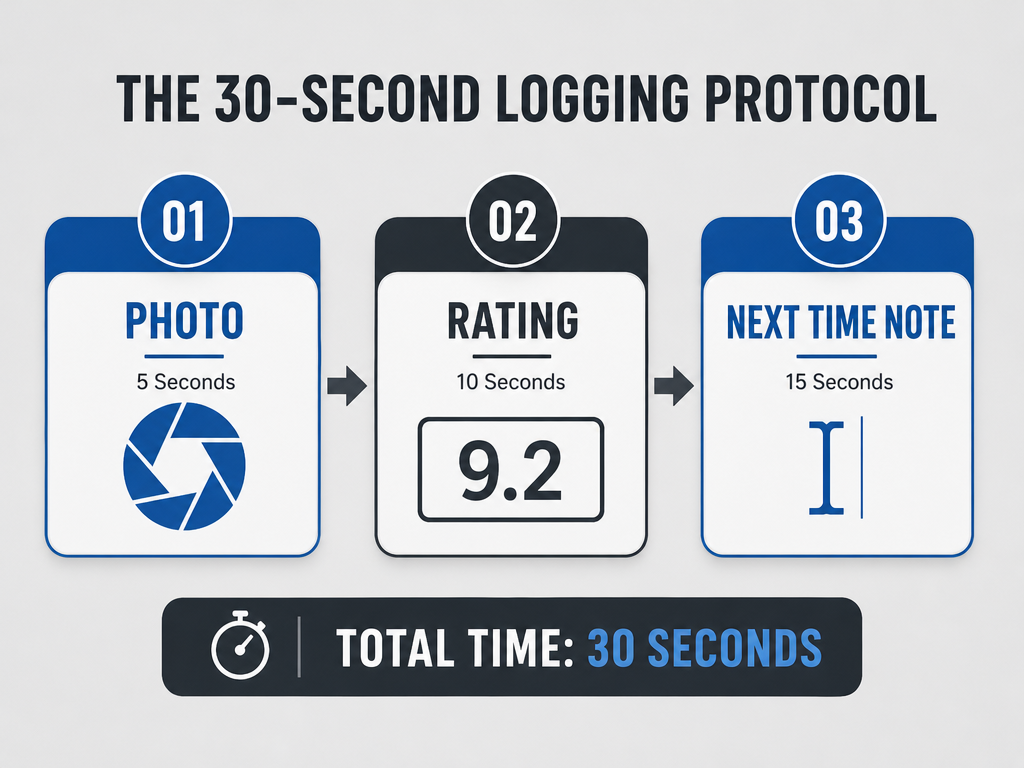 Mastering the 30-second protocol ensures you capture vital menu data without letting the logistics of tracking ruin your dining experience or social atmosphere.
Step 1: Photo (5 seconds). Take one clear shot of the dish. Don't fuss with angles or lighting - you need documentation, not content. Natural overhead light works for 90% of situations.
Step 2: Quick Rating (10 seconds). Assign a score immediately after finishing the dish. Don't overthink it - your immediate gut reaction is usually more accurate than extended deliberation. Use whatever scale your tool provides, but commit to a number before you leave the table.
Step 3: The "Next Time" Note (15 seconds). Write a single instruction sentence: "Order the special," "Ask for extra garlic," "Skip the dessert," "Get the lunch portion, not dinner." This tactical guidance is the most valuable piece of data you'll capture.
The entire protocol takes under 30 seconds per dish. Do it immediately after finishing - not later, not tomorrow, not when you get home. The moment you defer logging, the details start fading.
The "Next Time" Note: Your Most Valuable Data Point
Most food tracking focuses on describing what you ate - the ingredients, the presentation, the ambiance. This is backwards. The most valuable piece of information is prescriptive, not descriptive: what should I do differently next time?
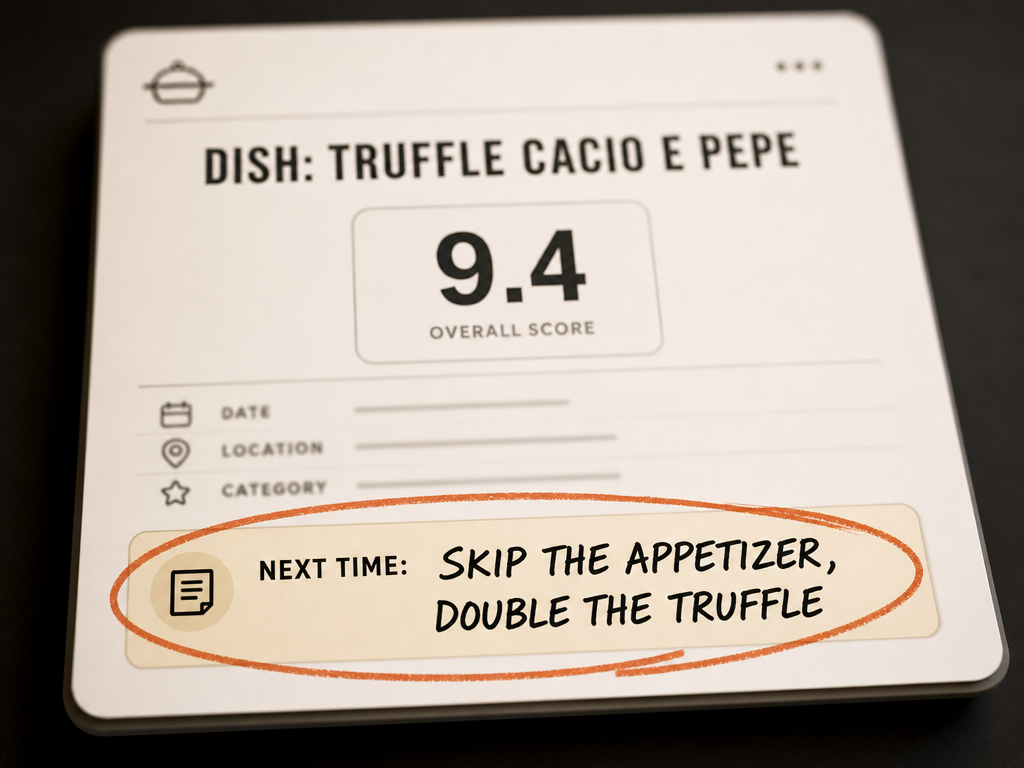 The 'Next Time' note is the most valuable piece of data for a serious foodie, providing a direct instruction to your future self for the perfect meal.
The "Next Time" note transforms your food journal from a passive record into an active decision-making tool. Six months from now, you won't remember the exact flavor profile or the waiter's name. What you need is clear guidance:
- "The carbonara is perfect as-is - don't modify anything"
- "Skip the appetizers and get two entrees instead"
- "Ask for the pasta al dente, not standard preparation"
- "Order the Monday special if they're still running it"
- "Bring someone who drinks wine - the list is exceptional"
This single sentence contains more actionable intelligence than three paragraphs of flowery description. It's the distilled wisdom of your past self, delivered exactly when you need it.
The note should focus on:
Order modifications that improve the dish
Menu navigation that avoids disappointments
Timing or context that matters (lunch vs. dinner, weekday vs. weekend)
Companion recommendations (dishes that pair well, who to bring)
Most tracking apps allow note fields, but they don't emphasize this tactical instruction. Add "Next Time:" as a prefix to make it instantly scannable when you return.
Solving the Camera Roll Problem
Your phone likely contains hundreds or thousands of food photos with zero context. Solving this retroactive cataloging problem requires triage, not completeness.
Step 1: Accept you will not catalog everything. You don't have time to process 2,000 photos. Focus on the "Greatest Hits" - the meals you'd genuinely want to recreate or recommend to others.
Step 2: Sort by date and work in reverse chronological order. Recent memories are sharper and easier to annotate. Start with the last three months, not three years ago.
Step 3: Batch process by location. If you traveled to Tokyo last year, dedicate one session to all your Tokyo photos. Location context helps trigger memory more effectively than random chronological ordering.
Step 4: Use photo metadata as memory triggers. Most photos include embedded location and timestamp data. Use this to reconstruct "I was in the West Village on September 12" and narrow down which restaurant it could have been.
Step 5: Mark the losers quickly. If a photo doesn't trigger any specific memory or craving, delete it immediately. A photo with no recollection attached offers zero value.
The goal isn't comprehensive historical documentation - it's extracting value from the subset of meals that actually matter. If you can rescue 50 exceptional dishes from your camera roll, that's a massive upgrade over the current unsearchable photo graveyard.
For more structured approaches to this problem, this guide to organizing food photos by restaurant provides additional frameworks.
Building a Custom System with Notion
For users who find existing apps too restrictive, Notion offers complete flexibility to design a custom culinary database from scratch.
The basic structure requires three interconnected databases:
Restaurants (one entry per venue)
- Name, location, cuisine type
- Contact information and hours
- Overall venue notes (atmosphere, service, price range)
- Relationship link to "Dishes" database
Dishes (one entry per menu item)
- Dish name and restaurant (relational property)
- Rating (number property on 1-10 scale)
- Date tried
- Photo and detailed notes
- "Next Time" instructions
- Relationship link to "Ingredients" or "Cuisine Tags" if desired
Trips or Dining Events (optional organizational layer)
- Group related meals by travel destination or dining occasion
- Roll up ratings to see "Best Dishes from Tokyo 2023"
The advantage of Notion is complete customization. You can add properties for dietary restrictions, price per dish, who you dined with, or any other metadata that matters to your tracking goals.
The disadvantage is setup complexity. Building a functional multi-database system requires comfort with Notion's relational properties and formulas. For users who want immediate functionality, pre-built apps offer faster value.
Templates are available from the Notion community, but customization is where Notion's system truly shines. You're building a tool that matches your exact tracking philosophy rather than adapting to someone else's vision.
For those comparing Notion-based systems to purpose-built apps, this review of food tracking apps provides context on when custom solutions make sense.
Frequently Asked Questions
What app can I use to track restaurants I want to try?
For tracking restaurants you haven't visited yet, your needs differ substantially from logging dishes you've already eaten. Most dish-tracking apps include a "wishlist" or "want to try" feature, but dedicated discovery tools like Eater and The Infatuation offer stronger pre-visit research capabilities. The key distinction is whether you want venue-level bookmarks (a list of restaurant names) or dish-level targets (specific menu items you're hunting). According to Eater Discovery App Relaunch, the Eater app relaunch includes 45,000 restaurants across 85 cities, making it particularly useful for building a comprehensive wishlist across multiple markets.
What does Gen Z use instead of Yelp?
The shift away from Yelp among younger users centers on three platforms: Instagram (for visual discovery and influencer recommendations), TikTok (for short-form reviews and "day in the life" dining content), and Beli (for social proof within trusted friend groups). The common thread is personalization - Gen Z users prefer recommendations from specific people they trust rather than averaged crowd-sourced ratings from anonymous strangers. Beli uses an ELO ranking system to surface restaurants your specific friend circle ranks highly, which feels more trustworthy than Yelp's aggregated star scores. For dish-level tracking rather than venue discovery, apps like Savor and Crumble offer the privacy and precision that appeal to users fatigued by performative public reviews.
What are some good apps that track my food intake?
If you're focused on nutrition tracking rather than culinary memory, you need calorie counters and macro trackers like MyFitnessPal, Cronometer, or Lose It. These apps optimize for dietary goals, not taste documentation. They're built for logging calories, macronutrients, and portion sizes - not for remembering which specific ramen shop in Tokyo had the perfect broth. The confusion arises because "food tracking" spans two entirely different use cases: health/nutrition versus culinary experience documentation. This guide focuses exclusively on the latter - apps designed to remember what tasted great, not what met your protein target. If your goal is weight management or dietary compliance, health-focused trackers are better tools.
Is Beli still invite only?
No. Beli operated with invitation-only access during its beta phase but has since opened to general availability on both iOS and Android. You can download the app directly from app stores without needing an invitation code or existing user referral. The early invite-only period helped Beli build its initial user base and refine the ELO ranking algorithm based on a controlled group of active users. The platform now focuses on growth rather than exclusivity, though it maintains a friend-based discovery model where your experience improves as more people in your social circle join and contribute their restaurant rankings.
How can I find "every 9/10 Cacio e Pepe I've ever had" instantly?
Instant retrieval requires two technical features that most food apps don't provide: dish-name tagging and advanced filtering. You need a system where "Cacio e Pepe" is tagged consistently across multiple restaurants, and the app allows you to filter by both dish name and rating threshold. Savor supports this through dish-specific entries and decimal ratings - you can tag every cacio e pepe you try, assign it a score, and later filter for "Cacio e Pepe" with a rating above 9.0. Without this level of granularity, you're stuck scrolling through chronological feeds or using inadequate restaurant-level ratings. The alternative is building a custom Notion database with properties for "Dish Name" and "Rating," then creating filtered views that show only your top-scoring versions of specific dishes.
How do I import my existing camera roll of food photos?
Most tracking apps don't offer automated photo import with context preservation - you'll need to manually select photos and add ratings and notes during the upload process. The workflow varies by app, but the general approach is: 1) Select multiple photos from your camera roll, 2) The app reads embedded GPS and timestamp metadata to suggest restaurant names and dates, 3) You add dish names, ratings, and notes for each photo, 4) The app creates separate entries for each dish. This is time-intensive for large backlogs, which is why the Solving the Camera Roll Problem section emphasizes triaging only your "Greatest Hits" rather than attempting comprehensive import. Yummi offers the most automated approach by auto-geotagging photos, but it sacrifices structured ratings for speed.
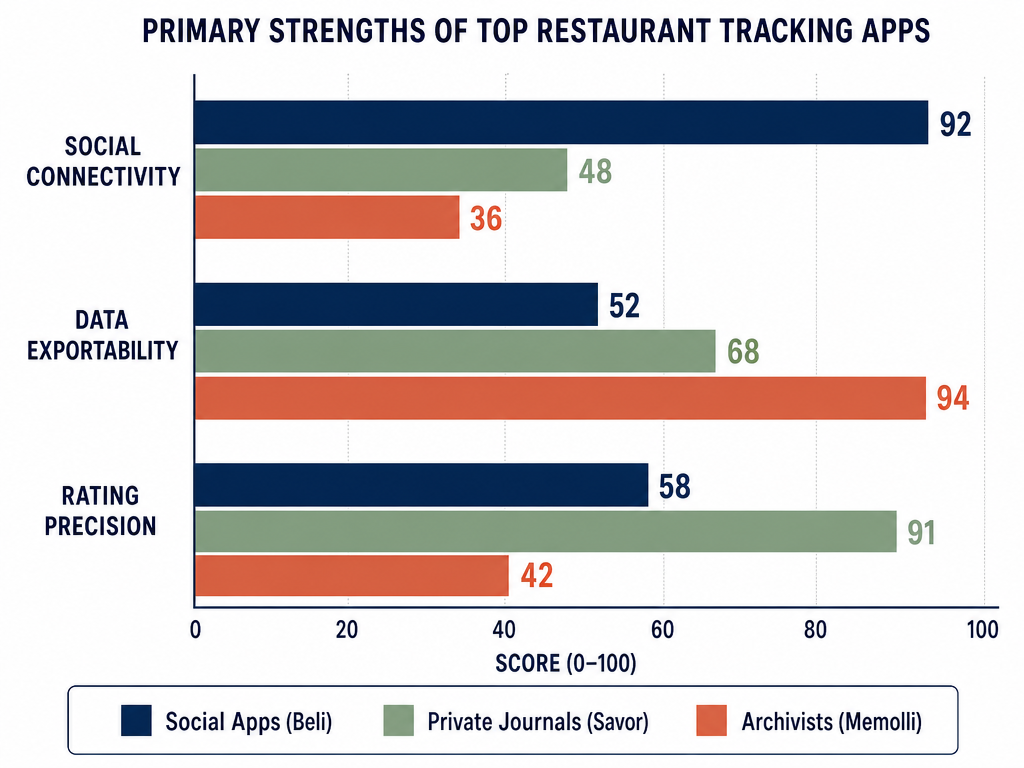 Choosing the right app depends on your priority: social sharing, precise data entry for personal records, or the ability to export your data for long-term sovereignty.
The camera roll graveyard doesn't have to be permanent. Whether you choose a pre-built app or build a custom system, the shift from restaurant-first to dish-first thinking transforms food documentation from passive photography into an active knowledge base.
Start simple: pick one tool, commit to the 30-second protocol for one month, and focus on the "Next Time" note. That single tactical sentence - written immediately after finishing a dish - will give you more value than 1,000 Instagram-ready photos without context.
Your best meals deserve better than digital oblivion. Give them a searchable home.