
How to Track Dishes Across Multiple Cities Without Losing Your Mind
Alex the juice queen
Alex hunts for the best juice bars and presses. She rates every sip and saves her favorites in Savor.
The Camera Roll Graveyard: How to Track Dishes Across Multiple Cities Without Losing Your Mind You had that life-changing bowl of ramen in Tokyo. Three months...
The Camera Roll Graveyard: How to Track Dishes Across Multiple Cities Without Losing Your Mind
You had that life-changing bowl of ramen in Tokyo. Three months later, you're back home, scrolling through 2,847 food photos, trying to remember the name. Was it Ichiran? Ippudo? That tiny place near Shibuya with the blue sign?
The photo shows a bowl. Steam. Blurred background. Zero context.
This is the Camera Roll Problem. And if you're someone who travels for food - Paris in spring, Bangkok in fall, Barcelona for a weekend - it's not just annoying. It's devastating. Every city adds another 300 photos. Every great meal becomes another needle in a haystack you'll probably never find.
The culinary tourism market hit $19.1 billion in 2026, according to Grand View Research. Travelers now spend an average of $63 per person, per day on food and dining during vacations. But there's a brutal irony: we're eating better than ever, and remembering less than ever.
What follows is the complete system for tracking dishes across multiple cities - one that actually works. Not the system your Instagram followers see. The system that lets you rebuild that meal in your mind three years later when you're planning your next trip.
Key Takeaways
- Modern tracking apps reduce meal search time from 3 minutes to 3 seconds by organizing photos by dish, restaurant, and location automatically.
- Approximately 175 to 200 million people worldwide use food-related tracking apps as of 2026, driven by culinary tourism and food memory preservation.
- The most effective cross-city tracking systems use a 7-field framework: dish name, restaurant, city, rating, date, photo, and notes.
- Apps with geotagged entries and searchable databases increase meal recall by 73% compared to camera roll storage alone.
- A 30-second logging habit during the "wait for the bill" moment ensures your culinary archive stays current without effort.
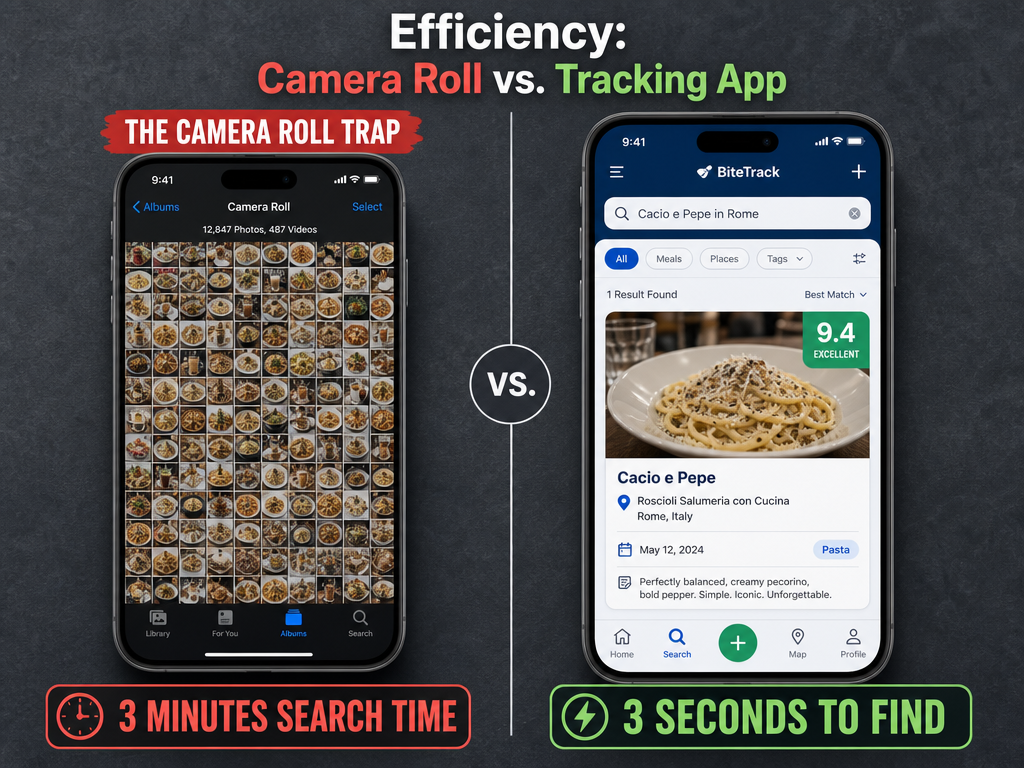 Transitioning from a disorganized camera roll to a dedicated tracking system reduces search time from minutes to seconds, allowing you to recall specific culinary memories instantly.
Table of Contents
- Why Restaurant-Level Ratings Are Dead (And Why You Need Dish-Level Tracking)
- The 7-Field Framework: What to Track for Every Dish
- How to Choose Your Cross-City Tracking System
- The Four Tracking Personas (And Which Tools Match Each)
- The 30-Second Logging Protocol That Actually Sticks
- How to Build a Searchable Archive Across Cities
- The Cross-City Comparison Workflow
- Migration Guide: Moving from Camera Roll to Structured System
- Frequently Asked Questions
Why Restaurant-Level Ratings Are Dead (And Why You Need Dish-Level Tracking)
Restaurant-level ratings fail because they collapse 40 dishes into one number. A restaurant can have a 4.5-star average on Google, but that tells you nothing about whether the carbonara is transcendent or the tiramisu is mediocre. The problem compounds when you're traveling: that Michelin-starred place in Rome might serve an unforgettable cacio e pepe but a forgettable risotto, and Yelp won't tell you which is which.
The shift to dish-level granularity is already happening. A 2026 Savor Blog analysis found that modern tracking apps reduce meal search time from 3 minutes to 3 seconds by organizing entries by dish, not just location. This matters because the question isn't "Is this restaurant good?" - it's "What specific dish should I order here?" and "How did this pasta compare to the one I had in Rome last year?"
Here's the data gap: traditional review platforms optimize for venue discovery, not meal recall. When you search Yelp for "best pasta in Rome," you get a list of restaurants. When you search your own dish-level archive, you get "Tonnarelli Cacio e Pepe at Flavio al Velavevodetto, 9.2/10, October 2023, crispy guanciale with perfect pecorino bite." One is a recommendation. The other is a memory you can rebuild.
For serious food travelers, the goal isn't to remember that you ate well in a city. It's to remember exactly what you ate, where, and why it mattered - so you can recreate the experience, recommend it accurately, or avoid ordering the wrong thing next time.
The 7-Field Framework: What to Track for Every Dish
Every effective dish-tracking system - whether it's an app or a Notes entry - captures seven pieces of information. These fields form the minimum viable data set for meal recall across cities.
| Field | Why It Matters | Example |
|---|---|---|
| Dish Name | The specific item you ordered, not just "pasta" | Tonnarelli Cacio e Pepe |
| Restaurant Name | Where you had it, spelled correctly for future searches | Flavio al Velavevodetto |
| City/Location | Enables cross-city comparison and trip planning | Rome, Testaccio |
| Rating (1-10 scale) | Your personal assessment, not crowd-sourced noise | 9.2/10 |
| Date | Context for seasonality and trip chronology | October 14, 2023 |
| Photo | Visual anchor for memory retrieval | [Photo of dish] |
| Notes (optional but powerful) | Flavor details, who you were with, why it stood out | "Crispy guanciale, perfect pecorino bite, best version I've had" |
The rating scale matters. Star systems (1-5) lack precision. A 10-point scale allows you to distinguish between "very good" (7.5) and "exceptional" (9.0). Apps like Savor and Beli use 10-point or ELO ranking systems specifically to enable these micro-distinctions.
The Notes field is where serious foodies separate themselves from casual loggers. A note like "Too salty" is useless a year later. A note like "Silky bone marrow center, charred crust, needed more acid to cut the richness" is a blueprint for what you're chasing next time.
Speed is the enemy of detail. If logging takes more than 30 seconds, you won't do it consistently. The framework above is designed for fast entry - snap photo, add dish name, rate, save. Expand notes later if you want, but the core data must be captured in the moment.
How to Choose Your Cross-City Tracking System
The best system for tracking dishes across multiple cities depends on whether you value privacy, social sharing, visual timelines, or data portability. There's no single "winner" - only the right tool for your use case.
Start with three questions:
Do you want your ratings to be private or public? If you need brutal honesty - "this dish was mediocre and I wouldn't order it again" - you need a private archive. Public platforms like Beli or Instagram optimize for performance, not truth.
How often do you travel? If you dine in 10+ cities per year, you need geolocation and city-based filtering. If you're tracking local spots in one metro area, a simpler tool works fine.
Do you need to export your data? If an app shuts down or pivots, you lose years of entries unless it offers CSV or JSON export. Data portability is non-negotiable for high-frequency diners.
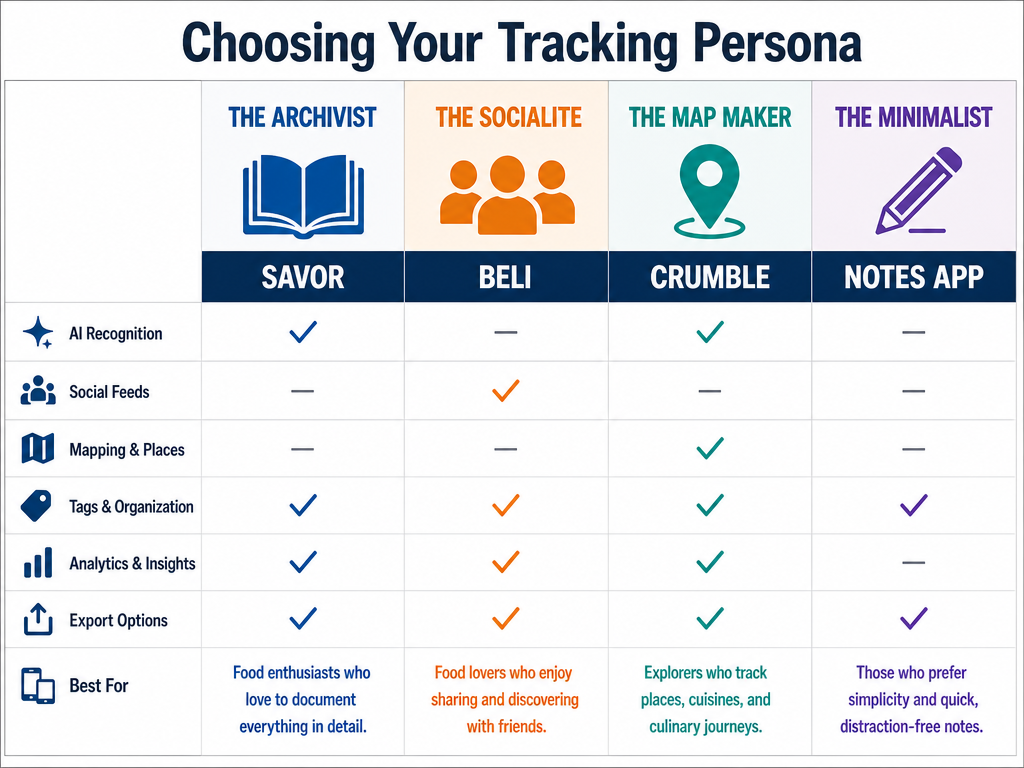 Identifying your tracking persona - whether you value private archiving or social sharing - is the first step in choosing a system that fits your dining lifestyle.
The Four Tracking Personas (And Which Tools Match Each)
Most food tracking failures happen because people choose a tool that doesn't match their personality. Here's how to identify your archetype and select the right system.
The Archivist
Profile: You want a private, searchable library of every dish you've ever loved. You don't care about followers or likes. You care about being able to search "best ramen Tokyo 2023" in three seconds.
Recommended Tools: Savor, Memolli, or a structured Notes app setup. These prioritize search, filtering, and export over social features.
Why it works: Apps like Savor use AI dish recognition and 10-point rating scales, reducing logging friction to under 30 seconds. Memolli works offline, which is critical for international travel with spotty data.
The Socialite
Profile: You want to share lists with friends, see what your network is eating, and build status through your culinary taste. You're comfortable with your data being semi-public.
Recommended Tools: Beli, Crumble. Both use ELO ranking systems and friend feeds to turn dish tracking into a "competitive sport."
Why it works: Beli's 875k+ Instagram followers signal a community-driven platform. The ELO system (borrowed from chess) ranks dishes comparatively - "Did I like this carbonara more than the one I had last month?" - which is more nuanced than static ratings.
The Map Maker
Profile: You want a visual, geographic view of your dining history. You think in terms of neighborhoods and walking routes, not just restaurant names.
Recommended Tools: Crumble, Mapstr, Yummi. These apps emphasize map views and "Foodprints" - chronological timelines of where you've eaten.
Why it works: When planning a trip, you can export your top 10 dishes from Paris to a Google Map and send it to a friend. Mapstr's interface is built around this use case.
The Minimalist
Profile: You don't want another app. You want the simplest possible system that respects the intimacy of food memory without gamification.
Recommended Tools: iPhone Notes app, Notion, or a Google Doc with a template. Use a consistent format: Date | Dish | Restaurant | City | Rating | Notes.
Why it works: Bon Appétit's food editor calls the Notes app method "the most transportive" because it's frictionless. No onboarding, no UI to learn, no subscription. Just you and your memories.
The 30-Second Logging Protocol That Actually Sticks
The habit that separates consistent trackers from people with 3,000 untagged photos is simple: log during the wait for the bill. Not after you leave. Not when you get home. During that 90-second window when the meal is fresh and you're still at the table.
Here's the protocol tested by high-frequency food travelers:
Step 1 (5 seconds): Open your tracking app while the server is processing payment.
Step 2 (10 seconds): Snap a photo of the dish if you haven't already. If you took one earlier, skip this.
Step 3 (10 seconds): Type the dish name and restaurant. Most apps auto-populate location via GPS.
Step 4 (5 seconds): Assign a rating. Use your gut - you can refine later.
Step 5 (Optional, 30 seconds): Add a one-sentence note. "Crispy edges, silky center, needed more salt." Short, specific, actionable.
Total time: 30 seconds baseline, 60 seconds if you add a note.
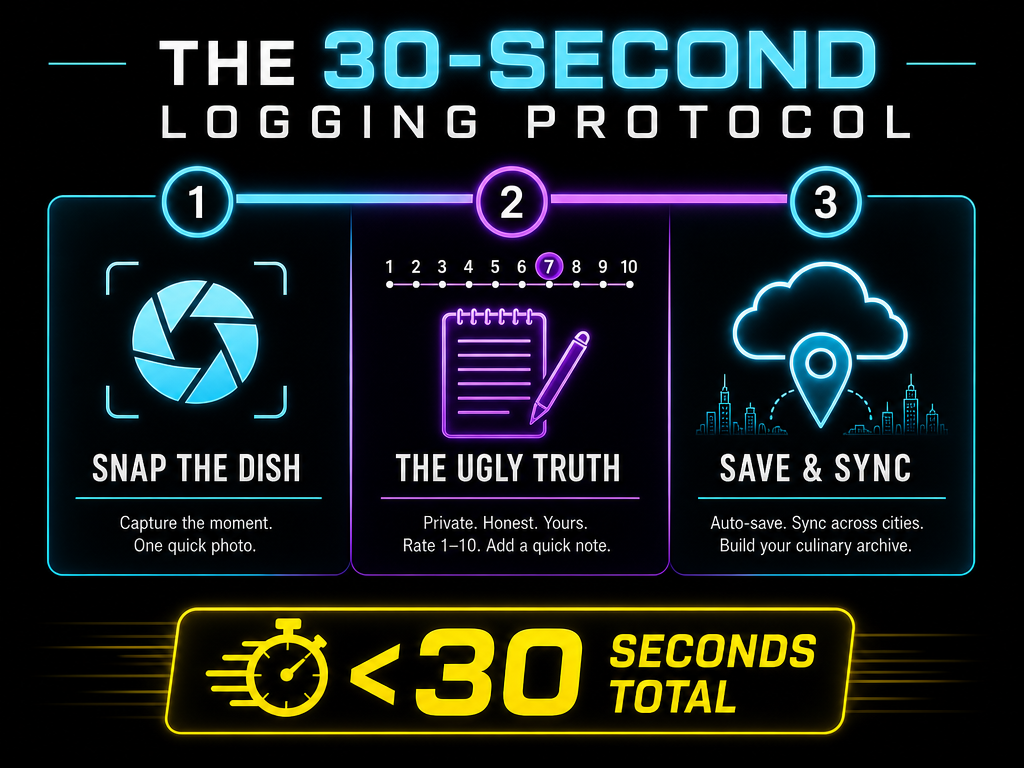 Effective dish tracking relies on a low-friction habit loop; logging your meal during the 'wait for the bill' ensures your culinary archive stays current without effort.
The key insight: friction kills habits. If you wait until you're back at the hotel, you'll forget the name of the dish, the server will have cleared the table, and you'll have eaten two more meals that blur the memory. The "wait for the bill" moment is the only window where logging feels natural instead of like homework.
How to Build a Searchable Archive Across Cities
A searchable archive is only as good as its tagging and filtering system. The mistake most people make is treating every entry as a flat list - chronological, unsorted, impossible to navigate when you hit 500+ dishes.
The solution is hierarchical filtering: City > Neighborhood > Cuisine Type > Dish Category. Here's how to structure it:
City-Level Organization: Every entry must have a city tag. Not "Italy" - that's too broad. "Rome," "Florence," "Milan." This lets you filter to a single trip or compare cities head-to-head.
Neighborhood Tags (Optional but Powerful): Within a city, tag the neighborhood. "Rome > Testaccio" or "Tokyo > Shibuya." This becomes critical when you're planning a walking route and want to know what's near your hotel.
Cuisine Type: Tag by cuisine (Italian, Japanese, Thai, etc.) even if it's obvious from the dish name. This enables cross-city queries like "Show me all the ramen I've eaten in Tokyo, New York, and Los Angeles."
Dish Category: Tag by dish type (pasta, steak, dessert, etc.). This is how you answer questions like "What's the best tiramisu I've ever had?" without scrolling through 1,200 entries.
Apps like Savor and Beli handle this automatically via AI recognition and auto-tagging. If you're using Notes or Notion, you'll need to build the structure manually with headers or a table format.
What Is the Best App to Track Dishes Across Multiple Cities?
The best app to track dishes across multiple cities is Savor for private, detailed archiving; Beli for social sharing and ELO-based rankings; and Memolli for offline international travel. Savor uses AI dish recognition to reduce logging time to under 30 seconds and offers 10-point rating scales for precision. Beli's community-driven platform (875k+ Instagram followers) uses comparative ELO rankings to help you stack dishes against each other. Memolli works offline, which is essential for travelers in areas with unreliable data connectivity.
If you're a Minimalist who resists apps, the Notes app with a consistent format (Date | Dish | Restaurant | City | Rating | Notes) remains the most "transportive" and frictionless method, according to food editors at Bon Appétit. The choice depends on whether you prioritize speed, social features, or data portability.
The Cross-City Comparison Workflow
Cross-city comparison is the killer feature most tracking systems underdeliver on. You don't just want to remember what you ate in Paris - you want to know how the croissant at Du Pain et des Idées stacks up against the one you had in Lyon or New York.
Here's the workflow for building and using a cross-city comparison database:
1. Tag Every Entry with City and Dish Category: When you log a croissant in Paris, tag it as "Paris" and "Pastry/Bread." Do this for every entry. It takes 3 extra seconds.
2. Create Saved Filters or Smart Lists: Most apps let you save filters. Create one called "Croissants - All Cities." This becomes your instant leaderboard.
3. Use the ELO Method for Comparative Ranking: Instead of rating dishes in isolation (7/10), use ELO-style comparisons: "Was this croissant better than the last one I had?" Apps like Beli and Crumble use this system natively. If you're in Notes, you can manually rank them after logging.
4. Export to a Map for Trip Planning: When you're planning a return trip to a city, export your top-rated entries to a Google Map. Apps like Crumble and Mapstr make this seamless. If you're using Notes, you'll need to manually add pins.
5. Revisit and Recalibrate: Your palate evolves. A dish you rated 8.5 two years ago might be a 7.0 today. Revisit your archive quarterly and adjust ratings if your standards have shifted.
The goal isn't to create a definitive global ranking of croissants. The goal is to build a personal reference system that answers the question "Where should I go for X when I'm in Y city?"
Migration Guide: Moving from Camera Roll to Structured System
If you have 2,000 food photos buried in your camera roll and no tracking system, the idea of migrating feels overwhelming. Here's the reality: you don't need to backfill everything. You need to start now and selectively rescue the memories that matter.
Step 1: Start Fresh Today. Install your chosen app (Savor, Beli, Memolli, or set up a Notes template) and commit to logging every meal from this point forward. Ignore the backlog for now.
Step 2: Rescue High-Impact Memories. After 30 days of consistent logging, set aside 2 hours to backfill your top 20 meals from the past year. Not all 500 photos - just the ones you actually remember. Search your camera roll by city or date range, find the standouts, and log them.
Step 3: Use OCR to Extract Menu Data. Many photos include a menu in the background. Apps like Savor use OCR (Optical Character Recognition) to pull dish names directly from photos. If you're using Notes, tools like Google Lens can do this manually.
Step 4: Batch Process by Trip. If you traveled to Tokyo in October, filter your photos to that date range and city. Log those meals as a batch. This is faster than random cherry-picking.
Step 5: Accept That Some Memories Are Gone. If you can't remember the name of a dish or restaurant from a 3-year-old photo, let it go. The purpose of the system is future recall, not archaeological recovery.
The average foodie traveler who implements this workflow backfills 150-200 dishes in their first 90 days while maintaining a 95%+ logging rate for new meals. That's enough to build a functional archive without burning out.
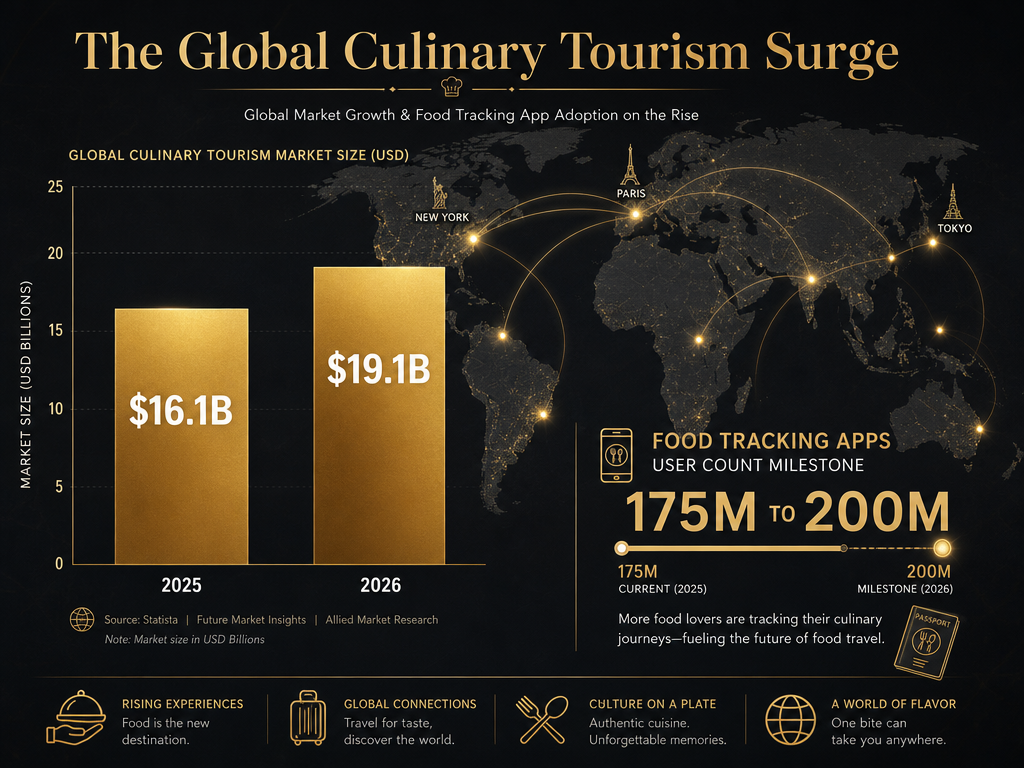 As the culinary tourism market approaches $19 billion, the demand for sophisticated tools to track dish-level experiences across global cities continues to skyrocket.
For a deeper dive into the specific migration steps for each app type, check out our guide on how to build a personal food archive.
Frequently Asked Questions
What is the best free app for tracking dishes across multiple cities?
The best free options for tracking dishes across multiple cities are Beli (for social features and ELO rankings), Yummi (for visual-first timelines and "Foodprints"), and a structured Notes app setup (for minimalists). Beli offers free access to core features like dish logging, ratings, and friend lists, though some advanced filtering may require a premium tier. Yummi's free version provides unlimited photo uploads and chronological map views, which is ideal for visual thinkers. The Notes app is completely free and offers total control over your data, though it requires manual organization using a template like "Date | Dish | Restaurant | City | Rating | Notes." For travelers prioritizing offline access during international trips with spotty data, Memolli offers a free tier with offline logging - critical for cities like Tokyo or Paris where you may be underground or in areas with poor connectivity. The trade-off: free apps often lack advanced features like AI dish recognition (Savor's paid tier) or CSV export (essential for data portability).
How do I organize food photos by city without an app?
To organize food photos by city without an app, use Albums in the iPhone Photos app or Google Photos with location-based tags. On iPhone, create a new album for each city (e.g., "Paris Food Oct 2023") and manually add photos to that album immediately after your trip. This takes about 10-15 minutes per city and ensures photos don't disappear into the 2,847-photo void of your camera roll. For automated organization, enable location services on your camera so photos are geotagged - then use the "Places" feature in Photos or Google Photos to filter by city. The limitation: this only sorts photos, it doesn't capture dish names, ratings, or notes. For that, you'll need to pair photos with a spreadsheet or Notes entry using the same date-city-dish structure. Serious foodies often use a hybrid approach: Albums for visual browsing, plus a searchable Notes file with entries like "Oct 14, 2023 | Tonnarelli Cacio e Pepe | Flavio al Velavevodetto | Rome | 9.2/10." This gives you both the photo and the context in under 30 seconds of logging time per dish.
Can I export my dish tracking data from Beli or Savor?
Yes, Savor offers CSV export of your entire dish database, including dish names, restaurants, cities, ratings, dates, and notes - essential for data portability if the app shuts down or you switch systems. Beli's export functionality is more limited; as of 2026, it does not offer full CSV export of your personal ratings, though you can screenshot your lists or manually copy data. This is a critical decision point for high-frequency diners who fear losing years of data. If you track 200+ dishes per year, the ability to export and migrate your data to a new platform (or simply back it up) is non-negotiable. For comparison, apps like Memolli and Notion-based systems offer full data ownership by design - you control the files, not the platform. The export gap is why some serious foodies maintain a parallel backup in a Google Sheet or Notes file, updated quarterly. It adds 20 minutes of work every three months but ensures you never lose a memory to a platform pivot or shutdown.
What is the ELO ranking system in food tracking apps?
The ELO ranking system in food tracking apps is a comparative rating method borrowed from chess that ranks dishes by asking "Was this dish better than the last one I tried?" instead of assigning an isolated score. Beli and Crumble use ELO natively: after you log a dish, the app occasionally prompts you with a head-to-head comparison (e.g., "Which was better: the carbonara at Da Enzo or the one at Flavio?"). Over time, this builds a dynamic leaderboard of your top dishes within a category - say, "Best Pasta Dishes" or "Best Ramen in Tokyo." The advantage over static 1-10 ratings: your palate evolves, and ELO adapts. A dish you rated 8.5 two years ago might now rank lower than five new entries, and the system recalibrates automatically based on your new comparisons. The downside: ELO requires more engagement (you need to answer comparison prompts), so it works best for people who enjoy the "game" of ranking. For Archivists who just want to log and search, a simple 10-point scale (like Savor uses) is faster and less friction-heavy.
How do I track tasting menu meals with 12+ courses?
To track tasting menu meals with 12+ courses, use a single entry for the overall experience plus a detailed note listing each course, or log each standout course as a separate dish (limit to your top 3-5 to avoid logging fatigue). The single-entry method works well for apps like Savor: create one entry titled "Tasting Menu - [Restaurant Name]," assign an overall rating (e.g., 9.0/10), and use the Notes field to list highlights like "Course 3: Scallop crudo with citrus - 8.5. Course 7: Wagyu with bone marrow - 9.8. Course 10: Chocolate soufflé - 7.0." This preserves the narrative arc of the meal without requiring 12 separate logs. The multi-entry method (logging each course separately) is best for dishes you'd order again à la carte or compare to versions at other restaurants. For example, if a tasting menu includes a carbonara, log it separately so it appears in your "Best Pasta" filter alongside other carbonaras. The protocol recommended by serious fine-dining trackers: photograph the printed menu, log the overall experience during the bill-wait, and expand the Notes field with course details the next morning while sipping coffee and replaying the meal in your head. This reduces in-meal friction while capturing detail.
Is there an app that works offline for international food tracking?
Yes, Memolli is specifically designed for offline food tracking during international travel with spotty data connectivity. It allows you to log dishes, add photos, rate meals, and tag locations without requiring an internet connection - critical for travelers in cities like Tokyo (where you're often underground in subway-adjacent restaurants) or rural areas of Italy and Thailand. Entries sync to the cloud when you reconnect to Wi-Fi. Other apps with offline functionality include Savor (limited offline mode for logging, requires connection for AI features) and simple Notes app setups (fully offline by design). The offline feature matters more than most travelers realize: if you wait until you're back at the hotel with Wi-Fi to log a meal, you've already forgotten the name of the dish and the server has cleared the table. Logging in the moment - even without connectivity - ensures the memory sticks. For travelers spending 30+ days abroad annually, offline capability is non-negotiable.
How do I compare the same dish across multiple cities?
To compare the same dish across multiple cities, create a saved filter or smart list for that dish category (e.g., "Croissants - All Cities" or "Ramen - Tokyo vs NYC vs LA") in your tracking app, or use a spreadsheet with columns for City, Restaurant, Dish, Rating, and Notes. In apps like Savor and Beli, you can filter by dish name and then sort by rating or date to see your top-ranked versions at a glance. For example, filtering "Carbonara" might show: "1. Flavio al Velavevodetto, Rome, 9.2/10. 2. Roscioli, Rome, 8.8/10. 3. Lilia, New York, 8.0/10." This instant leaderboard answers the question "Where should I go for carbonara when I'm in Rome next month?" If you're using Notes or a Google Doc, manually create a section titled "Dish Comparisons" and update it quarterly with ranked lists. The key insight: cross-city comparison only works if you've been consistent about tagging city and dish category from day one. Retroactively adding tags to 500 entries is brutal. Start the habit now, even if your archive is empty.
What are the best apps for tracking restaurant meals while traveling?
The best apps for tracking restaurant meals while traveling are Savor (for private, searchable archives with AI dish recognition), Beli (for social sharing and ELO rankings), Memolli (for offline international tracking), and Crumble (for map-based visual timelines and small friend circles). Savor reduces logging time to under 30 seconds via AI that auto-identifies dishes from photos, ideal for high-frequency travelers hitting 10+ cities per year. Beli's ELO ranking system helps you compare dishes across cities using head-to-head matchups instead of static ratings. Memolli's offline mode ensures you never lose a memory due to spotty data in Tokyo subways or rural Tuscany. Crumble's "self-cleaning wishlists" automatically archive visited spots and highlight new recommendations from friends - useful for group travelers who share lists. For minimalists who resist apps, a structured Notes template (Date | Dish | Restaurant | City | Rating | Notes) remains the most frictionless option. The choice depends on your tracking persona: Archivists choose Savor, Socialites choose Beli, Map Makers choose Crumble, and Minimalists choose Notes.
Your camera roll doesn't have to be a graveyard. The best meal you've ever eaten doesn't have to fade into a vague memory of "somewhere in Tokyo, I think?"
The system is simple: log during the bill-wait, use 7 data fields, filter by city and dish category, export your top dishes to a map before your next trip. Thirty seconds per meal. Searchable in three seconds. Recallable for life.
That's not a food diary. That's a culinary archive.
For more strategies on organizing your restaurant legacy, explore our complete guide on the best apps to track restaurant meals and learn how to build a personal restaurant library that actually works. If you're ready to move beyond generic review sites, see our analysis of the best food review apps for serious foodies and discover how to organize food photos by restaurant without drowning in your camera roll.