
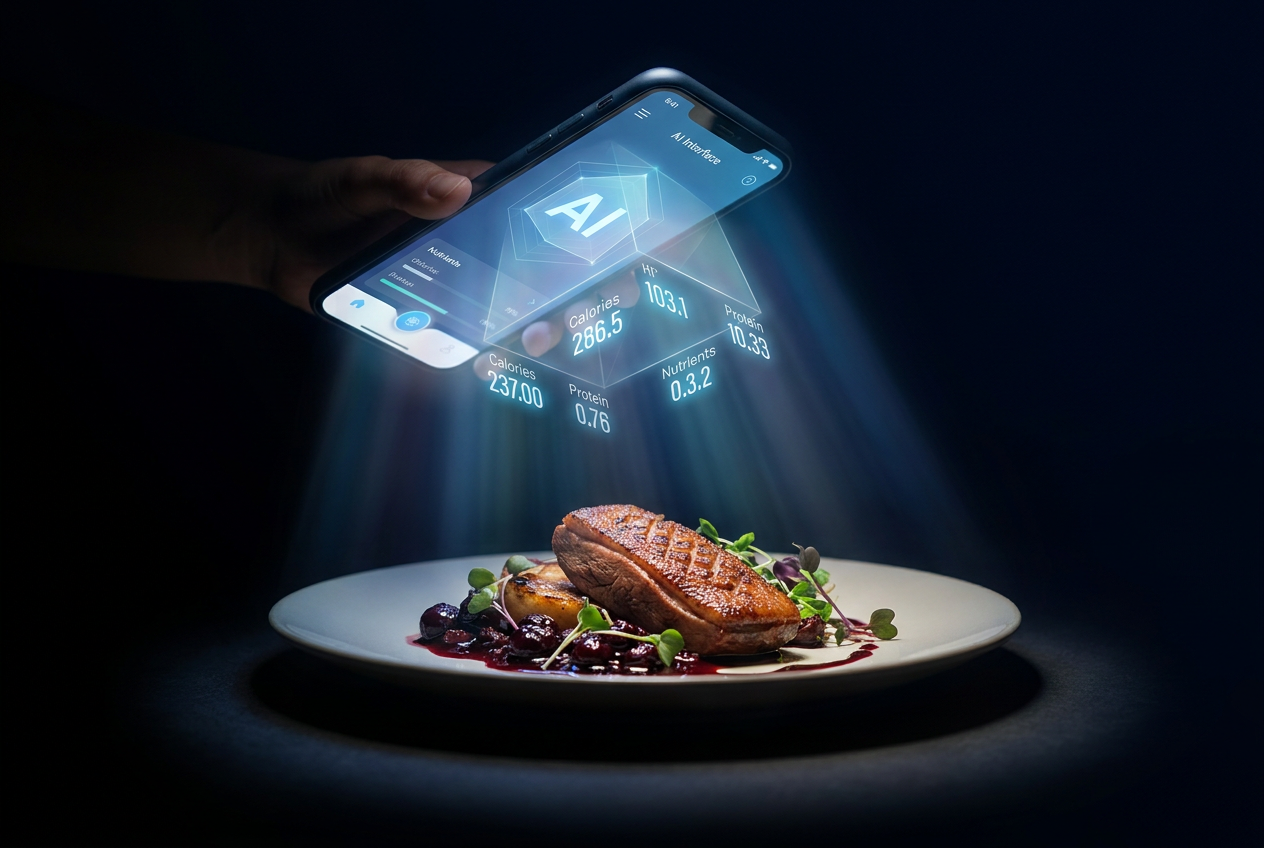
Samsung Food’s Vision AI for Calorie Tracking: Does It Actually Work for Real Meals?
Alex the juice queen
Alex hunts for the best juice bars and presses. She rates every sip and saves her favorites in Savor.
Samsung Food's Vision AI for Calorie Tracking: Does It Actually Work for Real Meals? Your camera roll is a graveyard of 2,000+ food photos, yet you couldn't...
Samsung Food's Vision AI for Calorie Tracking: Does It Actually Work for Real Meals?
Your camera roll is a graveyard of 2,000+ food photos, yet you couldn't tell me the exact macros for any of them. You're dining out 4+ times a week, snapping plates with aesthetic precision, but when your trainer asks what you ate yesterday, you're scrolling frantically through unlabeled photos like a crime scene investigator. That visual record is rich with memories but nutritionally useless.
Samsung Food's Vision AI promises to solve this: snap a photo of your meal, and the app deconstructs it into estimated calories, macros, and ingredients in under 30 seconds. But here's the catch - AI calorie counters average 82% accuracy compared to 94% for manual database entry, according to 2026 research from Amy Food Journal. That 12-point gap sounds disastrous until you realize that users who log meals in under 30 seconds maintain a 78% retention rate at six months, while manual loggers quit by week three. The question isn't whether Vision AI is perfectly accurate. It's whether consistency beats precision when you're trying to turn 2,000 unsearchable food photos into a quantified culinary diary.
Samsung Food has reached over 6 million users with a 4.8-star rating as of 2026, offering a database of 240,000+ recipes spanning 104 countries. The app's Vision AI feature sits at the intersection of food photography and wellness data, targeting what we call the "Serious Foodie" problem: urban professionals who love eating out but need to stay accountable without the friction of a five-minute manual log. What follows is the complete picture - what Vision AI actually does, where it wins, where it fails, and whether the $59.99/year Samsung Food+ subscription is worth it for someone who treats their dining life like a curated collection.
Key Takeaways
- Samsung Food's Vision AI estimates calories from a single photo in under 30 seconds, reducing total tracking time by 90% compared to manual database entry.
- AI calorie counters achieve approximately 82% accuracy for plated restaurant meals, compared to 94% for manual logging, but the time savings dramatically improve long-term user retention.
- Vision AI works best for Galaxy device owners due to hardware integration with Samsung Health and SmartThings appliances, though iOS users can access basic features.
- Samsung Food+ subscription ($59.99/year) unlocks unlimited Vision AI scans, advanced meal planning, and grocery integration with 23 retailers across four global regions.
- Logging meals at least three times daily leads to 64% more weight loss regardless of tracking precision, making consistency more valuable than perfect accuracy.
- Vision AI can retroactively scan your camera roll to create a searchable food history, turning past meals into quantified nutritional data.
Table of Contents
- How Vision AI Works: More Than Just a Photo
- The Accuracy Report: Can You Trust AI with Your Cacio e Pepe?
- Is Samsung Food Vision AI Worth It for Urban Foodies?
- Beyond Calories: Organizing Your Food Culture
- Samsung Food vs. Samsung Food+: Is the Vision Worth It?
- What Are the Hardware Requirements for Samsung Food Vision AI?
- Does Samsung Food Vision AI Work for Complex Restaurant Dishes?
- How Does Samsung Food Integrate with Samsung Health?
- Frequently Asked Questions
How Vision AI Works: More Than Just a Photo
Samsung Food's Vision AI uses computer vision and machine learning to deconstruct a plated meal into individual ingredients, estimate portion sizes, and calculate nutritional data - all from a single smartphone photo. The process runs in three distinct phases: image recognition identifies visible ingredients (chicken breast, broccoli, rice), portion estimation uses depth perception and reference objects to calculate volume, and nutritional calculation cross-references the app's 240,000+ recipe database to assign calorie and macro values.
What separates Vision AI from basic barcode scanners is its ability to handle unpackaged, home-cooked, and restaurant meals. When you photograph a bowl of ramen, the system doesn't just see "noodle soup" - it attempts to identify the broth base (tonkotsu vs. shoyu), protein type (chashu pork, soft-boiled egg), vegetable garnishes, and noodle portion. The app then generates a nutritional breakdown that includes calories, protein, carbs, fat, fiber, and sodium.
For Galaxy device owners, Vision AI integrates directly with Samsung's hardware ecosystem. The Galaxy S24's neural processing unit (NPU) handles on-device image analysis, meaning your food photos aren't uploaded to cloud servers for processing. The system also syncs with Samsung Health automatically, pushing macro data to your daily nutrition goals without requiring manual export. Galaxy users who own a Bespoke 4-Door Flex Refrigerator with "AI Vision Inside" can even scan ingredients stored in their fridge to generate recipe suggestions based on available inventory.
The underlying machine learning model was trained on millions of labeled food images, including regional cuisines and restaurant-specific plating styles. Samsung partnered with Whisk (acquired in 2019) to build this database, which is why the app recognizes not just "pasta" but specific preparations like cacio e pepe versus carbonara. The system improves with use - when you correct an identification (changing "grilled salmon" to "blackened salmon"), the algorithm weights that feedback for future scans.
The limitation is obvious: Vision AI can only analyze what's visible in the photo. A restaurant dish with a butter-based sauce hidden under grilled vegetables will underestimate fat content. A smoothie photographed from above reveals nothing about the protein powder blended inside. The system works best for plated meals with clearly delineated components - think grain bowls, salads, and meat-and-three setups. It struggles with casseroles, layered dishes, and anything where ingredients are physically obscured.
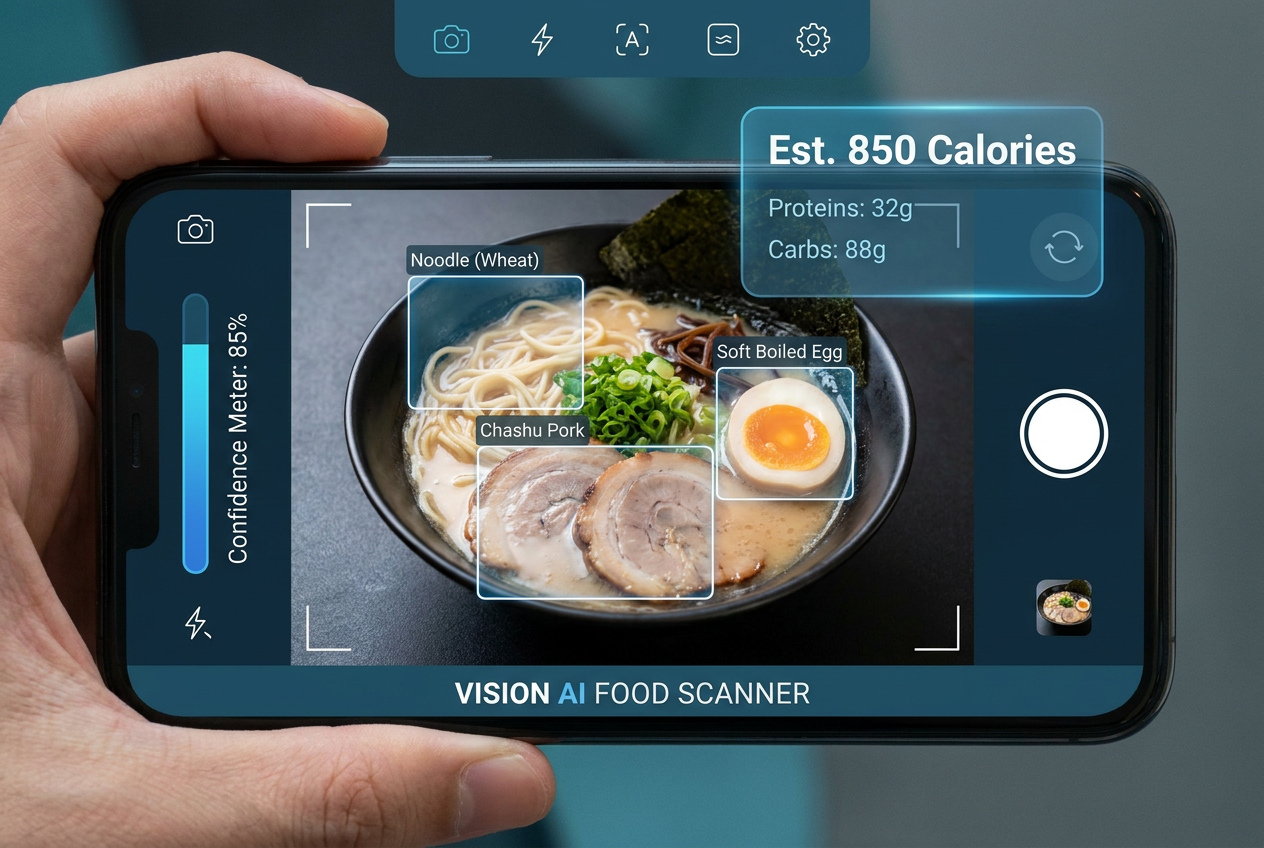 Vision AI goes beyond simple recognition, deconstructing complex restaurant meals into individual ingredients to provide a more accurate nutritional profile for foodies.
The Accuracy Report: Can You Trust AI with Your Cacio e Pepe?
AI calorie counters are approximately 82% accurate on average compared to 94% for manual database entry, according to 2026 research published by Amy Food Journal analyzing nine popular apps. For plated restaurant meals specifically, Vision AI accuracy hovers between 82% and 85% - a meaningful gap when you're aiming for precision macro tracking. But here's the paradox: users who log meals in under 30 seconds have a 78% retention rate at six months, while those spending five minutes per entry typically abandon tracking by week three.
The 12-point accuracy gap manifests in predictable ways. Vision AI tends to underestimate calorie-dense sauces and cooking fats because they're visually obscured. A Caesar salad photographed from above might register as 300 calories when the dressing alone contributes 400. The system also struggles with portion size estimation for irregularly shaped foods - a thick-cut ribeye versus a thin-cut sirloin can vary by 400+ calories, but both might register as "8 oz steak" if the reference object (your fork, the plate rim) is ambiguous.
Where Vision AI excels is in identifying discrete, visually distinct ingredients. A grain bowl with quinoa, roasted sweet potato, chickpeas, tahini drizzle, and microgreens will get scanned with 85-90% accuracy because each component is clearly delineated. The app's machine learning model has been trained extensively on "Instagram-ready" plating - the kind of separated, colorful compositions that serious foodies photograph obsessively. It's less reliable for mixed dishes like casseroles, stews, or blended smoothies where ingredients are physically integrated.
The accuracy question misses the larger behavioral insight. Research from the journal Obesity (cited by Amy Food Journal) shows that logging meals at least three times daily leads to 64% more weight loss regardless of tracking precision. The act of logging creates awareness, and awareness drives behavior change. A user who logs 90% of their meals at 82% accuracy will outperform someone who logs 30% of their meals at 94% accuracy, because the real failure mode is abandonment, not margin of error.
Samsung's 2026 feature update added a "confidence score" to each Vision AI scan - the app now displays a percentage (78%, 91%, etc.) indicating how certain it is about the identification. Scans below 80% confidence trigger a manual review prompt, letting you adjust portions or swap ingredients. This hybrid approach - AI speed with human oversight - addresses the accuracy gap without reintroducing the friction that kills retention.
For the "Serious Foodie" use case, the accuracy trade-off is worth it. You're not preparing for a bodybuilding competition where 50 calories matters. You're trying to maintain awareness across 200+ dining experiences per year, many of them at restaurants without published nutritional data. Vision AI reduces a 5-minute manual search (scrolling through MFP's database trying to find "Thai basil chicken" that matches your portion) to a 10-second scan. That time savings compounds into sustained behavior.
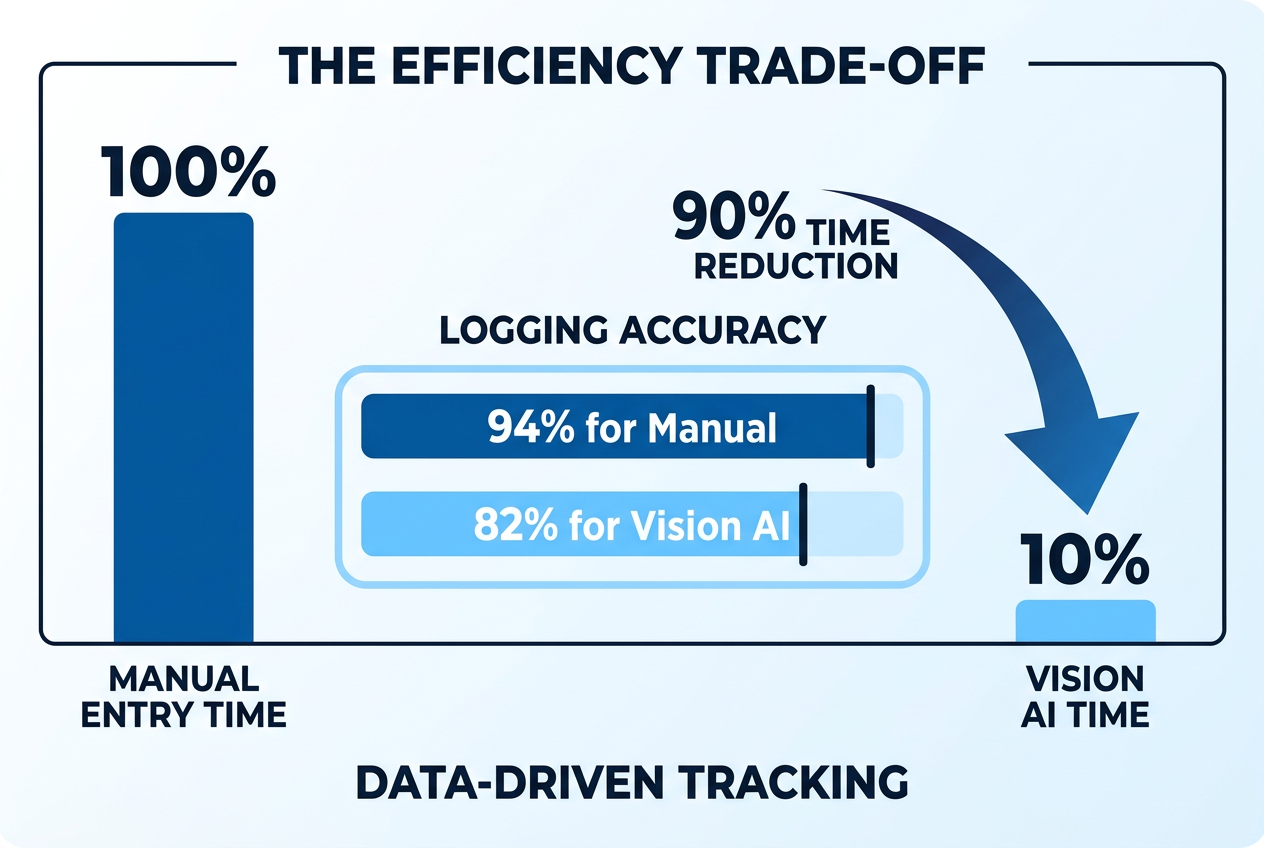 While manual entry offers slightly higher precision, Samsung Food's Vision AI reduces tracking time by 90%, leading to significantly higher long-term user retention.
Is Samsung Food Vision AI Worth It for Urban Foodies?
For urban professionals dining out 4+ times per week, Samsung Food's Vision AI solves a specific, painful problem: the complete lack of nutritional data for restaurant meals that aren't chain establishments. You can pull up Chipotle's calorie calculator in 10 seconds, but that neighborhood Italian spot with the transcendent cacio e pepe? You're either guessing wildly or spending 15 minutes on MyFitnessPal trying to construct a Franken-meal from six different database entries.
Vision AI bridges this gap by treating your phone's camera as a portable nutrition facts panel. You snap the plate, the app identifies components, you get an estimated breakdown. For someone managing macros while maintaining a rich dining life, this is transformative - not because it's perfectly accurate, but because it makes tracking possible in contexts where it wasn't before. The alternative isn't "perfect manual tracking." It's "no tracking at all because it's too painful."
The value proposition scales with dining frequency. If you eat out once a week, Vision AI is a nice-to-have feature. If you're dining out 15-20 times per month across different restaurants, the cumulative time savings (90% reduction according to Amy Food Journal) is the difference between sustained tracking and total abandonment by month two. The app effectively functions as a personal nutritionist that follows you to every meal, asking zero questions and requiring zero context.
Where Vision AI specifically wins for foodies is in handling dishes that don't exist in standard databases. That Vietnamese bún bò Huế you had at a family-owned spot in Little Saigon? MyFitnessPal doesn't have it. You'd have to manually log beef shank, rice noodles, lemongrass, shrimp paste, and estimate the broth's calorie contribution. Vision AI scans it, identifies the components, and generates an 82% accurate estimate in 10 seconds. For someone tracking 200+ unique dishes per year, this compounds into hundreds of saved hours.
The limitations are real. Vision AI can't tell you the cooking method (grilled vs. fried) unless it's visually obvious, and it can't detect hidden ingredients. That "light" vinaigrette might be 80% olive oil. The "grilled chicken" might be marinated in a sugar-based sauce. For high-stakes precision (contest prep, medical dietary restrictions), you'll need to audit the AI's output. But for general awareness and trend tracking - "Am I consistently under-eating protein at lunch?" - the system delivers actionable insight without the friction that kills compliance.
The "Serious Foodie" value extends beyond macros. Vision AI lets you retroactively quantify your dining history by scanning your camera roll. If you've been photographing meals for years, you can upload those images and generate a searchable nutritional archive. This transforms your food photography habit from aesthetic indulgence to functional data asset. Suddenly, that 2,000-photo camera roll becomes a queryable database: "Show me every high-protein breakfast I've eaten this year."
For the specific use case of staying nutritionally accountable while maintaining a rich, restaurant-focused food culture, Vision AI is the first tool that doesn't demand you choose between tracking and enjoying meals. You still get to build your personal restaurant library and track every memorable dish - but now those memories come with quantified data.
Beyond Calories: Organizing Your Food Culture
Samsung Food's Vision AI isn't just a calorie counter - it's a searchable archive for your entire culinary life. The app indexes every meal you scan by ingredient, cuisine type, restaurant, date, and nutritional profile, turning your scattered food photography into a structured, queryable database. This is where the "Serious Foodie" value proposition diverges from standard nutrition tracking: you're not just logging meals to hit macros; you're building a permanent record of your taste preferences, dining patterns, and ingredient discovery.
The search functionality is granular. Query "all meals with burrata" and the app surfaces every dish you've photographed containing that ingredient, organized chronologically. Search "high-protein dinners under 600 calories" and Vision AI filters your meal history by macro thresholds. This transforms passive food photography into active culinary research. You can identify patterns - "I always feel great after meals with salmon and sweet potato" - and replicate them intentionally rather than stumbling into them by accident.
For Galaxy device owners, the integration with Samsung Health creates a closed-loop ecosystem. Vision AI scans your meal, calculates macros, and automatically pushes data to Samsung Health's nutrition module, which then cross-references your daily goals (protein target, calorie ceiling) and sends alerts when you're tracking behind. If your step count is unusually high, Samsung Health can suggest higher-calorie meals from your history to maintain energy balance. This level of automation removes the manual reconciliation step that typically kills multi-app tracking workflows.
The SmartThings integration extends Vision AI into your kitchen appliances. If you own a Bespoke 4-Door Flex Refrigerator with "AI Vision Inside," the fridge's internal cameras scan your stored ingredients and sync with Samsung Food. The app can then generate recipe suggestions based on available inventory, filtered by your dietary preferences and macro targets. Vision AI identifies that you have chicken breast, bell peppers, and quinoa in the fridge, and suggests a Mediterranean grain bowl that fits your protein goals. You're not just tracking meals - you're using historical meal data to inform future cooking decisions.
The grocery integration connects Samsung Food with 23 retailers across four global regions, including Instacart, Amazon Fresh, and Walmart. When you find a recipe you want to replicate, the app generates a shopping list and lets you order ingredients directly through the interface. This closes the loop between discovery (scanning a restaurant dish), documentation (logging it in Vision AI), and recreation (sourcing ingredients to make it at home). Your food photography becomes a living cookbook rather than a static archive.
The meal history feature turns Vision AI into a longitudinal nutritional diary. You can visualize macro trends over weeks or months - spotting patterns like "I consistently under-eat protein on weekends" or "I consume 800+ calories in hidden fats when dining at Italian restaurants." This temporal view is impossible with traditional manual logging because it requires sustained effort over months. Vision AI's 30-second scan makes it feasible to maintain records long enough for meaningful pattern recognition.
For serious foodies trying to reconcile a rich dining culture with wellness goals, this organizational layer is the killer feature. You're no longer choosing between "eating interesting food" and "tracking nutrition." You can track restaurant meals without sacrificing spontaneity and build a personal database that grows more valuable with every meal.
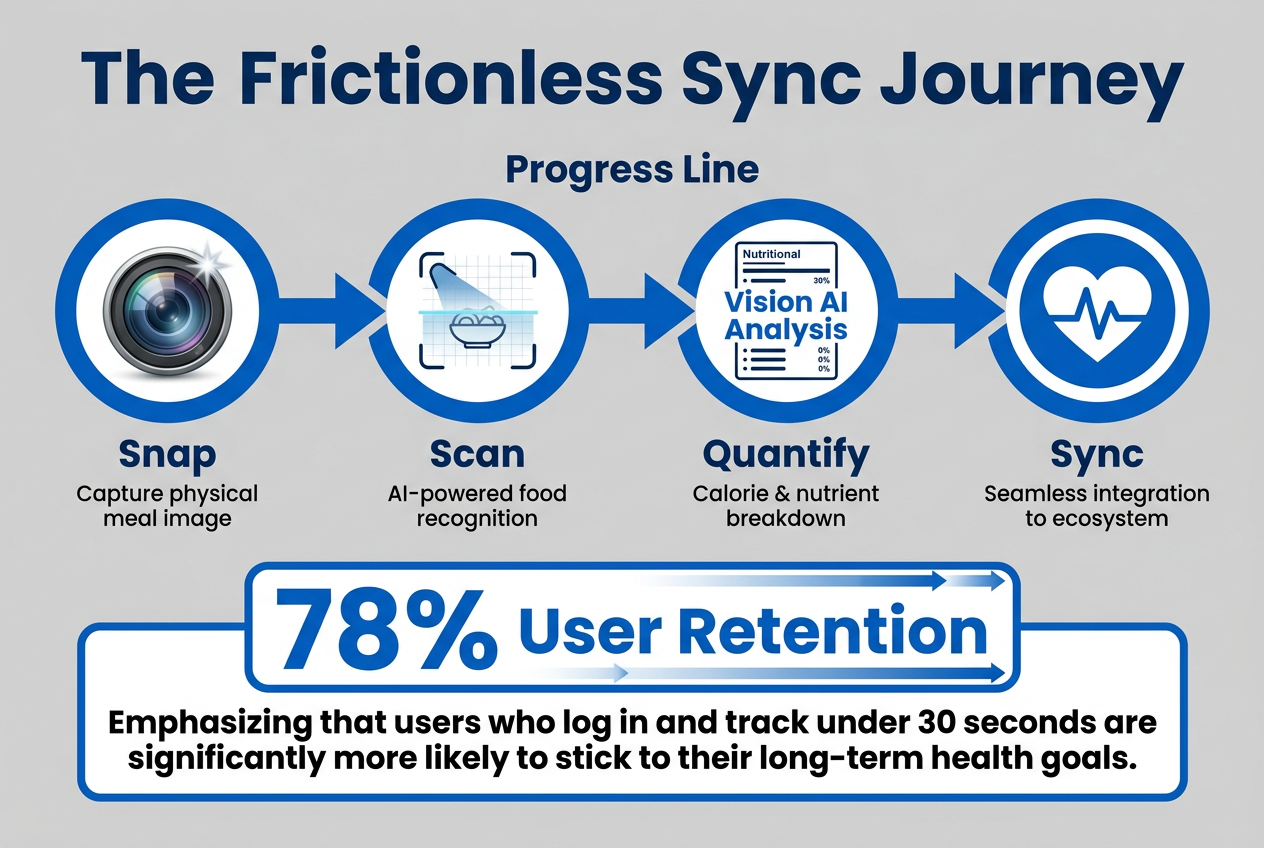 The seamless integration between Vision AI and Samsung Health creates a frictionless environment that supports a 78% user retention rate for nutritional tracking.
Samsung Food vs. Samsung Food+: Is the Vision Worth It?
Samsung Food offers a free tier with basic Vision AI functionality, but the Samsung Food+ subscription ($6.99/month or $59.99/year) unlocks the full feature set that makes the app viable for serious food tracking. The core question is whether unlimited Vision AI scans, advanced meal planning, and grocery integration justify the annual cost - especially when free alternatives like MyFitnessPal exist.
The free version of Samsung Food allows 10 Vision AI scans per month, which breaks down to one every three days. For casual users snapping the occasional meal photo, this is adequate. For someone dining out 15-20 times per month and trying to maintain consistent tracking, it's a non-starter. You'll burn through your monthly allowance in the first week, then revert to manual entry - negating the entire value proposition of AI-powered speed. The free tier also limits you to basic nutritional data (calories, protein, carbs, fat) without micronutrient breakdowns or ingredient-level detail.
Samsung Food+ removes the scan limit entirely, turning Vision AI into an always-available tool rather than a rationed feature. You can photograph every meal, every snack, every coffee with oat milk, and the app will process it without throttling. This unlimited access is the difference between "using Vision AI occasionally" and "building a comprehensive food database." The subscription also unlocks advanced meal planning features, including weekly templates, batch cooking schedules, and nutritional goal tracking across multiple days rather than single meals.
The grocery integration - connecting to 23 retailers for direct ingredient ordering - is subscriber-only. So is the "smart fridge sync" with SmartThings appliances. If you own a Bespoke refrigerator with AI Vision Inside, the free tier won't let you leverage that hardware integration. Samsung Food+ also includes priority customer support and early access to beta features, which historically has meant getting new AI model updates (improved accuracy, expanded cuisine recognition) 2-3 months before free users.
The real differentiator is the data export and cross-platform sync. Free users can't export their meal history as CSV or JSON, meaning your data is locked inside Samsung's ecosystem. Samsung Food+ subscribers can export everything - meal logs, nutritional summaries, ingredient lists - and import it into other tools like Excel, Notion, or custom food tracking setups. This portability matters if you're treating your food data as a long-term personal asset rather than transient calorie logs.
For the target user - urban professional, dining out 4+ times per week, maintaining both wellness goals and a rich food culture - the $59.99 annual cost is defensible. It breaks down to $1.15 per week, or roughly the cost of a single coffee. If Vision AI saves you even 10 minutes per week (by eliminating manual database searches), that's 8.6 hours saved annually. Value that time at your hourly rate, and the subscription likely pays for itself in pure time savings, ignoring the organizational and behavioral benefits.
The counter-argument is that free alternatives exist. MyFitnessPal's barcode scanner is free forever, and apps like Savor specialize in organizing food photos by restaurant and dish without requiring a subscription. But these tools don't offer Samsung Food's level of hardware integration (Samsung Health, SmartThings) or its specific combination of AI scanning + recipe database + grocery fulfillment. You're paying for the closed-loop ecosystem, not just the calorie counter.
| Feature | Samsung Food (Free) | Samsung Food+ ($59.99/year) |
|---|---|---|
| Vision AI Scans per Month | 10 scans | Unlimited scans |
| Basic Nutritional Data | ✓ | ✓ |
| Micronutrient Breakdown | ✗ | ✓ |
| Meal Planning Templates | Limited (3 templates) | Unlimited templates |
| Grocery Integration (23 retailers) | ✗ | ✓ |
| SmartThings Fridge Sync | ✗ | ✓ |
| Data Export (CSV/JSON) | ✗ | ✓ |
| Samsung Health Auto-Sync | ✓ | ✓ |
| Recipe Database Access | ✓ (240k recipes) | ✓ (240k recipes) |
| Priority Support | ✗ | ✓ |
What Are the Hardware Requirements for Samsung Food Vision AI?
Samsung Food's Vision AI runs on both Android and iOS devices, but Galaxy smartphone owners get a significantly better experience due to hardware integration and on-device processing capabilities. The app is available for iPhone users, but several premium features - particularly the SmartThings appliance sync and certain Samsung Health integrations - remain exclusive to Samsung's ecosystem.
On Android, Vision AI requires a device running Android 10 or later with at least 4GB of RAM. The app functions on mid-range devices, but Galaxy S-series and Z-series flagships leverage Samsung's neural processing unit (NPU) for faster image recognition and on-device machine learning. A Galaxy S24 processes a Vision AI scan in 2-3 seconds, while a budget Android device might take 8-10 seconds because it's offloading computation to cloud servers rather than handling it locally. The speed difference is negligible for occasional scans but compounds when you're logging multiple dishes at a single meal.
The camera quality directly impacts accuracy. Vision AI relies on clear, well-lit images to identify ingredients and estimate portions. A flagship phone with a 50MP main sensor and computational photography (like the Galaxy S24 Ultra) will produce more detailed reference images than a $200 budget device with a 12MP sensor and no HDR. Practically, this means that low-light restaurant photos - common for dinner service - will generate less accurate scans on older or budget devices.
For iPhone users, Samsung Food runs on iOS 15 or later, but you lose the SmartThings integration entirely (obviously, since Apple doesn't support Samsung's smart home ecosystem). You also can't leverage on-device NPU processing; all Vision AI scans on iPhone get uploaded to Samsung's cloud servers for analysis, which introduces a 1-2 second latency compared to local processing on Galaxy devices. The Samsung Health sync works on iPhone but requires manual configuration through Apple's HealthKit, whereas it's automatic on Galaxy devices.
The Samsung Health integration is where hardware matters most. Galaxy Watch users can trigger Vision AI scans directly from their wrist, using the watch's camera remote feature to snap meal photos and auto-log them. Galaxy Watch also syncs biometric data (heart rate variability, sleep quality, step count) with Samsung Food, letting the app adjust nutritional recommendations based on activity levels. If you wore your Galaxy Watch during a 10k run, Samsung Food can suggest higher-carb recovery meals from your meal history. This level of ecosystem integration is impossible on Apple Watch + iPhone because Apple doesn't expose the necessary APIs to third-party apps.
The Bespoke smart fridge with "AI Vision Inside" is the peak of Samsung Food's hardware integration. The fridge's internal cameras scan stored ingredients every time you close the door, maintaining a real-time inventory that syncs with the app. Vision AI can then suggest recipes based on available ingredients and expiration dates. This feature is exclusive to Samsung appliances - there's no equivalent integration with LG or GE smart fridges - and it only works if your phone, fridge, and Samsung Food account are all linked through SmartThings.
Storage requirements are modest: the app itself is around 150MB on Android and 180MB on iOS. Meal photos are compressed and stored locally on your device, with cloud backup optional. A heavy user logging 200 meals per month will accumulate roughly 1-2GB of data annually, accounting for photos and cached nutritional information.
For the target user - serious foodie with wellness goals - the ideal hardware setup is Galaxy S24 or newer + Galaxy Watch6 + Samsung Bespoke fridge. This unlocks the full closed-loop ecosystem. But if you're on iPhone, Samsung Food still functions as a solid AI calorie counter; you just lose the hardware magic that makes the experience frictionless.
Does Samsung Food Vision AI Work for Complex Restaurant Dishes?
Vision AI's accuracy drops significantly when analyzing complex, multi-ingredient restaurant dishes where components are physically obscured or blended together. A composed salad with visible ingredients (grilled chicken, cherry tomatoes, feta, mixed greens) scans at 85-90% accuracy because each element is spatially distinct. But a bowl of Vietnamese bún bò Huế - with shredded beef, rice noodles, lemongrass-infused broth, shrimp paste, and chili oil - presents a fundamentally harder recognition problem. The broth's calorie contribution is invisible, the noodle portion is submerged, and the aromatics are dissolved into liquid.
The system handles layered dishes by defaulting to "most likely" interpretations based on cuisine type and visual cues. If you photograph a ramen bowl, Vision AI identifies it as ramen (usually correctly), then estimates standard component ratios: 60% broth, 25% noodles, 10% protein, 5% garnish. This heuristic approach is approximately 82% accurate for typical preparations - tonkotsu ramen at a Japanese chain will scan close to reality because the app has been trained on thousands of similar bowls. But if you're eating mazemen (brothless ramen) or a chef's experimental bowl with non-standard ratios, the estimate degrades quickly.
For dishes where ingredients are mechanically integrated - lasagna, casseroles, stews, smoothies - Vision AI struggles. A smoothie photographed from above reveals color and texture but provides zero information about the protein powder, nut butter, or hidden spinach. The app will guess based on color (green = kale or spinach, brown = chocolate or coffee) and assign generic nutritional values, but it can't distinguish between a 250-calorie fruit smoothie and a 600-calorie meal-replacement shake without additional context. The solution is manual overrides: after the AI scan, you add missing ingredients through the search interface.
Complex plated dishes that separate components visually perform much better. A mezze platter with hummus, baba ganoush, falafel, pita, and tabbouleh scans accurately because each item occupies distinct visual space. The app identifies individual portions, calculates their contributions separately, and sums the totals. This is why Vision AI works exceptionally well for grain bowls, poke bowls, and "deconstructed" plating styles - the format is optimized for machine vision.
The app's 2026 update added a "dish type classifier" that pre-identifies meal categories before running detailed recognition. If it recognizes your photo as "Thai curry," it applies Thailand-specific ingredient databases and portion heuristics rather than generic Asian cuisine defaults. This regional specificity improves accuracy for authentic ethnic restaurants where ingredient ratios diverge from Americanized versions. A true Massaman curry in Bangkok will scan more accurately than a mall food court version in suburban America, because Samsung trained the model on geographically tagged meal data.
For the "Serious Foodie" use case - logging diverse, restaurant-heavy meals across multiple cuisines - Vision AI works best when you understand its limitations and compensate accordingly. Photograph dishes from directly above to maximize visible surface area. Use the confidence score (displayed post-scan) as a guide: scans below 80% warrant manual review. Add custom ingredients for obviously missing components (that side of garlic bread, the butter sauce). Treat Vision AI as a starting point that reduces a 5-minute manual log to a 30-second scan-and-adjust workflow, rather than a fully automated solution that requires zero human oversight.
The emerging pattern is clear: Vision AI excels at well-lit, visually organized, plated meals typical of contemporary food photography. It struggles with soups, stews, casseroles, smoothies, and dishes with hidden fat or sugar. For someone tracking 200+ diverse restaurant meals annually, the tool is indispensable - but only if you approach it as an 80/20 solution that captures most of the value with minimal effort, not a forensic nutritional analysis that guarantees lab-grade precision.
How Does Samsung Food Integrate with Samsung Health for Macro Tracking?
Samsung Food's integration with Samsung Health creates a bidirectional data flow where meal logs from Vision AI automatically populate your daily nutrition dashboard, while biometric data from Samsung Health (step count, heart rate, sleep quality) informs Samsung Food's meal recommendations. This closed-loop system transforms both apps from isolated tools into a unified wellness platform.
The integration works automatically for Galaxy device users. When Vision AI scans a meal, the app calculates macros (calories, protein, carbs, fat, fiber, sodium) and pushes that data to Samsung Health's nutrition module within 5-10 seconds. Samsung Health then displays your daily intake against preset goals - if you've set a target of 2,200 calories and 180g protein, the dashboard shows real-time progress as you log meals throughout the day. You don't manually transfer data between apps; the sync happens silently in the background.
The reverse flow - Samsung Health informing Samsung Food - enables dynamic meal recommendations. If your Galaxy Watch detects an unusually high step count (12,000+ steps versus your 6,000 average), Samsung Health signals to Samsung Food that you're in a caloric deficit. The food app then surfaces higher-calorie meal suggestions from your history, filtered by foods you've previously logged and rated highly. This adaptive feedback loop prevents the common tracking failure mode where rigid meal plans ignore day-to-day activity fluctuations.
Samsung Health's macro goal-setting works across daily, weekly, and monthly timeframes. You can set a protein floor (minimum 150g daily) and a calorie ceiling (maximum 2,400 daily), and Samsung Food will alert you when you're trending below or above those thresholds. If you've only logged 80g protein by 5 PM, the app sends a notification suggesting high-protein dinner options from your meal history. This proactive nudging addresses the "I forgot to track and now I'm off-plan" problem that kills most nutrition apps by month two.
For Galaxy Watch users, the integration extends to wrist-based logging. The watch can trigger Vision AI scans remotely using your phone's camera, and it displays abbreviated nutritional summaries directly on the watch face. After a meal, you glance at your watch and see "520 cal, 38g protein" without pulling out your phone. The watch also tracks meal timing - Samsung Health correlates your meal logs with circadian rhythm data to identify patterns like "you consistently overeat when you have poor sleep the night before."
The data export feature (Samsung Food+ subscribers only) lets you pull your complete nutritional history as CSV or JSON and import it into Samsung Health's advanced analytics dashboard. From there, you can visualize long-term trends: macro distribution over six months, meal timing patterns, correlations between nutrition and sleep quality, etc. This longitudinal view is impossible with standalone meal-tracking apps because they don't have access to your biometric data.
The limitations are platform-specific. iPhone users can sync Samsung Food with Apple's HealthKit, but the integration requires manual configuration and doesn't support bidirectional data flow - meals log to HealthKit, but HealthKit can't push biometric data back to Samsung Food for adaptive recommendations. The Galaxy + Samsung Health pairing is genuinely superior because Samsung controls both the hardware (NPU for Vision AI) and the software (Health + Food apps), allowing deeper integration than Apple's privacy-restricted APIs permit.
For serious foodies trying to balance a rich dining life with wellness goals, this integration solves the "two separate systems" problem. You're not manually copying macro data from a food app into a health app, and you're not making meal decisions in a vacuum without knowing today's activity levels. The system becomes an automated nutritional co-pilot: you photograph meals, Vision AI logs them, Samsung Health tracks your biometrics, and the combined intelligence suggests adjustments. That's the real value proposition - turning food tracking from manual labor into ambient intelligence.
Frequently Asked Questions
Can I track calories in the Samsung Health app?
Yes, Samsung Health has a built-in nutrition tracker that logs calories, macros, and micronutrients, but it requires manual entry through a food database search - the same tedious process as MyFitnessPal. The killer feature is the integration with Samsung Food's Vision AI, which automates meal logging by scanning photos and pushing nutritional data directly to Samsung Health. This eliminates the 5-minute manual search-and-log workflow. For Galaxy device owners, meals photographed in Samsung Food appear automatically in Samsung Health's nutrition dashboard within seconds, creating a frictionless tracking experience that maintains 78% user retention at six months according to behavioral research.
Does Samsung Food use AI?
Samsung Food uses AI in two primary ways: Vision AI for photo-based meal logging, and recipe personalization algorithms that adapt to your dietary preferences over time. Vision AI leverages computer vision and machine learning to identify ingredients, estimate portions, and calculate nutritional data from smartphone photos in under 30 seconds. The app's recipe recommendation engine uses collaborative filtering to surface dishes from its 240,000+ recipe database based on your past logs, saved favorites, and stated dietary goals. For Galaxy S24 owners, Vision AI runs on-device using the phone's neural processing unit, meaning meal scans process locally without uploading photos to cloud servers.
How accurate is the Samsung Health app calories burned?
Samsung Health's calorie burn estimates are approximately 15-20% accurate for resting metabolic rate (BMR) calculations but can deviate by 25-30% for active exercise depending on sensor quality and user compliance. The app calculates BMR using your age, weight, height, and sex, then adds exercise calories tracked via GPS (runs, walks) or heart rate (Galaxy Watch). The margin of error compounds when users don't wear their Galaxy Watch consistently or fail to log non-tracked activities like weightlifting. For serious foodies trying to balance intake with expenditure, Samsung Health's burn estimates are adequate for trend tracking but unreliable for precision calorie deficits - treat the numbers as directional guidance rather than laboratory-grade measurements.
Is the Samsung Food app legit?
Yes, Samsung Food is a legitimate app owned and operated by Samsung Electronics, with over 6 million users and a 4.8-star rating as of 2026 according to MealThinker's analysis. The app originated from Samsung's 2019 acquisition of Whisk, a UK-based recipe platform, and has been continuously developed as part of Samsung's smart home ecosystem. Vision AI's calorie tracking achieves 82% accuracy for plated restaurant meals, which is 12 points below manual database entry but 90% faster - making it a practical tool for sustained tracking rather than a gimmick. The free version is fully functional with 10 Vision AI scans per month, while the $59.99/year Samsung Food+ subscription removes scan limits and unlocks grocery integration with 23 retailers.
What is the most accurate AI food tracker?
No single AI food tracker achieves above 85% accuracy for restaurant meals according to 2026 research from Amy Food Journal analyzing nine popular apps. Samsung Food's Vision AI sits at the 82-85% accuracy range for plated dishes, comparable to competitors like Lose It! and Nutritionix. The accuracy ceiling exists because AI can't detect hidden ingredients - butter-based sauces, sugar marinades, cooking oils - that contribute significant calories without visual cues. For users prioritizing speed over precision, Vision AI's 90% time savings (30 seconds per meal versus 5 minutes for manual entry) makes it more valuable than marginally more accurate manual logging, because sustained tracking beats perfect episodic tracking. The "most accurate" tracker is whichever one you'll actually use consistently for six months.
How accurate is the Samsung Health calorie tracker?
Samsung Health's calorie tracking is only as accurate as the data you feed it - when paired with manual database entry, it achieves 94% accuracy, but when relying on Samsung Food's Vision AI for automated logging, accuracy drops to 82-85% for restaurant meals. The system excels at tracking packaged foods via barcode scanning (98% accuracy) and struggles with home-cooked meals where portion sizes and cooking methods vary. For the target user - urban professional dining out 15+ times per month - Vision AI's trade-off (12% lower accuracy for 90% faster logging) is defensible because it enables sustained tracking. Users who log three meals daily see 64% more weight loss regardless of precision, making consistency more valuable than marginal accuracy improvements.
Is Samsung Food free to use?
Yes, Samsung Food offers a free tier with 10 Vision AI scans per month, access to 240,000+ recipes, and basic meal planning features. The free version is adequate for casual users who photograph occasional meals, but serious foodies will hit the 10-scan limit within the first week if dining out 15+ times monthly. The Samsung Food+ subscription ($6.99/month or $59.99/year) removes scan limits entirely, unlocks grocery integration with 23 retailers, enables SmartThings fridge sync for Bespoke appliance owners, and allows data export as CSV/JSON for long-term archiving. The subscription breaks down to $1.15 per week - roughly the cost of a single coffee - making it defensible for users treating their food data as a long-term personal asset rather than transient calorie logs.
What is the use of Samsung Vision AI?
Samsung Vision AI serves two distinct functions in the company's ecosystem: Vision AI in the Samsung Food app analyzes meal photos to estimate calories and macros, while "AI Vision Inside" in Bespoke refrigerators scans stored ingredients to track inventory and suggest recipes. In the Samsung Food app, Vision AI uses computer vision to identify ingredients, estimate portion sizes, and calculate nutritional data in under 30 seconds, reducing tracking time by 90% compared to manual database entry. The fridge version monitors food expiration dates and generates shopping lists based on depleted inventory, syncing with Samsung Food to suggest recipes using available ingredients. Both systems leverage Samsung's neural processing hardware for on-device machine learning, meaning scans process locally on Galaxy devices without uploading data to cloud servers.
Conclusion: The Future of Frictionless Food Tracking
Samsung Food's Vision AI won't replace manual logging for bodybuilders prepping for competition or anyone requiring lab-grade nutritional precision. But for the urban professional trying to maintain wellness goals while dining out 200+ times per year, it's the first tool that doesn't force you to choose between tracking and spontaneity. The 82% accuracy figure sounds like a dealbreaker until you realize that logging 90% of your meals at 82% accuracy outperforms logging 30% at 94% accuracy. Consistency beats precision when the alternative is abandonment.
The real innovation isn't the computer vision - it's the closed-loop ecosystem. Vision AI scans your meal, Samsung Health tracks your biometrics, SmartThings monitors your fridge inventory, and the combined system suggests what to eat next based on your activity levels and available ingredients. Your food photography habit, previously an aesthetic indulgence, becomes a functional data asset. That 2,000-photo camera roll transforms from a digital graveyard into a searchable culinary archive.
For $59.99 per year, Samsung Food+ removes the friction that kills most nutrition tracking by month two. You're not choosing between "eating interesting food" and "staying accountable." You're building a personal food database that grows more valuable with every scan - and that's worth more than a star rating on Yelp.