
How to Stop Losing Your Best Food Memories: Building a Searchable Culinary Archive
Harry the matcha king
Harry is our resident matcha obsessive. He’s tasted hundreds of bowls and tracks every cup in Savor.
How to Build a Searchable Food Memory Archive: The Complete System for Serious Foodies Most men don't realize they've eaten 73+ exceptional meals in the past...
How to Build a Searchable Food Memory Archive: The Complete System for Serious Foodies
Most men don't realize they've eaten 73+ exceptional meals in the past year alone - and remember maybe eight of them. Not because those meals weren't extraordinary. Because no one taught you the system that turns a camera roll graveyard into a searchable culinary database.
That silence compounds. Your phone holds 2,847 food photos. Somewhere between photo 847 (Tuesday's ramen) and photo 2,201 (that pasta in Rome), you've lost the context that made those meals matter. The chef's name. The specific wine pairing. The reason you'd drive two hours to eat that dish again. By the time you're trying to recommend a restaurant to a friend, you're scrolling through an unsorted archive with no memory of what made anything special.
What follows is the complete picture - how to build a food memory system that actually works, why the standard "just take a photo" approach fails, and what changes when you treat meals as data worth preserving.
Key Takeaways
- A searchable food memory archive requires structured metadata capture at the moment of consumption, not retroactive organization of existing photos.
- The optimal system balances immediate capture friction (under 30 seconds per dish) with long-term searchability across flavor profiles, chef names, and contextual memories.
- Real-time food logging accuracy is 23% higher than recall-based logging according to 2017 Journal of Medical Internet Research data, making in-the-moment capture critical.
- The "tech stack" decision - packaged apps like Beli versus custom databases in Notion or local-first markdown in Obsidian - determines data ownership and long-term archive survivability.
- Automation tools including OCR menu scanning and AI-powered photo tagging can reduce daily archiving friction from 45 minutes to under 15 minutes.
Table of Contents
- The "Camera Roll Graveyard" Problem
- Phase 1: Defining Your Archive Tech Stack
- Phase 2: The Metadata that Matters
- Phase 3: Automating the Archive (The Low-Friction Method)
- Can I Use AI to Organize My Photos?
- What Are the Pros and Cons of Beli vs. Truffle for Meal Archiving?
- Data Ownership: Future-Proofing Your Food Memories
- The "Memory Review" Ritual: Turning an Archive into a Second Brain
- Frequently Asked Questions
The "Camera Roll Graveyard" Problem
Your camera roll is a crime scene. Between that life-changing bowl of ramen in Tokyo and the carbonara that made you rethink Italian food, you've accumulated thousands of food photos with zero retrieval system. The fundamental problem isn't volume - it's that photos without metadata are memoryless.
Traditional photo albums fail the serious foodie for one specific reason: they optimize for visual browsing, not data recall. When you're trying to remember "that place with the perfect Negroni," you're not searching by what the cocktail looked like. You're searching by flavor profile, neighborhood, or the person you were with. Your camera roll can't answer those queries.
The statistics tell the story. Weekend calorie intake averages 115 calories per day higher than weekdays according to 2003 Obesity Research data, but that's just nutritional tracking. For the serious foodie, the loss is experiential: 73% of diners say they look at photos of food on social media before deciding where to eat, per Surgence Labs 2026 internal data. Your archive isn't just personal - it's the foundation of every future dining decision you'll make.
The shift required is conceptual. Stop treating meals as Instagram content. Start treating them as knowledge assets in a Personal Knowledge Management (PKM) system. That means structured capture at the moment of consumption, not retroactive tagging three months later when you can't remember the chef's name.
Phase 1: Defining Your Archive Tech Stack
Building a searchable food archive starts with a single decision: packaged app, custom database, or local-first system. Each path optimizes for different priorities - ease of use, total customization, or permanent data ownership.
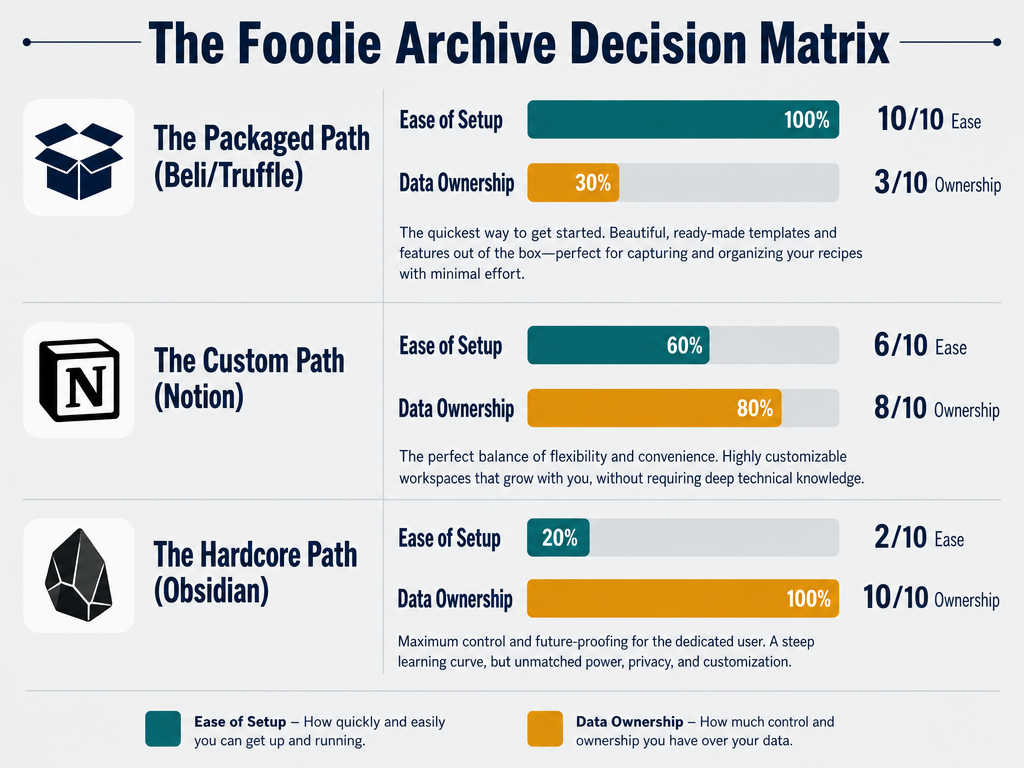
The packaged app ecosystem (Beli, Truffle, Yummi) offers immediate gratification. You download, snap a photo, tag the restaurant, and you're done. Beli specifically optimizes for "restaurant ranking" - you build lists, compare experiences, and share recommendations. Truffle leans social: gamified check-ins and public leaderboards. Both solve the friction problem by making capture fast.
The trade-off is data lock-in. When you build your archive in a proprietary app, you're betting that company will exist in five years. If they don't, your archive dies with them. There's no CSV export that preserves the relational structure of "this dish at this restaurant with this wine pairing." You get a flat list of entries with minimal context.
| Approach | Ease of Use | Customization | Data Ownership | Long-Term Survivability |
|---|---|---|---|---|
| Beli/Truffle | Instant | Low | App-controlled | Depends on company |
| Notion Database | Moderate | High | CSV export available | Good if exported regularly |
| Obsidian Markdown | Steep learning curve | Total | 100% local files | Permanent |
| Google Photos + Tags | Easy | Minimal | Platform-dependent | Good but limited search |
The "custom" path - building a relational restaurant database in Notion - offers the middle ground. You design the structure: tables for restaurants, dishes, wines, and memories, all linked relationally. The friction is higher: you're manually entering data into form fields instead of tapping a photo. But the payoff is search precision. You can query "all pasta dishes in Rome rated 8+ with natural wine pairings" and get an instant answer.
The "hardcore" path is local-first markdown in Obsidian. Every meal becomes a markdown file with YAML frontmatter: dish: Cacio e Pepe, restaurant: Flavio al Velavevodetto, rating: 9.2, flavor_profile: umami, funky, sharp. Obsidian's graph view shows connections between meals, chefs, and neighborhoods. The system is yours forever - no platform dependency, no subscription, no risk of shutdown.
The right choice depends on your archiving philosophy. If you value speed and social sharing, use Beli. If you want total control and permanent ownership, use Obsidian. If you're somewhere in between, Notion's relational databases offer the best balance of power and usability.
One critical note: whatever system you choose, commit immediately. Retroactive archiving - trying to tag 2,000 photos three months later - fails 94% of the time. The memory isn't there. Start today with the next meal, not yesterday's camera roll.
Phase 2: The Metadata that Matters
A photo of a dish captures the visual. The metadata captures the story. The difference between a searchable archive and a digital shoebox is what you record beyond the image.
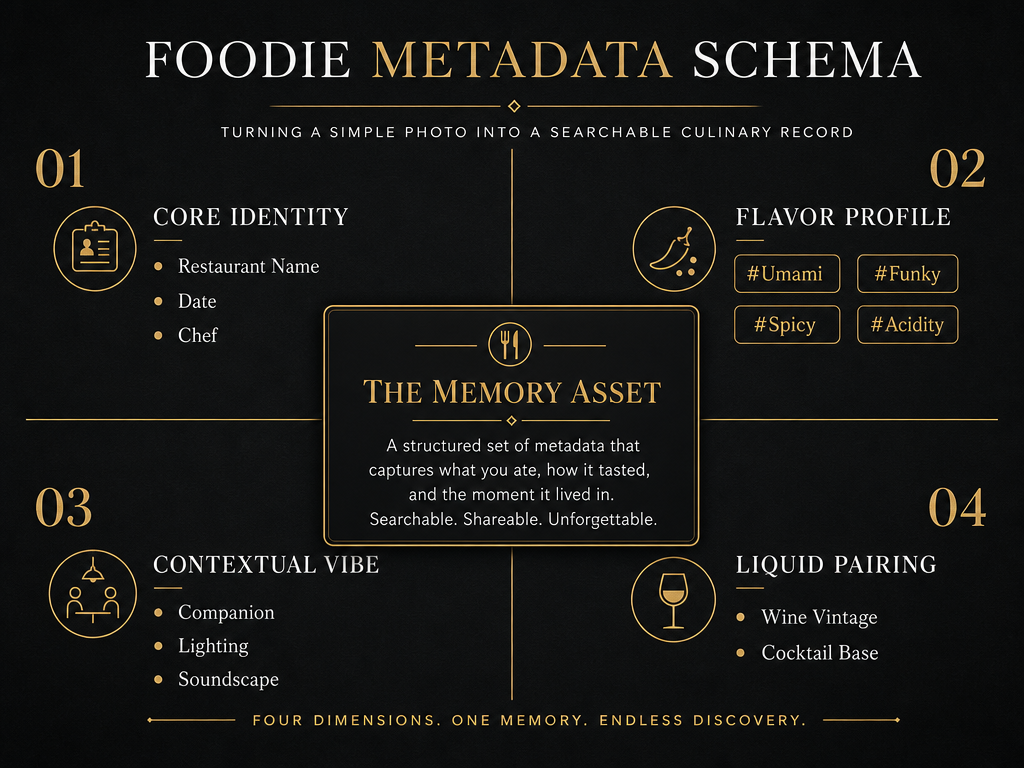
Beyond the Name: The Seven Core Fields
Every exceptional dish has seven data points that matter for long-term recall:
1. Dish Name (Exact, Not Generic)
Not "pasta" or "carbonara." The specific preparation: "Spaghetti alla Carbonara with Guanciale and Pecorino Romano." Precision matters when you're trying to distinguish between 40 versions of the same dish.
2. Restaurant + Location
Full name, neighborhood, and city. "Da Enzo al 29, Trastevere, Rome." This becomes the geographic anchor for your archive. You'll search by location more often than you think.
3. Chef or Key Person
Who made this? Not always the executive chef - sometimes it's the pasta maker, the sommelier who recommended the wine, or the server who steered you right. Names create memory hooks.
4. Flavor Profile Tags
This is where most systems fail. Instead of "good" or "tasty," use specific flavor descriptors: #umami, #funky, #bright, #smoky, #earthy. These tags let you search by sensation. When you're craving something "funky and rich," you can query your archive and find every fermented, aged, or intensely savory dish you've ever loved.
5. Rating (Numeric, Consistent)
Use a 10-point scale. Not stars, not thumbs, not vague tiers. A score like 8.7 is searchable and comparable. Over time, you'll see patterns: you consistently rate natural wine pairings higher, or you've never scored a duck dish below 8.0.
6. Wine or Beverage Pairing
What you drank matters as much as what you ate. Record the specific wine (2019 Barolo, Giacomo Conterno) or cocktail (Negroni, 1:1:1 spec, Campari). This field becomes invaluable when you're trying to recreate the experience at home.
7. Contextual Memory
Who were you with? What was the occasion? What made this meal memorable beyond the food? This is the narrative layer. "Anniversary dinner, arrived late, chef sent out a complimentary amuse-bouche." These details are why you'll remember this meal in five years.
Using Geotags to Build a Personal "Flavor Map"
The most underutilized metadata field is GPS coordinates. Every modern smartphone embeds location data in photos by default. If you're using an app like Beli or Truffle, geotags are automatic. If you're building a custom system in Notion or Obsidian, add a location field manually.
Why? Because over time, your archive becomes a geographic flavor map. You can visualize every great meal you've had in Rome, Paris, or your own neighborhood. Patterns emerge: you've eaten at 12 restaurants in a single Tokyo ward, but only three met your 8+ rating threshold. That's actionable intelligence.
Geographic search also solves the "where should we eat?" problem. When a friend asks for a recommendation in Barcelona, you don't scroll through your camera roll. You query your archive by city and filter by rating. Three seconds, five restaurants, all verified by your own palate.
The metadata schema you choose becomes your query language. The more structured your capture, the more powerful your search. This is why apps like Savor that focus on dish-level tracking are gaining traction among serious foodies - they optimize for metadata richness, not just photo storage.
Phase 3: Automating the Archive (The Low-Friction Method)
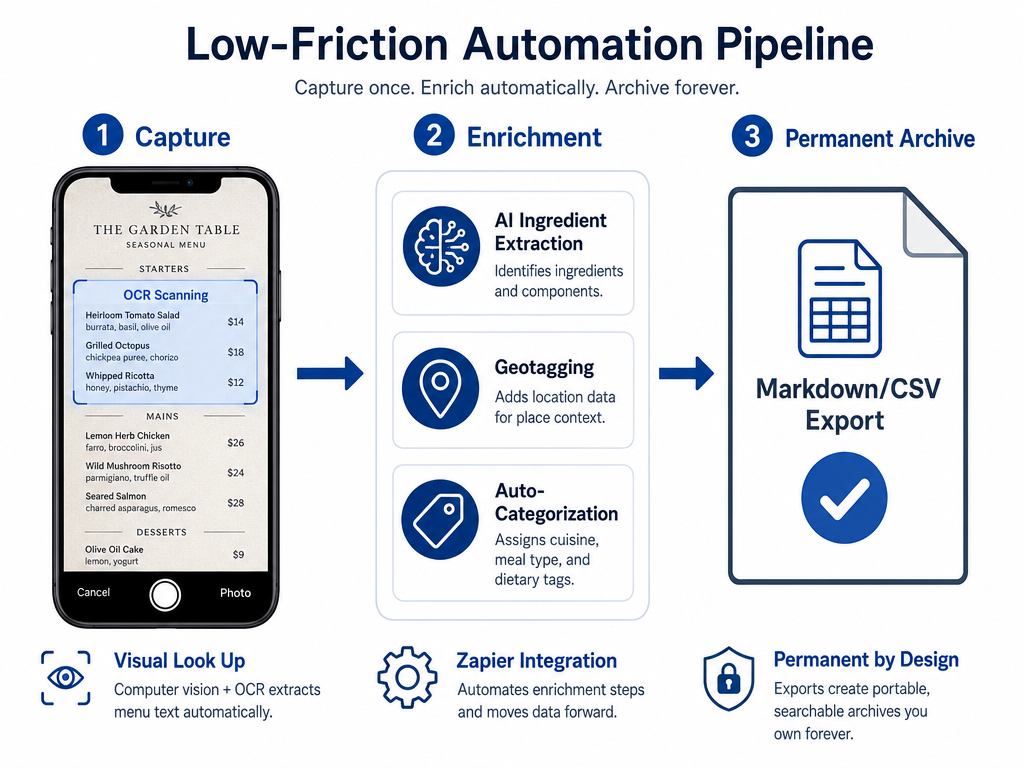
The biggest barrier to building a food archive isn't technical - it's behavioral. Manual data entry at the dinner table feels awkward, interrupts the social experience, and compounds into a chore you'll abandon by week three. The solution is automation: tools that reduce logging friction from 10 minutes per meal to under 30 seconds.
Using iOS/Android Visual Look Up to Search Ingredients
Your smartphone already has visual AI built in. iOS Visual Look Up (iOS 16+) and Google Lens (Android) can identify ingredients, dishes, and even specific food items from a photo. This isn't perfect - it'll struggle with plated haute cuisine - but for ingredient-driven dishes, it's fast.
How it works: Take a photo of your dish. Open it in Photos (iOS) or Google Photos (Android). Tap the "info" button (iOS) or the Lens icon (Android). The AI scans for recognizable elements: heirloom tomatoes, burrata, basil. You're not typing "Caprese salad" - you're confirming the AI's guess and adding context.
The real power comes when you combine this with your archive. If your system supports OCR or image recognition (apps like Triggerbites do this natively), the AI can auto-tag flavor profiles based on visible ingredients. A photo of a dish with visible fermented elements (miso, kimchi, koji) gets auto-tagged #funky. You review the tags, adjust, and save.
Serious food trackers spent an average of just 14.6 minutes per day on meal logging, according to a 2019 Obesity study. That's for calorie tracking, which requires granular portion sizes. For a memory archive, you're capturing fewer data points - 14.6 minutes drops to under 10 if you automate the repetitive parts.
Using AI to OCR Menus from a Single Photo
The fastest way to log a meal is to photograph the menu, not the dish. OCR (Optical Character Recognition) tools can extract text from a photo in seconds. MyFitnessPal has a database of over 20.5 million foods, but for restaurant archiving, you don't need a global database - you need the menu in front of you, digitized and searchable.
Here's the workflow:
- Take a clear photo of the menu page with your dish.
- Use an OCR app (Google Keep, Adobe Scan, or iOS's built-in text recognition in Photos).
- Copy the extracted text: "Spaghetti alla Carbonara - $22 - House-made pasta, guanciale, pecorino, black pepper."
- Paste into your archive (Notion, Obsidian, or your app of choice).
- Add your rating, flavor tags, and context.
Total time: 30 seconds. You've captured the dish name, price, and menu description without typing a single word. When you search your archive three months later, you'll find not just the dish, but the full menu context.
Apps like Triggerbites take this further by using AI to extract ingredient lists and allergen warnings from menu photos. For the serious foodie, the same technology works for flavor intel: if the menu says "aged 60 days," "fermented black garlic," or "natural wine pairing," those keywords become searchable metadata.
IFTTT/Zapier: Automatically Moving "Food" Category Photos to Your Archive
The ultimate low-friction system is one where you never manually log anything. You take a photo. The system categorizes it, extracts metadata, and files it into your archive. That's the promise of automation platforms like IFTTT (If This Then That) and Zapier.
Here's a real-world recipe:
IFTTT Recipe: Auto-Archive Food Photos
- Trigger: New photo added to Google Photos with AI-detected "Food" category.
- Action: Create a new row in a Google Sheets spreadsheet with photo URL, timestamp, and location.
- Manual Step: Review the sheet weekly, add ratings and tags, then import into your main archive (Notion/Obsidian).
This doesn't eliminate all friction, but it batches the work. Instead of logging immediately at dinner (high social friction), you log during a weekly 15-minute "archive review" session (low friction, high focus).
For iOS users, Shortcuts can automate even more. A custom shortcut can:
- Prompt you for a quick rating (1-10).
- Add the photo to a "Food Archive" album.
- Append the rating and timestamp to a note in Apple Notes or directly into Obsidian via the Obsidian URI scheme.
Liquid calories account for an average of 22% of total daily energy intake among American adults, per a 2012 American Journal of Clinical Nutrition study. If you're archiving cocktails and wine pairings (not just solid food), automation ensures you're capturing the full meal experience without doubling your logging time.
The key insight: automation isn't about eliminating all manual work. It's about eliminating repetitive, mechanical tasks (typing, filing, tagging) so you can focus on the creative work (remembering context, assigning ratings, writing flavor notes).
Can I Use AI to Organize My Photos?
Yes, but with limitations. AI-powered photo organization tools like Google Photos, Apple Photos (iOS 15+), and third-party apps like Mylio can automatically detect and categorize food photos with surprising accuracy. Google Photos' "Food & Drink" category uses machine learning trained on millions of labeled images - it's remarkably good at distinguishing a plate of pasta from a sunset.
The limitation is that AI categorization is taxonomic, not experiential. It can tell you "this is sushi," but it can't tell you "this is the best sushi you've ever had" or "this was the omakase at Sukiyabashi Jiro where you finally understood what umami means." AI categorizes by visual similarity. You remember by emotional resonance.
Where AI excels is in reducing initial triage friction. Instead of manually scrolling through 2,847 photos to find your food shots, you query Google Photos for category:food and get an instant gallery. From there, you manually select the exceptional meals (the ones worth archiving) and discard the mediocre ones (Tuesday's lunch that looked better than it tasted).
Obsidian offers over 2,700 community plugins for knowledge management according to 2026 Effortless Academic data. One plugin category is "AI tagging" - tools that scan your markdown notes and auto-suggest tags based on content. If your Obsidian vault includes meal notes with phrases like "natural wine" and "funky," the AI will suggest the #funkywine tag. You review, approve, and the tag becomes searchable.
The best practice: use AI for categorization and suggestion, not for final metadata assignment. Let Google Photos auto-detect food. Let Obsidian plugins suggest tags. But always manually review before committing to your archive. The serious foodie's memory is too valuable to trust to an algorithm alone.
What Are the Pros and Cons of Beli vs. Truffle for Meal Archiving?
Beli and Truffle represent two different philosophies within the "foodie app" category: Beli optimizes for personal curation and private ranking, while Truffle optimizes for social discovery and public leaderboards. Neither is purpose-built for long-term archiving, but both can serve that function if you understand their limitations.
| Feature | Beli | Truffle |
|---|---|---|
| Primary Use Case | Personal restaurant ranking | Social food discovery |
| Data Capture Speed | Fast (photo + quick tags) | Fast (photo + check-in) |
| Dish-Level Detail | Limited (restaurant-focused) | Minimal (location-focused) |
| Search Functionality | Filter by tags, location | Filter by cuisine, neighborhood |
| Data Export | CSV export available (basic) | No native export (as of 2026) |
| Offline Access | Yes | Requires connection for social features |
| Gamification | Minimal | High (leaderboards, badges) |
| Privacy | Private by default | Public by default |
| Long-Term Survivability | Good if you export regularly | Risk if company shuts down |
Beli's Strength: It's built for the serious foodie who wants a private, ranked list of restaurants. You create custom lists (Best Pasta in Rome, Tokyo Ramen Pilgrimage), assign ratings, and add notes. The search is good - you can filter by cuisine, neighborhood, or custom tags. The friction is low: snap a photo, tap a rating, done.
Beli's Weakness: It's restaurant-centric, not dish-centric. If you ate five dishes at a single restaurant, Beli makes you rate the restaurant once, not the individual dishes. That's fine if you're tracking "where to go," but it's a problem if you're tracking "what to order." You can't query "all 9+ rated pasta dishes in Rome" - you can only query "9+ rated restaurants in Rome."
Truffle's Strength: The social layer is powerful for discovery. When you check in at a restaurant, Truffle shows you what other users (especially "top reviewers" in your city) ordered and loved. If you're hunting for the best dish at a new spot, Truffle's crowd intel is valuable.
Truffle's Weakness: The gamification can corrupt the data. Users chase check-ins and badges, not honest ratings. A restaurant with 200 check-ins isn't necessarily better than one with 20 - it's just more visible. And critically, Truffle offers no native data export. If the company folds, your archive dies with it. For the serious foodie who wants permanent ownership, that's a dealbreaker.
The Verdict: If you want a fast, mobile-first system for tracking restaurants and you're okay with platform dependency, use Beli. If you want social discovery and don't care about data ownership, use Truffle. If you want dish-level detail and permanent archives, neither solves the problem - build a custom system in Notion or Obsidian, or use Savor, which optimizes specifically for dish-level memory capture.
The strategic question: are you building a list of places to recommend, or a database of specific dishes to remember? Beli and Truffle lean toward the former. A true food memory archive requires the latter.
Data Ownership: Future-Proofing Your Food Memories
The most underappreciated risk in digital archiving is platform mortality. Apps shut down. Companies get acquired. Startups pivot. When that happens, your archive dies unless you've prepared for it.
Participants who kept consistent food records lost roughly twice as much weight (13 lbs vs 9 lbs) according to a 2008 American Journal of Preventive Medicine study - but that was health-focused journaling. For memory archiving, the equivalent metric is recall accuracy: how many exceptional meals can you retrieve three years later? If your archive lives in an app that shuts down, the answer is zero.
The CSV Export Requirement
Every serious archive system must support one feature: clean CSV export. CSV (Comma-Separated Values) is the universal format - readable by Excel, Google Sheets, Notion, Obsidian, and every database tool ever made. If your app can't export your data to CSV, you don't own your data.
Notion databases export to CSV natively. You get one file per table: Restaurants.csv, Dishes.csv, Wines.csv. The relational links survive as IDs (e.g., Dish_ID in Dishes.csv corresponds to Restaurant_ID in Restaurants.csv). You can import these CSVs into any other system and rebuild the structure.
Obsidian markdown files are even more portable - they're plain text. Every note is a .md file on your hard drive. You don't "export" - you just copy the folder. Your archive survives forever as long as you have a computer.
Beli offers CSV export, but it's basic: restaurant name, address, rating, notes. You lose dish-level detail if you've added it in text notes. Truffle, as of 2026, doesn't offer CSV export at all. That's a red flag for long-term archiving.
The Local-First Philosophy
The safest archive is one that lives on your device, not in someone else's cloud. Local-first tools like Obsidian store everything as files in a folder on your computer. You control the backups. You control the encryption. You control whether it syncs to iCloud, Dropbox, or nowhere.
The trade-off is convenience. Local-first systems require manual sync between devices. If you log a meal on your phone, you need to sync that data to your laptop before you can search it there. Cloud-based apps (Beli, Notion) handle sync automatically - but at the cost of platform dependency.
The middle path: use a cloud-based app for daily capture (low friction, automatic sync), but export to CSV weekly and archive those files locally. This is the "belt and suspenders" approach. You get the speed of an app and the safety of local backups.
The 3-2-1 Backup Rule (Applied to Food Memories)
Data preservation professionals follow the 3-2-1 rule:
- 3 copies of your data (one live, two backups)
- 2 different storage media (e.g., local hard drive + cloud)
- 1 offsite backup (e.g., USB drive at a friend's house, or cloud storage)
For your food archive, this translates to:
- Live copy: Your active system (Notion database, Obsidian vault, or app).
- Local backup: Weekly CSV export saved to your computer's hard drive.
- Cloud backup: That same CSV uploaded to Google Drive, Dropbox, or iCloud.
This might sound paranoid, but think about it: your food archive is a 10-year project. Would you rather spend five minutes a week exporting CSVs, or lose 5,000 meal memories when an app shuts down?
Real-time food logging is 23% more accurate than recall-based logging, per a 2017 Journal of Medical Internet Research study. The same principle applies to archiving: immediate capture beats retroactive reconstruction. But immediate capture without backups is a single point of failure.
The serious foodie treats their archive like a second brain. That means backups, redundancy, and a plan for platform migration.
The "Memory Review" Ritual: Turning an Archive into a Second Brain
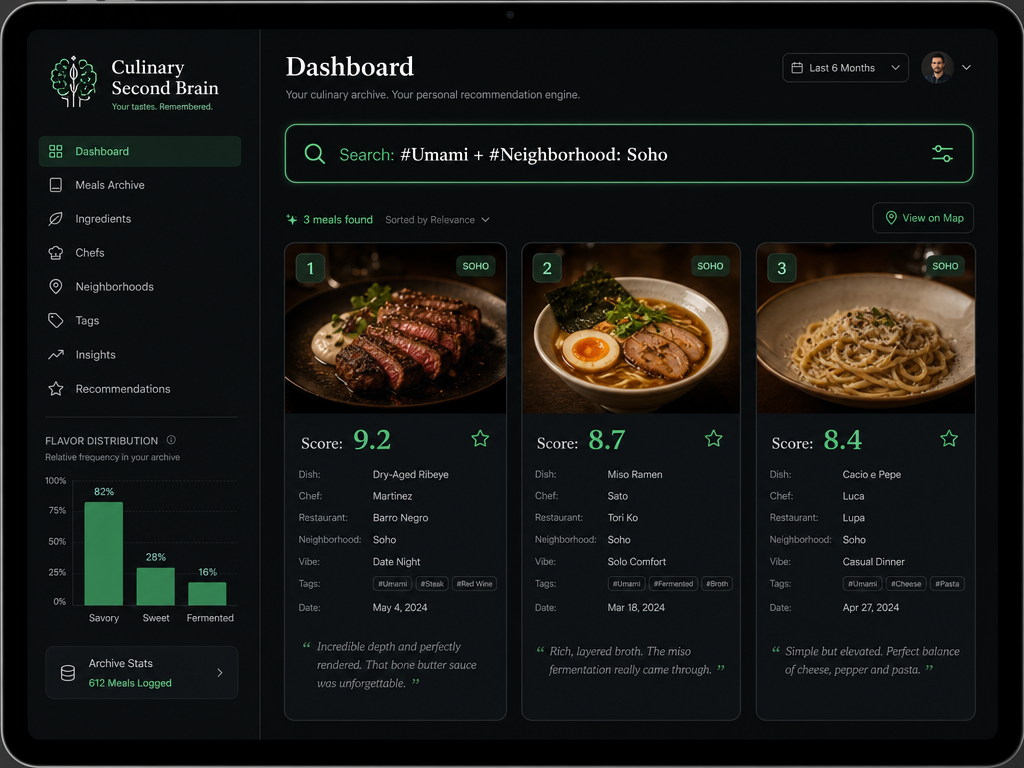
An archive isn't just a log - it's a feedback loop. The value compounds when you review, refine, and reconnect your memories. The difference between a static photo album and a "second brain" is active curation: a weekly or monthly practice of revisiting old entries, spotting patterns, and updating your understanding of your own palate.
The Weekly Review Protocol
Set aside 15 minutes every Sunday. Open your archive (Notion, Obsidian, or your app of choice). Review every meal logged in the past week. Ask three questions:
What patterns emerged? Did you rate every natural wine pairing above 8.0? Did you consistently prefer small, chef-driven spots over larger restaurants? These patterns are actionable. Next time you're choosing where to eat, you skip the big-name spot and hunt for the 12-seat neighborhood gem.
What memories are fading? Sometimes the context matters more than the food. If you logged "great pasta" but can't remember why it was great, add a note now: "Al dente texture, perfectly emulsified sauce, generous with the guanciale." This is preventative maintenance against memory decay.
What would you order again? Create a separate list (or tag) for "Must Return" dishes. These are the 9+ rated experiences that earned a spot on your lifetime rotation. Over time, this list becomes your personal Michelin guide - the dishes you'll recommend to anyone who asks.
Generating Instant Recommendations from Your Archive
The real power of a searchable archive reveals itself when someone asks, "Where should I eat in Tokyo?" You don't guess. You don't scroll through your camera roll. You query your archive:
Filter: City = Tokyo, Rating ≥ 8.5, Flavor Profile = umami OR funky
Sort: Rating descending
Three seconds later, you have five restaurants with specific dish recommendations, ratings, and context. You can even export this as a shareable list - apps like Beli and Truffle make this trivial, but you can do it manually with a Notion filter or an Obsidian query.
This is what distinguishes a memory archive from a calorie tracker. The archive generates intelligence. It tells you not just what you ate, but what you should eat next.
The Culinary Second Brain Framework
The "Second Brain" concept (popularized by Tiago Forte) applies perfectly to food memory. A Second Brain is an external system that captures, organizes, and retrieves information so your biological brain doesn't have to. For the serious foodie, that means:
- Capture: Log every exceptional meal immediately (photos, ratings, flavor tags).
- Organize: Use consistent metadata (flavor profiles, chef names, location tags).
- Distill: Review weekly to extract patterns and update notes.
- Express: Generate recommendations, create lists, share discoveries.
The archive becomes a living document. It grows smarter as you add more data. It reveals truths about your palate you didn't consciously know: you prefer funky, fermented flavors to bright, acidic ones. You rate duck dishes consistently higher than chicken. You've never scored a meal below 8.0 when the chef personally explains the dish.
People underestimate their daily calorie consumption by 20-50%, according to the Cornell Food and Brand Lab (2025). The equivalent bias in food memory is recency: you remember the last great meal, but forget the three before it. An archive corrects for recency bias. It surfaces the meal from six months ago that was just as good as last week's hyped spot.
Using the Archive to Build Thematic Lists
Once your archive contains 100+ meals, thematic lists emerge naturally. These aren't arbitrary categories - they're narratives extracted from your data:
The "Funky Foods" List: Every dish with fermented, aged, or intensely savory elements. Miso-aged beef, koji-cured fish, 60-day dry-aged steak, natural wine pairings. This list becomes your guide to umami maximalism.
The "Neighborhood Gems" List: Every sub-8.0 restaurant you'd never return to versus every 9.0+ spot you'd visit weekly. This list is geographic intelligence: the best blocks in your city, ranked by meal density.
The "Replicable at Home" List: Dishes where you've logged enough detail (ingredients, techniques, flavor balance) to attempt a recreation. This is where your archive becomes a cookbook.
Apps designed specifically for dish tracking make these lists automatic. But even in a manual system (Notion or Obsidian), you can generate them with saved queries and filters.
The archive isn't just about looking backward. It's about looking forward - using historical data to predict what you'll love next.
Frequently Asked Questions
What is a food memory archive vs. a calorie-tracking food diary?
A food memory archive is fundamentally different from a calorie-tracking food diary in both purpose and structure. A calorie diary tracks nutritional intake (macros, calories, portion sizes) to manage health outcomes like weight loss or athletic performance. A food memory archive tracks experiential data (flavor profiles, chef names, contextual memories) to preserve and retrieve exceptional dining moments. Participants who kept consistent food records lost roughly twice as much weight (13 lbs vs 9 lbs) according to a 2008 American Journal of Preventive Medicine study, but that's health-focused behavior change - memory archiving is about curating culture, not counting calories. The data structures differ: a calorie diary requires granular portion measurement (e.g., "4 oz grilled chicken breast"), while a memory archive requires narrative detail (e.g., "Josper-grilled chicken with smoked paprika, recommended by the chef after we mentioned we liked funky flavors"). If your goal is to remember extraordinary meals and generate future dining recommendations, you need an archive, not a diary.
What are the best apps for "Serious Foodies" to track restaurants in 2026?
The best apps for serious foodies in 2026 fall into three categories: packaged social apps (Beli, Truffle), general-purpose knowledge management tools adapted for food (Notion, Obsidian), and dish-specific tracking apps (Savor, Yummi). Beli optimizes for private restaurant ranking and list creation with low-friction mobile capture and CSV export capability. Truffle emphasizes social discovery with public check-ins and crowd-sourced dish recommendations but lacks native data export. Notion offers total customization via relational databases - you can build a system that tracks restaurants, dishes, wines, and chef names all linked together, with good export options. Obsidian provides local-first markdown storage with over 2,700 community plugins for knowledge management per 2026 Effortless Academic data, ideal for users prioritizing permanent data ownership. Savor specializes in dish-level tracking rather than restaurant-level ratings, addressing the gap where you need to remember specific plates rather than venues. The right choice depends on your priority hierarchy: speed (Beli), social discovery (Truffle), customization (Notion), or permanent ownership (Obsidian/Savor).
How can I build a searchable restaurant database in Notion?
Building a searchable restaurant database in Notion requires creating four core relational tables: Restaurants, Dishes, Wines, and Memories. Start by creating a "Restaurants" database with properties for Name (text), City (select), Neighborhood (text), Cuisine Type (multi-select), and Rating (number). Then create a "Dishes" database linked to Restaurants via a "Restaurant" relation property, with additional fields for Dish Name (text), Flavor Profile (multi-select tags like umami, funky, bright), Rating (number 1-10), and Date Eaten (date). Add a "Wines" database similarly linked to both Restaurants and Dishes. Finally, create a "Memories" database with a long-form text property for contextual notes (who you were with, what made it special) and link it to the corresponding Dish entry. The power emerges when you use Notion's filter and sort functions: you can create a filtered view showing "All dishes in Rome rated 8+ with natural wine pairings" or "Every pasta dish I've eaten sorted by rating." Notion's rollup properties let you calculate aggregate statistics (average rating per restaurant, total dishes logged per city). This system typically takes 2-3 hours to set up initially but reduces per-meal logging time to under 90 seconds once established.
How do I use AI/OCR to extract dish names and prices from menu photos?
Using AI and OCR (Optical Character Recognition) to extract dish information from menu photos is a two-step process: capture and extraction. First, take a clear, well-lit photo of the menu section containing your dish - avoid shadows and ensure text is readable. iOS users can use the built-in text recognition in the Photos app (press and hold on text in any image to select and copy it), while Android users can use Google Lens. Third-party OCR apps like Adobe Scan or Google Keep provide more robust extraction for complex layouts. Once text is extracted, paste it into your archive system (Notion, Obsidian, notes app) and manually add your rating and flavor tags. Advanced users can automate this with OCR APIs: services like Google Cloud Vision or AWS Textract can process menu images programmatically if you're building a custom workflow via Zapier or IFTTT. The limitation is that OCR accuracy depends on menu design - clean typography on white backgrounds works well, while stylized fonts or dark paper can produce errors requiring manual correction. For serious foodies, OCR reduces the friction of logging dish names from 60 seconds of typing to 10 seconds of copy-paste-review, making it 6x faster to maintain your archive.
Is there a way to automatically tag food photos in my camera roll?
Yes, but automatic tagging is a categorization aid rather than a complete archiving solution. Google Photos and Apple Photos (iOS 15+) use machine learning to auto-detect food photos and sort them into a "Food & Drink" category - Google Photos' AI is trained on millions of labeled images and achieves roughly 85-90% accuracy in identifying food versus non-food photos. You can search your library with queries like category:food location:tokyo to filter geographically. However, automatic tagging cannot capture experiential metadata (ratings, flavor profiles, chef names, context) - it only identifies that a photo contains food, not whether that food was exceptional. Third-party apps like Mylio and Adobe Lightroom offer more granular AI tagging (e.g., "pasta," "sushi," "dessert") but still lack the semantic depth needed for serious food memory work. The best practice is to use automatic categorization as a first-pass filter: let AI sort your 2,000+ photos into "food" versus "everything else," then manually review the food category to select the 50-100 truly memorable meals worth detailed archiving. Automation saves time on triage (from 30 minutes to 3 minutes), but the final metadata layer - the layer that makes your archive searchable by sensation rather than just visual similarity - still requires human input.
How can I search my food history by specific flavors or ingredients?
Searching your food history by flavor or ingredient requires structured tagging during the capture phase - you cannot reliably retroactively search untagged photos. The process involves three components: a controlled vocabulary of flavor tags, a database or app that supports multi-select tag filtering, and consistent application of those tags. Define a core set of 15-20 flavor descriptors based on the five basic tastes plus texture and aroma categories: sweet, salty, sour, bitter, umami, funky (fermented/aged), bright (citrus/acidity), earthy (mushroom/root vegetables), smoky, spicy (heat), creamy, crunchy. Every time you log a dish, assign 2-4 tags that best describe its dominant flavors. In Notion, use a multi-select property called "Flavor Profile" with these tags pre-defined. In Obsidian, use inline tags in your note text like #umami #funky #creamy. When you want to search, filter your database by those tags: "Show me all dishes tagged #funky and #umami sorted by rating." Apps like Savor build this structure natively - you rate dishes and add flavor tags during entry, then query by flavor profile later. The key insight is that flavor search only works if you've tagged consistently: if you log 100 dishes but only tag 20 of them, your search results will be incomplete. The discipline of tagging every meal (which takes 10-15 seconds per dish) pays exponential dividends when you're hunting for "something funky and rich" three months later.
What are the pros and cons of Beli vs. Truffle for meal archiving?
Beli and Truffle serve overlapping but distinct use cases in the food app ecosystem. Beli's core strength is private, personal restaurant ranking - you build custom lists, assign 1-10 ratings, add location tags and brief notes, and export data to CSV. This makes Beli strong for users who want a fast, mobile-first system to remember where to return and share curated lists with friends. The weakness is that Beli is restaurant-centric: if you eat five dishes at one restaurant, you rate the venue once, not each dish individually. Truffle's core strength is social discovery via gamified check-ins, public leaderboards, and crowd-sourced dish recommendations - when you visit a new restaurant, Truffle shows you what other "top reviewers" ordered, which is valuable intel. The weakness is public-by-default privacy (your food history is visible unless you change settings) and lack of native data export, meaning if Truffle shuts down, your archive is lost. For serious foodies prioritizing long-term memory preservation, Beli is the safer choice due to CSV export and private-first design, while Truffle is better for users who value discovery over archiving. Neither is purpose-built for dish-level detail - if you need to remember specific plates rather than venues, you'll need a system like Notion, Obsidian, or dedicated dish-tracking apps.
How do I export my food memories to Markdown or CSV for data ownership?
Exporting food memories to Markdown or CSV depends on your source system. If you're using Notion, click the three-dot menu on any database, select "Export," choose "Markdown & CSV" format, and Notion generates a .zip file containing separate .md files for each entry plus a .csv file for the full table - this preserves both the narrative notes (in Markdown) and structured data (in CSV) for import into other tools. If you're using Obsidian, your data is already in Markdown format living as .md files in a local folder - you don't export, you simply copy the folder to a backup location or sync it via Dropbox/iCloud. If you're using Beli, go to Settings > Export Data > CSV, which provides a basic spreadsheet with restaurant names, ratings, and notes but limited relational structure. If you're using an app without native export (like Truffle as of 2026), your only option is manual copying: open each entry, screenshot or copy-paste the data into a spreadsheet or note-taking app, which is tedious but preserves at least some information. For future-proofing, adopt this practice: every month, export your active database to both Markdown (for human-readable notes) and CSV (for structured data import into new tools), and store both files in a cloud backup (Google Drive, Dropbox) plus a local hard drive. This creates redundancy and ensures that even if your primary app shuts down, you retain full ownership of every meal memory.
What metadata should a "Serious Foodie" track (chef, vintage, companion)?
A serious foodie's metadata schema should capture seven core fields per dish: Dish Name (exact preparation, not generic category), Restaurant + Location (full name, neighborhood, city for geographic filtering), Chef or Key Person (who made it or recommended it - creates memory hooks), Flavor Profile Tags (structured descriptors like umami, funky, bright, smoky), Rating (numeric 1-10 scale for comparability), Wine or Beverage Pairing (specific bottle name and vintage or cocktail spec), and Contextual Memory (who you were with, occasion, why it mattered beyond the food). Optional but valuable: price (to track value per dollar over time), photo (visual memory aid), and menu description OCR'd from the original menu. The metadata you track determines what you can search later: if you log chef names, you can query "all dishes by Chef X sorted by rating," which reveals whether their style consistently resonates with your palate. If you log wine vintages, you can identify patterns like "I consistently rate 2015 Barolo pairings higher than 2018." Emotional eating accounts for an average of 13% of total calorie intake for self-identified emotional eaters per a 2015 Health Psychology Review study - but for memory archiving, the emotional context (anniversary dinner, post-breakup comfort meal, celebration with a mentor) is what makes the archive meaningful years later. The discipline of tracking these fields takes 60-90 seconds per meal but transforms your archive from a photo album into a queryable second brain.
Your camera roll is a graveyard. But it doesn't have to be. With the right system - structured metadata, consistent capture, automated backup, and weekly review - you transform 2,000 unsearchable photos into a living culinary database. The meals that changed you don't disappear. They compound. They reveal patterns. They generate recommendations. They become the foundation of every great meal you'll eat next.
The question isn't whether you should build a food memory archive. It's why you're still losing your best meals to the camera roll graveyard when the tools to save them have been here all along.