
Never Forget a Meal Again: How to Search Your Food Diary by Location
Harry the matcha king
Harry is our resident matcha obsessive. He’s tasted hundreds of bowls and tracks every cup in Savor.
How to Search Food Diary Entries by Location: A Complete Guide for Serious Foodies Your camera roll tells a story: 2,847 food photos taken across a dozen...
How to Search Food Diary Entries by Location: A Complete Guide for Serious Foodies
Your camera roll tells a story: 2,847 food photos taken across a dozen cities, each one a snapshot of a memorable meal. But three months after your trip to Rome, when you're trying to remember the name of that cacio e pepe spot in Trastevere, you're clicking through hundreds of thumbnails with nothing to show for it. The photo exists. The memory exists. But the connection between them? Lost.
This isn't a storage problem. It's an architecture problem. And in 2026, there's a better way.
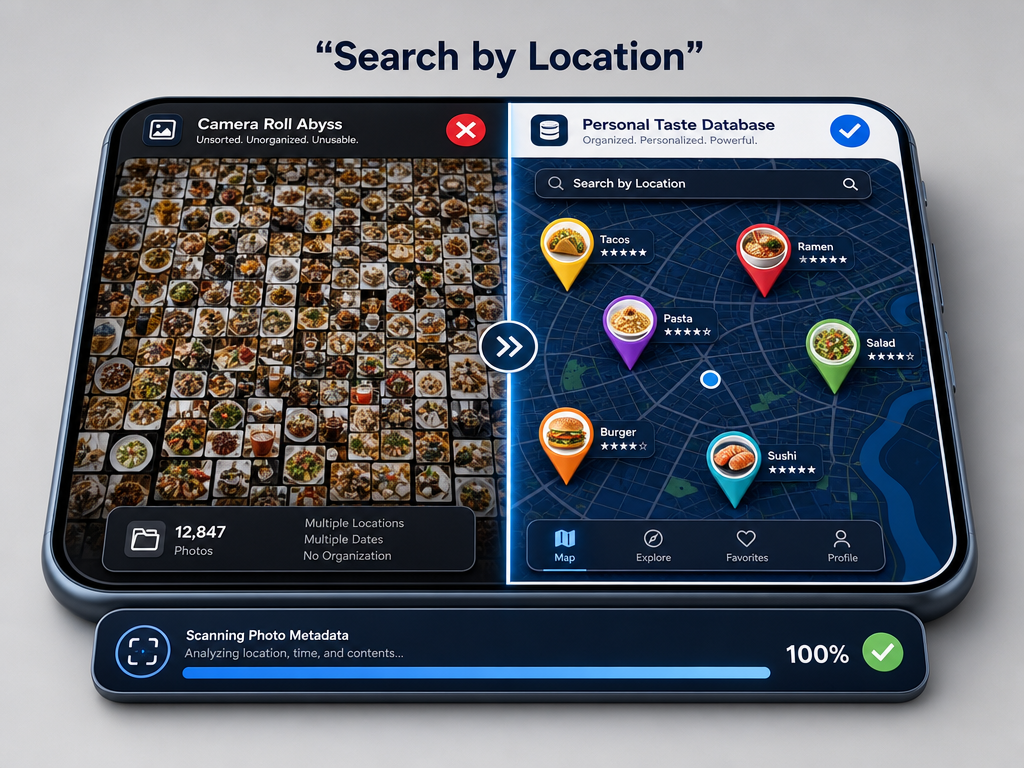 Move from an unindexed 'camera roll abyss' to a functional personal taste database that maps your culinary history by location for instant recall.
Table of Contents
- What Is Location-Based Food Diary Search?
- Why Your Current System Is Failing
- Native vs. Specialized: The Tools You Need
- The 2026 Tech Stack for Serious Foodies
- The Workflow: From Camera to Searchable Archive
- How to Retroactively Organize Old Data
- Choosing Your System: Private vs. Social
- Frequently Asked Questions
What Is Location-Based Food Diary Search?
Location-based food diary search means retrieving specific food memories by restaurant name, neighborhood, city, or even coordinates. It's the ability to type "pasta in Rome" into your phone and instantly see every dish you photographed in that city, complete with your ratings, notes, and the exact address.
This is fundamentally different from calorie tracking. Apps like MyFitnessPal or Cronometer index food by nutritional data. They're built to answer "How many calories did I eat?" Location-first food diaries answer a different question: "What was that incredible thing I ate, and where can I find it again?"
The mechanism works through GPS metadata. When you take a photo with location services enabled, your phone embeds latitude and longitude coordinates into the image file. Specialized food diary apps extract this data and use it to automatically pin each dish to a map, creating a visual archive of your culinary history.
The real power emerges when you can search this archive. Instead of scrolling through thousands of generic food photos, you can filter by location and instantly surface every meal from a specific trip, neighborhood, or even a single restaurant.
Why Your Current System Is Failing
Your phone's native Photos app technically has this data. iOS 19 and later versions include semantic search capabilities that allow users to query photos with natural language like "steak and chips on table," according to MacRumors. Android 16+ offers similar functionality.
But here's what's missing: these tools surface photos, not dishes. They can't tell you which restaurant served the best ramen in Tokyo because they don't understand the difference between a venue and a specific plate. They can't compare two versions of the same dish across different cities. And they certainly can't surface your personal rating from six months ago when you need a recommendation.
This is the "Camera Roll Fatigue" problem. You possess thousands of food photos that are functionally unindexed. You remember the feeling of a great meal, but you can't reconstruct the details when it matters.
The gap isn't technical - it's architectural. Generic photo apps weren't built to understand culinary memory. They organize by date and broad visual categories, not by dish, cuisine type, or the specific location where you experienced something extraordinary.
Native vs. Specialized: The Tools You Need
The Free Native Option
If you're committed to avoiding specialized apps entirely, you can still improve your system. Here's how to use native phone tools more effectively:
On iOS:
- Enable location services for your Camera app (Settings > Privacy & Security > Location Services > Camera > While Using the App)
- Use Photos' search bar to query by city name or landmark (e.g., "Paris" or "Colosseum")
- Create albums manually and name them by location and cuisine ("Tokyo Ramen," "Barcelona Tapas")
- Add notes to individual photos with restaurant names and dish descriptions
On Android:
- Turn on GPS tagging in your camera settings
- Use Google Photos' map view to browse by location
- Search by location name in the main search bar
- Star your favorite photos and add descriptions in the info panel
This approach is free and requires no new apps. But it's labor-intensive. You'll spend time manually organizing what specialized tools do automatically. And you still won't have dish-level metadata, rating systems, or the ability to compare similar dishes across multiple restaurants.
The Power of Specialized Apps
Dedicated food diary apps were built specifically to solve the architecture problem. They understand that serious foodies care about dishes, not just restaurants. They extract GPS data automatically and allow you to tag each photo with the specific dish name, your rating, price, and detailed notes.
Here's how the best ones approach location search:
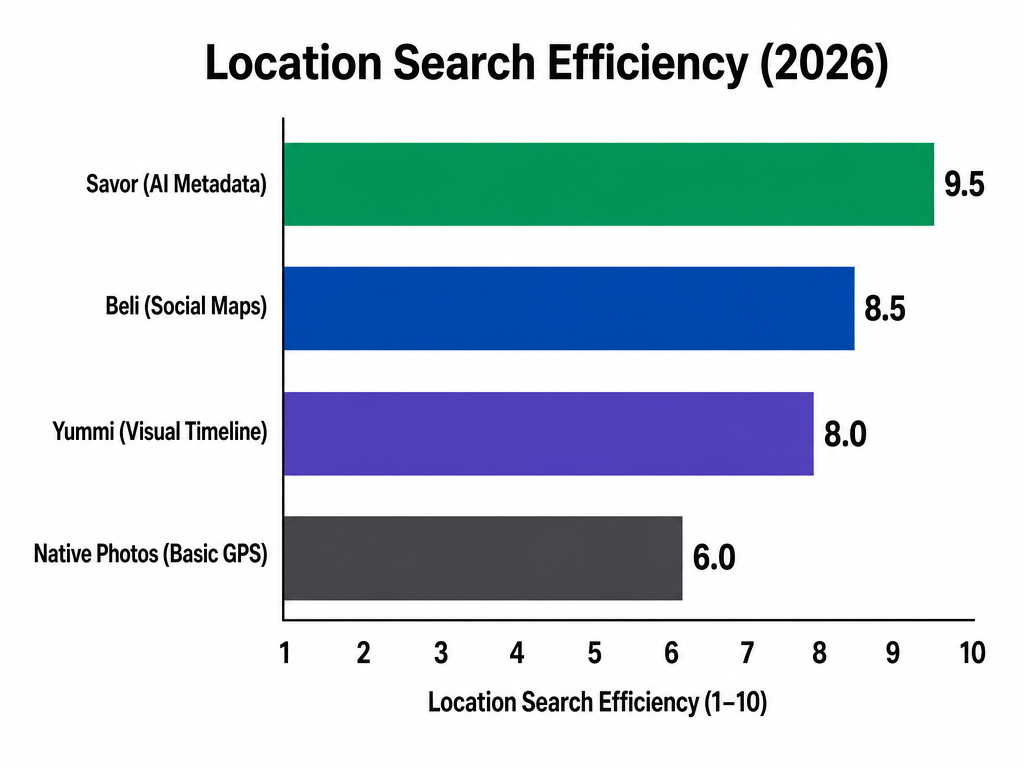 Specialized food journals outperform native photo tools by offering high-precision dish-level metadata and automated GPS mapping designed for culinary enthusiasts.
Savor focuses on private archival. Savor's AI photo recognition pulls metadata including date, GPS coordinates, and preliminary dish category, making it simple to search your entire dining history by location. You can filter by city, restaurant, or cuisine type and instantly surface every dish you've rated above a certain threshold. The interface is clean and map-centric, built for the person who wants an external brain for food memories rather than a social platform.
Beli serves a different audience: competitive foodies who want to compare rankings with friends. It includes map functionality, but the emphasis is on social discovery. You can see where your network has dined and compare your "best pizza in Brooklyn" list against theirs. Location search works, but it's integrated into a broader social layer.
Yummi emphasizes visual storytelling. Yummi uses geotagged "Foodprints" for one-click "NearMe" recall, according to the app's website. The interface displays your dining history as a timeline of visual memories, and you can filter by proximity to your current location or search by past trips.
Foodie Journal takes a more traditional approach. The app allows you to search across all entries by restaurant name, location, address, or personal notes, according to Foodie Journal's documentation. It integrates with Google Maps to display your meals on an interactive map, making it simple to browse your dining history geographically.
Each app approaches the same problem differently. The right choice depends on whether you prioritize privacy, social features, or visual presentation.
The 2026 Tech Stack for Serious Foodies
The most effective system isn't a single app - it's a layered approach that combines native phone capabilities with specialized tools.
Layer 1: Always-On GPS Tagging
Before you take another food photo, enable GPS tagging in your camera app. This is non-negotiable. Every photo you take from this point forward will carry embedded location data, which means every specialized app you use later can extract it automatically.
This setting lives in different places depending on your device:
- iPhone: Settings > Privacy & Security > Location Services > Camera > While Using the App
- Android: Camera app settings > Location tags > On
Layer 2: Visual Intelligence for Automatic Dish Identification
If you're using a newer iPhone with Apple Intelligence, you can leverage semantic photo search to identify dishes without manual tagging. Apple Intelligence's "Visual Intelligence" now allows users to search photos with semantic queries like "steak and chips on table," as MacRumors documented. This doesn't replace a dedicated food diary, but it makes initial organization faster.
On Android, Google Lens provides similar functionality. Point it at a food photo and it can often identify the dish type, which you can then manually add to your diary entry.
Layer 3: Selective Logging
Here's the brutal truth: you can't log everything. Attempting to document every meal leads to burnout and abandoned systems.
Instead, adopt the "9s and 10s" rule. Only create detailed entries for dishes that genuinely impressed you - the ones you'd order again or recommend to a friend. Everything else gets a photo and automatic GPS tagging, but no manual effort.
This approach creates a personal taste database of exceptional experiences rather than a comprehensive food log. It's the difference between a curated archive and a landfill.
Layer 4: Choose Your Primary Tool
Based on the decision factors outlined earlier, select one app as your canonical database:
Choose Savor if you want a private archive focused purely on dish-level memory and retrieval. It's built for the person who dines solo or values personal taste memory over social comparison.
Choose Beli if your food life is inherently social and you want to share lists, compare rankings, and discover new spots through your network.
Choose Yummi if you think visually and want a timeline-based interface that emphasizes photos over text.
Choose Foodie Journal if you want traditional map integration and straightforward search by restaurant name or address.
The key is consistency. Pick one and commit to it for at least three months. A half-populated database in three different apps is worse than a fully populated database in one.
The Workflow: From Camera to Searchable Archive
Here's the practical system that actually works:
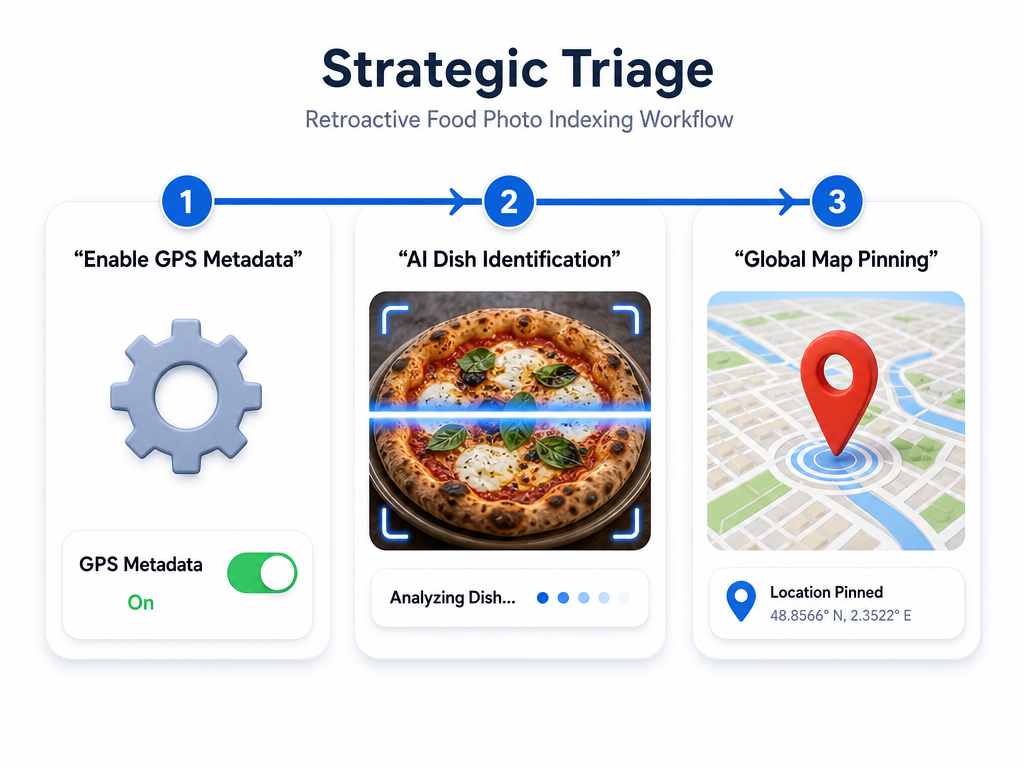 Leverage 2026 AI and metadata tools to convert your existing food photo backlog into an organized, searchable location-based archive in three simple steps.
Step 1: Capture (At the Table)
Take the photo with GPS tagging enabled. If the dish genuinely impressed you, open your chosen food diary app immediately and create an entry while the taste is still fresh. Add:
- The specific dish name (not just "pasta" - write "cacio e pepe")
- Your rating on whatever scale the app uses
- One-sentence tasting notes focusing on what made it memorable
- Price, if relevant to future decisions
This takes 90 seconds. Do it before you leave the restaurant.
Step 2: Batch Processing (Weekly)
Once a week, open your food diary app and review any photos you took but didn't log in real-time. Use Visual Intelligence or Google Lens to identify dish types if you've forgotten. Add minimal notes - even just a rating and location is better than nothing.
This weekly review catches anything you photographed but didn't have time to log properly. It prevents the backlog from becoming overwhelming.
Step 3: Retroactive Indexing (One-Time Project)
If you already have thousands of existing food photos, you need a strategic triage system. Don't attempt to index everything at once. Instead:
Start with your greatest hits. Open your camera roll and scroll through recent trips or special occasions. Export only the photos from meals you genuinely remember as exceptional.
Use batch upload. Most food diary apps let you select multiple photos and add location data in bulk. If the GPS metadata is already embedded, the app will extract it automatically.
Add minimal notes. For retroactive entries, focus on three data points: location, dish name, and a rough rating. Don't attempt to recreate detailed tasting notes from memory - they'll be fiction.
Accept incompleteness. Your retroactive archive will have gaps. That's fine. The goal is to capture the meals that still matter, not to create a comprehensive historical record.
This process might take a few hours spread across a week, but it transforms an unsearchable camera roll into a functional personal taste database.
How to Retroactively Organize Old Data
The biggest obstacle to adopting location-based food diary search is the overwhelming backlog of existing photos. Here's how to approach it without losing your mind:
The Strategic Import Method
Don't start with the oldest photo in your camera roll. That's a recipe for burnout. Instead, work backward from your most recent exceptional meals:
Month 1: Import only the dishes from your last major trip or the past 30 days of local dining. Focus on meals you'd recommend to a friend right now.
Month 2: Go back one more trip or add another 30 days of dining history. The pattern you'll notice: recent memories are easier to document because you actually remember them.
Month 3: Pick one or two "greatest hits" from earlier years - the meal in Tokyo that changed how you think about ramen, the Paris bistro you've recommended a dozen times. Add just those.
This approach builds momentum. You create a functional, searchable database quickly rather than spending months trying to reconstruct ancient history.
Handling Missing GPS Data
Some older photos won't have embedded location data, especially if you took them before enabling GPS tagging. Most specialized food diary apps allow manual location entry. You can:
- Search by restaurant name if you remember it
- Drop a pin on a map if you remember the neighborhood
- Use Google Maps Timeline to cross-reference dates and locations (if you had location services enabled on your phone during the trip)
Manual entry takes longer, but it's worth it for genuinely memorable meals. For everything else, accept the loss and move forward with better systems.
Choosing Your System: Private vs. Social
The final decision comes down to how you use food memories:
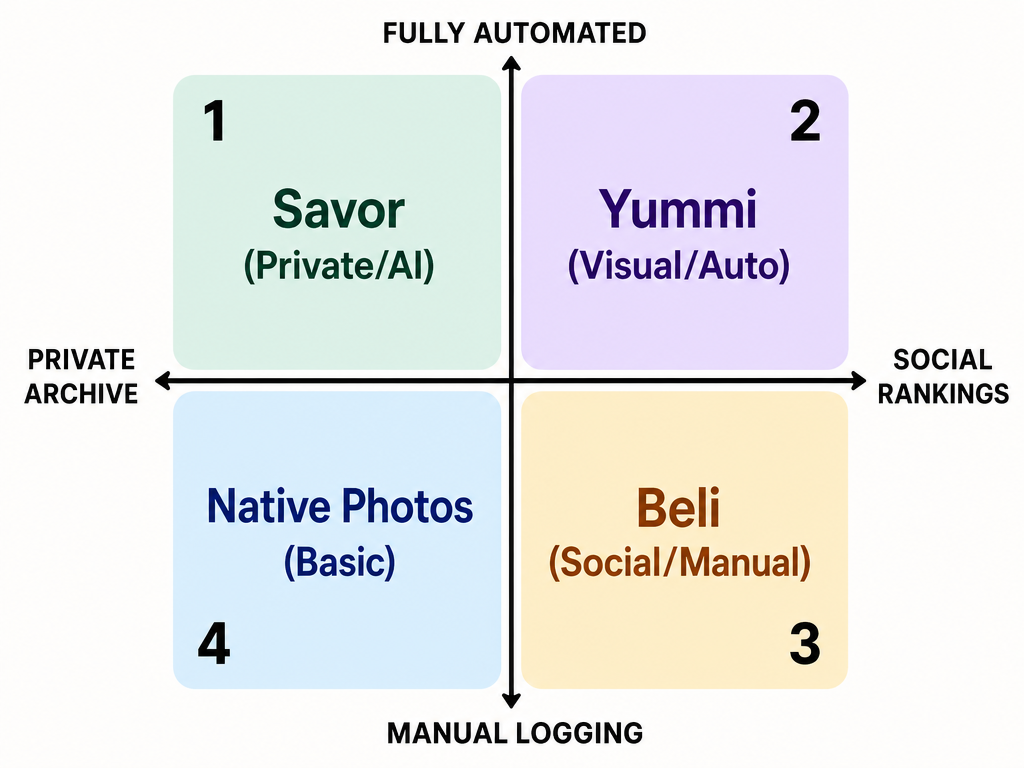 Choosing your food diary tool depends on your specific priorities: select Beli for social rankings or Savor for a private, AI-driven archive.
Choose a private archive (Savor, Foodie Journal) if:
- You dine primarily solo or with a consistent small group
- You want dish-level granularity without social noise
- Your goal is personal taste memory, not discovery through others
- You value speed and automation over sharing features
Choose a social platform (Beli) if:
- Your dining decisions are heavily influenced by friends' recommendations
- You enjoy comparing rankings and debating best-of lists
- You want to discover new restaurants through your network's activity
- You're comfortable with your dining history being visible to connections
There's no wrong choice. The best system is the one you'll actually use consistently. A simple private archive you maintain religiously beats an elaborate social platform you abandon after three weeks.
For many serious foodies, a hybrid approach works best: use a private dish-tracking app as your canonical database and share selectively to social platforms when you have something genuinely worth recommending.
Frequently Asked Questions
How can I search my existing iPhone photos by restaurant name?
Open the Photos app and use the search bar at the top. Type the restaurant name or city, and iOS will surface photos based on embedded GPS data and any location information it can extract. For more precise results, learn to use iOS's advanced semantic search features that let you query by visual content ("pasta") combined with location ("Rome").
What's the difference between a food journal and a calorie tracker for location features?
Calorie trackers like MyFitnessPal organize meals by nutritional data and date. They're built to answer "Did I stay within my macro targets?" Food journals focused on location organize by geography and dish type. They're built to answer "Where did I have that amazing ramen?" The underlying architecture is completely different, even if both apps might technically support location tagging.
Can I import my Google Maps Timeline into a food diary?
Most food diary apps don't support direct Google Maps Timeline import, but you can use Timeline as a reference tool. Open your Timeline for a specific date, identify restaurants you visited, and manually create entries in your food diary app. Some apps allow you to search for a restaurant by name and will automatically populate the address and coordinates.
Which apps allow for map view of my personal dining history?
All four specialized apps mentioned in this guide - Savor, Beli, Yummi, and Foodie Journal - include map-based interfaces for browsing your dining history geographically. The implementation varies: some display pins for each restaurant, while others use heat maps to show concentration of visits. The best way to evaluate is to try the free version of each and see which map interface matches how you think about food memories.
How do I tag a dish to a specific location if I forgot while at the restaurant?
Most food diary apps let you add location retroactively. You can either:
- Search for the restaurant by name, and the app will populate GPS coordinates automatically
- Drop a pin manually on the app's map interface
- Use your phone's photo metadata if you took a picture with GPS tagging enabled - the app will extract the coordinates when you upload the photo
The key is having some reference point: the restaurant name, the neighborhood, or the photo's embedded location data.
Is there a better food tracking app than MyFitnessPal for location-based search?
MyFitnessPal wasn't designed for location-based food discovery - it's a macro tracker. For location search, you need a dish-focused food diary app like Savor, Beli, Yummi, or Foodie Journal. These apps treat location as a primary organizational layer rather than an afterthought.
How do I turn on location services for my camera app?
On iPhone: Settings > Privacy & Security > Location Services > Camera > select "While Using the App." On Android: Open your Camera app > tap the Settings icon > find "Location tags" or "Save location" and toggle it on. After enabling this, every photo you take will include GPS coordinates in the metadata.
Your camera roll doesn't have to be a graveyard. With the right architecture - GPS-enabled photos, a specialized food diary app, and a consistent logging practice - you can build a searchable personal taste database that actually helps you remember and recreate the meals that matter.
The best time to start was three years ago. The second-best time is right now, with the next extraordinary dish you photograph. For more on building your personal restaurant library, explore how serious foodies are moving beyond generic review platforms to create their own culinary memory systems.