
Your Camera Roll is a Graveyard: The Complete Guide to Food Rater Apps That Actually Work
John the smoothie monster
John lives for smoothie bowls and cold-pressed juices. He uses Savor to remember his best blends.
Your Camera Roll is a Graveyard: The Complete Guide to Food Rater Apps That Actually Work Your phone holds 2,400 food photos. You remember taking them. You...
Your Camera Roll is a Graveyard: The Complete Guide to Food Rater Apps That Actually Work
Your phone holds 2,400 food photos. You remember taking them. You remember that incredible spicy tuna roll from three months ago, the name of the restaurant, even the neighborhood. But which photo? Was it that one from Brooklyn, or the place in Los Angeles? And what was that sauce called?
This is the food rater app problem nobody talks about. We don’t need another way to read strangers’ opinions about restaurants. We need a way to remember our own extraordinary meals before they vanish into the camera roll abyss.
Table of Contents
- The Problem with Public Rating Apps
- The Core Features of a Modern Food Rater
- Top App Recommendations (Categorized)
- How to Build Your External Brain
- Frequently Asked Questions
The Problem with Public Rating Apps
Yelp has 4.2 stars. Google Maps shows 4.4. The restaurant’s Instagram suggests a 45-minute wait. But none of this tells you what you actually need to know: which dish is worth ordering.
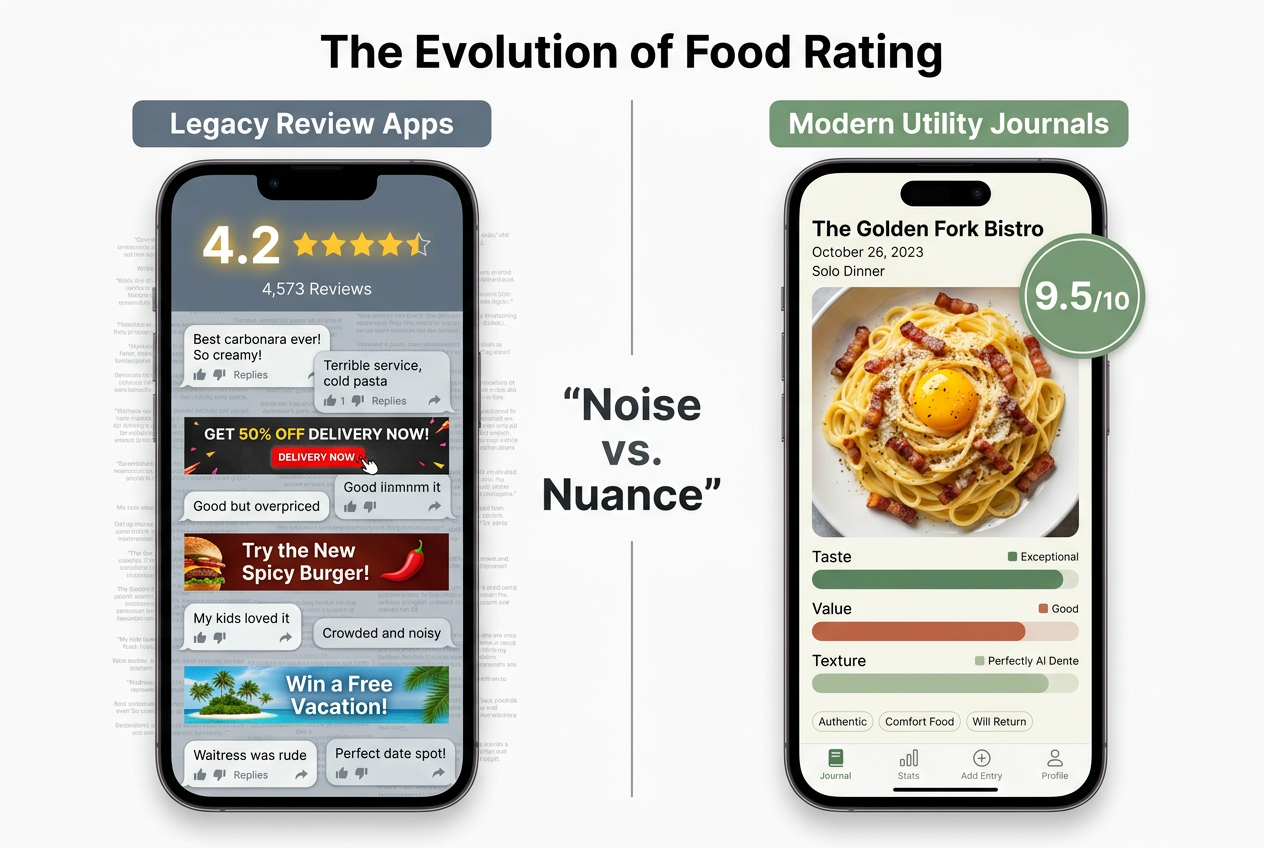
Here’s the real issue with traditional review platforms. They’re built for the wrong audience. Yelp optimizes for first-time visitors making quick decisions. Google Maps prioritizes location-based discovery. Instagram rewards aesthetic performance. None of them are designed for the person who wants to remember what they ate, track what they loved, and build a personal archive of taste.
The Serious Foodie’s needs are fundamentally different from a casual diner’s. You don’t care that a restaurant has a 4.3-star average when you know the carbonara is transcendent and everything else is mediocre. You don’t want to scroll through 40 photos of someone’s birthday party to remember whether you ordered the spicy or regular version of a dish. And you definitely don’t want to perform for an audience when you’re just trying to document a meal for your future self.
This creates what I call "Review Fatigue" - the exhausting disconnect between the information platforms provide and the information you actually need. Public rating systems reduce complex culinary experiences to a single number. They bury the specific details (the texture of the pasta, the exact spice level, the name of that green sauce) under generic praise. They treat restaurants as monolithic entities rather than collections of individual dishes, each deserving its own evaluation.
The shift toward private data isn’t just about privacy. It’s about utility. When you rate a dish for yourself rather than for an audience, you can be brutally honest. You can track the things that matter to you - whether a dish tastes better with a specific wine, how it compares to the version you had in Rome, whether it’s worth the premium price. You can build a personal flavor map that reflects your actual preferences, not the crowd’s consensus.
The best food review apps recognize this fundamental distinction. They’re not trying to be the next Yelp. They’re trying to be your external brain for food.
The Core Features of a Modern Food Rater
Dish-Level Precision
Rating a restaurant 4 stars is useless when only the carbonara was exceptional. This is the fundamental flaw in traditional review systems - they aggregate experiences that should remain distinct.
Consider a meal at a mid-range Italian spot. The burrata appetizer is forgettable - watery cheese, stale bread, zero seasoning. The house-made tagliatelle with ragù is a revelation - perfectly al dente pasta with a sauce that tastes like it simmered for eight hours. The tiramisu is competent but unremarkable. What’s the restaurant’s rating? Three stars? Four? The question itself is wrong.
A proper food rater app treats each dish as its own entry. The carbonara gets a 9.2 with notes about the guanciale-to-egg ratio. The house salad gets a 6.1 with a reminder to skip it next time. The cacio e pepe gets a 10-point score with detailed observations about how they achieved that impossibly creamy texture without cream.
This dish-level granularity transforms how you interact with restaurants. Instead of avoiding a 3.5-star place, you know exactly which two dishes to order and which section of the menu to ignore. Instead of trusting a stranger’s opinion about "the pasta," you have your own comprehensive database of every pasta dish you’ve tried, scored according to your personal taste criteria.
AI Photo Logging
The manual entry problem has killed countless food journals. You finish an incredible meal, pull out your phone to log it, face a blank form asking for restaurant name, dish name, ingredients, notes... and you close the app. Three months later, you have 300 unlabeled photos and zero useful data.
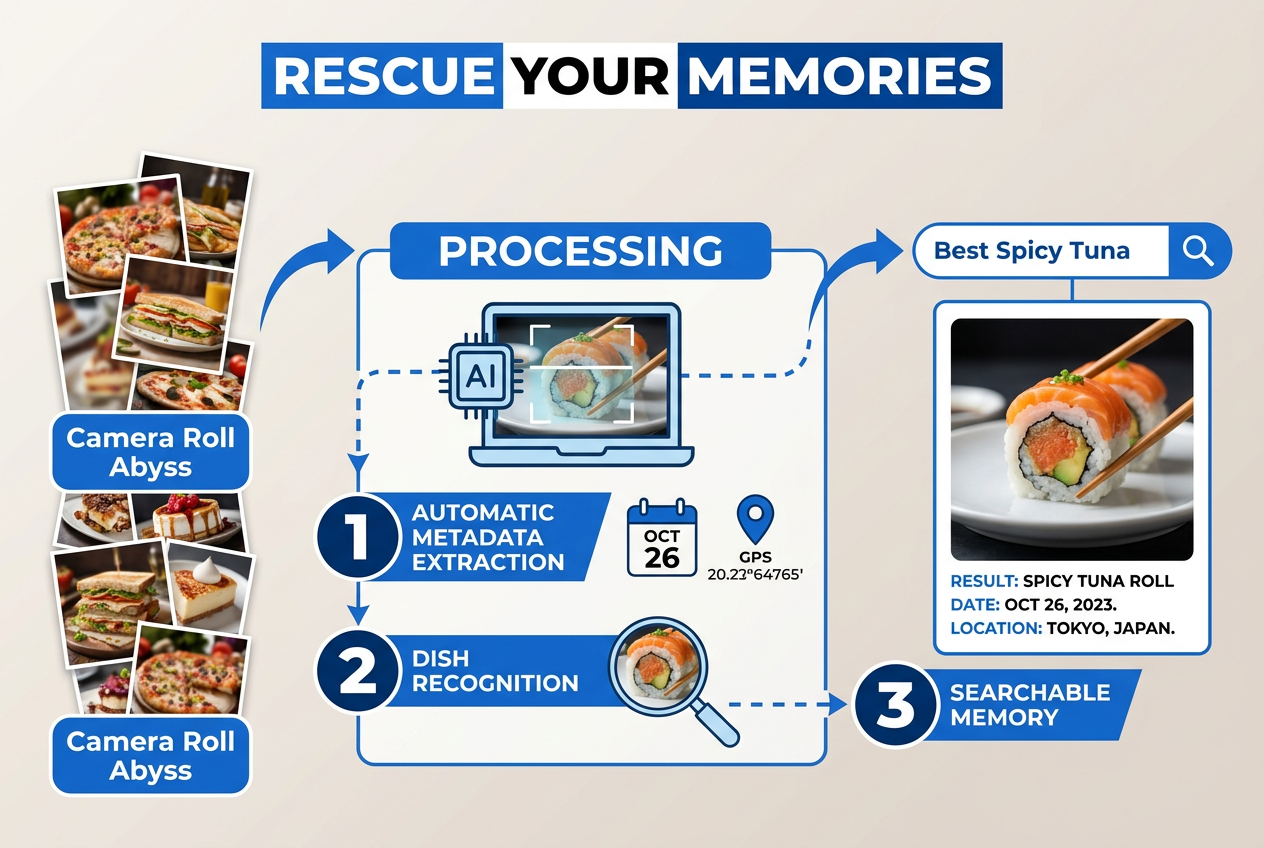
Modern food rater apps solve this through AI photo recognition. You snap a photo of your dish. The app automatically extracts the metadata: the date you took it, the GPS coordinates of the restaurant, even a preliminary guess at the cuisine type and dish category. Some apps can identify specific dishes ("This looks like a margherita pizza") and pre-populate fields.
This automation removes the friction that makes food journaling feel like homework. You’re not filling out forms - you’re just taking the photo you were going to take anyway. The app handles the organizational work in the background, creating a structured database from your casual snapshots.
The real magic happens when this data becomes searchable. Six months from now, when you’re trying to remember that incredible ramen place, you can search "spicy miso ramen 9+" and get instant results. When you’re planning a trip to Los Angeles, you can pull up every dish you’ve rated above 8.5 in that city. When someone asks for a sushi recommendation, you can show them your top-rated nigiri with photos, notes, and precise location data.
The apps that handle AI photo logging best, like those covered in our guide to apps that help you remember every dish you’ve eaten, create a seamless workflow between capturing and cataloging.
Searchable Memories
The difference between a camera roll and a food database is search functionality. Your photos app can find images by date or location, but it can’t answer the question "What was that incredible seafood pasta I had somewhere in Boston last spring?"
A searchable food memory system indexes every dimension of your dining experiences:
By rating threshold: "Show me everything I’ve scored 9.0 or higher in the past year." This creates an instant greatest-hits collection for when friends ask for recommendations or you’re planning a special meal.
By ingredient or dish type: "Where did I have that amazing duck?" becomes a database query, not an archaeology project through your camera roll. You can track your evolving relationship with specific ingredients - how your opinion of oysters changed over time, which preparations of octopus you prefer.
By location and context: "What should I eat in Chicago?" transforms from a vague Google search to a precise query of your own dining history. You can filter by neighborhood, price point, or occasion (date night versus casual lunch).
By temporal patterns: When did you last visit a specific restaurant? How has a dish changed since your first visit? Which season produces the best tomatoes at that farm-to-table spot? Your food journal becomes a time machine for taste.
The most sophisticated apps add semantic search - the ability to search based on descriptive terms rather than exact matches. You can query "rich but not heavy" or "spicy but nuanced" and get results based on your written notes, not just structured data fields. This is how the best apps for tracking favorite dishes distinguish themselves from simple photo galleries.
Top App Recommendations (Categorized)
The food rater app landscape isn’t one-size-fits-all. Your ideal tool depends on whether you want to compete with friends, maintain a private archive, or create a visual diary. Here’s how the leading apps stack up.

For the Social Gamer: Beli
Beli positions itself as "Letterboxd for food," and the comparison is apt. The app revolves around ranking restaurants in competitive lists - your top 10 pizza places, your essential Austin eats, your definitive sushi hierarchy.
The social architecture here is intentional. Your profile becomes a curated showcase of your taste, visible to friends who can challenge your rankings, suggest additions, or build their own competing lists. It’s less about individual dish tracking and more about staking claims: "This is the best Vietnamese in the city, fight me."
Beli excels at creating dining FOMO. When a friend adds a spectacular-looking dish, you see it in your feed. When multiple people in your network rate a restaurant highly, it surfaces in your recommendations. The competitive element drives discovery - you want to have an opinion on the restaurants your friends are debating.
The limitations are equally clear. Beli’s focus on restaurant-level rankings means dish-specific details often get lost. The social pressure to maintain a public-facing profile can inhibit honest criticism. And the competitive list format doesn’t serve someone who wants a comprehensive, searchable archive of every meal.
Best for: People who view dining as a social activity, want to share recommendations actively, and enjoy friendly competition over taste hierarchies.
For the Private Archivist: Savor
Savor takes the opposite approach - it’s a utility-first tool designed for comprehensive dish tracking without social performance. The core philosophy is "rate the meal, not just the venue."
The app’s strength is granularity. Every dish gets its own entry with customizable rating scales, detailed note fields, and automatic photo organization. You can track the specific cut of beef at a steakhouse, the spice level of different curries at your regular Thai spot, or how the seasonal menu changes at a farm-to-table restaurant.
Savor’s AI photo recognition pulls metadata from your images - date, location, even preliminary dish identification - but keeps everything private by default. There’s no feed to perform for, no friends to impress, just a growing database of your culinary history organized for easy retrieval.
The app shines at solving the "camera roll abyss" problem. That photo of an incredible taco from four months ago? Savor’s search function can surface it based on cuisine type, location, or your rating. You’re building a personal food encyclopedia, not a social media presence.
The trade-off is obvious: no built-in discovery mechanism beyond your own history. Savor won’t tell you about trending restaurants or what your friends are eating. It assumes you already know what you want to track and need help remembering it. For people who prefer private journaling over public performance, this is a feature, not a bug.
Best for: Serious foodies who eat out frequently, want comprehensive dish-level records, and prefer private documentation over social sharing. Learn more about the best apps to rate individual dishes.
For the Visual Diarist: Yummi
Yummi approaches food tracking through visual storytelling. The app’s signature feature is "Foodprints" - a calendar-style timeline where each day displays the photos of what you ate, creating a visual narrative of your culinary year.
The interface feels less like a database and more like a scrapbook. Your dining history appears as a grid of images organized by time, location, or event. You can create themed collections ("Summer 2025 travel," "Best desserts") that emphasize visual cohesion over structured data.
Yummi’s geo-tagging creates an interesting hybrid between memory and exploration. The app can generate a map of everywhere you’ve eaten, turning your dining history into a travel document. This works particularly well for food-focused trips where the visual timeline helps you remember not just what you ate but the sequence and context of meals.
The weakness is searchability. While Yummi excels at browsing - scrolling through your beautiful photo timeline, rediscovering forgotten meals - it’s less effective at targeted queries. Finding "that place with the incredible duck confit" requires scrolling through images rather than database search.
The app occupies a middle ground between Beli’s social features and Savor’s private utility. You can share specific collections with friends, but the core experience is personal documentation. The visual-first design means Yummi works best for people who think in images and want their food journal to feel like an Instagram highlight reel organized for their own reference.
Best for: Visual thinkers who want their food memories organized by time and place, prefer browsing to searching, and value aesthetic presentation alongside data tracking.
For the Beverage Specialist: Memolli
Memolli started as a beer rating app and evolved into a comprehensive food and drink journal with unusually deep customization options. The app’s heritage shows in its robust support for pairing notes, tasting sessions, and collection management.
The standout feature is flexibility. Memolli lets you create custom fields for any data point you want to track - vintage year for wine, hop varieties for beer, roast level for coffee. This makes it powerful for people who want to document the technical aspects of what they’re consuming alongside subjective impressions.
The interface is map-centric, organizing entries by location with filtering options for cuisine type, rating, or custom tags. This geographic approach works well for beer tourism or wine country visits where you’re sampling multiple offerings from different producers in a specific region.
Memolli’s privacy-first architecture means zero social features by default - no feeds, no followers, no public profiles. You can share individual entries or collections through direct links, but the app doesn’t push social interaction. This resonates with people who want documentation tools without the performance pressure of social platforms.
The learning curve is steeper than competitors. Memolli’s power comes from customization, which means you need to invest time setting up fields, tags, and organizational systems. It rewards meticulous tracking but can feel overwhelming for casual users who just want to remember their favorite dishes.
Best for: Beer, wine, and coffee enthusiasts who want detailed technical notes, people who prioritize privacy and customization over social features, travelers who want location-based organization.
For the Curator: The Infatuation
The Infatuation occupies a different category - it’s not a tracking tool but a curated guide platform. However, it solves one aspect of the food discovery problem through professional editorial voices and scenario-based recommendations.
The app’s strength is context-aware curation. Instead of generic "best restaurants" lists, The Infatuation provides guides like "Where to take your parents when they visit," "The best date spots under $50," or "Where to eat before a concert at Madison Square Garden." This approach acknowledges that restaurant quality is situation-dependent.
The editorial perspective means consistency. Unlike crowd-sourced reviews where you’re averaging hundreds of conflicting opinions, The Infatuation gives you a single, opinionated voice. You learn whether your taste aligns with theirs and adjust accordingly.
The obvious limitation: The Infatuation can’t track your personal history. It’s a one-way information source, not a journaling tool. You consume their recommendations but can’t build your own database. This makes it complementary to personal tracking apps rather than a replacement.
Best for: People who want professional curation for discovery, prefer scenario-based recommendations over ratings, and don’t need comprehensive tracking functionality. Can be used alongside personal tracking apps covered in our guide to apps for sharing food lists.
How to Build Your External Brain
The hardest part of starting a food journal isn’t choosing an app - it’s confronting the backlog. You have 2,000 existing food photos representing years of dining experiences. Do you start fresh and lose that history, or commit to the archaeological project of logging everything retroactively?
The answer is strategic triage. Your goal isn’t to document every meal you’ve ever eaten. It’s to capture the meals worth remembering and create a system that prevents future losses.
Import Your Greatest Hits First
Begin with the meals you can remember vividly. These are the dishes that justified the trip, the experiences you’ve recommended to multiple friends, the flavors you’ve tried to recreate at home. If you can recall specific details about a meal - the restaurant name, the dish, why it mattered - it belongs in your database.
Go through your camera roll chronologically, but don’t aim for completeness. You’re looking for the highlights: that life-changing pasta in Rome, the perfect street tacos, the sushi that redefined your understanding of fish. These entries form your initial reference library, the baseline against which future meals will be measured.
For each entry, capture four essential data points:
- The specific dish name (not just "pasta" but "cacio e pepe with black pepper from Sarawak")
- Your rating (use whatever scale your app provides, but be consistent)
- One specific detail that made it memorable (the texture, a particular ingredient, how it compared to other versions)
- Context if relevant (who you were with, why you were there, what made this meal significant)
This process typically takes 2-3 hours for 50-100 essential meals. It feels like work initially, but you’re creating the foundation of your external brain. Each entry becomes a reference point for future comparisons.
Back-Date with Metadata
Most apps allow you to adjust the date and location of entries. When you’re importing historical photos, use your camera roll’s metadata to reconstruct the timeline. That photo from "IMG_4673.jpg" might not mean anything now, but the date stamp tells you it was from your March trip to San Francisco, which helps you remember the context.
Geo-location data is particularly valuable for building your culinary map. Even if you can’t remember the exact restaurant name, knowing a dish was from a specific neighborhood in Tokyo helps narrow future searches. Some apps can even reverse-geocode your photo locations to suggest restaurant names.
Establish Your Capture Routine
The key to maintaining a food journal is making capture effortless. Your routine should take less than 60 seconds per dish:
Take the photo you were going to take anyway. Don’t stage elaborate shots if that’s not your style. The documentation photo can be quick and casual.
Open your app immediately. Don’t wait until you get home. The best time to log a dish is while you’re still tasting it, when the specific details (spice level, temperature, texture) are fresh.
Add the rating and one key observation. You don’t need paragraph-length reviews. "9.2 - perfect al dente, mushroom ragù could use more salt" is more useful than generic praise.
Trust the AI for metadata. Let the app auto-fill date, location, and preliminary categorization. You can refine later if needed, but don’t let perfect be the enemy of logged.
This routine works because it integrates with existing behavior. You’re already taking food photos. You’re already thinking about what you’re eating. The app just provides structure for information you were going to process anyway.
Create Private Lists for Planning
Once you have 50+ entries, start building thematic collections. These lists transform your archive from a passive record to an active planning tool:
- "Must return" - Dishes rated 9.0+ that warrant repeat visits
- "Show visitors" - Your definitive guide when friends ask for recommendations
- "Replicate at home" - Dishes you want to learn to cook yourself
- "[City name] map" - Essential stops for your next trip
These lists are private by default but can be shared selectively. When someone asks "Where should I eat in Austin?", you’re not scrolling through your camera roll - you’re sharing a curated collection of your highest-rated dishes with photos, ratings, and specific ordering instructions.
The goal is creating what productivity experts call an "external brain" - a trusted system that holds information so your biological brain doesn’t have to. You’re not trying to remember every meal. You’re building a searchable database that remembers for you, freeing your mental energy for actually tasting and experiencing food rather than trying not to forget it.
For more detailed strategies on turning your photos into a searchable restaurant library, check out our comprehensive guide on how to organize your restaurant photo library.
Frequently Asked Questions
What is a food rater app?
A food rater app is a personal database tool that lets you track, rate, and organize individual dishes rather than just restaurants. Unlike public review platforms like Yelp, these apps function as a private journal for your culinary experiences, helping you remember specific meals, compare dishes across restaurants, and build a searchable archive of everything you’ve eaten. The best food rater apps use AI to automatically organize photos, extract metadata like date and location, and create a memory system that prevents great meals from disappearing into your camera roll.
How is a food rater app different from Yelp or Google Reviews?
The fundamental difference is audience and purpose. Yelp and Google Reviews are public platforms designed for crowd-sourced recommendations - you’re writing for strangers making quick decisions about where to eat. Food rater apps are private tools designed for personal memory and tracking - you’re documenting for your future self. This changes everything: you can be brutally honest without worrying about a restaurant’s feelings, track dish-level details that don’t matter to the general public, and build a database organized around your specific preferences rather than consensus opinions. You’re creating a personal taste map, not contributing to the wisdom of crowds.
Do I need to take special photos for food rater apps?
No. The best food rater apps work with the casual photos you’re already taking. You don’t need professional lighting, styled compositions, or multiple angles. The documentation photo serves one purpose: triggering your memory of what the dish looked like. Most apps use AI photo recognition to automatically extract useful metadata (date, location, preliminary dish identification) from standard smartphone photos. If you’re already photographing your meals for Instagram or personal reference, you’re already creating the raw material these apps organize. The only requirement is that the photo clearly shows what you ate.
Can I track both restaurants and home cooking?
Yes, though different apps handle this with varying levels of grace. Apps like Savor and Memolli let you create entries for any food experience - whether it’s a Michelin-starred tasting menu or your attempt at recreating that carbonara recipe. The key is maintaining consistent rating criteria so your home-cooked 8.5 means the same thing as a restaurant 8.5. Some users create separate lists or tags to distinguish professional versus home cooking, while others use a unified system. The approach depends on your goals: if you’re tracking cooking skill development, separate categories help measure progress. If you’re building a comprehensive flavor database, mixing sources shows you where your home cooking rivals professionals.
How do I choose between a social app like Beli and a private tool like Savor?
Ask yourself one question: are you documenting for yourself or performing for others? Social apps like Beli excel at creating shareable taste identities - your profile becomes a curated showcase of your culinary opinions, designed to spark conversations and recommendations. Private tools like Savor prioritize comprehensive tracking and searchability - you’re building a personal database without the pressure of public performance. Many serious foodies use both: Beli for competitive rankings and social discovery, Savor for exhaustive dish-level documentation. The apps serve different psychological needs. Choose social if dining is inherently communal for you. Choose private if you view food tracking as a personal practice, more akin to journaling than broadcasting.
What’s the minimum number of entries before a food rater app becomes useful?
Around 30-50 dishes. Below that threshold, you’re still in the setup phase where the app feels like extra work without delivering obvious value. Once you cross 50 entries, you start experiencing the "external brain" effect - you can search your history instead of trying to remember restaurant names, compare similar dishes across venues, and pull up curated lists when friends ask for recommendations. At 100+ entries, the app becomes genuinely transformative: you have enough data to identify patterns in your taste, track how your preferences evolve over time, and maintain a comprehensive map of your culinary landscape. The key is consistency during that initial build-out period. Three months of diligent tracking creates a foundation that makes the app indispensable.
Can these apps help me eat healthier?
Yes, but not in the way typical nutrition apps do. Traditional food diary apps focus on macros and calories. Food rater apps help you build self-awareness about your actual preferences versus your perceived ones. You might think you love rich, heavy pasta dishes until your rating history shows you consistently score lighter preparations higher. The data reveals patterns - you rate meals higher when they include vegetables, or you’re more satisfied by smaller portions of high-quality ingredients. This awareness drives better decisions without the punitive calorie-counting framework. You’re not restricting based on external rules; you’re eating more of what you genuinely enjoy and less of what doesn’t deliver on taste. The health benefits emerge as a side effect of honoring your actual palate.
How do I handle dishes I didn’t photograph?
Add text-only entries. Most food rater apps allow entries without photos, though the workflow varies. The key is capturing the information while it’s fresh - immediately after the meal or at least the same day. Text entries benefit from more detailed written notes since you don’t have visual memory aids. Include specifics: exact dish name, standout ingredients, what made it memorable (or forgettable), how it compared to similar dishes you’ve tracked. Some users photograph the menu instead of the dish itself, which provides enough visual context for future recall. The goal is preventing the information from evaporating, even if the documentation is imperfect.