
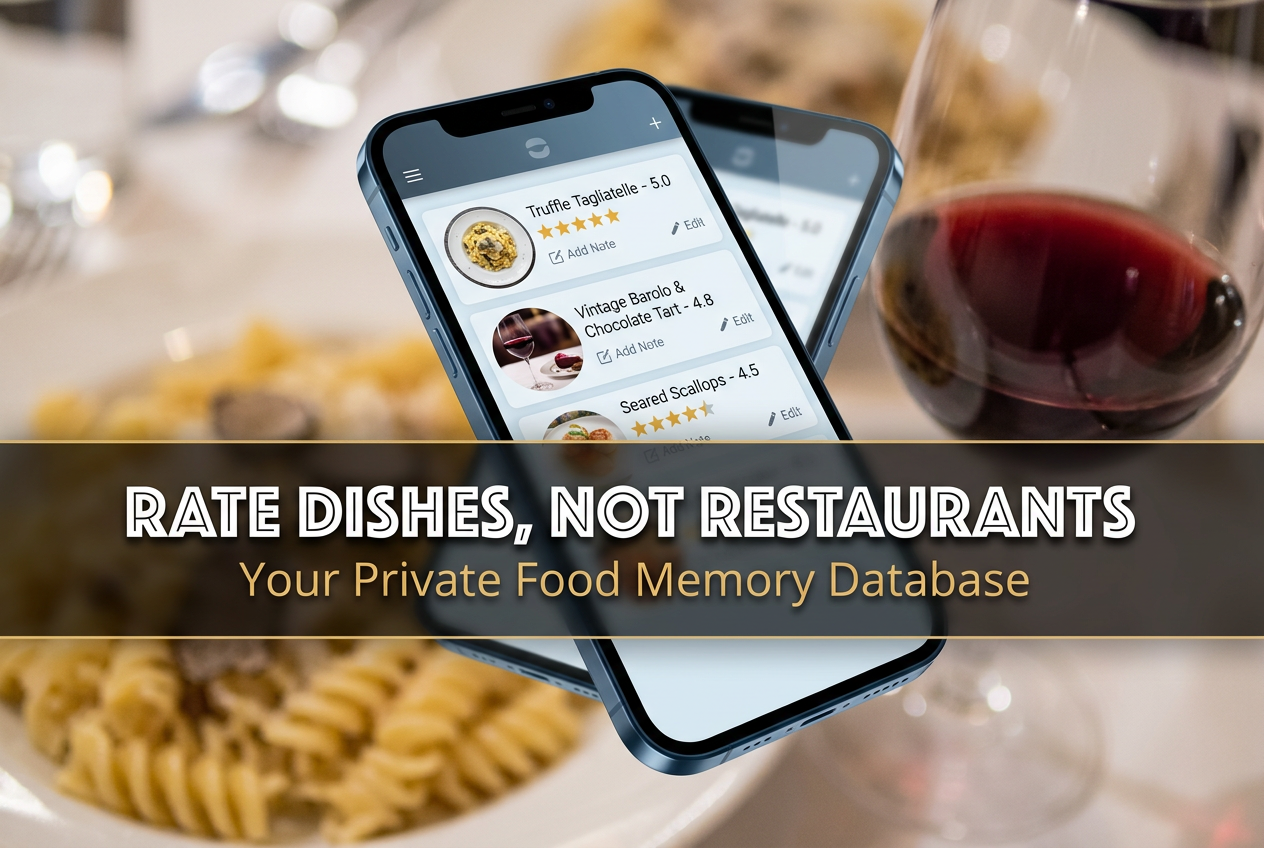
The 7 Best Apps to Rate Food Dishes Privately
John the smoothie monster
John lives for smoothie bowls and cold-pressed juices. He uses Savor to remember his best blends.
The 7 Best Apps to Rate Food Dishes Privately (And Finally Stop Trusting Your Camera Roll) Your camera roll is a graveyard. Somewhere between 2,000...
The 7 Best Apps to Rate Food Dishes Privately (And Finally Stop Trusting Your Camera Roll)
Your camera roll is a graveyard. Somewhere between 2,000 screenshots, blurry concert videos, and accidental pocket photos lies the best duck confit you’ve ever eaten - but you can’t remember where, when, or even what restaurant served it.
You had an extraordinary meal three weeks ago. The flavors were so precise, so perfectly balanced, that you actually put your fork down mid-bite to appreciate it. You took a photo. You promised yourself you’d remember. And now? It’s gone. Lost in the digital void alongside 47 nearly identical photos of other plates you also swore you’d never forget.
The problem isn’t your memory. It’s that we’ve been conditioned to treat every meal like a social media audition instead of a personal archive worth keeping. We rate restaurants with clumsy five-star scores that tell us nothing about whether the pasta was exceptional or just the ambiance. We trust strangers on Yelp who think a 4.0-star venue means every dish is equally good (spoiler: it never does).
What serious food lovers actually need is something radically different: a private space to rate individual dishes, not entire restaurants. A system precise enough to distinguish between the life-changing Cacio e Pepe and the forgettable appetizer at the same 4.5-star trattoria. A tool that doesn’t perform for an audience - it performs for you, six months from now, when you’re trying to remember which bistro in Paris had that transcendent duck.
This guide reverse-engineers the entire private food rating landscape to show you exactly which apps treat your culinary history like the valuable database it actually is.
Table of Contents
- The 4.0-Star Paradox: Why Restaurant Ratings Are Useless
- What a Serious Food Rating App Actually Needs
- The Top Contenders: 7 Apps That Rate Dishes, Not Just Venues
- The Comparison Matrix: Private vs. Social, Dish vs. Restaurant
- Technical Features That Actually Matter
- The Privacy Factor: Why Private Ratings Lead to Better Data
- How to Transition From Camera Roll Chaos to a Structured Database
- Frequently Asked Questions
The 4.0-Star Paradox: Why Restaurant Ratings Are Useless
Here’s the uncomfortable truth about restaurant ratings: they’re designed to answer the wrong question.
When you search "best Italian restaurant near me," you get a list of venues with aggregate scores. A 4.5-star rating tells you that most people had a generally positive experience. It doesn’t tell you that the Carbonara is a 9.2 masterpiece while the Tiramisu is a disappointing 6.1. It can’t distinguish between the appetizers (mediocre) and the pasta (transcendent). It treats every dish like an equal participant in some grand averaging ceremony.
This is the 4.0-star paradox: a restaurant can have impeccable service, beautiful ambiance, and two genuinely extraordinary dishes alongside six forgettable ones - and still earn a respectable four stars. For the person who ordered the wrong thing, that rating was a lie. For the person who stumbled onto the right dish, it was an understatement.
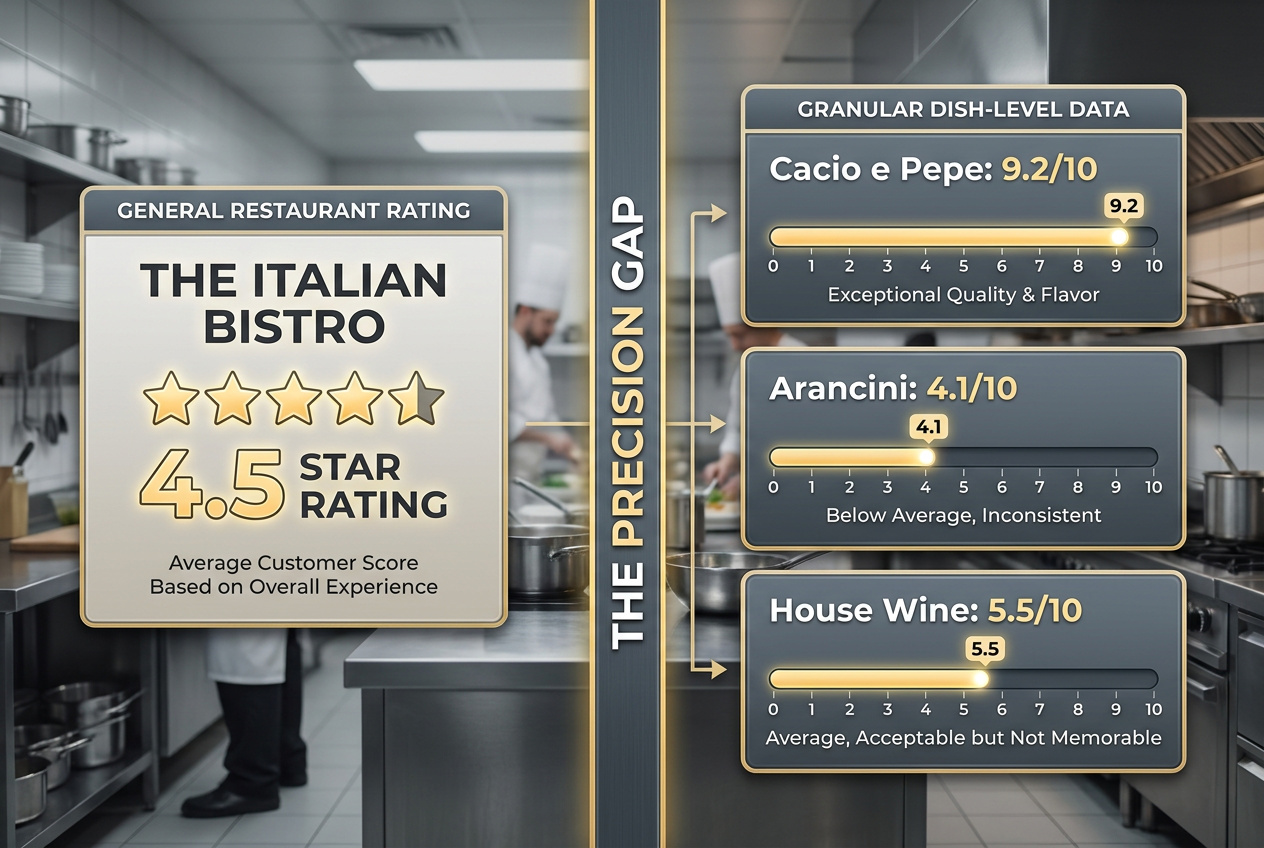
The entire model is built on a false assumption: that your experience at a restaurant is uniform. That if the venue is good, everything in it must be equally good. Real food lovers know this is absurd. We don’t remember restaurants - we remember dishes. We return to a specific place for a specific plate, not for some vague sense of overall quality.
This is why generic rating platforms fail serious foodies. They’re optimized for the casual diner who eats out twice a month and just wants to avoid food poisoning. They’re not built for someone who needs to answer the question: "Which restaurant in this neighborhood makes the best Margherita pizza?" or "Where did I have that incredible short rib last winter?"
What a Serious Food Rating App Actually Needs
If you’re going to build a personal culinary database - something that actually serves your future self - the app needs to solve problems that Yelp and Google Maps actively ignore. Here’s what matters:
Dish-Level Precision
You need the ability to rate the Steak Frites separately from the French Onion Soup. A venue score is a useless average. Dish-level ratings let you build a map of what’s actually worth ordering, not just which restaurants are generally acceptable.
A Real Rating Scale
Five stars isn’t enough resolution. The difference between a 7.5 and an 8.5 dish is massive - one is good, the other is something you’d cross a city to eat again. The best apps use a 10-point scale (or even 100-point for true critics) that mirrors how wine, coffee, and film critics actually evaluate quality.
Visual Memory Triggers
Food is a visual medium. Your brain doesn’t store the memory of a dish as a text description - it remembers the golden crust on the bread, the way the sauce pooled on the plate, the first moment you saw it. Apps that prioritize photography aren’t being shallow; they’re working with how human memory actually functions.
Geographic Recall
You need to be able to answer "What did I eat here?" as easily as "Where did I eat that?" The best apps to track restaurant meals understand that location is half the story. Geotagging turns your history into a searchable map - essential for travelers and neighborhood explorers alike.
Private by Default
Public ratings create performance anxiety. You start choosing what to post based on how it will photograph or how others will judge your taste. Private apps let you log the ugly-but-delicious taco truck meal alongside the Michelin-starred tasting menu without worrying about your "brand."
Searchable Text Fields
Six months from now, you won’t remember the restaurant name. You’ll remember "that place with the incredible octopus" or "the spot near the green line station." Apps that let you add detailed notes, searchable tags, and custom descriptors are worth their weight in gold.
The Top Contenders: 7 Apps That Rate Dishes, Not Just Venues
1. Savor - The Precision Instrument
Core Position: Dish-focused ratings on a 10-point scale with full privacy controls
Best For: Food lovers who want to build a personal culinary database
Privacy Level: High (Private by default, selective sharing)
Savor was built to solve the exact problem we’ve been discussing: your camera roll is not a database, and restaurant ratings don’t tell you which dishes to order. The app centers around individual plates, not venues. Each dish gets its own entry with a 10-point rating, detailed notes, photos, and automatic location tagging.
The 10-point scale gives you the resolution to distinguish between "good" (7.0-7.5), "excellent" (8.0-8.5), and "actively worth a detour" (9.0+). You can track specific attributes - texture, seasoning, value - and build a personal flavor profile over time. The interface is designed for quick logging (under 30 seconds per dish) but deep searchability when you need to answer "Where did I have that incredible risotto?"
Crucially, everything is private by default. You’re not building a social profile or performing for followers. You’re archiving your own taste history. When you do want to share, you can create curated lists or share specific dish entries - but the pressure is off.
Standout Features:
- 10-point dish rating system with customizable criteria
- Offline mode for travel (entries sync when you reconnect)
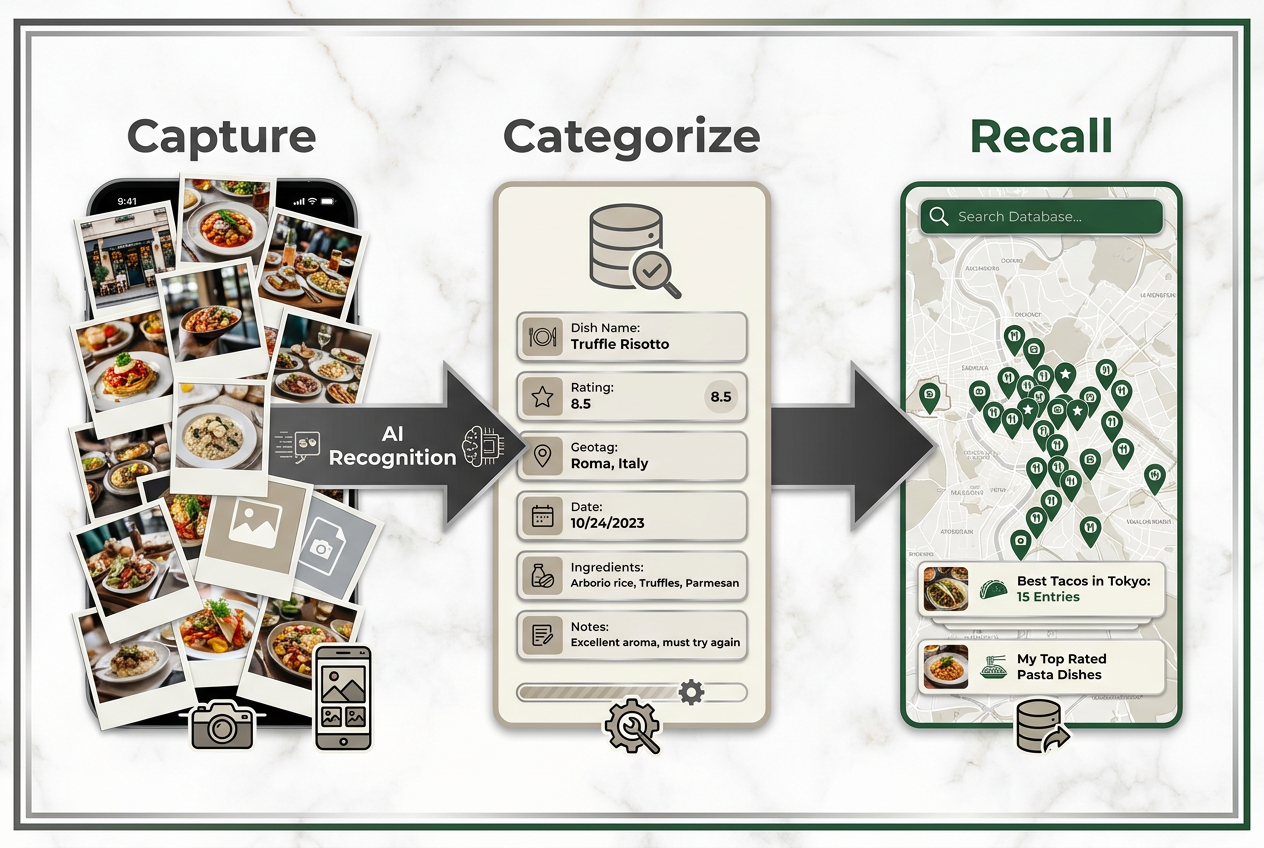
- AI-assisted photo tagging (recognizes dishes and suggests categories)
- Map view to visualize your culinary geography
- Export your data as CSV (you own your history)
The Trade-off: iOS-focused (Android version in development). If you’re an Android loyalist, you’ll need to wait or look elsewhere.
2. Memolli - The Visual Chronicler
Core Position: Photo-first private food journal with calendar view
Best For: Visual thinkers who want a beautiful chronological archive
Privacy Level: High (Fully private, no social features)
Memolli treats your meals like a visual diary. The app is optimized for photography and presentation - each entry feels like a scrapbook page rather than a data point. You can add multiple photos per meal, write freeform notes, and browse your history by date or location.
The interface is gorgeous, which matters more than it sounds. If the act of logging a meal feels aesthetically pleasing, you’re more likely to do it consistently. Memolli understands this. The trade-off is that the rating system is simpler (five stars) and the app doesn’t push you toward structured data entry. It’s more "diary" than "database."
Standout Features:
- Calendar view to see your full month of meals at a glance
- Multi-photo support (capture the appetizer, entrée, and dessert separately)
- Location tagging with map visualization
- No social pressure - everything is yours
The Trade-off: Less structure means less powerful search. You’re browsing more than querying. If you need to answer "Which restaurant had the best duck in 2024?", you’ll be scrolling rather than filtering.
3. Beli - The Social Ranking Specialist
Core Position: Letterboxd-style dish ranking with social discovery
Best For: Foodies who want to share curated lists with friends
Privacy Level: Medium (Social-first, but with privacy options)
Beli takes the film-rating model (Letterboxd) and applies it to food. You build ranked lists, follow friends to see their favorites, and discover new dishes through your network’s recommendations. The interface is clean, the community is engaged, and the focus is on dishes rather than restaurants - a major improvement over Yelp.
The app works best if you have a group of friends who also use it. The discovery features are powerful: you can see your network’s highest-rated dishes in a specific neighborhood or cuisine type. But this is explicitly a social app. If you’re looking for a private archive, Beli will feel like it’s pulling you toward performance rather than introspection.
Standout Features:
- Ranked lists (create "Best Tacos in LA" or "Dishes I’d Travel For")
- Friend activity feed (see what your network is eating)
- Dish-level ratings with notes
- Strong iOS design language
The Trade-off: The social features are both the strength and the weakness. If you want private, unfiltered logging, Beli will feel like you’re always "on stage."
4. Yummi - The Life-Logger
Core Position: Chronological food diary with photo collections
Best For: People who want to document every meal, not just highlights
Privacy Level: Medium (Private with optional sharing)
Yummi is designed for completionists. The app encourages you to log breakfast, lunch, and dinner every day, building a comprehensive timeline of your eating life. It’s less about rating individual dishes and more about creating a searchable history.
The calendar view is the star feature - you can see exactly what you ate on any given day, which is surprisingly useful for both food lovers and people tracking dietary patterns. The app also includes basic nutrition tracking if you want it, though it’s not the primary focus.
Standout Features:
- Daily logging prompts (gentle reminders to capture every meal)
- Timeline view (scroll through your food history chronologically)
- Photo-centric design
- Optional social sharing
The Trade-off: The UI can feel cluttered. The app tries to serve both casual loggers and serious foodies, which means it doesn’t fully commit to either. If you’re looking for more organized ways to manage food photos, you might find the interface overwhelming.
5. Google Maps - The Ubiquitous Default
Core Position: Universal restaurant discovery and basic reviews
Best For: Casual diners who need a one-stop navigation tool
Privacy Level: Low (Public reviews, though you can rate without reviewing)
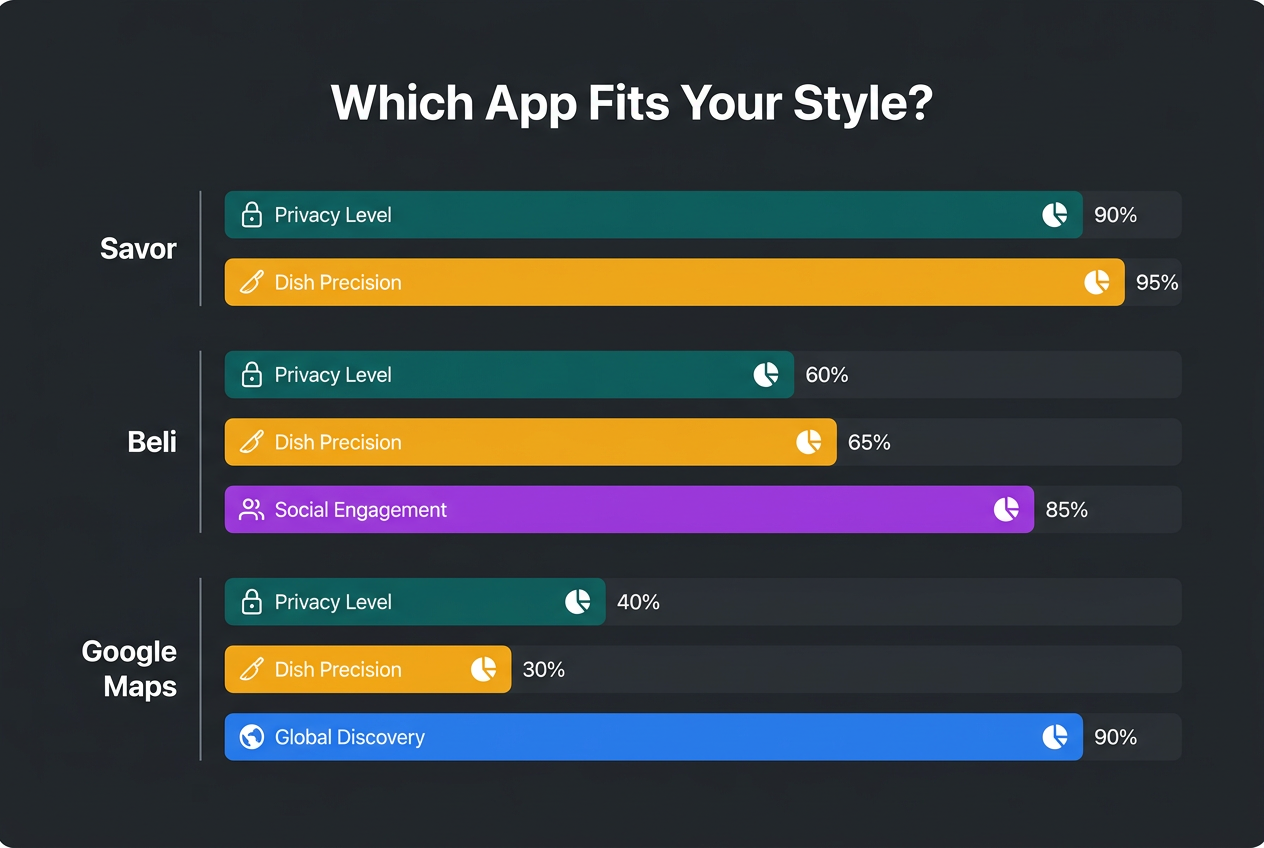
Google Maps isn’t designed for serious foodies, but it’s everywhere. You can rate restaurants, add photos, and write reviews - and your data will be seen by millions of other users. The app’s strength is its universal coverage: every restaurant, everywhere, has at least some data.
The problem is that Google Maps is still venue-focused. You can mention specific dishes in your written review, but there’s no structured way to rate the Pad Thai separately from the Tom Yum Soup. Your five-star rating applies to the entire restaurant, not the individual plates. For quick reference and navigation, it’s unbeatable. For personal culinary archiving, it’s inadequate.
Standout Features:
- Universal coverage (every restaurant is already in the system)
- Photo uploads with location tagging
- Integration with other Google services
- Crowd-sourced hours and menu data
The Trade-off: Your data is public and belongs to Google. There’s no dish-level precision. You’re feeding the algorithm, not building a personal database.
6. Notion (Custom Food Database)
Core Position: DIY food tracking system built on a flexible workspace
Best For: Power users who want total customization
Privacy Level: High (Self-hosted, fully private)
Notion isn’t a food app - it’s a blank canvas. But for the right person, it’s the most powerful option on this list. You can build a custom database with exactly the fields you want: dish name, restaurant, cuisine type, rating, price, date, notes, photos, and any other metadata you can imagine.
The flexibility is both the appeal and the challenge. You need to invest time upfront to design your system, but once it’s built, you can query your data in ways that purpose-built apps don’t allow. Want to see all dishes rated 8.5+ under $15? Filter by date range, location, and cuisine type? Notion can do it.
Standout Features:
- Total customization (build the exact system you want)
- Powerful filtering and sorting
- Can integrate with other databases (wine ratings, travel logs, etc.)
- Cross-platform (desktop, mobile, web)
The Trade-off: Setup is labor-intensive. There’s no mobile-optimized quick entry. You’re building the Ferrari yourself, which means you need to enjoy the process of database design.
7. Notes App + Folders (The Zero-Tech Option)
Core Position: Simple text logging with photo attachments
Best For: Technophobes or people who want zero learning curve
Privacy Level: Maximum (Local storage, no cloud sync unless you choose it)
Sometimes the best tool is the one you’ll actually use. Your phone’s built-in Notes app (iOS) or Keep (Android) can function as a basic food journal. Create a folder called "Food," add a new note for each meal, attach a photo, rate it out of 10, and write a sentence or two.
This is the lowest-tech option, which means it’s also the lowest friction. No account creation, no learning curve, no subscription. The limitation is searchability - you’ll be scrolling rather than filtering, and there’s no map view or automatic tagging. But if the alternative is not tracking your meals at all, Notes beats nothing.
Standout Features:
- Already on your phone
- Zero learning curve
- Completely private
- No subscription fees
The Trade-off: No structure means no powerful search. You’re essentially creating a glorified camera roll with captions. Better than nothing, but frustrating once your archive grows past 50 entries.
The Comparison Matrix: Private vs. Social, Dish vs. Restaurant
Here’s the strategic breakdown of where each app actually excels:
| App | Privacy Level | Dish-Level Focus | Rating Scale | Best Use Case |
|---|---|---|---|---|
| Savor | High (private default) | Yes (core feature) | 10-point | Building a personal dish database with precision |
| Memolli | High (fully private) | Partial (notes-based) | 5-star | Visual diary with beautiful photo browsing |
| Beli | Medium (social-first) | Yes | 10-point | Sharing curated lists with your foodie network |
| Yummi | Medium (private with sharing) | Partial | 5-star | Logging every meal chronologically |
| Google Maps | Low (public) | No | 5-star | Quick reference and navigation |
| Notion | High (self-hosted) | Yes (customizable) | Custom | Total control for power users |
| Notes App | Maximum (local) | Manual | Custom | Zero-friction logging with no tech barriers |
The fundamental choice is between private database and social discovery. Apps like Savor and Memolli optimize for personal archiving - they assume your future self is the primary user. Apps like Beli optimize for community - they assume you want to share and discover through your network. Neither is wrong; they’re solving different problems.
The second axis is structure vs. flexibility. Purpose-built apps (Savor, Beli) give you less control but more guidance. They know what data to capture and how to make it searchable. Flexible tools (Notion, Notes) give you total freedom but require you to design your own system. Most people overestimate their willingness to build custom systems and underestimate the value of opinionated defaults.
Technical Features That Actually Matter
Here are the features that separate genuinely useful food apps from digital clutter:
Offline Mode
You shouldn’t need a cell signal to log a meal. The best apps to remember dishes you’ve eaten work offline and sync when you reconnect. This is essential for international travel, rural dining, or anywhere service is spotty.
Geotagging
Automatic location capture means you never have to manually type the restaurant name. The app knows where you were when you took the photo. Months later, you can browse a map and see every meal you’ve eaten in a specific neighborhood.
AI Photo Recognition
Modern apps can identify dishes from your photos. Take a picture of Pad Thai, and the app suggests "Thai cuisine" and "noodle dish" as tags. This reduces manual data entry from 60 seconds to 10 seconds, which dramatically increases the odds you’ll actually use the app consistently.
Export Your Data
You should own your food history. Apps that let you export as CSV or JSON respect this. Platforms that lock your data in their ecosystem are betting you’ll never want to leave. Choose the former.
Quick Entry Mode
The best apps have a "fast log" option: take photo, rate on scale, add optional note, done. Full entries are great when you have time, but most meals need to be captured in under 30 seconds while you’re still at the table. Apps that require five fields of data entry will be abandoned within a week.
Search and Filter
A personal food database is only useful if you can query it. "Show me all pasta dishes rated 8.5+ in Rome" should be three taps, not a scrolling treasure hunt. Apps with robust filtering (by cuisine, rating, price, date, location) are exponentially more valuable than simple chronological lists.
The Privacy Factor: Why Private Ratings Lead to Better Data
Here’s what nobody tells you about public food reviews: they make you a worse critic.
When you know others will see your ratings, you start optimizing for audience approval rather than personal honesty. You inflate scores for places you want to support. You hedge your language to avoid offending chefs or seeming too harsh. You photograph the beautiful dishes and skip the mediocre ones because they won’t get likes.
This isn’t a character flaw - it’s human nature. Public platforms create performance anxiety. The result is a database that reflects your social persona rather than your actual taste.
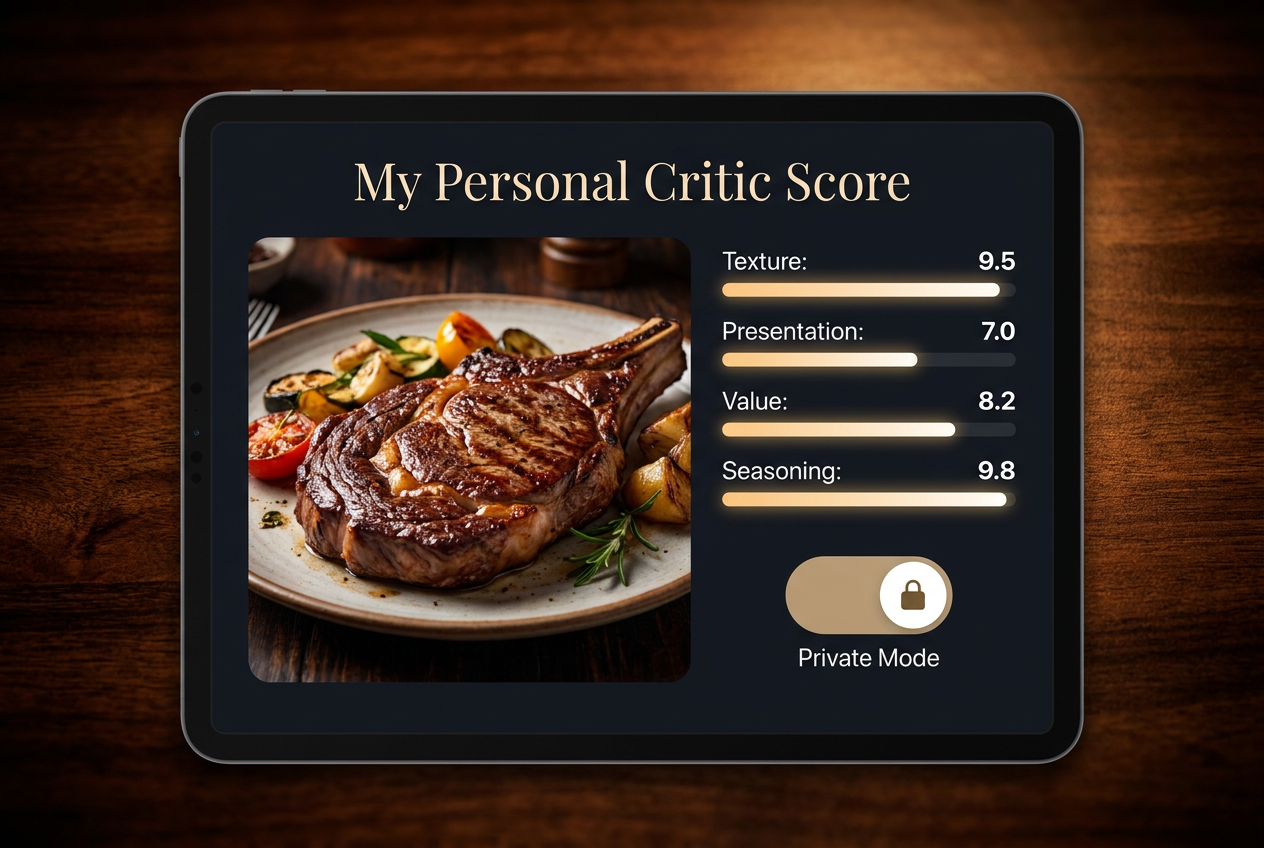
Private apps remove this pressure. When the only person reading your review is future-you, honesty becomes effortless. You can rate the Michelin-starred entrée a 6.5 without guilt. You can give the hole-in-the-wall taco truck a 9.2 without worrying if it fits your "foodie brand." You can track the ugly-but-delicious dishes alongside the Instagram-perfect ones.
The data you collect privately is cleaner. It reflects what you actually think rather than what you want others to think you think. Six months later, when you’re trying to remember which restaurant had the transcendent duck, that honest 9.5 rating will guide you correctly. The inflated public review you wrote to be polite will lead you astray.
Privacy also enables granularity. You can track attributes that would seem pedantic in a public review: crust texture, sauce-to-protein ratio, seasoning precision, plating creativity, value for money. When you learn to rate dishes like a professional food critic, this level of detail becomes essential. In private, it’s just useful data. In public, it looks like showing off.
This is why serious wine collectors use private tasting notes. Why film critics keep personal logs separate from published reviews. Why professional chefs maintain private recipe databases. The tools for public performance and private mastery are different, and trying to use one for the other’s purpose always fails.
How to Transition From Camera Roll Chaos to a Structured Database
You’re convinced. You want a personal food database. Now what?
Here’s the battle-tested workflow for migrating from random photo chaos to a searchable culinary archive:
Step 1: Pick Your Tool (And Commit)
Choose one app from this list. Just one. The worst mistake is trying to use three different systems simultaneously. You’ll log some meals in Savor, others in Notion, lose track of which app has what data, and eventually abandon all of them.
Your choice should reflect your personality:
- Minimalist who wants structure? Savor.
- Visual thinker who browses chronologically? Memolli.
- Social butterfly who shares constantly? Beli.
- Control freak who needs customization? Notion.
- Technophobe who hates learning curves? Notes app.
Step 2: Start Fresh, Don’t Backfill
You have 2,000 food photos in your camera roll. Do not try to log them all retroactively. It’s a trap. You’ll spend eight hours entering old data, burn out, and quit before you’ve captured a single new meal.
Instead, draw a line. Today is Day One of your structured archive. Everything from this point forward gets logged. Your camera roll remains a static museum of the past. Your new database is a living record of the present and future.
If specific past meals are critically important (that Rome trip, your partner’s birthday dinner), log those selectively - but limit yourself to 10 entries maximum.
Step 3: Create a Logging Ritual
Tie the behavior to an existing habit. The two moments that work best:
- Before you start eating: Take photo, log dish while it’s in front of you.
- At the end of the meal: Rate and add notes after you’ve experienced the whole thing.
Most people succeed with the first approach. Rating mid-meal is harder because your opinion might change after the third bite. But if you wait until you’ve left the restaurant, you’ll forget entirely.
The compromise: take photo immediately, add rating and notes within 24 hours. Give yourself a narrow window, but allow for reflection.
Step 4: Build Your Personal Rating Scale
A 10-point scale means nothing until you calibrate it with your own reference points. Decide what each score means to you:
- 9.0-10.0: Dishes worth crossing a city (or country) to eat again
- 8.0-8.9: Excellent; would happily order again
- 7.0-7.9: Good; no regrets but wouldn’t seek it out
- 6.0-6.9: Decent; fine but forgettable
- 5.0-5.9: Mediocre; edible but disappointing
- Below 5.0: Actively bad; warn others
Your first 20 entries will feel arbitrary. That’s fine. You’re building a reference library. By entry 50, you’ll have internalized your scale and can rate new dishes with consistency.
Step 5: Use Tags and Notes Strategically
Most people either under-document (photo only, no context) or over-document (500-word essays per dish). Neither works long-term.
The sweet spot: one sentence describing what made the dish memorable, plus 3-5 searchable tags (cuisine type, cooking method, key ingredient, price range, occasion).
Example:
- Dish: Margherita Pizza
- Rating: 8.7/10
- Note: Perfect char on crust, San Marzano tomato sweetness balanced by fresh mozzarella
- Tags: #italian #pizza #woodfired #under20 #datenight
This gives you enough detail to remember the dish six months later, but doesn’t require 10 minutes of writing.
Step 6: Review Monthly
Set a calendar reminder: first Sunday of each month, spend 15 minutes scrolling your food archive. This serves two purposes:
- Memory reinforcement: Revisiting past meals keeps them alive in your mind.
- Pattern recognition: You’ll start noticing your personal preferences ("I rate oxtail dishes consistently higher than lamb") and recurring favorites.
This review session is also when you’ll catch gaps - realizing you forgot to log that incredible brunch two weeks ago while you still have time to reconstruct it from memory.
Frequently Asked Questions
What’s the difference between rating a restaurant and rating a dish?
Restaurant ratings are averages across every aspect of the experience: food, service, ambiance, value. They’re useful for answering "Should I go here?" but useless for answering "What should I order?" Dish ratings focus on a single plate, evaluating it on its own merits. A 4-star restaurant might have one 9.5/10 dish and five 6.0/10 dishes. Dish ratings tell you which specific items are worth ordering, not just whether the venue is generally acceptable. Understanding how to organize and rate individual dishes transforms your food tracking from vague impressions into actionable data.
Why use a 10-point scale instead of 5 stars?
Five stars lacks resolution. The difference between a 7.5 and 8.5 dish is massive - one is good, the other is something you’d travel for. But on a five-star scale, both would round to four stars and appear equivalent. A 10-point scale (or even 100-point for serious critics) gives you the precision to distinguish between "solid," "excellent," and "transcendent." It mirrors how wine, coffee, and film critics evaluate quality, allowing you to build a nuanced personal database rather than a collection of vague thumbs-up ratings.
Should I log every meal or just the memorable ones?
This depends on your goal. If you want a complete timeline of your eating life (useful for dietary tracking or pure documentation), log everything. If you want a curated collection of exceptional dishes, be selective. Most serious foodies find the sweet spot is logging anything rated 7.0 or above, plus occasional "lessons learned" from disappointing meals. The key is consistency within your chosen approach - don’t switch between "log everything" and "highlights only" every other week, or your archive will be incoherent.
What if I forget to log a meal right away?
Capture the photo immediately, even if you do nothing else. Photos trigger memory better than text, and you can fill in the rating and notes within 24-48 hours. After that window, your recollection will be too vague to produce useful data. If you completely forget a meal, let it go - trying to reconstruct weeks-old entries from hazy memory just pollutes your database with inaccurate information. Better to have a complete archive from today forward than a patchy, unreliable historical record.
How do private food apps compare to public review platforms?
Public platforms like Yelp optimize for crowd-sourced recommendations and business discovery. They’re built to answer "Where should strangers eat?" Private apps optimize for personal archiving and recall. They answer "What did I love, and where can I find it again?" Public reviews are influenced by social performance - you write for an audience, which distorts honesty. Private tracking removes that pressure, producing cleaner data about your actual preferences. The best food review apps understand this distinction and lean into personal utility rather than social validation.
Can I export my data if I switch apps?
This varies dramatically by platform. Consumer-friendly apps (Savor, Notion) offer CSV or JSON export, giving you full ownership of your data. Walled gardens (most social platforms) make data extraction difficult or impossible, betting you’ll never want to leave. Before committing to any app, check their export options. Your food history is valuable - years of curated taste data shouldn’t be held hostage by a platform that might shut down or change direction.
Is it worth paying for a food tracking app?
Free apps typically monetize through ads, data harvesting, or limiting features behind aggressive paywalls. Paid apps (usually $3-10/month or $30-50/year) remove these frictions and signal that you’re the customer, not the product. For something you’ll use multiple times daily, the cost is negligible - roughly the price of one coffee per month. The real question is whether the app saves you time and improves your culinary life. If it helps you remember and reorder exceptional dishes, or prevents you from wasting money on disappointing repeat visits, it pays for itself immediately.
What’s the best app if I’m just starting to track food seriously?
Start with Savor if you want structure and privacy, or Beli if you want social discovery. Both are purpose-built for dish-level ratings and require minimal setup. Avoid Notion unless you genuinely enjoy database design - the learning curve will kill your momentum before the habit forms. Most importantly, commit to 30 days of consistent logging before evaluating whether the app works for you. The first week always feels clunky because you’re building muscle memory. By week three, the workflow becomes automatic, and the value becomes obvious.
Your camera roll will still be a chaotic mess. That’s fine. But somewhere inside it, you now have a parallel archive - a curated database of every dish that mattered, tagged and rated and ready to serve you the next time you’re standing on a street corner trying to remember where you had that transcendent duck.
Stop trusting strangers. Start trusting your own data.