
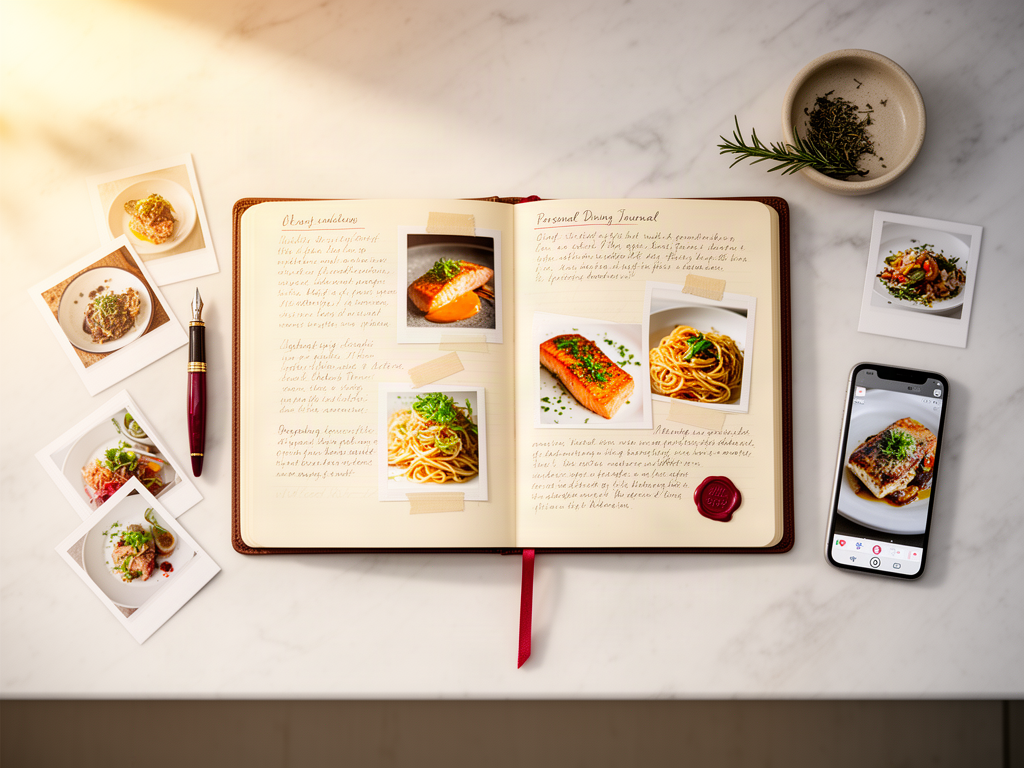
How to Build a Personalized Dining Out Archive: The Anti-Yelp System for Serious Foodies
Harry the matcha king
Harry is our resident matcha obsessive. He’s tasted hundreds of bowls and tracks every cup in Savor.
How to Build a Personalized Dining Out Archive: The Anti-Yelp System for Serious Foodies You just had an extraordinary meal. Three weeks later, you're...
How to Build a Personalized Dining Out Archive: The Anti-Yelp System for Serious Foodies
You just had an extraordinary meal. Three weeks later, you're scrolling through your camera roll trying to remember the name of that dish - the one that changed how you think about duck confit. You know you photographed it. Somewhere between 2,847 unsorted food photos, the memory is fading.
A personalized dining out archive is a private, searchable database of your culinary experiences - not a collection of restaurant ratings, but a detailed record of specific dishes, flavor profiles, and dining moments that matter to you. It transforms your scattered food photos and vague memories into a structured system you can actually search, compare, and learn from.
Most men don't realize they've eaten 73+ exceptional dishes this year but can't name 12 of them. This guide explains the architectural decision between social discovery apps, private archival systems, and analog journaling, then provides a concrete framework for building whichever system matches your actual dining habits.
Table of Contents
- What Is a Personalized Dining Out Archive?
- Why Your Camera Roll Isn't an Archive
- The Three Archival Philosophies
- The Serious Foodie Metadata Schema
- Choosing Your Tech Stack
- The Analog Alternative
- Building Your Archive: The Three-Phase Workflow
- Migration: Dealing With the Backlog
- How to Search and Learn From Your Archive
- Frequently Asked Questions
What Is a Personalized Dining Out Archive?
A dining archive is fundamentally different from a restaurant list. It's a private culinary memory system that records what happened - not where to go next.
At its core, an archive captures three dimensions:
- Sensory Memory: What did it taste like? How was the texture, the aroma, the visual presentation?
- Context: Who were you with? What was the occasion? What was the vibe of the room?
- Provenance: Where exactly did this happen? Can you recreate it or find it again?
According to research on dietary tracking, approximately 4% of food images captured for research purposes are unusable due to poor resolution, which highlights how even basic photo quality matters when you're trying to preserve culinary memory.
The archive mindset means treating meals like cultural experiences worth documenting - the same way you'd log films you've watched or books you've read. It's not performative. It's personal infrastructure.
Why Your Camera Roll Isn't an Archive
Here's what happens without a system: You take a photo. It lives with 2,000 other food photos. Three months later, you can't remember if that incredible pasta was in Rome or Milan, whether it was cacio e pepe or carbonara, or what the restaurant was called.
Your camera roll has three fatal flaws:
No Metadata Beyond Time and Location: Photos capture the visual moment but not the taste, the name of the dish, the wine pairing, or why it mattered.
No Searchability: You can't query "show me all the duck dishes I've rated 9/10" or "which restaurants in Paris served the best desserts."
No Comparison Framework: When you want to remember your favorite ramen spot, you're scrolling through hundreds of noodle photos with no reference point for which bowl was transcendent and which was forgettable.
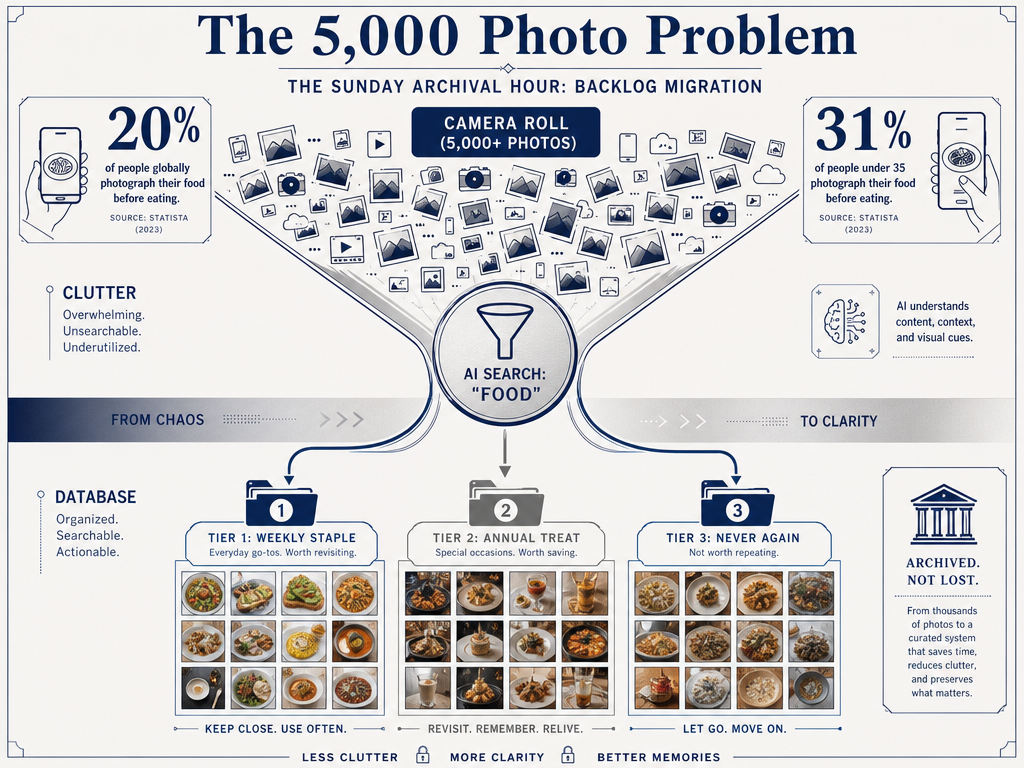
Research from Statista shows that 31% of people take pictures of food they have cooked themselves, and 20% of people take pictures of food they have ordered in a restaurant. That's a substantial volume of visual data disappearing into the void without context.
An archive solves this by adding structure: fields, tags, notes, and ratings that make your dining history searchable and useful.
The Three Archival Philosophies
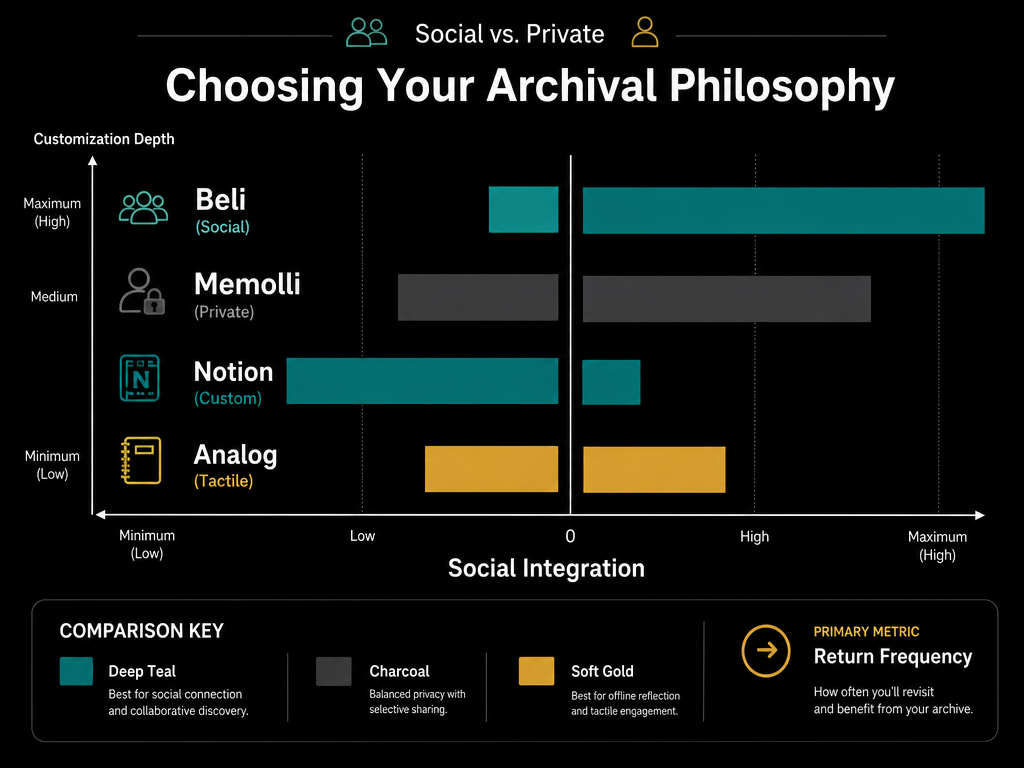
Before choosing a platform, you need to decide which archival philosophy matches your actual behavior. Each approach serves a different intent.
Philosophy 1: Low-Friction Social Discovery
Best For: Urban foodies who want quick rankings and social validation
Core Value: Speed and network effects
Example Platform: Beli
This philosophy prioritizes getting information captured in under 30 seconds. You snap a photo, drop a quick star rating, maybe add one sentence. The system auto-fills restaurant details. Your friends see what you're eating. You see their recommendations.
The tradeoff: You sacrifice depth for speed. No space for tasting notes, wine pairings, or granular flavor analysis. Your archive becomes a ranked list, not a culinary diary.
Philosophy 2: High-Detail Private Memory
Best For: The serious foodie who wants to preserve every detail
Core Value: Depth and future recall
Example Platform: Memolli, Notion
This is archival as an art form. You log the dish name, the specific ingredients you identified, the cooking technique, your thoughts on seasoning, the ambient noise level, the table number you prefer. You're building a personal database that will be useful five years from now when you're trying to recreate that flavor profile at home.
The tradeoff: It takes time. If you're dining out 200 times a year, spending 10 minutes per entry isn't sustainable. This works for special occasions or for dedicated logging sessions at home.
Philosophy 3: Analog Ritual
Best For: Fine-dining enthusiasts and culinary professionals
Core Value: Mindful appreciation and tactile memory
Example Platform: Moleskine Passion Journal, Stone Journal
Writing by hand forces you to slow down and engage with the memory differently. The physical act of journaling - sketching the plating, writing out flavor notes in your own handwriting - creates a different kind of retention than typing into an app.
The tradeoff: Zero searchability. You can't query an analog journal for "all the best pasta dishes" without manually flipping through pages. This is pure memory preservation, not data retrieval.
The Serious Foodie Metadata Schema
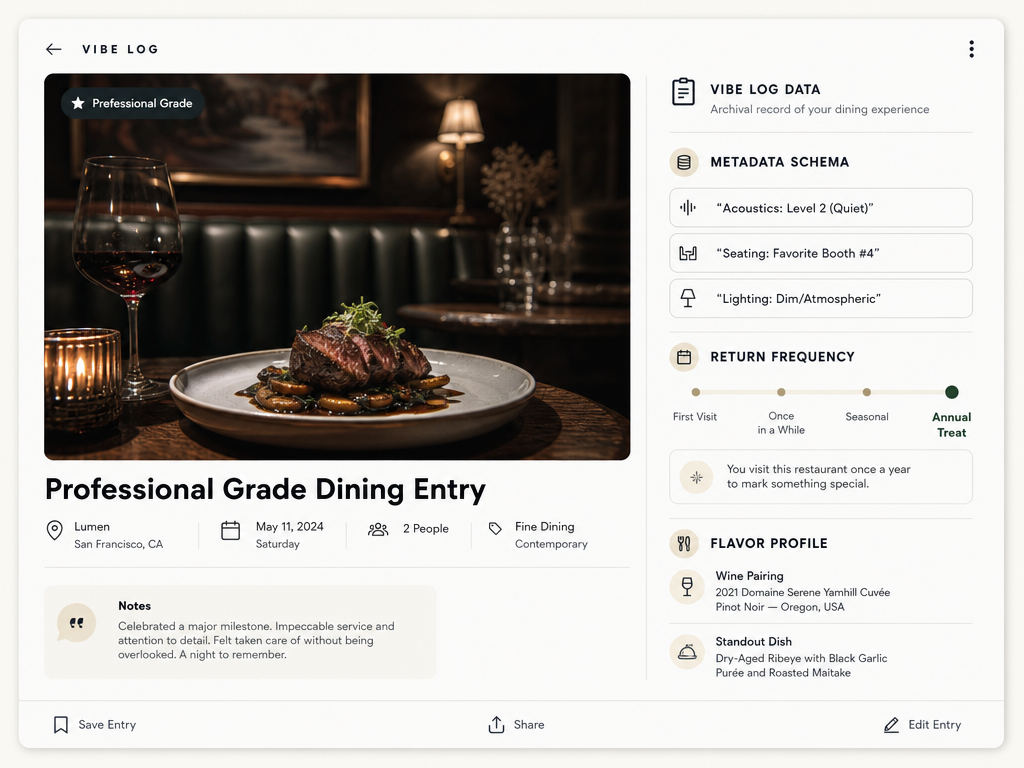
If you're building a high-detail archive, the difference between a useful database and a useless one comes down to which fields you track. Here's the professional-grade schema:
The Big Three (Mandatory Fields)
- Date: When did this happen? Essential for tracking seasonal menus and your own evolving palate.
- Occasion: Anniversary dinner, business lunch, solo exploration? Context shapes memory.
- Total Spend: Not for budgeting - for calibrating expectations. Higher-priced meals should deliver differently than budget-friendly ones.
The Flavor Profile (Core Archival Data)
- Dish Name: Exactly as it appeared on the menu. Not "pasta" but "Cacio e Pepe with Pecorino Romano and Tellicherry Black Pepper."
- Standout Element: What made this dish memorable? The texture of the handmade noodles? The unexpected garnish? The char on the protein?
- Wine/Cocktail Pairing: What you drank matters. Flavor memory is multi-sensory.
- Specific Ingredient Notes: Did you identify saffron? Was there an unusual acid? These details matter when you're trying to recreate or find something similar.
The Vibe Log (Environmental Metadata)
- Acoustic Level (1-5 Scale): Can you have a conversation? This is the most underreported dining variable.
- Favorite Table Number: If you're returning, you want the same experience. Table 12 by the window is not the same as Table 3 near the kitchen pass.
- Service Speed: Was this a 90-minute experience or a 3-hour tasting menu? Time is context.
The Return Frequency Metric
Instead of stars, consider tracking frequency of return:
- Weekly Staple: You'd go back every week if you could
- Monthly Rotation: Solid choice when you're in the neighborhood
- Annual Treat: Special occasion only
- One and Done: Glad you tried it, no need to return
This framework is more useful than a 1-5 rating because it's tied to actual behavior, not abstract quality judgment.
Choosing Your Tech Stack
The best platform depends entirely on how you actually dine out. Here's the honest breakdown.
Tier 1: The Sprinter (Beli)
Use Case: You eat out frequently and need to log fast
Strengths: Auto-fills restaurant details, social discovery layer, mobile-first design
Weaknesses: Limited customization, minimal tasting note space, no advanced search
Beli is designed for the urban diner who hits 15+ restaurants a month and wants a quick ranking system. If you're spending more than 60 seconds logging a meal, you're doing it wrong in this ecosystem.
Tier 2: The Archivist (Memolli)
Use Case: You want photo-centric memory preservation without social performance
Strengths: Private by default, generous space for notes, photo organization
Weaknesses: Less structure than Notion, minimal analytics
Memolli sits in the middle ground: easier than building a custom Notion database but more detailed than Beli. It's built specifically for people who want to remember meals, not influence where others dine.
Tier 3: The Architect (Notion)
Use Case: You want complete control over your data structure
Strengths: Infinite customization, powerful search and filtering, can integrate with other databases
Weaknesses: Steep learning curve, requires regular maintenance, easy to over-engineer
Notion appeals to the "data nerd" who wants a bespoke life OS. You can build a restaurant database with custom properties, linked tables for ingredients, galleries sorted by cuisine type, and automated reminders to revisit highly rated spots. The downside: you need to want to build this system, not just use it.
Professional restaurant photographers need 30-80 food photos to fully cover a menu, which gives you a sense of how much visual documentation matters in culinary archiving. Your personal archive doesn't need that volume, but the principle holds: specificity matters.
The Analog Alternative
Not everything needs to be digital. There's a legitimate case for physical journaling, especially for fine-dining experiences where the ritual of documentation matters as much as the data itself.
The Stone Journal (Chef-Grade)
Designed specifically for culinary professionals, the Stone Journal includes prompts for plating sketches, ingredient breakdowns, and technique notes. It's a physical artifact you can keep on your shelf - a culinary memoir, not a searchable database.
Moleskine Passion Journal (Food Edition)
Pre-structured pages with fields for recipes, tasting notes, and meal memories. Less intimidating than a blank notebook, more tactile than an app.
The obvious limitation: you can't search an analog journal. If you want to find "all the best pasta dishes I've had in the last five years," you're flipping through pages and relying on your index system. But for some people, that's a feature, not a bug. The act of revisiting old pages reinforces memory in a way that scrolling through an app doesn't.
Building Your Archive: The Three-Phase Workflow
The difference between a functioning archive and an abandoned one is having a sustainable workflow. Here's the system that actually works.
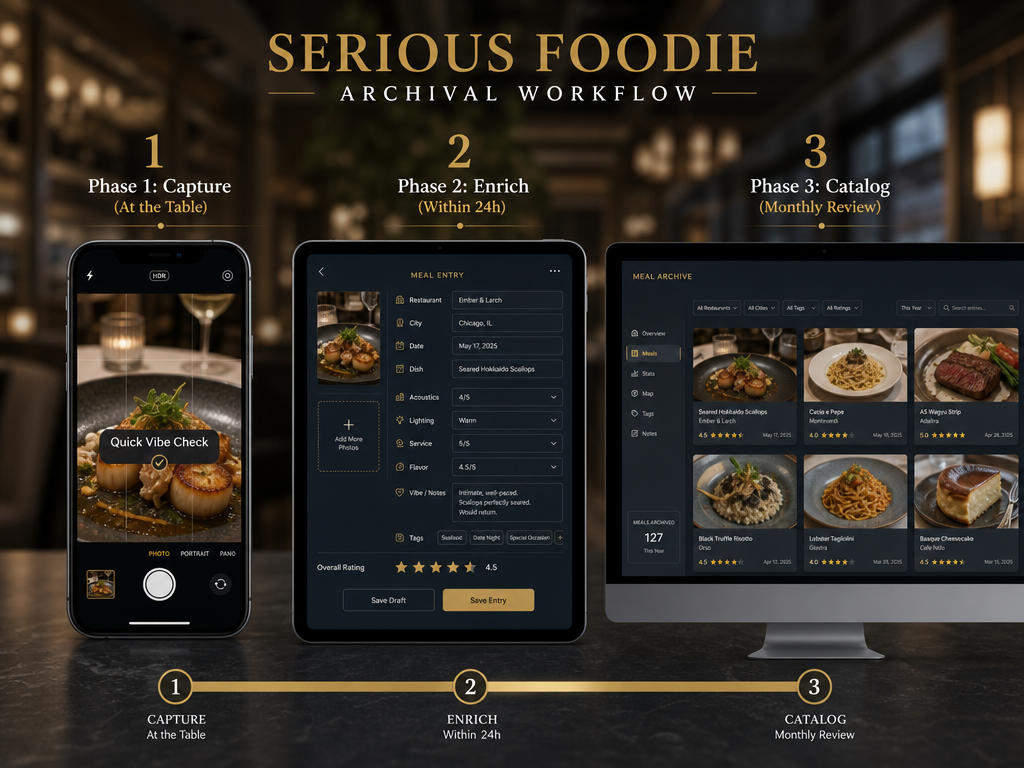
Phase 1: Capture (At the Table)
Take the photo. That's it. Don't try to write tasting notes while your food gets cold. Capture the visual memory and move on.
Pro Move: Use your phone's voice memo app to record a 30-second note immediately after the meal while you're still processing the flavors. "The duck had this incredible char, almost burnt but not quite, paired with a cherry gastrique that was way more savory than sweet."
Phase 2: Quick Log (Within 24 Hours)
While the memory is fresh, add the bare minimum:
- Restaurant name
- Dish name
- Quick rating or return frequency
This takes 90 seconds and prevents the worst-case scenario: a photo with zero context three months later.
Phase 3: Deep Curate (Monthly)
Once a month, set aside an hour. Go through the month's meals. Expand your notes. Add details you remember. Tag dishes by cuisine type or flavor profile. This is when you build the actual archival value.
The monthly session is when you look for patterns: "I rated four different ramen spots this month - which one had the best broth?" or "Every pasta dish I loved used a specific type of olive oil."
For readers interested in more advanced tracking systems, our guide on how to track dishes across multiple cities covers location-based archival strategies in detail.
Migration: Dealing With the Backlog
You already have 2,000+ food photos in your camera roll. Here's how to salvage that data without losing your mind.
Step 1: Use Search Queries to Filter
On iPhone: Open Photos, search "food" or "restaurant"
On Android: Open Google Photos, search "food" or "meal"
AI photo recognition is surprisingly good at identifying food images. This gets you a filtered view without manually scrolling through everything.
Step 2: Create a "Dining Archive" Folder
Move all food photos to a dedicated album. This separates your culinary history from vacation photos and screenshots.
Step 3: Tiered Migration (Not Everything Deserves Equal Treatment)
You don't need to log every mediocre sandwich. Use a three-tier system:
Tier 1 (The Greatest Hits): Meals you actively remember and would recommend to others. Migrate these first with full notes.
Tier 2 (The Solid Experiences): Good meals, worth logging, but less urgent. Add basic details when you have time.
Tier 3 (The Forgettable): If you can't remember anything about the meal from the photo alone, delete it or leave it in the camera roll. Not every meal deserves archival space.
Step 4: Sunday Archival Sessions
Pick one Sunday a month. Brew coffee. Spend 60-90 minutes migrating your top-tier meals from the previous month. Make it a ritual, not a chore.
AI-Assisted Migration (2026 Context)
Newer tools are using AI photo analysis to automatically extract restaurant names and dates from image metadata. If your photo has location data enabled, some platforms can pre-fill the restaurant name and even suggest dishes based on visual recognition. This speeds up backlog migration considerably, though you'll still want to verify accuracy and add your own tasting notes.
If you're interested in comparing different organizational approaches, our article on how to organize restaurant photos by dish explores alternative metadata strategies.
How to Search and Learn From Your Archive
The entire point of building an archive is making your culinary history queryable. Here's what a functioning system lets you do:
Find Your Best Meals by Cuisine Type
"Show me all the Japanese restaurants I've rated 9/10 or higher." Now you have a shortlist for your next Tokyo trip or when recommending spots to friends.
Track Flavor Patterns
"What do all my favorite desserts have in common?" Maybe they all use brown butter. Maybe you consistently prefer citrus-forward pastry over chocolate-heavy. Your archive reveals your palate.
Remember Context for Special Occasions
"What did we order on our anniversary three years ago?" Your archive is a time machine for recreating meaningful meals.
Build Custom Lists for Travel
Before a trip to Barcelona, query your archive for "all tapas dishes I've loved" and create a comparison framework. When you try patatas bravas at five different spots, you'll know which version comes closest to your favorite.
For a deeper dive into building searchable food databases, see our guide on how to build a searchable dining history database.
Compare Return Frequency
"Which restaurants have I been back to three or more times?" This reveals your actual favorites - not what you say you love, but where you spend your money and time.
Frequently Asked Questions
What is the best app for keeping track of restaurants?
The best app depends on your archival philosophy. Beli works for quick social logging, Memolli excels at private photo-centric memory, and Notion offers maximum customization if you're willing to build your own structure. There's no universal winner - only the right tool for your specific dining habits and how much time you're willing to invest in documentation.
How do I create my own archive?
Start with the three-phase workflow: capture photos at the table, add quick notes within 24 hours, and do monthly deep curation sessions. Choose one platform (digital or analog), commit to the minimum metadata schema (date, dish name, rating), and migrate your backlog in tiers starting with meals you actually remember. Consistency matters more than perfection.
Is Notion overkill for personal use?
Notion is overkill if you want a simple ranking system. It's perfectly calibrated if you enjoy building custom databases and want complete control over your data structure. The learning curve is real, and maintenance is ongoing. If the idea of designing your own database sounds tedious rather than exciting, choose a simpler platform.
How do I make food photos look professional?
Natural light is everything. Shoot near a window, avoid direct overhead lighting, and never use your phone's flash. Compose the shot with negative space around the dish rather than filling the entire frame. For detailed photography techniques, our article on how to take better food photos covers lighting, composition, and quick mobile editing.
How do professional chefs organize their kitchen?
Professional kitchen organization follows the mise en place principle - everything in its assigned place based on workflow efficiency. While that's about physical space, the concept applies to digital archives: organize by how you'll actually search (by cuisine, by city, by dish type) rather than chronologically. Your archive should reflect your retrieval patterns, not just when you took the photos.
Which AI photo organizer is best for organizing photos?
For food-specific organization, look for tools that can recognize dish types and extract location metadata. Apple Photos and Google Photos both offer decent AI search for "food" queries. For more advanced organization, platforms like Notion with image recognition or dedicated food apps like Memolli that tag by cuisine type offer better culinary-specific sorting than general photo managers.
What are the criteria for a good food review?
Professional food criticism evaluates technique, ingredient quality, execution, value for price, and whether the dish achieves its stated intention. For personal archives, your criteria should match what you care about: flavor, texture, creativity, portion size, or how well it paired with your wine. The best review framework is one you'll actually use consistently rather than an ideal checklist you abandon after three entries.
How many photos does the average person take per day?
While general photography statistics vary widely, the question for food archiving is different: it's about which photos you actually review and use. Most people photograph food they'll never look at again. The goal of an archive is reducing that waste - fewer photos, better documentation, more intentional preservation of meals that genuinely mattered.
Your camera roll is not a culinary archive. It's a graveyard of extraordinary meals slowly fading into the visual noise of daily life. Building a personalized dining out archive - whether digital or analog, social or private, simple or complex - transforms that chaos into searchable memory.
The system you choose matters less than the habit you build. Start with one platform, commit to the minimum metadata that makes a meal findable, and adjust as you learn what you actually reference. Three months from now, when you're trying to remember that perfect duck dish, you'll know exactly where to look.