
How to Catalog Meals by Cuisine and Country: The Complete System for Serious Foodies
John the smoothie monster
John lives for smoothie bowls and cold-pressed juices. He uses Savor to remember his best blends.
How to Catalog Meals by Cuisine and Country: The Complete System for Serious Foodies Your camera roll holds 2,847 food photos. You remember taking them - the...
How to Catalog Meals by Cuisine and Country: The Complete System for Serious Foodies
Your camera roll holds 2,847 food photos. You remember taking them - the perfect carbonara in Rome, that mind-bending taco in Mexico City, the omakase that changed your life. But three months later, you can't remember which restaurant served what, or whether that incredible curry was Thai or Indian.
Here's the truth most food lovers don't admit: more than 50% of American adults eat out three or more times per week, and we're losing almost all of it to the black hole of our camera rolls.
This isn't about meal planning or calorie counting. It's about building a personal culinary intelligence system that actually helps you rediscover extraordinary meals, plan future trips, and give meaningful recommendations without scrolling through thousands of unsearchable photos.
Table of Contents
- Why Most Food Tracking Fails (And What Actually Works)
- The Taxonomy Decision: Cuisine vs. Country
- The Three-Tier System for Cataloging Meals
- Method 1: The Gamified Socialite (Beli)
- Method 2: The Digital Scrapbooker (Memolli)
- Method 3: The Data Architect (Notion/Airtable)
- The Fusion Problem: How to Handle Hybrid Cuisines
- The Photo Hygiene Protocol
- Making Your Catalog Searchable for Trip Planning
- Frequently Asked Questions
Why Most Food Tracking Fails (And What Actually Works)
You've probably tried this before. You bookmarked a restaurant on Google Maps. You took a photo. Maybe you even opened your Notes app and typed "amazing pasta place near the fountain."
Six months later, you're trying to recommend that spot to a friend visiting Rome, and you can't find it. The photo has no location data. The bookmark has no context. The note says nothing about what you actually ordered.
The reason most food tracking systems fail is simple: they're built for the wrong goal. Recipe apps are designed for home cooking. Calorie counters are built for nutritionists. Review platforms are optimized for the restaurant, not the dish.
Serious foodies need something different - a system that captures the meal, the context, and the memory trigger, all organized in a way that actually helps you find that information later.
The Taxonomy Decision: Cuisine vs. Country
This is the first fork in the road, and it matters more than you think.
Do you organize your food memories by the cuisine of the dish (Italian, Japanese, Mexican) or by the country where you ate it (Italy, Japan, Mexico)?
The Cuisine-First Approach works best if you:
- Care more about comparing versions of the same dish across different cities
- Want to track your exploration of a specific culinary tradition
- Often eat authentic regional food outside its country of origin (e.g., omakase in New York)
The Country-First Approach works best if you:
- Use food tracking primarily for trip planning and memory
- Value the cultural and travel context as much as the food itself
- Want to see what you've "eaten through" in specific regions
Here's the reality: you need both. The most effective systems use a dual taxonomy where the primary tag is the country (or city) and the secondary tag is the cuisine type. This lets you answer questions like "What was the best Thai food I had in Los Angeles?" or "Which cities have I eaten the best ramen in?"
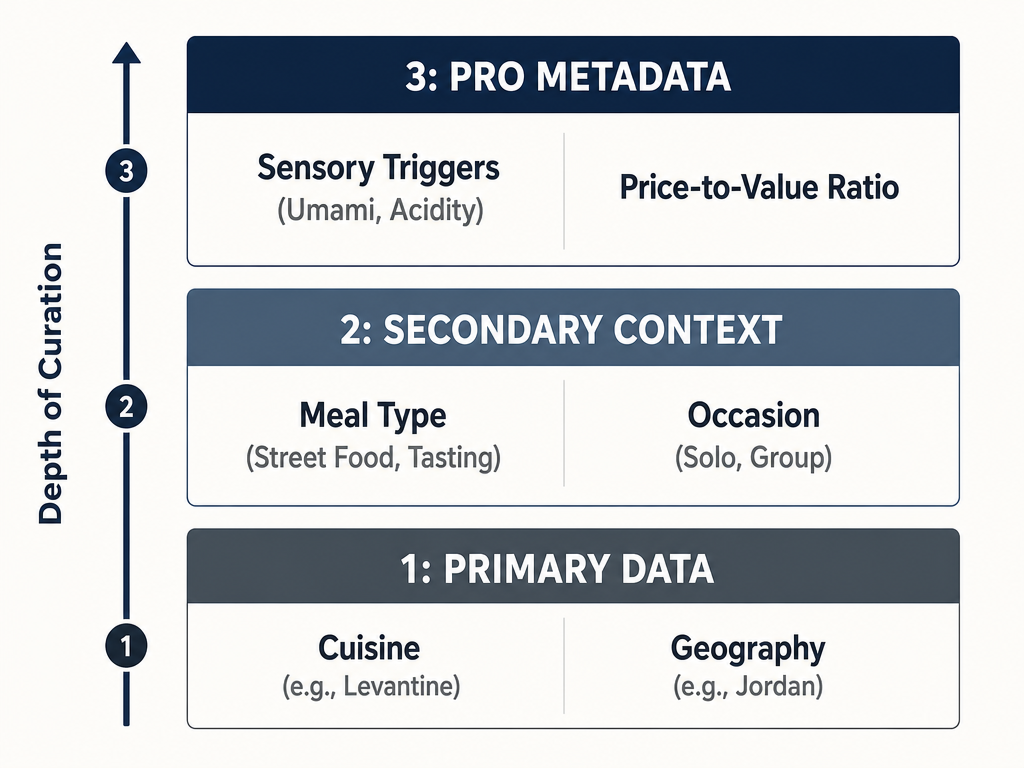 Building a structured taxonomy is essential for transforming a chaotic camera roll into a high-utility culinary intelligence system for future recommendations.
The Three-Tier System for Cataloging Meals
Before we get into specific tools, you need to understand the three levels of food data that actually matter:
Level 1 (Primary): The non-negotiable fields you capture for every single meal
- Restaurant name
- City/Country
- Primary cuisine type (Levantine, Cantonese, Neapolitan)
- Date
- Specific dish name
Level 2 (Secondary): Context that makes the memory retrievable
- Meal type (Tasting Menu, Casual, Street Food, Fine Dining)
- Occasion (Date Night, Solo, Business, Group)
- Price tier (Budget, Mid-Range, Splurge)
- One-sentence taste note
Level 3 (Pro): The metadata that separates collectors from curators
- Standout ingredient or technique
- Beverage pairing
- Price-to-value ratio
- Star/numerical rating
- Would you order it again? (Yes/No)
Most people start at Level 1 and never move forward. The real utility comes when you consistently capture Level 2 data, which gives you the context to actually remember why a meal mattered.
Method 1: The Gamified Socialite (Beli)
Beli is built for people who treat dining as a social sport. It's not just about tracking what you ate - it's about seeing where your friends are eating and building a ranked map of your city's best spots.
Core Mechanism: Beli uses a pairwise ranking system. Every time you add a restaurant, the app occasionally asks you to compare two places: "Which did you prefer: Roberta's or L'Artusi?" Over dozens of comparisons, the app auto-calculates a ranked list of your favorites.
Why it works: The pairwise system forces you to make real decisions. It's harder to game than star ratings, and it surfaces your actual preferences rather than your aspirational ones.
Why it sometimes fails: Cross-cuisine comparisons get weird. Asking "Which is better: the best pizza you've ever had or the best omakase?" is like asking whether you prefer your left kidney or your right one. The answer is contextual, but Beli treats it as absolute.
Best for:
- Urban foodies in NYC, LA, SF, or other major hubs
- People who want social discovery features
- Those who care more about restaurants than individual dishes
The limitation: Beli is restaurant-centric, not dish-centric. You can note what you ordered, but the ranking system is built around the venue. If a restaurant serves one transcendent dish and six mediocre ones, Beli struggles to capture that nuance.
For more on apps that focus on discovery and social sharing, explore our guide to the best food review apps.
Method 2: The Digital Scrapbooker (Memolli)
Memolli is the opposite of Beli. It's entirely private, visual-first, and optimized for memory rather than ranking.
Core Mechanism: You snap a photo of your meal (or import one from your camera roll), add a location, write a quick note, and it's saved to a personal map. The app organizes everything chronologically and geographically, so you can browse by timeline or location.
Why it works: It honors the reality that sometimes bad photos trigger good memories. You don't need a perfectly lit shot - you just need enough visual context to remember the moment. The map view is exceptional for travel rediscovery.
Best for:
- Private memory-keeping without social pressure
- Visual thinkers who remember meals by image first, text second
- Travelers who want to rediscover their food history by city
The limitation: Memolli is backward-looking, not forward-looking. It's a memory book, not a recommendation engine. You can't easily filter by cuisine type, rank dishes, or generate a "best of" list for a friend visiting your city.
If you're looking for more private journaling options, see our roundup of the best apps to organize food photos.
Method 3: The Data Architect (Notion/Airtable)
For people who want total control, nothing beats a custom database. Notion and Airtable let you build exactly the cataloging system you need, with as much or as little complexity as you want.
Core Mechanism: You create interconnected databases - one for Restaurants, one for Meals, one for Cuisines. Each meal entry links to a restaurant, which links to a city, which links to a country. You can add custom fields for everything: dietary restrictions, who you went with, whether you'd return, what you drank.
System Architecture:
- Database A: Restaurants (Linked to Location/Country, Cuisine Type, Price Tier)
- Database B: Meals (Linked to Restaurant, Date, Specific Dishes, Rating, Notes)
- Database C: Cuisines (Definitions, Regional Sub-types, Personal Exploration Progress)
Why it works: Roll-up fields let you see which country you've eaten through the most, which cuisine you consistently rate highest, or which city has your highest concentration of 5-star meals. You can filter, sort, and view your data dozens of ways.
Why it's hard: This is not a 10-second capture system. You need to sit down and actually build the database, then commit to maintaining it. If you're not already a Notion/Airtable user, the learning curve is real.
Best for:
- Detail-oriented foodies who want a comprehensive archive
- People who already use Notion for other parts of their life
- Those who want to track non-food metadata (who you dined with, what you drank, ambiance notes)
Pro tip: Use the "One Minute Rule." Right after you get the check, spend 60 seconds logging the meal while it's fresh. The specific dish names, the standout flavors, the one thing you'd tell a friend. Waiting until you get home means you've already forgotten half of it.
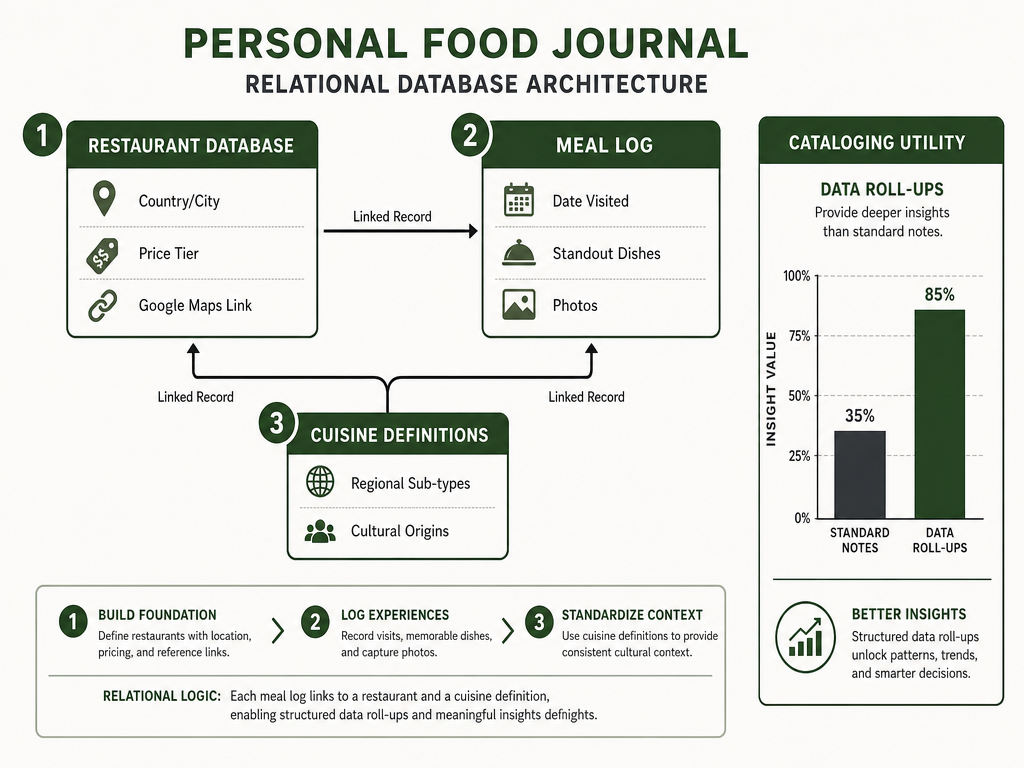 A relational database approach allows serious foodies to track culinary progress across specific regions while maintaining a searchable history of individual dining experiences.
For a deeper look at creating personalized food archives, check out our guide on how to build a personal restaurant library.
The Fusion Problem: How to Handle Hybrid Cuisines
Here's where most systems break down: how do you catalog a Japanese-Peruvian restaurant in London?
Do you tag it by the restaurant's location (UK), the chef's heritage (Peru), the cuisine origin (Japan), or the technique (French-trained)?
The Two-Tag Solution: Use dual cuisine tags: one for Origin (the cultural heritage of the dish) and one for Execution (the technique or fusion style).
Example:
- Restaurant: Nobu London
- Location: United Kingdom
- Cuisine Origin: Japanese
- Cuisine Execution: Peruvian-Japanese Fusion
- Dish: Black Cod Miso
- Notes: Nobu-style. Sweet, umami-rich miso glaze. Buttery texture. Would order again.
This system lets you answer both "Show me all Japanese food I've had" and "Show me all the meals I've eaten in London."
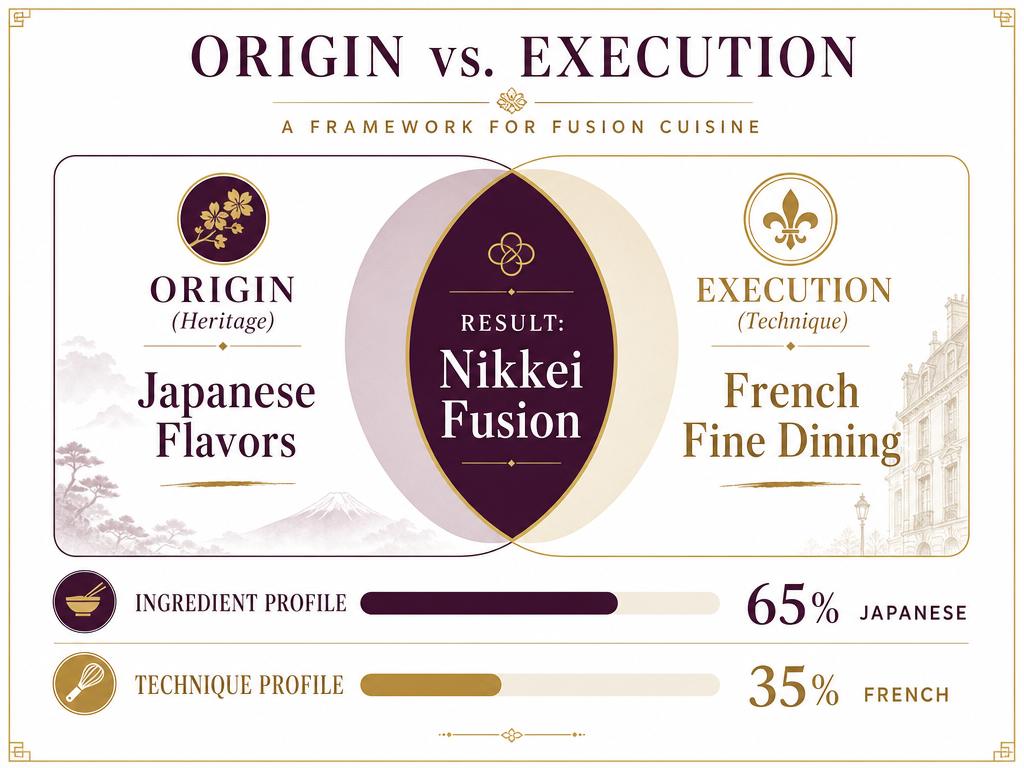 Avoid the 'fusion trap' by tagging meals based on both their cultural heritage and the technical execution, ensuring hybrid restaurants remain easily discoverable.
Regional Specialties: When cataloging regional cuisines (Sichuan vs. Cantonese, Neapolitan vs. Roman), use the most specific tag you can confidently apply. If you're not sure whether it's Levantine or specifically Jordanian, default to the broader category and add a note.
The Photo Hygiene Protocol
Your iPhone's camera roll is a mess. Let's fix that.
Auto-Tagging with Location Services: Make sure your phone's camera has location services enabled. This auto-tags every photo with GPS coordinates, which means apps like Google Photos can automatically group your food photos by city.
The Album System: Create a dedicated "Food" album in your Photos app. Every time you take a food photo, manually add it to this album. It takes three seconds and makes everything searchable later.
The One Minute Rule (Again): Right after you take the photo, spend one minute adding context. Either:
- Use your voice memo app to record a 10-second note ("Carbonara at Roscioli, near Campo de' Fiori, Rome. Guanciale was crispy, egg was just set. Pecorino Romano.")
- Use your Notes app to type a quick entry with the restaurant name and dish
- Open your food tracking app and log it immediately
The goal is to bridge the gap between your camera roll and your text-based logs before you forget what you ate.
Photo Organization: If you're serious about archiving, consider using Google Photos' AI-powered search. You can search "ramen," "tacos," or "pasta" and it'll pull up relevant food photos. It's not perfect, but it's considerably better than scrolling through 2,847 unsorted images.
For more strategies on organizing your food photos, read our article on how to master your restaurant photo library.
Making Your Catalog Searchable for Trip Planning
The real test of any food cataloging system is this: can you use it three months later?
The Trip Planning Test: You're visiting Tokyo in six weeks. Can you quickly pull up:
- Every exceptional ramen you've ever had (anywhere) to set a baseline?
- The specific neighborhoods in Tokyo where you've already eaten?
- The dishes you loved most from your last Japan trip?
If your system can't answer these questions in under 60 seconds, it's not working.
Searchable Fields: The minimum viable search requires:
- City
- Cuisine type
- Dish category (pasta, ramen, tacos, etc.)
- Your personal rating
The "Best Of" View: Create saved filters or views for:
- "Top 10 Meals of All Time"
- "Best [Cuisine Type]"
- "Restaurants I'd Return To"
- "[City Name] Recommendations"
These aren't just vanity lists - they're the queries your friends will ask when they're planning their own trips.
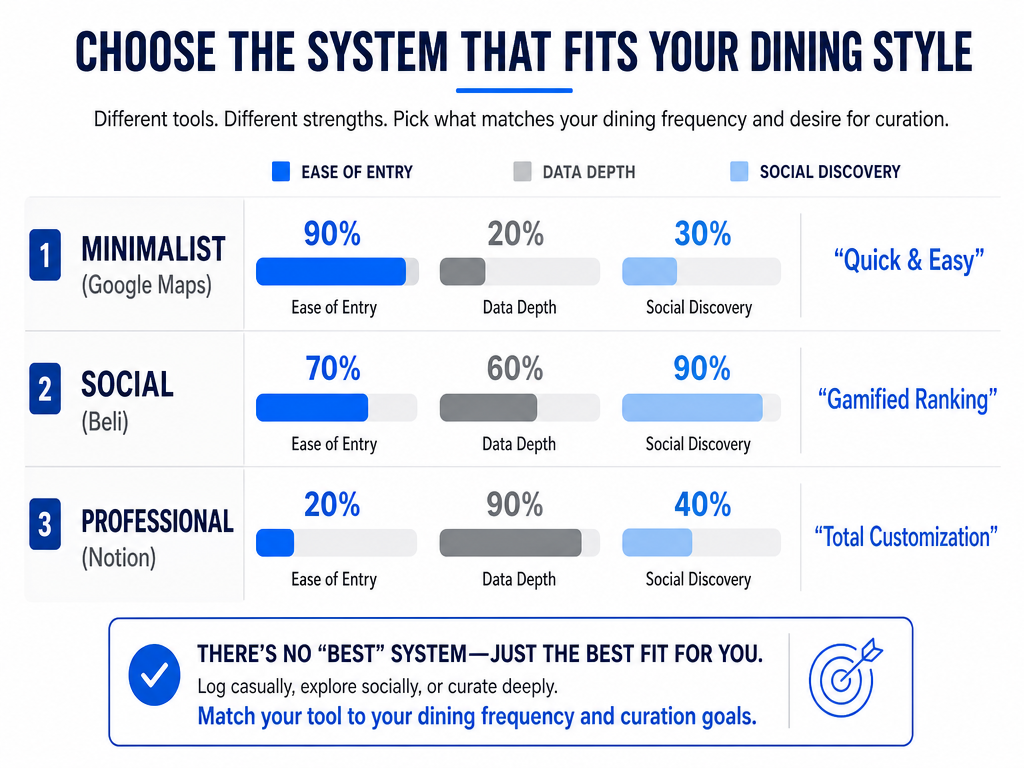 Choosing the right platform depends on your goals: Google Maps offers speed, Beli provides social ranking, and Notion enables deep, private data architecture.
The Recommendation Protocol: When a friend asks "Where should I eat in Rome?" your system should let you:
- Filter by city (Rome)
- Filter by your rating (4+ stars)
- Sort by meal type (if they want fine dining vs. casual)
- Export a clean list with restaurant names, dish recommendations, and your one-sentence note
This is the difference between a food diary and a culinary intelligence system.
Frequently Asked Questions
How do I organize food photos by cuisine type?
Use your phone's built-in album feature to create cuisine-specific folders (Italian, Japanese, Mexican), or use a food tracking app that lets you tag photos by cuisine. The most efficient method is to tag photos immediately after taking them - waiting until later means you'll forget the details. For advanced organization, Google Photos' AI search can recognize food categories, though it's not perfect for specific cuisines.
What's the best way to catalog meals when traveling?
Capture three things immediately: the restaurant name, the city, and the specific dish. Use your phone's Notes app, a voice memo, or a dedicated food tracking app. The key is the 60-second rule - log it right after the meal, not when you get back to your hotel. If you wait, you'll forget half the details. For multi-city trips, organize by city first, then by cuisine or meal type within each city.
Should I organize meals by country or cuisine?
Use both. Set your primary organization by country or city (where you ate), then add a secondary tag for cuisine type (what you ate). This dual taxonomy lets you answer questions like "What's the best Italian food I had in New York?" or "What did I eat in Tokyo?" Most effective systems use location as the primary filter and cuisine as the secondary filter.
How do I handle fusion restaurants in my catalog?
Use a two-tag system: one tag for the dish's cultural origin (e.g., Japanese) and another for the fusion style or technique (e.g., Peruvian influence). For example, a Japanese-Peruvian restaurant in London would be tagged with UK as location, Japanese as cuisine origin, and Peruvian-Japanese as the fusion style. This lets you search for either the traditional cuisine or the fusion category later.
What information should I capture for each meal?
Start with Level 1 essentials: restaurant name, city, cuisine type, date, and specific dish name. Add Level 2 context when possible: meal type (casual, fine dining), occasion (date night, solo), price tier, and a one-sentence taste note. If you're serious about building a searchable archive, add Level 3 details: standout ingredients, beverage pairing, numerical rating, and whether you'd order it again.
How can I make my food catalog actually useful for recommendations?
Build saved filters or views for common queries: "Top 10 Meals of All Time," "Best Ramen," "Restaurants I'd Return To," and city-specific lists. When a friend asks for recommendations, you should be able to filter by city, sort by your rating, and export a clean list in under 60 seconds. The catalog is only useful if it answers real questions faster than scrolling through your camera roll.
Is there an app to keep track of restaurants?
Yes, several apps serve different needs. Beli is best for social discovery and ranking restaurants in major cities. Memolli works well for private, visual-first memory keeping organized by location. For comprehensive control, Notion or Airtable let you build custom databases linking restaurants, meals, and cuisines. Google Maps works for quick bookmarking but lacks detailed dish-level notes. The best choice depends on whether you prioritize social features, privacy, or data architecture. For a detailed comparison, see our guide to the best apps to track restaurant meals.
How do I remember what I ordered at restaurants months later?
Capture the dish name and one sensory detail immediately after eating - right when you get the check. Use a voice memo, your Notes app, or a food tracking app. The one-minute rule is critical: if you wait until you get home, you'll forget the specifics. For visual memory, take a photo of the menu or the dish. Over time, building this habit turns your camera roll from a graveyard of untagged photos into a searchable archive of culinary experiences. Consider reading our article on how to build a personal food journal for more strategies.
The camera roll graveyard is optional. You can keep eating extraordinary food and forgetting it, or you can spend 60 seconds after each meal building a system that actually works.
Your next great meal is waiting. Whether it's in Rome, Tokyo, or the taco truck two blocks from your apartment, the question isn't just "Where should I eat?" - it's "How will I remember this three months from now?"
Choose your system. Commit to the taxonomy. Capture the context. Your future self will thank you when a friend asks for a recommendation and you actually have an answer.