
How to Organize Meals by Dish Category: A Master System for Foodies
John the smoothie monster
John lives for smoothie bowls and cold-pressed juices. He uses Savor to remember his best blends.
How to Organize Meals by Dish Category: A Master System for Gastronomic Memory Your camera roll holds 2,847 food photos. You remember taking every single one...
How to Organize Meals by Dish Category: A Master System for Gastronomic Memory
Your camera roll holds 2,847 food photos. You remember taking every single one of them, yet when you're trying to recall that life-changing agnolotti you had somewhere in Italy last spring, you're scrolling for ten minutes. The photo exists. The memory exists. But the system doesn't.
This isn't about meal planning for Tuesday night. It's about building a personal gastronomic database - a searchable archive that treats dining out as a cultural hobby worth preserving. If you've ever felt frustrated by the "black hole" of your smartphone, this guide will show you how to organize meals by dish category using a three-tiered taxonomy, the right tech stack, and a workflow that actually works.
Table of Contents
- Why Traditional Meal Categories Don't Work for Serious Foodies
- The Serious Foodie Taxonomy: Three Tiers That Actually Make Sense
- The Tech Stack: Choosing Your Tools
- The Searchable Camera Roll Workflow
- Modern Dish Taxonomy: Beyond Soup, Salad, and Entree
- Categorization Challenges: What to Do With Hybrid Dishes
- Building Cross-Reference Systems
- Frequently Asked Questions
Why Traditional Meal Categories Don't Work for Serious Foodies
Most food organization systems were built for home cooks planning weekly menus. They use broad, generic categories like "Breakfast," "Lunch," "Dinner," or the classic restaurant trifecta of "Appetizer, Main, Dessert." These categories work fine if you're meal prepping for a family of four, but they collapse under the weight of a real dining archive.
Consider this: You're trying to remember that exceptional crudo you had. Was it an appetizer? A small plate? Part of a tasting menu? The traditional category tells you nothing about the dish itself - only when it appeared in the meal sequence. You're not organizing experiences. You're filing paperwork.
The serious foodie needs high-granularity tagging. Among each racial and ethnic subgroup except for non-Hispanic Asians, burgers and sandwiches (including tacos and burritos) were the top source of sodium, according to the Dietary Guidelines for Americans. Even government researchers understand that dish-level categorization matters more than meal-level sorting when tracking real eating patterns.
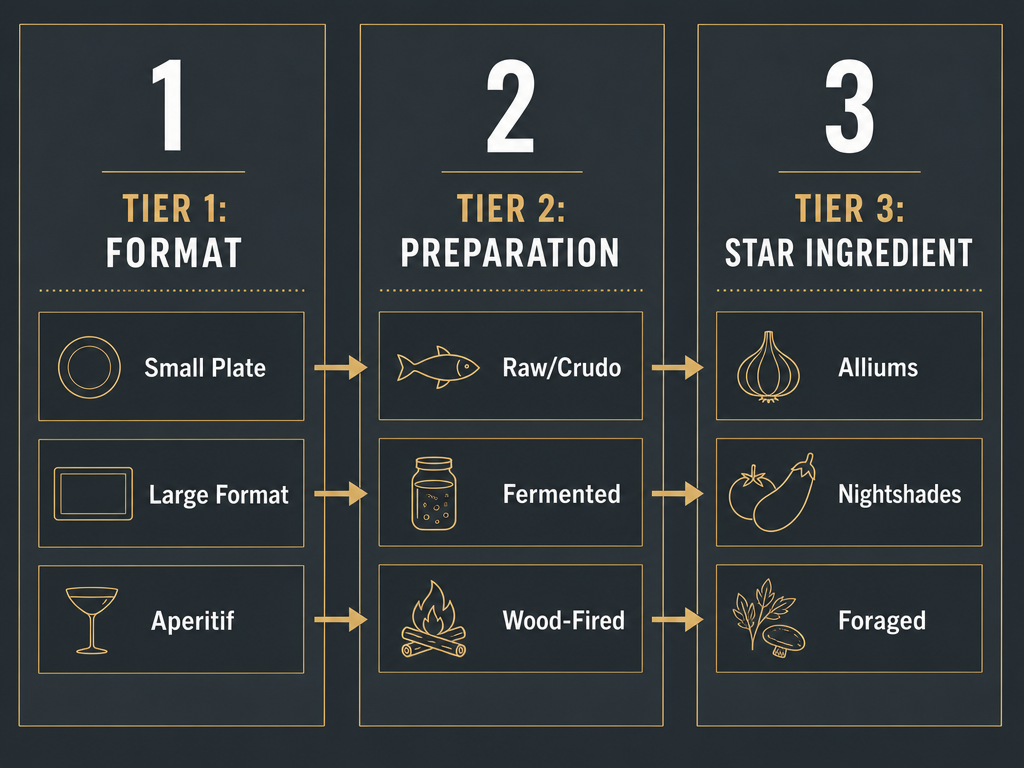 A tiered classification framework for gastronomic enthusiasts, allowing for precise dish organization by moving from broad service formats to specific preparation styles and core ingredients.
The Serious Foodie Taxonomy: Three Tiers That Actually Make Sense
Forget arbitrary meal times. A functional dish taxonomy should reflect how you actually think about food - by format, preparation, and core ingredient. Here's a three-tier system designed for searchability and precision.
Tier 1: Course/Format
This tier describes the structural role of the dish, not the time you ate it.
- Small Plate: Tapas, mezze, banchan, cicchetti - anything designed for sharing or tasting
- Large Format: Family-style dishes, whole roasted proteins, paella for the table
- Hand-Held: Sandwiches, tacos, hand pies, anything that requires no utensils
- Bowl: Ramen, grain bowls, poke, anything served in a vessel designed for one
- Composed Plate: A plated dish with distinct components arranged intentionally
- Raw/Crudo: Tartares, ceviches, sashimi, oysters - uncooked centerpieces
- Dessert: Sweets and final courses
- Aperitif/Digestif: Pre- or post-meal drinks that define the experience
Tier 2: Preparation/Style
This tier captures the cooking method or culinary style - the "how" behind the dish.
- Fermented: Kimchi, miso, natural wines, preserved vegetables
- Wood-Fired: Pizza, asado, robata-grilled items
- Braised: Long-cooked meats, stews, confits
- Fried: Tempura, katsu, schnitzel, anything cooked in oil
- Cured: Charcuterie, gravlax, bottarga
- Hand-Pressed: Fresh pasta, dumplings, hand-rolled sushi
- Charred: Grilled vegetables, yakitori, anything with intentional char
- Emulsified: Sauces, aiolis, hollandaise - technique-driven preparations
Tier 3: The "Star" Ingredient
This tier identifies the primary ingredient that defines the dish's character.
- Alliums: Onions, garlic, shallots, leeks - dishes where these dominate
- Nightshades: Tomatoes, eggplant, peppers
- Shellfish: Oysters, clams, scallops, shrimp
- Foraged: Mushrooms, ramps, sea vegetables, wild greens
- Offal: Liver, sweetbreads, bone marrow, heart
- Grains: Rice, farro, buckwheat, polenta
- Legumes: Beans, lentils, chickpeas
- Brassicas: Cabbage, kale, broccoli, Brussels sprouts
This three-tier system lets you search with precision. You're no longer looking for "that Italian thing I had in Rome." You're searching for "Hand-Pressed Pasta, Emulsified Sauce, Shellfish." The difference is everything.
The Tech Stack: Choosing Your Tools
A personal gastronomic database requires three layers: social discovery, private archiving, and quick capture. Here's how to build a stack that actually works.
The Social Layer: Using Beli for Rankings and Comparisons
If you want to compare notes with other serious eaters, Beli offers dish-level tracking with a social component. You can follow friends, see what they're rating highly, and discover new spots through people whose taste you trust - not through anonymous strangers on Yelp.
Beli's strength is its focus on individual dishes rather than restaurant-wide ratings. You can track that specific uni pasta at a neighborhood spot without endorsing the entire menu.
The Archive Layer: Setting Up a Notion Database
For serious archiving, you need a database with custom fields and real search functionality. Notion is the most flexible option for building a personal food archive because it lets you create properties for every dimension that matters: dish category, price point, chef, date eaten, city, flavor profile, and your personal 10-point rating.
 A structured digital archive allows serious foodies to transform dining memories into a searchable database, cross-referencing every dish by chef, category, and personal rating.
Set up your Notion database with these core properties:
- Dish Name (text)
- Restaurant (text)
- City/Location (select)
- Tier 1: Format (select)
- Tier 2: Preparation (multi-select, because a dish can be both braised and charred)
- Tier 3: Star Ingredient (multi-select)
- Chef (text)
- Date Eaten (date)
- Price Point (number or select: $, $$, $$$, $$$$)
- Personal Rating (number, 1-10 scale)
- Tasting Notes (text)
- Photo (files & media)
The power of this system reveals itself six months later when you're trying to remember every exceptional pasta dish you've eaten. You filter by "Hand-Pressed" in Tier 2 and sort by rating. Everything surfaces instantly.
The Quick-Capture Layer: iPhone Captions and Smart Albums
The problem with elaborate systems is that they require discipline. You're not going to open Notion mid-meal to log every dish. That's where iOS native features come in.
When you take a food photo on iPhone, swipe up immediately and add a caption. Use a simple, consistent format: Dish Name, Category, Restaurant Name. For example: Agnolotti, Pasta, Osteria Francescana. This caption becomes searchable text in your Photos app.
To make this even more powerful, create a Smart Album in Photos that automatically collects images with captions containing food-related keywords. Go to Albums > tap the "+" icon > New Smart Album > set the condition to "Caption contains" and add keywords like "pasta," "crudo," "taco," or any category from your taxonomy.
Now when you search "pasta" in Photos, every captioned pasta dish appears instantly. This isn't a replacement for your Notion database - it's your fast-capture buffer. Once a week, review your Smart Album and transfer the top dishes into your permanent archive with full tasting notes.
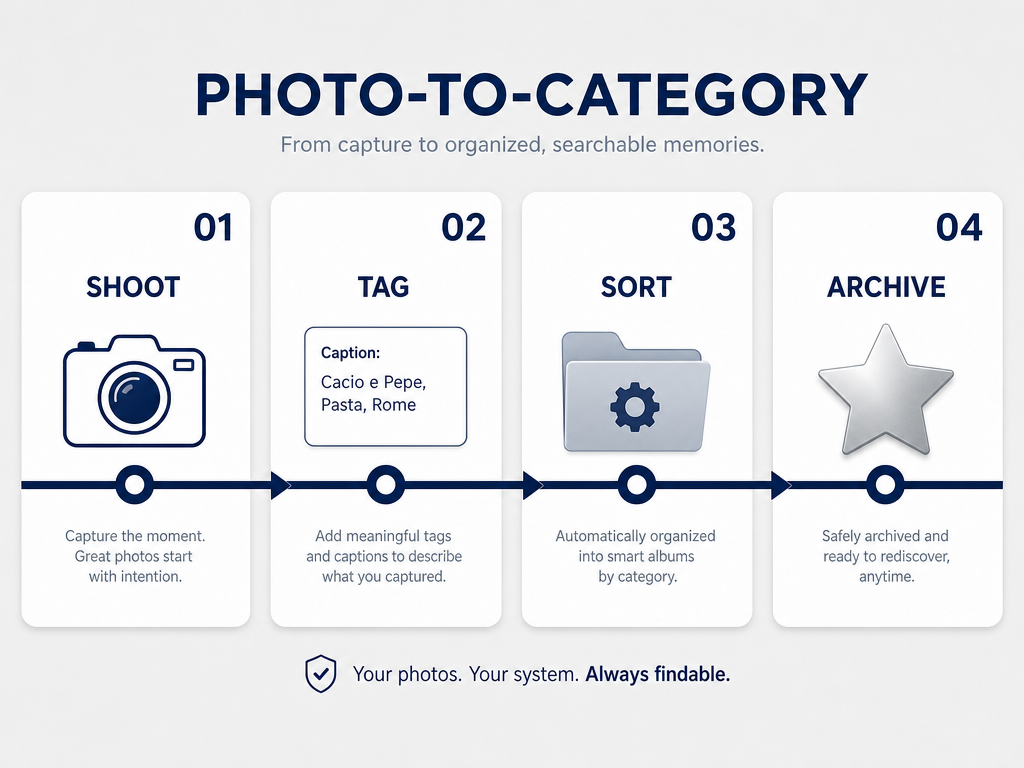 This streamlined four-step workflow enables enthusiasts to bridge the gap between a cluttered smartphone camera roll and a sophisticated, searchable gastronomic library.
The Searchable Camera Roll Workflow
Here's the complete system, step by step.
Step 1: Shoot Take your photo. Natural light, 45-degree angle, minimal editing. The photo is evidence, not art.
Step 2: Tag
Immediately swipe up and add a caption using your consistent format: Dish Name, Primary Category, Restaurant Name. If you're eating something exceptional, add additional tags like the chef's name or the city.
Step 3: Sort Your Smart Album automatically collects captioned food photos. No manual sorting required.
Step 4: Review Once a week, open your "Dining Out" Smart Album. Review the dishes. Transfer the top three into Notion with full details: all three taxonomy tiers, tasting notes, price point, personal rating. Delete or archive the mediocre ones.
This workflow solves the fundamental problem: you capture everything in the moment without breaking the flow of the meal, then you curate later when you have time to think.
If you're looking for a more comprehensive system for organizing food photos by restaurant, check out this guide to mastering your personal restaurant library.
Modern Dish Taxonomy: Beyond Soup, Salad, and Entree
Traditional restaurant categories were designed for French service in the 1950s. They don't account for modern dining formats like tasting menus, shared plates, or global cuisines that don't follow Western meal structures.
Here are modern categories that reflect how people actually eat now:
Small Plates / Tapas Dishes designed for sharing. This includes Spanish tapas, Middle Eastern mezze, Korean banchan, and Italian cicchetti. The defining characteristic isn't size - it's intent. These dishes are meant to be sampled, not consumed solo.
Bowls A composed dish served in a single vessel. This category spans cultures: ramen, poke, grain bowls, bibimbap, congee. The bowl is the format, not the cuisine.
Sandwiches & Hand-Helds Anything you eat with your hands. Tacos, banh mi, doner kebabs, hand pies, gyros. There's an ongoing debate about whether a hotdog qualifies as a sandwich, but for archiving purposes, the question is simpler: did you eat it with your hands? If yes, it goes here.
Crudo & Raw Preparations Sashimi, tartares, ceviches, oysters, carpaccio. The unifying element is minimal cooking - the dish is defined by the quality and treatment of raw ingredients.
Composed Plates A plated dish with multiple distinct components arranged with intention. This is the category for fine dining presentations where placement matters.
Fermented & Preserved Dishes where fermentation or preservation is the defining technique. Kimchi, miso soup, house-made pickles, charcuterie platters. This category cuts across courses because the technique is what makes it memorable.
According to Grace + Vine Studios, a large recipe blog with 1,000+ posts may utilize up to 100 total categories and subcategories to maintain user experience. You're not running a public blog - you're curating a private archive - but the principle holds. High granularity improves searchability.
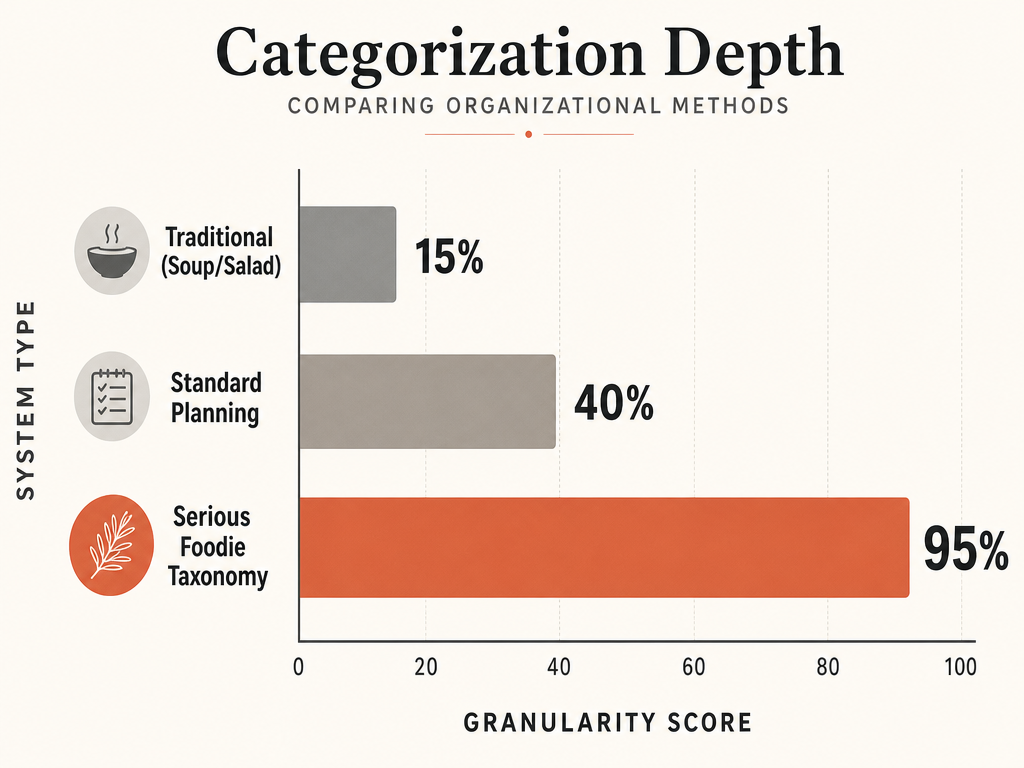 A comparison of organizational depth, highlighting how advanced taxonomy provides substantially more granular insights for cataloging complex dining experiences than traditional meal categories.
Categorization Challenges: What to Do With Hybrid Dishes
Some dishes resist easy categorization. A deconstructed taco isn't quite a taco anymore. A savory porridge sits somewhere between a bowl and a composed plate. This is where the Cube Rule of Food Identification becomes relevant - it categorizes dishes based on the location of starch, defining any dish with no starch as a "Salad." It's a playful framework, but it highlights a real issue: strict taxonomy breaks down when chefs intentionally blur boundaries.
The solution is to organize by the intent of the chef rather than rigid ingredient rules. Ask yourself: What is this dish trying to be? A deconstructed taco is still conceptually a taco - it's playing with the format, not abandoning it. Tag it as "Hand-Held (Deconstructed)" in Tier 1 and move on.
For genuinely ambiguous dishes, use multi-select fields in your database. A dish can be both "Small Plate" and "Raw/Crudo" if it fits both categories. The point isn't taxonomic purity - it's making sure you can find the dish again when you search for either term.
Building Cross-Reference Systems
The real power of a personal food database comes from cross-referencing. You're not just organizing by dish type - you're organizing by location, chef, occasion, and flavor profile simultaneously.
Here's how to structure cross-references in Notion:
Location-Based Searching
Create a "City" property (select field) with every city you've eaten in. Now you can filter your entire database to show only dishes eaten in Tokyo, or Paris, or wherever your last trip took you. Combine this with a "Country" property for broader searches.
This becomes invaluable when planning return trips. You're not asking friends for recommendations - you're reviewing your own archive of what worked last time.
Chef-Based Tracking
Add a "Chef" property to track specific culinary voices across multiple restaurants. When a chef you admire opens a new spot, you already have context for their style and strengths based on previous meals.
Occasion-Based Filtering
Create a "Vibe" or "Occasion" property with tags like "Date Night," "Solo Dining," "Business Meal," "Celebration." Six months later, when you're planning an anniversary dinner, you filter by "Date Night" and sort by rating. Every romantic meal you've ever documented surfaces instantly.
Flavor Profile Cross-Referencing
Add flavor descriptors as tags: "Umami-Forward," "Acid-Driven," "Rich/Fatty," "Bright/Citrus," "Earthy," "Funky/Fermented." Over time, you'll notice patterns in your highest-rated dishes. Maybe you consistently rate acid-driven crudo higher than rich, fatty preparations. That's not a rule - it's self-knowledge.
If you're interested in systematically tracking your favorite dishes across categories, this guide to tracking restaurant meals and ratings offers a complementary framework.
Frequently Asked Questions
What are the different categories of food dishes?
The most useful categories for serious foodies move beyond traditional meal times (breakfast, lunch, dinner) or course sequence (appetizer, main, dessert) to focus on format, preparation, and core ingredients. A functional modern taxonomy includes: Small Plates, Large Format, Hand-Helds, Bowls, Composed Plates, Raw/Crudo, and specialized categories like Fermented or Wood-Fired. The goal is to describe the dish itself, not when you ate it.
What is the best way to categorize recipes?
The best way depends on your goal. If you're organizing home cooking, broad categories like "Weeknight Dinners" or "Baking" work fine. If you're archiving restaurant experiences, you need dish-specific categories organized in three tiers: Format (Small Plate, Bowl, etc.), Preparation (Braised, Fried, Fermented), and Star Ingredient (Shellfish, Grains, Offal). This three-tier system enables precise searching months or years later.
What are some good categories for dinner?
For home cooking, useful dinner categories include protein-based sorting (Chicken, Beef, Seafood, Vegetarian), cooking method (One-Pot Meals, Sheet Pan Dinners, Slow Cooker), or cuisine type (Italian, Thai, Mexican). For restaurant dining archives, shift to dish archetypes: Composed Plates, Bowls, Large Format Sharing, or Hand-Helds. The distinction matters because restaurant categories should reflect the dining experience, not cooking logistics.
What is the best app to track my meals?
The best app depends on what you're tracking. If you want dish-level memory and personal ratings rather than calorie counting, dedicated food archiving tools work better than fitness apps. Beli focuses on dish ratings with a social layer, while Notion offers fully customizable databases for serious archiving. For quick capture, native iPhone features like photo captions and Smart Albums provide instant searchability without opening a separate app.
How do I organize iPhone photos into categories?
Use photo captions and Smart Albums for instant searchability. When you take a food photo, swipe up and add a caption with the dish name and category (e.g., "Carbonara, Pasta, Restaurant Name"). Then create a Smart Album in Photos: go to Albums > tap "+" > New Smart Album > set the condition to "Caption contains" and add your category keyword. The album auto-populates with every photo matching that keyword. For more detailed organization strategies, see this guide to organizing food photos.
How can I tag food photos on my iPhone so they are searchable by dish?
The fastest method is adding captions immediately after shooting. Swipe up on any photo in your camera roll and type a consistent format: Dish Name, Category, Location. This text becomes searchable in the Photos app. You can also use third-party apps like Samsung Food that use AI to auto-tag food photos, though manual captions give you more control over taxonomy.
What are the best apps for foodies?
The best apps for serious foodies prioritize dish-level tracking over restaurant-wide ratings. Savor and Beli focus on individual dish memory and ratings. For recipe organization, tools like Notion or Airtable offer custom databases. For discovery, apps like Resy and Tabelog (for Japan) surface reservations and authentic reviews. The key is choosing tools that match your specific need - discovery, memory, or organization.
How do I build a restaurant tracker in Notion or Airtable?
Start with a database containing these core fields: Dish Name (text), Restaurant (text), City (select), Date (date), Rating (number 1-10), Category (multi-select for your taxonomy), Price Point (select: $-$$$$), Chef (text), Tasting Notes (long text), and Photo (file upload). Use views to filter by city, category, or rating. Create a "Top Dishes" view sorted by rating, and a "To Revisit" view for places you want to return to. The real power comes from consistent tagging - if you're disciplined about categorization, searching becomes instant.
Your camera roll doesn't have to be a graveyard. With a functional taxonomy, the right tools, and a consistent workflow, every exceptional dish becomes part of a searchable archive. You're not just eating anymore. You're curating a personal culinary history that actually remembers what mattered.