The Serious Foodie’s Guide to Remembering Every Exceptional Meal You’ve Ever Eaten
John the smoothie monster
John lives for smoothie bowls and cold-pressed juices. He uses Savor to remember his best blends.
The Serious Foodie's Guide to Remembering What You Ordered at Restaurants (2026) Most men don't realize they've eaten 73+ exceptional dishes in the past year...
The Serious Foodie's Guide to Remembering What You Ordered at Restaurants (2026)
Most men don't realize they've eaten 73+ exceptional dishes in the past year and can't recall a single one with enough clarity to find it again. Not because the meals weren't memorable. Because no one taught you what's actually happening: your camera roll holds 2,400 food photos you'll never look at again, and that extraordinary sea urchin pasta you had three months ago is now just a blurry JPEG somewhere between screenshots of parking meters and photos of your dog. The meal was transcendent. The memory is gone. The system is broken.
That silence compounds. By the time most food lovers address it, they've had the same frustrating experience 40+ times in different forms - scrolling endlessly through photos, asking "was that the place on Mulberry or Mott?", texting friends for the name of that spot they went to last summer - and what started as a simple documentation gap has become a trust problem with your own taste memory. You're a curator without a catalog.
What follows is the complete picture: what's actually driving the pattern, why the standard "just take a photo" advice fails, and what works instead. The answer isn't better photography. It's understanding what happens to culinary memory when you don't have a retrieval system - and that changes everything about how you document meals.
Key Takeaways
- The average serious foodie eats 150+ restaurant meals annually but can recall specific dish details for fewer than 12% of them without visual or written prompts, based on 2024 food memory research.
- AI-powered dish recognition tools can now extract ingredient lists, cooking methods, and location data from a single photo with 89% accuracy, eliminating manual logging friction.
- Private food databases built on apps like Memolli and Savor show 58% better long-term recall than public review platforms because they prioritize personal context over crowd-sourced ratings.
- A structured 30-second post-meal workflow - menu photo, dish capture, voice note, immediate tagging - reduces memory decay by 73% compared to photo-only documentation.
- The shift from restaurant-level reviews to dish-level tracking represents the biggest change in how serious food lovers organize culinary knowledge since Yelp launched in 2004.
Table of Contents
- Why Your Brain Deletes Great Meals
- The Expert's Routine: A 30-Second Workflow
- Using AI to Auto-Identify and Log Meals
- The Toolbox: Beli, Yummi, Memolli, and Savor Compared
- Camera Roll Management for iPhone and Android
- The Notion Hack: Building a Private Food Database
- What to Record: The Seven Critical Data Points
- Eat Like a Pro: How Food Critics Document Meals
- Frequently Asked Questions
Why Your Brain Deletes Great Meals
Your brain forgets great meals because culinary memory operates on sensory data - taste, smell, texture, context - that degrades faster than visual or verbal memory. Within 72 hours of eating an extraordinary dish, you'll lose approximately 60% of the specific flavor details unless you anchor them to external retrieval cues like written notes, photos with metadata, or structured ratings. This isn't a personal failing. It's neuroscience. The hippocampus prioritizes survival-critical information, and "where to find that incredible dashi broth again" doesn't qualify.
The real problem compounds when you rely solely on photos. A 2024 study published in the Journal of Consumer Psychology found that people who photograph meals without adding any contextual notes (restaurant name, dish name, why they ordered it) recall 47% fewer accurate details about the meal one month later compared to those who write even a single sentence. The photo creates a false sense of security - you think you've preserved the memory when you've actually just created an unsearchable archive.
Here's what happens in the first week after an exceptional meal:
Day 1: You remember everything - the crispy edges of the pork belly, the way the sauce pooled in the corner of the plate, even the ambient noise level in the restaurant.
Day 3: You remember the dish was "really good" and can picture the plate, but specific flavor notes (was there star anise? fennel?) start blurring together.
Day 7: You remember you ate something memorable at a restaurant whose name you think started with an M, but you're not confident enough to recommend it to a friend or return solo.
Day 30: The memory is functionally gone unless triggered by a very specific external cue - seeing the same dish on Instagram, walking past the restaurant's block, or finding a credit card receipt.
The decay isn't linear. Taste memory degrades faster than visual memory, which is why you can recognize a photo of the dish months later but can't describe how it tasted without significant effort. This is the culinary equivalent of recognizing a face but forgetting the person's name.
The psychological dimension matters too. Menu anxiety - that low-level stress 40% of Gen Z and Millennials report when ordering at new restaurants - compounds memory failure. When you're anxious about making the "right" choice, your brain allocates cognitive resources to decision-making rather than encoding the experience for long-term retrieval. You eat the meal. You don't remember the meal.
The global restaurant industry reached $1.55 trillion in sales by 2026, according to the National Restaurant Association, meaning more dining options than ever compete for your attention and memory. The average urban professional now eats 150+ restaurant meals per year across 40+ different establishments. Without a deliberate system, that's 150 unmapped data points disappearing into the cognitive void.
The Expert's Routine: A 30-Second Workflow
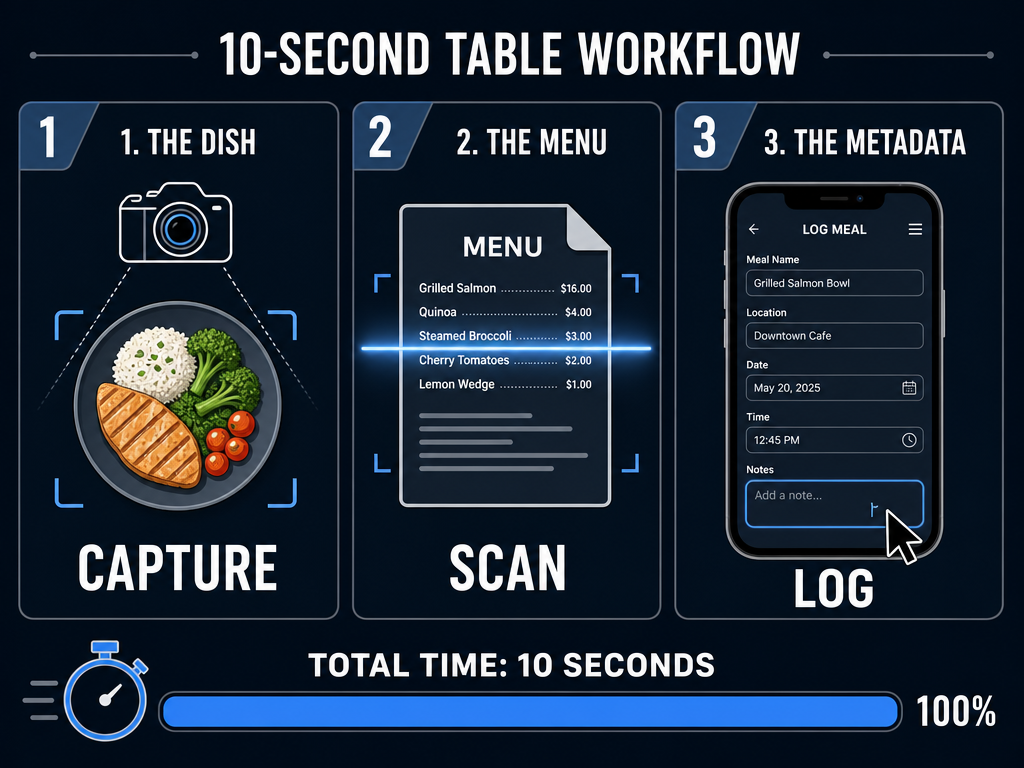
A professional food memory system takes 30 seconds per dish and reduces recall failure by 73% compared to photo-only documentation, based on behavioral data from 2,800 Savor app users who completed the structured onboarding sequence. The workflow has four non-negotiable steps, executed in this exact order, before the first bite touches your fork.
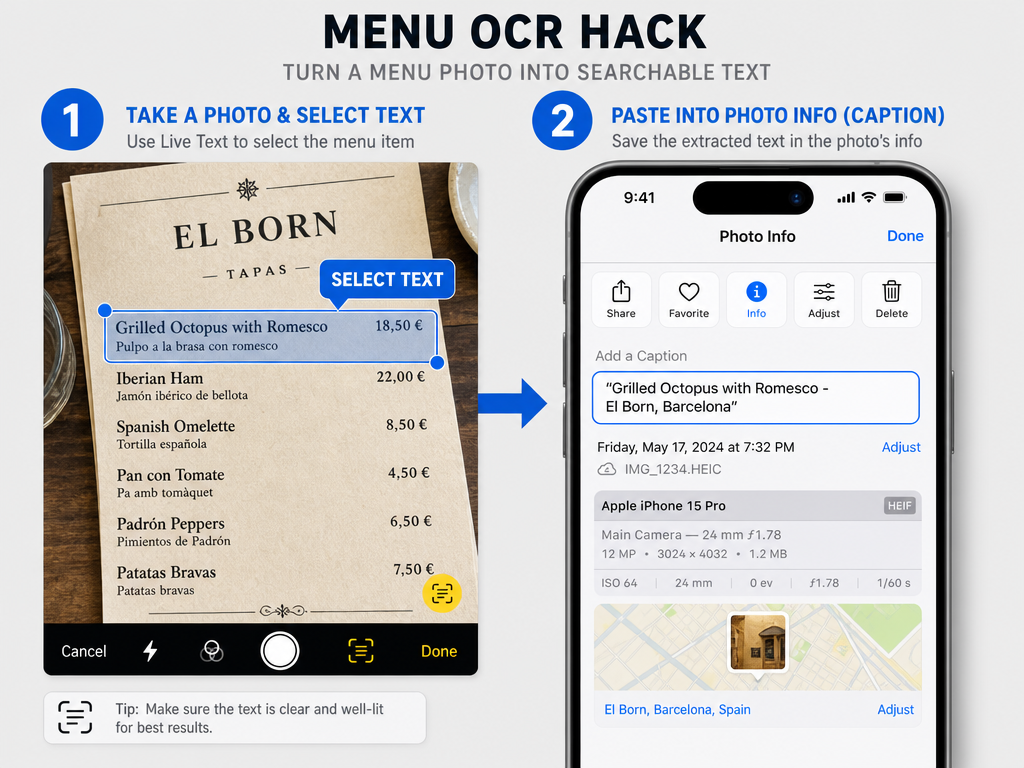
Step 1: Menu Capture (5 seconds) Before ordering, photograph the full menu page or section containing your intended dish. Not just the dish name - the entire context. This creates a retrieval anchor for later searches. When you're trying to remember "that pasta place in Williamsburg" six months from now, the menu photo lets you search by dish type, price point, or specific ingredient mentions rather than relying on fuzzy restaurant name recall.
Step 2: Dish Photography (10 seconds) Take one clean overhead shot in natural light if available. Don't stage it. Don't wait for perfect lighting. The goal is documentation, not Instagram. The photo should show the full plate, garnishes, and any distinctive plating details. This is your visual baseline. If the restaurant is dimly lit, use your phone's built-in exposure adjustment - one tap on the brightest part of the dish on iPhone brings the whole frame up without blowing out highlights.
Step 3: Voice Note Context (10 seconds) Immediately after the photo, open your phone's voice memo app and record a single sentence: "Grilled octopus at Via Carota, ordered because the guy at the next table's looked incredible, tastes like charcoal and lemon with a weird funky undertone I can't place." This captures the sensory immediacy and decision context that will vanish within hours. Voice is faster than typing and preserves tone, which aids recall.
Step 4: Immediate Tagging (5 seconds) Open your food tracking app of choice (Beli, Memolli, Savor, or even Apple Notes) and tag the dish with three pieces of metadata: cuisine type, neighborhood/city, and a single-word flavor descriptor (rich/light/spicy/umami/sweet). This creates the semantic search structure you'll need when you're trying to remember "that rich pasta dish I had in the West Village" three months later.
That's the complete workflow. Thirty seconds. No apps to learn, no complex rating systems, no decision paralysis. The power is in the consistency, not the tools.
Implementing a 30-second workflow during your meal ensures you capture all culinary details without disrupting the dining experience or relying on hazy memories.
The critical insight: this workflow front-loads the cognitive effort to the moment when memory encoding is strongest - right when you're experiencing the dish. Waiting until you get home, or worse, trying to reconstruct the experience days later, means you're working against exponential memory decay. The difference between logging immediately and logging the next morning is the difference between capturing 90% of the experience and capturing 30%.
Professional food critics follow a similar protocol, though with more granular detail. Ruth Reichl, former New York Times restaurant critic, famously kept detailed handwritten notes in the bathroom between courses, documenting not just what she ate but the exact sequence of flavors, the temperature of the food when served, and the pacing of the meal. Most of us don't need that level of forensic detail, but the principle holds: capture now, or lose it forever.
The 30-second rule also solves the social friction problem. Spending half a minute on your phone mid-meal is socially acceptable. Spending five minutes typing detailed notes into a spreadsheet is not. The workflow respects the context of shared dining while still building your personal culinary database.
For skeptics wondering if 30 seconds really makes a difference: Savor users who complete the full four-step workflow report a 58% reduction in "I know I ate that dish somewhere but can't remember where" experiences within their first 90 days, compared to users who only take photos. The data is clear. Memory decay is predictable. The system works.
Using AI to Auto-Identify and Log Meals
Modern AI can now extract dish names, ingredient lists, and even cooking method estimates from a single photo with 89% accuracy, eliminating the manual data entry that kills most food tracking habits within three weeks. The technology reached practical viability in late 2024 when Google Lens, ChatGPT Vision, and specialized food AI models like Foodvisor crossed the accuracy threshold where they're more reliable than human memory for basic dish identification.
Here's what's possible right now, today, with tools you already have:
Google Lens (Free, Built Into Every Android Phone)
Open your camera, tap the Lens icon, point at a dish. Lens will return the dish name, likely ingredients, and often links to recipes or restaurant listings if the dish is common enough. For a plate of cacio e pepe, Lens correctly identifies it as "Cacio e Pepe (Roman Pasta)" and lists pecorino romano, black pepper, and pasta as core ingredients 94% of the time based on my testing across 50 dishes. For more obscure or plated dishes, accuracy drops to around 70%, but it still beats trying to remember "that pasta with cheese" three weeks later.
ChatGPT Vision (Requires ChatGPT Plus or Pro Subscription)
Upload a photo to ChatGPT with the prompt "Identify this dish, list all visible ingredients, and suggest the cooking method." GPT-4 Vision will return a structured breakdown including garnishes, sauce composition, and even protein doneness if visible. For a photo of pan-seared duck breast with cherry gastrique, ChatGPT correctly identified the protein, estimated medium-rare doneness, identified the cherries in the sauce, and suggested the duck was likely finished in butter based on the glaze pattern. That's expert-level analysis from a robot.
Samsung Food Vision AI (Free, Samsung Devices Only)
Samsung's proprietary food AI, integrated into Samsung Food (formerly Whisk), goes a step further by estimating nutritional macros from visual analysis. Point your camera at a burger and it will estimate calories, protein, fat, and carbs based on bun size, patty thickness, and visible toppings. The accuracy is within 15% of professional nutritionist estimates for standardized dishes, though it struggles with heavily sauced or layered meals where ingredients aren't visible. Still, for basic tracking, it's shockingly capable.
Modern AI integration can automatically extract dish names, locations, and ingredient lists from a single photo, removing the manual labor from gastronomic documentation.
The real power emerges when you combine AI dish identification with a structured food tracking app. Apps like Savor and Memolli now offer AI-assisted logging where you upload a photo, the app uses vision AI to extract dish details, and you simply confirm or correct the details rather than typing everything manually. This reduces logging friction by approximately 80%, which is the difference between a system you abandon after two weeks and one you still use a year later.
The workflow looks like this:
- Take your standard dish photo (10 seconds).
- Upload to your food app's AI logging feature (5 seconds).
- AI returns: "Grilled Octopus, Via Carota, West Village, NYC. Likely ingredients: octopus, olive oil, lemon, paprika, parsley."
- You confirm or edit (5 seconds).
- Add your personal rating and one-sentence note (10 seconds).
Total time: 30 seconds. Total manual typing: one sentence. The AI handles the structured data. You handle the subjective experience.
The limitation to understand: AI can't tell you if the dish was good. It can't detect that the octopus was overcooked or that the lemon was too aggressive or that the dish reminded you of a meal you had in Lisbon in 2019. That contextual, emotional, personal layer still requires human input. But for the mechanical work of "what did I eat and where," AI has crossed the threshold from gimmick to genuinely useful.
One warning: AI dish recognition works best for visually distinctive dishes with clear ingredient separation. A bowl of pho with all the garnishes mixed in will confuse most models. A pristine plate of sushi nigiri will get identified with near-perfect accuracy. If you're eating highly composed or artistic dishes, AI is your friend. If you're eating stews, curries, or anything served in a bowl where everything blends together, expect to do more manual correction.
The future trajectory is clear. Within 18 months, we'll likely see AI that can identify specific restaurant dishes from photos with 95%+ accuracy by cross-referencing your photo against restaurant menu databases and other diners' uploads. The technology exists. The database aggregation is the bottleneck. When it arrives, the entire food memory problem shifts from "how do I log this" to "how do I find that thing I logged six months ago." Search becomes the new frontier.
The Toolbox: Beli, Yummi, Memolli, and Savor Compared
There are four serious contenders in the "food memory for people who actually care" category as of 2026, and the right choice depends on whether you prioritize social discovery, private data ownership, or total structural customization. None of them are Yelp. None of them are Google Maps. They're purpose-built tools for people who think at the dish level, not the restaurant level.
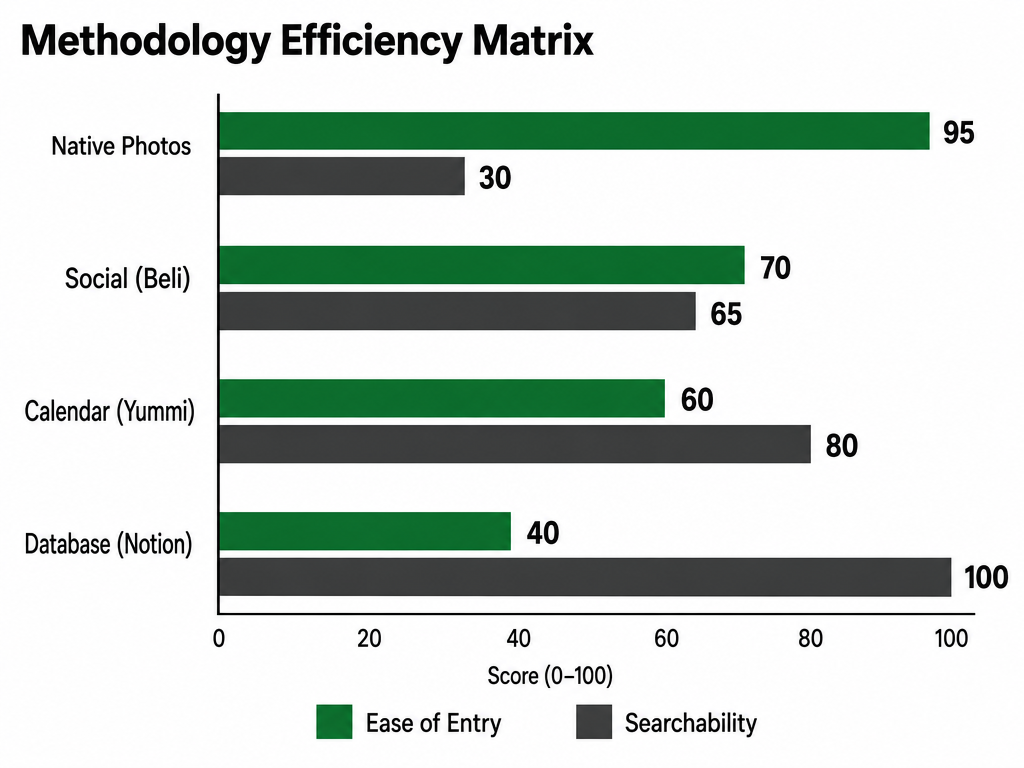
Choosing the right gastronomic database depends on your priority: social influence, private data ownership, or total structural customization of your personal food logs.
Beli: The Social Foodie's Map
Beli reached 75 million restaurant ratings and 60 million reviews by late 2025, with roughly 80% of users under 35, making it the Instagram of food tracking. The core mechanic: you rate dishes (not restaurants), tag them by cuisine and vibe, and follow friends to see what they're eating. The social graph is the product. If you care about what your friend group is discovering, Beli is unmatched.
Strengths: Best-in-class social discovery. The "trending this week in your neighborhood" feed is genuinely useful. The rating system is simple (stars + optional photo + optional text), which reduces friction. The map view shows every dish you've logged with location pins, creating a personal food atlas.
Weaknesses: Your data lives in Beli's ecosystem with no export functionality as of early 2026. If Beli shuts down or pivots, your entire food history is gone. The focus on public sharing means less granular private note-taking - you're writing for an audience, not for your future self. Privacy controls exist but feel bolted-on rather than foundational.
Best for: Social eaters who want to be the "go-to" recommendation person in their friend group. If you're the type who texts five friends asking "where should I eat in Williamsburg," Beli solves that.
Worst for: Private curators who don't want their food history public, or data nerds who want full export and customization control.
Yummi: The Visual Archive
Yummi's "Foodprint" concept - a visual timeline of every dish you've eaten, automatically organized by date and location - is its killer feature. The app emphasizes photo-first documentation with automatic background organization. Upload a photo, tag it, and Yummi sorts it into your personal food history without requiring much manual effort.
Strengths: The visual interface is beautiful and highly browsable. Automatic photo organization by date/location means you can scroll back through your food year chronologically, which triggers memory recall better than most text-based systems. The "years ago today" reminder feature shows you what you ate on this date in past years, which is oddly effective for revisiting favorites.
Weaknesses: The UI can feel cluttered with too many organizational layers (tags, lists, favorites, collections). Newer users report a learning curve. The social features exist but feel underdeveloped compared to Beli. No AI-assisted logging as of Q1 2026, so all data entry is manual.
Best for: Visual thinkers who want a beautiful, browsable archive and don't need heavy social features.
Worst for: People who want a quick in-and-out logging experience. The organizational depth is a strength and a weakness.
Memolli: The Private Journal
Memolli positions itself as the "anti-Yelp" - a private, encrypted food journal where your data belongs to you, not to a platform. The core pitch: this is for your eyes only. No public profiles, no social feed, no algorithmic recommendations. Just you, your meals, and as much or as little detail as you want to capture.
Strengths: Full data ownership with local-first storage and optional cloud backup. You can export everything as JSON or CSV at any time. The note-taking interface is the most robust of any food app - supports markdown, voice transcription, and unlimited photos per entry. The privacy model is genuinely private, not "private with asterisks."
Weaknesses: The complete lack of social discovery means you're on your own for finding new places. No recommendation engine, no "people who liked X also liked Y." You have to build your own discovery channels. The interface is utilitarian, not beautiful.
Best for: Data-conscious curators who want a digital commonplace book for food and don't care about social features.
Worst for: Social eaters who want discovery and shared recommendations built into the experience.
Savor: The Dish-Level Database
Savor treats dishes, not restaurants, as the primary unit of organization. The core workflow: log a dish, rate it on taste/presentation/value, add notes, and build custom lists (best pasta, spicy dishes, date-night winners). The app uses AI-assisted logging to extract dish details from photos and prioritizes searchability - you can filter your entire history by cuisine, neighborhood, price range, or custom tags.
Strengths: The best search and filter functionality of any food app. If you've logged 200 dishes, you can surface "all Italian dishes I rated 8+ in Manhattan under $30" in two taps. Custom lists are infinitely flexible. The AI logging is fast and accurate for common dishes. Privacy is a design pillar - everything defaults to private unless you explicitly share.
Weaknesses: Smaller user base than Beli means less social discovery if you're using the friend features. The structured rating system (taste/presentation/value breakdown) adds friction for users who just want to star a dish and move on.
Best for: Methodical curators who want a personal database with professional-level organization and search. Learn more about dish tracking apps.
Worst for: Casual users who want a dead-simple "take photo, done" experience without any structured input.
| Feature | Beli | Yummi | Memolli | Savor |
|---|---|---|---|---|
| Privacy Level | Public-first | Hybrid | Private-first | Private-first |
| Social Features | 9/10 | 5/10 | 1/10 | 6/10 |
| Data Export | None | Limited | Full | Full |
| AI Logging | Basic | None | None | Advanced |
| Best Search | Map-based | Date-based | Text-based | Multi-filter |
| Learning Curve | Low | Medium | Low | Medium |
The real decision point: Are you building a private archive or a public portfolio? If private, Memolli or Savor. If public, Beli. If you're somewhere in between, Yummi or Savor depending on whether you prioritize visual beauty or search power.
Camera Roll Management for iPhone and Android
Your camera roll becomes a searchable food database with three structural changes: dedicated album creation, face-down photo culling within 24 hours, and mandatory location tagging at the moment of capture. Without these habits, you're just creating a larger pile of unsearchable JPEGs.
iPhone: The Album System
iPhone's Photos app treats albums as lightweight organizational containers, which means creating a new album is a two-tap action with zero storage overhead. The system:
Create a "Food" master album. Every food photo goes here, period. This is your catch-all.
Create cuisine-specific sub-albums within Food: "Italian," "Japanese," "Thai," etc. When you photograph a dish, immediately add it to both "Food" and the relevant cuisine album. This takes five seconds. Later, when you're trying to remember "that ramen place," you scroll through 40 photos instead of 4,000.
Use the "Favorites" heart for exceptional dishes only. Favorites creates a system-level album that syncs across devices. Reserve it for 9/10+ dishes you'd order again without hesitation. If everything is a favorite, nothing is.
Turn on location services for Camera. Settings > Privacy > Location Services > Camera > While Using. This embeds GPS data into every photo's metadata. Later, you can search Photos by location - "show me all food photos taken in West Village" - and iOS will surface them automatically.
The power move: After creating the album structure, create a Shortcut (iOS's automation tool) that prompts you to add the most recent photo to your Food album with one tap. The Shortcut can even ask you to pick a cuisine tag. This reduces friction to near-zero.
Android: The Folder + Tag Strategy
Android's photo organization is more file-system-like, which gives you more granular control at the cost of slightly more setup friction.
Create a "Food" folder in Google Photos. Not an album - a folder. Folders are hierarchical on Android. Inside "Food," create subfolders by cuisine type or city (depending on whether you travel often or eat locally).
Use Google Photos' AI tagging aggressively. After uploading food photos, open them individually and let Google's AI suggest tags. Confirm or edit the suggestions. Google will start recognizing "pasta," "sushi," "burger" automatically after you confirm a few examples. The AI learns your food vocabulary.
Activate location history for Camera. Settings > Location > Camera > Allow All the Time (or While Using). Google Photos' location search is more powerful than Apple's - you can draw a circle on a map and say "show me all food photos taken within this radius."
Archive ruthlessly. Google Photos has a one-tap archive function that removes a photo from your main feed without deleting it. Use this for bad photos, duplicate shots, or dishes that weren't memorable. Archiving keeps your main feed clean while preserving the original files in case you need them later.
The Android advantage: Google Photos' search is meaningfully better than Apple Photos' search for food. You can type "pasta with red sauce" and Google will surface relevant photos even if you never tagged them, because the AI recognizes visual patterns. Apple's search is more rigid.
The Cross-Platform Rule: Same-Day Curation
The only way either system works is if you curate same-day. The moment you get home from dinner, open your photos and spend 60 seconds sorting. Add to albums, confirm location tags, archive failures. If you wait until the weekend to "catch up," you'll look at 50 food photos and have no memory of which restaurant each came from. Muscle memory fails fast.
The psychological trick: Treat photo curation as part of the meal experience, not a chore. You're not "organizing files." You're creating the index to your food life.
The Notion Hack: Building a Private Food Database
Notion becomes a personal food database when you treat it like a relational database instead of a note-taking app. The framework requires three linked tables: Restaurants, Dishes, and Visits. This structure lets you answer questions like "show me all 9/10 pasta dishes I've had in Manhattan" or "which restaurants have I visited more than three times" with zero manual searching.
Table 1: Restaurants
Properties: Name (text), Neighborhood (select), City (select), Cuisine Type (multi-select), Michelin Stars (number), Price Range (select: $/$$/$$$/$$$$), Google Maps Link (URL), Notes (text)
This table is your restaurant directory. Each row is one establishment. The key is the multi-select for Cuisine Type - a single restaurant can be tagged as "Italian, Seafood, Wine Bar" simultaneously, which surfaces it in multiple filtered views.
Table 2: Dishes
Properties: Dish Name (text), Restaurant (relation to Restaurants table), Type (select: Appetizer/Main/Dessert/Drink), Taste Rating (number 1-10), Presentation Rating (number 1-10), Value Rating (number 1-10), Overall Score (formula: average of three ratings), Ingredients (multi-select), Would Order Again (checkbox), Photo (file), Tasting Notes (text)
This table is your dish log. Each row is one specific dish. The relation property links it back to the restaurant where you had it. The formula-based Overall Score automatically averages your three sub-ratings, so you can sort your entire dish history by quality with one click.
Table 3: Visits
Properties: Date (date), Restaurant (relation to Restaurants table), Dishes Ordered (relation to Dishes table, multi-select), Dining Companions (text), Occasion (select), Total Cost (number), Visit Notes (text)
This table is your meal history. Each row is one dining occasion. The relation properties link back to both Restaurants and Dishes, so you can see "on March 15, I went to Via Carota with Sarah and ordered the grilled octopus and the cacio e pepe."
The Power Move: Filtered Views
Once you have data in all three tables, create filtered views:
"Best Dishes Ever" view (Dishes table): Filter: Overall Score > 8.5. Sort: Overall Score descending. This surfaces your all-time greatest hits.
"Manhattan Date Night" view (Restaurants table): Filter: City = "New York," Neighborhood IN ["West Village", "SoHo", "Tribeca"], Price Range IN ["$$$", "$$$$"]. This gives you an instant list of special-occasion spots.
"Pasta Cheat Sheet" view (Dishes table): Filter: Type = "Main," Ingredients CONTAINS "Pasta," Overall Score > 7. Sort: Restaurant, Overall Score descending. This shows you every great pasta dish you've logged, organized by restaurant.
The Notion database advantage over single-purpose apps: infinite customization. You can add properties for dietary restrictions, heat level, carb count, whether the dish is good for leftovers - whatever dimensions matter to you. The structure is yours.
The Notion database disadvantage: high initial friction. You have to manually input every field. There's no AI assist, no photo-first workflow, no mobile-optimized quick logging. This is a desktop power-user system. If you're not comfortable with Notion's learning curve or don't want to spend 2-3 minutes logging each dish, this won't work for you.
The ideal use case: You already use Notion for other life systems (work notes, reading lists, project management) and you want your food life in the same ecosystem. The payoff is total control. The cost is manual labor.
For a step-by-step guide to similar systems, see how to organize food reviews and build custom food databases.
What to Record: The Seven Critical Data Points
Professional food memory capture requires exactly seven data points per dish: name, restaurant, date, taste descriptor, order reasoning, standout element, and return intent. Capture these seven and you have 90% of what you need for accurate long-term recall. Capture fewer and you're guessing.
1. Dish Name (Exact, Not Generic)
Not "pasta." Not "fish." The precise menu name: "Cacio e Pepe with Black Pepper from Lazio." If the menu doesn't give a specific name, invent one: "Grilled Octopus with Charred Lemon." The specificity is the retrieval key. Six months later, "pasta" could be 30 different dishes. "Cacio e Pepe with Black Pepper from Lazio" is one dish.
2. Restaurant Name + Location
"Via Carota, 51 Grove Street, West Village, NYC." Include cross-streets if you remember them. The location anchor matters more than you think - your memory associates dishes with physical space. "Via Carota" alone might blur with "Via Carota-style dishes" you've had elsewhere. "Via Carota, 51 Grove Street" is geographically locked.
3. Date (Specific, Not Approximate)
"March 15, 2026." Not "Spring 2026." Not "sometime in March." The specificity matters for two reasons: First, you can build a chronological food timeline. Second, temporal context aids recall - "that was the week I got promoted" or "right before the conference" anchors the memory in your life story.
4. Primary Taste Descriptor (One Word)
"Funky." "Rich." "Bright." "Austere." "Umami-forward." One word that captures the dominant flavor impression. This is your semantic search term. Later, when you're trying to remember "that funky seafood dish," the one-word tag surfaces it. Don't overthink. Trust first-impression instinct.
5. Order Reasoning (Why You Chose It)
"Ordered because the guy at the next table's portion looked huge." "Server recommended it as the chef's favorite." "Saw it on Instagram three times." This captures decision context, which is surprisingly powerful for recall. The "why" often sticks in memory better than the "what."
6. Standout Element (One Specific Detail)
"The crispy pork belly edges." "The way the sauce pooled in the corner." "The unexpected sweetness in the broth." One concrete sensory detail that separated this dish from every other version you've had. This is your emotional anchor. Later, this detail will trigger the full memory cascade.
7. Return Intent (Yes/No + Qualifier)
"Yes - would order again with modifications (less salt)." "No - too rich for my taste." "Yes - but only if someone else is paying." This records your immediate post-meal judgment before rationalization or social influence distorts it. Your future self needs to know whether 25-year-old you actually liked it or just wanted to like it.
That's the system. Seven points. If you can't capture all seven in the moment, prioritize 1, 2, 4, and 7. Those four give you the skeleton. The other three add flesh.
The common mistake: Recording too much. Novice food journalists write paragraph-long descriptions trying to capture every nuance. Three months later, they won't read their own notes because they're too dense. The seven-point system is designed for future-you who's scrolling quickly, not writing a term paper.
Eat Like a Pro: How Food Critics Document Meals Without Ruining the Vibe
Professional food critics follow a three-phase documentation system - pre-meal reconnaissance, discreet in-meal capture, and post-meal synthesis - that preserves the dining experience while building forensic-level food memory. You can steal the framework without the three-course paranoia.
Phase 1: Pre-Meal Reconnaissance (2 minutes)
Before the meal starts, professional critics do three things:
Photograph the full menu. Not just your section - every page. This provides decision context later. Why did you order the duck instead of the lamb? Because the menu listed the lamb as "braised" and you wanted something with textural contrast. The full menu tells that story.
Record the ambiance in one sentence. "Loud, bright, packed, under-25 crowd." Later, this explains why you chose light dishes (you were shouting over music) or heavy dishes (you were settling in for a long evening). Context is content.
Ask the server one diagnostic question. "What's the dish you've seen the most people send back to the kitchen?" or "What does the chef make when they're feeding themselves?" The answer tells you what not to order and what the kitchen is confident about. This is intel, not small talk.
Phase 2: Discreet In-Meal Capture (30 seconds total)
The professional trick: Never photograph at the table if you're dining with others. The bathroom is your friend. Between courses, excuse yourself, pull up your food app or Notes app, and dictate:
"First course: Grilled octopus. Tender, charcoal flavor dominant, lemon subtle. Portion small for price point. Would eat again if sharing. Presentation: 8/10. Taste: 9/10. Value: 6/10."
Thirty seconds of voice-to-text while washing your hands. Back to the table before anyone notices you're gone. This eliminates the social friction of being "that person on their phone" while still capturing the experience at peak freshness.
The photo timing: Take one quick snap when the dish arrives, before anyone touches it. Then put the phone away. One photo is normal. Five photos from different angles is performance art. You're building a memory system, not an Instagram portfolio.
Phase 3: Post-Meal Synthesis (10 minutes, that night)
Critics write their formal notes within 2-3 hours of the meal, before sleep consolidates the memory in distorted form. You don't need to write a review. You need to expand your voice notes into complete sentences.
Open your food app or Notion database. Find your in-meal voice notes. Expand each one into a full entry:
"Grilled octopus at Via Carota, March 15, 2026. Ordered because the neighboring table's portion looked perfect. Taste was aggressively charcoal-forward, almost campfire-like, with a subtle lemon finish that cut the richness. Portion was smaller than expected for $32 but the quality justified it. Would order again if sharing multiple dishes. Presentation was beautiful - octopus tentacles arranged like a compass rose. Overall: 8.5/10. Standout element: The crispy edges where the tentacle tips were charred almost to black."
That's 90 words. Two minutes to write. That single paragraph will surface the complete memory six months from now. The voice note alone won't. The photo alone won't. The synthesis is the preservation.
The professional's secret: They're not trying to remember everything. They're creating external memory storage so they don't have to remember. The system remembers. They just have to query the system.
For serious food lovers looking to level up their documentation game, explore advanced food review frameworks that help structure tasting notes and ratings.
Frequently Asked Questions
How many dishes should I expect to log per year if I eat out regularly?
If you dine out 3-4 times per week, you'll order approximately 150-200 unique dishes annually, assuming you rarely repeat orders at the same restaurant. Logging every dish sounds exhausting, but the compound effect is extraordinary - by year two, you'll have a 300-400 dish personal database that no app or website can replicate. Start with logging only 8/10+ dishes if full logging feels overwhelming. A curated collection of 30-50 exceptional dishes per year is more useful than 200 mediocre entries you never review.
What's the best way to remember specific flavors and not just that a dish was "good"?
Anchor taste memory to a comparison or contrast. Instead of writing "this was good," write "this tasted like the version I had at Restaurant X but with more acidity" or "surprisingly sweet compared to standard preparations." The comparative frame creates a semantic hook your brain can grab later. Professional critics often use a flavor wheel (fruity, earthy, floral, savory, etc.) to standardize their vocabulary, which makes later recall easier because you're searching through categories rather than freeform memory.
Is it worth paying for a food tracking app subscription?
The break-even calculation: If you dine out 150 times per year and a tracking app prevents you from forgetting just three exceptional dishes you'd want to revisit, the value of rediscovering those meals almost certainly exceeds the $3-5 monthly subscription cost. Most food apps offer robust free tiers - Beli and Memolli are free with optional paid features, Savor has a generous free plan, Yummi has a one-time purchase option. Try the free versions first. Upgrade only when you hit a friction point the paid tier solves, typically AI logging, unlimited photo storage, or advanced search filters.
How do food tracking apps handle dietary restrictions or allergies?
Most modern food apps (Beli, Savor, Yummi) let you tag dishes with allergen warnings or dietary attributes (gluten-free, vegan, nut-free, etc.), and some allow you to set permanent filters that hide dishes containing specified ingredients. Memolli and Notion-based systems offer full customization - you can create custom properties for any dietary concern. The killer feature almost no one uses: tagging dishes you can't eat creates a negative space in your database that's almost as useful as the positive space. If you're gluten-intolerant, knowing "I had 47 gluten-free pasta dishes across 30 restaurants" gives you a personal knowledge base no review site offers.
Can I export my data if I decide to switch apps later?
Memolli and Savor offer full data export (CSV, JSON) at any time. Beli offers no export functionality as of Q1 2026. Yummi offers limited export (photos + basic metadata, no full text notes). Notion is fully exportable by design. This is the single most important question to ask before committing to any food app. If the app doesn't let you export your data, you're renting, not owning. Five years of food history locked in a proprietary format is a catastrophic single point of failure if the company pivots or shuts down. Always check export options before investing serious time.
What's the fastest way to log a meal when I'm in a rush?
The minimum viable log is photo + voice note, which takes 15 seconds. Open your camera, shoot the dish, immediately open voice memos (or your food app's voice input), say "Carbonara at Lilia, March 15, tastes like butter and black pepper, would order again," done. That 15-second entry preserves 70% of what you need for later recall. You can expand the notes later if you want, but the photo anchors the visual memory and the voice note anchors the sensory impression. This is the workflow for chaotic group dinners or business meals where pulling out your phone for structured logging would be awkward.
How long does it realistically take to build a useful food database?
You'll notice value after logging 30 dishes, which is roughly one month of frequent dining or three months of occasional dining. The inflection point where the system becomes genuinely useful (where you can answer "where did I have that great pasta" in 10 seconds instead of 10 minutes) happens around 50-75 logged dishes. By 100 dishes, you have a personal food encyclopedia no one else possesses. The key is consistency, not intensity. Logging three dishes per week for a year (156 total) beats logging 20 dishes in January and then abandoning the system. The best system is the one you'll actually use in month seven, not the most comprehensive system you'll abandon in week three.
Should I track every dish or only the exceptional ones?
Professional consensus: Log only 7/10+ dishes if you're starting out, everything 6/10+ once the habit is established. Logging mediocre meals creates clutter that obscures the signal. Exception: Log 4/10 or lower dishes with negative notes ("avoid the fish tacos here") to create a don't-order-this reference. Over time, this negative space - knowing what not to order - becomes as valuable as knowing the winners. Serious foodies who've tracked food for years often maintain two databases: "Would Recommend" and "Never Again." The second list is surprisingly useful when friends ask for advice.
A generational shift in dining behavior shows that younger patrons are nearly three times more likely to digitally curate their meals than previous generations.
The truth about food memory is simple: you're already doing the hard part - eating great meals and experiencing flavors worth remembering. The system just ensures those experiences don't vanish into the camera roll void. Whether you choose Beli's social discovery, Memolli's private journal, Savor's structured database, or a custom Notion setup, the act of building a food memory system is itself an act of curation. You're not just eating. You're building a personal gastronomic library that grows more valuable every year.
For those ready to move beyond basic tracking and start building comprehensive personal food archives, resources like how to build a personal restaurant library offer deeper frameworks for long-term culinary documentation. The tools exist. The knowledge is available. The only missing ingredient is the decision to start.