
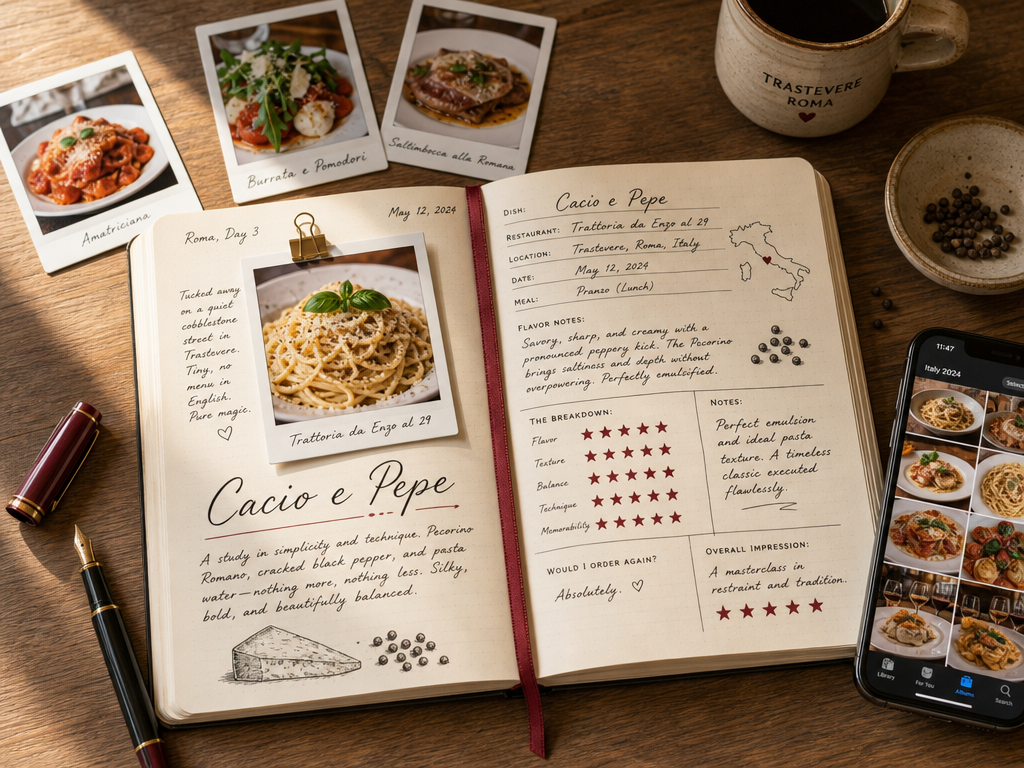
How to Track the Best Dish at Every Restaurant You Visit
John the smoothie monster
John lives for smoothie bowls and cold-pressed juices. He uses Savor to remember his best blends.
How to Track the Best Dish at Every Restaurant You Visit: A Complete System You had an extraordinary meal three months ago. You remember the moment - the...
How to Track the Best Dish at Every Restaurant You Visit: A Complete System
You had an extraordinary meal three months ago. You remember the moment - the server placing the plate in front of you, that first bite, the way everything just clicked. But now, scrolling through 2,400 food photos in your camera roll, you can't remember the restaurant's name, the exact dish, or whether it was in Brooklyn or the Lower East Side.
Your camera roll is a graveyard of incredible meals you can't retrieve.
The problem isn't that you didn't take a photo. The problem is that a photo without context is just visual noise. A 4-star restaurant rating tells you nothing about which dish made the meal unforgettable. Generic review apps collapse your entire dining experience into a single, useless number.
This guide introduces a different approach: the Dish-First Framework. Instead of rating restaurants, you'll build a searchable, personal database of every exceptional dish you've ever eaten - organized by location, cuisine type, and your own 10-point scoring system.
Table of Contents
- Why Restaurant Ratings Don't Work
- The Dish-First Framework
- The Four-Layer System for Tracking Dishes
- The Categorized Tool Guide
- The DIY Method: Building Your Own System
- The Backlog Strategy: Cleaning Up Your Camera Roll
- Frequently Asked Questions
Why Restaurant Ratings Don't Work
A 4-star restaurant review is a collapsed metric. It tells you the restaurant was "good," but it doesn't tell you that the duck confit was transcendent while the dessert was forgettable. It doesn't record that the server recommended ordering the pasta "al dente, not fully cooked" or that the chef uses a specific Sicilian olive oil you've been trying to source.
Restaurant-level ratings create three problems:
The Averaging Problem: A single star rating flattens the highs and lows of a multi-course meal into mathematical mediocrity. You lose the signal in the noise.
The Memory Problem: When you return to a restaurant six months later, you can't remember which of the 40 menu items you ordered last time, much less whether it was worth reordering.
The Searchability Problem: Your camera roll groups photos chronologically, not by dish, cuisine, or quality. Finding "that amazing carbonara from somewhere in Rome" requires scrolling through hundreds of unrelated images.
The 5 Best Apps to Track Your Favorite Dishes (And Actually Remember What You Ate) explores this problem in depth, but the solution is straightforward: shift from restaurant-first documentation to dish-first documentation.
The Dish-First Framework
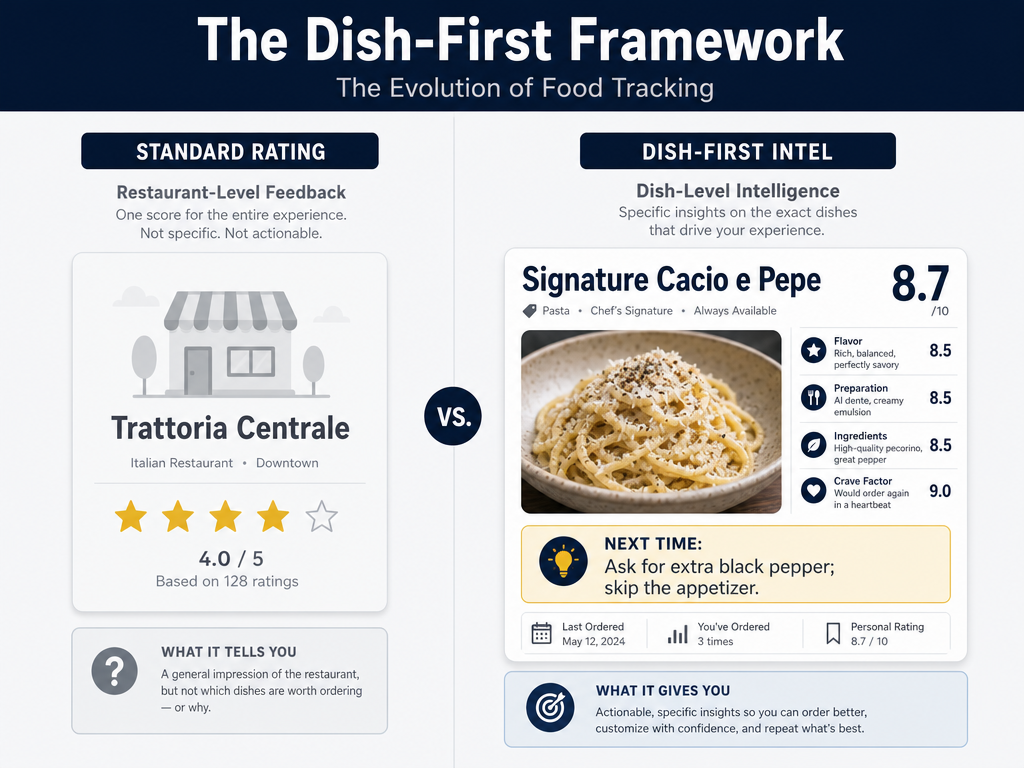 The Dish-First Framework replaces vague star ratings with precise decimal scores and actionable instructions for your future self, ensuring every return visit is optimized.
The Dish-First Framework treats the dish, not the restaurant, as the atomic unit of your culinary memory. Instead of asking "Was this restaurant good?" you ask "Was this specific dish worth ordering again?"
This framework requires three mandatory fields for every entry:
Dish Name (Precise): Don't write "pasta." Write "Cacio e Pepe with Pecorino Romano and hand-cracked black pepper." Specificity is your future self's best friend.
Decimal Rating (10-Point Scale): Use a 10-point scale with decimal precision. An 8.2 and an 8.7 feel similar in the moment, but the difference matters when you're deciding where to spend $200 on your next trip. The decimal forces you to interrogate your own taste instead of defaulting to a vague thumbs-up.
The "Next Time" Note: This is the most valuable field in your database. It's not a rating - it's an instruction to your future self. Examples: "Order the large size, not small." "Ask for extra char on the crust." "Skip the dessert, double down on the appetizer."
The "Next Time" note transforms a simple memory into strategic intelligence. It's the difference between a diary and a playbook.
The Four-Layer System for Tracking Dishes
A functional dish-tracking system operates on four layers: capture, categorization, retrieval, and sovereignty. Each layer solves a specific failure mode in traditional restaurant reviews.
Layer 1: Capture (The 30-Second Protocol)
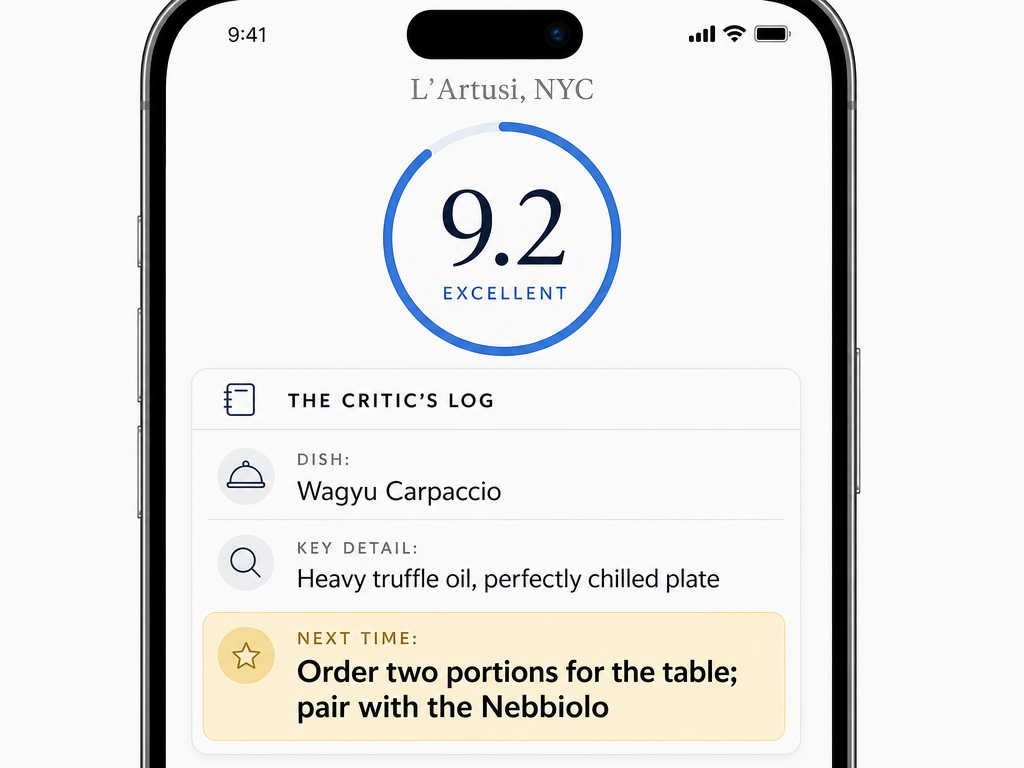 The 'Next Time' note is the most critical field in your database, transforming a simple memory into a strategic instruction for your next visit.
The moment the plate arrives, you have 30 seconds to capture the critical data before the food cools or the conversation resumes. This isn't leisure journaling - it's tactical documentation.
Photo First: Take one well-lit photo. Natural light beats flash. Overhead angle beats 45-degree angle. You're creating a visual index, not an Instagram post.
Quick Rating: Assign a preliminary score immediately after the first three bites. Your initial sensory reaction is more honest than the one you'll have after finishing the plate and paying the bill.
One-Sentence Instruction: Write the "Next Time" note while the taste is still in your mouth. "The edges were perfect - ask for extra crispy next time" is more useful than any paragraph of flowery description you'll write later.
Best Apps to Remember Every Dish and Meal You've Ever Eaten details the capture process across different app ecosystems, but the principle remains constant: speed beats perfection.
Layer 2: Categorization (The Indexing System)
A photo without metadata is invisible. Your future self needs multiple paths to find the same dish.
By Location: Tag entries with city and neighborhood. "Tokyo, Shibuya" is findable. "Japan" is not.
By Cuisine Type: Use broad categories (Italian, Japanese, Mexican) and sub-categories (Neapolitan pizza, Edomae sushi, Oaxacan mole). The hierarchy matters.
By Dish Type: Pasta, ramen, steak, pastry. When you're craving a specific format, you need to filter by structure, not just geography.
By Rating Tier: Create custom tiers. Some people use "Never Again" (0-4), "Solid" (5-7), "Exceptional" (8-9), "Hall of Fame" (9.5-10). Your system can differ, but the thresholds must be consistent.
Layer 3: Retrieval (The Search Problem)
The best database in the world is useless if you can't find what you need when you need it. Retrieval is where most systems fail.
Search by Dish Name: You should be able to type "carbonara" and see every version you've logged, sorted by rating.
Filter by Location + Type: "Show me all ramen in Tokyo rated above 8.5" should return results in under two seconds.
Chronological Timeline: Sometimes you just need to scroll backward through your dining history by date, the way your camera roll works - but with actual context attached.
Layer 4: Sovereignty (The Export Problem)
The scariest moment in any foodie's digital life is realizing that the app holding three years of dining memories just shut down. Data sovereignty - the ability to export and own your records - is not optional.
Look for platforms that offer:
- Plain-text export (CSV, JSON)
- Photo downloads with preserved metadata
- No vendor lock-in
Apps that refuse to let you export your data are betting you'll be too lazy to leave. They're usually right. Don't let them be right about you.
The Categorized Tool Guide
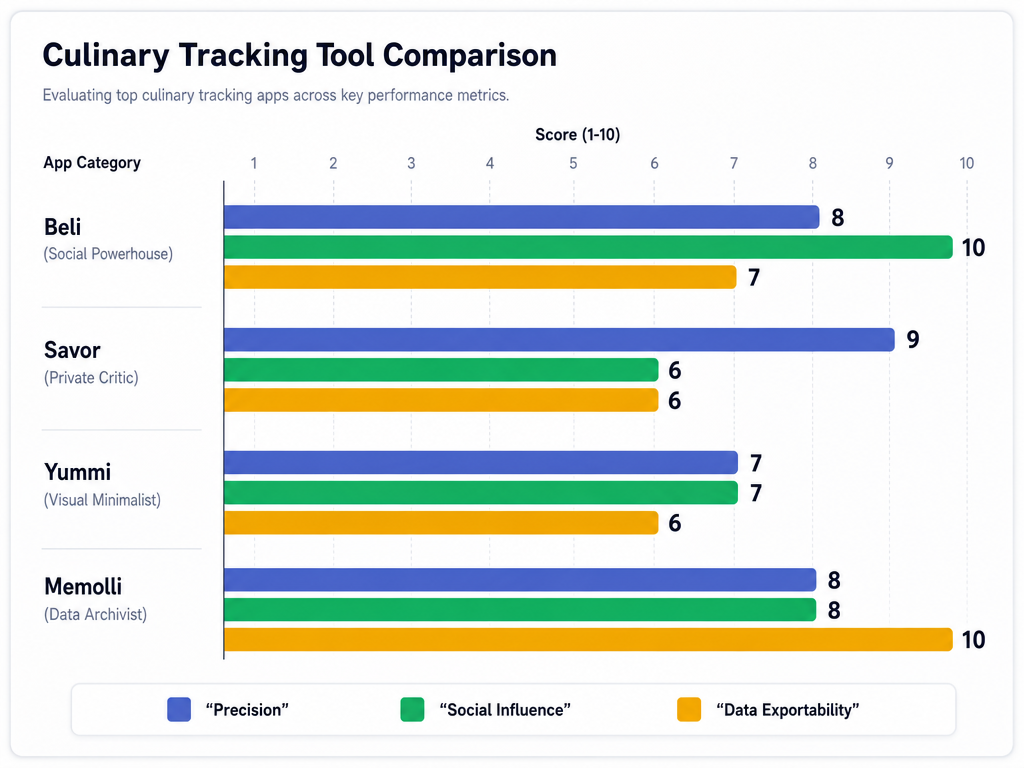 Not all tracking apps are created equal. Choose your platform based on whether you prioritize social competition, granular data precision, or long-term data sovereignty.
The Social Powerhouse: Beli
Beli rebuilt restaurant discovery around a simple premise: trust your friends, not the internet. Instead of anonymous five-star reviews, Beli users rank restaurants using an ELO-based comparison system (borrowed from chess ratings). The app repeatedly asks, "Which was better: Restaurant A or Restaurant B?" Over time, your personal leaderboard emerges.
Key Strength: Social proof from a curated circle. If your foodie friends are on Beli, their rankings become your shortlist.
Key Limitation: The ELO system is frustrating for people who prefer absolute ratings. You can't just assign a "9" to a dish and move on - you have to constantly compare.
Best For: Urban diners who treat restaurant discovery as a competitive sport and value social validation.
As of September 2025, users had logged over 75 million restaurant ratings on Beli, according to The New York Times. By comparison, from 2021 through 2024, Yelp users logged approximately 83.6 million ratings.
Beli is no longer invite-only as of 2025. The app is now openly available for download.
The Private Critic: Savor
Savor is built for people who reject the social-ranking game entirely. It's a private, dish-first database that uses a 10-point decimal scoring system. You're not rating restaurants - you're rating individual dishes and building a searchable archive of your personal taste.
Key Strength: Decimal precision (8.2 vs. 8.7) forces you to articulate why one carbonara was better than another. The "Next Time" notes feature is the killer app - it's where most users store the actionable intel that makes return visits better.
Key Limitation: The free tier is functional but limited. Savor Pro unlocks full search, filtering, and export features for $4.99/month or $49.99/year.
Best For: Serious diners who want a private culinary archive, not a social feed.
The Minimalist: Yummi
Yummi is the anti-spreadsheet. It's a photo-first app that auto-geotags every meal, creating a visual calendar of your dining history. There's no scoring system, no mandatory text fields - just photos, dates, and locations.
Key Strength: The fastest capture method available. Open the app, take a photo, done. Yummi handles the rest.
Key Limitation: No structured rating system means you lose the ability to rank dishes quantitatively. It's a memory aid, not an evaluation tool.
Best For: Visual thinkers who want to document every meal without friction.
The Data Archivist: Memolli
Memolli is for people who've been burned by app shutdowns before. It prioritizes data portability above all else. Every entry you create can be exported as plain text. The interface is utilitarian - no flashy animations, no gamification - but the commitment to user ownership is absolute.
Key Strength: Full CSV export and local storage mean your data survives even if Memolli disappears tomorrow.
Key Limitation: The UI feels spartan compared to competitors. Memolli Pro starts at $3/month for advanced features, but even the free tier respects your sovereignty.
Best For: Multi-decade archivists who want to own their culinary records forever.
Other Options: Discovery vs. Memory
The Eater discovery app includes 45,000 restaurants across 85 cities, but it's optimized for discovery, not memory. It helps you find where to eat, not remember what you ate.
Yelp, Google Maps, and TripAdvisor remain useful for discovering new restaurants, but they're terrible at dish-level tracking. Their five-star systems collapse all signal into a single, unhelpful average.
For a broader comparison of food review platforms, see Best Food Review Apps for Tracking and Discovering Meals.
The DIY Method: Building Your Own System
Not everyone wants to entrust their dining history to a third-party app. If you're comfortable with spreadsheets or note-taking apps, you can build a custom tracking system that's as powerful as any commercial solution.
Recommended Fields for a Notion or Spreadsheet Build
- Date: ISO format (YYYY-MM-DD) for easy sorting
- Restaurant Name: Full legal name, not nickname
- City/Neighborhood: Precise location for filtering
- Dish Name: Specific and descriptive
- Rating: 10-point decimal scale
- Price: Total cost or per-dish cost in local currency
- Companion: Who you dined with (useful for remembering context)
- Next Time Note: The instruction to your future self
- Photo URL/Link: If you store photos separately (Google Photos, Dropbox)
- Tags: Cuisine type, dish type, dietary restrictions
Notion's relational databases let you link entries across multiple tables. You can create separate tables for restaurants, dishes, and cuisines, then cross-reference them. It's overkill for most people, but if you're a power user, it's unbeatable.
The Analog Option: Physical Journals
Some diners reject digital systems entirely. They carry pocket-sized journals (Moleskine, Leuchtturm1917) and record meals with pen and ink. The tactile ritual of handwriting forces you to be more intentional about what you record.
Advantage: No app shutdowns, no subscription fees, no privacy concerns.
Disadvantage: Zero searchability. Finding "that ramen place in Kyoto" requires flipping through months of entries.
Analog works best as a supplement, not a replacement. Take notes in the moment, then digitize the critical entries later.
The Backlog Strategy: Cleaning Up Your Camera Roll
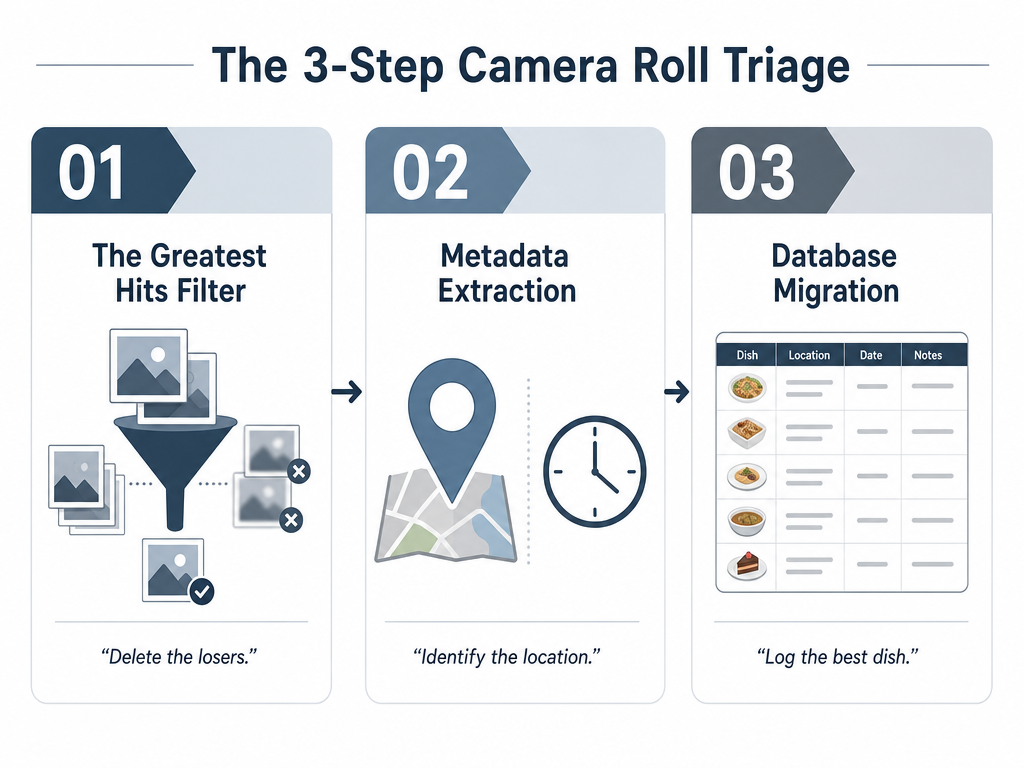 Don't let thousands of food photos go to waste. Use a three-step triage process to extract the 'intel' from your camera roll and build your legacy database.
You've just learned a new system, but your camera roll still holds 2,400 unlabeled food photos. How do you retroactively triage years of dining history without losing your mind?
Step 1: The "Greatest Hits" Triage
Don't try to log everything. That's a recipe for burnout. Instead, scroll through your camera roll and identify the top 20 meals you still remember clearly. If you can recall the dish name, the restaurant, and why it mattered, it's worth logging.
Start with meals from the last six months. Memory degrades quickly. Anything older than a year is probably lost unless it was truly exceptional.
Step 2: Use GPS Metadata (If Available)
Most smartphone photos embed GPS coordinates in the image file. If your photos were taken with location services enabled, you can extract the coordinates and reverse-geocode them to get the restaurant's address.
On iPhone, open a photo in the Photos app, swipe up, and check the map. On Android, check the photo details. If the location is accurate, you've saved yourself hours of detective work.
Third-party apps like Photo Investigator (iOS) or Exif Viewer (Android) can bulk-extract location data from entire albums.
Step 3: Delete the Losers
This is the hardest step. If you can't remember the dish, the restaurant, or why you took the photo, delete it. A cluttered archive is worse than no archive at all.
Your camera roll is not a museum. It's a working tool. Treat it accordingly.
For more strategies on organizing food photos, see The 5 Best Apps to Organize Food Photos by Restaurant (2026 Guide).
Frequently Asked Questions
Is Beli still invite-only?
No. Beli ended its invite-only phase in 2025 and is now openly available for download on iOS and Android.
What is the best app for tracking restaurants?
It depends on your intent. If you want social validation and competitive rankings, use Beli. If you want private, dish-level precision, use Savor. If you want the fastest possible capture, use Yummi. If you want data sovereignty, use Memolli. There's no single "best" app - only the best fit for your workflow.
What is the best app for keeping track of restaurants?
For dish-first tracking rather than restaurant-level ratings, Savor offers the most granular system with 10-point decimal scoring and "Next Time" notes. For restaurant discovery, the Eater app covers 45,000 restaurants across 85 cities. For a complete comparison, see Best Apps to Share Lists for Serious Foodies Who Hate Yelp.
How do I see restaurants on maps?
Most dish-tracking apps (Beli, Savor, Yummi) include map views that plot your logged meals geographically. Google Maps also lets you create custom lists, but it lacks dish-level tagging. For serious foodies, Mapstr is a dedicated map-based bookmarking tool that integrates with other apps.
How can I track individual dishes, not just the restaurant?
Use apps built around dish-first architecture (Savor, Memolli) or build a custom Notion database with separate tables for restaurants and dishes. Avoid restaurant-rating apps like Yelp and TripAdvisor - they collapse everything into a single star rating and ignore dish-level nuance.
What is the "Next Time" note?
The "Next Time" note is a tactical instruction you write to your future self while the meal is still in your mouth. Examples: "Order the large, not small." "Ask for extra char." "Skip the dessert." It's the most useful field in a dish-tracking database because it turns memory into strategy.
How can I catalog my existing 2,000+ food photos?
Use the three-step backlog triage: (1) Identify your top 20 most memorable meals from the last six months and log only those. (2) Extract GPS metadata from photos to recover restaurant locations. (3) Delete photos you can't remember - a cluttered archive is worse than no archive. For detailed guidance, see Beyond the Camera Roll: How to Build Your Personal Restaurant Library.
What fields should I include in a food tracking spreadsheet?
Mandatory fields: Date (YYYY-MM-DD), Restaurant Name, City/Neighborhood, Dish Name, Rating (10-point decimal), Price, "Next Time" Note. Optional fields: Companion, Photo URL, Tags (cuisine type, dish type), Dietary Notes. Use Notion for relational databases or Google Sheets for portability.
Can restaurants see Beli reviews?
No. Beli reviews are private to your social circle. Unlike Yelp or Google, where reviews are publicly visible, Beli operates as a closed network. Only people you've connected with can see your ratings.
You've spent thousands of dollars and hundreds of hours eating memorable meals. The least you can do is remember them. A camera roll is not a database. A star rating is not a memory. A restaurant review is not a playbook.
The Dish-First Framework gives you a system to track, rate, and retrieve every exceptional dish you've ever eaten. Whether you use Beli for social competition, Savor for private precision, or a custom Notion build for total control, the principle remains the same: document the dish, not the restaurant.
Three months from now, when you're trying to remember that transcendent carbonara, you'll thank yourself for taking 30 seconds to log it properly.
Your future self is counting on you. Don't let them down.