
How to Track Your Favorite Dishes by City: A Guide for Serious Foodies
Alex the juice queen
Alex hunts for the best juice bars and presses. She rates every sip and saves her favorites in Savor.
How to Track Dishes by Restaurant City: The Serious Foodie's Complete Guide You had an extraordinary bowl of ramen in Tokyo three months ago. The broth was...
How to Track Dishes by Restaurant City: The Serious Foodie's Complete Guide
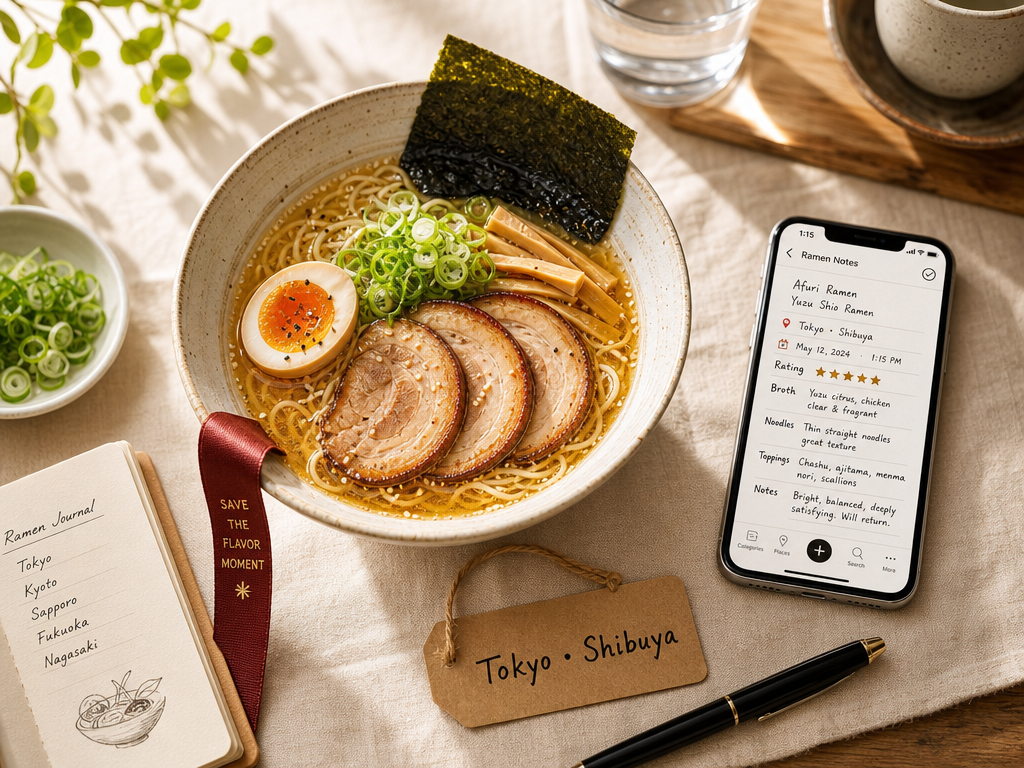
You had an extraordinary bowl of ramen in Tokyo three months ago. The broth was cloudy and rich, almost creamy, with a depth you still think about. You took a photo. You remember the neighborhood - somewhere near Shibuya - but the restaurant name? Gone. The specific dish? Lost in a camera roll of 2,847 photos you'll never organize.
This is the Camera Roll Graveyard problem, and it's not a memory issue. It's a system failure.
The intent behind searching "how to track dishes by restaurant city" isn't casual. You're not looking for another Yelp clone that lets you leave public reviews of entire restaurants. You're looking for a personal knowledge management system for flavor - a private, searchable archive that lets you answer questions like "What was that perfect tonkotsu I had in Tokyo?" or "Show me every exceptional pasta dish I've eaten in Italy" without scrolling through thousands of untagged photos.
This guide presents three distinct tiers of dish-tracking systems - Low Friction, High Data, and Native/Free - matched to your technical appetite and the level of granularity you actually need. By the end, you'll have a concrete methodology for capturing, organizing, and retrieving your culinary memories by dish name, city, and personal rating.
Table of Contents
- Why Track Dishes Instead of Restaurants
- The Three Layers of a City-Based Dish Catalog
- Method 1: Native Tools (Low Friction)
- Method 2: Dedicated Food Apps (High Data)
- Method 3: DIY Database (Power User)
- The Batch and Tag Workflow
- Automating City and Location Tagging
- Rating Systems That Actually Work
- AI Limitations for Food Photo Recognition
- Retrospective Cleanup for Old Photos
- Data Export and Longevity
- Frequently Asked Questions
Why Track Dishes Instead of Restaurants
Most restaurant apps focus on venue ratings: you give a place four stars, write a review, move on. But when you return to Paris six months later, you don't remember the restaurant's overall vibe - you remember the specific steak frites that made you reconsider everything you knew about beef.
Tracking at the dish level changes the question from "Was this restaurant good?" to "Which specific dish was extraordinary, and would I order it again?"
This distinction becomes critical when you're building a city-based catalog. A single restaurant might serve twelve dishes. You loved two, tolerated eight, and actively disliked two. A five-star venue rating flattens that nuance into uselessness. A dish-level system lets you return to Rome and immediately pull up a list that says: "Order the carbonara at Flavio al Velavevodetto (9.2/10), skip the amatriciana (6.1/10)."
Research shows that people who couldn't recall specific positive dining experiences were 47% less likely to recommend restaurants to others. The implication is clear: without a structured memory system, even your best meals fade into generic impressions.
The Three Layers of a City-Based Dish Catalog
A functional dish-tracking system organizes around three hierarchical layers:
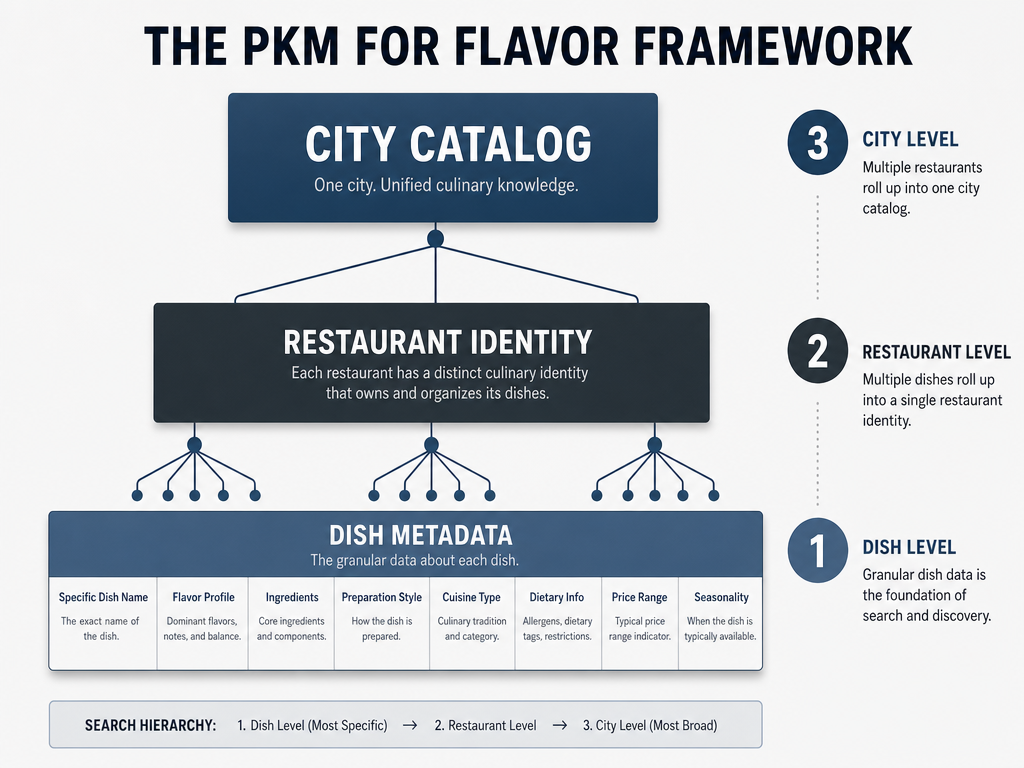 The 'Three Layers' system ensures your food memories are searchable by specific cravings while remaining organized within the broader context of the city you visited.
Layer 1: Dish Metadata
This is the atomic unit - the specific thing you ate. You need:
- Dish name (not just "pasta," but "cacio e pepe")
- Your rating (absolute or relative - we'll cover both)
- Quick sensory note (optional but valuable: "aggressively peppery, perfect al dente")
Without this layer, you're just photographing food. With it, you're building a searchable flavor database.
Layer 2: Restaurant Identity
The context around the dish:
- Restaurant name
- Neighborhood or address (critical for cities like Tokyo where addresses are nearly useless)
- Meal occasion (lunch counter vs. formal dinner changes everything)
Layer 3: City Catalog
The organizing principle that makes the whole system retrievable:
- City or region (Rome, not just "Italy")
- Trip or date (lets you create chronological "food timelines")
- Cuisine type (useful for cross-city searches like "best tonkotsu I've had anywhere")
This three-layer structure is what separates a casual photo collection from a personal culinary encyclopedia. When you're planning a return trip to Barcelona, you don't scroll through 400 photos. You filter by city, sort by rating, and see your top ten dishes in seconds.
Method 1: Native Tools (Low Friction)
The lowest-effort approach uses tools already on your phone: Apple Photos, Google Photos, or your native Notes app. This method prioritizes speed over data depth.
The Apple Photos Caption Workflow
Apple Photos has a secret weapon for foodies: the caption field. It's searchable, it's permanent, and it doesn't require a third-party app.
Here's the workflow:
- Take the photo at the table. Don't stage it - just capture it.
- Immediately after the meal (or that evening), open the photo and tap "Add a Caption."
- Write a structured caption using a consistent format:
Tokyo - Ichiran Shibuya - Tonkotsu Ramen (8.5/10)
Creamy broth, firm noodles, perfect spice level.
- Use consistent city prefixes. Always start with the city name. This makes search trivial - type "Tokyo" and every dish you've eaten there appears.
The limitation is obvious: there's no relational database, no filtering by rating, no automatic geotagging. But for someone who wants to spend five seconds per meal and still have a searchable archive, this works.
Google Photos offers a similar system through its "Description" field, though it's slightly less prominent in the interface.
The Notes App "City Folders" Method
A slightly more structured version uses your native Notes app with a rigid folder hierarchy:
- Folder: Tokyo
- Tonkotsu Ramen - Ichiran Shibuya (8.5/10)
- Sushi - Sushi Dai Tsukiji (9.2/10)
- Folder: Rome
- Carbonara - Flavio al Velavevodetto (9.2/10)
- Cacio e Pepe - Felice a Testaccio (7.8/10)
Each note contains:
- Dish name and restaurant
- Your rating
- A few lines of sensory description
- The photo (if you want it embedded)
This is low-tech, zero-cost, and completely private. The downside is friction - you're manually creating folders and typing everything. No auto-location, no sorting by rating, no export to CSV.
But it's yours. No startup will shut it down. No Terms of Service will change. For foodies who value ownership over features, this is a legitimate option. If you're interested in building a personal restaurant library that you fully control, the Notes app method is a solid foundation.
Method 2: Dedicated Food Apps (High Data)
If you're willing to invest an extra 30 seconds per meal, dedicated apps offer substantially more power: auto-geotagging, filtering, export, and in some cases, social discovery.
Savor: The 10-Point Private Archive
Savor is built around a single premise: you track dishes, not restaurants, using a 10-point rating scale instead of generic stars. It's explicitly private-first - no public profiles, no social feed, no algorithmic recommendations.
Key features:
- Dish-level granularity. You rate the carbonara, not the entire restaurant.
- 10-point scale. Lets you distinguish between "very good" (7.5) and "transcendent" (9.2). Research from the platform shows this level of precision helps serious foodies articulate what they actually loved.
- Automatic location tagging. Uses GPS to attach city and neighborhood data.
- Flavor profile notes. Optional fields for texture, spice level, and intensity.
The friction is slightly higher than native tools, but the reward is a genuinely searchable database. You can filter by city, sort by rating, and export your data if the app ever shuts down.
For foodies who want depth without social noise, Savor is the standout. If you're comparing the best apps to track favorite dishes, Savor's 10-point system and dish-first architecture make it particularly well-suited for this use case.
Beli: The Social Ranker
Beli takes the opposite approach: it's social, competitive, and built around ranked lists rather than numerical ratings. According to platform data, 70% of Beli's user base is Gen Z, which gives you a sense of its aesthetic and tone.
Key features:
- Relative ranking. Instead of saying "this pasta is an 8.2," you say "this pasta is better than that pasta."
- Power Rankings. Public leaderboards of your favorite dishes in a city or cuisine.
- Social discovery. See what dishes your friends (or food influencers) have ranked highly.
The strength is discoverability - if you're traveling to a new city, you can see what dishes serious eaters have ranked in their top ten. The weakness is privacy: everything is public by default, and the ranking system assumes you remember enough dishes to create meaningful comparisons.
Beli is for foodies who treat dining as a competitive sport. If that's not you, the social pressure to keep ranking things will feel exhausting.
Yummi: The Visual Timeline
Yummi emphasizes chronological and geographic visualization. It calls your dining history a "Foodprint" and displays it on a calendar and map.
Key features:
- Calendar view. See what you ate on a specific date.
- Map view. Visualize your dining history geographically.
- Auto-geotagging via EXIF data. Pulls location from your photo metadata.
The UI can feel cluttered if you're a data-heavy user, but for someone who thinks in terms of "What did I eat on that trip to Lisbon in October?" it's intuitive. The calendar-first design makes it easy to organize dishes by city and date, though the filtering options are less robust than Savor's.
Method 3: DIY Database (Power User)
If you want total control and don't mind the setup time, building a custom database in Notion or Airtable gives you unlimited flexibility.
The Notion "Food Vault" Approach
Notion's "The Food Vault" template has been duplicated over 18,400 times, which tells you there's real demand for this level of organization.
A basic Notion setup includes:
- Database: Dishes
- Dish Name (text)
- Restaurant (text)
- City (select, multi-select for neighborhoods)
- Rating (number, 1-10)
- Cuisine Type (select)
- Date (date)
- Notes (text)
- Photo (file upload)
You can then create filtered views:
- Tokyo Dishes (Rating > 8.0)
- All Italian Pasta
- Top 10 Dishes of 2025
The advantage is flexibility - you can track price, ingredients, who you dined with, and dietary restrictions. The disadvantage is friction: every meal requires manual entry across seven fields. No auto-location, no streamlined mobile workflow.
This is for the subset of foodies who already use Notion for everything and enjoy the ritual of cataloging. If you're not already in that camp, the setup cost is prohibitive. For those interested in organizing restaurant photos by dish in a highly customized way, Notion offers unmatched control.
The Airtable Relational Database
Airtable is Notion's more powerful, slightly more complex cousin. It's better suited for foodies who want to track relationships between dishes, restaurants, and cities in a structured way.
A typical setup includes three linked tables:
- Table: Dishes (dish name, rating, notes, photo)
- Table: Restaurants (name, neighborhood, city, overall rating)
- Table: Cities (city name, country, trip dates)
Dishes link to Restaurants, Restaurants link to Cities. This lets you ask questions like:
- "Show me all 9+ rated dishes in Rome."
- "Which restaurants have I visited in Tokyo, and what did I order at each?"
The power comes from relational filtering and rollups - you can automatically calculate your average rating per city or see how many dishes you've tried in a specific neighborhood.
The tradeoff is complexity. If you've never used Airtable, the learning curve will frustrate you. But for data-minded foodies, it's the most powerful option.
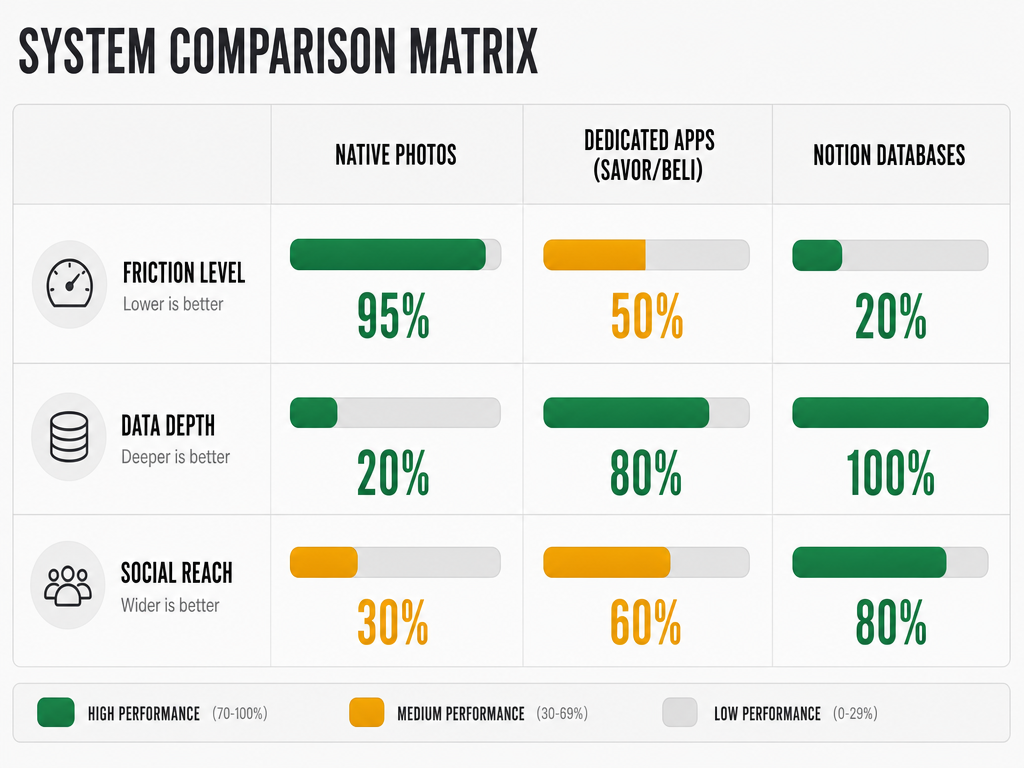 Choosing the right system involves balancing ease of use with the level of detail you want to preserve for your future self.
The Batch and Tag Workflow
The most sustainable workflow isn't logging in real-time - it's batching your entries during a quiet moment later.
Here's the framework:
At the Table: Quick Capture (5 seconds)
- Take the photo.
- If you're using a dedicated app, snap it directly in-app so location is auto-captured.
- If you're using native tools, just use your camera.
Do not try to write detailed notes while food is getting cold. Your dining companions will resent you, and the notes will be rushed and useless anyway.
During the Meal: Real-Time Enjoyment (0 seconds)
Put the phone away. Taste the food. Notice the texture, the spice, the way the dish evolves as it cools. This sensory attention is what lets you write meaningful notes later.
Evening Reflection: The Batch Entry (5 minutes)
At the end of the day - or the end of the trip - sit down with your photos and log everything:
- Open each photo.
- Add the dish name, restaurant, and city.
- Assign a rating (we'll cover systems in the next section).
- Write a one-sentence sensory note: "Aggressively salty, rich umami, perfect char on the crust."
This batch workflow respects the dining experience while still capturing the data. You're not frantically typing between bites - you're reflecting on the day's meals in a calm, focused session.
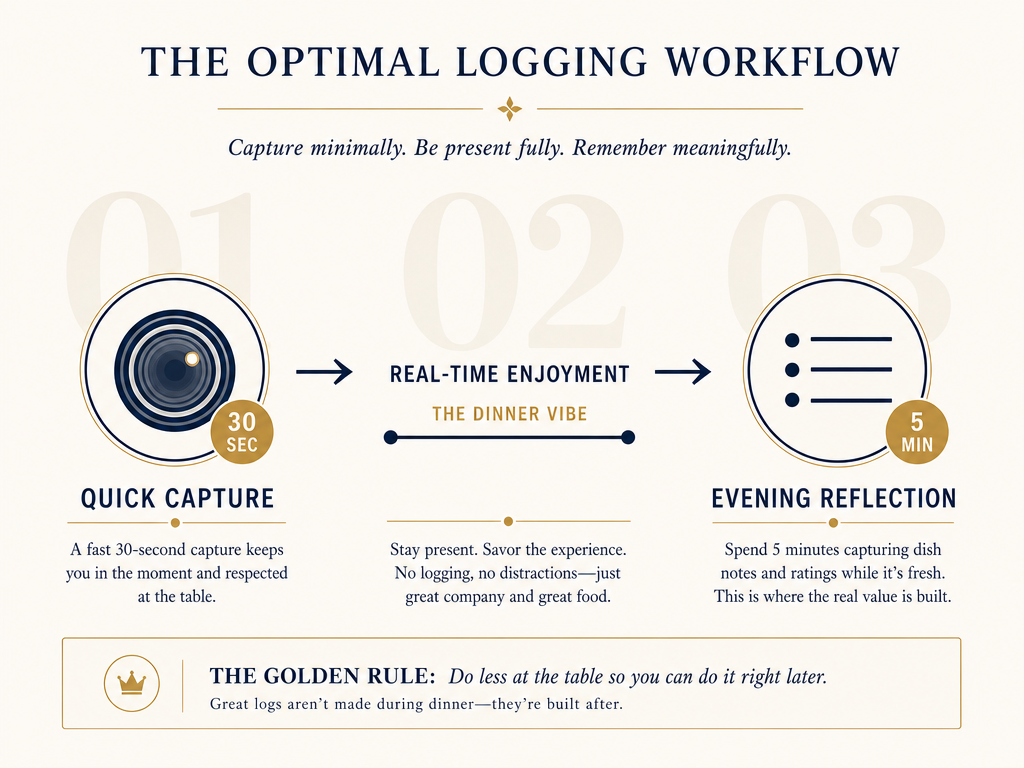 The most sustainable tracking workflow prioritizes the dining experience, leaving the data entry for a quiet moment of reflection later in the evening.
Automating City and Location Tagging
Manual city tagging is tedious. The good news: most of the work can be automated using EXIF data and geo-fencing.
EXIF Data Extraction
Every photo you take contains EXIF metadata - GPS coordinates, timestamp, device info. Apps like Yummi and Savor can read this data and automatically tag your dish with the correct city and neighborhood.
The requirement: you must have location services enabled for your camera app.
If you've disabled GPS for privacy reasons, you're stuck with manual tagging. But if you leave it on, most dedicated apps will pull the location automatically.
Geo-Fencing for City Names
Some apps (like Google Photos and Yummi) use geo-fencing: they recognize when you're in a specific city and auto-apply a "Tokyo" or "Rome" tag to all photos taken in that geographic boundary.
This works well for major cities but breaks down in edge cases:
- Small towns without defined boundaries
- Cities with sprawling suburbs (where does "Los Angeles" end?)
- International travel where time zones shift
The solution: verify auto-tags during your evening batch session. It's faster than typing every city manually, but it's not foolproof.
Rating Systems That Actually Work
The 5-star system is dead. It's too coarse, too culturally loaded, and too easy to game. Serious foodies need something better.
The 10-Point Absolute Scale (Recommended for Analytical Foodies)
This is what professional critics use. It allows granular distinctions:
- 9.0-10.0: Transcendent. You'll remember this dish for years.
- 8.0-8.9: Excellent. Worth a detour.
- 7.0-7.9: Very good. Would order again.
- 6.0-6.9: Good. Fine, but not memorable.
- 5.0-5.9: Mediocre. Edible but forgettable.
- Below 5.0: Actively bad.
The advantage: precision. You can articulate why an 8.5 carbonara was better than an 8.2 version without resorting to vague language like "it was just better."
The disadvantage: you need to calibrate your scale over time. Your first fifty ratings will be inconsistent until you develop a personal standard.
The Forced Ranking System (Recommended for Competitive Foodies)
This is Beli's approach: you don't assign numbers, you rank dishes relative to each other.
Example:
- Carbonara at Flavio al Velavevodetto (Rome)
- Tonkotsu at Ichiran (Tokyo)
- Cacio e Pepe at Felice a Testaccio (Rome)
The advantage: it's easier to say "this is better than that" than to assign an absolute number. You're always comparing apples to apples.
The disadvantage: it requires memory. You can't rank a new dish unless you remember enough existing dishes to place it correctly.
The Binary "Would I Order This Again?" System (Recommended for Casual Foodies)
If numbers feel arbitrary, simplify to yes/no:
- Yes: I would specifically return to this restaurant to order this dish.
- No: It was fine, but I wouldn't seek it out.
This is brutally simple and surprisingly effective. It forces you to be honest about whether a dish was actually special or just photogenic.
AI Limitations for Food Photo Recognition
AI tagging sounds like the future: take a photo, let the algorithm identify the dish, auto-populate the name. But the reality is messier.
Research from Apple's internal benchmarks shows that Apple Intelligence "Food Scenes" achieves 81% accuracy on common Western dishes like pizza and burgers, but only 41% accuracy on plated fine dining. The reason is training data: AI models are trained on millions of pizza photos and relatively few photos of omakase sushi or French tasting menus.
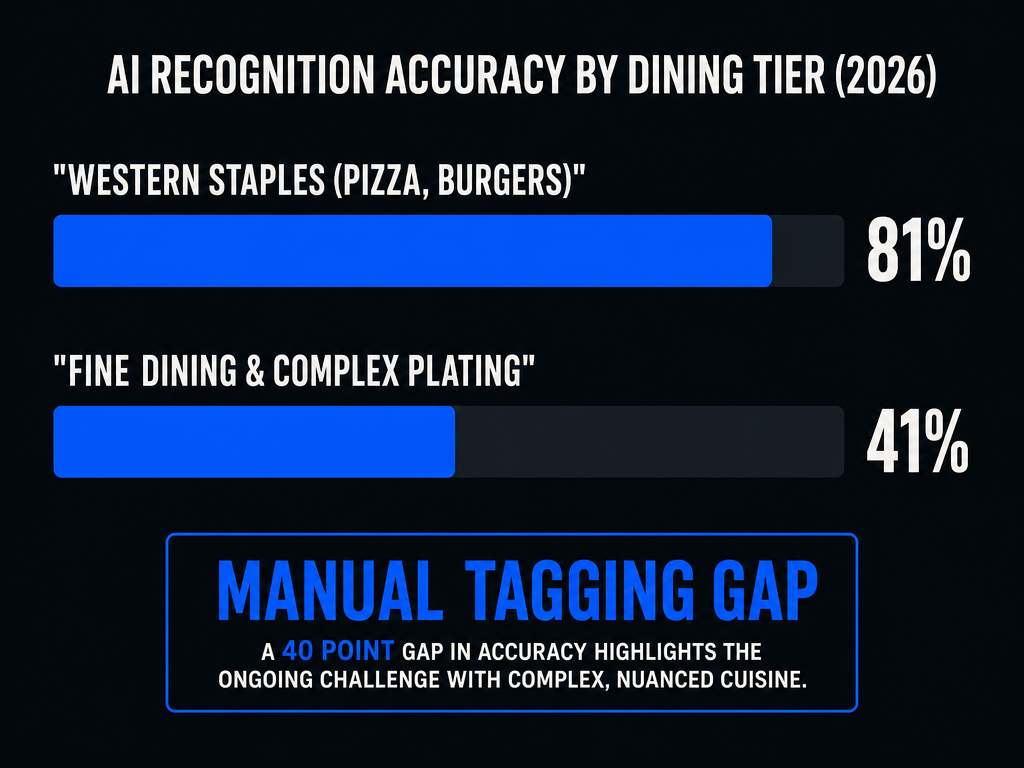 While AI is becoming more capable, it still struggles with the nuances of fine dining, making manual dish-level tagging a necessity for serious foodies.
Google Lens performs better on identifying restaurant names (by reading signage in photos) but struggles with dish names. It might correctly identify "Italian restaurant" but guess "spaghetti" when you're eating bucatini all'amatriciana.
The practical takeaway: use AI as a first pass, but verify everything manually. Let the app auto-suggest "ramen," then correct it to "tonkotsu ramen with extra garlic."
Retrospective Cleanup for Old Photos
You've taken 2,847 food photos over the past three years. They're completely untagged. How do you fix this without losing your mind?
The Triage System
- Export all food photos to a single folder. Use your phone's "Search" function to find photos taken at restaurants (filter by GPS data near known restaurant districts).
- Sort by city using EXIF data. Apps like Google Photos can auto-group by location.
- Apply a prioritized cleanup:
- Top tier: The truly exceptional meals. Tag these fully (dish name, restaurant, rating, notes).
- Middle tier: Very good meals. Tag with dish name and city only.
- Lower tier: Mediocre or forgettable. Archive without tagging, or delete.
This prevents you from trying to tag every photo and gives you a functional database of your best dishes in a few hours.
Using AI for Batch Location Tagging
Google Lens and Apple Intelligence can help with bulk cleanup:
- Open Google Lens, point it at a photo, and it will often identify the restaurant name (if signage is visible).
- Apple Photos' "Memories" feature can auto-group photos by city and date, which gives you a starting point for tagging.
Neither tool is perfect, but they cut manual work substantially.
Data Export and Longevity
Every app eventually dies. The question is whether you can export your data before that happens.
Apps with Confirmed Export Features
- Savor: CSV export of all dishes, ratings, and notes.
- Notion/Airtable: Full export to CSV, JSON, or Markdown.
- Apple Notes: Manual copy-paste, but you own the data.
Apps without Export (Proceed with Caution)
- Beli: No CSV export as of 2026. If the app shuts down, your rankings disappear.
- Yummi: Limited export functionality.
The rule: never invest more than six months of data entry into a platform that doesn't let you export. If you're serious about building a multi-decade culinary archive, you need portability.
If you're interested in food tracking apps that balance usability with data ownership, prioritize platforms that offer clean exports.
Frequently Asked Questions
What is the best app for tracking restaurants?
The answer depends on what you're tracking. If you track entire restaurants (not individual dishes), Google Maps and Yelp are sufficient. But if you want dish-level granularity organized by city, dedicated apps like Savor or Beli are better suited. For those interested in apps to remember every dish you've eaten, dish-first platforms are the clear choice.
How to track restaurant food?
Start with three data points: dish name, restaurant/city, and your rating. Take a photo at the table, then batch your tagging later in the evening. Use a consistent format (e.g., "Tokyo - Ichiran - Tonkotsu Ramen (8.5/10)") so your archive is searchable. Choose a platform (native tools, dedicated app, or DIY database) based on how much friction you're willing to tolerate.
What is the easiest app to track food?
The absolute easiest is your native Photos app with caption tagging. Zero learning curve, zero cost, fully private. You just type a structured caption like "Rome - Flavio - Carbonara (9.2/10)" and you're done. The tradeoff is no filtering, no export, and no advanced features. For a dedicated app with minimal friction, Savor offers auto-location and a streamlined mobile workflow.
How do I automate the city/location tagging?
Enable location services for your camera app so every photo includes GPS coordinates in its EXIF data. Apps like Savor, Yummi, and Google Photos can read this data and auto-tag your photos with the correct city. For manual workflows (like Apple Notes), you'll need to type the city prefix yourself, but the EXIF data still provides a backup reference if you forget where a photo was taken.
What is the best way to rate food so I actually remember the difference?
Use a 10-point scale instead of 5 stars. It forces you to articulate why an 8.5 carbonara was better than an 8.2 version. Alternatively, use forced ranking (this dish is better than that dish) if you're comfortable with relative comparisons. Avoid vague language like "it was good" - write one specific sensory note instead: "aggressively salty, rich umami, perfect char."
Can AI identify my old food photos retrospectively?
AI can help, but it's not reliable enough for serious foodies. Apple Intelligence achieves 81% accuracy on common dishes like pizza but only 41% on fine dining. Google Lens is better at identifying restaurant names (by reading signage) than dish names. Use AI as a first pass to speed up cleanup, but verify everything manually. Research on AI food photo accuracy shows that manual tagging is still essential for precision.
How do I export my data if an app shuts down?
Before committing to any app, verify it offers CSV or JSON export. Savor, Notion, and Airtable all support clean exports. Apps like Beli currently don't. If you're building a multi-decade archive, data portability is non-negotiable. Even if you love an app's features, lock-in risk is real - startups fail, platforms pivot, and Terms of Service change.
According to research, 84% of diners use photos to decide where to eat, and 82% order a dish based on its photo. The implication is clear: visual memory matters, but only if it's organized. A camera roll full of untagged food photos is functionally useless. A searchable database organized by dish, city, and rating is a personal culinary encyclopedia you'll reference for decades.
The question isn't whether you should track your meals - it's whether you're willing to invest five minutes per day to stop losing them. Choose your system, commit to the workflow, and start building. Your future self, standing in Tokyo at 11 PM trying to remember that perfect ramen spot, will thank you.