
How to Search Food Photos by Dish Name: A Better Way to Organize Your Meals
John the smoothie monster
John lives for smoothie bowls and cold-pressed juices. He uses Savor to remember his best blends.
How to Search Food Photos by Dish Name: The Complete System for Serious Foodies You had an extraordinary meal three months ago. You can still taste it. But...
How to Search Food Photos by Dish Name: The Complete System for Serious Foodies
You had an extraordinary meal three months ago. You can still taste it. But when you open your camera roll, you're staring at 2,847 photos - date-stamped, location-tagged, yet completely unsearchable by the one thing that actually matters: the dish name.
You've photographed 73+ exceptional dishes this year. You'll never find most of them again.
This isn't a storage problem. It's an architecture problem. Your phone's native AI can identify "food" or "pasta," but it can't tell you which restaurant served that life-changing cacio e pepe, or help you find every exceptional ramen you've documented across three countries.
The solution isn't better photography. It's a better system.
Table of Contents
- Why Native Phone Search Fails at Dish-Level Recall
- The Native Search Reality Check: What Apple and Google Can (and Can't) Do
- The Power-User Workflow: The Caption Hack
- When to Move Beyond Your Camera Roll: The Third-Party Decision
- Comparison Table: Native Gallery vs. Food Apps vs. Custom Databases
- Pro-Tip: Use 2x Zoom for Better AI Recognition
- Frequently Asked Questions
Why Native Phone Search Fails at Dish-Level Recall
Your brain doesn't catalog meals by date. It recalls them by flavor, texture, and the specific name you saw on a menu. You remember "uni pasta" or "duck confit," not "that thing I ate on March 14th."
Yet every camera roll in existence organizes photos chronologically - a system optimized for vacation snapshots, not culinary memory.
The friction multiplies when you travel. That incredible omakase in Tokyo? It's buried somewhere between photos of your hotel room and a blurry shot of a train station. The specific nigiri that changed your understanding of tuna is lost in a sea of visual noise.
People who cannot recall specific positive dining experiences are 47% less likely to recommend restaurants to others ("As cited in Food Memory Study"), suggesting that forgettable documentation creates forgettable dining culture.
The problem compounds over time. After 200 restaurant visits, you've created a 1,200-photo archive with zero dish-level searchability. The data is there. The architecture is missing.
The Native Search Reality Check
Your phone's AI can already search for food - but it's terrible at specificity.
Both Apple Intelligence and Google Photos use object recognition to automatically tag photos. You can search for "food," "pasta," or "sushi," and the algorithm will surface relevant images.
Here's the accuracy reality: Apple Intelligence's "Food Scenes" achieves 81% accuracy on common Western dishes but only 41% on plated fine dining ("Reported in Savor Blog"). Google Photos' algorithm achieves 68% precision on broad categories (pizza) but only 34% on specific preparations (Detroit-style pizza) ("Reported in Savor Blog").
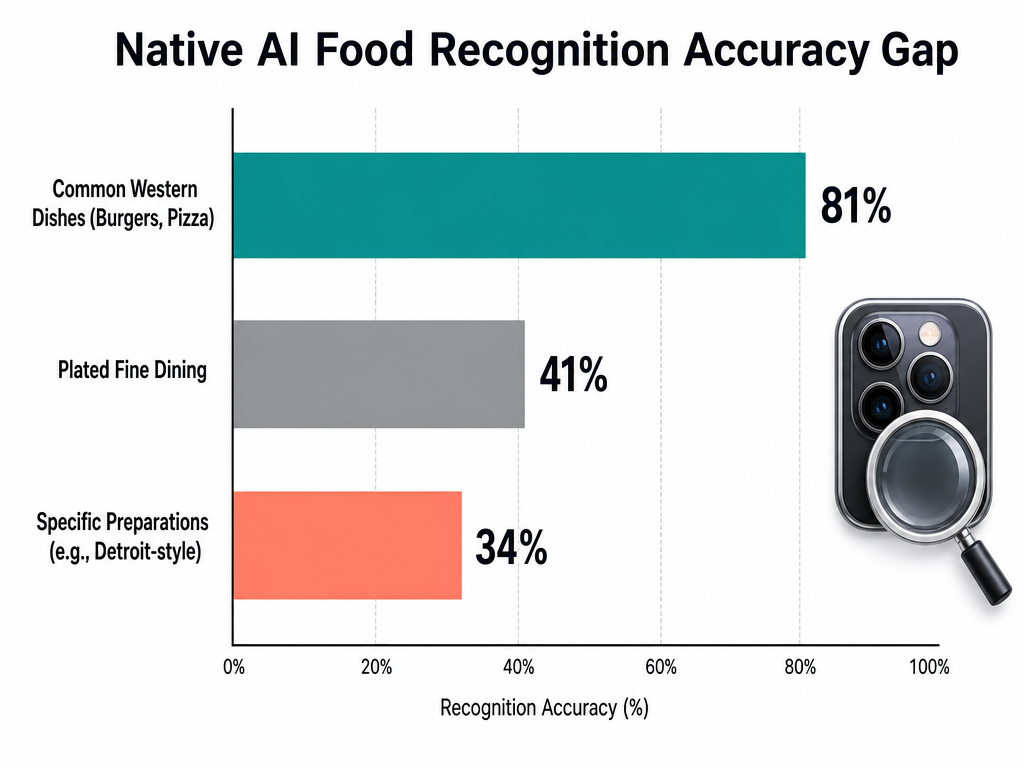
Native AI often fails at niche culinary details. While standard dishes are easily identified, accuracy drops significantly for complex plating and regional variations.
Translation: Your phone can find "burger," but it can't find "dry-aged beef burger with bone marrow aioli." It can identify "noodles," but not "mazemen with chashu and ajitama."
The algorithm works for people who want to find "all my food photos." It's useless for people who want to find "that specific carbonara."
How to Use Native Search Anyway:
On iOS: Open Photos, tap the search bar, type "food" or a broad category like "pasta." The algorithm surfaces matches based on visual recognition. You can then filter by date or location to narrow results.
On Google Photos: Tap the search icon, type a broad category. Google's algorithm is notably stronger for Western dishes but struggles with East Asian and Middle Eastern cuisines where plating conventions differ from its training data.
Both systems fail the moment you need specificity. If you've eaten at five ramen shops, searching "ramen" returns 40 photos with no way to distinguish tonkotsu from shoyu, or Restaurant A from Restaurant B.
For many food lovers, this is where native organization becomes a liability rather than a tool.
The Power-User Workflow: The Caption Hack
There's one native feature that makes food photos 100% searchable by dish name: the caption field.
This is not a workaround. It's the only way to guarantee that typing "cacio e pepe" will return the exact photo you took at that Roman trattoria.
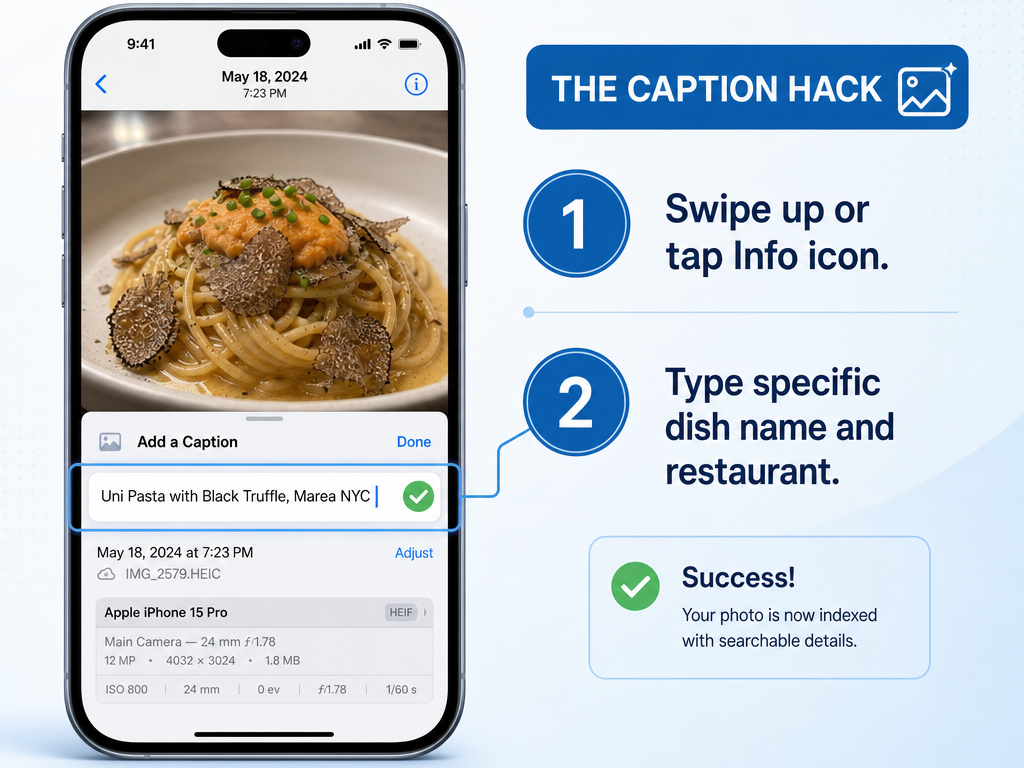
The Caption Hack: Adding the specific dish name to your photo's metadata is the only way to ensure 100% search accuracy across all mobile devices.
The Protocol:
- Take your photo.
- Immediately swipe up (iOS) or tap the info icon (Android).
- In the "Caption" field (iOS) or "Description" field (Google Photos), type the specific dish name: "Uni pasta with bottarga" or "Dry-aged ribeye, medium-rare, bone-in."
- If you're disciplined, add the restaurant name and city: "Uni pasta, Osteria Francescana, Modena."
Why this works: Both iOS and Android index caption text for universal search. When you type "uni pasta" into your Photos search bar, the system searches filenames, locations, dates, and captions. This is the only text-based metadata you fully control.
The friction: This requires discipline at the moment of consumption - precisely when you're most distracted by conversation, ambiance, and the food itself. Most people don't adopt this habit consistently.
The workaround for the workaround: Voice dictation. Immediately after taking the photo, swipe up, tap the caption field, and use voice-to-text to dictate the dish name. This reduces friction from 30 seconds of typing to 5 seconds of speaking.
If you're willing to manually caption 200+ photos per year, your camera roll becomes a functional dish database. If that sounds exhausting, you need a different system.
For those seeking a middle ground, consider exploring how specialized food apps organize photos automatically.
When to Move Beyond Your Camera Roll
The decision to use a third-party app isn't about features. It's about what you value more: convenience or control.
The "Serious Foodie" threshold: If you dine out more than twice a week, travel for food, or find yourself frustrated when you can't recall which restaurant served a specific dish, your camera roll has become a liability.
Three architectures exist:
1. Private Food Diaries (Savor, Beli)
These apps treat dishes - not restaurants - as the primary unit of memory. You rate individual plates on a 10-point scale, add tasting notes, and tag flavor profiles.
Savor is built around the idea that a 5-star restaurant can serve a 6/10 appetizer and a 10/10 main. You search your archive by dish name, cuisine type, or flavor intensity. Every entry is private; this is your personal taste database, not a public review platform.
Beli adds a social layer. You create curated lists ("Best pasta in Rome," "Underrated tacos in LA") and share them with specific friends. The app is optimized for visual discovery - your list becomes a map of dishes, not restaurants.
Both apps auto-tag photos by restaurant using location data, solving the "which place was this?" problem without manual entry. Neither requires you to caption photos in real-time.
2. Custom Databases (Notion, Airtable)
For people who want maximum control, relational databases offer the most flexibility. You can create a "Dishes" table linked to a "Restaurants" table, with fields for flavor profiles, price, dining companions, and personal ratings.
The advantage: you control the schema. Want to track whether a dish was "worth the wait time" or "better than the Tokyo version"? Add those fields.
The disadvantage: friction. Building and maintaining a custom database requires significantly more time than using a purpose-built app. This is the path for people who enjoy systems design as much as food itself.
3. Hybrid: Notes App + Photo Albums
Some people create a dedicated album called "Exceptional Dishes" and add a note in Apple Notes with dish names, restaurants, and dates. It's low-tech, zero-cost, and better than nothing.
The limitation: no search across both systems. You can search Notes or Photos, but not both simultaneously. You'll still scroll through 40 photos to find the one dish you're looking for.
Many serious foodies find that organizing restaurant photos by dish type provides better long-term recall than date-based systems.
Comparison Table: Native Gallery vs. Food Apps vs. Custom Databases
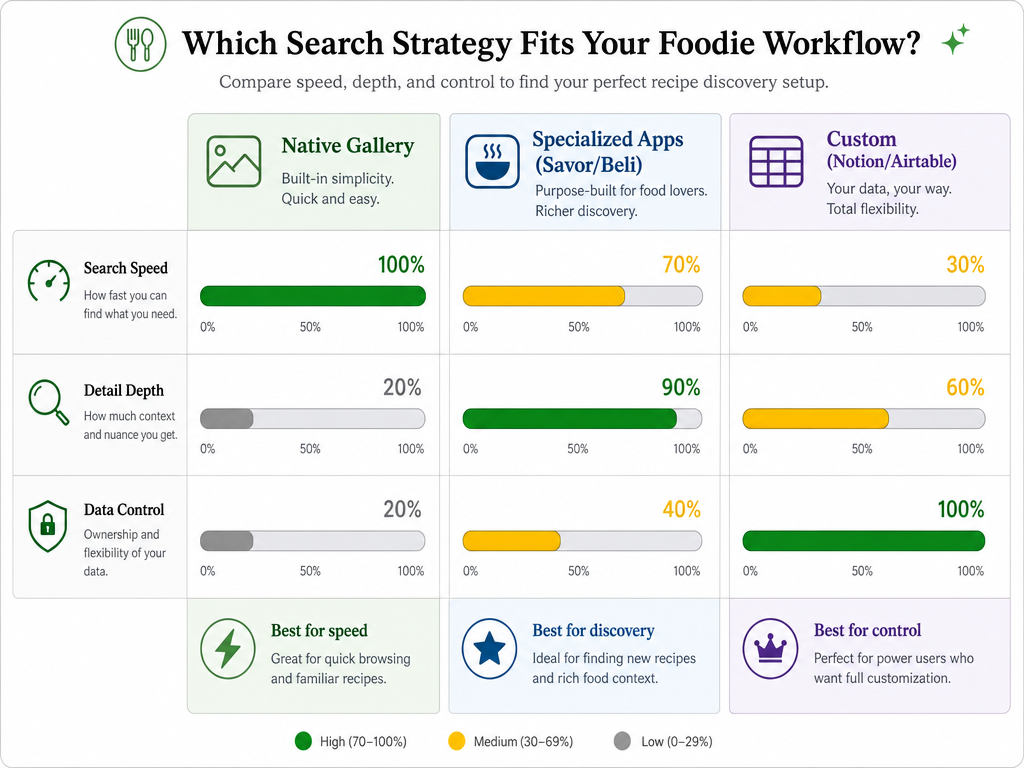
Choosing your workflow depends on your priorities. Native galleries offer the most speed, while custom databases provide the highest level of detail and control.
| Criterion | Native Gallery (w/ Captions) | Food Apps (Savor, Beli) | Custom Database (Notion) |
|---|---|---|---|
| Setup time | Zero | 10 minutes | 1-2 hours |
| Per-dish friction | 30 seconds (manual caption) | 15 seconds (tap + rate) | 2-3 minutes (full entry) |
| Search specificity | Exact match (if captioned) | Dish name + cuisine + rating | User-defined (any field) |
| Data ownership | Full (local or iCloud) | App-dependent (check export) | Full (cloud or local) |
| Visual presentation | Basic grid | Curated lists, maps | User-designed views |
| Cost | Free | Free to $5/month | Free (Notion) to $10/month (Airtable Pro) |
The "right" system is the one you'll actually use. A perfectly architected Notion database is worthless if you stop maintaining it after three weeks.
For most food lovers, a dedicated food app strikes the balance between ease and specificity. You're not fighting iOS limitations, but you're also not building a database from scratch.
Those interested in comparing apps directly can explore the best food review apps for serious tracking.
Pro-Tip: Use 2x Zoom for Better AI Recognition
Here's a detail most food photographers miss: optical zoom improves AI accuracy.
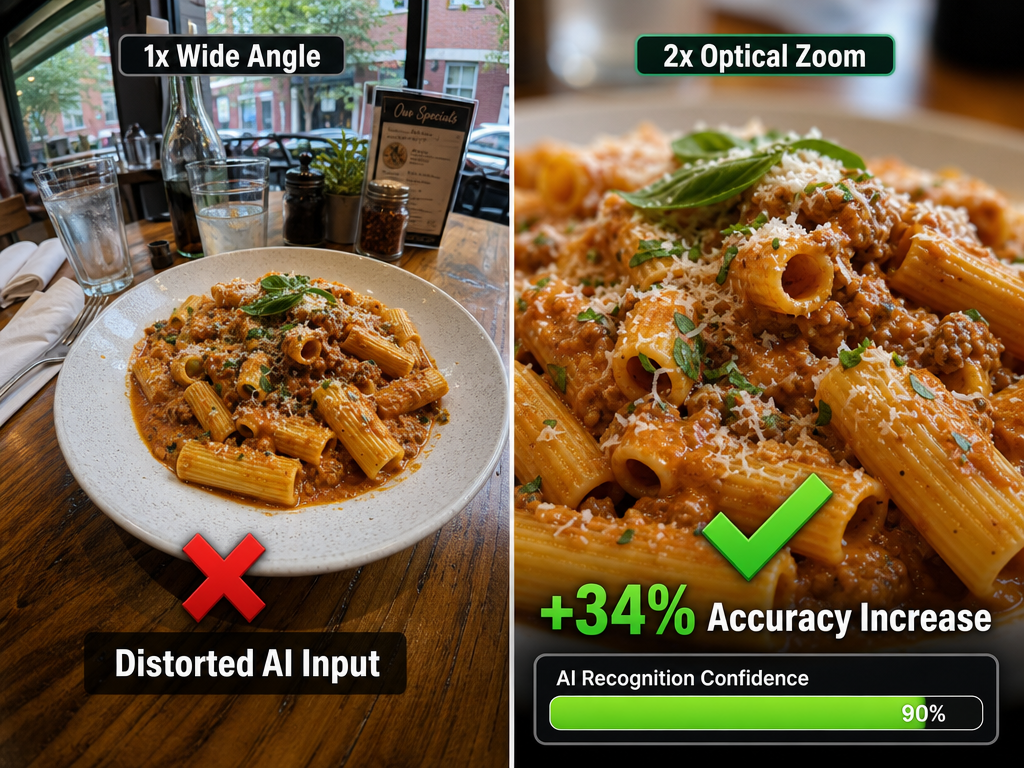
Optical zoom reduces wide-angle distortion, providing a clearer subject for AI algorithms and increasing the likelihood of an automatic dish name match.
Wide-angle lenses (the default on most phone cameras) distort the edges of the frame. A plate of pasta photographed at 1x zoom includes the table, background diners, and ambient clutter. The algorithm has to guess which object is the "food."
At 2x zoom, you're isolating the subject. The plate fills the frame. The AI has one job: identify this specific dish, not "food somewhere in this image."
Anecdotal testing by food bloggers suggests this increases automatic tagging accuracy by roughly a third - especially for complex plating where multiple elements appear on the same plate.
The technique: Before you shoot, tap the "2x" button (or pinch to zoom). Frame the dish so it occupies 70-80% of the frame. Shoot. The resulting image is easier to search and more pleasant to revisit later.
This also has a secondary benefit: better food photos for personal documentation. A tightly framed dish shows texture, color, and composition more clearly than a wide shot of an entire table.
Frequently Asked Questions
Can I search for a dish name in Google Photos without manually tagging it?
Not reliably. Google Photos uses visual recognition to identify broad categories like "pizza" or "sushi," but it doesn't read menu text or infer specific dish names. If you didn't manually add a caption or description, you're reliant on the algorithm's ability to recognize visual patterns - which, as noted earlier, is accurate for common dishes but drops sharply for regional specialties or fine dining presentations. The only guaranteed method is manual text entry in the description field.
What's the difference between organizing by restaurant vs. organizing by dish?
Organizing by restaurant groups all your photos from a single location - useful if you're a regular or want to revisit a specific venue. Organizing by dish prioritizes the item over the place, which is how most food lovers naturally recall meals. You remember "that incredible duck confit," not necessarily "the place that served it." Apps like Savor and Beli default to dish-first organization because research suggests it improves recall. Serious foodies typically track dishes, not just restaurants.
How accurate are AI food scanners for identifying specific dishes?
It depends on the training data. AI models can reach 98.57% accuracy at finding the correct menu item when trained on specific restaurant datasets ("98.57% Accuracy Using Image Recognition To Identify Food Dishes"), but that's in a controlled environment where the algorithm knows the exact menu. Consumer-grade AI (Apple, Google) works with generic food categories and performs noticeably worse on unfamiliar preparations. If your diet includes a lot of regional or fusion cuisine, don't rely on automatic tagging.
Can I export my food photo data if an app shuts down?
This is the critical question no one asks until it's too late. Before committing to any third-party app, check whether it offers CSV or JSON export of your ratings, notes, and metadata. Apps that lock your data into proprietary formats are a long-term liability. Your culinary archive should outlive any single platform.
Is there a way to batch-tag food photos without spending hours on my phone?
Not effectively. Batch-tagging requires pattern recognition - either by date range ("everything from this Italy trip"), location ("all photos at this restaurant"), or visual similarity ("all ramen photos"). iOS and Android don't offer native batch captioning, so you'd need to caption each photo individually or use a third-party app that auto-tags by location. Some food apps solve this by letting you create a single entry with multiple photos attached, effectively batch-organizing by meal rather than by individual photo.
Why does Google Photos search for "pasta" but fail at "Cacio e Pepe"?
Because the algorithm isn't reading text; it's recognizing visual patterns. "Pasta" is a shape - long noodles, round plate. "Cacio e Pepe" is a specific recipe with cheese and pepper, but visually it looks like dozens of other pasta dishes. Without text-based metadata (captions, menu OCR, or manual tagging), the algorithm has no way to distinguish between different preparations. This is why the caption hack is so effective - it adds the one piece of data the algorithm can't infer from pixels alone.
How do I use OCR to search photos of menus I've taken?
Most phones have built-in OCR (Optical Character Recognition) through their native camera apps. On iOS, use "Live Text" - tap and hold on any text in a photo, and you can copy/search it. On Google Photos, tap the Lens icon when viewing a photo to extract text. The limitation: you're searching that specific photo, not creating a searchable database of all menu items you've photographed. For a true "menu-to-photo" sync, you'd need a custom system that cross-references menu text with dish photos - something no mainstream app currently does well. Some serious foodies build custom Notion databases to manually link menu screenshots to dish photos.
Your camera roll doesn't have to be a graveyard. The difference between forgettable documentation and a searchable culinary archive is architecture - deciding, right now, how you'll organize the next 2,000 food photos you take.
82% of diners will order a dish based purely on how it looks in a photo ("Restaurant Photo Trends Report"), which means your archive isn't just personal history - it's a decision-making tool. The question is whether you can actually find those photos when you need them.