
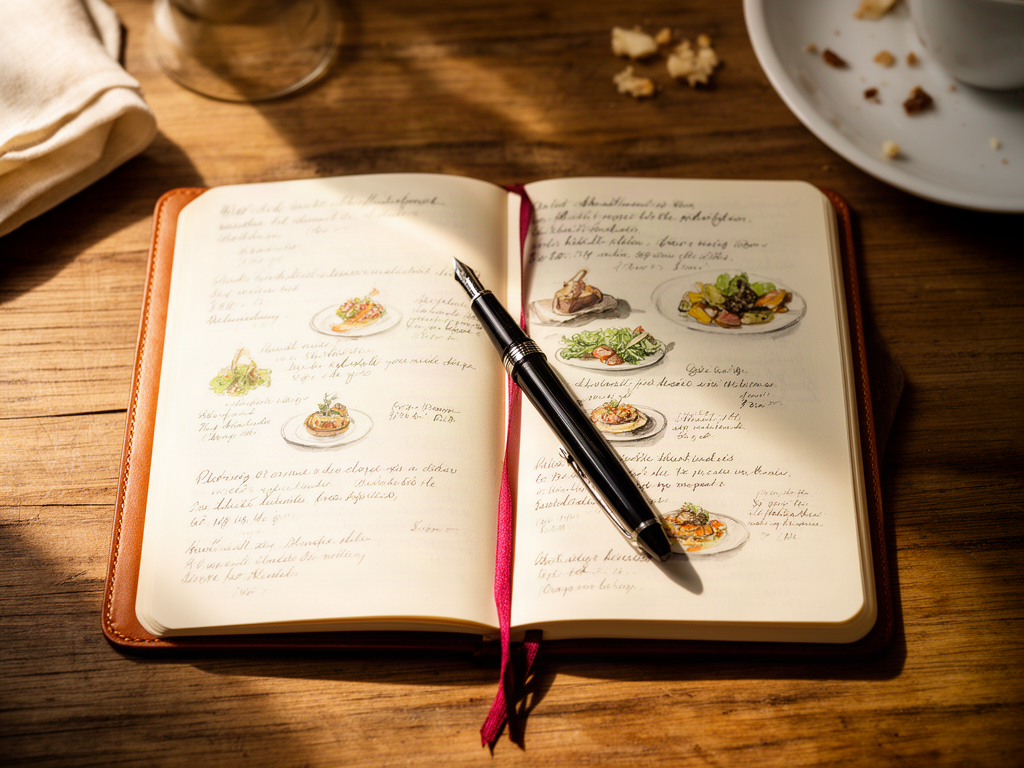
How to Remember What You Ordered While Traveling
Alex the juice queen
Alex hunts for the best juice bars and presses. She rates every sip and saves her favorites in Savor.
How to Remember What You Ordered While Traveling: The Complete System for Serious Foodies You're scrolling through your camera roll three months after...
How to Remember What You Ordered While Traveling: The Complete System for Serious Foodies
You're scrolling through your camera roll three months after Barcelona. You know you had an extraordinary meal somewhere in El Born - a duck confit that changed the way you think about fat and texture - but you can't remember the restaurant name. The photo shows a perfectly plated dish, but no context. The memory is fading. The metadata is useless.
This is the central crisis of the modern food traveler: we photograph everything and remember nothing.
The good news? You don't need a better memory. You need a better system.
Table of Contents
- Why Your Camera Roll Is Failing You
- The Three-Layer Memory Problem
- What Is the Best App for Food Journaling?
- The "Capture Now, Curate Later" Workflow
- The No-App Method: Using Native Phone Features
- Tool Deep-Dive: Private vs. Social vs. Custom
- How to Search Your Food Memories Years Later
- The Hybrid System: Best of All Worlds
- Frequently Asked Questions
Why Your Camera Roll Is Failing You
Your phone's default photo library was designed for family snapshots and sunsets, not culinary documentation. It has no concept of "dish," "restaurant," or "would order again." When you search for "pasta Rome 2024," iOS guesses based on location data and image recognition. It often guesses wrong.
The standard approach - taking a photo and moving on - creates a searchable black hole. You've captured the image but lost the context: the restaurant name, the specific dish, the reason it mattered, the small details that made it extraordinary.
Most food lovers hit this wall around their third international trip. The camera roll swells to 3,000 photos. The great meals blur together. The mediocre ones vanish entirely.
The Three-Layer Memory Problem
Remembering what you ordered requires capturing three types of information, and most people only get one:
Layer 1: The Visual (what the dish looked like)
Layer 2: The Metadata (restaurant name, dish name, location, date)
Layer 3: The Personal Archive (your rating, tasting notes, "would order again" status)
Your camera roll handles Layer 1 automatically. It's terrible at Layer 2. It completely ignores Layer 3.
The systems below address all three layers without requiring you to spend ten minutes typing notes while your dinner gets cold.
What Is the Best App for Food Journaling?
The best app depends on what you value: privacy, social discovery, or total customization.
For private memory-keeping without social pressure, Memolli and similar dedicated food journal apps focus on capturing personal meal histories. For competitive foodies who want to rank restaurants into personal leaderboards, Beli ditches the traditional star-rating system entirely in favor of forced rankings - "this was better than X but worse than Y." For visual eaters who want a calendar view of their food history, Yummi organizes your photos into a "Foodprint" using automatic geotagging.
Each app solves a different friction point. The minimalist who hates typing will prefer Yummi's photo-first approach. The data-obsessed thinker will build a custom tracker in Notion, which now supports map-style database views for travel-food tracking.
None of these tools are perfect. The real question is: do you want to rely on a third-party app that might disappear, or build a system using tools you already own?
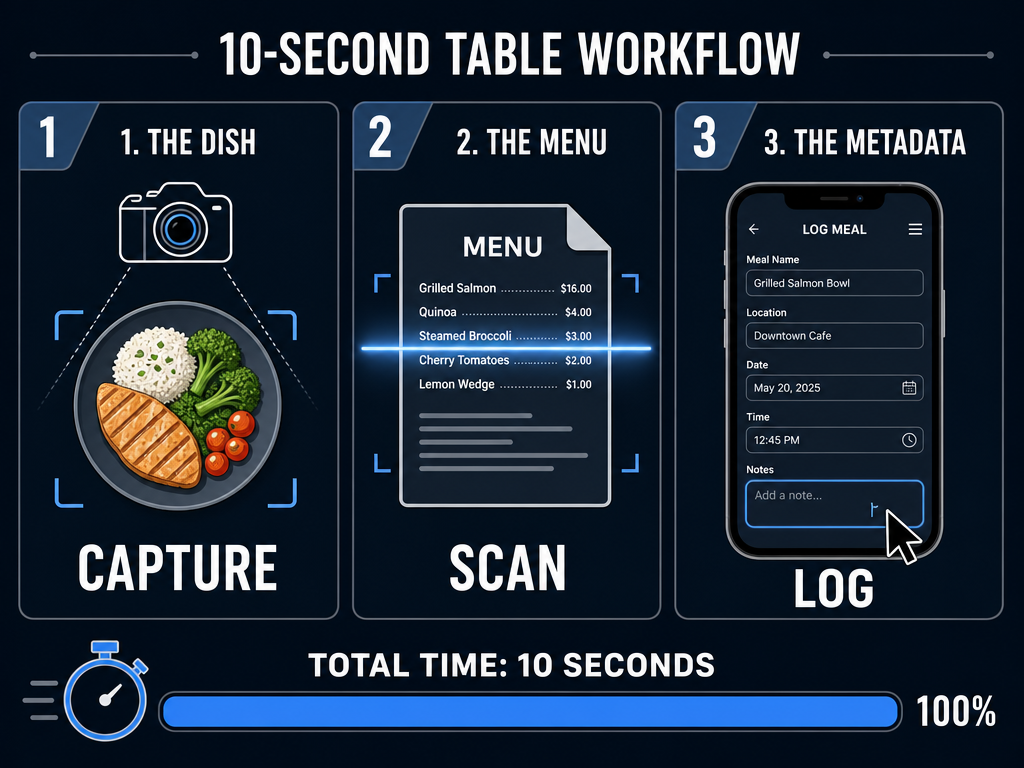 Master the ten-second food journaling workflow by capturing the dish and menu simultaneously to ensure you never lose a culinary detail while staying present at the table.
The "Capture Now, Curate Later" Workflow
The secret to remembering meals isn't taking better notes - it's reducing the friction of capture to near zero.
Here's the ten-second system I use:
At the Table (5 Seconds):
- Take one photo of the dish as it arrives
- Take one photo of the physical menu showing the dish name (this is the critical step most people skip)
On the Commute (2 Minutes):
3. Swipe up on the dish photo in your iPhone Photos app
4. Tap "Add a Caption"
5. Type: "Restaurant Name | Dish Name | Quick thought"
Example: "Casa Mono | Duck confit | Best fat texture of the year"
That's it. You've now created a searchable record that includes the visual, the metadata, and your initial reaction. When you search "duck confit" six months later, this photo will surface immediately.
The menu photo is insurance. If you forget to add the caption that night, you can use Live Text (iOS) or Google Lens (Android) to extract the exact dish description later without retyping.
For more advanced systems that track every meal you've loved, explore how to build a personal dish tasting database using structured methods.
The No-App Method: Using Native Phone Features
You don't need a dedicated app to build a searchable food archive. Your phone already has everything required.
iOS Users:
- Enable "Show Captions" in Photos settings
- After each meal, add a caption with restaurant name and dish name
- Use "Live Text" to copy menu descriptions directly from photos
- Search your library by typing keywords into the Photos search bar
The caption field is indexed by iOS search. If you write "Uni sushi Tsukiji," you can find that exact photo two years later by searching "Uni Tsukiji" or even just "uni."
Android Users:
- Use Google Photos' built-in tagging system
- Add custom tags like "Barcelona," "Duck," "Would order again"
- Use Google Lens to scan menus and save text
- Search by tag, location, or recognized text
The limitation of this method is organization. Your food photos live alongside everything else. There's no easy way to filter "all pasta dishes I've rated 9/10 or higher" or build a visual map of meals by city.
That's where organizing food photos by dish type becomes essential for serious food travelers.
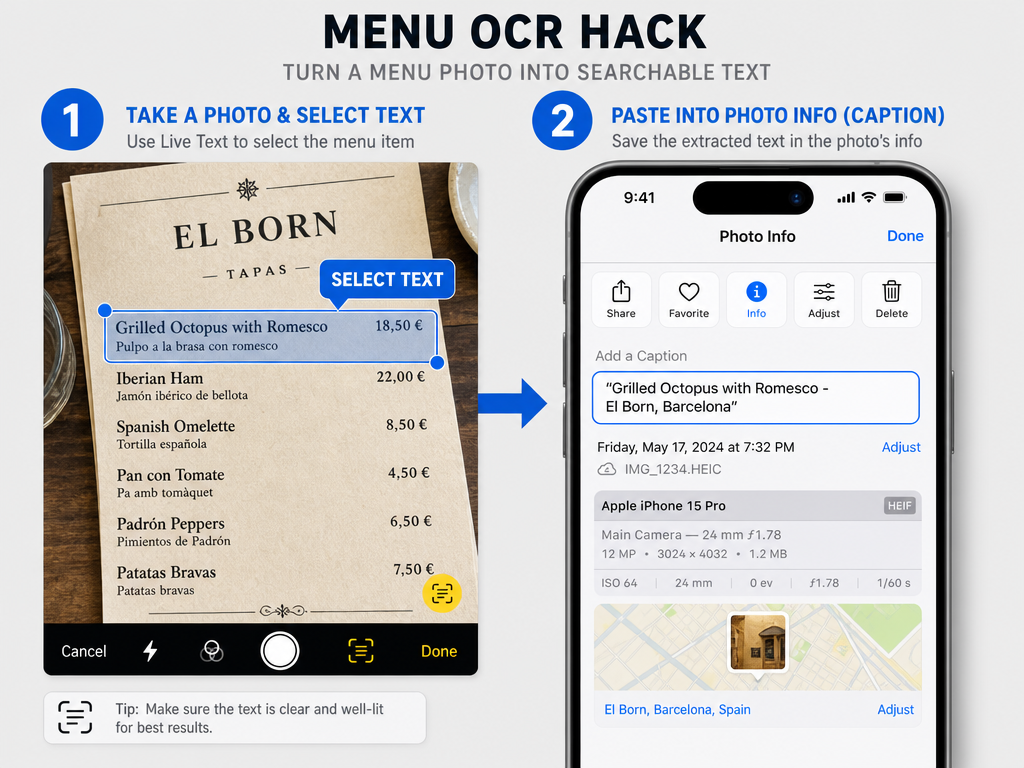 Leverage native OCR features to copy exact dish descriptions from physical menus into your photo's metadata, creating a searchable, private food database without extra apps.
Tool Deep-Dive: Private vs. Social vs. Custom
Let's compare the three major approaches side by side:
| Method | Best For | Setup Time | Long-Term Searchability | Social Features |
|---|---|---|---|---|
| Native Photos (iOS/Android captions) | Minimalists who hate extra apps | 0 minutes | Medium (caption search only) | None |
| Beli | Competitive eaters who want rankings | 5 minutes | High (filterable by rank) | Optional sharing |
| Yummi | Visual thinkers who want a calendar | 5 minutes | Medium (date and location) | Photo-focused |
| Notion | Data obsessives who want full control | 30+ minutes | Highest (custom database) | Shareable pages |
| Dedicated apps (Memolli, etc.) | Private journalers avoiding review fatigue | 10 minutes | High (structured fields) | None |
The "right" choice depends on whether you value speed (native photos), structure (Notion), or community (Beli). Most serious food travelers eventually use a hybrid approach: quick capture at the table, detailed curation later.
For travelers managing dishes across multiple cities, consider how to track dishes across different locations to avoid losing your culinary trail.
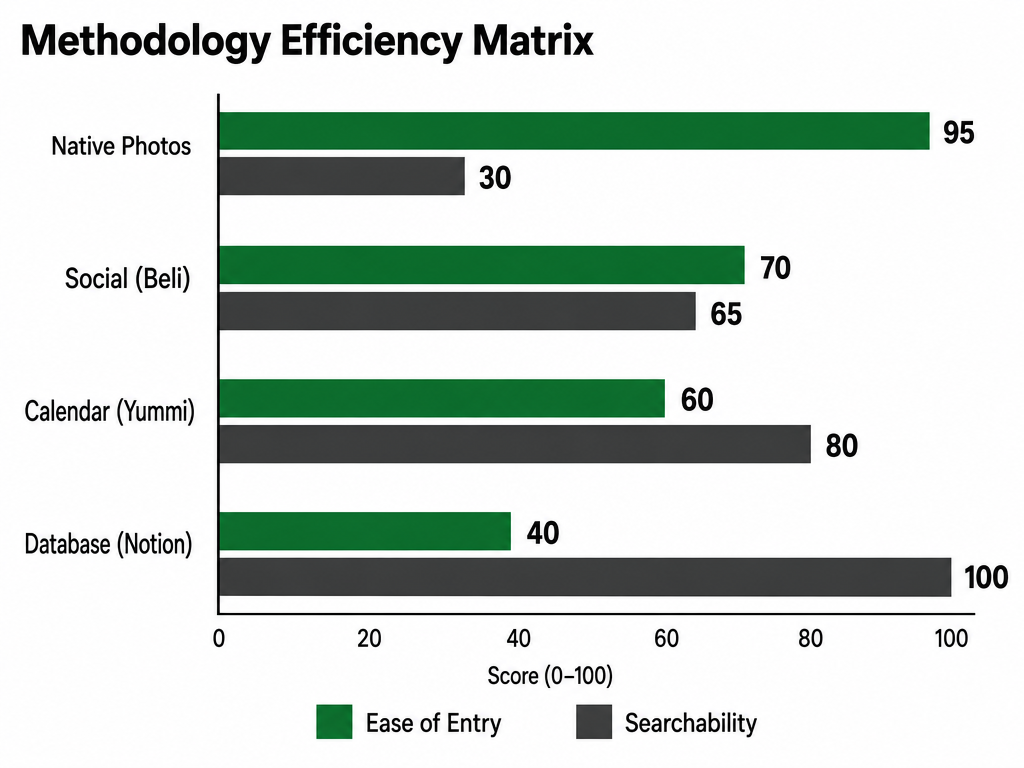 Choose your journaling tool based on your priority: native photo features offer the lowest friction, while custom databases like Notion provide the highest long-term searchability.
How to Search Your Food Memories Years Later
The true test of any system is retrieval. Can you find that sushi spot in Osaka when you're planning next year's trip?
Effective Search Strategies:
By Location: "Tokyo ramen" or "Barcelona duck"
By Ingredient: "Uni" or "Truffle" or "Wagyu"
By Rating: Create a "9/10" album in Photos, or a filtered Notion view
By Date: "2024 Italy" or "Summer 2023"
The key is consistency in how you label things. If you sometimes write "NYC" and sometimes write "New York," your search results will fracture.
One trick: always include the year in your captions. "Rome 2024" is more useful than just "Rome" when you've been three times.
For those building serious food archives, learn how to organize restaurant photos by dish to surface memories faster.
The Hybrid System: Best of All Worlds
After years of experimentation, most dedicated food travelers converge on a hybrid approach:
At the table: Use your phone's native camera and captions (zero friction, always works)
Back at the hotel: Batch-add entries to a private database (Notion, Memolli, or a custom spreadsheet)
For social sharing: Selectively post standout meals to Beli or Instagram, but keep your master list private
This approach preserves presence during the meal while ensuring long-term searchability. You're not typing paragraphs while your pasta gets cold, but you're also not relying on a camera roll that becomes unsearchable after 500 photos.
The critical insight: the best food memory system is one you'll actually use. If it takes more than ten seconds at the table, you won't do it consistently.
For building a comprehensive personal archive, explore the best apps to track restaurant meals that fit different workflows.
The goal isn't to become a data-entry clerk. The goal is to let the system handle memory so you can stay present at the table - and still find that perfect duck confit three years later when you're planning your next trip.
Frequently Asked Questions
What is the 3 2 1 method of journaling?
The 3-2-1 method refers to a journaling framework where you capture three observations, two insights, and one question or next action. While it's mentioned in general journaling contexts, it hasn't been formally adapted as a standard food journaling protocol. For food memory, a more practical approach is the three-layer system outlined above: capture the visual, log the metadata, and record your personal reaction.
How to make a trip journal?
Start by deciding whether you want a physical notebook, a digital document, or a dedicated app. For food-focused trip journals, the most effective method is capturing meals immediately using your phone's camera and caption feature, then organizing entries by day or location afterward. The key is reducing friction: if you wait until the end of the day to journal, you'll forget crucial details.
Is there a better food tracking app than MyFitnessPal?
MyFitnessPal is designed for calorie and macro tracking, not memory preservation. If your goal is remembering extraordinary meals rather than monitoring nutrition, yes - apps like Yummi, Beli, or even native photo captions with structured keywords are better suited. The "best" app depends on whether you prioritize health metrics (MyFitnessPal) or culinary documentation (memory-focused tools).
Does the iPhone have a food filter?
iPhones don't have a dedicated "food filter" in the camera app, but you can use third-party camera apps with food-optimized presets that enhance warm tones and saturation. More importantly for memory purposes, iOS includes Live Text and searchable captions, which are better tools for remembering what you ate than any photo filter.
What is the best app for travel journals?
For general travel journaling, apps like Day One or Journey are popular. For food-specific travel memories, the answer depends on your workflow: Yummi for visual calendars, Beli for ranking systems, Notion for custom databases. Most serious food travelers use their phone's native features for immediate capture and migrate important meals to a structured system later.
How to take the best food photos with iPhone?
Use natural light whenever possible, shoot from a 45-degree angle, and avoid using the flash. Clean the lens before shooting. More importantly for memory: always photograph the menu alongside the dish so you can extract the exact name later using Live Text. The best food photo for memory purposes includes context, not just beauty.
What is the best way to organize photos on your iPhone?
Create albums by trip ("Barcelona 2024"), by category ("9/10 Dishes"), or by cuisine type ("Ramen"). Use the caption field religiously - it's indexed by search. Enable iCloud Photos so your archive persists across devices. For food photos specifically, consider creating a smart album that filters by keyword in captions, though this requires manual tagging.