
How to Track the Best Dishes You’ve Tried Abroad (Without Losing Them in Your Camera Roll)
John the smoothie monster
John lives for smoothie bowls and cold-pressed juices. He uses Savor to remember his best blends.
How to Track the Best Dishes You've Tried Abroad (Without Losing Them in Your Camera Roll) You're scrolling through your phone three months after Tokyo, trying...
How to Track the Best Dishes You've Tried Abroad (Without Losing Them in Your Camera Roll)
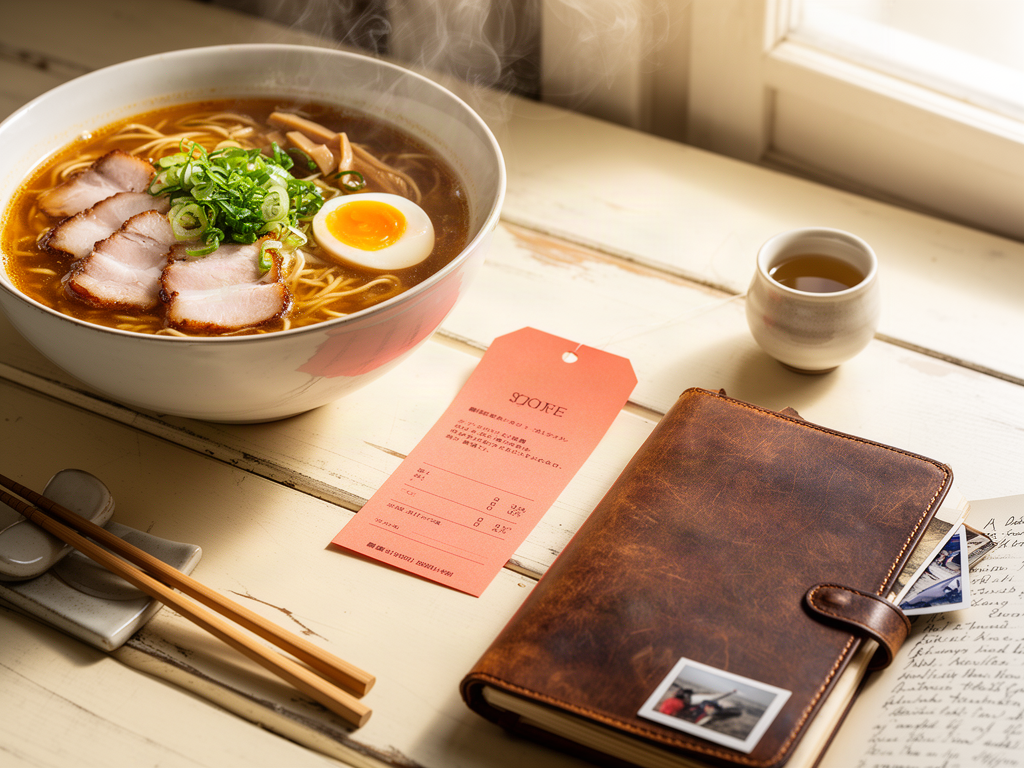
You're scrolling through your phone three months after Tokyo, trying to remember the name of that ramen shop. The one with the pork belly that melted on your tongue. You know you took a photo. You're sure of it. But it's buried somewhere between 2,000 other meal photos, and you can't remember if it was in Shibuya or Shinjuku.
This is the camera roll graveyard. A mass grave of extraordinary meals you'll never find again.
The real problem isn't that you forgot to take photos - it's that photos alone are useless without context. Without the dish name, the restaurant, the neighborhood, the flavor notes that made it special. Without a system to make those moments searchable, you're just collecting digital clutter.
Let's fix that.
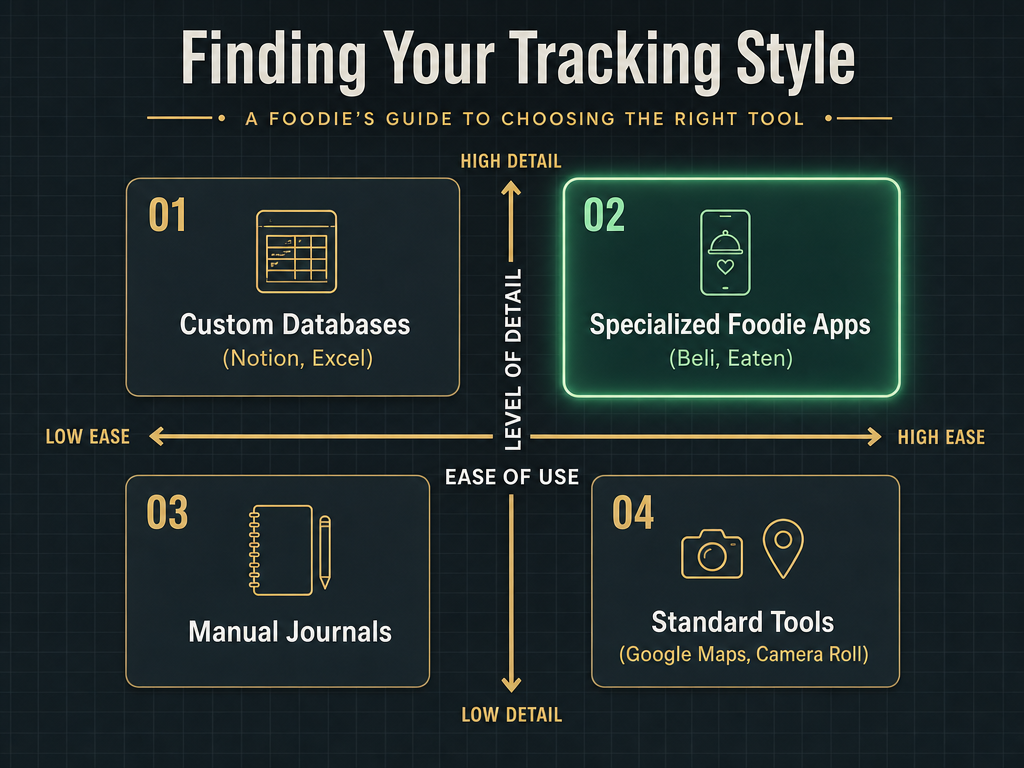 Choosing the right system depends on your preference for speed versus depth. Most serious foodies find the 'Sweet Spot' in specialized apps that balance both.
Table of Contents
- The Camera Roll Trap: Why Your System Is Failing
- What Is the Best App for Finding Food While Traveling?
- The Big Three: Apps Built for Dish-Level Tracking
- The Power-User Workflow: Building Your Personal Culinary Archive
- How Do I Make My Food Photos Searchable?
- The 5-Day Rule: Why Consistency Beats Perfection
- Frequently Asked Questions
The Camera Roll Trap: Why Your System Is Failing
Here's what happens to most travelers. You eat something extraordinary. You take a photo. You tell yourself you'll remember. Three weeks later, it's gone.
Not the photo - that's still there, sandwiched between a blurry shot of a train station and someone's dog. What's gone is the context. The name of the dish. The exact location. The reason it was special.
Your camera roll isn't a database. It's a digital shoebox with no labels.
The fundamental problem is that most people conflate documentation with memory. Taking a photo feels like preservation, but without metadata, it's just evidence that something happened. You can't search "best carbonara I've ever had" and expect your phone to surface the right image from Rome.
This is where serious foodies diverge from casual travelers. They don't just collect photos - they build systems.
What Is the Best App for Finding Food While Traveling?
The question itself reveals a common confusion. There are apps for finding food (discovery tools like Google Maps, Tabelog for Japan, or Beli's social recommendations), and there are apps for tracking what you've eaten (memory tools).
Most people need both, but they serve different purposes.
For discovery while abroad:
- Google Maps remains the universal baseline - available offline, works in every country, and integrates reviews from multiple sources
- Beli excels at surfacing dishes your friends have tried and rated highly
- Tabelog (in Japan) and region-specific platforms provide local credibility that Western apps can't match
For tracking what you've tried: This is where the landscape gets interesting, because generic review apps (Yelp, Google Reviews) were built for rating restaurants, not dishes. If you want to remember that the duck confit at that bistro in Lyon was transcendent while the dessert was forgettable, you need something else.
The best apps for tracking dishes while traveling share three features:
- Dish-level logging (not just restaurant check-ins)
- Searchable archives (filters by city, cuisine, or date)
- Private tracking (your personal database, not a social feed)
The Big Three: Apps Built for Dish-Level Tracking
Let's compare the specialized tools that actually understand the assignment.
Beli: The Social Food Map
Beli positions itself as a visual recommendation engine. It's Instagram for food recommendations, minus the influencer noise.
What it does well:
- Gorgeous interface that makes logging feel effortless
- Strong social layer - you can follow friends and see exactly which dishes they've rated
- "Rankings" feature that lets you create personal top-10 lists by category (best ramen, best steak, etc.)
The tradeoffs: Beli is fundamentally social. If you want a private archive disconnected from any feed or following system, this isn't it. The app is also iOS-only as of 2026, which limits its utility for Android travelers.
Best for: People who want to share their taste with friends and use dining as a social connector.
Eaten: The Dish-First Database
Eaten was built on a simple premise: restaurants are just containers for dishes. The app centers entirely on logging individual plates, not venues.
What it does well:
- True dish-level tracking with fields for flavor notes, price, and rating
- City-based organization - you can pull up a list of every dish you tried in Mexico City, sorted by rating
- Timeline view that shows your full culinary journey chronologically
The tradeoffs: Some users report the app can feel slow when syncing large libraries. The interface prioritizes depth over speed, which means more fields to fill per entry. If you're logging 30 dishes on a two-week trip, that friction adds up.
Best for: Methodical travelers who value completeness and don't mind spending 60 seconds per entry.
Yummi: The Visual Timeline
Yummi treats your food memories as a visual diary. Think of it as a photo journal with light tagging features.
What it does well:
- Lightning-fast entry - snap a photo, add a location tag, done
- Beautiful gallery view that lets you scroll through past trips visually
- Minimal friction for travelers who want documentation without overthinking
The tradeoffs: The simplicity comes at a cost. There's no advanced search, no detailed flavor notes, and limited filtering beyond basic tags. It's a scrapbook, not a database.
Best for: Visual thinkers who trust their photo memory and just need light organization.
For a broader comparison of apps that help you remember meals, check out our guide to the best apps to remember every dish you've eaten.
The Power-User Workflow: Building Your Personal Culinary Archive
Apps are tools. They're only as useful as the system you build around them. Here's the workflow that serious foodies use to turn fleeting meals into a permanent, searchable archive.
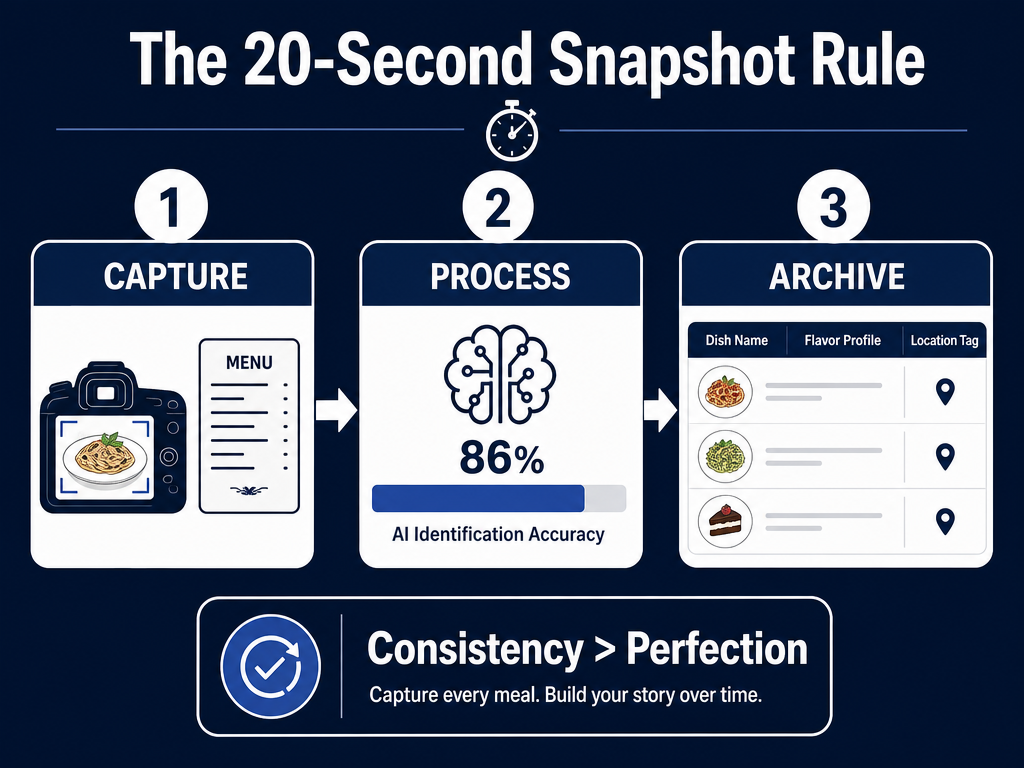 Mastering the 20-second snapshot rule ensures you capture the dish-level details that traditional restaurant reviews often miss during busy international travels.
Phase 1: The Snapshot Rule (During the Meal)
Take two photos, not one:
- The dish itself (well-lit, close enough to see texture)
- The menu entry (name, description, and price)
The menu photo is your insurance policy. Three months from now, you won't remember whether that pasta was called "Cacio e Pepe" or "Pasta alla Gricia," but your camera roll will.
Optional third shot: The restaurant's facade or interior. This helps jog your memory when you're trying to reconstruct the experience later.
Phase 2: The Fast Log (Within 24 Hours)
The data shows that consistent tracking falls from 68% in week 1 to 21% by week 12 on average. The enemy of memory is delay.
Create a capture habit while the details are fresh:
- Use voice-to-text to quickly log flavor notes ("rich, slightly salty, perfect al dente texture")
- Tag the city and neighborhood (not just the restaurant name)
- Assign a quick rating (a 1-10 scale is fine; perfection is the enemy here)
This should take 20-30 seconds per dish if you're using a dedicated app. If it takes longer, your system has too much friction.
For iPhone users specifically, our analysis of the best food tracking apps for iPhone covers platform-specific shortcuts that make this even faster.
Phase 3: The Archive (End of Trip)
At the end of your journey, spend 15 minutes organizing your entries:
- Create custom lists ("Best of Barcelona," "Dishes to Recreate," "Worth a Return Trip")
- Add final notes about context (was it a Michelin spot? A street cart? Recommended by a local?)
- Cross-reference with Google Maps by saving the restaurant with a custom label
This final step transforms random logs into a searchable library. When someone asks for your top Rome recommendations, you're not scrolling through photos - you're pulling up a curated list of your highest-rated pasta dishes, complete with addresses.
If you're interested in how professional critics approach this, we've documented the complete framework for scoring dishes like a food critic.
How Do I Make My Food Photos Searchable?
The technology exists. Modern AI can recognize food items with roughly 68-86% accuracy in real-world cases, but accuracy isn't the same as usefulness.
Automated tagging might correctly identify "pasta," but it won't tell you whether it was carbonara or cacio e pepe. It won't remember that the sauce was too salty or that the portion was enormous.
The most reliable path to searchable food memories combines light AI assistance with manual input:
Use AI for the basics:
- Apps like Google Photos and Apple Photos already auto-tag common ingredients (beef, salad, dessert)
- Specialized tools like Samsung Food's Vision AI can extract text from menu photos
Add manual context for the details:
- Dish name
- Flavor profile (sweet, savory, spicy, umami)
- Notable ingredients
- Rating
This hybrid approach gives you the speed of automation without sacrificing precision. You're not typing out every detail, but you're adding the 2-3 data points that matter most for future searches.
For more on organizing food photos specifically, our guide on organizing food photos by restaurant walks through advanced strategies.
The 5-Day Rule: Why Consistency Beats Perfection
Research shows that consistent tracking, even if incomplete, is significantly more associated with long-term success than "perfect" but sporadic logging. The same principle applies to food memories.
The goal isn't to log every single meal with forensic detail. It's to build a habit of capturing the moments that matter, regularly enough that the practice sticks.
The 5-day framework:
- Track at least five days a week when you're traveling or exploring new restaurants
- Accept that you'll miss meals - breakfast at the hotel buffet doesn't need an entry
- Focus on quality over quantity - one well-documented dish beats five half-hearted entries
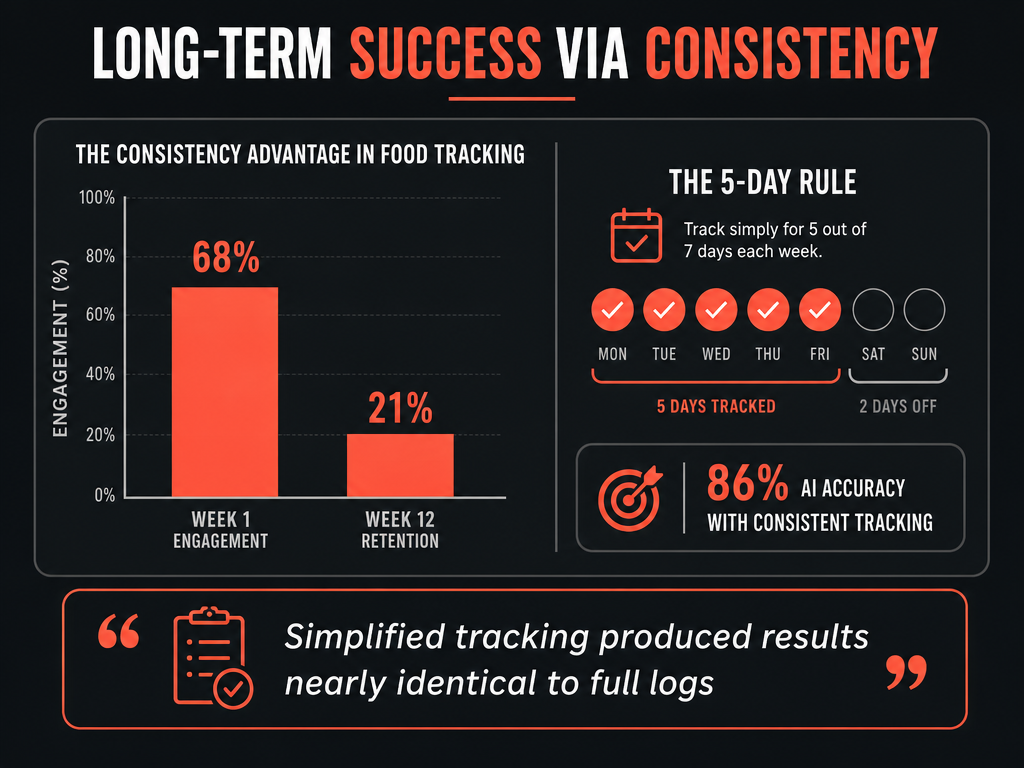 Research shows that maintaining a 'good enough' consistency - tracking five days a week - is more effective for long-term memory retention than attempting a perfect, 100% log.
The data on simplified tracking producing results nearly identical to full tracking (5.7% vs 4.0% outcomes) validates what serious foodies already know: you don't need to document every bite to build a useful archive. You need to document the dishes you actually want to remember, consistently.
The DIY Notion Template: For the Obsessive
If apps feel too limiting, build your own system. Notion, Airtable, or even a well-structured Google Sheet can become a powerful culinary database.
Essential fields for a custom food memory database:
| Field Name | Purpose | Example |
|---|---|---|
| Dish Name | What it's called | "Tonkotsu Ramen" |
| Restaurant | Where you had it | "Ichiran Shibuya" |
| City/Country | Location metadata | "Tokyo, Japan" |
| Date | When you tried it | "2026-03-15" |
| Rating (1-10) | Your score | 9 |
| Flavor Notes | What stood out | "Rich pork broth, perfect noodle chew, slightly salty" |
| Price | Cost context | "¥980" |
| Would Order Again? | Binary filter | Yes/No |
| Photo Link | Visual reference | [Link to cloud storage] |
The advantage of a custom database is infinite flexibility. You can add fields for spice level, dietary restrictions, companion notes (who you ate with), or even weather (because sometimes that beach-side ceviche tastes better because it was 85 degrees and sunny).
The disadvantage is maintenance. Unlike an app, your Notion database won't automatically sync across devices or remind you to log entries. It's a tool for disciplined travelers who already know they'll maintain it.
For those building their own systems, our piece on building a personal culinary archive offers additional architecture ideas.
Which Food Tracking App Is Best?
There isn't one. The best system is the one you'll actually use.
If you're social and want to share discoveries with friends, Beli is your app. If you're methodical and want deep dish-level analysis, Eaten makes sense. If you just need fast visual logging, Yummi works. If you want complete control and customization, build your own in Notion.
The real question isn't "Which app?" It's "What level of friction can I tolerate, and what features do I actually need?"
Most serious foodies end up using a hybrid approach:
- Google Maps for saving restaurants and general discovery
- A dedicated dish tracker (Beli, Eaten, or Savor) for rating individual plates
- A cloud photo system (Google Photos, iCloud) as backup visual storage
The system that works is the one that fits your travel style and your tolerance for administrative overhead.
Frequently Asked Questions
What is the easiest way to track food while traveling?
The easiest method is the "photo + quick note" approach: take a clear photo of the dish and the menu, then use your phone's voice-to-text to immediately log a 10-second flavor note and rating. This takes under 30 seconds per meal and creates enough metadata to make the memory retrievable later. Apps like Beli and Yummi are built around this fast-capture principle.
Is Beli still invite only?
No, Beli is now publicly available on the iOS App Store as of 2026. The app previously used an invite system during its beta phase, but it's now open to all users.
Can I use Google Maps internationally?
Yes, Google Maps works in every country and can be used offline if you download map data in advance. For tracking purposes, you can save restaurants with custom labels ("Best Ramen Tokyo") and organize them into lists, which syncs across all your devices. The limitation is that Google Maps tracks restaurants, not individual dishes, so you'll need supplementary tools if you want dish-level memory.
What is the best free app to track my meals?
Google Maps is technically free and surprisingly capable for basic tracking - you can save locations, write reviews, and organize lists by trip or cuisine type. For dish-specific tracking, most specialized apps (Beli, Eaten) have free tiers but limit features or entries. If you're willing to build your own system, Notion's free plan offers unlimited blocks and can function as a robust food database with no cost.
Is there a better food tracking app than MyFitnessPal?
MyFitnessPal is designed for calorie and macro tracking, not culinary memory. If your goal is to remember flavor, dishes, and restaurants - rather than nutritional data - then yes, apps like Beli, Eaten, or even a simple Notion template are considerably better. They're built for different purposes. For more on apps that focus on dishes rather than nutrients, see our comparison of apps to track favorite dishes.
What are some alternatives to Beli?
Eaten offers deeper dish-level analysis with less social focus. Yummi provides faster visual logging. Savor specializes in private, searchable dish archives. Google Maps works for basic restaurant saving. Notion or Airtable let you build a completely custom system. Each has different tradeoffs between speed, depth, and privacy.
How do I enable Google Maps tracking for restaurants?
In Google Maps, tap a restaurant pin, then select "Save." You can add it to an existing list (like "Want to Try" or "Tokyo 2026") or create a new one. To add personal notes, write a review or use the "Add a note" feature in your saved lists. For offline use, download the region's map data before your trip by searching for the city and selecting "Download offline map."
The best meals you'll ever eat shouldn't disappear into the void of your camera roll. Build a system. Use it consistently. And when someone asks you three years from now about that extraordinary ramen in Tokyo, you'll pull up the exact dish, the exact shop, and the exact reason it was special.
That's not just tracking food. That's building a culinary memory you can actually use.