
How to Track Dish Ratings While Traveling: The Serious Foodie’s Guide
Alex the juice queen
Alex hunts for the best juice bars and presses. She rates every sip and saves her favorites in Savor.
How to Track Dish Ratings While Traveling: The Serious Foodie's Complete Guide You're standing in a bustling night market in Bangkok, staring at a papaya salad...
How to Track Dish Ratings While Traveling: The Serious Foodie's Complete Guide
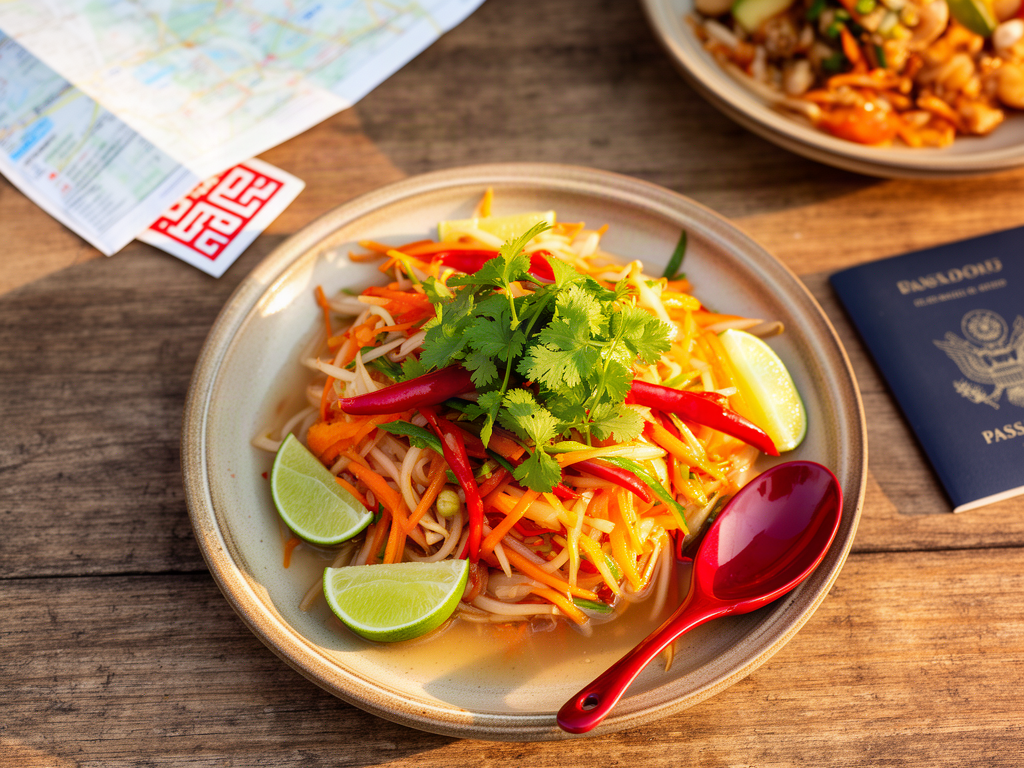
You're standing in a bustling night market in Bangkok, staring at a papaya salad so vibrant it could stop traffic. You take a bite. The flavors hit like a symphony - sweet, sour, salty, and that electric heat from the bird's eye chilies. You pull out your phone, snap a photo, and promise yourself you'll remember this one.
Three months later, you're scrolling through 2,400 food photos in your camera roll. Which one was the transcendent som tam? Was it the stall near the river or the one by the temple? Did you rate it higher than the one in Chiang Mai? The details have evaporated. The memory is gone.
This is the modern foodie's paradox: we photograph everything and remember nothing.
If you're treating food as culture - not just fuel - you need more than a camera roll graveyard. You need a methodological solution that captures dish-level data (taste, texture, specific ingredients) without ruining the dining experience or losing the information in digital chaos.
Table of Contents
- Why Restaurant Ratings Fail the Serious Foodie
- What Makes Dish-Level Tracking Different
- The Batch & Tag Workflow: Capture Now, Log Later
- Tiered Recommendations: Finding Your System
- AI Best Practices: When to Trust the Machine
- Traveling Hacks: Offline Strategies and Time Zone Management
- The Metadata That Actually Matters
- Frequently Asked Questions
Why Restaurant Ratings Fail the Serious Foodie
Restaurant ratings treat dining as a binary proposition: the whole place was either good or bad. But any serious food traveler knows the truth - restaurants are inconsistent. A venue can serve transcendent duck confit and forgettable tartare on the same menu. Rating the restaurant tells you nothing about which dish to order.
This is the "one-dish wonder" problem. You return to a highly-rated restaurant, order the wrong thing, and walk away disappointed. The five-star review didn't specify that only the XO fried rice is worth the trip.
Research shows that people who could not recall specific positive dining experiences were 47% less likely to recommend restaurants to others. Memory isn't just sentimental - it's functional. Without dish-level recall, your entire culinary archive becomes worthless.
When you track dishes instead of venues, you build a personal taste profile that actually improves your future dining decisions. You're not chasing Yelp stars. You're building a searchable database of your own palate.
What Makes Dish-Level Tracking Different
Dish-level tracking requires a fundamental shift in how you think about food documentation. Instead of asking "Was this restaurant good?" you're asking four specific questions:
- What exactly did I eat? (Dish name, preparation method, key ingredients)
- How did it taste? (Flavor profile, texture, temperature, balance)
- What made it memorable? (The crispy skin, the fermented bean paste, the unexpected citrus note)
- Would I order it again? (A personal rating on a consistent scale)
The difference between casual food photography and serious dish tracking is granularity. A blurry photo of a plate means nothing six months later. A photo paired with structured metadata - "Khao Soi, Mae Sai stall, coconut curry broth with crispy noodles, 8.5/10, best I've had outside Chiang Mai" - becomes a reference point you can actually use.
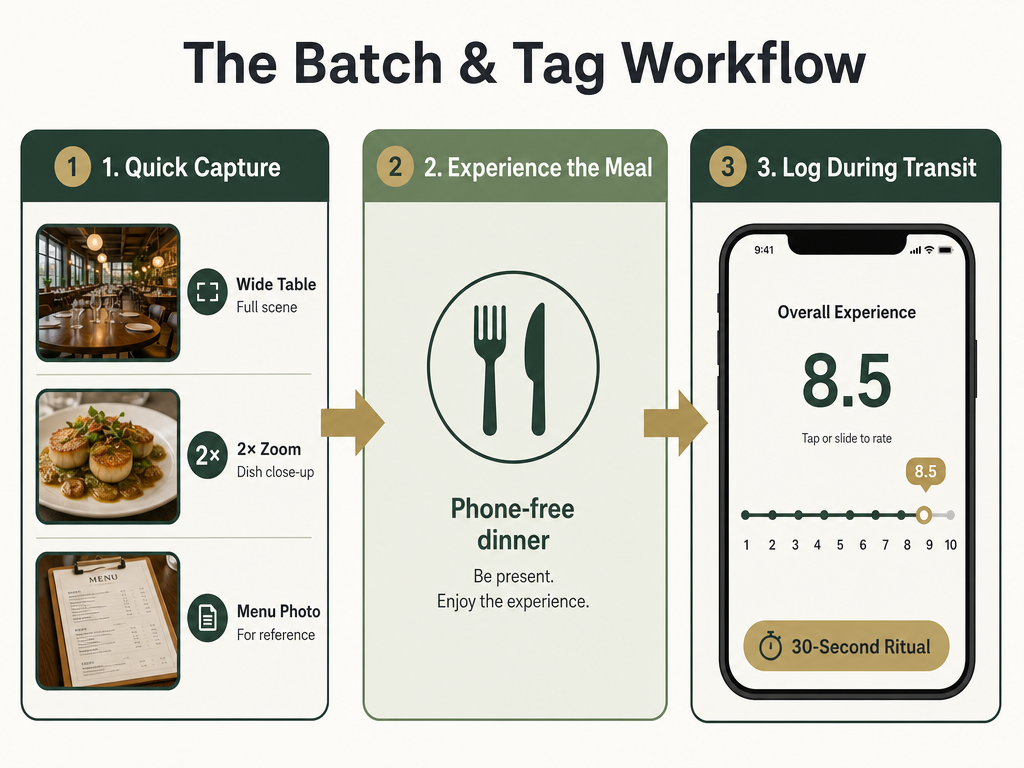 Mastering the 'Batch & Tag' workflow allows you to maintain dish-level granularity in your records without sacrificing the social experience of your travels.
Professional food critics don't try to log everything during the meal. They use a capture-first, organize-later system. The goal during dinner is to enjoy the experience and gather raw data. The organization happens in the hotel room or the next morning.
The Batch & Tag Workflow: Capture Now, Log Later
The biggest mistake amateur food trackers make is trying to log everything in real-time. You end up typing on your phone while your dining companion stares at their cooling pasta. The meal becomes a data entry exercise instead of a sensory experience.
The solution is the Batch & Tag workflow - a three-photo ritual followed by a 30-second logging session later.
During the meal, capture three photos:
- The Wide Shot: A full table view showing all dishes, drinks, and the dining environment. This establishes context.
- The Hero Shot: A close-up of your primary dish at 2x zoom, showing texture and plating details.
- The Menu Shot: A photo of the menu or the dish description, capturing the official name, price, and any listed ingredients.
That's it. Three photos per meal, maximum. Put the phone away and eat.
Later - during the Uber ride home, in your hotel room, or the next morning - you complete the logging ritual:
- Open your tracking app of choice
- For each dish, write a one-sentence description: "Cacio e pepe, perfectly emulsified, aggressive black pepper, al dente rigatoni"
- Add a 10-point rating (more precise than 5 stars)
- Tag it with location, cuisine type, and any standout characteristics ("spicy," "house-made pasta," "best version")
- Optional: Add cost and whether you'd reorder
This entire process takes 30 seconds per dish once you've built the habit. The key is separation of concerns - capture the data during the experience, organize it during downtime.
For more detailed strategies on organizing your restaurant photos, consider how photo metadata and captions can create a searchable system that works across platforms.
Tiered Recommendations: Finding Your System
There's no universal "best" tracking system. Your ideal setup depends on three primary decisions:
Decision 1: Social vs. Private?
Do you want to build a public recommendation engine for friends, or a private technical archive for your own palate? These are fundamentally different use cases with different optimal tools.
Decision 2: What's Your Granularity Threshold?
Do you need to remember "this place was good," or do you need to remember "the duck confit was an 8.2/10 but the tartare was a 6/10"? The latter requires a more structured system.
Decision 3: How Much Friction Can You Tolerate?
Which is more important - capturing data quickly during a 10-course meal, or having powerful search and filtering afterward? You can optimize for one or the other, rarely both.
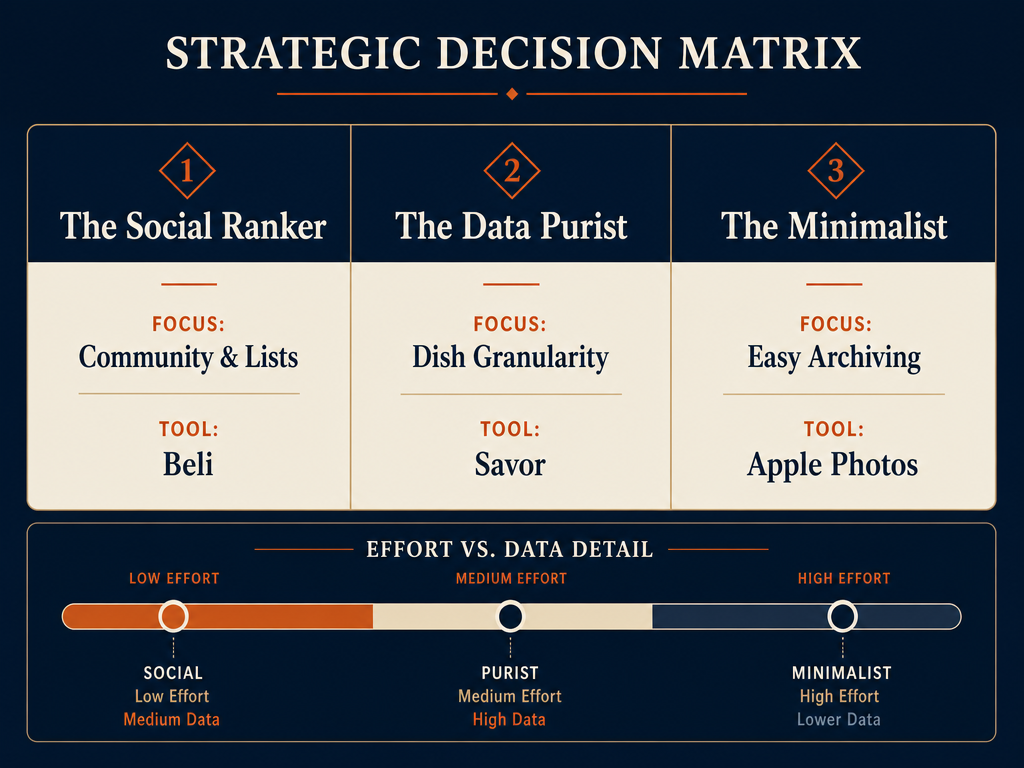 Choosing the right system depends on your goals: building a social community, maintaining a private technical archive, or simply keeping an organized camera roll.
The Social Ranker: Beli
Best for: Building power lists and sharing recommendations with your network
Beli dominates the social food tracking space. As of September 2025, Beli users have logged more than 75 million restaurant ratings, making it the largest crowdsourced food database after Yelp.
The app's strength is curation - you create ranked lists ("Best Ramen in Tokyo," "Hidden Gems in Mexico City") that your friends can follow. It's designed for people who want their taste to become social capital.
The tradeoff: Beli is venue-focused. You can add dish-level notes, but the interface prioritizes restaurant rankings. If you need precise dish tracking, you'll fight against the UX.
Best use case: You're building a public-facing food reputation and want your recommendations to be discoverable by your network.
If you're interested in how different apps handle dish tracking versus restaurant reviews, the distinction becomes critical when you're trying to remember which specific plates made an impact.
The Data Purist: Savor
Best for: 10-point dish ratings and private archives
Savor is the anti-Yelp. It's built for people who want dish-level granularity without any social features. The app uses a 10-point rating scale specifically for dishes, not restaurants. You log the cacio e pepe at 8.5, the carbonara at 7.0, and you never have to post anything publicly.
The system includes AI dish recognition (more on this below), but the core philosophy is manual, structured note-taking. You're building a personal taste database, not trying to influence anyone else's dining choices.
The tradeoff: No social features means no community recommendations. You won't discover new places through Savor - you'll document places you've already been.
Best use case: You want a searchable archive of your personal palate, with precise ratings and detailed tasting notes that you can reference years later.
For travelers who need to track meals across multiple cities, a private system with robust tagging becomes essential when your dining history spans continents.
The Visual Diarist: Yummi
Best for: Map-based "foodprints" and visual memory
Yummi takes a different approach entirely - it treats food tracking as visual storytelling. The app creates "foodprints" on a map, using photo metadata to auto-log location and time. It's less about structured data and more about creating a visual diary of your culinary travels.
The interface is gorgeous. Scrolling through your Yummi feed feels like flipping through a professional food magazine where you're the subject.
The tradeoff: The vlog aesthetic comes at the expense of search functionality. Finding "that incredible pasta I had somewhere in Rome" requires visual memory, not keyword search.
Best use case: You're a visual thinker who remembers experiences through images, not structured notes. You want your food memories to feel like art, not a database.
The Tech Minimalist: Apple Photos Captions
Best for: People who refuse to add another app
You don't actually need a dedicated app to track dishes. You can build a surprisingly effective system using native iPhone features - specifically, photo captions.
Here's the protocol:
- Take your three-photo set (wide, hero, menu)
- Immediately add a caption in Apple Photos: "Tonkotsu Ramen, Ichiran Shibuya, 8/10, perfect broth viscosity"
- Use consistent formatting so you can search later
When you search "Tonkotsu" in Photos, every ramen you've ever logged will surface. When you search "8/10," you'll see your highest-rated dishes.
The tradeoff: No dedicated UI means no filtering by cuisine type, location, or rating range. You're limited to basic text search.
Best use case: You're philosophically opposed to food tracking apps but want some structure beyond the chaos of your camera roll.
For those exploring the best apps to track restaurant meals, understanding the spectrum from full-featured apps to minimalist caption systems helps you find your personal sweet spot.
AI Best Practices: When to Trust the Machine
The promise of AI dish recognition sounds perfect - point your camera at a plate, and the app automatically identifies it as "Margherita pizza" or "Pad Thai." In practice, the technology is uneven.
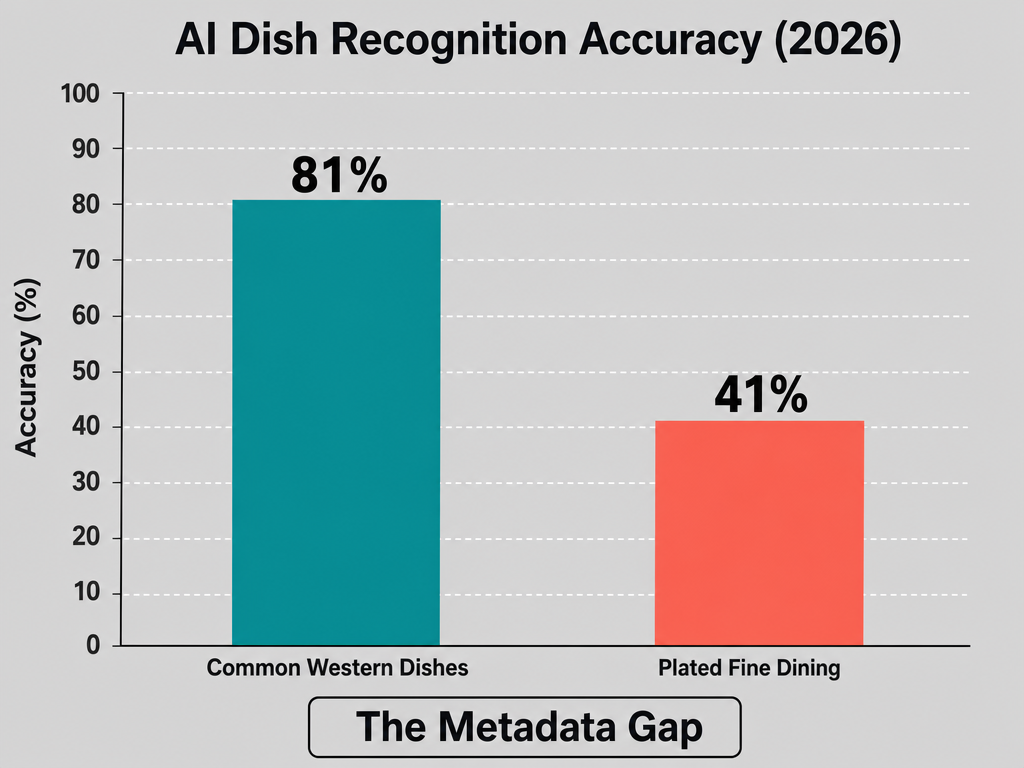 While AI is improving, its current failure rate with complex fine-dining plates makes manual metadata tagging essential for serious culinary archiving.
Apple Intelligence's "Food Scenes" AI achieves 81% accuracy on common Western dishes (burgers, pizza) but only 41% on "plated fine dining". The system works well for visually distinct, heavily photographed dishes. It falls apart on regional variations and artistic plating.
When AI works:
- Simple, iconic dishes: pizza, burgers, sushi rolls, tacos
- Dishes with distinctive visual signatures: ramen (noodles in broth), pho (rice noodles with herbs), pad thai (visible shrimp and peanuts)
- Menu staples that appear in millions of training photos
When AI fails:
- Regional variations: It can't distinguish tonkotsu ramen from shoyu ramen by looking at the broth
- Fine dining plating: A deconstructed dessert looks like abstract art to the algorithm
- Fusion cuisine: When a dish blends multiple culinary traditions, the AI guesses at the dominant influence and often gets it wrong
- Similar-looking dishes: Carbonara and cacio e pepe are both "pasta with white sauce" to a machine
The smart approach is to treat AI as a starting suggestion, not a final answer. Let the app auto-tag your burger photo, but manually add "dry-aged beef, caramelized onions, house sauce" to make it actually useful later. The AI handles the obvious categorization; you handle the nuance.
Manual metadata still wins for serious archiving. A keyword like "funky" or "umami-forward" or "best I've had in this city" gives you search power that no image recognition algorithm can provide.
If you're building a personal food database, understanding where automation helps and where it hinders determines whether your system becomes useful or just another digital junk drawer.
Traveling Hacks: Offline Strategies and Time Zone Management
The biggest technical challenge of tracking dishes while traveling is connectivity. You're in a basement ramen shop in Tokyo with no Wi-Fi, or you're in a Moroccan medina where your data plan doesn't work. Your tracking system needs to function offline.
Offline-First Photo Capture
Your camera app always works offline - that's your baseline. Take the three-photo set (wide, hero, menu) regardless of connectivity. The photos are timestamped with GPS coordinates automatically if you've enabled location services.
Most tracking apps have offline modes that let you create entries without an internet connection. The data syncs when you reconnect. But read the fine print - some apps require connectivity for AI tagging or restaurant lookups, making them useless in remote areas.
Pre-Downloaded Maps and Restaurant Pins
Before you travel, use Google Maps to create custom lists of restaurants you want to try. Drop pins on each location and save the list offline. When you arrive in a new city without data, you can navigate to each pin using offline maps.
The hack here is to screenshot the menu from the restaurant's website or Instagram before you go. When you're sitting in the restaurant without Wi-Fi, you can reference the screenshot to remember dish names and make informed ordering decisions.
Time Zone Backdating
This is the problem nobody warns you about: your photos are timestamped in your phone's current time zone, but your tracking app might log entries in UTC or your home time zone. Three weeks later, you can't figure out which Tokyo meal happened on Tuesday versus Wednesday because the timestamps are off by 12 hours.
The solution is to log meals with date and time as separate metadata fields, not just timestamps. Most dedicated food apps handle this automatically, but if you're using a general note-taking app, you'll need to manually note "Tuesday lunch" versus relying on photo timestamps.
For serious food travelers who need to organize restaurant photos across multiple countries, time zone management and offline functionality aren't optional features - they're deal-breakers.
The Metadata That Actually Matters
You can log 47 data points per dish and still have a useless archive if you're tracking the wrong things. After analyzing how professional food critics structure their notes, a pattern emerges: there are six essential metadata fields that make future searches possible, and everything else is noise.
1. Dish Name (Official)
Use the menu's exact wording, not your interpretation. "Tonkotsu Ramen" beats "pork noodle soup." Precision matters for search.
2. Venue + Location
Restaurant name and city, at minimum. Neighborhood helps if you're tracking multiple cities: "Ramen Nagi, Shibuya, Tokyo."
3. Your Rating (10-Point Scale)
Five stars compress too much nuance. A 10-point scale lets you distinguish "very good" (7.5) from "exceptional" (9.0). Professional critics use 100-point scales, but that level of precision is performative for most people.
4. Key Flavor Descriptor
One or two words that capture what made the dish distinctive: "funky," "citrus-forward," "smoky," "perfectly balanced," "too sweet." This is what you'll remember six months later.
5. Standout Element
What would you tell a friend who asked "what was special about it?" The crispy skin. The house-made XO sauce. The unexpected pairing of miso and maple. One specific, memorable detail.
6. Reorder Decision
Binary: Yes or No. Would you order this exact dish again if you returned to this restaurant? This single field creates a filtered list of your "greatest hits."
Everything else - price, server name, wine pairing, Instagram handle of your dining companion - is optional. Track it if it brings you joy, but don't let metadata bloat slow down your logging process.
Understanding how to rate food with consistent criteria across different cuisines is what separates a useful archive from a digital scrapbook.
Frequently Asked Questions
What are the best apps for foodies?
The best app depends on your tracking philosophy. Beli dominates for social ranking and list-building - great if you want to share recommendations publicly. Savor focuses on private dish-level ratings with a 10-point scale, ideal for building a personal taste database. Yummi excels at visual storytelling with map-based foodprints. For minimalists, Apple Photos with structured captions creates a searchable system without adding another app.
Which food tracking app has the highest rating?
App ratings fluctuate based on recent updates and user expectations. According to available data, Savor consistently receives high marks for its dish-level focus and 10-point rating system among serious food enthusiasts. However, "highest rating" is less important than "best fit for your use case" - a highly-rated social app won't help if you want private archiving.
Is the Beli app better than Google Maps for restaurants?
Beli and Google Maps serve different purposes. Google Maps excels at discovery - finding restaurants near you with basic ratings and reviews. Beli is better for curation - creating ranked lists of your favorite places and sharing them with friends. As of September 2025, Beli users have logged more than 75 million restaurant ratings, but it remains venue-focused rather than dish-focused. For tracking specific dishes, neither is ideal.
How to make pictures of food look good for tracking?
Natural light is your primary weapon. Position your dish near a window and shoot during daylight hours. Use a 45-degree angle for most plated dishes - this shows depth and texture better than straight overhead shots. Take a close-up at 2x zoom to capture texture details: the char on a steak, the layers in a croissant, the glisten of oil on fresh pasta. Research shows that 84% of diners use photos to decide where to eat, and 82% will order a dish based purely on how it looks in a photo, so presentation matters even in personal archives. Avoid harsh artificial lighting and don't use flash - it flattens everything and kills shadows that create dimension.
What is the difference between Beli and Google Maps?
Beli is a curated list-making platform built around personal taste - you rank restaurants and share those rankings with your network. Google Maps is a discovery tool with crowdsourced reviews and location-based search. Google Maps shows you what's nearby; Beli shows you what your trusted friends think is worth visiting. For dish-level tracking, both fall short because they're fundamentally venue-rating systems, not dish-rating systems.
Should I trust Google or Yelp reviews more?
Neither, at least not blindly. Both platforms suffer from the same fundamental problem: they aggregate venue ratings across dozens or hundreds of dishes. A restaurant can have terrible pasta and extraordinary pizza, and a five-star average tells you nothing about which to order. Professional food critics and serious foodies increasingly use private dish-level tracking systems instead of relying on public review platforms. Use Google and Yelp for discovery - finding restaurants in a new city - but build your own archive for decision-making.
Your camera roll doesn't have to be a graveyard of forgotten meals. The difference between food photography and food memory is structure. Capture three photos per meal. Log the data later using a consistent system. Track dishes, not restaurants. Build a searchable archive of your personal palate, and six months from now, when someone asks "where should I eat in Bangkok?" you'll have a real answer instead of a vague memory.