
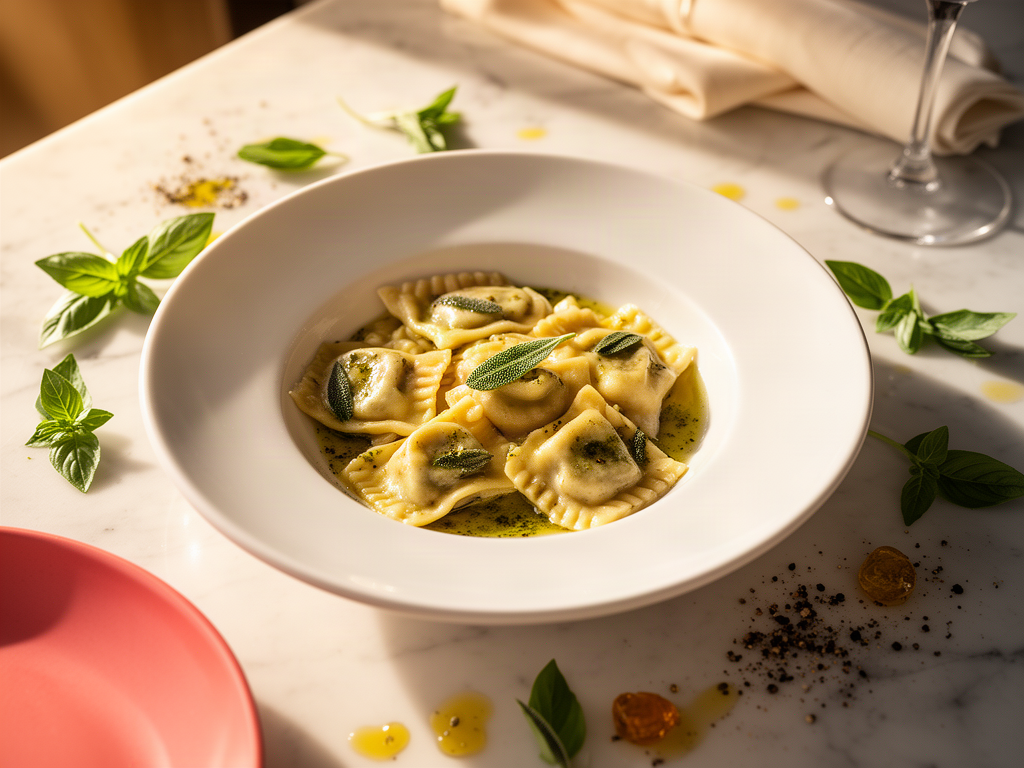
How to Build a Personal Dish Database That Actually Works: The Anti-Restaurant Rating Guide
Harry the matcha king
Harry is our resident matcha obsessive. He’s tasted hundreds of bowls and tracks every cup in Savor.
How to Build a Personal Dish Database That Actually Works: The Anti-Restaurant Rating Guide You spent $180 on omakase in Tokyo three months ago. The toro...
How to Build a Personal Dish Database That Actually Works: The Anti-Restaurant Rating Guide
You spent $180 on omakase in Tokyo three months ago. The toro melted like snow on your tongue. The uni tasted like the ocean condensed into a single bite. You took seventeen photos.
Today, you can't remember the restaurant's name.
Your camera roll holds 2,847 food photos from the past year. You've eaten at least 73 exceptional dishes across twenty cities. You can recall maybe eight of them with any precision. The rest? A graveyard of unsearchable moments, trapped in a timeline you'll never scroll through again.
This isn't a memory problem. It's an architecture problem.
Restaurant ratings are built wrong. A 4.5-star venue can serve a 9.8 agnolotti and a 6.2 burger on the same menu. Yelp tells you where to go, not what to order when you get there. Google Maps knows you saved a place but can't tell you why.
The average user spends 3 minutes searching their camera roll for a specific food photo from 6 months ago. Modern dish-tracking apps reduce that search time to 3 seconds.
This guide is about building a personal dish database - a searchable, private system where you track meals by the thing that actually matters: the individual dish, not the restaurant average.
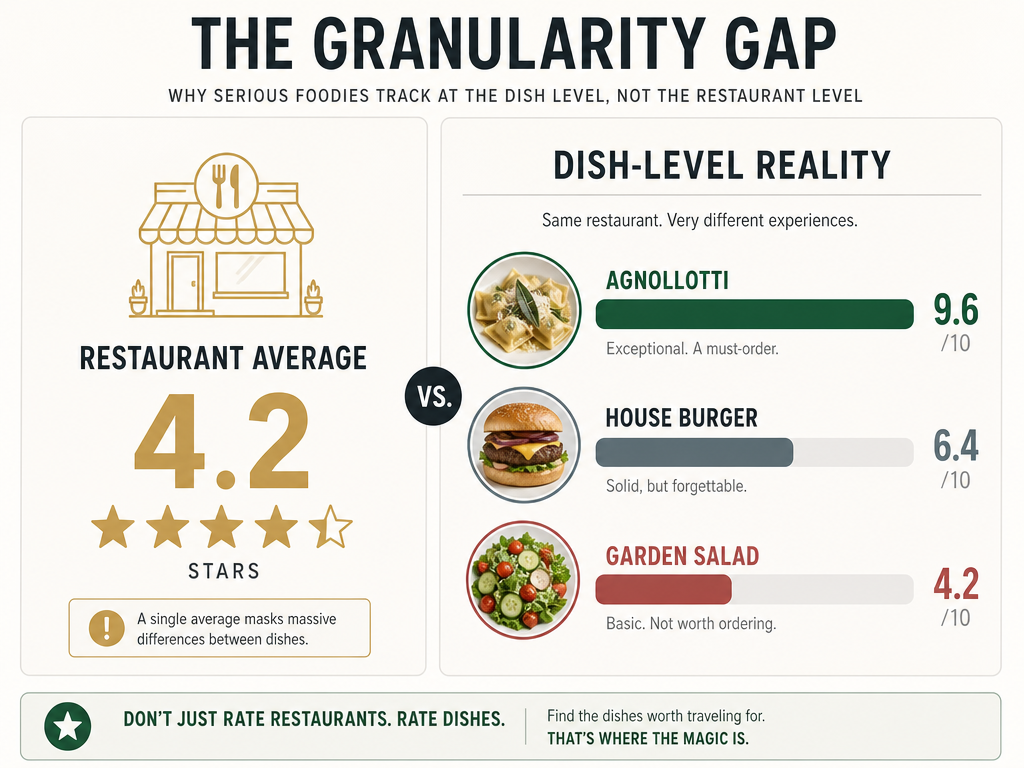 A restaurant's average rating often hides the truth: you are there for one specific masterpiece, not the entire menu. Dish-level tracking reveals these culinary outliers.
Table of Contents
- The Camera Roll Problem: Why Your Food Photos Are Useless
- The Shift to Dish-Level Data
- The Archetype Matchmaker: Which System Fits Your Foodie Personality
- The 10-Second Workflow: How to Log Without Ruining Dinner
- Comparative Matrix: Speed, Depth, and Sociality
- The Migration Guide: Moving Your Top 50 Meals
- What Does Gen Z Use Instead of Yelp?
- Frequently Asked Questions
The Camera Roll Problem: Why Your Food Photos Are Useless
Your phone is a museum with no curator.
You have thousands of food photos, but they lack the three things that make information actionable: metadata, searchability, and context. A photo of tonkotsu ramen taken on March 14th at 7:42 PM in Fukuoka tells you nothing about the restaurant, the specific dish name, the price, or why it mattered.
When you're back home and someone asks for a ramen recommendation, you scroll. You scroll through photos of your dog, screenshots of flight confirmations, and sixteen photos of the same sunset. By the time you find the ramen photo, you've forgotten if it was the place near the train station or the one your Airbnb host recommended.
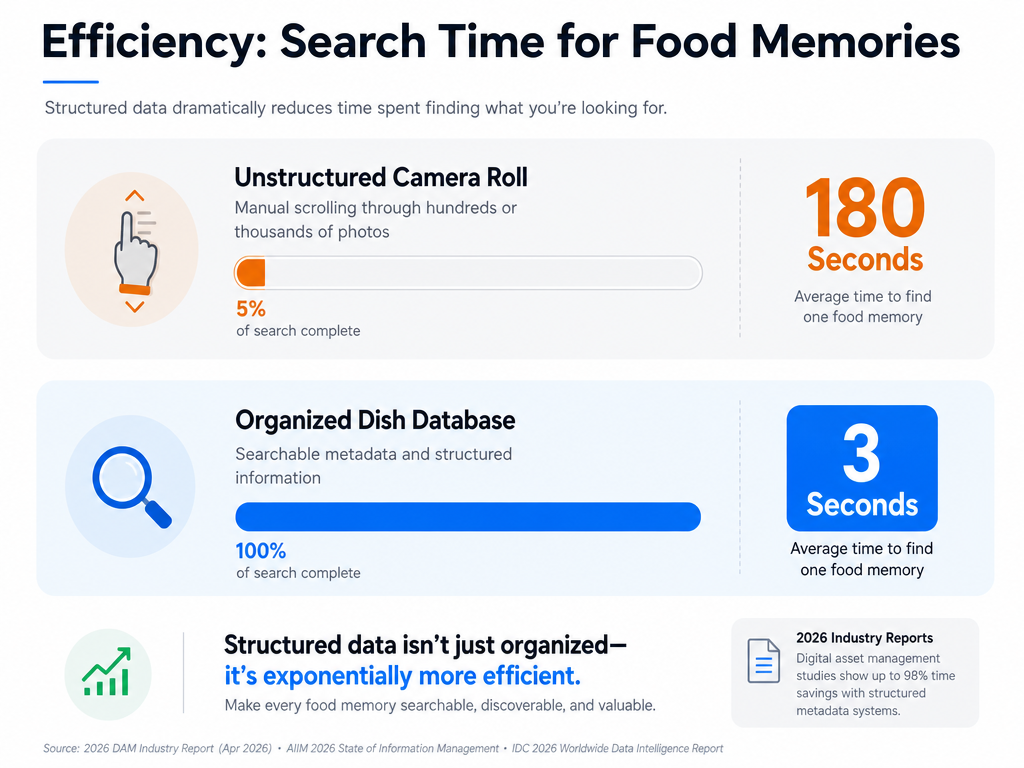 Modern dish-tracking applications reduce search time by 98% compared to manual camera roll scrolling, transforming a 'photo graveyard' into an actionable database.
The camera roll is a passive repository. It captures moments but provides no framework for retrieval. You need a system that adds structure at the point of capture - one that asks: What dish? Which restaurant? What score? What city?
This is the foodie graveyard problem, and it's why apps to organize food photos by restaurant exist in the first place.
The Shift to Dish-Level Data
Restaurant-level ratings are a blunt instrument.
A restaurant receives a single aggregate score based on dozens of variables: service, ambiance, bathroom cleanliness, the chef's mood on Tuesday. None of this tells you whether the duck confit is worth ordering.
Dish-level curation flips the model. Instead of asking "Is this a good restaurant?" you ask "Which specific dishes are worth the trip?" This approach acknowledges a culinary reality: most restaurants have one or two standout items and a menu full of functional mediocrity.
Consider a hypothetical Italian bistro with a 4.2-star average on Google. That rating might reflect:
- Agnolotti: 9.6
- Carbonara: 8.9
- Tiramisu: 8.4
- House burger: 6.4
- Caesar salad: 5.9
The aggregate score tells you nothing. The dish-level breakdown tells you to order the agnolotti, skip the burger, and maybe grab dessert.
This is the conceptual shift: you're no longer reviewing venues. You're cataloging individual culinary experiences across a distributed network of kitchens. The restaurant is metadata. The dish is the data.
If you're curious about structuring these kinds of records, see how to track dishes by restaurant city.
The Archetype Matchmaker: Which System Fits Your Foodie Personality
Choosing a dish-tracking system isn't about finding the "best" tool. It's about matching your behavior to the right architecture. There are three dominant archetypes, each with distinct tradeoffs in speed, depth, privacy, and social utility.
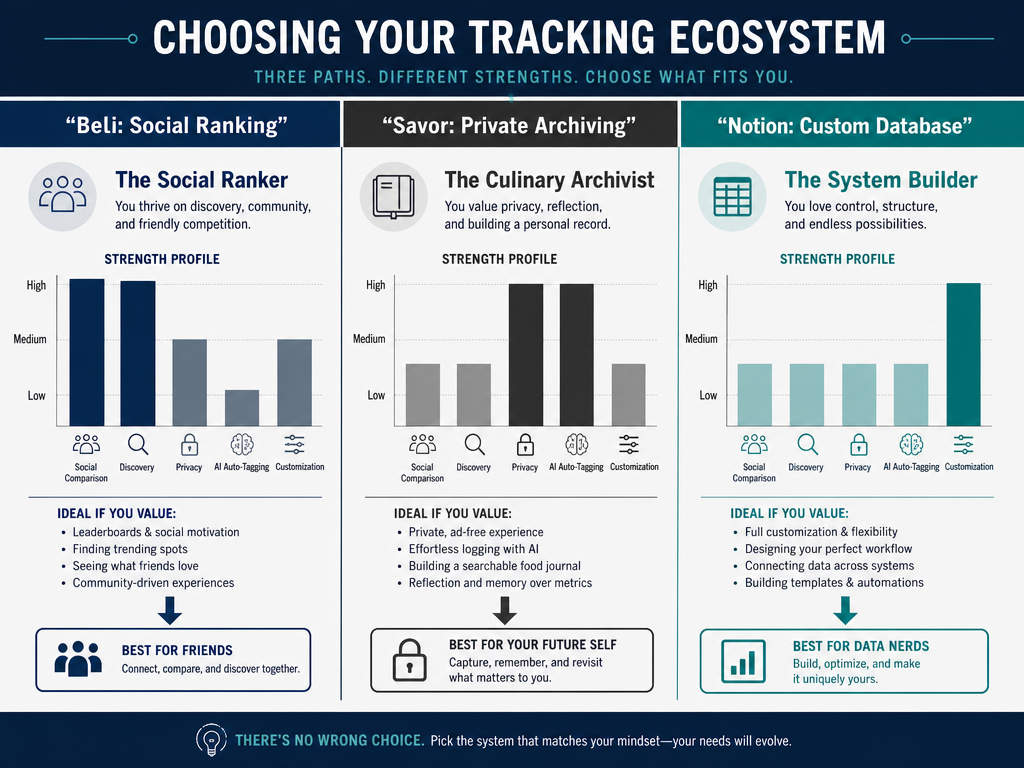 Whether you prioritize social competition, private archiving, or total database control, there is a specific tracking methodology suited to your foodie personality.
The Social Ranker: Beli
Beli is what happens when Letterboxd meets Tinder for food. It's a social platform where you rank dishes by making head-to-head comparisons: carbonara A versus carbonara B. The app uses an ELO-style ranking system - borrowed from chess - to build a personal leaderboard of your favorite meals.
Over 75 million restaurant ratings have been recorded on Beli as of September 2025, and over 80% of users are Gen Z or Millennials. It's a platform built for people who want their food opinions to be public, searchable, and part of a larger social graph.
How it works: You snap a photo, tag the restaurant, name the dish, and assign a quick rating. Over time, the app prompts you to compare dishes you've rated: "Which was better, the Tokyo ramen or the Bangkok pad thai?" Your answers refine the rankings. Your friends can see your list. You can see theirs.
Best for: People who treat dining as a social activity and want their recommendations to be visible and shareable. If you're the person who gets asked "Where should I eat in Rome?" every three months, Beli turns your opinion into a searchable public resource.
Tradeoff: Privacy is minimal. Everything you post is visible to your network. If you want a private archive, this isn't it. But if you want social validation and a sense of competitive curation, Beli delivers.
For more on Beli's role in the modern food landscape, explore Beli app alternatives.
The Culinary Archivist: Savor
Savor is built for people who want a private, searchable culinary memory bank. It uses AI to recognize dishes from photos, automatically extracting details like cuisine type, dish name, and visual characteristics. You add notes, a 10-point score, and location data. The app turns your camera roll into a structured database you can query by dish, city, or flavor profile.
How it works: Take a photo. The AI identifies the dish (it knows the difference between tonkotsu and shoyu ramen). You add a quick score and a note: "Broth too salty, chashu perfect." Later, when you're planning a Tokyo trip, you search "ramen Tokyo 9+" and instantly pull up your highest-rated bowls with addresses and tasting notes.
Best for: The meticulous diner who wants to remember not just what they ate, but why it mattered. This is for people who take notes on wine pairings, track regional variations of the same dish, and want to search their entire dining history by flavor descriptor.
Tradeoff: This is a private system. You can share individual meals, but there's no public feed or social graph. If you want to be the go-to food expert in your friend group, you'll have to manually export recommendations. The upside is complete control over your data and zero pressure to perform for an audience.
Learn more about how Savor fits into the best dish tracking apps landscape.
The System Builder: Notion
Notion isn't a food app. It's a blank canvas for people who want total control over their database schema. You design the structure: a "Dishes" table with columns for restaurant, city, cuisine, rating, photo, date, and personal notes. You link it to a "Restaurants" table with aggregate scores, addresses, and visit logs. You build custom views: "Best pasta in Italy," "Top 10 dishes under $20," "Tokyo 2024 trip log."
How it works: You create a database manually. After a meal, you open Notion, create a new entry, upload a photo, fill in the fields. It's slower than a purpose-built app, but the flexibility is unmatched. You can add custom fields for wine pairings, chef names, reservation difficulty, or whatever data points matter to you.
Basic schema:
- Dish Name (text)
- Restaurant Name (text)
- City / Country (select)
- Cuisine Type (multi-select)
- Rating (number, 1-10)
- Photo (file upload)
- Date (date field)
- Notes (long text)
You can create relational links between dishes and restaurants, allowing you to see all the meals you've had at a specific venue or aggregate scores for a particular city.
Best for: People who enjoy database design and want to build a completely custom system. If you're comfortable with spreadsheets and want to track non-food variables (like who you dined with or the sommelier's name), Notion is your tool.
Tradeoff: High friction. Every entry requires manual input. There's no AI assistance, no auto-tagging, and no social features. You're building your own infrastructure from scratch. The payoff is a system that's exactly what you want, but you pay for it in setup time and ongoing discipline.
For a comparison of Notion and other organizational tools, see the best apps to organize recipes.
The 10-Second Workflow: How to Log Without Ruining Dinner
The best system is the one you'll actually use. That means minimizing friction at the moment of capture. If logging a meal feels like homework, you'll stop doing it.
Here's the protocol that works:
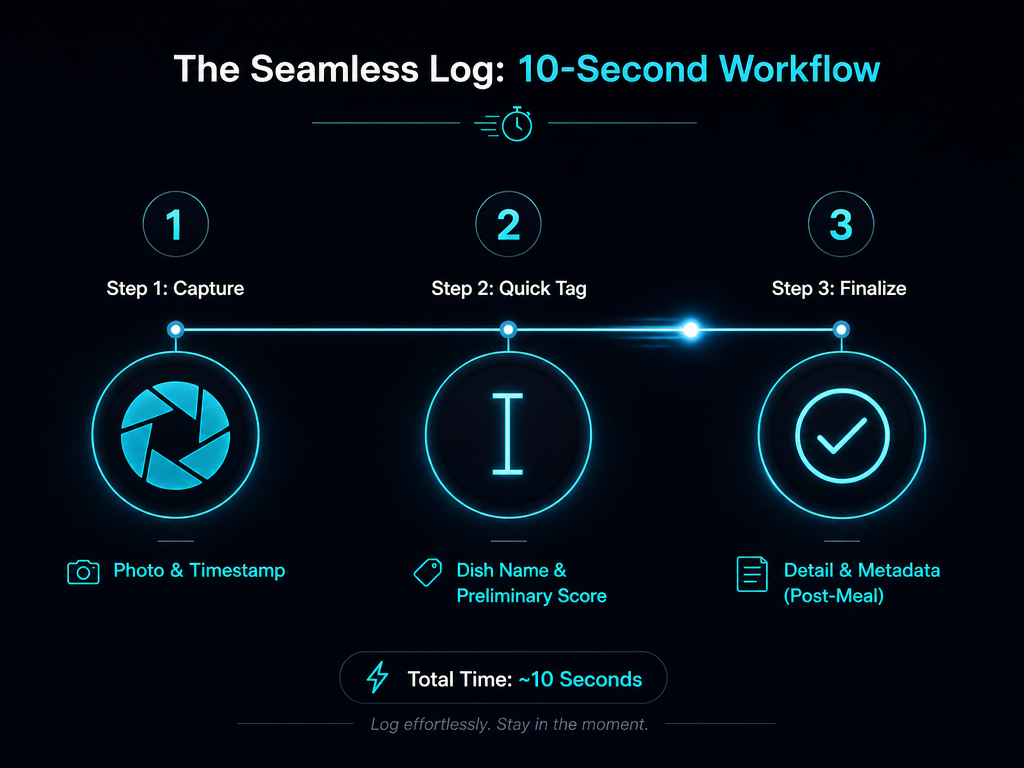 Mastering the 10-second log ensures you capture critical data points at the table without letting technology interrupt your actual dining experience.
Step 1: Capture (3 seconds)
Take the photo. Don't obsess over lighting or composition. You need documentation, not portfolio material. One shot. Move on.
Step 2: Quick Tag (5 seconds)
Open your app. Enter the dish name and a gut-reaction score (1-10 scale, no overthinking). If the app supports voice notes, record a 5-second impression: "Crust perfect, sauce too sweet." That's it. Close the app.
Step 3: Finalize Later (2 minutes)
After the meal, when you're back at your hotel or on the train, open the app again. Add the restaurant name, location, and any additional context you want to preserve. This is when you write the longer note about texture, flavor balance, or why the dish worked.
The key insight: separate the capture moment from the reflection moment. At the table, you're logging data points. Later, you're building the narrative.
This workflow prevents two failure modes:
- Analysis paralysis at the table: You don't need to write a full review while your companion waits. Just capture the raw data.
- Forgetting later: Without the immediate tag, you'll open your camera roll three days later and have no idea which photo corresponds to which restaurant.
This is the discipline that turns intention into habit. If you're interested in similar systems, check out how to keep a food diary for dining out.
Comparative Matrix: Speed, Depth, and Sociality
| Feature | Beli | Savor | Notion |
|---|---|---|---|
| Logging Speed | Fast (5 seconds) | Fast (7 seconds with AI) | Slow (2-3 minutes manual) |
| Depth of Notes | Low (short caption) | High (structured fields + long notes) | Complete (unlimited custom fields) |
| Social Features | Full public feed, friend rankings | Private-first, selective sharing | None (unless you build it) |
| AI Assistance | None | Dish recognition, auto-tagging | None |
| Search Power | Basic (by dish or restaurant) | Advanced (by dish, city, cuisine, score) | Total (custom queries on any field) |
| Map Integration | Limited | Full (GPS coordinates on entries) | Manual (embed maps if you want) |
| Data Export | Limited | Full CSV export | Full (native Notion export) |
| Best For | Social validation, quick logs | Private memory bank, serious curation | Total customization, data nerds |
This table distills the tradeoffs. Beli is for speed and social proof. Savor is for depth and retrieval. Notion is for people who want to design their own culinary operating system from the ground up.
No single winner exists. The right choice depends on whether you prioritize community, memory, or control.
If you're looking for more app-specific comparisons, see the best food review apps.
The Migration Guide: Moving Your Top 50 Meals
You have 2,847 photos. You're not going to retroactively log all of them. That's a recipe for burnout and abandonment.
Here's the pragmatic approach: migrate the top 50 meals from your existing camera roll into your new system. Not the top 50 restaurants - the top 50 individual dishes that you still remember and would actively recommend.
Step 1: The Memory Test
Scroll through your camera roll for 20 minutes. Mark any photo where you can instantly recall: the dish name, the restaurant, and why it was exceptional. If you have to squint and wonder "Was this the good ramen or the mediocre one?" skip it. You're looking for the meals with emotional weight.
Step 2: Batch the Entries
Set aside 90 minutes. Open your tracking app. Go through your marked photos one by one. For each:
- Upload the photo
- Enter the dish name
- Add the restaurant and city
- Assign a score based on your current memory (it's fine if this is slightly inaccurate - you're building a baseline)
- Write one sentence about what made it memorable
Do ten entries, take a break. Do another ten. You'll finish the 50 in a single session.
Step 3: Protect the Future
From this point forward, commit to the 10-second workflow for every new meal. Your historical archive is now seeded. Every new entry adds to it.
This approach acknowledges the reality: you can't recover the past perfectly, but you can build a reliable system for the future. The 50 entries give you enough data to make the system useful immediately. If someone asks for a Tokyo recommendation, you'll have three excellent ramen shops already logged.
This is how you turn a chaotic camera roll into a functional culinary database. For more on organizing your archive, read how to organize restaurant photos by dish.
What Does Gen Z Use Instead of Yelp?
Yelp fatigue is real. Younger diners don't trust aggregate reviews from anonymous strangers. They want recommendations from people with similar taste - or from their own curated archives.
The shift is away from crowd-sourced consensus and toward personal curation. Instead of asking "What's the highest-rated sushi place?" the question becomes "Which sushi did I rate highest?" The locus of authority moves from the platform to the individual.
Beli exemplifies this transition. It's built on the premise that your friends' opinions matter more than a 4.3-star average from 800 reviewers you've never met. The app surfaces dishes your network has loved, creating a taste-based social graph.
But there's a quieter revolution happening in private archives. Apps like Savor, Notion databases, and even Apple Notes are becoming personal Yelp replacements - systems where you're both the contributor and the audience. You're not trying to help strangers. You're helping your future self.
This is the Gen Z insight: the best recommendation engine is the one you build yourself, meal by meal, over years. It's not scalable. It's not monetizable. But it's accurate in a way that crowd-sourced data never will be.
For a deeper look at how this generation approaches food discovery, explore best apps for foodies in New York.
Frequently Asked Questions
What is the best app for ranking restaurants?
If you're ranking restaurants as venues, Google Maps and Yelp remain dominant. But if you're ranking individual dishes, the best tools are Beli (for social ranking), Savor (for private archiving), and Notion (for custom database control). The "best" app depends on whether you prioritize speed, social features, or data depth.
What is a good app to track restaurants?
For casual logging, Google Maps' "saved places" feature works. For serious tracking, Savor offers structured fields, AI recognition, and searchable archives. Notion provides total flexibility if you're willing to design your own system. Beli works if you want tracking combined with social proof and friend recommendations.
How do I use Notion to track specific dishes across different cities?
Create a "Dishes" database with fields for dish name, restaurant, city, cuisine type, rating, photo, and date. Use the city field as a filter to create custom views: "Tokyo 2024," "Paris ramen," or "Best pasta worldwide." Link each dish entry to a "Restaurants" table to see all meals from a single venue. Notion's relational databases let you query by any field, making cross-city comparison simple once the structure is built.
What is the best app to track your meals?
For nutrition tracking, MyFitnessPal dominates. For culinary memory, Savor is purpose-built for dish-level logging with photos, scores, and searchable metadata. Beli works if you want social features. Notion works if you want to design your own schema from scratch.
Is there an app that uses AI to identify dishes and save them to a list?
Yes. Savor uses AI to recognize dishes from photos, automatically tagging cuisine types and suggesting dish names. Samsung Food also offers vision-based recognition, though it's more focused on calorie estimation than culinary memory. For a comparison, see Samsung Food's Vision AI review.
What is the best app for finding restaurants in New York City?
For discovery, The Infatuation and Eater remain strong editorial sources. For personal tracking, build a Savor or Notion archive of dishes you've loved in NYC, then filter by neighborhood. If you want social recommendations, Beli surfaces what your friends have rated highly. For reservations, Resy is essential.
Is Beli still invite only?
As of 2025, Beli has opened to public access in most regions. Early versions required invites, but the platform has since scaled. Check the App Store for current availability, as regional rollouts may vary.