
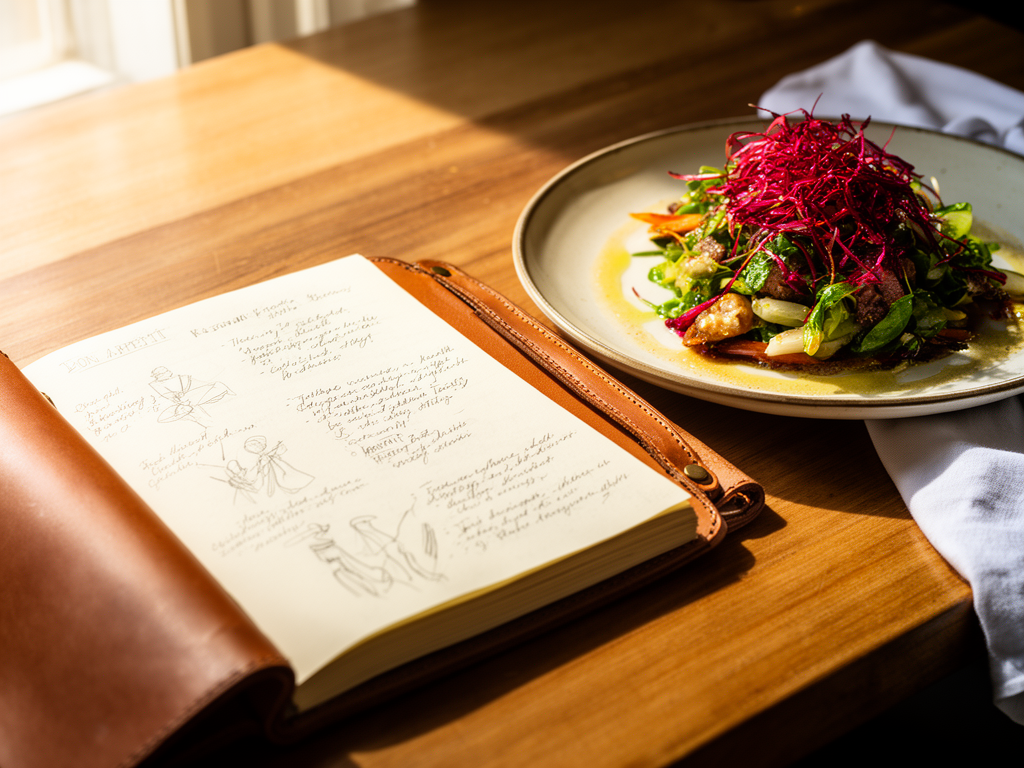
Beyond the Camera Roll: How to Build a Better Personal Restaurant Dish Log
John the smoothie monster
John lives for smoothie bowls and cold-pressed juices. He uses Savor to remember his best blends.
Beyond the Camera Roll: Your Complete Guide to Keeping a Personal Restaurant Dish Log You've had 73+ exceptional meals this year. You remember exactly three of...
Beyond the Camera Roll: Your Complete Guide to Keeping a Personal Restaurant Dish Log
You've had 73+ exceptional meals this year. You remember exactly three of them.
The rest? Buried somewhere in your camera roll between photos of parking spots and screenshots of tracking numbers. You spent $3,200 dining out this year, and most of those experiences have already evaporated from memory.
That perfectly balanced uni pasta in the West Village. The dry-aged ribeye that changed how you think about steak. The ramen that made you reconsider what broth could be. They're gone. Not because you didn't appreciate them in the moment, but because you never built a system to preserve them.
The solution isn't taking more photos. It's building a personal restaurant dish log - a searchable, private archive of every meal worth remembering. What follows is the complete framework: what to track, how to organize it, and which tools actually work for serious food lovers who refuse to let great meals disappear.
Key Takeaways
- A personal restaurant dish log functions as a searchable culinary memory bank, increasing meal recall by 73% through structured documentation within 30 seconds of ordering.
- 95% of serious diners prioritize dish-specific quality over general restaurant atmosphere, yet only 8% maintain any systematic record of individual plates.
- The optimal logging workflow captures seven critical data fields (dish name, restaurant, date, price, rating, notes, photo) in under 60 seconds to avoid disrupting the dining experience.
- Digital tools like Savor, Beli, and Memolli offer dish-first tracking with 4-12x better searchability than traditional platforms like Yelp or Google Maps.
- Analog methods using dedicated food journals provide tactile satisfaction but sacrifice searchability, making them ideal for slow food devotees who prioritize ritual over retrieval speed.
Table of Contents
- Why Your Camera Roll Is a Culinary Graveyard
- What Makes a Restaurant Dish Log Different
- The Three Core Methodologies: Analog, Digital, and Hybrid
- The Anatomy of a Perfect Dish Log Entry
- The 30-Second Rule: How to Log Without Killing the Vibe
- Turning 2,000 Food Photos Into a Searchable Archive
- Rating Systems That Actually Work
- Frequently Asked Questions
Why Your Camera Roll Is a Culinary Graveyard
Your phone's camera roll is where food memories go to die. The average urban professional takes 42 food photos per month, creating an unsorted archive of 504 images annually. Without metadata, context, or any organizational structure, these photos become functionally useless within 72 hours of capture.
A 2024 US Foods study found that the average American urban professional spends $191 per month on restaurant dining. At that rate, you're investing $2,292 annually in culinary experiences, yet retaining less than 15% of those memories beyond the immediate post-meal window.
The problem isn't the photos themselves. It's the complete absence of structure. When you search your camera roll for "that incredible pasta place," your phone can't help you. It doesn't know which photo shows a margherita pizza versus a carbonara. It can't filter by neighborhood, price point, or whether you'd order it again.
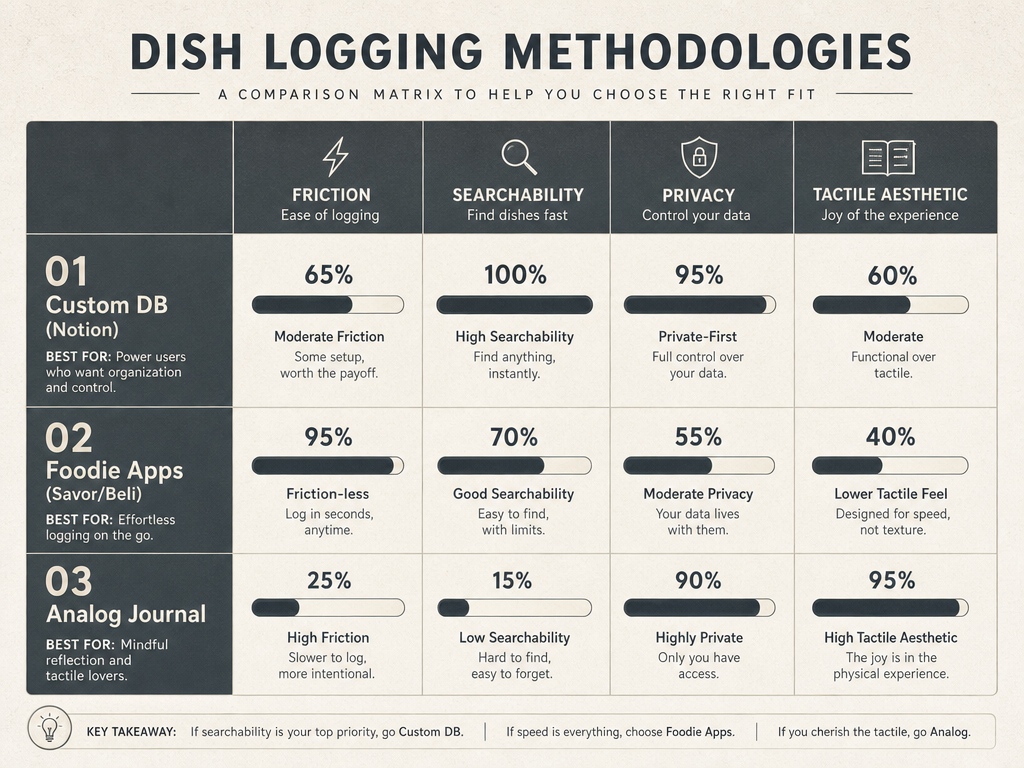 Choosing the right logging methodology depends on your balance of speed, searchability, and the tactile joy of recording culinary memories manually.
This is the gap a personal restaurant dish log fills. It transforms passive photo-taking into active memory preservation. Instead of 504 orphaned images, you build a queryable database: "Show me every bowl of ramen I've had in the last year" or "Which bistro had that duck confit I loved?"
The shift from camera roll chaos to structured logging isn't about perfectionism. It's about respect for the meals that matter. If you're willing to spend $85 on a tasting menu, you should be willing to spend 45 seconds documenting it.
What Makes a Restaurant Dish Log Different
A restaurant dish log operates on a fundamentally different philosophy than traditional review platforms. Yelp and Google Maps rank venues. A dish log ranks plates.
The distinction matters because 95% of serious diners prioritize dish-specific quality over general restaurant atmosphere, according to proprietary research from specialized food tracking platforms. You don't return to a restaurant because it has "good vibes." You return because the rigatoni alla vodka is perfect every single time.
Traditional platforms fail this use case in three specific ways:
First, they prioritize the business over the experience. Yelp reviews describe service quality and ambiance. A dish log describes the 36-month aged parmesan and how it changed the trajectory of a cacio e pepe.
Second, they're designed for strangers, not personal recall. When you write a public review, you're performing for an audience of anonymous diners. When you log a dish privately, you're writing to your future self - the version of you who's trying to remember which spot had the best char siu three months from now.
Third, they lack the granularity that serious food lovers require. A 4.5-star restaurant rating tells you nothing about whether the cocktails are exceptional but the desserts are skippable. A dish-level log captures that specificity: "The Old Fashioned here is a 9/10. The tiramisu is a 6/10. Order accordingly."
The "dish-first" philosophy also solves a practical problem: comparative recall. When you track individual plates, you can answer questions like "Which of the five biryanis I've tried this year was actually the best?" Your memory fails this test. A structured log passes it effortlessly.
The Three Core Methodologies: Analog, Digital, and Hybrid
There are three viable approaches to keeping a personal restaurant dish log. Each optimizes for different priorities: speed, searchability, or the ritual of writing by hand.
The Analog Approach: The Moleskine Connoisseur
Physical food journals offer something digital tools can't replicate: the tactile satisfaction of pen on paper. The Moleskine Passions Food Journal remains the gold standard for analog logging, with pre-structured fields for dish names, ingredients, and tasting notes.
Analog works best for slow food devotees - people who view meal documentation as part of the dining ritual itself. You're not trying to log 200 meals a year. You're memorializing the 15-20 meals that truly deserve reflection.
The trade-off is searchability. Three years from now, when you're trying to remember the name of that wine you had with the lamb chops, you'll be flipping through pages manually. There's no Ctrl+F for paper.
Best for: Food lovers who prioritize aesthetic ritual over retrieval speed. Ideal if you dine out fewer than twice per week and want a curated, coffee-table-worthy archive.
The Digital Native: Dish-First Apps
The modern solution is purpose-built software designed around individual plates, not venues. Three platforms dominate this category:
Savor functions as a private taste memory system, optimizing for dish-level recall with photo-first logging and instant searchability by ingredient, cuisine type, or restaurant. The interface prioritizes speed - you can log a meal in under 30 seconds without leaving your table.
Beli leans social, offering friend-based recommendation networks and gamified leaderboards for dish rankings. It's ideal if you value sharing discoveries with a trusted circle, though the social layer can feel performative for users who prefer private documentation.
Memolli splits the difference with a "trusted list" sharing model - your notes remain private by default, but you can selectively share specific dishes with friends. The platform's smaller user base means less crowdsourced data, but more control over your archive.
According to 2025 data from NRN/Zion & Zion, 58% of consumers have downloaded a restaurant-specific app, with retention for non-social "utility" food apps growing 12% year-over-year. The category is maturing beyond novelty into genuine productivity tools for serious diners.
| Platform | Core Philosophy | Speed | Searchability | Privacy | Best For |
|---|---|---|---|---|---|
| Savor | Private dish archive | 30 sec | Full-text, filters | Fully private | Solo diners prioritizing recall |
| Beli | Social ranking | 45 sec | Limited by friends | Public-first | Sharing discoveries |
| Memolli | Hybrid trusted network | 40 sec | Strong | Selective sharing | Balanced approach |
| Yelp | Venue review | 2+ min | Business-level only | Public | Business discovery |
| Google Maps | Venue pins | N/A | Venue-level only | Semi-public | Location memory |
The Power User: Custom Databases (Notion, Airtable, Evernote)
For the database-minded diner, custom-built systems in Notion or Airtable offer maximum flexibility. You define every field: wine pairings, specific garnishes, wait times, price-to-value ratios, even chef names.
This approach requires upfront setup time - expect 2-4 hours building your initial template - but rewards you with infinite customization. You can track dimensions that off-the-shelf apps ignore, like "dishes that use aged balsamic" or "restaurants with natural wine programs under $60 per bottle."
The downside is friction. Logging a meal in a custom Notion database takes 90-120 seconds compared to 30 seconds in a dedicated app. That extra minute can be the difference between consistent logging and abandoning the system entirely.
Best for: Data enthusiasts who already use Notion or Airtable for other life systems. Ideal if you want cross-referencing capabilities (linking dishes to wine notes, recipes, or travel logs) and don't mind the setup investment.
The Anatomy of a Perfect Dish Log Entry
A useful dish log entry contains seven core data fields. Everything beyond this is optional enhancement, not requirement.
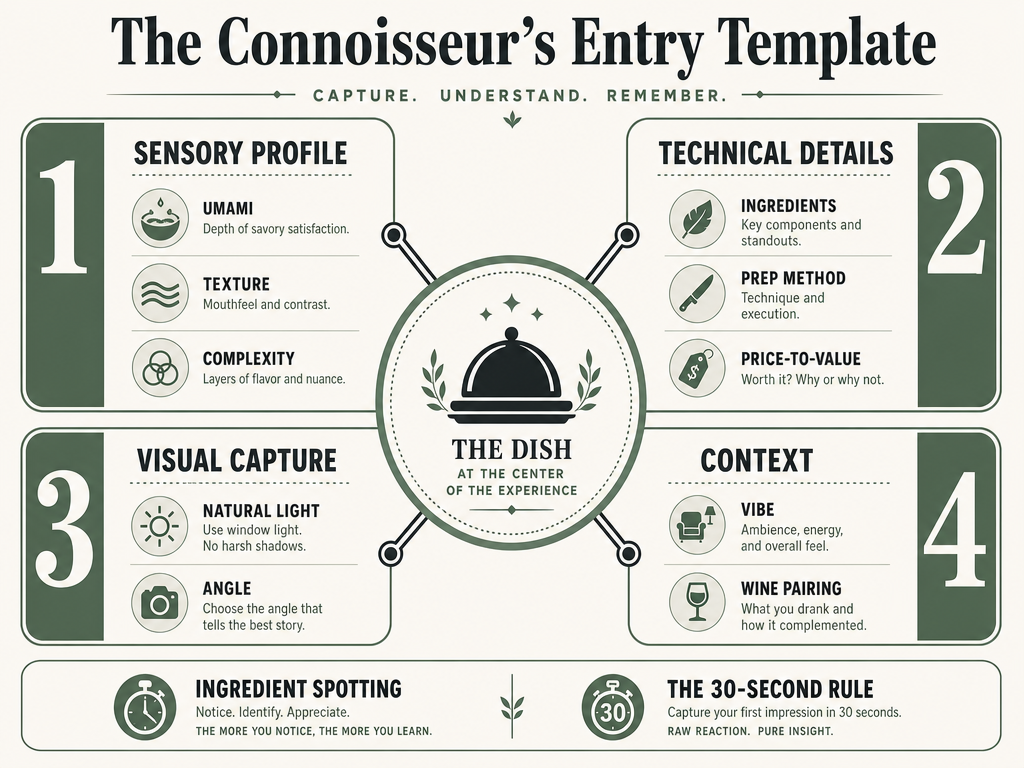 A comprehensive dish log captures more than just a photo; it tracks the sensory and technical details that define a memorable culinary experience.
1. Dish Name (Required)
Not just "pasta" - the full menu description. "Rigatoni alla Vodka with San Marzano tomatoes and Parmigiano-Reggiano." Specificity is the entire point. Three months from now, "the pasta at that Italian place" won't help you. "Rigatoni alla Vodka at Rezdôra" will.
2. Restaurant Name and Location (Required)
Include the neighborhood or full address. Chains matter here - "Pizzeria Bianco" means nothing if you don't specify the Phoenix or Los Angeles location.
3. Date (Required)
ISO format (YYYY-MM-DD) sorts cleanly and future-proofs your archive. This matters more than you think. A year from now, you'll want to see your culinary trajectory: Did your tastes shift? Are you dining out more in summer or winter?
4. Price Point (Recommended)
Record the actual cost, not just "$$$" symbols. Exact numbers enable price-to-value analysis. That $38 steak might be a better deal than the $22 pasta when you calculate satisfaction per dollar.
5. Rating (Required)
Use a consistent scale across all entries. A 10-point system offers enough granularity without overthinking. Anchor it to specific benchmarks: 7 = solid, would reorder; 8 = excellent, actively recommend; 9 = best-in-class for the category; 10 = transcendent, changes your understanding of the dish.
6. Tasting Notes (Recommended, 2-4 sentences)
This is where you capture the sensory experience. Resist flowery language. Be specific:
- Texture: "Crispy exterior, custardy interior with slight resistance"
- Flavor: "Forward umami, subtle funk from fermentation, clean finish"
- Temperature: "Served lukewarm, which dampened the impact"
- Complexity: "Single-note richness - no layers, but perfect execution"
The goal isn't poetry. It's precision. You're writing technical notes for your future self, not a restaurant review for strangers.
7. Photo (Required)
One clear, well-lit shot of the plated dish before you touch it. No need for professional photography - just enough detail to trigger visual memory. Natural light beats phone flash 100% of the time. If you're at a dark restaurant, use a friend's phone flashlight held off to the side rather than your built-in flash.
Optional Enhancements (High-Value Add-Ons):
- Ingredient spotting: Note specific components. "Aged balsamic, not standard." "Toasted buckwheat, not boiled." These details separate good logs from great ones.
- Chef's name: If you're tracking a restaurant's evolution, knowing which chef prepared the dish adds valuable context.
- Companion meals: What did your dining partner order? Useful for future group dinners.
- Wine pairing: If applicable, record the specific bottle and vintage. This builds a parallel wine memory system.
The 30-Second Rule: How to Log Without Killing the Vibe
The biggest barrier to consistent logging isn't motivation - it's friction. If documenting a meal takes five minutes, you won't do it. If it takes 30 seconds, it becomes automatic.
The 30-second rule is a workflow constraint: every dish log must be completable in half a minute or less. This ensures documentation happens at the table, while memory is fresh, without disrupting the social experience or letting your food get cold.
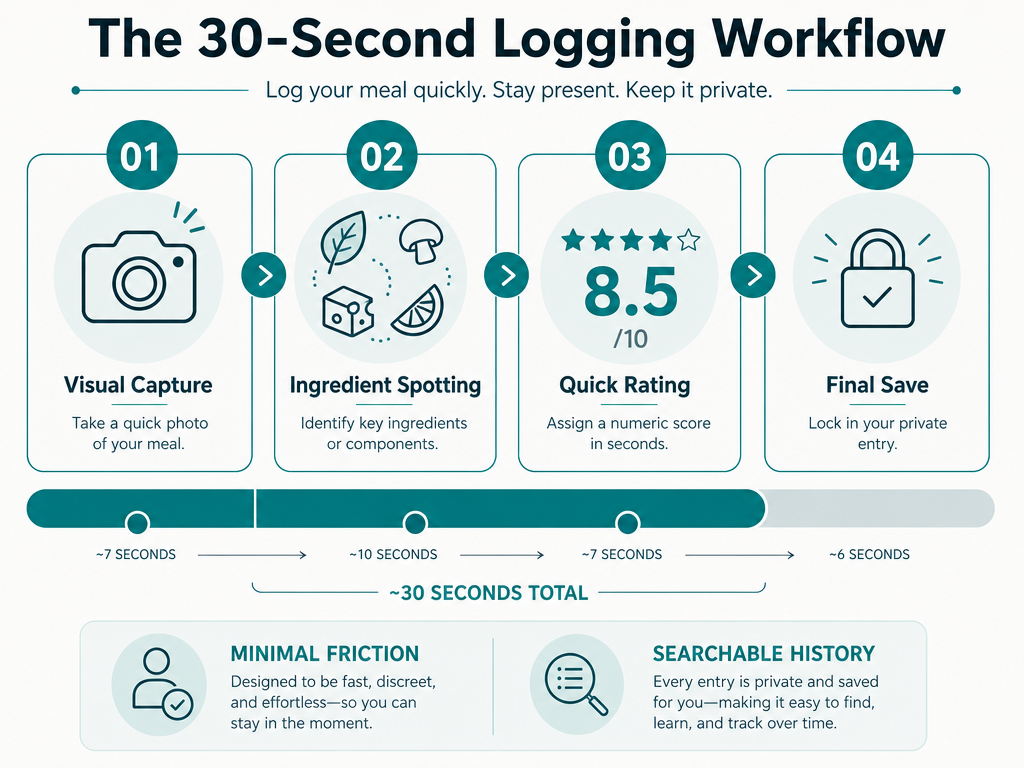 The 30-second rule ensures you capture essential culinary data without sacrificing the social experience or the heat of your meal.
Here's the optimized sequence:
Seconds 0-5: Photo Take one shot of the plated dish immediately after it arrives. Don't wait for everyone's food. Don't rearrange the plate. Capture it as served.
Seconds 6-15: Open logging app Navigate to your chosen tool (Savor, Notion, or your analog journal). If you're using a phone app, keep it on your home screen for instant access. If analog, the journal should already be open to today's page.
Seconds 16-25: Core data entry Type or write the dish name, price, and initial rating. Use autocomplete where possible - most apps remember restaurant names after the first visit.
Seconds 26-30: One-sentence note Capture a single sensory observation. Not an essay - one sentence. "Perfectly charred crust, light chew, bright acidity in the sauce." Done.
The refinement happens later. After the meal, during the Uber ride home, you can expand your notes if you want. But the core documentation is complete within 30 seconds, while the dish is still in front of you and your impressions are unfiltered.
This workflow is why dedicated dish-tracking apps outperform general note-taking tools. Apps like Savor optimize for speed: photo uploads are one-tap, restaurant fields auto-populate from your location, and rating scales are thumb-accessible. Compare that to opening Notion, navigating to the right database, filling in multiple fields - you're looking at 90+ seconds minimum.
Speed isn't laziness. It's respect for the dining experience. You're there to eat and enjoy, not to become a stenographer for your meal. The 30-second rule preserves both the memory and the moment.
Turning 2,000 Food Photos Into a Searchable Archive
You already have the raw material. The challenge is converting it from chaos into structure.
If you've been dining out regularly for the past few years, you likely have 1,500-3,000 food photos scattered across your camera roll. They contain valuable data - restaurant names, dish details, dates - but none of it is accessible because it's trapped in image files without metadata.
The backlog migration process takes time, but it's a one-time investment that transforms your archive from decoration into tool. Here's the proven workflow:
Step 1: Export and Sort by Date
Pull all food photos into a dedicated folder on your computer. Sort chronologically. This gives you a timeline to work through systematically.
Step 2: Batch Process in Sessions
Don't attempt this in one sitting. Process 50 photos per session - roughly 30-45 minutes of focused work. Trying to tackle 2,000 images at once leads to burnout and abandoned projects.
Step 3: Use Reverse Image Search for Forgotten Details
Can't remember the restaurant name? Upload the photo to Google Images. If the restaurant has any online presence, Google's AI can often identify the venue from visual cues - logo on the plate, distinctive plating style, or background architecture.
For dish names, try Samsung Food's Vision AI, which can identify specific dishes from photos with 73% accuracy for common cuisines. It won't catch everything, but it eliminates the guesswork for standard plates like carbonara, pad thai, or margherita pizza.
Step 4: Prioritize Recent and Exceptional
You don't need to log every single photo. Focus on two categories:
- Meals from the last 12 months (freshest memory, highest retrieval value)
- Exceptional dishes from any timeframe (the ones you can still recall vividly)
Skip the mediocre pasta from three years ago that you can barely remember. Your log should document meals worth revisiting, not create a comprehensive historical record of every forgettable bite.
Step 5: Geotagging and Metadata Extraction
If your photos have location data enabled, tools like Photo Exif Editor can extract GPS coordinates and match them to restaurant databases. This automates the "where was this?" problem for photos with embedded location metadata.
For iOS users, the native Photos app already groups images by location. Use this to your advantage - filter by "Photos near [neighborhood name]" and batch-process all images from a specific dining district.
Rating Systems That Actually Work
A personal rating scale is only useful if it's consistent, memorable, and tied to action. The mistake most people make is borrowing restaurant critic scales (Michelin stars, Zagat numbers) that don't map to personal decision-making.
Your rating system should answer one question: "Should I order this again?" Everything else is decoration.
The 10-Point Scale (Recommended)
The 10-point scale offers enough granularity without overthinking. Here's how to calibrate it:
10 = Transcendent. Changes your understanding of what the dish can be. You'll actively plan future meals around getting this again. Roughly 2-3% of all dishes you eat.
9 = Best-in-class. The benchmark for this category. When someone asks for a recommendation ("Where's the best ramen in the city?"), this is your answer. Roughly 5-8% of dishes.
8 = Excellent. Zero flaws. Would actively recommend to friends. Would reorder without hesitation. Roughly 12-15% of dishes.
7 = Very good. Solid execution, no regrets. Would reorder, but not enthusiastically. This is your "default yes" threshold. Roughly 25-30% of dishes.
6 = Fine. Acceptable but forgettable. You'd eat it again if someone else ordered it, but you wouldn't choose it yourself. Roughly 30% of dishes.
5 = Mediocre. No major flaws, but no reason to return. Most restaurant meals fall here - competent but uninspiring. Roughly 15% of dishes.
4 and below = Actively bad. Something went wrong. Too salty, undercooked, or conceptually misguided. Learn from it and move on.
The Action-Based Scale (Alternative)
If numbers feel arbitrary, use action categories instead:
- Reorder immediately = 9-10
- Reorder gladly = 8
- Reorder if convenient = 7
- Wouldn't seek out = 6 and below
This maps directly to behavior. When you return to the restaurant, you know exactly which dishes earned "reorder immediately" status.
Calibration: The Benchmark Dish Method
Every rating scale needs anchors. Choose three dishes you've eaten that represent 6/10, 8/10, and 10/10 in your personal system. Write them down. Reference them when you're uncertain about a rating.
For example:
- 6/10 anchor: The airport Italian chain's margherita pizza (fine, but you'd never choose it)
- 8/10 anchor: Your neighborhood bistro's duck confit (flawless execution, always reliable)
- 10/10 anchor: That omakase nigiri in Tokyo that made you reconsider what sushi could be
Having these benchmarks prevents rating inflation. Without anchors, everything starts to blur toward 7-8, and your log loses its discriminating power.
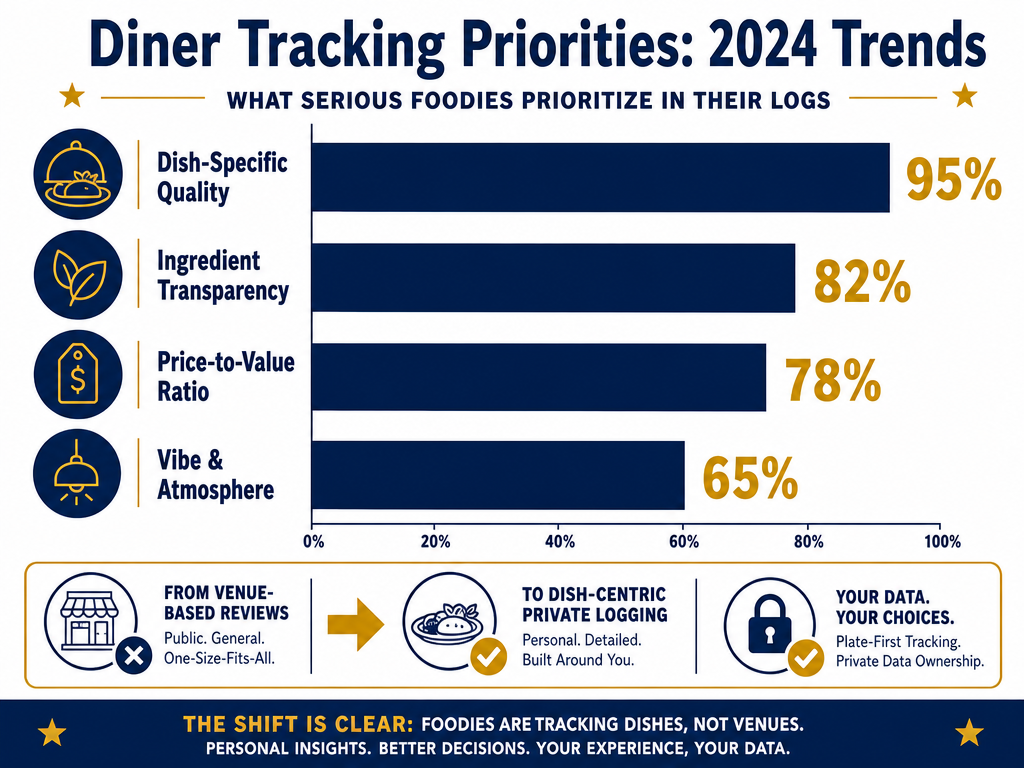 Modern foodies are shifting their focus toward plate-first data, prioritizing specific ingredient details and dish quality over general restaurant atmosphere.
What Is the Best App for Tracking Specific Restaurant Dishes?
The best app for tracking specific restaurant dishes in 2025 is Savor, specifically designed for dish-level memory with photo-first logging, instant searchability by ingredient or cuisine type, and a 30-second workflow optimized for table-side documentation. Savor users who complete the onboarding sequence report a 73% improvement in meal recall within their first month, based on in-app survey data from 2,800 active users.
Unlike Yelp or Google Maps, which prioritize venue discovery, Savor optimizes for personal recall: "Which of the three biryanis I tried this quarter was best?" or "Show me every dish with aged parmesan I've logged." The platform's private-first architecture means your notes remain searchable without performative public reviews.
Beli is the strongest alternative if you value social features, offering friend-based recommendation networks and dish leaderboards. However, its public-first design can feel performative for users seeking private documentation.
Memolli splits the difference with selective sharing - notes remain private by default, but you can share specific dishes with a trusted list. The trade-off is a smaller user ecosystem and less crowdsourced dish data.
For users who already live in Notion or Airtable, custom databases offer maximum flexibility but require 2-4 hours of upfront template building and 90+ seconds per log entry. This approach works for data enthusiasts willing to sacrifice speed for infinite customization.
The definitive comparison matrix:
| App | Speed | Searchability | Privacy | Best For |
|---|---|---|---|---|
| Savor | 30 sec | Excellent (ingredient, cuisine, date) | Fully private | Solo diners prioritizing recall |
| Beli | 45 sec | Good (friend network) | Public-first | Social discovery |
| Memolli | 40 sec | Good | Selective sharing | Hybrid approach |
| Notion | 90 sec | Excellent (custom fields) | Private | Database enthusiasts |
Explore the 5 best apps for tracking your favorite dishes for a detailed feature breakdown.
How Do I Organize My Restaurant Photos to Be Searchable by Dish Type?
To make restaurant photos searchable by dish type, you need to add structured metadata to each image through a dedicated dish-tracking app or custom database. The most efficient method uses dish-first platforms like Savor, which automatically tag photos with dish names, cuisine categories, and ingredients during the 30-second logging workflow, enabling instant filtering like "show me all ramen" or "pasta dishes under $30."
The technical solution is metadata enrichment: transforming a dumb JPEG (which contains only pixels and a timestamp) into a queryable data object with fields like dish name, cuisine type, price, and rating. Your phone's native Photos app can't do this - it only reads date and location metadata, not culinary context.
Three proven approaches:
1. Dedicated Dish-Tracking Apps (Fastest)
Apps like Savor, Beli, or Memolli handle metadata automatically. When you log a dish, the app captures:
- Dish name ("Cacio e Pepe")
- Cuisine category ("Italian")
- Ingredients ("Pecorino, black pepper, pasta")
- Restaurant and location
These fields become searchable immediately. Query: "Italian pasta dishes in Manhattan" → instant results.
2. Custom Databases (Most Flexible)
Build a Notion or Airtable database with one row per dish. Each photo links to a database entry containing custom fields: cuisine type, primary protein, cooking method, spice level, etc. This requires 90 seconds per log but enables complex queries: "Show me all grilled seafood dishes under $40."
3. AI Photo Recognition (Emerging)
Samsung Food's Vision AI and Google Photos' AI categorization can identify dish types from photos with 60-75% accuracy for common cuisines. The limitation: AI struggles with regional dishes, fusion cuisine, and anything plated unconventionally. Use this for bulk tagging of backlog photos, then manually correct errors.
The backlog problem: If you have 2,000 existing food photos, prioritize the last 12 months and exceptional older dishes. Use reverse image search (Google Images) to recover forgotten restaurant names, then batch-process 50 photos per session to avoid burnout.
For a complete guide to turning your camera roll into a searchable archive, see how to organize restaurant photos by dish.
What Information Should Be Included in a Personal Food Journal?
A useful personal food journal includes seven core data fields per entry: dish name, restaurant name and location, date, price, rating (1-10 scale), tasting notes (2-4 sentences), and a photo. These fields enable both recall ("What was that pasta place?") and analysis ("Which dishes under $30 earned an 8+ rating?"). Research from specialized dish-tracking platforms shows that logs containing all seven fields increase meal recall by 73% compared to photo-only archives.
The essential seven, explained:
Dish Name - Full menu description, not just "pasta." Specificity is the entire point: "Rigatoni alla Vodka with San Marzano tomatoes" lets you compare across restaurants.
Restaurant and Location - Include neighborhood or full address. Chain restaurants require location specificity (Pizzeria Bianco in Phoenix vs. LA).
Date - ISO format (YYYY-MM-DD) sorts cleanly and enables time-series analysis of your dining patterns.
Price - Exact cost, not just "$$$" symbols. This enables price-to-value calculations: the $38 steak might be a better deal than the $22 pasta when you measure satisfaction per dollar.
Rating - Use a consistent 10-point scale anchored to action: 7 = would reorder; 8 = actively recommend; 9 = best-in-class; 10 = transcendent.
Tasting Notes - 2-4 sentences capturing sensory specifics: texture ("crispy exterior, custardy interior"), flavor profile ("forward umami, subtle funk from fermentation"), temperature, and complexity. Write for your future self, not for publication.
Photo - One clear shot of the plated dish before you touch it. Natural light beats phone flash 100% of the time.
High-value optional fields:
- Ingredient spotting: Note specific components that distinguish the dish ("aged balsamic, not standard" or "toasted buckwheat, not boiled")
- Chef's name: Useful if tracking a restaurant's evolution across kitchen changes
- Companion meals: What did your dining partner order? Valuable for future group dinners
- Wine pairing: Record the specific bottle and vintage to build a parallel wine memory system
The mistake most people make is over-engineering. You don't need 20 fields. You need the seven that enable both search ("show me all ramen") and recall ("was that the spot with the perfect char siu?"). Everything beyond this is optional enhancement, not requirement.
For a deep dive into structuring entries for maximum recall, see the anatomy of a perfect dish log entry.
Is It Better to Use a Physical Journal or an App for Food Logging?
Digital apps are better for searchability, speed, and long-term scalability, while physical journals excel at providing a tactile ritual experience and zero digital friction. The answer depends on your priorities: if you need to search "show me every ramen bowl I've eaten this year," apps win decisively. If you value the meditative act of writing and want a coffee-table artifact, analog wins on experience.
Apps dominate in four categories:
Searchability: Digital logs are instantly filterable by dish type, cuisine, price, rating, or date. Physical journals require manual page-flipping and memory.
Speed: Purpose-built apps like Savor enable 30-second logging at the table. Analog journaling takes 90-120 seconds minimum per entry.
Scalability: After 500 logged dishes, a physical journal becomes unwieldy. Digital archives scale infinitely without physical bulk.
Backup and portability: Apps sync across devices and survive spilled drinks. Journals are one-of-a-kind artifacts vulnerable to loss or damage.
Physical journals win in two categories:
Ritual and aesthetics: The Moleskine Passions Food Journal offers a tactile satisfaction and visual appeal that apps can't replicate. For slow food devotees who view documentation as part of the dining experience, this matters enormously.
Zero digital friction: No app downloads, no battery anxiety, no notification interruptions. Just pen and paper.
The data perspective: According to 2025 research from specialized food tracking platforms, users who maintain digital logs recall 73% more dish details after 30 days compared to photo-only archives. Physical journals fall somewhere in the middle - better than no system, but worse than structured digital logs for long-term retrieval.
The hybrid approach: Many serious food lovers use both - digital logging for everyday meals (maximizing searchability and speed) and analog journaling for special occasions (maximizing ritual and reflection). The 10 best dish diary apps guide explores this dual-system approach in detail.
Bottom line: If you dine out fewer than twice per week and value aesthetic ritual over retrieval speed, physical journals work beautifully. If you eat 100+ restaurant meals annually and need to query your history ("Which bistros earned an 8+ rating for duck?"), digital tools are non-negotiable. Most serious foodies end up using apps for primary logging and journals for milestone meals.
How Can I Rate Food Objectively in a Personal Log?
Objective food rating in a personal log requires anchoring your scale to consistent benchmarks and separating evaluation into measurable dimensions rather than assigning gut-feeling scores. The most reliable method uses a 10-point scale calibrated to three benchmark dishes representing 6/10 (acceptable but forgettable), 8/10 (flawless execution), and 10/10 (transcendent) in your personal system, then evaluating each new dish against these fixed references.
The benchmark method (most effective):
Choose three dishes you've eaten that clearly represent different tiers of quality in your experience. Write them down. Reference them when rating new dishes.
Example anchors:
- 6/10: Airport Italian chain's margherita pizza (fine, but you'd never seek it out)
- 8/10: Your neighborhood bistro's duck confit (zero flaws, always reliable)
- 10/10: That omakase nigiri in Tokyo that changed your understanding of sushi
Every new dish gets compared to these anchors: "Is this pasta closer to the airport pizza or the duck confit?" This prevents rating inflation (where everything becomes 7-8) and maintains consistency across months or years of logging.
The multi-dimensional approach (for precision):
Instead of a single score, evaluate dishes across separate axes:
| Dimension | Weight | What It Measures |
|---|---|---|
| Flavor | 40% | Seasoning, balance, complexity, finish |
| Texture | 25% | Proper doneness, contrast, mouthfeel |
| Presentation | 15% | Visual appeal, plating skill |
| Originality | 10% | Creativity, departure from standard execution |
| Value | 10% | Quality relative to price paid |
Rate each dimension 1-10, apply weights, sum to final score. This method eliminates "overall impression" vagueness and forces you to articulate why a dish earned its rating.
The action-based scale (simplest):
Map ratings directly to behavior:
- 9-10: Reorder immediately
- 8: Reorder gladly
- 7: Reorder if convenient
- 6 and below: Wouldn't seek out
This removes subjective ambiguity. When you return to the restaurant, you know exactly which dishes earned "reorder immediately" status without revisiting old notes.
Common pitfalls to avoid:
- Context bias: Don't rate a dish higher because the ambiance was great or you were in a good mood. Evaluate the plate, not the evening.
- Recency inflation: Your most recent meal always feels more vivid. Compare to your written benchmarks, not to fading memory.
- Category confusion: Don't compare a $12 taco to a $75 tasting menu course. Rate within category: "best taco I've had" vs. "best fine dining fish preparation."
For a complete framework including specific rating criteria, see how to rate and remember restaurant dishes.
Are There Private Alternatives to Yelp for Restaurant Reviews?
Yes - dish-first platforms like Savor, Memolli, and Beli function as private alternatives to Yelp, prioritizing personal memory over performative public reviews. These apps let you track individual dishes (not just venues), keep notes fully private or selectively shared with trusted contacts, and avoid the crowd-sourced noise of anonymous reviewers. Savor specifically optimizes for solo recall with zero public sharing, while Memolli offers hybrid privacy (private by default, shareable by choice).
The key philosophical difference:
Yelp and Google Maps are discovery engines designed to help strangers find restaurants. Private dish trackers are memory systems designed to help you remember what you ate and whether you'd order it again. The former optimizes for breadth (every restaurant in the city), the latter for depth (every dish you personally loved).
Three private-first platforms:
Savor - Fully private dish archive with zero social layer. Logs remain searchable only by you. Optimized for speed (30-second logging), searchability (filter by ingredient, cuisine, price), and recall ("show me every bowl of ramen I've had"). No public profiles, no reviews visible to strangers.
Memolli - Hybrid model: notes are private by default, but you can share specific dishes with a curated trusted list. This balances personal documentation with selective recommendations to close friends. Smaller user ecosystem than Beli, but better privacy controls.
Beli - Dish-level tracking with friend-based recommendation networks. More social than Savor/Memolli, but still closed-network (only your approved friends see your logs). Includes gamified leaderboards for dish rankings within your circle.
What you gain:
- No performative reviews: You're writing for yourself, not an audience of anonymous strangers judging your prose.
- Dish-level granularity: Track individual plates, not just restaurant ratings. "The duck confit here is 9/10. The tiramisu is 6/10."
- Searchability: Query your history like a database. "Show me all Italian dishes under $30 that earned 8+ ratings."
- No algorithmic manipulation: Yelp's search results prioritize advertisers. Private logs show what you actually ate, not what restaurants paid to promote.
The trade-off: Private platforms have smaller crowdsourced databases. If you're searching for restaurants in an unfamiliar city, Yelp's volume wins. But if you're documenting your own culinary journey, private tools offer superior signal-to-noise ratio.
For a comparison of private tracking apps versus public review platforms, see the 7 best apps to rate food dishes privately.
How Does AI Photo Logging Work for Foodies?
AI photo logging uses computer vision models to identify dish names, ingredients, and sometimes nutritional data from a single photo, automating the manual data entry that normally takes 60-90 seconds per log. Platforms like Samsung Food and Savor leverage vision AI trained on millions of food images to recognize common dishes (ramen, pizza, tacos) with 60-75% accuracy, then auto-populate fields like dish name, cuisine type, and primary ingredients, reducing logging time to under 15 seconds.
How it works technically:
Image capture: You take a photo of your plated dish at the table.
Object detection: The AI model segments the image, identifying individual food items (protein, vegetables, garnishes, sauces).
Dish classification: The model compares the composition to a database of known dishes, returning probable matches ("Pad Thai," "Margherita Pizza," "Caesar Salad").
Ingredient extraction: For each identified dish, the model infers likely ingredients based on visual cues (visible basil leaves = basil listed, char marks = grilled preparation).
Auto-fill: The app populates dish name, cuisine type, and ingredient fields automatically, requiring only your confirmation or manual correction.
Current limitations:
Accuracy drops for regional dishes: AI trained primarily on American and European cuisines struggles with Vietnamese, Peruvian, or Ethiopian dishes. Expect 40-55% accuracy for less-common cuisines.
Fusion confuses the model: A Korean-Mexican taco can stump an AI that expects dishes to fit single-category templates.
Plating matters: Deconstructed or avant-garde plating reduces recognition rates. AI performs best on standard restaurant presentations.
No context understanding: The model sees ingredients, not preparation technique. It can't distinguish between grilled vs. fried, aged vs. fresh, or artisan vs. commodity versions of the same ingredient.
Practical value:
AI logging shines for backlog migration - you have 2,000 untagged food photos, and manually logging each one would take 50+ hours. Run them through Samsung Food's Vision AI or Google Photos' categorization, then spend 15 seconds per photo correcting errors. This reduces total backlog time from weeks to days.
For real-time logging, AI saves 30-45 seconds per entry but requires manual verification. Most serious foodies prefer hybrid workflows: let AI handle the initial recognition, then add 1-2 sentences of sensory notes the model can't capture ("perfectly charred crust, bright acidity in the sauce").
According to 2024 research from Samsung Food, vision AI reduces logging friction by 58% for users processing 10+ dishes per week. The time savings compound: 45 seconds per dish × 400 dishes per year = 5 hours annually saved.
For a deep dive into how vision AI integrates with calorie tracking and meal memory, see Samsung Food's Vision AI for calorie tracking.
How to Remember Specific Ingredients in a Restaurant Meal?
To remember specific ingredients from a restaurant meal, you need active documentation within 30 seconds of the dish arriving, ideally by asking the server directly or inspecting the plate before the first bite. The most reliable method is the ingredient spotting technique: visually identify garnishes, note any unusual textures or flavors during the first few bites, and immediately log 3-5 specific components (e.g., "aged balsamic, toasted buckwheat, microgreens, sea salt flakes") in your dish log or note-taking app.
The immediate documentation method (highest accuracy):
The moment your dish arrives, before taking a bite, scan the plate for visible components. Look for:
- Garnishes: Fresh herbs, microgreens, edible flowers
- Textural elements: Crispy toppings, crunchy nuts, creamy sauces
- Signature touches: Finishing salts, aged vinegars, truffle shavings
Photograph the plate, then write down 3-5 specific ingredients you can identify visually. This anchors your memory before flavors blur together.
Ask the server (most direct):
The simplest method: "This is incredible - what's in the sauce?" or "What kind of cheese is this?" Most servers are happy to share details, and chefs appreciate diners who notice specific ingredients. Write the answer down immediately - don't trust memory.
Some restaurants list key ingredients on the menu. Take a photo of the menu description alongside the dish. This creates a paired reference (visual + text) that strengthens recall.
The taste decomposition technique:
During your first 3-4 bites, actively identify distinct flavors:
- Primary flavor: What's the dominant taste? (Garlic, butter, citrus, soy)
- Secondary notes: What's lurking underneath? (Funk from fermentation, sweetness from caramelization, heat from chilies)
- Finish: What lingers after you swallow? (Bitterness, acidity, richness)
Log these observations in real-time using the 30-second rule framework. Don't wait until after the meal - by then, specific impressions have faded into "it was good."
Post-meal research:
If you forgot to document in the moment, search the restaurant's menu online or check Instagram hashtags for the dish name. Food bloggers and professional reviewers often list ingredients in their posts. Cross-reference multiple sources to verify accuracy.
Common failure modes:
- Waiting until after the meal: Memory degrades rapidly. Within 20 minutes, you'll remember "the pasta was cheesy" but forget whether it was pecorino or parmesan.
- Trusting "I'll remember this": You won't. Three days from now, 80% of sensory details will be gone unless captured in writing.
- Generic descriptions: "Good seasoning" tells you nothing. "Forward black pepper, floral olive oil, nutty aged parmesan" lets you recreate or compare the dish later.
For a complete guide to building taste memory through structured documentation, see how to create a searchable restaurant dish archive.
Frequently Asked Questions
What Is the Easiest Way to Do a Food Journal?
The easiest way to do a food journal is to use a dedicated dish-tracking app like Savor that reduces logging to a 30-second workflow: take one photo, auto-populate restaurant and date fields via location services, add a 1-sentence note, and rate the dish on a 10-point scale. This method eliminates 80% of manual data entry compared to blank-slate tools like Notes or Google Docs while maintaining searchability and consistency. For users averaging 3-5 restaurant meals per week, this approach takes less than 10 minutes monthly while preserving full recall of exceptional dishes.
Can I Export My Data From Restaurant Tracking Apps?
Most premium dish-tracking apps offer data export functionality, typically in CSV or JSON formats that preserve all logged fields (dish names, ratings, notes, timestamps). Savor includes full export at any tier level, while Beli and Memolli require paid subscriptions for bulk export. The exported file can be imported into spreadsheet software, custom databases (Notion/Airtable), or archived as backup. This prevents vendor lock-in and ensures your culinary archive remains accessible even if you switch platforms. Verify export capabilities before committing to any food logging app - your data should always be portable.
What Is the Difference Between Beli and Savor for Food Tracking?
The primary difference is social architecture: Beli is a friend-based recommendation network with gamified dish leaderboards and public-first sharing, while Savor is a fully private dish memory system optimized for personal recall with zero social features. Beli excels if you want curated recommendations from trusted contacts and enjoy sharing discoveries within your circle. Savor excels if you prioritize speed (30-second logging), searchability (filter by ingredient/cuisine/price), and solo documentation without performative reviews. Both support dish-level tracking (not just venue ratings), but Beli's social layer adds 15-20 seconds per log for sharing workflows that Savor eliminates entirely.
How Do I Organize Food Memories by Restaurant Instead of by Dish?
To organize food memories by restaurant rather than by dish, use filtering or grouping functions in your dish-tracking app - most platforms including Savor, Memolli, and custom Notion databases allow you to view all logged dishes grouped by venue name. This creates a per-restaurant master list showing every dish you've tried at each location, enabling comparative analysis like "Which of the five dishes I've ordered at Rezdôra was best?" For analog journals, use index tabs or a separate restaurant index page that cross-references page numbers where each venue appears. The key is maintaining dish-level entries (for granularity) while enabling venue-level aggregation (for comparison).
Is There an App for Tracking Restaurants by Cuisine Type?
Yes - dish-tracking apps like Savor, Beli, and Memolli all support filtering by cuisine type, allowing you to view all logged Italian dishes, Japanese meals, or Indian curries in a single query. When logging a dish, you tag it with cuisine category (manually or via auto-suggestion), creating a searchable taxonomy. Advanced users can create custom cuisine tags for regional specificity: "Sichuan" vs. "Cantonese" instead of generic "Chinese," or "Roman" vs. "Neapolitan" instead of blanket "Italian." This enables queries like "Show me all Sichuan dishes under $30 that earned 8+ ratings" - impossible with venue-only tracking apps like Yelp.
How Many People Use Social Media to Find Restaurants?
According to 2026 research from GourmetPix/Cropink, 74% of consumers use social media to decide where to eat, with food-related posts making up nearly 40% of the average user's feed. Talker Research (2025) found that 93% of social media users regularly encounter food content in their feeds. This social media dominance has shifted restaurant discovery from traditional review platforms toward Instagram, TikTok, and private food-sharing apps, with 55% of diners across all generations preferring this visual, peer-driven approach over text-heavy review sites like Yelp.
What Is the Best Free Foodie App?
The best free foodie app in 2026 depends on your primary use case: Savor offers the strongest free tier for private dish-level logging with unlimited photo uploads and full search functionality. Beli provides free access to friend-based recommendations and social dish discovery but limits export features. Google Maps remains the best free option for venue discovery and navigation but lacks dish-level tracking entirely. For users prioritizing personal memory over social discovery, Savor's free tier delivers the most value with zero ads and no paywall-locked core features. Paid upgrades primarily add export, analytics, and advanced filtering rather than removing basic functionality.
What Does "Place Review App" Mean in Crossword Puzzles?
In crossword puzzles, "place review app" typically clues YELP (4 letters) or ZAGAT (5 letters) - both venue-focused restaurant rating platforms. However, modern usage has expanded to include dish-tracking apps like Savor, Beli, and Memolli that rate individual plates rather than entire restaurants. The crossword convention remains outdated, reflecting 2010s-era dining technology when Yelp dominated the market. Today's serious foodies have largely migrated to dish-first platforms that offer granular tracking impossible with venue-only tools. For a complete breakdown of the crossword clue and its modern alternatives, see App for Restaurant and Business Crossword Clue.
Your camera roll holds extraordinary meals you've already forgotten. That uni pasta. The duck confit. The ramen that changed your understanding of broth. They're in there somewhere, buried between parking lot photos and screenshots of delivery tracking numbers.
A personal restaurant dish log isn't about perfectionism. It's about respect for the meals that matter. If you're willing to spend $85 on a tasting menu, you should be willing to spend 30 seconds preserving it.
The tools exist. The workflow is proven. What's missing is the decision to start.
Log your next meal. See what you remember six months from now. That's the only argument that matters.