
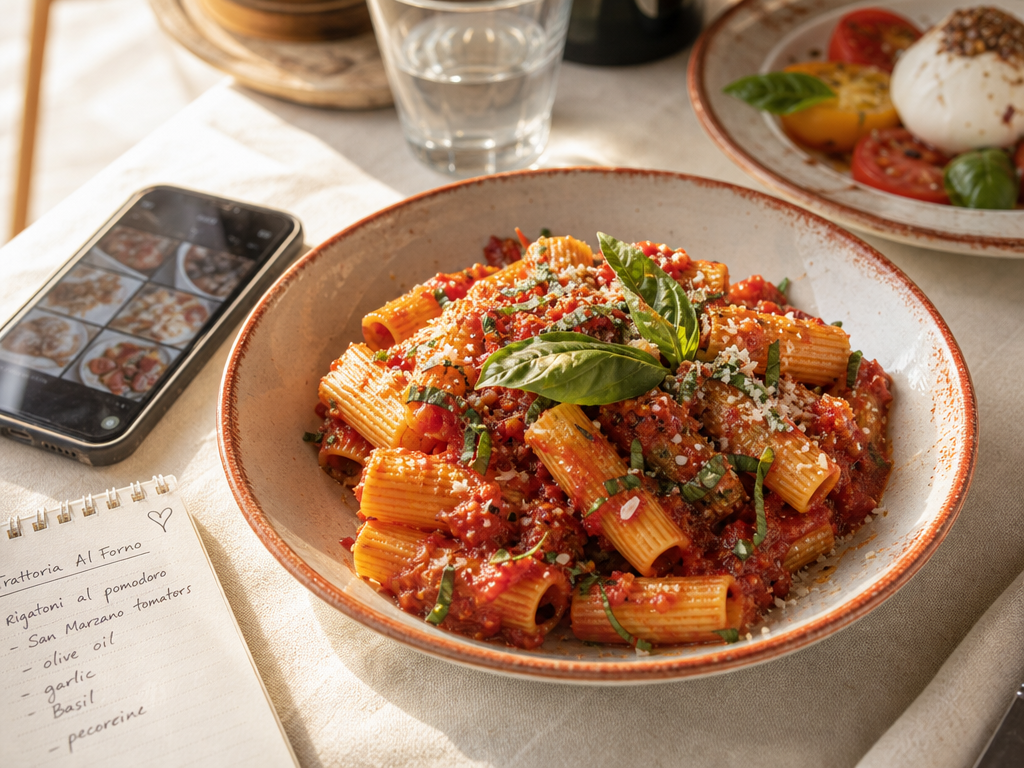
How to Track the Dishes You Actually Want to Order Again
John the smoothie monster
John lives for smoothie bowls and cold-pressed juices. He uses Savor to remember his best blends.
How to Track the Dishes You Actually Want to Order Again (Without Losing Them in Your Camera Roll) You're scrolling through 2,847 food photos at 11 PM, trying...
How to Track the Dishes You Actually Want to Order Again (Without Losing Them in Your Camera Roll)
You're scrolling through 2,847 food photos at 11 PM, trying to remember the name of that incredible pasta you had three months ago. Was it the place near the bookstore? Or the one by the bridge? You remember the dish was life-changing. You remember taking the photo. You remember absolutely nothing else.
Your camera roll has become a graveyard of exceptional meals you'll never find again.
This is the foodie memory gap - the moment when passive consumption (snapping a photo while your server waits) fails to become active curation (creating a searchable personal database of dishes you'd actually reorder). The problem isn't that you don't care about food. It's that the tools we use to capture meals weren't designed to help us remember them.
This guide will show you how to transition from chaotic photo hoarding to a functional system for tracking every dish worth ordering again.
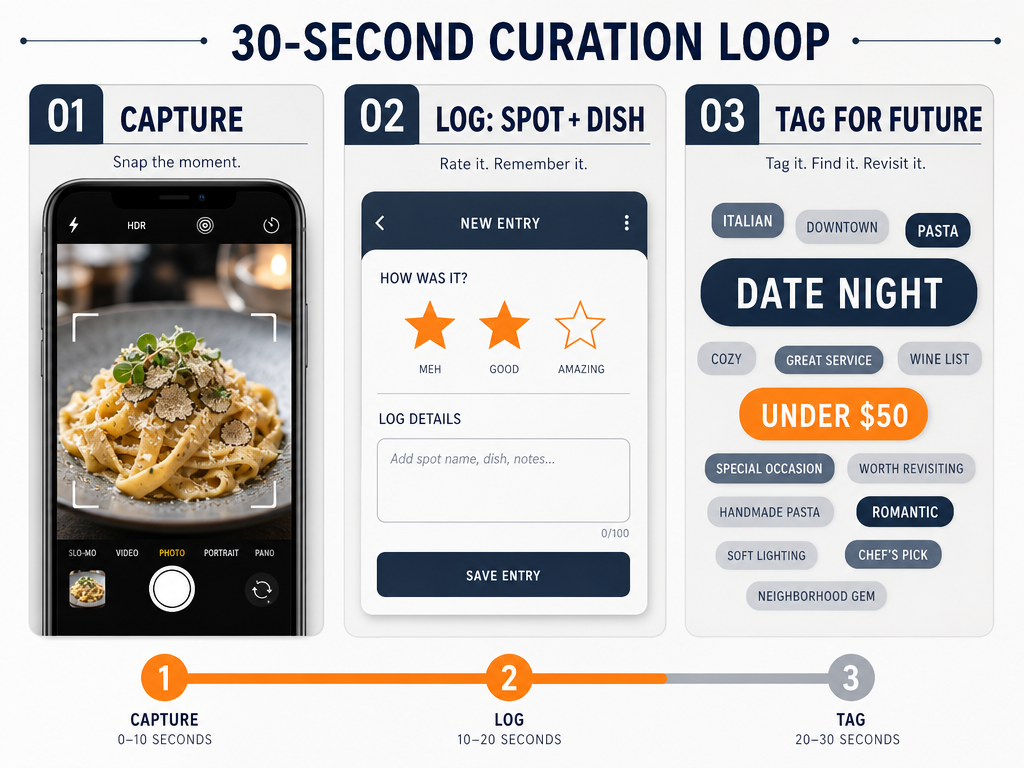 Transition from passive photography to active curation with this simple 30-second workflow designed to help you remember every great meal you have ever eaten.
Table of Contents
- Why Your Camera Roll Fails You
- The OS Hack: Search What You Already Have
- The 30-Second Rule: A System That Actually Works
- Choosing Your Tool: The Core Comparison
- Technical Deep Dive: How to Add Dish-Specific Notes
- Beyond the Basics: Advanced Organization Strategies
- Frequently Asked Questions
Why Your Camera Roll Fails You
Your phone's camera roll is brilliant for capturing moments. It's catastrophically bad for retrieving them.
Generic restaurant review apps don't solve this problem either. Yelp and Google Reviews treat venues as monoliths - you rate the entire restaurant, not the specific octopus carpaccio that made you rethink seafood. When you search for "that place with the good pasta," you're fighting against a system designed to rank businesses, not catalog dishes.
The real issue is searchability. Your camera roll has no concept of "spicy vodka rigatoni" or "the miso-glazed cod from that Brooklyn spot." Photos exist in chronological order, tagged with nothing more than a timestamp and maybe a location pin. Three months later, that extraordinary bowl of ramen is buried under 400 brunch photos, screenshots, and pictures of your friend's dog.
The solution isn't to take fewer photos. It's to create a parallel system - one where every exceptional dish gets logged while the check is being paid, complete with enough detail to actually find it again.
The OS Hack: Search What You Already Have
Before you commit to a new app, there's immediate value in the tools you already own.
Apple's Visual Look Up identifies food in photos and can suggest related recipes, according to Apple Support. The feature works surprisingly well for common dishes. Open a photo, tap the info button, and look for the sparkle icon. If your phone recognizes the dish (ramen, tacos, croissants), you can search your entire library for similar items.
The iOS 27 (projected) Visual Intelligence update reportedly includes nutritional insights by taking a picture of a meal. While this leans toward calorie tracking rather than culinary memory, it demonstrates Apple's increasing investment in food recognition technology.
For Android users, Google Photos offers text search within images. If a menu or receipt appears in your shot, you can type the dish name months later and find it. It's not perfect - handwritten specials boards rarely work - but it's better than scrolling blindly.
The immediate action: Spend 10 minutes tonight searching your existing photos. Type "pizza," "ramen," or "burger" into your Photos app and see what surfaces. You'll probably rediscover a few gems you'd completely forgotten.
This OS-level approach has limits. It won't tell you which restaurant served the dish, what you thought about it, or whether you'd order it again. For that, you need something more deliberate.
The 30-Second Rule: A System That Actually Works
The best tracking system is the one you'll actually use while the server is clearing your plate.
Here's the framework:
Step 1: Capture the plate. Take the photo you were already going to take. Natural light, 45-degree angle, minimal props. You know the drill.
Step 2: Log the "Spot + Dish + Star" immediately. Before you put your phone down, open your chosen tool and enter three things: the restaurant name, the specific dish, and a quick rating. This takes 30 seconds. If you wait until you get home, you won't do it.
Step 3: Tag for the future. Add one or two search tags that'll help you filter later. "Date Night." "Under $20." "Spicy." "Tokyo 2025." The goal isn't to create a perfect taxonomy - it's to create enough metadata that future-you can actually find this entry.
The 30-second constraint is critical. If your system requires manually entering ingredients, sourcing recipes, or writing paragraph-long reviews, you'll abandon it by week three. The friction has to be low enough that logging a dish feels automatic, like adding a song to a playlist.
Choosing Your Tool: The Core Comparison
The right tool depends on whether you value privacy over social validation, and whether you're willing to trade ease-of-use for customization.
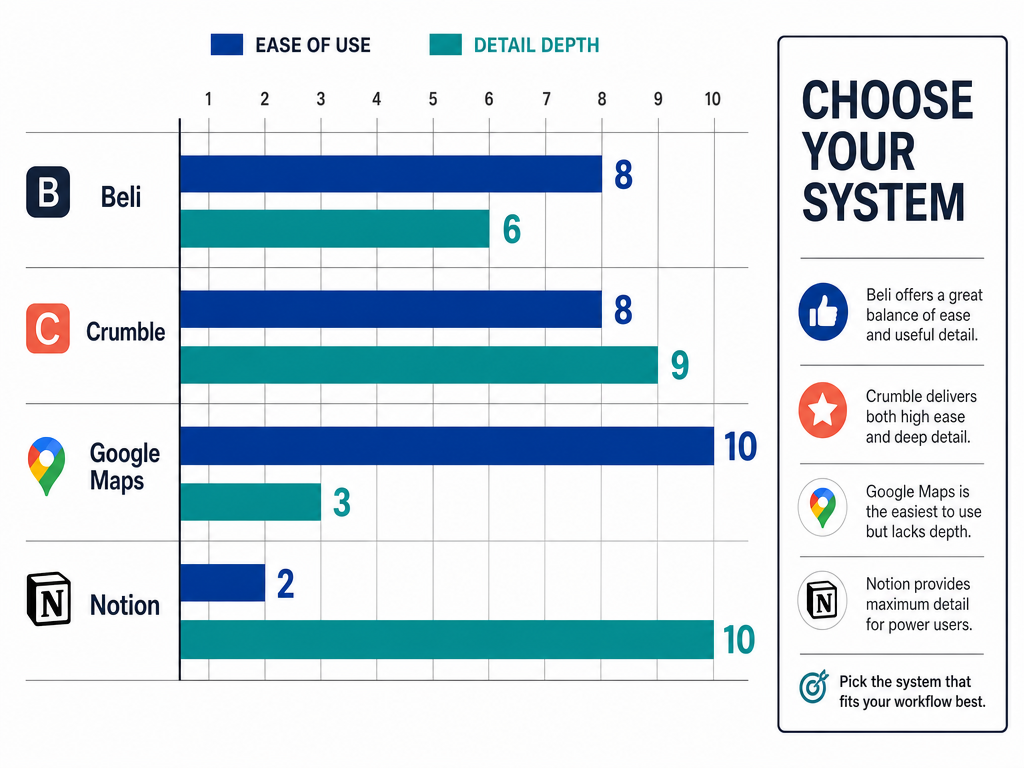 Compare the most popular food tracking systems to find the perfect balance between low-friction logging and high-detail database management for your culinary journeys.
Beli: For the Competitive Foodie
Best for: People who want a social leaderboard and restaurant rankings.
Beli lets you tag favorite dishes and add notes, but its real strength is the ranking mechanic. Instead of assigning arbitrary stars, you compare dishes head-to-head: was the carbonara at Restaurant A better than the one at Restaurant B? Over time, this builds a personalized hierarchy.
The downside? It can feel performative. You're not just logging meals for yourself - you're creating content for a community. Some people love this. Others find it exhausting.
Beli works well if you're competitive about food, enjoy sharing recommendations with friends, and don't mind that most of its restaurant data skews heavily toward US cities.
Crumble: For the Private Cataloger
Best for: The private foodie who wants a map of dishes without calorie distractions.
Crumble Plus offers an AI food scan feature that converts a photo directly into a dish entry. You take a picture, the app identifies the food, and you add a quick rating and note. The interface is map-based, which makes it particularly useful for travelers building a geographic record of meals.
Crumble's biggest advantage is its lack of social features. There's no pressure to perform for followers. It's your private database, organized visually around the places you've eaten.
The catch? It's a progressive web app rather than a native store app, which means slightly slower load times and occasional glitches depending on your browser.
Google Maps: For the Minimalist
Best for: The minimalist who wants everything in one navigation app.
Google Maps allows users to create shared "Your Places" lists and add custom descriptions/notes to each saved location. You can save a restaurant, then bury notes about specific dishes in the description field of the pin.
This approach has zero friction if you already use Maps for navigation. You're not downloading a new app or learning a new interface. You're just adding a few extra steps to something you already do.
The disadvantage? There's no dedicated dish search. If you save 50 restaurants, each with multiple dish notes, finding "that place with the good duck confit" requires manually opening each pin and reading your own notes. It works, but it doesn't scale well.
Notion: For the Data Architect
Best for: The data architect who wants a fully custom food database.
Notion gives you infinite customization. You can create databases with fields for "Cuisine," "Price Range," "Dish Name," "Flavor Profile," and "Would I Order Again?" You can link dishes to cities, tag them by ingredient, and build filtered views that show only your top-rated pasta dishes.
The problem is obvious: this is extremely high friction. You have to design the system yourself, then maintain it long-term. Most people get excited about the setup, create a beautiful template, log five meals, and never open it again.
Notion works if you genuinely enjoy database design and you're the kind of person who maintains spreadsheets for fun. If you're not, choose something simpler.
If you're interested in exploring more structured approaches to cataloging your culinary experiences, building a personal restaurant library offers a deeper framework for organizing dining memories by more than just location.
Technical Deep Dive: How to Add Dish-Specific Notes
Most apps let you add notes. Few people use them effectively.
In Beli: Tap the restaurant, select "Add Dish," then use the notes field to capture specific details. Don't write an essay. Write reminders: "Ask for extra gochugaru," "Comes with complimentary banchan," "Skip the pork, get the beef."
In Crumble: After the AI scan, you can manually edit the dish name and add a rating. Use the note field for context: "Better than the one in London," "Only available on weekends," "Portion size is huge - share it."
In Google Maps: Edit your saved place, then click into the description field. Format your notes consistently so future-you can parse them quickly. Example format: "DISHES: Octopus carpaccio (9/10), Squid ink pasta (7/10). NOTES: Reservations required, loud on weekends."
In Notion: Create a template for new dish entries that forces you to fill in key fields: Restaurant Name, Dish Name, Rating (out of 10), Price, Date Visited, Tags. The structure should be simple enough that you can fill it out on your phone in under a minute.
The mistake most people make is writing too much. Long-form reviews feel impressive when you write them. They're useless when you're trying to decide where to eat six months later. Keep notes short, specific, and action-oriented.
For those who want to go deeper into structured note-taking for dishes, learning how to keep private food tasting notes provides a more comprehensive framework for serious foodies.
Beyond the Basics: Advanced Organization Strategies
Once you've built a habit of logging dishes, you can start organizing them in ways that make your database genuinely useful.
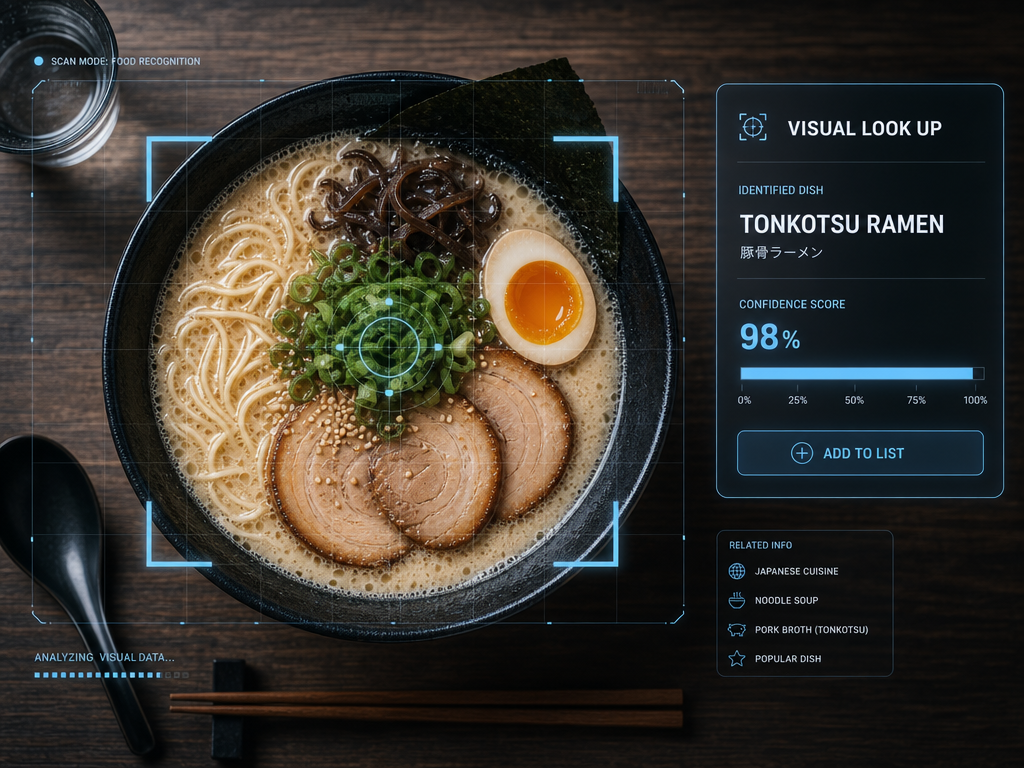 Leverage built-in AI features like Apple's Visual Look Up to automatically identify past meals and bridge the gap between your camera roll and your database.
Organize by Cuisine Type
Create separate lists or tags for Italian, Japanese, Thai, Mexican, etc. This makes it easy to answer questions like "What's the best ramen I've ever had?" without scrolling through unrelated entries.
If you're tracking dishes across multiple cuisines and want a more sophisticated filtering system, organizing meals by dish category offers a master framework for building a searchable culinary archive.
Organize by City or Country
If you travel frequently, this becomes invaluable. When you return to Tokyo or Barcelona, you can instantly pull up your highest-rated dishes from previous trips instead of starting from scratch.
For travelers who want to maintain detailed records across multiple cities, tracking favorite meals by city provides a complete system designed specifically for geographic organization.
Organize by Price Point
Tag dishes as "Budget," "Mid-Range," or "Splurge." When you're craving something specific but have a limited budget, this helps you filter accordingly.
Organize by Occasion
Create tags like "Date Night," "Business Lunch," "Quick Lunch," or "Late Night." Different contexts require different kinds of restaurants. Your romantic anniversary dinner database shouldn't mix with your "best hangover breakfast" list.
Use Custom Ratings Consistently
Don't just slap a 5-star rating on everything you enjoyed. Develop a personal scale and stick to it. Example framework:
- 10/10: Life-changing. Would travel specifically to eat this again.
- 8-9/10: Exceptional. Would enthusiastically recommend.
- 6-7/10: Good. Worth ordering if you're already at the restaurant.
- 4-5/10: Mediocre. Wouldn't order again.
- 1-3/10: Actively bad. Warning to future self.
The specific numbers don't matter. What matters is that your scale means the same thing six months from now.
For those who want to develop a more sophisticated personal rating methodology, creating a private food rating system walks through how to build a personal memory architecture that actually works.
Export Your Data
If you're using Notion or another customizable platform, periodically export your data as a CSV file. Apps shut down. Services get acquired. Companies change their terms. If you've spent years building a food database, you don't want it locked in a proprietary format you can't access.
Google Maps data can be exported through Google Takeout. Notion databases can be exported as CSV. Crumble and Beli don't currently offer robust export options, which is a real risk if you're building a long-term archive.
Frequently Asked Questions
What is the best app for tracking restaurants?
There's no single "best" app - it depends on your priorities. Beli works well for competitive foodies who want social features and comparative rankings. Crumble is ideal for private users who prefer a map-based visual interface. Google Maps offers minimal friction if you already use it for navigation. Notion provides infinite customization but requires significantly more effort to maintain. For most people, the best app is whichever one you'll actually use while the check is being paid.
What are some alternatives to Beli?
The main alternatives are Crumble (for private, map-based dish tracking), Google Maps (for integrating food notes into your existing navigation app), Notion (for building a fully custom food database), and Apple Photos with Visual Look Up (for leveraging AI to search existing photos by dish type). Each tool trades off different features - social vs. private, low friction vs. high detail, integration vs. specialization.
How do you use Apple Visual Look Up to identify food?
Open a photo in the Photos app, tap the info button (the circled "i"), and look for the sparkle icon. If your iPhone recognizes the food in the image, you'll see a label like "Ramen" or "Pizza." Tap it to see related information or search your entire photo library for similar dishes. According to Apple Support, this feature works on most food photos and can suggest related recipes, though it's more effective for common dishes than obscure regional specialties.
How do I add notes to places on Google Maps?
Save the restaurant to one of your lists (or create a new list), then tap the saved place to open its info card. Tap "Edit" and look for the description field. This is where you can add dish-specific notes. Format them consistently so they're easy to scan later. Example: "BEST: Duck confit (9/10), Frites (8/10). SKIP: Salad was wilted. NOTES: Reservations recommended." These notes sync across devices and stay with the saved location permanently.
How do I filter restaurants in Google Maps by saved places?
Open Google Maps, tap "Saved" at the bottom of the screen, then select the specific list you want to view (Favorites, Want to Go, custom lists). The map will show pins for all saved locations in that list. You can't filter by dish or cuisine within a list - that's one of the limitations of using Maps as a food tracking tool. For more advanced filtering, you'd need a dedicated app or a custom Notion database.
Is Beli worth it for serious foodies?
Beli is worth it if you enjoy the social and competitive aspects of food tracking. The head-to-head ranking system (comparing one dish directly against another) builds a more nuanced personal hierarchy than simple star ratings. It's particularly useful if you're the kind of person who loves debating "best of" lists with friends. However, if you prefer private logging without social features, or if you primarily eat outside the US where Beli's restaurant data is thinner, you might find Crumble or a custom Notion setup more useful.
If you're trying to decide whether social features enhance or complicate your food tracking workflow, exploring the best food review apps compares how different platforms handle the balance between personal memory and community-driven discovery.
What is the best app for food tracking that focuses on dishes, not restaurants?
Crumble is specifically designed for dish-level tracking, with features that let you rate and search individual menu items rather than entire venues. Crumble Plus offers an AI food scan feature that converts a photo into a dish entry automatically. Beli also supports dish tagging and notes, though its primary interface is restaurant-focused. For complete control, Notion lets you build a custom database where dishes are the primary unit of organization, with restaurants as linked entities.
For a comprehensive comparison of tools designed specifically for dish-level tracking rather than venue reviews, the best apps to track favorite dishes provides a detailed breakdown of features and use cases.
How can I search my existing camera roll for specific dishes?
Use your phone's built-in photo search. On iPhone, open Photos and type the dish name in the search bar - Apple's AI can identify common foods like "pizza," "ramen," or "tacos." On Android, Google Photos offers similar functionality and can also search text visible in images (menus, receipts). The quality of results depends on how clearly the dish appears in the photo and how common it is - obscure regional specialties won't work as well as universally recognized foods.
Can I automate meal tracking using my credit card or reservation apps?
Not reliably, and not for dish-level detail. Some finance apps can categorize restaurant spending, and reservation platforms like OpenTable and Resy keep a history of your bookings, but none of them capture which specific dishes you ordered. The only automation that currently works at the dish level is photo-based AI scanning, like the feature offered by Crumble Plus, which still requires you to take a photo and confirm the dish name.
How do I export my data if a food tracking app shuts down?
Before committing to any app long-term, check whether it offers data export. Notion databases can be exported as CSV files. Google Maps data can be exported through Google Takeout. As of now, Beli and Crumble don't offer robust export options, which is a real risk if you're building a multi-year archive. If data sovereignty is important to you, consider using a platform that gives you direct access to your data or maintaining a parallel backup in a spreadsheet or Notes app.
The best system for tracking dishes is the one you'll actually use. It's not about finding the perfect app or building the most elaborate database - it's about creating just enough structure that your best meals don't disappear into the void of your camera roll.
Start simple. Pick one tool. Log your next five meals. If the system still feels natural after two weeks, you've found something that works.
And three months from now, when you're craving that specific bowl of ramen, you'll actually be able to find it.