
How to Track Your Favorite Meals by City: A Complete System for Serious Foodies
John the smoothie monster
John lives for smoothie bowls and cold-pressed juices. He uses Savor to remember his best blends.
How to Track Your Favorite Meals by City: A Complete System for Serious Foodies You had an extraordinary bowl of ramen in Tokyo. Three months later, you're...
How to Track Your Favorite Meals by City: A Complete System for Serious Foodies
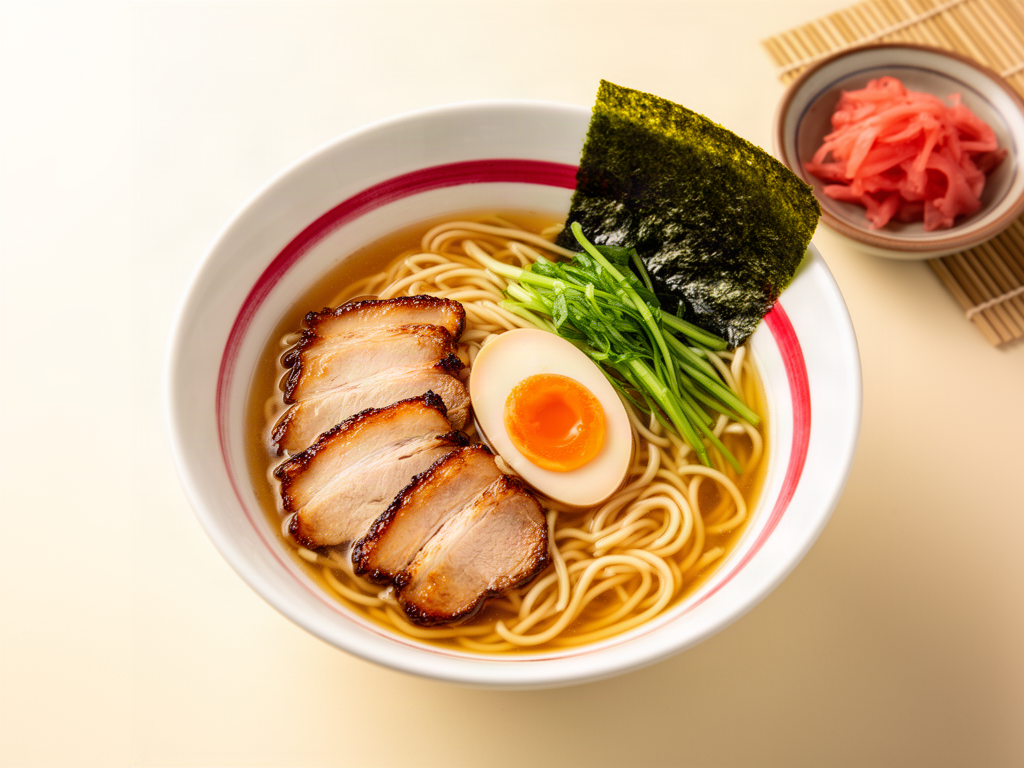
You had an extraordinary bowl of ramen in Tokyo. Three months later, you're trying to remember the name of the place. Was it near Shinjuku? Shibuya? You scroll through 2,847 unsorted photos on your phone. The bowl looks incredible. But where was it? What was it called? And what made it so special?
This isn't a memory problem. It's a system problem.
The modern foodie faces a paradox: we photograph everything, yet remember nothing. We've replaced the act of savoring with the reflex of shooting. Our camera rolls have become graveyards of extraordinary meals we'll never find again. Meanwhile, Google Maps stars, Notes app entries, and Instagram captions create a fragmented, unsearchable mess that fails the moment you actually need it.
The solution isn't better memory. It's better architecture.
This guide presents a tiered framework for tracking meals by city, ranging from zero-friction native solutions to professional-grade personal databases. It's designed for the urban professional who treats dining as a primary hobby and wants to build a searchable, spatial, dish-level archive that actually works.
Table of Contents
- Why Your Current System Is Failing You
- The Four Levels of Meal Tracking
- Level 1: The Sprinter (Google Maps with Strategic Tagging)
- Level 2: The Socialite (Beli and Crumble)
- Level 3: The Curator (Yummi and Truffle)
- Level 4: The Critic (Custom Notion or Sheets Database)
- The "By City" Strategy: How to Filter and Share
- The Three Signal Rating Framework
- The "Wait for the Bill" Workflow
- Migration: Escaping Google Maps and Yelp
- The Pro Layer: Tracking What Critics Track
- Frequently Asked Questions
Why Your Current System Is Failing You
Most food lovers operate in one of three broken states:
The Photo Hoarder: 3,000+ food photos in the camera roll. Zero organization. Searching requires scrolling for 10 minutes and hoping you remember what the dish looked like.
The Star Collector: Google Maps is littered with saved places. But when you filter by city, you see restaurants, not dishes. You remember you loved something at that Italian place in Rome, but not what.
The Note Taker: A chaotic Notes app document titled "Food" containing 47 entries like "that pasta place near the Colosseum" with no address, no dish name, and no way to search by city or cuisine.
The fundamental problem is that these systems track places, not experiences. You don't remember restaurants. You remember dishes. The carbonara. The duck confit. The specific nigiri that changed how you think about tuna.
Building a proper meal tracking system by city requires answering three questions:
- Automation vs. Control: Do you want an app that syncs your credit card and photos automatically, or a custom database you control entirely?
- Privacy vs. Social: Is this a private diary or a tool to share recommendations with friends?
- Granularity: Are you tracking restaurants, or tracking every specific dish, wine pairing, and contextual note?
Your answer determines which tier you need.
The Four Levels of Meal Tracking
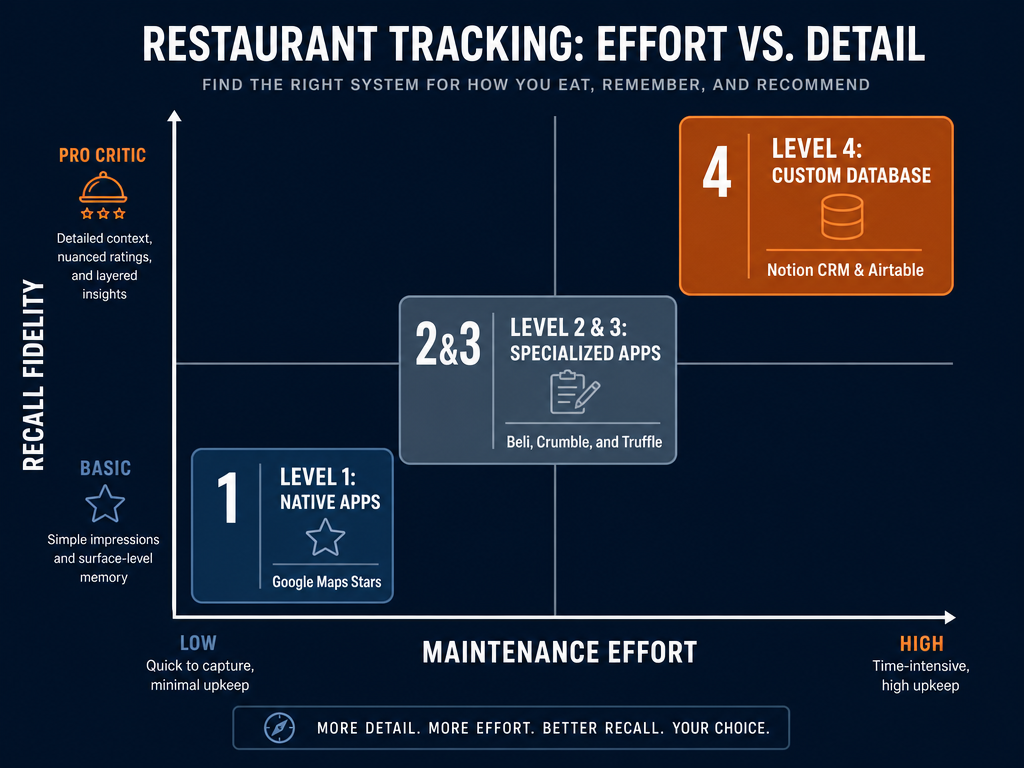 Choosing your tracking system depends on your desired level of detail. While maps are easy, custom databases offer the highest fidelity for serious foodies.
Level 1: The Sprinter (Google Maps with Strategic Tagging)
Effort: Minimal
Fidelity: Low
Best For: Casual diners who want quick saves without learning new apps
Google Maps already lives on your phone. The trick is using it intentionally.
The System:
- Save restaurants with the "star" feature
- Add emoji prefixes to organize by city: 🇯🇵 for Tokyo, 🇮🇹 for Rome, 🇫🇷 for Paris
- Use the "Add a note" feature to record the specific dish: "🇮🇹 Cacio e Pepe - best version, ask for extra pepper"
Strengths:
- Zero learning curve
- Works offline
- Integrates with navigation
Limitations:
- No dish-level search
- Lists become unwieldy after 100+ entries
- Can't filter by cuisine or rating
- Notes don't support photos or structured data
This is the entry point. It works until it doesn't.
Level 2: The Socialite (Beli and Crumble)
Effort: Low to Moderate
Fidelity: Medium-High
Best For: Foodies who want social validation and friend-sourced recommendations
This tier introduces apps built specifically for food tracking with a social layer.
Beli
Beli has over 60 million global reviews with 10% of its user base being international (Taste Cooking). Roughly 80 percent of Beli's users are under 35 (Wikipedia), making it the social network for a generation that treats dining as identity.
Key Feature: Head-to-head ranking instead of star ratings. You compare two restaurants directly: "Which ramen did you prefer?" The app builds a ranked list over time.
By-City Workflow:
- Filter your rankings by city tags
- Share city-specific lists ("My Tokyo 2026 Rankings")
- See where friends are eating in real-time
Strengths:
- Comparative ranking produces more honest, nuanced ratings
- Strong social discovery (see what friends rated highly)
- Map view shows your ranked spots by location
Limitations:
- Social pressure can feel performative
- Not fully private (friends see your activity)
- Ranking system requires consistent engagement
Crumble
Crumble offers per-dish ratings with tenth-of-a-star granularity. You're not rating the restaurant; you're rating the duck breast, the cacio e pepe, the miso black cod.
By-City Workflow:
- Tag entries by city
- Create shareable "City Guides" (e.g., "My 48 Hours in Barcelona")
- Export your data for backup
Strengths:
- Dish-level precision
- Map-based visualization
- Progressive web app (no app store required)
Limitations:
- Smaller user base than Beli
- Manual entry can feel tedious for high-volume diners
Both apps address the core problem: they track what you ate, not just where you went. If you're comfortable with social features and want friend recommendations, this is your tier. For the best apps to share lists, these platforms lead the category.
Level 3: The Curator (Yummi and Truffle)
Effort: Low (Automated)
Fidelity: High
Best For: Foodies who want zero-friction logging with visual memory
This tier is for people who want their system to work for them, not the other way around.
Truffle
Truffle offers "zero-effort" tracking via credit card sync and Instagram Story tagging (The Truffle App). You eat. You pay. Truffle logs the restaurant automatically.
By-City Workflow:
- Every logged meal is geotagged
- View your dining history on a map
- Filter by city or date range
- Share curated lists with friends
Strengths:
- Completely passive logging
- Credit card integration captures every meal
- Instagram story sync adds photos automatically
Limitations:
- Requires linking financial accounts (privacy trade-off)
- Doesn't capture dish-level detail unless you add it manually
- Limited to meals you pay for (misses shared dishes, tastings)
Yummi
Yummi is photo-first. Take a picture of your dish, and the app prompts you to add location, dish name, and notes.
By-City Workflow:
- Photos auto-organize by location
- Create "Foodprints" (visual maps of your dining history)
- Export city-specific albums
Strengths:
- Visual memory works better than text for most people
- Simple, Instagram-like interface
- Easy to browse past meals by scrolling photos
Limitations:
- Less structured than database systems
- Search depends on manual tagging
- No built-in rating system
If you want automation and visual recall, this tier delivers. For those interested in how to organize food photos by restaurant, these tools provide elegant solutions.
Level 4: The Critic (Custom Notion or Sheets Database)
Effort: High
Fidelity: Maximum
Best For: Power users who want total control and custom fields
This is the professional tier. You're building a personal restaurant CRM.
Core Structure:
| Field | Purpose |
|---|---|
| Restaurant Name | Searchable primary identifier |
| City | Filter by location |
| Dish | Specific item ordered |
| Rating (1-10) | Quantified quality score |
| Vibe | Context (date night, solo lunch, business) |
| Price | Budget tracking |
| Wine/Pairing | Beverage notes |
| Date | Chronological sorting |
| Photo | Visual reference |
| Notes | Free-form tasting notes |
By-City Strategy:
- Use Notion's database views to create filtered pages: "Tokyo 2026," "Barcelona 2025," "NYC Ongoing"
- Tag entries with cuisine types (Omakase, Tapas, Neapolitan Pizza)
- Create linked databases for wineries, chefs, or ingredient suppliers
Strengths:
- Infinite customization
- Full data ownership
- Cross-reference capability (link restaurants to specific chefs, wine regions, etc.)
- Export to CSV for backup or analysis
Limitations:
- Manual entry is time-intensive
- Requires discipline to maintain
- Learning curve for Notion or advanced Sheets features
Technical Deep Dive: Automation Shortcuts
On iOS, use Shortcuts to create a "Log Meal" automation:
- Trigger: Share photo from Camera Roll
- Action: Prompt for restaurant name, dish, and rating
- Output: Create new row in Notion database with photo, location, and timestamp
On Android, Tasker or IFTTT can replicate similar workflows.
For no-code users, there are Notion templates for restaurant tracking available as free community resources. These templates include pre-built databases with city filters, rating systems, and photo galleries. If you're interested in the best Notion templates for restaurant tracking, community forums and Reddit threads offer downloadable starting points.
This tier is overkill for casual diners. But for serious foodies who treat dining as research, it's the only system that scales.
The "By City" Strategy: How to Filter and Share
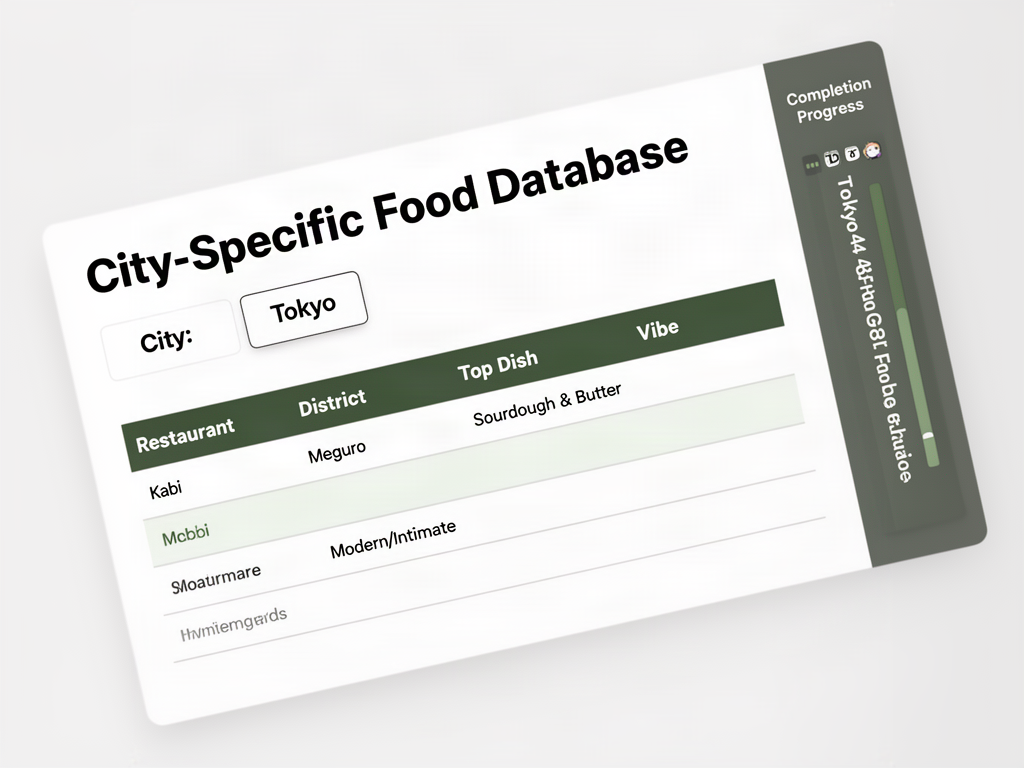 Filtering your food logs by city allows you to create curated guides for friends or plan your return trips with surgical precision.
Most apps show a global map. The real power comes from city-specific views.
Creating City Guides:
Whether you're using Beli, Crumble, Notion, or Sheets, the workflow is similar:
- Tag every entry with a city field (Tokyo, Rome, Barcelona)
- Create filtered views or shared lists specific to that city
- Add a "Best Dish" field so friends know exactly what to order
- Include contextual notes: "Best for date night," "Solo lunch counter," "Group dinner"
Example: "My 48 Hours in Tokyo" List
| Restaurant | District | Best Dish | Vibe | Price |
|---|---|---|---|---|
| Sukiyabashi Jiro | Ginza | Chu-toro nigiri | Silent, reverent | ¥¥¥¥ |
| Afuri | Harajuku | Yuzu Shio Ramen | Casual, quick | ¥¥ |
| Narisawa | Minato | Bread of the Forest | Special occasion | ¥¥¥¥ |
This list is useful. It's searchable. It's shareable. And it doesn't require friends to wade through generic Yelp reviews.
Shared Map Feature:
Most social apps (Beli, Crumble) allow you to create a shared map for travel groups. Before a trip to Barcelona, your group populates a collaborative map with everyone's recommendations. You arrive with a pre-vetted hit list.
For those building personal restaurant libraries, this city-based filtering is essential.
The Three Signal Rating Framework
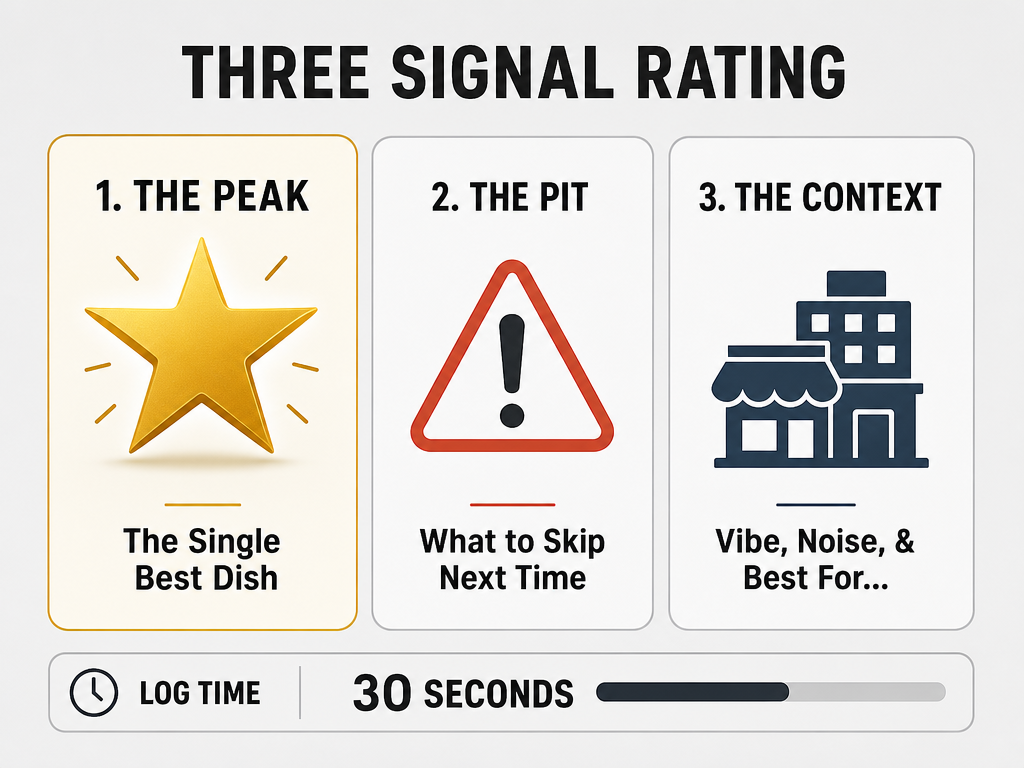 The Three Signal Rating ensures you capture the most important data points in under 30 seconds, making your personal food atlas actually useful.
Star ratings are broken. A 4-star restaurant tells you nothing about whether you will like it. Professional critics use a different framework.
The Three Signal System:
The Peak: What was the single best dish? This is the reason to return. Be specific. Not "the pasta," but "the cacio e pepe with extra pecorino and cracked pepper."
The Pit: What should you skip next time? Honest assessment prevents repeat mistakes. "The tiramisu was undersaturated. Order the panna cotta instead."
The Context: Who is this place for? "Perfect for a solo lunch at the counter." "Date night, but loud." "Bring clients, not friends."
This framework takes 30 seconds to complete and delivers more value than 10 paragraphs of Yelp prose.
Application Across Tiers:
- Google Maps Notes: "🇮🇹 Peak: Carbonara. Pit: Amatriciana too salty. Context: Solo lunch."
- Beli/Crumble: Use the notes field for Peaks and Pits. Tag with context labels.
- Notion Database: Create dedicated columns for Peak Dish, Avoid, and Vibe.
This system ensures that six months later, when a friend asks "Where should I eat in Rome?", you have an answer that's actually useful. For more on how to review and track meals like a serious foodie, this framework is foundational.
The "Wait for the Bill" Workflow
The physical habit matters as much as the app.
Most people try to log meals in the moment. This is a mistake. You're mid-conversation, the food is hot, and you're fumbling with your phone. The result is incomplete entries or no entry at all.
The Professional Workflow:
- Take the photo when the dish arrives. One shot. Don't obsess over lighting.
- Eat. Enjoy. Be present.
- When the bill arrives and you're waiting for the card to process, open your tracking app and log the meal. You have 90 seconds of dead time anyway.
- Record three things: Restaurant name, best dish, one-sentence note.
This workflow integrates tracking into a natural moment of downtime. It requires no additional time and doesn't disrupt the meal.
OCR for Menu Scanning:
If you're building a Notion database, use iOS Live Text or Google Lens to scan the menu when it arrives. Screenshot it. Later, OCR the text to extract dish names and prices without manual typing.
This is a minor efficiency gain that compounds over hundreds of meals. For guidance on the best apps to track restaurant meals, OCR-enabled tools provide a meaningful edge.
Migration: Escaping Google Maps and Yelp
You're stuck. You have 200 starred places in Google Maps and 50 Yelp bookmarks. The thought of migrating to a new system feels impossible.
The Exit Strategy:
Google Maps and Yelp don't provide clean export functions. You'll need to extract data manually or with third-party tools.
From Google Maps:
- Open Google Takeout (takeout.google.com)
- Select "Maps (your places)"
- Download your saved places as a JSON file
- Use a JSON-to-CSV converter (free online tools available)
- Import the CSV into Notion, Sheets, or your target app
From Yelp: Yelp doesn't offer a native export. The manual method:
- Open your bookmarks page
- Use a browser extension like "Instant Data Scraper" to extract names and URLs
- Export as CSV
- Manually clean and import
Reality Check: This process takes time. If you have 200+ entries, expect 2-3 hours of work. But once it's done, you own your data.
The alternative is staying trapped in a system that doesn't serve you.
The Pro Layer: Tracking What Critics Track
Professional food critics don't just track dishes. They track context.
Non-Food Metadata:
- Noise Level: Is this a quiet date spot or a loud group dinner venue?
- Lighting: Can you actually see the food you're photographing?
- Reservation Difficulty: Did you book 3 months ahead or walk in?
- Service Quality: Was the staff knowledgeable, pushy, or absent?
- Ambiance Category: Formal, casual, trendy, timeless?
These fields seem minor until you're searching your database six months later trying to remember "that quiet place in Barcelona that was perfect for a business dinner."
Adding These Fields:
- Google Maps: Include in your note: "Quiet, dim lighting, book ahead"
- Beli/Crumble: Use tags or notes
- Notion/Sheets: Create dedicated columns
The serious foodie tracks more than taste. They track experience architecture.
For those interested in modern food review systems, this contextual layer is what separates casual logging from professional documentation.
Frequently Asked Questions
Is there an app for foodies?
There's no single "app for foodies." The term covers too much ground. Discovery apps like Michelin Guide and Eater help you find restaurants. Tracking apps like Beli, Crumble, and Savor help you remember what you ate. Reservation apps like Resy and OpenTable help you book tables. Most serious foodies use a combination of three to five apps depending on their workflow. The right answer depends on whether you're discovering, tracking, or sharing.
How do you track meals easily?
The easiest method is the "Wait for the Bill" habit: take a photo when the dish arrives, then log the entry in 30 seconds while waiting for your card to process. Use native tools like Google Maps with emoji city tags if you want zero learning curve. Upgrade to Beli or Crumble if you want social features and dish-level tracking. Upgrade to Notion or Sheets if you want infinite customization and data ownership. The "easiest" system is the one you'll actually use consistently.
Is Beli a good app?
Beli is excellent for its intended audience: socially-minded foodies under 35 who prefer comparative ranking over star ratings. Beli reached over 75 million restaurant ratings as of September 2026 (Instagram/Snapshots Data). The head-to-head comparison system produces more honest, nuanced results than traditional scoring. Limitations include social pressure (friends see your activity) and the need for consistent engagement to build meaningful rankings. If you want a private food diary, Beli isn't the right fit. If you want social discovery and friend-sourced recommendations, it's strong.
What is the best app for keeping track of restaurants?
The best app depends on your tracking style. For social discovery, Beli and Crumble lead. For automated logging, Truffle's credit card sync is unmatched. For visual memory, Yummi excels. For full control and customization, a Notion or Google Sheets database is the professional standard. Most serious foodies use a hybrid approach: a social app for discovery and a private database for archival. The right answer is the system you'll maintain six months from now.
How do professional food critics organize their notes?
Professional critics use structured frameworks, not free-form prose. They track peak dish (the reason to return), contextual notes (who this place is for), and non-food metadata (noise level, lighting, reservation difficulty). Many use spreadsheets or databases with fields for restaurant name, city, dish, rating, price, and vibe. The "Single Best Dish" principle is common: every entry must identify the one standout item. Consistent frameworks enable pattern recognition across hundreds of meals.
How to import Google Maps stars into a tracking app?
Use Google Takeout to download your saved places as a JSON file. Convert the JSON to CSV using a free online converter. Import the CSV into your target app (Notion, Sheets, or apps that support CSV import). Expect to spend 2-3 hours cleaning data if you have 200+ entries. The effort is worth it for data ownership and searchability. Once migrated, you can filter by city, cuisine, and rating in ways Google Maps doesn't support.
Your camera roll holds thousands of extraordinary meals you'll never remember. The modern foodie doesn't need a better memory. They need better systems.
Start with the tier that matches your effort tolerance. Build the habit before you build the perfect system. Track by city so your data becomes useful when you travel or make recommendations.
And remember: the goal isn't to document every meal. It's to never forget the exceptional ones.