
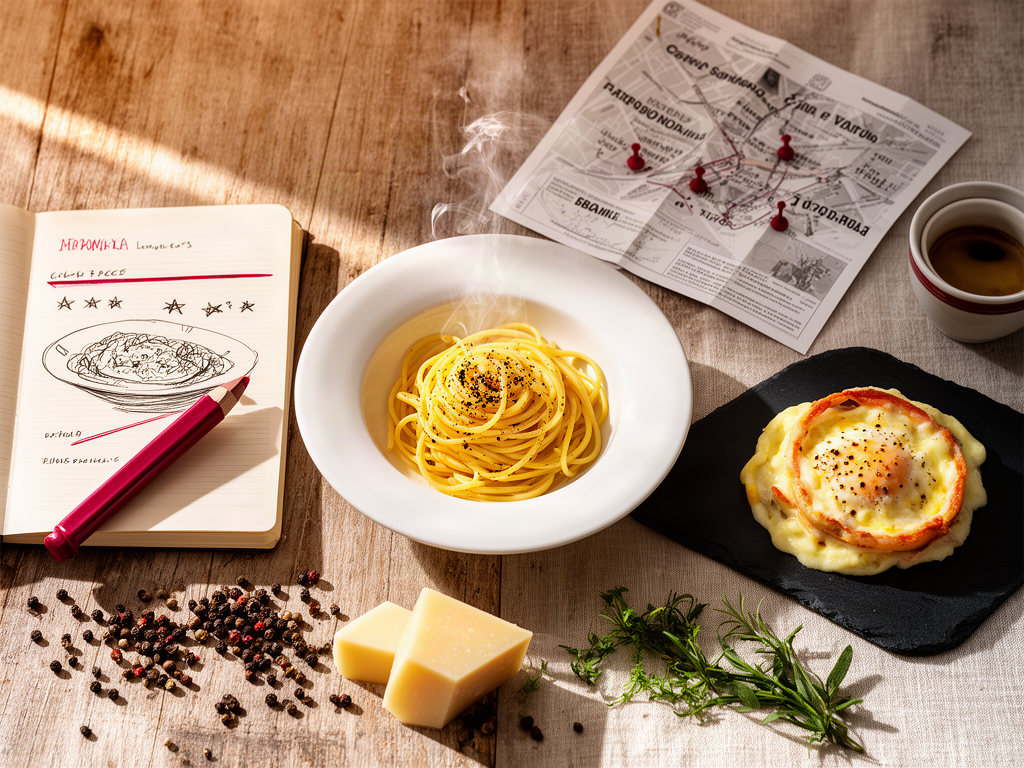
How to Track Top-Rated Dishes by Location: A System for Serious Foodies
Alex the juice queen
Alex hunts for the best juice bars and presses. She rates every sip and saves her favorites in Savor.
How to Track Top-Rated Dishes by Location: The Complete System for Serious Foodies Your camera roll is a graveyard. Somewhere between photo 847 and 2,143,...
How to Track Top-Rated Dishes by Location: The Complete System for Serious Foodies
Your camera roll is a graveyard. Somewhere between photo 847 and 2,143, there's a snapshot of the best carbonara you've ever eaten. You remember the taste - the silky egg yolk coating each strand of pasta, the sharp bite of pecorino, the way the guanciale released tiny pockets of rendered fat with every bite. You remember it was in Rome. Or was it Brooklyn? Was it that place near the Pantheon, or the other one your friend recommended?
Three weeks later, you can't remember the name of the restaurant. Six months later, you can't even find the photo.
This is the camera roll problem, and it's not just about lost photos. It's about lost experiences. The average serious foodie takes ~2,000 food photos per year, but 68% fail to find specific photos later without structured tagging. Those 2,000 moments - each representing a decision, a discovery, a small act of culinary cartography - vanish into an unsearchable void.
The solution isn't taking fewer photos. It's building a system that treats every dish as data worth preserving.
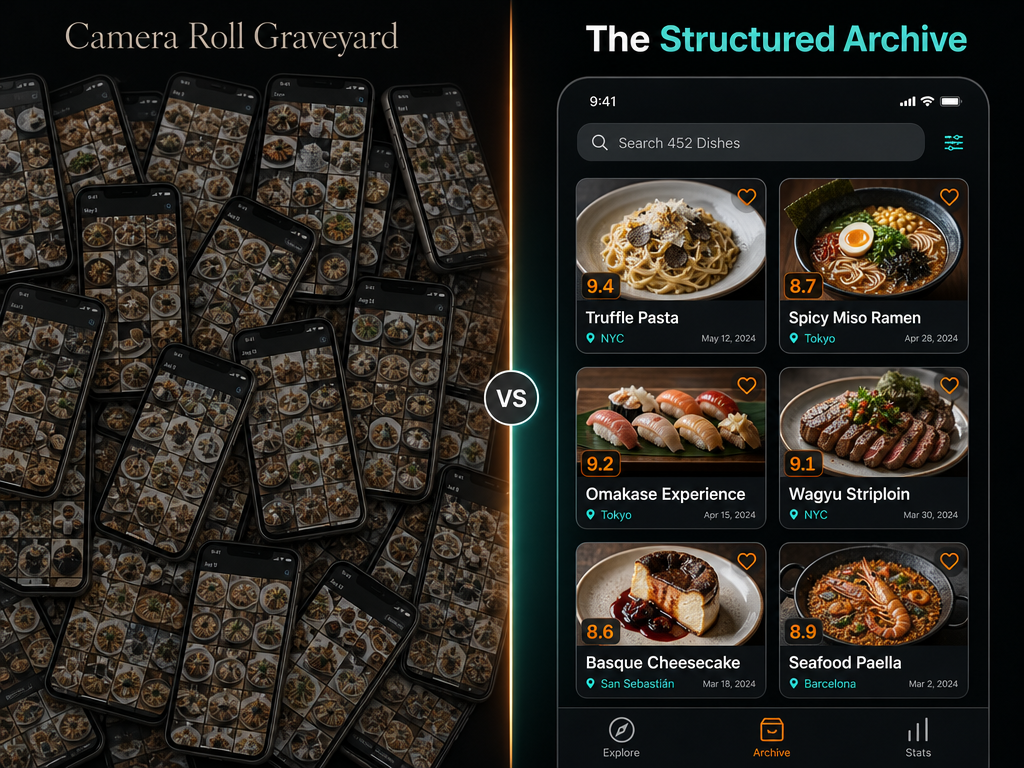 Move beyond the 'camera roll graveyard' by transitioning from simple photography to a structured, searchable database of every dish you have ever enjoyed.
Table of Contents
- What "Tracking Dishes by Location" Actually Means
- Why Restaurant Ratings Don't Solve This Problem
- The Three Types of Dish Trackers
- How to Choose Between Social and Private Tracking
- The Four-Step Protocol for Tracking Any Dish
- How to Handle the Tasting Menu Problem
- Data Portability: Why CSV Export Matters
- Frequently Asked Questions
What "Tracking Dishes by Location" Actually Means
Tracking top-rated dishes by location means building a searchable, organized database of specific meals indexed by geography, not just restaurant names. It's the difference between remembering "I had great pasta in Rome" and being able to pull up "Cacio e pepe at Flavio al Velavevodetto, October 2024, 9.2/10, creamy but not heavy, perfect black pepper bite."
This isn't about restaurant discovery - that's what Yelp's 330 million reviews already handle. This is about forensic meal archiving. It's about creating a personal culinary map that answers questions like:
- What was that incredible duck dish I had in Lyon?
- Which city had my favorite ramen?
- Have I tried mole negro anywhere other than Oaxaca?
- What did I order at that place in Tokyo that made me want to cry?
The practice shifts your relationship with food photography from passive documentation to active curation. Instead of 2,000 unsorted photos, you're building a queryable database where every entry includes dish name, location, rating, and the contextual details that make memories stick.
Why Restaurant Ratings Don't Solve This Problem
Restaurant ratings operate at the wrong resolution. When you rate a restaurant 4 stars, you're creating an average that flattens everything into a single data point. The stellar duck confit gets averaged with the forgettable dessert. The restaurant with one transcendent signature dish and seven mediocre ones looks identical to the restaurant with eight solid dishes and no standouts.
This is why you've had the experience of visiting a highly-rated restaurant and leaving disappointed. The crowd loved the burger. You ordered the fish. The aggregate rating told you nothing about what you actually experienced.
Dish-level tracking solves this by disaggregating the data. Instead of "Bistro X: 4 stars," you get:
- Duck confit: 9.5/10
- Steak frites: 7/10
- Chocolate mousse: 6/10
- House wine: 8/10
Now you know what to order when you return. More importantly, you know whether to return at all.
The shift from restaurant-level to dish-level thinking also eliminates what researchers call "rating inflation psychology." Public ratings on platforms like Yelp tend to skew higher because users are rating for an audience - both the restaurant and other readers. Private logs, by contrast, are calibrated to your personal scale. That mediocre pasta isn't a 4-star because you don't want to hurt anyone's feelings. It's a 6.5 because that's what it was.
The Three Types of Dish Trackers
Dish tracking tools fall into three distinct categories, each optimized for a different user archetype. Understanding these categories is more useful than comparing individual apps feature-by-feature.
The Social Rankers prioritize discovery and competitive ranking. Beli reached over 70 million restaurant reviews globally by late 2025 by building around an ELO-based pairwise comparison system. Instead of assigning absolute scores, Beli asks: "Did you like Dish A or Dish B more?" Over time, this generates a ranked leaderboard of every dish you've tried.
The strength here is social currency. Your Beli profile becomes a public recommendation engine. The weakness is performance pressure - everything you log is visible by default, which can discourage honest tracking of mediocre meals or experimental failures.
The Private Archivists treat meal tracking as personal forensics. Apps like Savor and Memolli emphasize searchability, metadata richness, and privacy. These tools assume you're building a long-term culinary archive, not competing for foodie clout. The user experience prioritizes retrieval over sharing: "Show me every bowl of ramen I've rated above 8.5 in the past three years."
The strength is honest, detailed logging without social friction. The weakness is isolation - you can't easily share a curated list with friends planning a trip.
The Visual Mappers like Yummi and Truffle organize your meal history geographically and chronologically. These apps excel at answering location-first questions: "What did I eat in Barcelona last March?" They often integrate with Instagram or Google Photos to retroactively map existing food photos.
The strength is spatial memory - seeing your meals plotted on a map triggers stronger recall than scrolling through a text list. The weakness is manual effort for complex meals. A 12-course tasting menu becomes a significant data entry project.
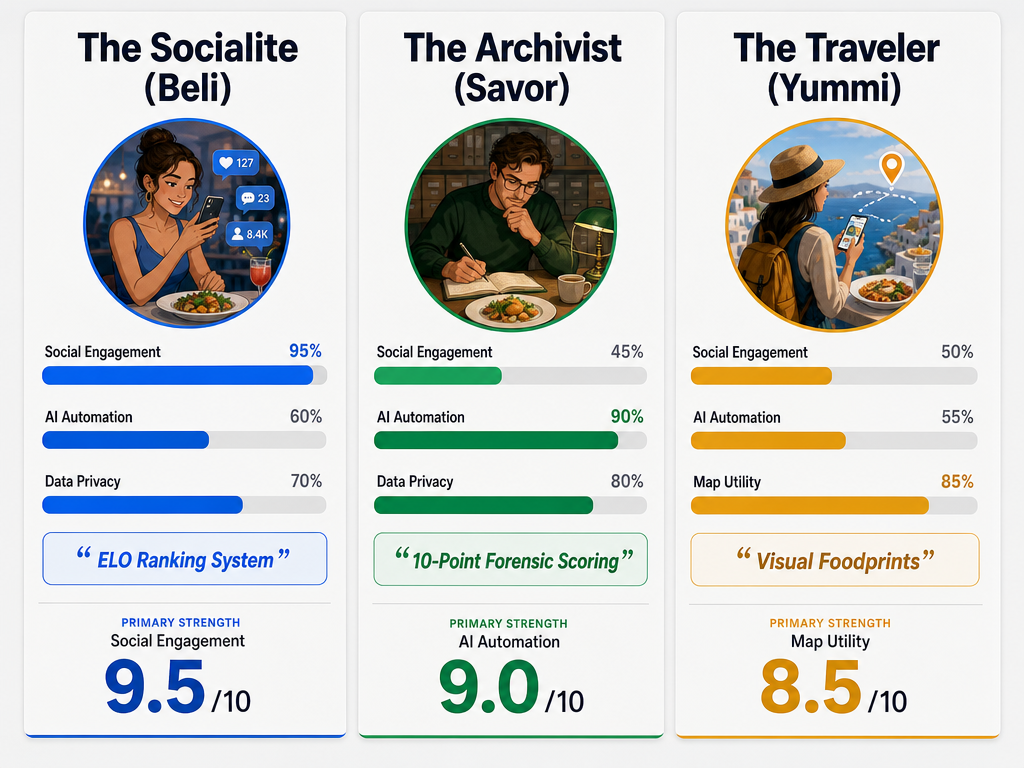 Choosing the right tool depends on your goals: use Beli for social rankings, Savor for private AI-driven logs, or Yummi for map-based travel history.
How to Choose Between Social and Private Tracking
The choice between public and private tracking isn't about features - it's about intent. Here are the decision points that matter:
Choose social tracking (Beli) if:
- You value discovery as much as archiving
- You're comfortable with public-by-default logging
- You want your recommendations to influence where friends eat
- You enjoy the gamification of building a ranked leaderboard
- You're willing to trade privacy for social utility
Choose private tracking (Savor, Memolli) if:
- Honest self-reflection matters more than social validation
- You want detailed metadata (spice level, cooking method, wine pairing)
- You're building a long-term archive for personal reference
- You need to export your data if the app shuts down
- You don't want performance anxiety influencing what you log
Choose visual mapping (Yummi, Truffle) if:
- You think in terms of "where was that place?" more than "what did I eat?"
- You have a large backlog of food photos to organize retroactively
- You travel frequently and want a chronological timeline
- Visual memory triggers work better for you than text search
Most serious foodies eventually use two systems: a private archive for honest tracking and a public profile for curated recommendations. The private log is where you record everything - including the meals you'd rather forget. The public profile is where you surface the greatest hits.
If you're just starting, begin with private tracking. You can always port your best meals to a social platform later. Going the other direction - trying to make a public profile honest - is psychologically harder.
The Four-Step Protocol for Tracking Any Dish
Every meal tracking system, regardless of platform, follows the same four-step architecture. Master this protocol and you can adapt it to any tool.
Step 1: Capture the Raw Data
Take a photo before you touch the food. This sounds obvious, but the timing matters. Pre-fork photography captures plating, portion size, and composition - details you'll forget once you start eating. If the lighting is bad, don't stress about Instagram-quality shots. You're building an archive, not a portfolio.
For dishes with multiple components, take two photos: an overhead shot and a detail shot. The overhead captures the full composition. The detail shot captures texture - the char on a steak, the gloss on a sauce, the irregular edges of hand-torn pasta.
Step 2: Add Structured Metadata
This is where most people fail. A photo without metadata is just a pretty picture. Useful metadata includes:
- Dish name (as listed on the menu, not your interpretation)
- Restaurant name and location (city minimum, neighborhood better)
- Date (automatic in most apps, but verify it's correct)
- Key ingredients (protein, main carb, defining sauce or spice)
- Cooking method (grilled, braised, raw, deep-fried)
- Price (helps calibrate expectations on future visits)
The dish name matters more than you think. Menus lie. "Pan-seared scallops with cauliflower purée" might arrive as three tiny scallops on a bed of mush. Record what the menu promised, then note what actually arrived in your rating or notes field.
Step 3: Assign a Comparative Value
This is where the ELO vs. 10-point debate happens. ELO ranking (Beli's method) works by asking "which dish did I prefer?" after every meal. Over time, this generates a ranked list without you ever assigning an absolute number. The advantage is speed - you're never stuck deciding if something is an 8.2 or an 8.5. The disadvantage is delayed gratification - you can't see a numerical score until you've logged many meals.
The 10-point scale (used by Savor and private trackers) lets you assign a score immediately. Most serious foodies eventually settle on a personal rubric:
- 1-3: Actively bad, would not order again under any circumstance
- 4-5: Below average, forgettable
- 6-7: Solid, would eat again but wouldn't seek out
- 8: Very good, worth a detour
- 9: Exceptional, would travel for
- 10: Life-changing, defines a category
The key is consistency. Your scale doesn't need to match anyone else's - it just needs to be stable over time so you can trust your own data.
Step 4: Quarterly Data Export
This step separates archivists from dabblers. Every three months, export your meal log as a CSV or JSON file and store it somewhere permanent - a cloud drive, a local backup, an email to yourself. This protects against three failure modes:
- The app shuts down (common in food tech)
- Your account gets corrupted or banned
- The platform changes their export policies
Beli raised $12 million in funding as of June 2025, which sounds stable - until you remember that Instagram raised $500 million and still makes it difficult to export your data in a usable format. Assume every platform will eventually make your data harder to access, and plan accordingly.
If an app doesn't offer CSV export, consider it a deal-breaker. You're building a culinary archive that should outlast any single platform.
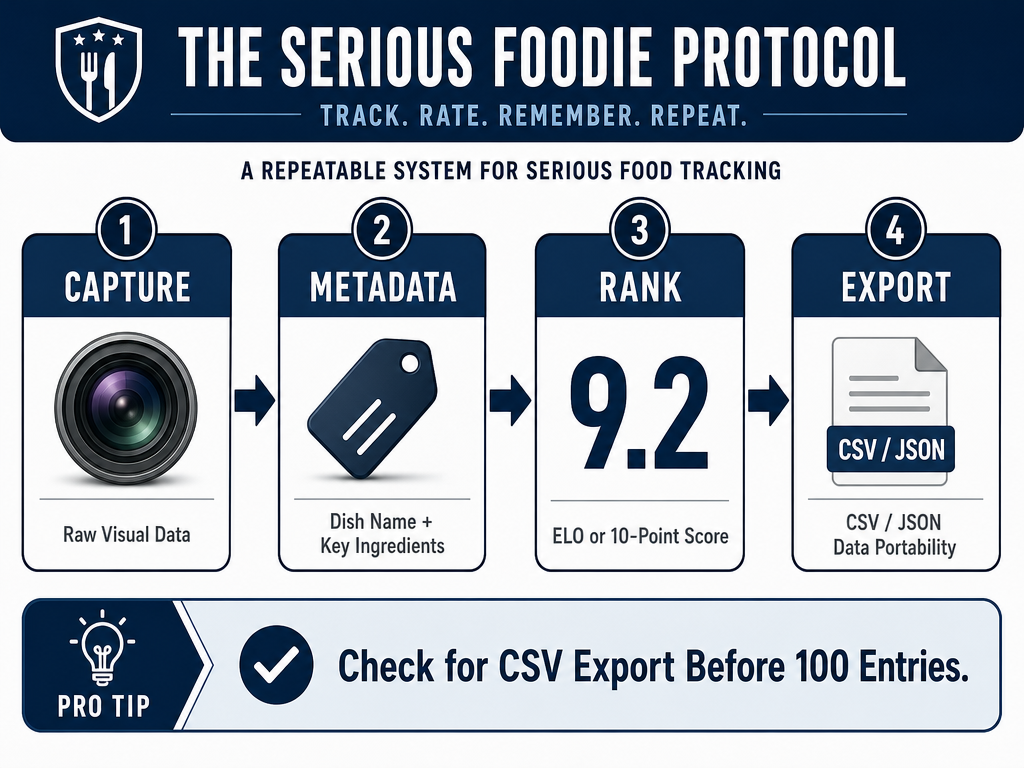 Follow the professional protocol to ensure your food logs are more than just memories: capture, tag, rank, and secure your data for the long term.
How to Handle the Tasting Menu Problem
Multi-course tasting menus are the stress test for any tracking system. Logging twelve dishes in a single sitting creates friction that most apps aren't designed to handle. Here's how to approach it without ruining the meal:
During the meal: Take quick photos and voice memos. Most phones let you dictate notes hands-free. After each course, say the dish name and your immediate impression into your phone's recording app: "Course three, duck breast with cherry gastrique and farro, perfect medium-rare, fruit is too sweet, eight." This takes fifteen seconds and captures the details while they're fresh.
After the meal: Batch-upload your photos and transcribe your voice notes into your tracking app. This is when you add structured metadata and calibrate your ratings against each other. Course three might have felt like an eight in the moment, but after course eight arrived, you realize it was actually a nine.
Resist the temptation to rate everything at the table. You're there to eat, not to run a data entry operation. The photos and voice memos are scaffolding for the real work you'll do later.
Some apps - notably Savor - offer "tasting menu mode" that streamlines this workflow. You can batch-upload photos, and the app uses AI to suggest dish names and ingredients based on visual recognition. The accuracy varies (AI still struggles with deconstructed dishes and fusion cuisine), but it reduces transcription time.
For high-end tasting menus, photograph the printed menu card if the restaurant provides one. This gives you exact dish names and sequence, which is harder to reconstruct from memory later.
Data Portability: Why CSV Export Matters
Most articles about food apps ignore the single most important feature: the ability to get your data out. Here's why this matters more than UI polish or AI features.
You've spent two years logging every notable meal. That's 400+ entries with photos, ratings, locations, and notes. Then the app gets acquired, pivots to a subscription model you won't pay for, or simply shuts down. If you can't export your data, you've lost two years of culinary memory.
CSV export is the universal standard. It's a simple spreadsheet format that any other app or database can import. JSON is slightly better for complex data (it handles nested metadata more gracefully), but CSV is the baseline. If an app doesn't offer at least CSV export, it's treating your data as a hostage.
Check export capabilities before committing to any platform. Go into the app's settings and look for "Export data," "Download my information," or "Data portability." If you can't find it in five minutes, it probably doesn't exist.
For apps that don't offer export, third-party tools like data scrapers can sometimes extract your information, but this is fragile and often violates terms of service. Start with tools that respect your ownership of your own meal history.
Frequently Asked Questions
What is the highest-rated food tracking app?
There is no single "highest-rated" food tracking app because ratings reflect different use cases. Yelp had 330 million cumulative reviews as of December 31, 2025, making it the most popular for restaurant discovery, but it doesn't track individual dishes. Beli leads in social dish ranking with its ELO-based system, while Savor and Memolli are preferred by users who want private, searchable archives. The "best" app depends on whether you prioritize social discovery, private forensics, or geographic mapping.
Is Beli still invite-only?
No. Beli moved beyond invite-only access during its 2024-2025 scaling phase and is now available for download in most major urban markets. Early adopters experienced an invite system to manage growth, but the app is now broadly accessible, though feature availability and restaurant coverage vary by region.
What does Gen Z use instead of Yelp?
Many younger food enthusiasts gravitate toward Beli for its pairwise ranking system and visual-first interface, which feels more native to their existing social media habits. Instagram and TikTok are also primary discovery channels, where creators share specific dishes rather than restaurant reviews. The shift is from crowd-sourced aggregate ratings to individual creator endorsements and personal archives. For tracking their own meals, Gen Z users often prefer apps with strong social sharing features and visual organization over text-heavy review platforms.
Is there an app that can track restaurants I've visited?
Yes, but most apps track restaurants, not dishes. Google Maps lets you save places and add notes, but it lacks dish-specific metadata and rating systems. Apps built specifically for meal tracking - like Savor, Yummi, and Beli - let you log individual dishes with photos, ratings, and detailed notes. The key difference is granularity: traditional apps treat the restaurant as the unit of measurement, while dish tracking apps treat each plate as its own data point.
How can I export my food diary if the app shuts down?
Before an app shuts down, immediately access its export feature - usually found in Settings under "Data," "Privacy," or "Account." Export your data as a CSV or JSON file and save multiple copies to different locations (cloud storage, local drive, email attachment). If the app has already shut down without warning, check if the company posted shutdown instructions or data retrieval tools on their website or social media. If no export function exists and the app is gone, your data is likely unrecoverable - this is why you should test export functionality and perform regular backups while the app is still active.
What is the 10-point scoring system for rating dishes?
A 10-point system assigns a numerical score to each dish based on personal criteria. Most serious foodies calibrate their scale so that 1-3 represents actively bad experiences, 4-5 is below average, 6-7 is solid but unremarkable, 8 is very good and worth seeking out, 9 is exceptional and worth traveling for, and 10 is reserved for transformative, category-defining dishes. The key is internal consistency - your scale only needs to make sense to you, but it should remain stable over time so historical ratings remain meaningful. Unlike restaurant ratings that average multiple dishes, dish-level scoring lets you capture what actually worked versus what didn't.
Most men photograph 2,000 meals a year and remember twelve. The difference between those who build a useful culinary archive and those who maintain a chaotic camera roll comes down to system design. Track dishes, not restaurants. Capture metadata, not just photos. Export your data quarterly. Choose tools that respect your ownership of your own taste history.
That extraordinary carbonara in Rome deserves better than to vanish into photo 1,847 of 4,293. Give it coordinates, context, and a score. Build an archive you can actually search. Your future self, standing in front of a menu in an unfamiliar city, will thank you.
For additional resources on building your personal food database, explore our guides on how to organize food photos by restaurant, the best apps for private dish rating, tracking favorite dishes effectively, creating a searchable restaurant library, the modern food review revolution, and how to review food like a professional critic.