
How to Build a System to Remember Which Restaurants Had the Best Pasta
John the smoothie monster
John lives for smoothie bowls and cold-pressed juices. He uses Savor to remember his best blends.
How to Remember Which Restaurants Had the Best Pasta: A System for Serious Foodies You're scrolling through your camera roll at 11 PM, trying to remember the...
How to Remember Which Restaurants Had the Best Pasta: A System for Serious Foodies
You're scrolling through your camera roll at 11 PM, trying to remember the name of that restaurant with the life-changing cacio e pepe. Was it in Brooklyn? Rome? Did you even save the photo? Your phone holds 2,400 food images, but they're essentially invisible - undated, unsorted, and utterly useless when you need them most.
Most serious foodies hit the same wall around their third year of obsessive dining: thousands of incredible meals blur into a single, frustrating memory fog. The problem isn't your palate. It's that you never built a system.
This guide shows you how to build a personal pasta atlas - a searchable, private archive of every exceptional dish you've ever had, organized by restaurant, location, and what actually made it unforgettable.
Table of Contents
- Why Your Camera Roll is Killing Your Food Memory
- The Three-Layer System for Tracking Pasta
- Native Tools: Start With What You Already Have
- Dedicated Apps: For the Completist Foodie
- The Pasta Evaluation Framework
- How to Search Your Pasta Archive Instantly
- Comparing Dishes Across Cities and Restaurants
- Frequently Asked Questions
Why Your Camera Roll is Killing Your Food Memory
The average food enthusiast takes hundreds of dining photos yearly, yet can recall specific details about fewer than a dozen meals. The disconnect isn't mysterious - your camera roll is a searchable nightmare. Photos are chronological, not contextual. Searching "pasta" might pull up 80 images spanning three years, with no restaurant names, no location data, and no hint about which bowl of bucatini all'amatriciana deserves your next cross-town pilgrimage.
Star ratings don't help either. A restaurant with a perfect 5.0 might serve mediocre carbonara but excellent tiramisu. You need dish-level memory, not venue-level averages.
The solution isn't taking fewer photos. It's building infrastructure around them. Think of it as moving from a shoebox of receipts to a proper accounting system. The meal happened. The memory exists. You just need a retrieval mechanism that matches how you actually think about food.
The Three-Layer System for Tracking Pasta
Great pasta memory architecture has three distinct layers, each serving a different retrieval need:
Layer 1: Visual Reference
Your photo, properly tagged with location and dish name. This is your baseline - the raw sensory data.
Layer 2: Searchable Context
Restaurant name, date, city, dish type (cacio e pepe vs. carbonara), and your immediate reaction. This layer makes your archive functional rather than decorative.
Layer 3: Comparative Memory
Personal ratings, flavor notes, and the "would I travel for this" test. This is what separates a food diary from a food intelligence system.
Most people never build past Layer 1. They take a photo, post it to Instagram, and the memory dies there. Professional food critics work across all three layers simultaneously - and you should too.
The key distinction: you're not building this for an audience. This is private infrastructure. No follower counts, no public validation, just ruthlessly honest documentation of what worked and what didn't.
Native Tools: Start With What You Already Have
Before downloading anything new, exhaust what's already on your phone. Modern smartphones contain surprisingly powerful food memory tools - they're just hidden in plain sight.
iPhone Photos Search
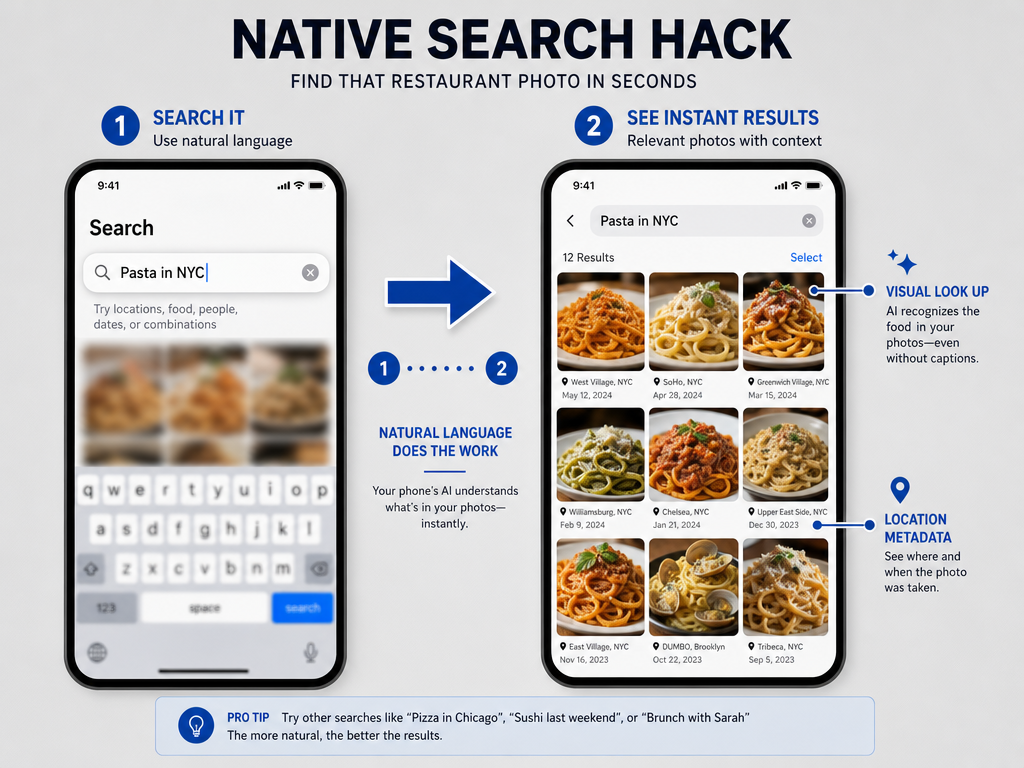
iOS Photos now uses on-device AI to identify objects within images. Open your Photos app and type "pasta" in the search bar. The algorithm scans every photo for visual matches - fusilli, pappardelle, rigatoni - and surfaces them instantly.
Refine the search by adding location. Try "pasta Rome" or "pasta Brooklyn" to narrow results geographically. This works because Photos automatically tags images with GPS coordinates when you shoot them.
The limitation: AI identification is general, not specific. It'll recognize "pasta" but won't distinguish between carbonara and amatriciana, or tell you which restaurant served it. For that, you need manual intervention.
Visual Look Up
On any food photo, tap the "info" (i) icon at the bottom of the screen. If Visual Look Up recognizes the dish, you'll see a small sparkle icon. Tap it for identification suggestions.
Visual Look Up excels at recognizing dish types and ingredients but struggles with preparation styles. It might identify "spaghetti" but miss the fact that it's alla chitarra, or recognize "tomato sauce" without catching the guanciale that makes it proper amatriciana.
Still, it's a useful starting point for photos you took months ago without context. The feature requires iOS 15 or later and works best in well-lit, clearly composed shots.
Location History Cross-Reference
Google Maps Timeline (Android) or Apple Maps Significant Locations (iOS) track everywhere you've been. Open your location history, find the date you remember eating that extraordinary pasta, and see which restaurants you visited that day.
This reverse-engineering approach works surprisingly well for recent meals. You might not remember the restaurant name, but you remember it was a Wednesday in October near your hotel. Location data narrows the field considerably.
The privacy-conscious will note that this requires enabling location tracking - a tradeoff worth considering based on how seriously you take food memory versus data minimization.
Dedicated Apps: For the Completist Foodie
Native tools handle casual memory retrieval. Serious foodies need something built for the job. With over 60% of all restaurant orders predicted to be placed via mobile apps by 2025, the digital dining infrastructure has matured substantially. But most restaurant apps focus on discovery and ordering, not memory and comparison.
Savor: The Dish-Level Archive
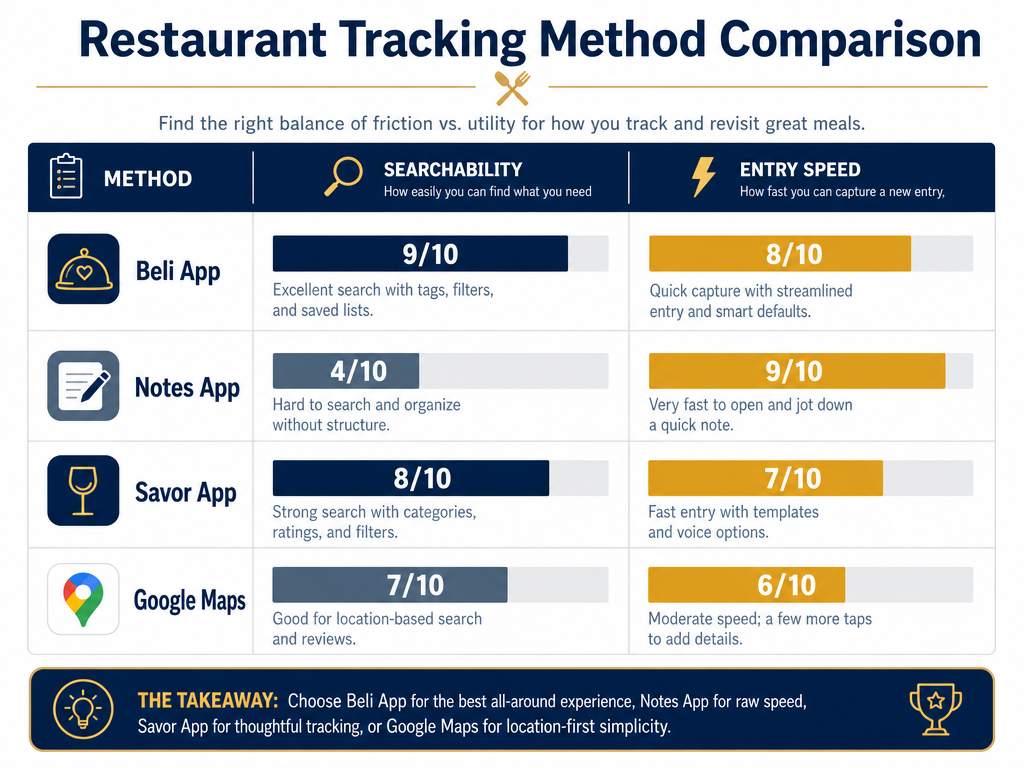
Savor is built around a radical premise: rate dishes, not restaurants. You log individual plates - that specific cacio e pepe from that specific visit - with photos, notes, and a personal 10-point score.
The interface prioritizes speed. Open the app, snap a photo, tap the restaurant name (auto-populated from your location), add a quick rating, and you're done. The entire workflow takes 30 seconds, which matters when you're dining out 200 times a year.
Search is where Savor shines. Filter your archive by dish type ("show me every pasta I've rated above 8"), by city ("what were my best meals in Rome?"), or by restaurant ("which dish should I order at Roscioli next time?").
The app stays private by default. No social features, no public profiles, no pressure to perform for an audience. This is your personal taste database, not a content engine. Learn more about why dish-first apps solve the star-rating problem.
Beli: The Competitive Ranking Game
Beli takes a different approach - it gamifies your food memory with head-to-head comparisons. The app repeatedly asks: "Which carbonara was better, the one from Felice or the one from Flavio al Velavevodetto?" Your answers build a ranked list of your top dishes in each category.
This works well if you enjoy the sorting process and want definitive rankings. It's also more social than Savor - you can share lists with friends and see their rankings.
The downside: maintaining rankings feels like work. Every new dish requires re-evaluating your entire hierarchy. For high-volume diners eating out 150+ times yearly, that overhead becomes exhausting.
Beli is best for foodies who want curated top-10 lists rather than comprehensive archives. If your goal is "track my five best pastas in Rome," it's excellent. If your goal is "remember every notable pasta I've ever had," it's insufficient.
Notes App: The Purist's Choice
Bon Appétit famously recommends the simplest possible system: one Note per year, titled "Best Dishes 2026." After each meal, add a single line: [Date] | [Restaurant] | [Dish Name] | [One-sentence 'why'].
Example:Oct 12 | Roscioli | Cacio e Pepe | Perfectly emulsified, aggressive black pepper, al dente to the second
This works because it enforces discipline. You can't log everything, so you log only what genuinely matters. The constraint is the feature.
The limitation is search. Text-based notes don't filter by geography or dish type. Finding "that carbonara in Trastevere" means manually scanning hundreds of entries. Fine for light users, painful for anyone dining out seriously.
For guidance on building a more robust manual system, see how to organize meals by dish category.
Google Maps Saved Places
Google Maps lets you save restaurants and add private notes. After a meal, save the location and write a quick dish review in the notes field.
The advantage: location data is built-in. When you're back in that neighborhood, your saved places surface automatically. The map view also helps with spatial memory - seeing where restaurants cluster can trigger recollections.
The disadvantage: Google Maps isn't built for food logging. There's no way to filter saved places by dish type, rating, or cuisine. It's essentially a glorified bookmark folder with geographic visualization.
This works as a supplement to a primary system but rarely as the system itself. For more comprehensive tracking methods, explore the best apps to track your restaurant legacy.
The Pasta Evaluation Framework
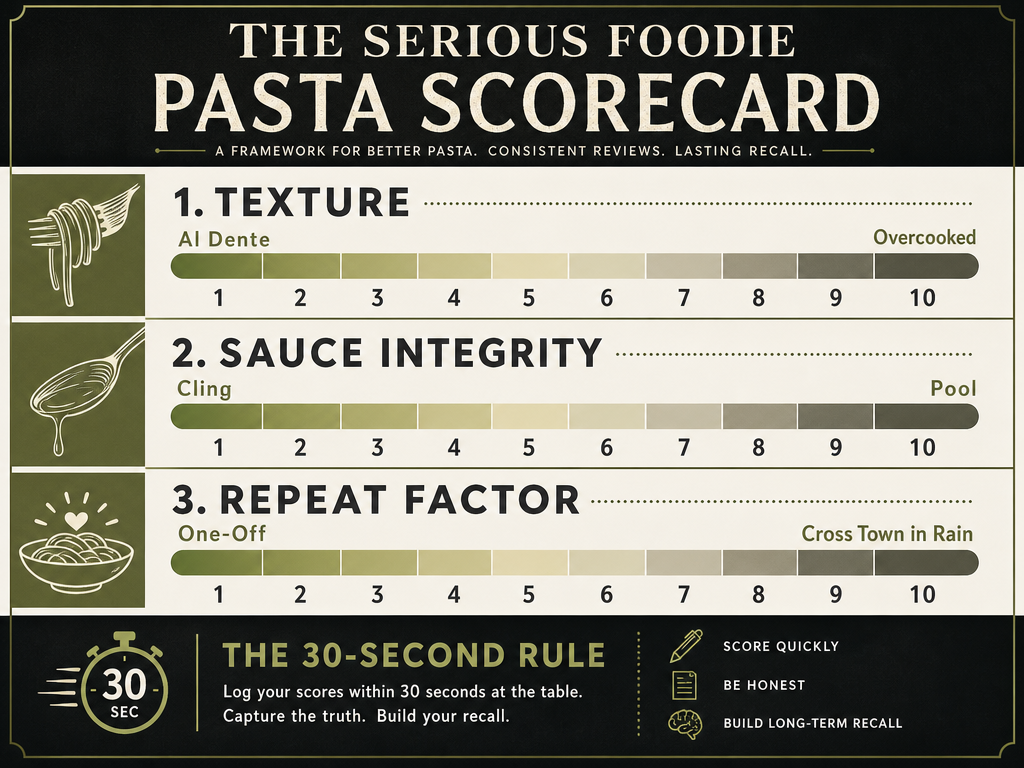
Generic star ratings fail because they collapse multiple dimensions into a single number. A proper pasta evaluation separates the variables that actually drive memory.
1. Texture and Doneness
Al dente isn't a single point - it's a spectrum. Properly cooked pasta offers resistance without chalkiness, firmness without rubberiness. The noodle should yield to your teeth with a slight snap, not mush into paste or require aggressive chewing.
When documenting texture, ask: Could I identify this pasta blindfolded based on mouthfeel alone? Exceptional pasta has textural personality - the irregular surface of bronze-die extruded penne, the satisfying chew of hand-rolled pici.
Common failure modes: undercooked (raw starch flavor), overcooked (mushy, sauce-logged), or inconsistent (some noodles perfect, others overdone because they clumped during cooking).
2. Sauce Integration
The sauce should cling to the pasta, not pool at the bottom of the bowl. This comes from proper emulsification - the cook finishing the pasta in the sauce pan with pasta water, creating a silky coating that adheres to each strand.
Look for visual cues: glossy sheen on the noodles, minimal liquid separation, sauce that moves with the pasta rather than sliding off.
Exceptional carbonara coats each rigatoni tube inside and out. Poor carbonara leaves you with dry pasta at the top of the bowl and scrambled eggs at the bottom. The difference is technique, not ingredients.
For a deeper dive into pasta craftsmanship, read about how to make homemade pasta.
3. The Repeat Factor
Would you cross town in the rain for this specific dish? Would you order it again on a return visit, even if the menu has other tempting options? Would you recommend this dish to a friend visiting from out of town?
This isn't about the restaurant's ambiance or service - it's about whether this exact preparation of this exact dish earned permanent mental real estate.
High repeat factor: You remember specific flavor details months later. You compare other versions against this benchmark. You feel compelled to document it.
Low repeat factor: It was fine. Competently executed. You'd eat it again if it appeared in front of you, but you wouldn't seek it out.
The repeat factor is where personal taste overrides objective quality. A technically perfect dish that doesn't resonate emotionally scores lower than a flawed dish that connects deeply. That's fine. This is your archive, not a critic's guide.
How to Search Your Pasta Archive Instantly
A food archive is only valuable if you can retrieve specific memories on demand. The difference between a camera roll and a culinary database is searchability.
Tag Systematically From the Start
Every entry needs at minimum: restaurant name, dish name, location (city/neighborhood), date, and your rating. Optional but valuable: price, dining companions, occasion.
Use consistent terminology. Decide whether you'll call it "cacio e pepe" or "cheese and pepper pasta" and stick with that choice. Inconsistent naming breaks search.
Some apps auto-suggest dish names based on common menu items. Use them. Fighting autocomplete to type your own creative description makes future searches harder.
Filter by Multiple Criteria
The killer search query isn't "pasta" - it's "pasta above 8/10 rating in Rome under $20." Multi-criteria filtering turns your archive from a chronological list into a decision engine.
When planning a trip, filter by city. When craving a specific style, filter by dish type. When budgeting, filter by price range.
The goal is answering questions like: "What were my three best affordable pastas in Trastevere?" or "Which carbonara topped my list last time I was in Rome?"
Use Location as a Memory Trigger
Geography is often your strongest retrieval cue. You might not remember the restaurant name, but you remember it was near the Pantheon, or two blocks from your hotel, or in that neighborhood with the good gelato shop.
Apps that surface saved places based on your current location turn passive archives into active recommendations. Walking through a neighborhood you visited two years ago, the app reminds you: "You rated the amatriciana here 9/10 in September 2024."
This is why organizing restaurant photos by location becomes increasingly valuable as your archive grows.
Comparing Dishes Across Cities and Restaurants
The real payoff from systematic tracking isn't remembering individual meals - it's developing pattern recognition across your entire dining history.
Build Internal Benchmarks
After logging 50+ pasta dishes, you develop personal standards. That cacio e pepe from Flavio al Velavevodetto becomes your 10/10 reference point - everything else gets compared against it.
This isn't about declaring objective truth. It's about calibrating your own scale. When you say "that was an 8/10 carbonara," you're placing it in a specific position relative to every other carbonara you've documented.
Over time, these benchmarks sharpen your palate. You start noticing details you previously missed - the difference between grated Pecorino Romano and Parmigiano-Reggiano, the specific ratio of egg yolk to cheese that creates perfect sauce consistency.
Track Regional Variations
Roman pasta tastes different from Sicilian pasta, which tastes different from Neapolitan pasta. Tracking these regional distinctions helps you understand not just individual dishes but entire culinary traditions.
Your archive becomes a map of how different cities interpret the same dish. How does carbonara in Rome compare to carbonara in Bologna? Which region's amatriciana aligns with your personal preference?
This matters when traveling. Instead of generic "best pasta in Italy" searches, you can ask: "Which cities serve the style of pasta I personally rated highest?" For more on this approach, see how to track dishes across multiple cities.
Separate Technique from Ingredients
A great pasta dish succeeds on two axes: quality ingredients and skilled execution. Sometimes you encounter premium ingredients (fresh truffle, aged Parmigiano) executed poorly. Other times, humble ingredients (dried spaghetti, canned tomatoes) become transcendent through technique.
Your notes should capture both. "Expensive guanciale but under-rendered" tells a different story than "grocery-store pancetta cooked perfectly."
This separation helps you make better ordering decisions. If a restaurant uses exceptional ingredients but weak technique, you know to order dishes that require less skill (raw preparations, simple grills) rather than complex sauces.
Frequently Asked Questions
Is there an app that can track restaurants I've visited?
Several apps track restaurant visits, but most focus on venue-level memory (which restaurants you've been to) rather than dish-level memory (which specific plates you ordered). Google Maps Saved Places tracks locations with notes. Foursquare Swarm logs check-ins. For serious food tracking, apps like Savor and Beli go deeper, letting you log and rate individual dishes rather than just marking that you visited a restaurant.
What does Gen Z use instead of Yelp?
Younger diners increasingly use TikTok, Instagram, and BeReal for restaurant discovery, relying on video content and peer recommendations rather than traditional text reviews. For personal tracking rather than public sharing, apps like Beli and specialized food journals are gaining traction. The shift is away from anonymous crowd-sourced ratings toward trusted individual voices and private memory systems.
How do I turn on Visual Look Up for food?
Visual Look Up is available on iPhone running iOS 15 or later. It's enabled by default - there's no separate setting to toggle. To use it, open a photo in the Photos app, tap the info button (i), and look for the sparkle icon if the system recognizes objects in the image. Visual Look Up works best on clearly composed, well-lit food photos. It can identify general dish types (pasta, sushi, salad) but won't provide specific preparation details or restaurant information.
What is the best app for keeping track of restaurants?
The "best" app depends on what you're tracking. For logging individual dishes with ratings and searchability, Savor offers the most comprehensive dish-level system. For competitive ranking of your top favorites, Beli excels. For simple text-based notes, your phone's native Notes app works fine. For location-based reminders, Google Maps Saved Places integrates with your navigation. Most serious foodies eventually use a combination - a primary dish-tracking app supplemented by location notes and photos.
What are the top 5 apps for food tracking?
For meal logging with nutritional data, apps like MyFitnessPal and Cronometer lead. But for tracking memorable restaurant experiences, the landscape is different. Savor focuses on dish-level ratings and personal archives. Beli gamifies rankings and social sharing. The Notes app offers extreme simplicity for curated "best of" lists. Google Maps handles location-based memory. Foursquare Swarm logs visits. Choose based on your primary goal: nutrition tracking, personal memory, social sharing, or geographic discovery.
Can you take a picture of something and search it on an iPhone?
Yes, through Visual Look Up. Take or open a photo, tap the info (i) button, and if the system recognizes objects, you'll see a sparkle icon to tap for identification suggestions. This works for food, plants, landmarks, pets, and other recognizable subjects. It won't retrieve your exact photo from the past, but it can help identify what's in a photo you're currently viewing. For searching your existing photos by content, use the search bar in the Photos app - type "pasta," "sushi," or other food terms to find relevant images.
How do I remember what I ate at a restaurant?
Build a system immediately after eating. The 30-second rule: before the bill arrives, open your tracking app, snap a photo, and add the dish name and a one-sentence note. Wait until you get home and the details blur. For restaurants you visit regularly, maintain a running list of what you've tried. For special occasion dining, write longer notes that evening while the experience is fresh. Location data helps - enable GPS tagging on your camera so you can cross-reference when and where photos were taken. For a comprehensive approach, explore how to keep a food diary for dining out.
Your camera roll doesn't have to be a graveyard. With the right system - whether that's a dedicated app, enhanced native tools, or a hybrid approach - every exceptional pasta becomes a permanent, searchable part of your culinary history. The difference between forgetting and remembering isn't your memory capacity. It's having infrastructure that matches how you actually think about food.
Start small. Pick one method from this guide and implement it for your next ten meals. Iterate from there. The goal isn't perfection - it's making sure that when you're craving that specific rigatoni from that specific restaurant, you can find it without scrolling through 2,400 unsorted photos.