
How to Track Your Favorite Restaurant Dishes: The Complete System for Serious Foodies
Harry the matcha king
Harry is our resident matcha obsessive. He’s tasted hundreds of bowls and tracks every cup in Savor.
How to Track Your Favorite Restaurant Dishes: The Complete System for Serious Foodies You had an extraordinary meal three months ago. The duck confit was...
How to Track Your Favorite Restaurant Dishes: The Complete System for Serious Foodies
You had an extraordinary meal three months ago. The duck confit was perfect - crispy skin, meat that fell off the bone, paired with a cherry gastrique that balanced sweet and tart. You remember the moment, the conversation, the ambiance. But when you scroll through your camera roll trying to find it, you're met with 2,847 unlabeled food photos. Which restaurant was it? What was the exact dish called? Would you even recognize the photo?
This is the modern foodie's dilemma: we eat better than ever, but we remember less.
Table of Contents
- Why Your Camera Roll Isn't Enough
- The Three Types of Dish Trackers
- The Manual Master System
- The Social Ranking Approach
- The Private Visual Journal
- The Pro Workflow: Non-Negotiables
- Phone Integration Hacks
- What is the easiest app to track meals?
- How to track restaurant food at the dish level
- What is the best app for keeping track of restaurants?
- Frequently Asked Questions
Why Your Camera Roll Isn't Enough
The average food lover takes hundreds of restaurant photos per year. They're time-stamped, geotagged, and theoretically searchable. But here's the problem: your phone doesn't know the difference between a life-changing carbonara and the mediocre pasta you had at the airport. It can't tell you which dish was a 10 and which was a 6. It doesn't remember that you ordered the rigatoni, not the penne.
Your camera roll is a cemetery of unorganized food memories, and the real tragedy is that you're making the same ordering mistakes over and over. You can't remember which appetizer was forgettable or which entrée you swore you'd get again. Without a system, your culinary education gets reset after every meal.
This isn't about counting calories or tracking macros. It's about curation and retrieval - building a personal culinary database that answers a simple question: "What should I order when I sit down?"
The Three Types of Dish Trackers
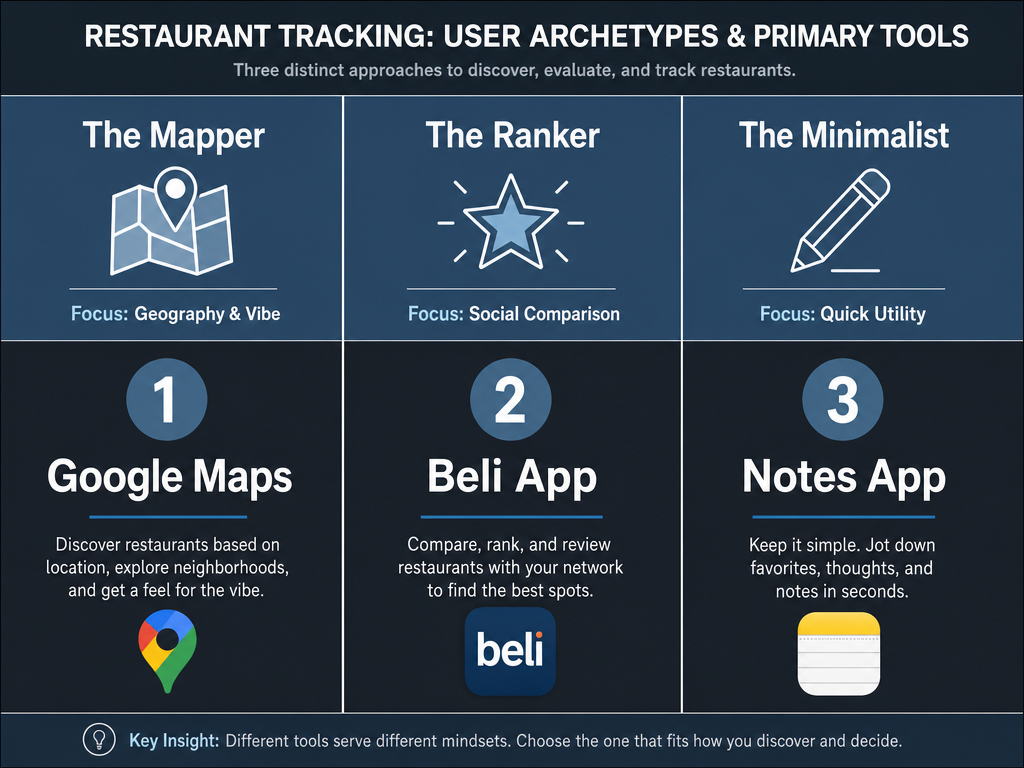
Before choosing a method, you need to understand your own archetype. Most serious foodies fall into one of three categories, each with different priorities and tolerances for effort.
The Mapper values geographic organization and private control. They want to search by neighborhood, see where they've been, and maintain complete ownership of their data. They're comfortable with some manual work if it means total customization. For Mappers, building a personal restaurant library becomes a core part of their dining ritual.
The Ranker loves social validation and gamification. They want to compare notes with friends, see how their top restaurants stack up, and get recommendations based on shared taste profiles. They're willing to sacrifice some privacy for community features. Rankers often gravitate toward social food review platforms that turn dining into a shared experience.
The Minimalist wants the lowest-friction solution possible. They'll take a photo and jot quick notes, but they won't spend 10 minutes filling out a detailed form. They're less concerned with perfect organization and more focused on capturing enough detail to trigger the memory later. For Minimalists, organizing food photos in a way that requires minimal ongoing effort is essential.
Most tracking systems favor one archetype over the others. The key is recognizing which one you are before committing to a platform.
The Manual Master System
If you're a Mapper, your ideal solution probably already lives on your phone: a combination of native tools and a structured template. This isn't sexy, but it's powerful. You maintain complete control, avoid platform lock-in, and never worry about an app shutting down and taking your data with it.
Notion as Your Culinary Database
Create a database in Notion with these properties:
- Dish Name (text)
- Restaurant (text)
- Neighborhood/City (select)
- Cuisine Type (multi-select: Italian, Japanese, Mexican, etc.)
- Star Rating (select: 1-10 scale)
- Price (number)
- Date Visited (date)
- Who I Was With (text)
- Next Time Order (text - critical field)
- Photo (file)
The magic is in the "Next Time Order" field. This is where you note what worked and what didn't: "Skip the meatballs. Double order the rigatoni. Ask for extra chili oil." This turns your database from a passive archive into an active playbook.
Notion's filtering lets you search by neighborhood, cuisine, or rating. You can create a "10-Star Dishes" view or a "Next Time I'm in Brooklyn" collection. It requires discipline, but the payoff is a system that works exactly how you think. For those interested in a comprehensive framework, the guide on how to build a personal dish tasting database offers a detailed blueprint.
Google Maps as Your Geographic Archive
Google Maps lets you save places, add notes, and organize into custom lists. Here's the workflow:
- After the meal, open Google Maps and find the restaurant
- Save it to a custom list (e.g., "Brooklyn - Tried & Loved")
- Add a detailed review in the notes section with dish names and ratings
- Star it if it's a place you'd return to
The limitation? Google Maps is restaurant-level, not dish-level. You'll remember you loved the place, but you might not remember which specific item made it special. That's where your phone's Notes app becomes the companion - one note per restaurant, with dish-level detail. Link to your Google Maps list at the top, and you've got a free, searchable, geographically organized system.
The trade-off is effort. Every entry is manual. There's no autocomplete, no social features, no algorithmic suggestions. But for Mappers, this is a feature, not a bug.
The Social Ranking Approach
If you're a Ranker, you want an app that does the heavy lifting while creating a shareable experience. Beli has become the standard-bearer for this approach, reaching the #56 spot in the Food & Drink category on the App Store with over 17,000 ratings averaging 4.8 out of 5.
How Beli Works
Beli is built around a simple premise: rank your favorite restaurants. After you dine, you add the restaurant to your list and assign it a position. Number one is your absolute favorite. Everything else falls in order below it. As you eat at new places, you constantly re-evaluate: does this new spot crack the top 10? Does it dethrone your former number three?
The social layer is where Beli shines. You can follow friends, see their rankings, and compare overlap. The app generates a "Taste Match" score, showing how aligned your preferences are with other users. When planning dinner with friends, you can pull up your collective top spots and find consensus. Beli also lets you create themed lists - best brunch, best pizza, best date spots - so you're not comparing apples to oranges.
The Ranking Fatigue Problem
Beli's strength is also its weakness. Forcing everything into a single ranked list works brilliantly when you have 20 restaurants. It becomes exhausting at 200. How do you rank a perfect omakase experience against the best taco truck in your neighborhood? They're incomparable. Many users hit a wall where they start creating dozens of micro-lists (Best Italian in Manhattan, Best Ramen in LA) just to avoid the apples-to-oranges trap.
Beli also doesn't focus on dish-level detail. You're ranking the restaurant, not the specific menu items. If a place has one transcendent dish and three mediocre ones, you're left with an imprecise overall ranking.
For social ranking with slightly less pressure, apps similar to Beli exist across different platforms. Some focus more on collaborative lists, others on local discovery. The key is deciding if you want public social validation or a private personal archive.
The Private Visual Journal
For Minimalists who want something more robust than their camera roll but less work than a manual database, Memolli offers a middle path. It's designed around visual memory - the idea that you'll remember a meal better by seeing the photo than by reading your notes.
Memolli's core feature is fully offline logging with automatic sync, meaning you can capture details at the table without worrying about connectivity. The interface is deliberately simple: photo, restaurant name, quick notes, rating. That's it. There's no social layer, no public reviews, no pressure to write a mini-essay. It's a private diary, not a recommendation engine.
The app's strength is speed. You can log a meal in under 30 seconds. Take a photo, tap the restaurant (autocomplete from your location), assign a star rating, and move on. If you want to add notes about specific dishes, you can, but it's not required. The timeline view shows your meals chronologically, creating a visual "foodprint" of your dining life.
Minimalists appreciate Memolli because it removes friction. There's no ranking anxiety, no comparing your taste to others, no algorithmic feed. It's just you and your meals. The downside? Limited search and filter capabilities compared to more robust systems. If you're trying to remember what you ate six months ago in Barcelona, you'll be scrolling through a timeline rather than querying a database.
For those looking for alternatives with similar simplicity but different features, exploring the best apps to track favorite dishes can reveal options that balance ease of use with more granular tracking.
The Pro Workflow: Non-Negotiables
Regardless of which system you choose, these practices separate casual food photo takers from serious curators.
The Menu Capture
Before you order, take a photo of the menu. Not because you'll reference it later (though you might), but because it creates a contextual anchor. When you scroll through your photos weeks later, seeing the menu immediately before the dish photos triggers the memory: "Oh right, that was the place with the weird appetizer section and the $40 dry-aged ribeye."
This is especially critical when traveling. You ate at five restaurants in Tokyo. Two weeks later, you have 50 food photos and no idea which dish came from which restaurant. The menu photo is your Rosetta Stone.
Geotagging: Ensure It's On
Check your phone's camera settings and make sure location data is enabled for photos. This seems obvious, but many people disable it for privacy without realizing they're crippling their ability to search later. Geotagged photos let you filter by location in your phone's native Photos app: "Show me every meal I photographed in Rome."
Without geotags, your only organizational tools are date and manual albums. With geotags, your phone becomes a geographic food diary automatically.
The "Next Time" Note
This is the most underutilized but most valuable practice: immediately after the meal, write down what you'd order differently next time. Not just what you loved, but what you'd skip.
"The spicy rigatoni was a 10. The meatballs were a 6 - underseasoned and too dense. Next time, get two pasta dishes and skip the meat entirely. Also, the house red was better than the overpriced Super Tuscan."
These notes sound simple, but they're the difference between a static photo archive and a dynamic decision-making tool. Most people don't take notes at all. The ones who do write, "Everything was amazing!" which is useless six months later when you're trying to decide what to order. For a structured approach, the guide on how to write restaurant reviews offers techniques that apply to personal notes as well.
Phone Integration Hacks
Your phone's native features are more powerful than most people realize. Here's how to use them without a dedicated app.
Visual Look Up (iPhone) and Google Lens (Android)
Apple's Visual Look Up and Android's Google Lens can identify objects in your photos, including food. If you took a picture of a dish but can't remember what it was called, open the photo and tap the info button. If the AI recognizes the food type, it'll offer suggestions. This works better with visually distinctive dishes (sushi, pizza, certain desserts) than with generic preparations, but it's a surprisingly useful fallback when your memory fails.
You can also search your Photos app directly by typing food keywords: "pizza," "sushi," "pasta." The AI scans your images and returns matches. It's not perfect - it might confuse a ramen bowl with pho - but it's better than manually scrolling through thousands of photos.
Smart Albums
Create a smart album in your phone's Photos app that automatically collects food photos. On iPhone, you can't create fully custom smart albums without third-party apps, but you can use the built-in "Food & Drink" category. Open Photos, tap the Albums tab, and scroll down to Media Types. If "Food & Drink" isn't showing, your phone hasn't recognized enough food photos yet. Keep taking pictures, and it'll eventually populate.
On Android with Google Photos, you can search by category and then save that search as a shortcut. Type "food," and Google will show every photo it thinks contains a meal. You can refine by adding location: "food in Brooklyn" or "food in Paris."
The limitation of both systems is that they're reactive, not proactive. They don't help you organize in real time; they just make searching easier after the fact.
Shared Albums for Group Dining
If you dine with a regular group, create a shared album (iCloud Shared Albums or Google Photos Shared Albums) where everyone uploads their food photos. This creates a collective memory bank. When someone asks, "Where did we go for that amazing pasta last month?" you have a shared archive to reference.
Label the album clearly: "2026 NYC Dining" or "Paris Trip Food." This prevents it from becoming a dumped mess of everyone's random photos. Set a rule: only food photos from meals together get added.
What is the easiest app to track meals?
The easiest app depends on what "easy" means to you. If easy means low friction at the moment of capture, Memolli wins. You take a photo, tap the restaurant name from an autocomplete list, assign a quick star rating, and you're done. No fields to fill, no social pressure, no ranking anxiety. The entire process takes less than 30 seconds.
If easy means minimal ongoing maintenance, Google Maps saved places with quick notes is hard to beat because you're already using Google Maps to navigate. After the meal, open the app, save the restaurant to a custom list, and add a sentence or two in the notes. No separate app to download, no new habit to form. It integrates into your existing routine.
If easy means not having to remember anything manually because the app does it for you, then Beli offers a streamlined experience focused on ranking rather than detailed logging. You don't have to remember dish names or write reviews - you just decide where a restaurant ranks relative to your other favorites.
The hardest but most customizable option is Notion or Apple Notes with a structured template. It requires discipline, but the payoff is a system that works exactly how you think, with no algorithm or app developer deciding what fields matter.
How to track restaurant food at the dish level
Tracking at the dish level - not just the restaurant - requires a different mindset and different tools. Most review apps focus on the venue: you write one review, assign one rating, and move on. But the best restaurants often have a mix of exceptional and mediocre dishes. If you only track at the restaurant level, you lose the granularity that makes the system useful.
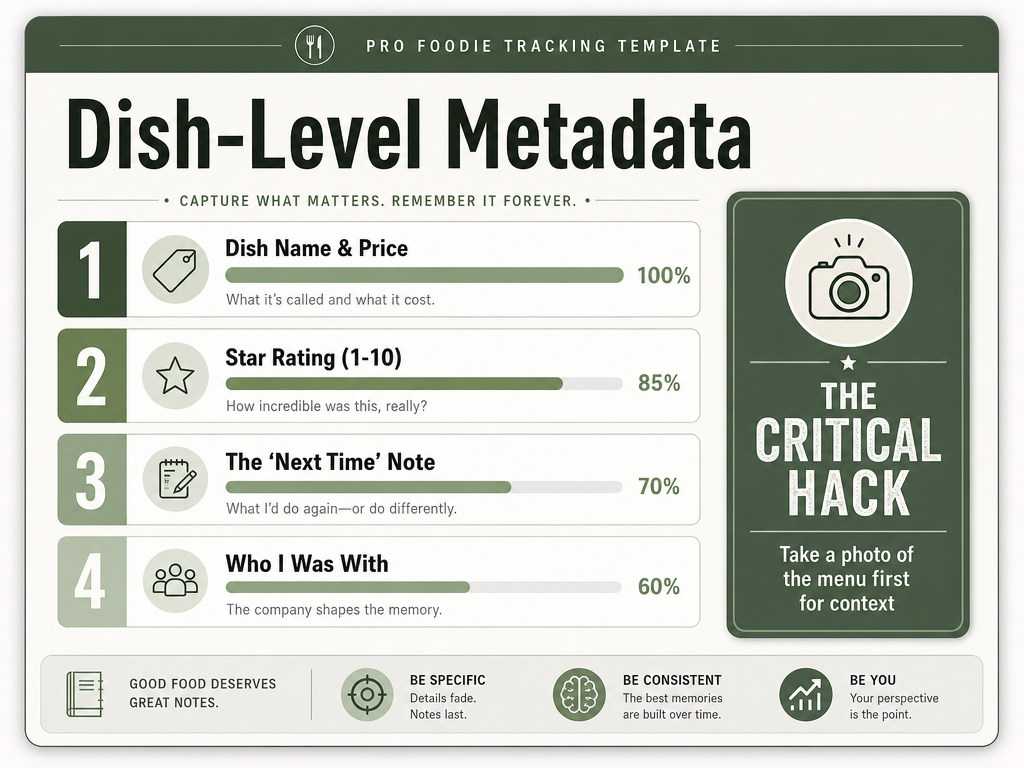
The Metadata Checklist
To track dishes effectively, you need to capture:
- Dish name (as written on the menu, not your interpretation)
- Specific rating (10-point scale works better than 5-star because it allows more nuance)
- Flavor notes (sweet, salty, spicy, umami, bitter - or more detailed descriptors if you're into that)
- Texture notes (crispy, creamy, chewy, etc.)
- Would order again? (yes/no/maybe)
- Modifications made (extra spicy, no cilantro, etc.)
This level of detail sounds excessive, but it's the difference between "I loved that restaurant" and "I loved the duck confit but hated the meatballs." One is a vague sentiment; the other is actionable intelligence. For a comprehensive approach, how to track dishes loved at restaurants provides a step-by-step framework.
Photo Organization Strategy
When photographing multiple dishes, follow this sequence:
- Menu photo (context)
- Full table shot (shows everything you ordered)
- Individual dish close-ups (one per dish, from the same angle for consistency)
This creates a visual narrative. The menu photo anchors the memory, the table shot shows the overall spread, and the close-ups provide detail. When you scroll through your camera roll later, this sequence makes it obvious which photos belong to the same meal.
Label your photos immediately if your app allows it. In Apple Photos, you can add captions directly. In Google Photos, you can add descriptions. A simple label like "Rigatoni - 10/10" takes five seconds and makes future searching effortless.
What is the best app for keeping track of restaurants?
The best app for keeping track of restaurants depends on whether you prioritize social discovery, private organization, or comprehensive data control.
For Social Discovery: Beli
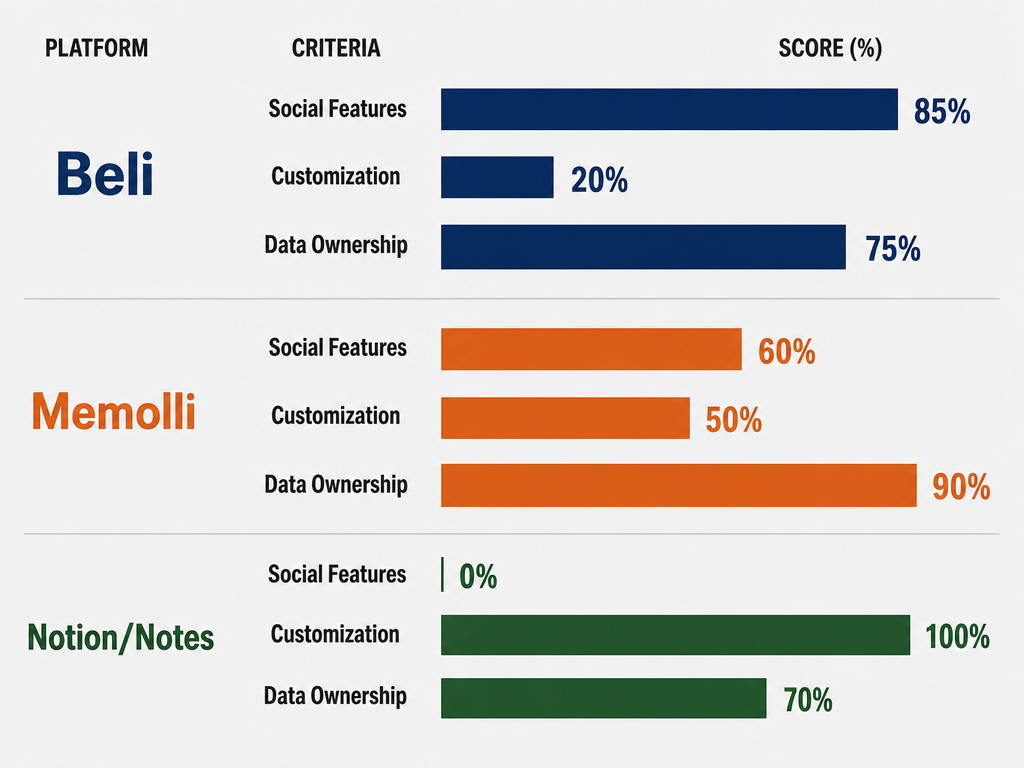
If you want to see what your friends are eating, compare taste profiles, and maintain ranked lists, Beli is purpose-built for this. The app's social features turn dining into a shared experience. You can create collaborative lists for group trips, follow food-obsessed friends for recommendations, and use the Taste Match algorithm to find people with similar preferences. The trade-off is that your data lives in a proprietary system with limited export options.
For Private Organization: Notion or Apple Notes
If you want complete control and don't care about social features, a manual system in Notion or Apple Notes gives you unlimited customization. You define the fields, the organization, the filters. You can export your data anytime in multiple formats. The trade-off is effort - every entry is manual, and there's no autocomplete or algorithmic assistance. This approach is detailed in how to organize restaurant photos.
For Visual Memory: Memolli
If you think in images and want a frictionless capture process, Memolli prioritizes speed and visual recall. It's designed for people who don't want to write essays about every meal but still want something better than an unsorted camera roll. The trade-off is limited filtering - you can browse chronologically or by simple tags, but you can't build complex queries like "show me all Italian dishes rated 9 or higher that I ate in Brooklyn."
For Geographic Mapping: Google Maps
If you organize your world geographically and want to see your dining history on a map, Google Maps' saved places feature is unmatched. You can create custom lists (e.g., "NYC - Must Return," "Paris - Tried," "Tokyo - Want to Go"), drop pins for every restaurant, and add notes. The map view shows your culinary footprint across a city or country. The trade-off is that it's restaurant-level, not dish-level, unless you write detailed notes manually. Those interested in location-based organization often benefit from how to organize restaurant dishes by country.
There's no single "best" app. The right choice depends on your archetype and what you value most: social connection, data ownership, ease of use, or geographic visualization.
Frequently Asked Questions
What is the 30/30/30 rule for restaurants?
Some restaurant operators use a general guideline for cost allocation where roughly equal portions of revenue go to food cost, labor, and overhead expenses like rent and utilities, with the remainder as profit margin. For diners, this concept doesn't directly impact how you track meals, but understanding it helps you appreciate why certain dishes are priced the way they are.
Is there an app that can track Michelin-starred restaurants?
Most comprehensive food tracking apps let you log Michelin-starred restaurants, but they don't filter for them automatically unless you create a custom tag or list. Apps like Beli allow you to save and rank any restaurant, including Michelin-starred venues. If you want a system specifically for high-end dining, a manual Notion database with a "Michelin Stars" property (0, 1, 2, or 3) gives you precise filtering. Google Maps also works - create a custom list called "Michelin Stars" and manually add them as you dine. Those tracking high-end experiences often explore best food spotting apps for additional features.
What are the best apps for foodies?
The best apps for serious foodies fall into different categories. For discovery and reviews, traditional platforms dominate but lack dish-level granularity. For personal tracking, apps like Memolli (private visual journal), Beli (social ranking), and manual systems in Notion or Apple Notes (full customization) serve different needs. The answer depends on whether you want social features, complete data control, or minimal friction. A breakdown of options is available in best apps to share lists for foodies.
What's the most accurate food tracking app?
If "accurate" means calorie and macro tracking, apps like MyFitnessPal or Cronometer excel because they use extensive food databases verified by nutritionists. But if "accurate" means accurately capturing your personal dining experiences with dish-level detail, no automated app does this - you need a manual or semi-manual system where you control the inputs. Accuracy in food memory requires you to log specific details (dish name, flavor notes, modifications) immediately after eating, regardless of which app you use. Samsung Food's Vision AI attempts automated calorie recognition, but its reliability varies significantly depending on dish complexity, as explored in Samsung Food Vision AI review.
What is the #1 food tracking app?
There's no single "#1" because different apps serve different purposes. For calorie tracking, MyFitnessPal has dominated for years due to its massive food database. For restaurant tracking with social features, Beli has strong user ratings and growing adoption. For private culinary archiving, manual systems in Notion or structured notes apps offer unmatched flexibility. The "#1" app is whichever one matches your specific workflow and priorities. If you want a comprehensive comparison, best apps to track restaurant meals breaks down options by use case.
Tracking your favorite restaurant dishes isn't about obsessive documentation - it's about building a personal culinary archive that actually serves you. It's the difference between having 2,847 unlabeled food photos and having a searchable database of every exceptional meal you've eaten, complete with notes on what to order next time.
The system you choose matters less than the consistency with which you use it. Whether you opt for the manual control of Notion, the social features of Beli, the visual simplicity of Memolli, or the geographic mapping of Google Maps, the key is capturing the right details at the right time: dish name, specific rating, and actionable notes for your next visit.
Your camera roll doesn't have to be a graveyard. With the right workflow and tools, it can become the foundation of a culinary memory system that makes every future meal better than the last.