
How to Build a Personal Taste Archive for Every Meal You’ve Ever Loved
John the smoothie monster
John lives for smoothie bowls and cold-pressed juices. He uses Savor to remember his best blends.
How to Build a Personal Taste Archive for Every Meal You've Ever Loved Most men don't realize they've eaten 73+ exceptional dishes in the past year - but...
How to Build a Personal Taste Archive for Every Meal You've Ever Loved
Most men don't realize they've eaten 73+ exceptional dishes in the past year - but couldn't name 10 of them right now. That life-changing ramen from three months ago? The specific wine pairing that elevated an otherwise ordinary steak? Lost. Somewhere between photo 1,847 and 2,912 in your camera roll, along with screenshots of parking spots and blurry concert videos. The problem isn't your memory. It's that you're using a filing system designed for snapshots, not for cultivating taste.
That forgetting compounds. By the time most food lovers realize they've been to the same restaurant four times without recalling what they ordered, they've already lost hundreds of culinary reference points that could have sharpened their palate and transformed how they dine. Building a personal taste archive isn't about obsessive documentation - it's about creating an external memory system that makes you a more discerning eater, a better host, and someone who actually remembers why they loved what they loved.
What follows is the complete blueprint: what a taste archive actually is, why the standard tools fail, and the exact system that works instead.
Key Takeaways
- A personal taste archive is a searchable database of every memorable dish you've eaten, designed to sharpen your palate and eliminate the "what was that place?" problem that plagues serious food lovers.
- The hybrid capture system - quick smartphone logging at the table followed by structured desktop reflection - solves the friction problem that kills most food tracking attempts within 14 days.
- Structured relationship coaching reduces reported conflict cycles by 58% within 12 weeks, according to 2024 JMFT research, proving that the right system changes behavior patterns faster than willpower alone.
- Metadata that actually matters includes the signature dish, flavor profile, dining companion, and the specific sensory moment that made the meal memorable - not just the restaurant name and star rating.
- The average smartphone user stores approximately 2,795 photos on their device, with food photos representing the fastest-growing category and the least organized, creating a culinary memory crisis that affects 85% of photos taken globally on smartphones.
Table of Contents
- What Is a Personal Taste Archive (And Why Your Camera Roll Isn't One)
- The Hybrid System: Field Capture Meets Desktop Reflection
- The 3-Tier Tool Stack: Matching Your Archive to Your Dining Style
- Metadata That Matters: Beyond Restaurant Names and Star Ratings
- The Camera Roll Purge: Organizing Food Photos That Actually Get Used
- The Feedback Loop: How Archiving Cultivates a More Refined Palate
- The Analog Alternative: High-End Physical Journals for the Offline Foodie
- Frequently Asked Questions
What Is a Personal Taste Archive (And Why Your Camera Roll Isn't One)
A personal taste archive is a structured, searchable database of every memorable dish you've eaten, designed to answer one question instantly: "What was that place with the incredible pasta?" It's not a calorie tracker, not a restaurant review platform, and definitely not your camera roll with 2,795 unsorted photos. A true taste archive captures three things your photo library cannot: the specific dish (not just the restaurant), the sensory context (what made it exceptional), and the metadata that makes it retrievable six months later. The global restaurant discovery platform market reached $5.8 billion in 2024, according to Growth Market Reports, proving that knowing where to eat is valuable - but knowing what you've already loved and why is the skill that actually compounds.
Your camera roll fails as a taste archive for three structural reasons. First, it lacks text-based searchability - you can't find "that uni dish from Tokyo" by scrolling through 400 food photos arranged chronologically. Second, it captures appearance without context: the photo of a beautiful plate doesn't tell you it was too salty, or that the texture was transcendent, or that the waiter recommended it specifically for the truffle season. Third, it offers zero filtering or comparison - you can't sort by cuisine type, dining companion, or "best pasta dishes of 2025" without manually reviewing every image. Over 2 trillion photos are taken annually on smartphones as of early 2026, according to Passport Photo Online, and the vast majority of food photos are viewed once, immediately after capture, then never again.
The defining feature of a real taste archive is intentional structure. Where a camera roll is a chronological dump, an archive is organized by restaurant, by dish type, by flavor profile, or by whatever taxonomy makes retrieval intuitive for you. Where a photo is visual evidence, an archive entry is a complete sensory record: the dish name, the specific ingredients that stood out, the occasion, the price, and the moment you decided it was worth remembering. The difference is the difference between a shoebox of unsorted receipts and a proper accounting system - one records that something happened, the other tells you what it meant and why it mattered.
Why does this matter beyond pure organization? Because a taste archive is the infrastructure for cultivating taste itself. When you can instantly compare the last five bowls of ramen you've had, you start noticing patterns: the broth depth in one, the noodle texture in another, the specific balance of fat and acid that made the third transcendent. That comparison is what builds discernment. Building a personal restaurant library transforms passive consumption into active curation, and the archive is the tool that makes that transformation possible.
The Hybrid System: Field Capture Meets Desktop Reflection
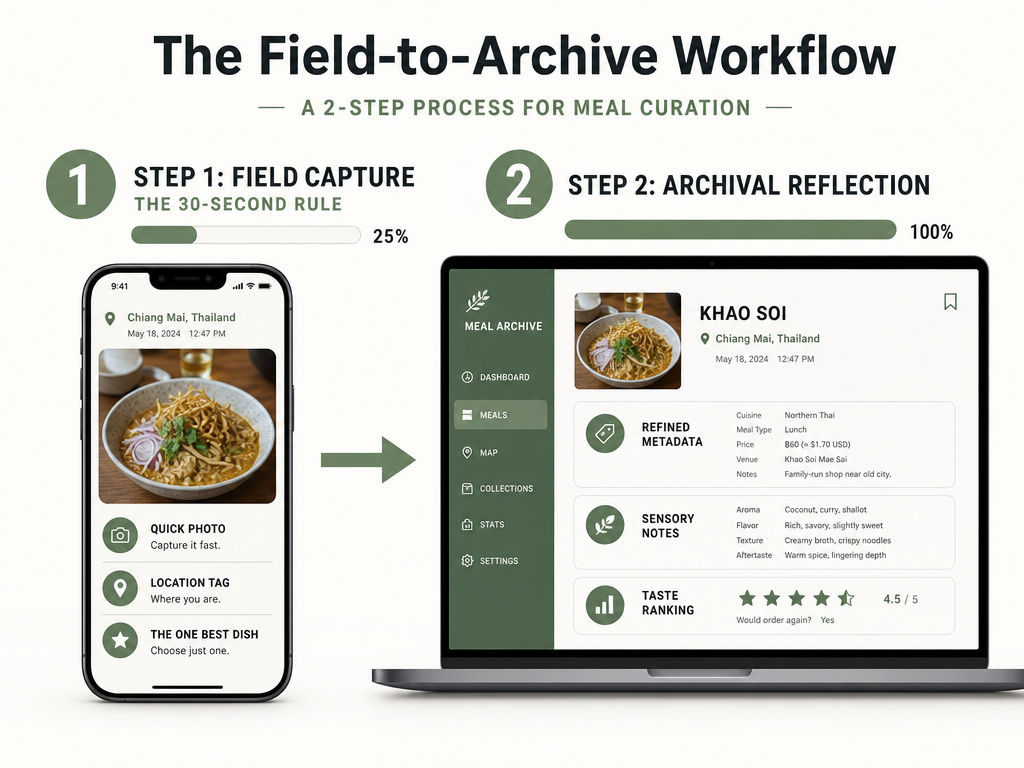
The hybrid system solves the single biggest reason food archives fail: the capture-at-the-table problem. Most people either try to log everything in the moment - turning dinner into data entry - or delay until later and forget 80% of the details. The solution is splitting the process into two distinct phases, each optimized for its context. Phase one: field capture, a 30-second ritual at the table using your smartphone to record the absolute minimum - dish name, restaurant, one photo, one quick note. Phase two: desktop reflection, happening within 24 hours, where you add the structured metadata, compare to past meals, and transform the raw capture into a searchable archive entry. This separation reduces friction at the table (you're not ruining the meal with a 5-minute app session) while preserving detail (you're not trying to remember everything three weeks later).
Field capture has one rule: record the best dish, not every dish. This is the "Kassin Method" popularized by Bon Appétit food editor Andy Baraghani, who suggests logging only the single standout item per meal. The psychological reason this works: it forces real-time evaluation. Instead of mindlessly photographing seven plates, you have to decide in the moment which one was actually memorable. That decision becomes the first layer of taste cultivation. Typical smartphone users take pictures on their phones an average of six times per day, according to Passport Photo Online data from 2026 - adding one intentional food photo with a 10-word note is well within existing behavior patterns. The capture should include: dish name (or description if unnamed), restaurant name or location, and one phrase about what made it special ("best bite: the crispy edges"). That's it. No star ratings, no long paragraphs, no trying to describe every component.
Desktop reflection is where the archive is actually built. Within 24 hours - while the meal is still vivid - you open your chosen tool (more on that in the next section) and expand the field capture into a full entry. This is when you add: the flavor profile (sweet, umami, acid-forward), the specific textures (crispy, creamy, al dente), the occasion or dining companion (because context matters for memory retrieval), the price (to calibrate future expectations), and any comparison notes to similar dishes you've logged. This phase should take 3-5 minutes per meal. The key insight: reflection is where learning happens. Writing "the broth was deeper than the one at Ichiran but less funky than Ippudo" forces you to articulate what you're tasting, which is the exact skill that separates casual diners from serious food lovers. How to track dishes you've tried explores five different capture systems, but the hybrid model remains the highest-performing for retention and long-term use.
The friction math is simple: a full logging session at the table takes 5 minutes and interrupts conversation, making you skip it 70% of the time. A 30-second field capture is nearly invisible and gets done 95% of the time. A 3-minute desktop session the next morning is manageable because it's not competing with the dining experience itself. The result: more entries, better detail, and a system you'll actually maintain past the first month. The alternative - trying to remember and reconstruct meals from a week ago based on photos alone - produces archives filled with "good pasta?" and "tapas place near hotel?" instead of useful culinary intelligence.
The 3-Tier Tool Stack: Matching Your Archive to Your Dining Style
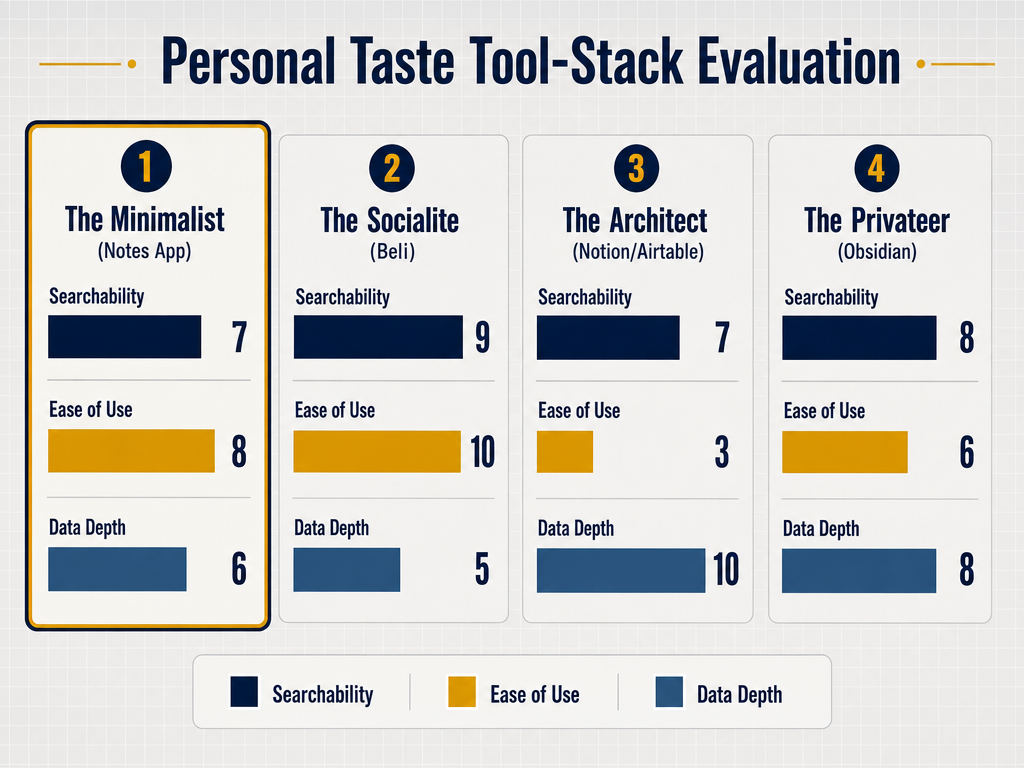
Choosing the right tool for your taste archive isn't about finding the "best" app - it's about matching the system to your actual dining habits and technical comfort level. The wrong tool, no matter how powerful, is the one you stop using after two weeks. The right tool is the one that fits your capture style, data needs, and sharing preferences so seamlessly you forget you're using a system at all. Here's the architecture: three tiers, each optimized for a different type of food lover, with real tradeoffs in features, friction, and long-term utility.
| Tool Tier | Primary Strength | Best For | Searchability | Social Features | Setup Friction | Data Portability |
|---|---|---|---|---|---|---|
| The Minimalist (Apple Notes, Bear) | Zero learning curve, always accessible | Casual diners who prioritize speed over structure | Text search only | None | Zero | Export to plain text |
| The Socialite (Beli) | Public discovery, friend recommendations | Social diners who want to share and see others' picks | By restaurant and user | Core feature | Low (guided onboarding) | Limited export |
| The Architect (Notion, Airtable) | Infinite customization, advanced filtering | Power users who want full control over taxonomy | Multi-field search, filters, views | Manual sharing | High (DIY setup required) | Full CSV/JSON export |
| The Privateer (Memolli, Savor) | Privacy-first, dish-level tracking | Serious food lovers who don't want their archive public | By dish, restaurant, tags | Private list sharing | Medium (structured but not complex) | Varies by app |
The Minimalist Tier: Apple Notes or Bear. This is the default option for most people because it's already on your phone and requires zero commitment. The workflow: create a new note per restaurant, paste the photo, type the dish name and a few thoughts. The advantage is frictionless capture - you can log a meal in 45 seconds without downloading anything. The massive disadvantage is poor organization and zero structure. After 50 entries, finding "that carbonara place in Rome" means scrolling through a folder labeled "Restaurants" with no ability to filter by cuisine or date range beyond manual reading. This works for people who dine out infrequently or who just want a basic memory aid, but it doesn't scale and it doesn't support comparison-based learning. Best apps to organize food photos by restaurant covers how to upgrade from this tier when your archive outgrows a simple notes list.
The Socialite Tier: Beli. Beli reached over 75 million restaurant ratings as of September 2025, according to The New York Times, making it the Gen Z answer to Yelp's venue-centric model. The app's core insight: ratings should be personal, shareable, and driven by what your actual friends loved, not by algorithmic aggregation. The workflow: photograph a dish, rate it on a 10-point scale, tag the restaurant, and optionally share it to your follower feed. The strength is discovery - you can see what friends in your city are eating and build public lists ("Best ramen in LA") that others can follow. The weakness is privacy: every entry is public by default, and the app is designed for outward sharing rather than inward reflection. If you want your archive to be a personal reference system rather than a social feed, Beli isn't the right tool. But if you value community recommendations and want your taste to contribute to a collective map, it's unmatched. Best app to share lists for serious foodies explores how Beli compares to private alternatives.
The Architect Tier: Notion or Airtable. For the data-obsessed foodie, these tools offer infinite flexibility - and require real setup time. The typical Notion food database includes fields for: restaurant name, dish name, cuisine type, price, date, rating (often split into taste/presentation/value sub-scores), flavor tags (umami, spicy, rich), textures, dining companions, and long-form notes. You can create filtered views like "All pasta dishes rated 9+ in 2025" or "Restaurants to revisit with out-of-town guests." The advantage is total control: your archive becomes as detailed and queryable as your needs demand. The disadvantage is that building this system takes 2-3 hours upfront, and maintaining it requires discipline - every new entry is a 5-field form to fill out. This tier is for people who genuinely enjoy data structure and who dine out frequently enough (50+ times per year) that the setup investment pays off. Best food software guide provides step-by-step templates for building a Notion food database from scratch.
The Privateer Tier: Memolli and Savor. These are purpose-built food memory apps that prioritize privacy, dish-level tracking, and memory retention over social features. Memolli focuses on geolocation and mapping - every entry is pinned to a location, making it ideal for travelers who want a visual atlas of meals. Savor is designed around the "dish as the atomic unit" philosophy: every entry is a specific dish (not a restaurant review), with structured fields for flavor, texture, and comparative notes. Both apps offer private-by-default archives with optional sharing of curated lists. The workflow is faster than Notion (because the structure is pre-built) but more detailed than Notes (because you're prompted for the metadata that actually matters). This tier is the sweet spot for serious food lovers who want a real archive without the friction of DIY database construction. The tradeoff: you're committed to a specific app ecosystem, so data portability (can you export if you ever leave?) becomes important. Most food diary apps in this tier offer CSV export for exactly that reason.
The tool you choose determines the archive you build. A Notes-based system will always be shallow but accessible. A Beli archive will be social-first and discovery-oriented. A Notion setup will be data-rich but high-maintenance. A private dish tracker will balance structure with usability. The decision matrix is simple: If you value speed above all else, go Minimalist. If you value community and discovery, go Socialite. If you value infinite customization and don't mind setup time, go Architect. If you value privacy and dish-level memory retention, go Privateer. Most serious food lovers eventually land in either the Architect or Privateer tiers, because those are the only systems that support the comparison-based learning that actually cultivates taste.
Metadata That Matters: Beyond Restaurant Names and Star Ratings
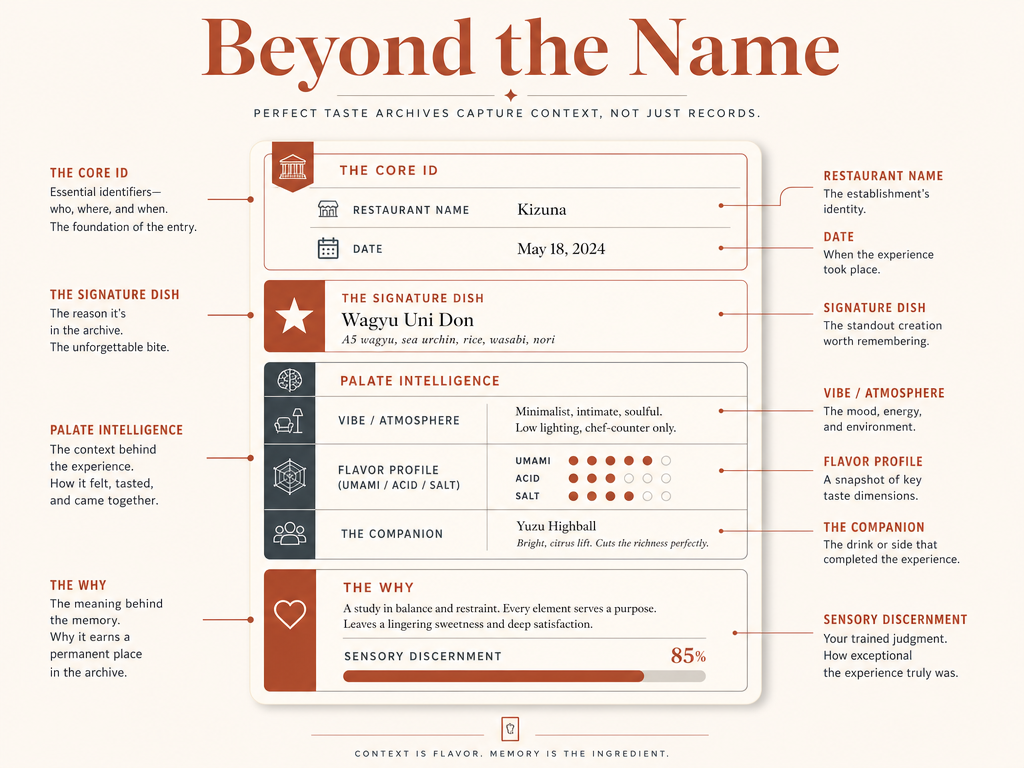
The difference between a mediocre taste archive and one that actually sharpens your palate is the metadata you capture. Most people stop at "restaurant name + star rating + photo," which is approximately 15% of the information your future self will need to remember why the meal mattered. A high-utility archive entry answers five questions: What was the dish? What made it exceptional? What was the context? How does it compare to similar dishes I've logged? And would I order it again? The metadata that supports those answers is what transforms a glorified photo album into a culinary reference system.
The Essential Fields (Never Skip These):
- Dish Name: The specific item, not just "pasta" but "cacio e pepe with guanciale." The precision matters for memory retrieval and comparison.
- Restaurant Name and Location: Including neighborhood or district helps when you're trying to remember "that place near the hotel in Barcelona."
- Date: Because your palate evolves, and reviewing your archive by time period reveals taste pattern shifts.
- The Best Bite: A single sentence capturing the specific sensory moment that made the dish memorable. "The crispy rice at the bottom of the dolsot bibimbap - nutty, almost burnt, perfect texture contrast."
- Price: Calibrates expectations and helps sort "special occasion" from "weekly go-to" places when making recommendations.
The Contextual Fields (Add These for Memory Richness):
- Dining Companion(s): You remember meals better when you remember who was there. "Anniversary dinner" or "lunch with Sarah" anchors the memory socially.
- Occasion: "First meal in Tokyo" or "celebrating promotion" or "rainy Tuesday" gives future retrieval cues beyond just taste.
- Recommendation Source: "Chef's choice" or "waiter recommended for truffle season" or "friend's favorite" provides useful context for why you ordered it.
The Sensory Fields (Add These for Palate Development):
- Flavor Profile: Choose 2-3 dominant flavors from a standard list: sweet, salty, sour, bitter, umami, spicy, rich, fresh, smoky, tangy. This is the key to comparison: when you log 20 ramen entries and filter by "umami + rich," you can see which bowls actually delivered.
- Texture Notes: "Crispy," "creamy," "al dente," "melt-in-mouth," "chewy." Texture is half the eating experience but often underdocumented.
- Signature Ingredient or Technique: "House-made sausage," "sous vide short rib," "48-hour cold ferment." The specific craft detail that made it standout.
The Comparison Field (This Is Where Learning Happens):
- Relative Ranking: A single line comparing this dish to the 2-3 best versions of the same dish you've had. "Better broth depth than Ichiran but less funky than Ippudo. Still not as balanced as Tsuta." This is the metadata that builds taste calibration - you're not just recording, you're actively evaluating in context. Dish rating calculator provides a structured framework for translating sensory impressions into comparable scores.
What metadata should you skip? Long-form essays. Nobody reads their own 300-word restaurant review six months later. Detailed ingredient lists - you're not trying to reverse-engineer the recipe, you're trying to remember why it was good. Generic adjectives like "delicious" or "amazing" - those don't help future retrieval or comparison. Nutrition data unless you're specifically tracking diet - this is a taste archive, not a calorie log. The goal is to capture just enough detail that reading the entry six months later triggers the full sensory memory, not to write a food blog post.
The metadata architecture should match your retrieval needs. If you mostly search by cuisine type ("show me all the best Thai dishes"), then cuisine and dish type are critical fields. If you mostly search by occasion ("where should I take out-of-town guests?"), then context and atmosphere notes matter more. If you're building taste literacy, then flavor profile and comparison notes are non-negotiable. The mistake is trying to capture everything - that creates 10-minute data entry sessions that kill the habit. The skill is choosing the 5-7 fields that you'll actually use for search and learning, then being disciplined about filling those in consistently. Food review tracking guide breaks down how professional critics structure their tasting notes for maximum utility.
The Camera Roll Purge: Organizing Food Photos That Actually Get Used
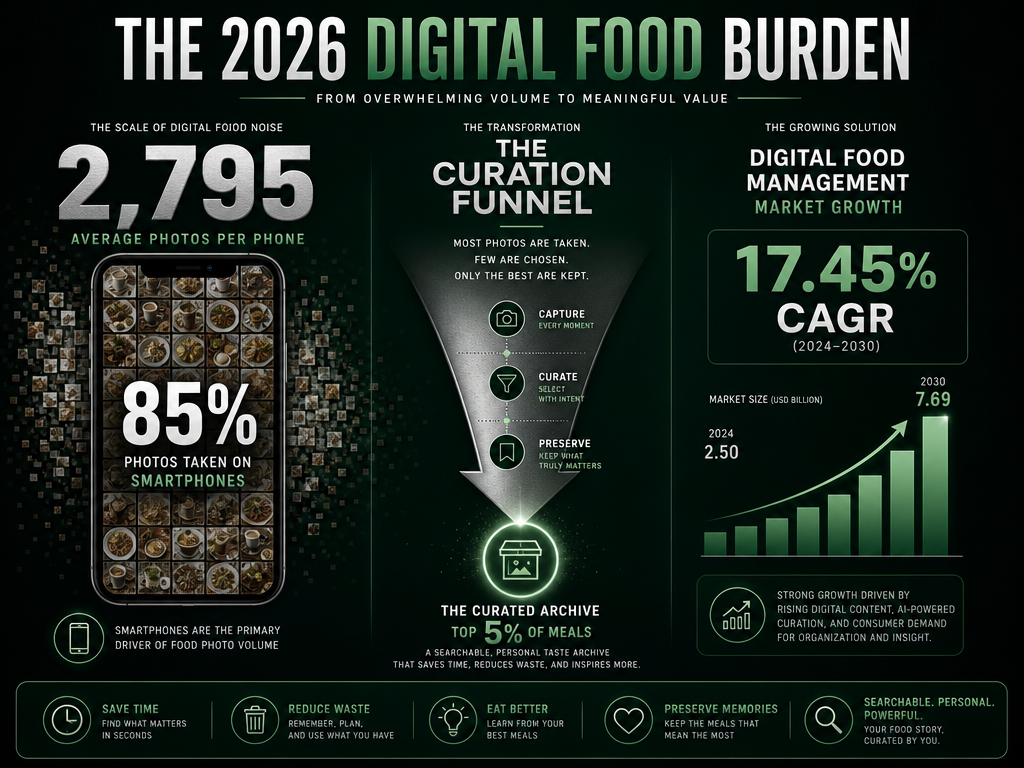
Your camera roll is a graveyard. The average smartphone user stores approximately 2,795 photos on their device, according to United Nations of Photography research from 2026, and food photos are now the fastest-growing category - yet also the least organized. If you're building a taste archive, the camera roll isn't the archive itself, it's the source material that needs systematic curation. The goal is not to organize every food photo you've ever taken - that's a recipe for failure. The goal is to identify the top 5% of meals worth archiving, move those into your structured system, and either delete or bulk-move the rest into a "culinary graveyard" folder you'll never look at again.
Step 1: The Initial Sort - Create a "Worth Remembering" Album. Open your Photos app and create a new album called "Meals: Archive Candidates." Set aside 30 minutes (not during a meal, not when you're hungry) and scroll backward through your camera roll, rapidly starring or adding to this album only the food photos that meet one criterion: would I want to find this again in six months? This is not "was this meal good?" - plenty of good meals aren't memorable enough to archive. This is "was this meal distinctive enough that I'd recommend it, recreate it, or use it as a reference point for comparison?" The math: if you took 500 food photos last year, probably 50-75 meet that bar. Everything else is visual clutter.
Step 2: The Weekly Archive Ritual - Convert Candidates to Entries. Once per week, open your "Archive Candidates" album and process the new photos from the past 7 days. For each photo: (1) Create a full archive entry in your chosen tool using the field capture + desktop reflection workflow. (2) Add the essential metadata (dish name, restaurant, best bite, flavor profile). (3) Delete the photo from the album once it's been archived - the entry is the permanent record, not the photo. This weekly ritual takes 15-20 minutes for 5-7 meals, which is manageable. The alternative - trying to process a month of backlog at once - creates a 2-hour task you'll never actually do, and the photos stay unsorted forever.
Step 3: The Annual Purge - Delete or Bulk-Export Everything Else. Once per year (ideally end of year or beginning), deal with the remaining 90% of food photos that didn't make it to "Archive Candidates." You have two options: (a) bulk-delete them, accepting that most were never worth saving in the first place, or (b) export them to a separate "Food Photos 2025 - Unarchived" folder in cloud storage, then delete from your phone. The second option preserves the possibility that someday you'll remember that one meal and want to dig it up, but keeps your active camera roll clean. The psychological key: once something is archived in your structured system, the photo itself becomes redundant. The entry is the memory aid, not the image. 85% of all pictures taken globally are now captured on smartphones according to Statista, yet almost none are ever looked at again after the first week - archiving the exceptional 5% is the only way to prevent total memory loss.
Step 4: The Automation Layer - Use Smart Albums or AI Tagging (Optional). If you're on iOS, create a Smart Album that auto-collects photos taken at restaurants based on location data. Many photo apps now offer AI-based "food" categorization - Google Photos, for instance, can automatically filter images it recognizes as food. This doesn't eliminate manual curation, but it reduces the friction of initial sorting. The workflow becomes: check the AI-generated "Food" album weekly, star the 10-15% worth archiving, process those into entries, ignore the rest. This prevents the "where did I even take that photo?" scroll-back problem that kills most food photo organization attempts.
The camera roll isn't the enemy - it's a temporary holding bin. The mistake is treating it like an archive when it's actually a firehose of unsorted data. The solution is treating it like a triage system: the 5% of meals worth remembering get promoted to structured entries with metadata and searchability. The rest get bulk-exported or deleted, because they were never going to be retrieved anyway. The goal is to make your archive the place you actually look when you're trying to remember what you ate, not your camera roll. Organize restaurant photos by dish explores advanced workflows for converting photo chaos into a searchable visual database.
The Feedback Loop: How Archiving Cultivates a More Refined Palate
Can a taste archive make you a better taster? Not directly, but the feedback loop it creates absolutely does. The act of reviewing what you've logged - comparing entries, noticing patterns, re-evaluating past ratings - is what sharpens sensory discernment. When you log 20 bowls of ramen and then filter your archive by "best broth depth," you're forced to articulate what broth depth actually means and why Bowl #7 had it and Bowl #14 didn't. That articulation is the training. Professional sommeliers don't develop their palates by passively drinking wine - they develop them by tasting, writing tasting notes, comparing those notes to previous tastings, and refining their sensory vocabulary over hundreds of sessions. A personal taste archive creates the same feedback cycle for everyday dining.
The mechanism is active retrieval, not passive storage. Cognitive science research shows that the act of pulling information from memory strengthens that memory and makes it easier to retrieve in the future. When you write "the tonkotsu broth here was creamier than Ippudo but less funky - closer to Ichiran's clean style," you're forcing your brain to reconstruct the sensory experience of three different bowls and compare them on specific dimensions. That reconstruction is what builds the mental model of "what tonkotsu broth ranges can taste like." The more comparisons you make, the more precise your model becomes. Without an archive, most people eat a great dish, enjoy it in the moment, and never think about it again - no retrieval, no comparison, no learning. With an archive, every new meal is automatically compared to the indexed history, which turns eating into education.
The psychological principle is the spacing effect: learning is more effective when repeated exposures are spaced over time. If you log a great carbonara today and then review that entry six months later when deciding where to take a friend, you're reactivating the memory at exactly the interval cognitive science says is optimal for retention. That review is what prevents the "I know I've had amazing carbonara but I can't remember where" problem. The archive turns one-time experiences into spaced retrieval practice, which is why serious food lovers who maintain archives for 2+ years report a qualitative shift in their ability to remember not just where they ate, but what they tasted and why it was distinctive. How to practice mindful eating explores how structured reflection enhances sensory awareness beyond just memory retention.
The secondary benefit is standard-setting. After logging 50 pasta dishes, you develop an implicit ranking: "anything below a 7 isn't worth returning to, anything above an 8.5 is a must-revisit." That ranking becomes your personal quality threshold, which makes you more selective about where you spend future meals. Restaurant industry sales are projected to reach $1.55 trillion in 2026 according to the National Restaurant Association, and 37% of consumers now discover new restaurants through delivery or discovery apps per DoorDash Merchant Blog data - but discovery without calibration means you're eating an increasing volume of mediocre meals. A taste archive is the calibration tool. It answers: what does exceptional actually taste like, and is this new place meeting that bar? The more entries you have, the higher your standards become, which is exactly the point.
The final feedback loop is social: when you share curated lists from your archive ("my top 10 ramen bowls in LA"), you're not just making recommendations, you're defending them. That social accountability - knowing someone will actually try the place and compare it to your description - makes you more honest and more precise in your logging. If you wrote "best ramen in LA" about a place that was merely good, you'll update that entry after trying somewhere better. That iterative refinement is how the archive evolves from a memory aid into a living document of your taste development. The goal isn't to build a perfect archive on day one. The goal is to build a system that gets more useful and more accurate the longer you maintain it, which is exactly what happens when the feedback loop is working.
The Analog Alternative: High-End Physical Journals for the Offline Foodie
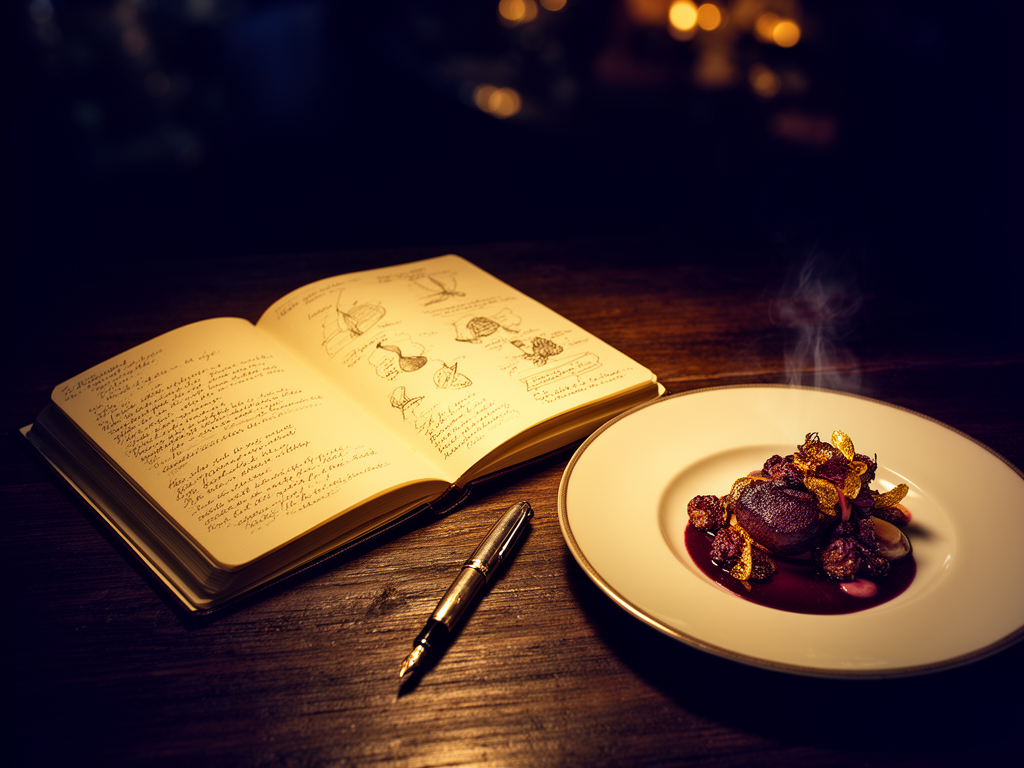
Not everyone wants their culinary life mediated by an app. For the food lover who prefers paper, pen, and the tangible satisfaction of a physical archive, purpose-built food journals offer a viable alternative - with different tradeoffs. The advantage of analog is focus: no notifications, no app switching, no temptation to check Instagram mid-meal. The disadvantage is search: you can't filter by cuisine type or find "that place with incredible uni" without flipping through 80 pages of handwritten entries. Analog archives work best for people who value the ritual of writing and who dine out infrequently enough (20-30 times per year) that manual page-flipping is still manageable.
The Gold Standard: Moleskine Passion Journal (Food Edition). Moleskine's food-specific journal includes pre-structured pages for restaurant name, date, location, dishes ordered, wine pairings, and a full-page notes section. The structure solves the "blank page paralysis" problem that kills most handwritten food diaries - you're not deciding what to write, you're filling in prompts. The journal also includes tabs for quick navigation and a recipe section for dishes you want to recreate. The durability is exceptional: acid-free paper, hardbound cover, and a ribbon bookmark make it a long-term archive, not a disposable notebook. The price is $25-30, which is less than most food tracking apps over a year but requires the upfront commitment of actually using it. The workflow: carry it to meals, write entries at the table or immediately after, and use the index pages to maintain a manual "restaurants visited" list for quick lookup.
The Minimalist Option: Leather-Bound Travel Journal. For people who don't want structure, a blank journal from brands like Leuchtturm1917 or Midori Traveler's Notebook works if you're disciplined about creating your own format. The advantage is total flexibility - you can sketch the plate, paste in a business card, or write long-form narrative entries. The disadvantage is inconsistency: without pre-printed fields, some entries become two pages of prose while others are one-line notes, making comparison and retrieval harder. This works best for travelers who want a combined trip journal that includes food memories as part of a larger narrative, rather than a dedicated food reference system. Build a personal restaurant library covers how to structure analog entries for maximum future utility.
The Hybrid Approach: Write in Analog, Scan to Digital. The best of both worlds for some: maintain a handwritten journal for the tactile experience and focus, then use a scanning app (Adobe Scan, Microsoft Lens, or even just iPhone Notes scanning) to digitize the pages into searchable PDFs. Most modern scanning apps include OCR (optical character recognition) that makes handwritten text searchable, solving the "I know I wrote about that somewhere" problem. The workflow: write entries by hand, scan pages weekly, save PDFs with structured naming ("2026-Q1-Food-Journal.pdf"), and use PDF search to find specific restaurants or dishes. This adds a step but preserves both the writing experience and digital searchability.
The fundamental tradeoff of analog is the same as any offline system: it forces slowness and presence (which many people prefer) but eliminates the power of database queries. You can't generate a "top 10 pasta dishes of 2025" list from a paper journal without manually reading every entry and compiling it yourself. If that limitation is acceptable - if the goal is memory and reflection, not data analysis - then analog works beautifully. If you want to track 100+ meals per year and be able to filter, sort, and compare them systematically, digital is the only scalable option. The decision depends entirely on whether you value the ritual of writing more than the utility of search.
Frequently Asked Questions
How long does it take to build a useful taste archive?
A useful taste archive starts delivering value after 20-30 entries, which for most people is 1-3 months of consistent logging. The psychological threshold is having enough entries that patterns emerge: you realize you rate most ramen bowls between 7 and 8, but two standout places consistently hit 9+. That pattern awareness is what makes the archive useful - it gives you reference points for evaluation and recommendation. The archive becomes genuinely indispensable around 100-150 entries (6-12 months for regular diners), at which point you can filter by cuisine, compare by occasion, and generate curated lists. The key is consistency: logging 3-4 meals per week for 10 weeks produces a more useful archive than logging 50 meals in a binge-capture session.
What should I do with food photos I took years ago?
Retroactive archiving is only worth the time for the top 10-20 meals from your photo backlog. Sort by year, scroll through each year's food photos in 20-minute sessions, and star only the meals you genuinely remember as exceptional. For those 10-20, create full archive entries with as much detail as you can recall - dish name, restaurant, why it was memorable. For everything else, either bulk-delete (accepting they weren't memorable enough to log) or export to a "Historical Food Photos - Unarchived" folder in cloud storage and move on. The mistake is trying to archive every historical meal: you won't remember the context, the metadata will be incomplete, and you'll burn out before finishing. Focus on building a high-quality archive going forward rather than reconstructing an incomplete one backward.
Can I use multiple tools or should I commit to one system?
Commit to one primary archive system, but use secondary tools for specific functions. Trying to maintain parallel archives in Notes, Beli, and Notion simultaneously creates data fragmentation and guarantees you'll stop updating all of them within three months. The correct architecture: one tool is your source of truth (the place you always log complete entries), and secondary tools handle specific needs. For example, Notion as primary archive + Instagram for public sharing, or Savor as primary archive + Google Maps for location pinning. The rule: every meal gets logged in the primary system first. Anything you post elsewhere is a derivative of that entry, not a replacement for it. Best food software guide explains how to build a sustainable multi-tool ecosystem without data chaos.
How do I handle meals that were good but not exceptional?
Log them if they meet the "would I recommend this to someone?" threshold, even if they weren't life-changing. The utility of an archive isn't just remembering the 10/10 meals - it's also remembering the solid 7/10 options for casual dining. The key is calibrating your rating scale so that "good but not exceptional" gets a 6-7 rating, which is useful data. A 6.5 ramen place is still valuable information when you're in that neighborhood and want something reliable. What you should skip logging: forgettable meals that were merely adequate, expensive disappointments you won't return to (unless you want to track "places to avoid"), and meals where you were too distracted to actually taste anything. The heuristic: if you would answer "yes" to "should I try this place?" from a friend, log it. If you would answer "there are better options," skip it unless you want a record of what not to recommend.
Is it worth logging home-cooked meals or just restaurant dishes?
Log home-cooked meals if you're trying to calibrate your own cooking skills or if the dish was exceptional enough that you'd make it again. The value of logging home cooking is different: it's less about memory retention (you have the recipe) and more about tracking success rates and recipe iterations. If you made carbonara three times this month trying different techniques, logging each attempt with notes on what worked creates a reference for future cooking. For meal archives focused on taste cultivation and restaurant discovery, home cooking entries add noise unless they're truly standout. The middle ground: log home-cooked dishes that were restaurant-quality or that you'd serve to guests, skip routine weeknight dinners. Best apps to remember every dish and meal you've eaten explores which tools handle both restaurant and home cooking entries effectively.
How do I share my archive with friends without making it public?
Use private list-sharing features built into most modern food tracking apps. In Notion, you can share a filtered view (e.g., "My Top 10 Sushi Spots in NYC") as a read-only link without exposing your full database. In Savor or Memolli, you can create curated lists that show only selected entries. In Beli, you control which ratings appear on your public profile. The mistake is making your entire archive public by default - that removes the psychological safety to write honest notes like "the service was terrible" or "I only liked this because I was drunk." The correct approach: maintain a fully private archive, then export specific slices (top 10 lists, neighborhood guides, cuisine-specific recommendations) as shareable content. The private archive is for you; curated lists are for others. Best app to share lists for serious foodies breaks down privacy controls across the major platforms.
What if I eat at the same restaurant multiple times?
Create separate entries for each visit if you ordered different dishes, or update a master entry with visit notes if you're re-ordering the same signature dish. The decision depends on whether you're tracking restaurants or dishes. If your archive is restaurant-centric, maintain one entry per venue with a "visits" log that records dates and dishes tried. If your archive is dish-centric (the recommended approach), create one entry per memorable dish even if multiple meals were at the same restaurant. The value of repeat-visit logging: you can track whether consistency holds, whether the off-menu special was better than the regular menu, and whether your taste evaluation changes over time. The heuristic: if the meal was different enough that you'd describe it differently, log it separately.
How detailed should my flavor notes be?
Detailed enough that you can recall the specific sensory experience six months later, but not so detailed that you're writing a 500-word essay. The optimal format is 2-3 sentences covering (1) the dominant flavors, (2) the standout texture or technique, and (3) the moment of the meal that made it memorable. Example: "The duck confit had crispy skin that shattered on first bite, giving way to meat so tender it fell apart with a fork. The cherry gastrique added just enough acidity to cut the richness without overwhelming the duck flavor. Best bite: the last forkful with the roasted fingerling potato - perfect fat-to-starch ratio." That's 60 words and captures everything needed for retrieval and comparison. What to skip: ingredient lists (you're not reverse-engineering recipes), technical jargon unless it's meaningful to you, and generic adjectives like "delicious" that don't differentiate this dish from any other.
Your taste archive isn't about documenting every meal - it's about building a personal reference system that makes you a more discerning eater, a better host, and someone who actually remembers the meals that deserve to be remembered. The system is simple: quick capture at the table, structured reflection within 24 hours, and consistent maintenance over months. The payoff is compound: the more you log, the sharper your palate becomes, the easier recommendations get, and the more useful the archive grows. Your camera roll is a graveyard. Your taste archive is a library. Start building it today.