
How to Track Dishes Worth Reordering at Restaurants: A Complete System
Harry the matcha king
Harry is our resident matcha obsessive. He’s tasted hundreds of bowls and tracks every cup in Savor.
How to Track Dishes Worth Reordering at Restaurants: The Complete System (2026) You've had 73+ exceptional meals this year. Yet when someone asks "where should...
How to Track Dishes Worth Reordering at Restaurants: The Complete System (2026)
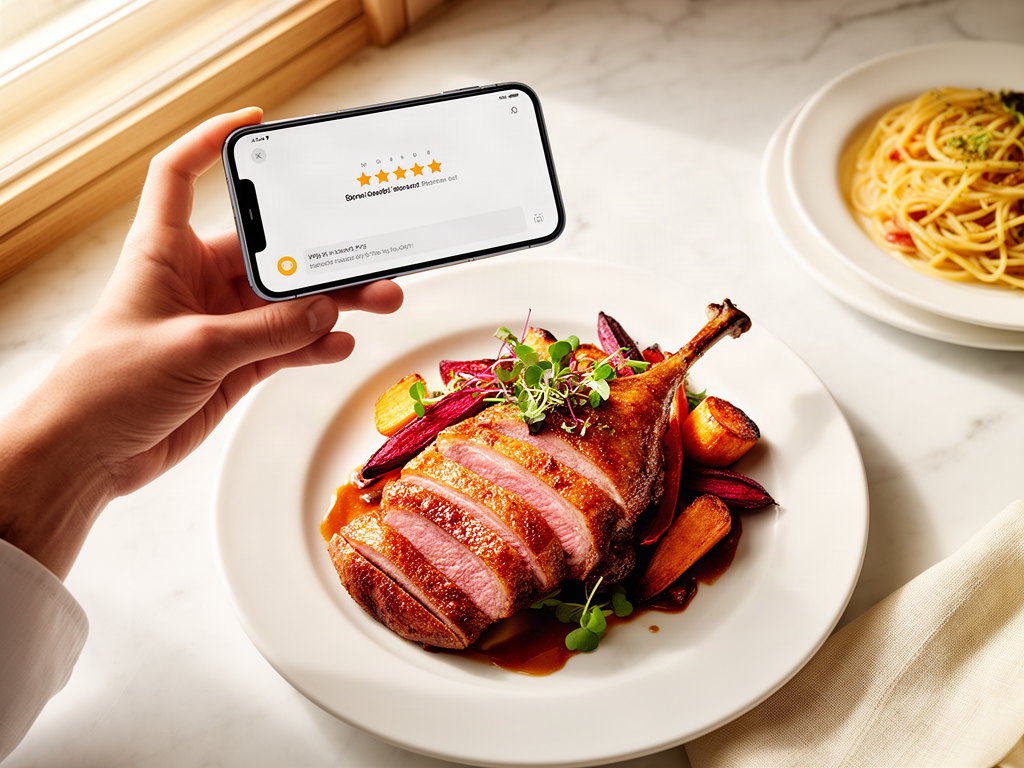
You've had 73+ exceptional meals this year. Yet when someone asks "where should I eat?", you stare blankly at your camera roll, scrolling through 2,400 unsearchable food photos, trying to remember which restaurant had that incredible duck confit.
The problem isn't your memory. It's that you're tracking the wrong thing.
Most people rate restaurants. Serious foodies rate dishes. This fundamental shift - from venue-level stars to item-level tracking - eliminates menu regret, builds reorder confidence, and turns your dining history into a searchable culinary database.
This guide provides the complete system for tracking individual dishes, not just restaurants, so you never lose another great meal.
Table of Contents
- Why Restaurant Ratings Fail You
- The Death of the Star Rating
- The Serious Foodie Stack: Choosing Your Tool
- How to Build Your Personal Rating System
- The 10-Second Logging Habit
- The Reorder Decision Framework
- Privacy vs. Social: Which Approach Fits Your Style?
- How to Transition Your Camera Roll
- Frequently Asked Questions
Why Restaurant Ratings Fail You
A 4.6-star restaurant doesn't guarantee a 4.6-star meal. The math is brutal: aggregate ratings mask individual performance.
Consider this scenario. You visit a highly-rated Italian spot. The carbonara scores a genuine 9.5 out of 10 - perfectly emulsified, guanciale rendered to translucent ribbons, black pepper with actual heat. But the tiramisu is a 4.0, and the cacio e pepe is a forgettable 6.5. The restaurant's overall rating averages these wildly different experiences into a single, misleading number.
According to research cited by Savor, 67% of diners report regretting their menu choice at least once a week due to relying on venue-wide aggregate ratings. You're not choosing poorly. You're using the wrong measurement system.
Restaurant ratings answer "Is this place good?" Dish ratings answer "What should I order when I go back?"
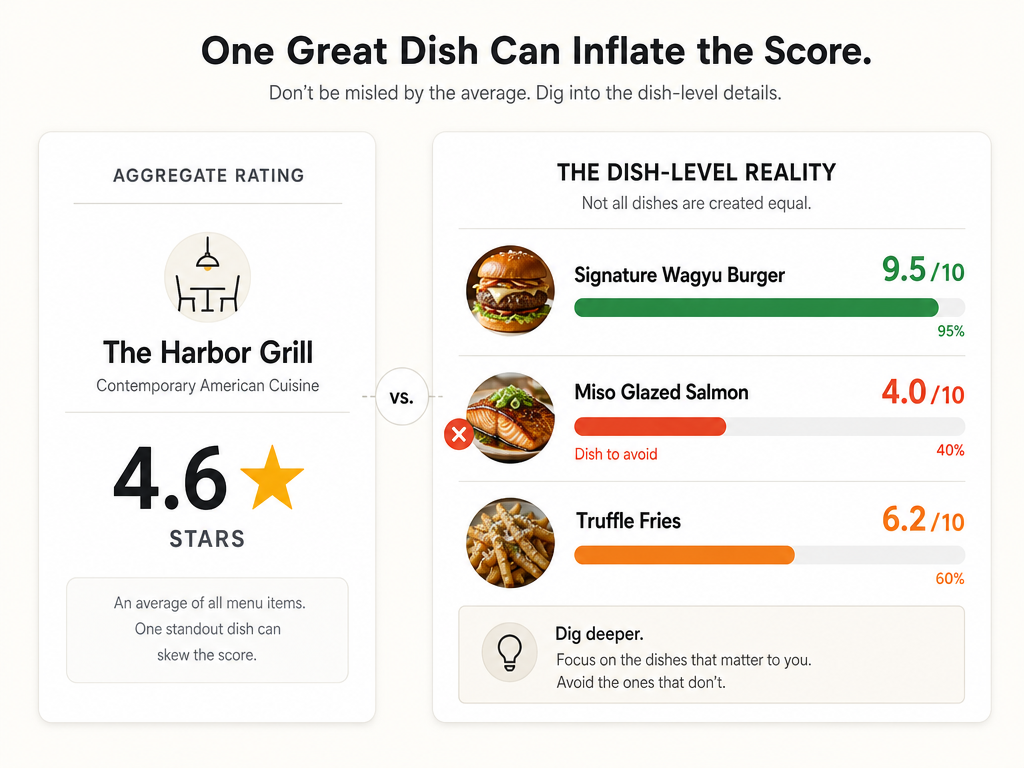 Aggregate ratings often mask mediocre meals. Dish-level tracking identifies the '9.5' signature items while helping you skip the '4.0' menu filler.
The second problem is scale. Google removes approximately 95 million fake reviews annually as of 2025. Even legitimate reviews suffer from recency bias, inconsistent standards, and the fact that most reviewers don't return to the same restaurant multiple times to verify consistency.
Your personal dish database bypasses this noise entirely. You're not crowdsourcing opinions from strangers. You're building a calibrated archive of your own taste.
The Death of the Star Rating
Stars and five-point scales collapse nuance into arbitrary buckets. Was that ramen a 4 or a 5? What's the functional difference? When you return three months later, does "four stars" tell you anything useful about what made it memorable?
Serious foodies are abandoning stars for two better systems:
The 10-Point Score: Granularity matters. A 7.5 pasta and an 8.5 pasta occupy entirely different tiers of reorder priority. The 10-point system forces you to calibrate more carefully. A dish that scores 9+ becomes a "definitive" - the benchmark against which you'll judge every future version.
Forced Comparisons: Instead of assigning an absolute number, ask "Is this better than my current #3 burger?" This method builds a living, ranked hierarchy. Your top 10 list evolves with each new meal, and context determines value.
The key is consistency. Whether you choose a 10-point scale or a ranked list, commit to a single framework and apply it every time. Switching systems mid-archive destroys your ability to compare entries months later.
The Serious Foodie Stack: Choosing Your Tool
Choosing a dish-tracking app depends on three variables: privacy preference, manual vs. automated logging, and the granularity of data you want to capture.
Tier 1: Specialized Dish-Tracking Apps
These apps are purpose-built for item-level logging, not venue reviews.
Savor: Private, dish-first architecture. You log individual plates, not restaurants. Built-in 10-point scoring, automatic photo organization, and exportable CSV data. No social features, no public reviews. Your archive belongs to you. Ideal for the privacy-conscious professional who treats food as a personal discipline, not a performance.
Beli: Social-first approach. Compete with friends' rankings, share curated lists, and discover through trusted networks. Best for users who want a leaderboard of dining achievements and value community validation. The tradeoff: your data lives in a social platform, not a private vault.
GoodEats (mygoodeats.app): Advocates for local-only, on-device storage. No cloud sync, no social sharing. Your culinary history never leaves your phone. Appeals to users with strict data sovereignty requirements, though you lose cross-device access.
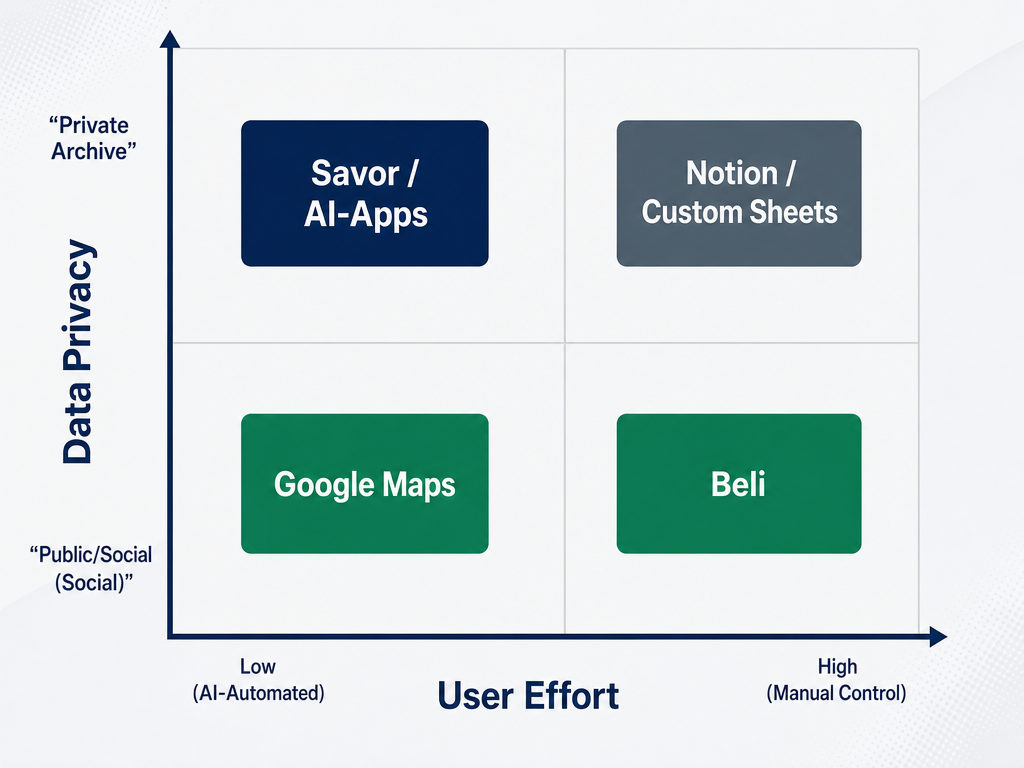 Choosing your stack depends on your goals. Automated AI tools offer the lowest friction, while custom templates offer the highest level of detail.
Tier 2: AI-Assisted General Tools
If you're unwilling to commit to a specialized app, you can retrofit existing platforms.
Google Maps "Ask Maps": Google's AI can surface photos of specific dishes from your saved locations. It's low-friction - you're likely already using Maps - but dish-level ratings require workarounds (comments on saved places, photo captions with scores). The search functionality is improving, though it still struggles with precise queries like "show me every 9+ pasta dish I logged in Italy."
Notion AI + Custom Template: For power users who demand total control. Build a relational database with fields for dish name, restaurant, city, cuisine type, 10-point score, flavor notes, and reorder status. Notion's AI can auto-tag photos and extract text from images. The initial setup takes hours, but you own the infrastructure forever. Export to CSV at any time.
Tier 3: The Camera Roll Fallback
If you refuse to adopt any app, at least implement a naming convention. Before you leave the restaurant, rename your photos: 2026-03-15_Locanda_Carbonara_9.5.jpg. It's tedious, but it beats total chaos. Use iPhone's built-in search to find dishes by name months later.
For tracking your favorite dishes by cuisine type, specialized apps significantly outperform general-purpose tools. The reason is simple: they're designed around the dish as the atomic unit, not the restaurant.
How to Build Your Personal Rating System
A rating system only works if it's repeatable. Here's the framework professional food critics use, adapted for personal archiving.
The 10-Point Scale (Professional Standard)
- 10: Transcendent. Changes your understanding of what's possible. You'll remember this dish a decade from now.
- 9: Exceptional. Technical perfection and emotional resonance. Immediate reorder.
- 8: Excellent. Significantly above average. Worth a detour.
- 7: Very good. Solid execution, memorable elements. You'd happily order again.
- 6: Good. Competent, no flaws, but nothing noteworthy.
- 5: Average. Forgettable. Won't reorder.
- 4: Below average. Noticeable flaws in execution or concept.
- 3: Poor. Actively unpleasant elements.
- 2: Very poor. Multiple serious failures.
- 1: Inedible.
Calibrate your scale by anchoring it to known quantities. What's your personal 10? For many people, it's a childhood dish they'll never recreate, or a meal tied to a specific memory. Once you've identified your 10, everything else falls into place.
The Four-Dimension Model
For deeper analysis, rate each dish across four criteria, then average them:
- Technique (1-10): Execution, knife work, temperature control, timing
- Flavor (1-10): Balance, seasoning, complexity, finish
- Creativity (1-10): Originality, risk-taking, unexpected combinations
- Value (1-10): Quality relative to price point
This model lets you compare dishes fairly across different price points and restaurant contexts.
The Forced Ranking Method
Maintain a living "Top 10" list for each category (burgers, ramen, pasta, etc.). Every new entry forces you to ask: Does this displace something currently on the list? If yes, where does it rank?
This method has one major advantage: it prevents rating inflation. You can't have fifteen 9.5-rated ramen bowls. Something has to give.
For more on creating a private food rating system that evolves with your palate, focus on consistency over complexity. A simple 10-point scale beats an abandoned seven-criteria rubric.
The 10-Second Logging Habit
The primary reason most food tracking fails is friction. Manual entry apps have high abandonment rates. The solution: reduce logging to under 10 seconds.
The Three-Step Workflow
Capture: Take a photo the moment the dish arrives. Don't wait until after you've eaten. The visual reference matters.
Tag: Open your tracking app and log the dish name, restaurant, and a single-word flavor note ("rich", "delicate", "funky", "bright"). Skip lengthy paragraphs. You're building an index, not writing a novel.
Rate: Assign a 10-point score immediately after finishing. Your initial impression is more reliable than a score you assign three days later while scrolling through photos.
This entire process - photo, name, score - takes eight seconds. You're training a muscle memory, not building a meditation practice.
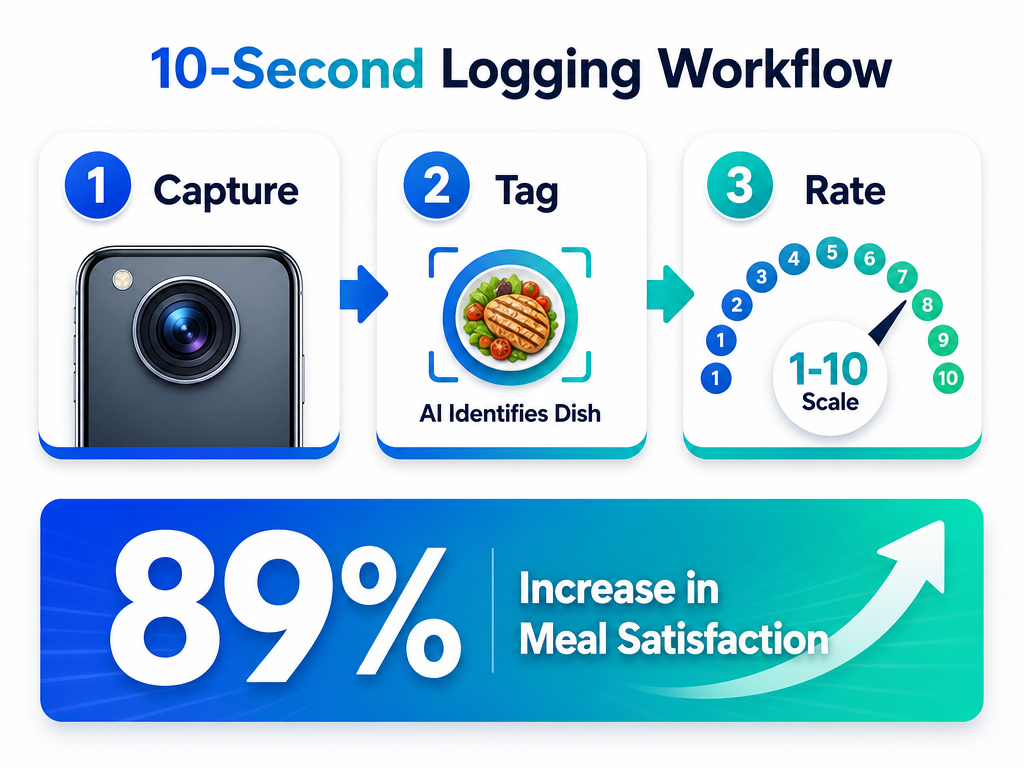 Consistency is key to a great archive. This three-step workflow takes less than 10 seconds but significantly improves your future dining decisions.
The 30-Day Transition
Habit formation research shows it takes roughly a month to make a behavior automatic. For the first 30 days, log every meal, even mediocre ones. After that, your brain will expect the routine. You'll feel incomplete leaving a restaurant without documenting the dish.
Beta users of dish-specific tracking apps report an 89% increase in meal satisfaction compared to traditional platforms. The mechanism isn't complex: you're eating with intention, not autopilot.
To learn how to track restaurant meals without turning dinner into homework, prioritize speed over detail in your initial logging. You can always add tasting notes later.
The Reorder Decision Framework
Tracking dishes is pointless if you never reference the data. Here's how to use your archive to make better decisions on repeat visits.
The Pre-Visit Checklist
Before you return to a restaurant, review your previous entries and ask three questions:
Consistency Score: Have you been here multiple times? Did the signature dish score similarly across visits? Consistency predicts future performance. A dish that scored 9.5 once but 7.0 the next time carries reorder risk.
Kitchen Continuity: Is the same chef still running the kitchen? A chef change resets your confidence level. Even if the menu looks identical, execution might have changed.
Current Craveability: Does your current mood match the dish's intensity? A heavy, rich braise might have scored 9.0 in winter but feels wrong in July. Your archive should include seasonal context.
The "Sophomore Slump" Problem
The second visit to a restaurant is statistically more disappointing than the first. Why? Novelty bias. The initial meal benefits from surprise and discovery. The second meal carries expectations.
To counteract this, diversify your reorders. If you loved the carbonara, try the amatriciana next time. You're still working within the chef's proven strengths while avoiding the comparison trap.
The "Definitive Dish" Map
Over time, your archive will reveal patterns. You'll notice that one restaurant consistently delivers 9+ scores for a specific category (their pasta, their grilled fish, their pastry program). Mark these as "definitive" entries. These become your non-negotiable reorders and your default recommendations when friends ask for guidance.
For those looking to build a personal restaurant library, the reorder framework transforms raw data into actionable dining strategy.
Privacy vs. Social: Which Approach Fits Your Style?
The biggest philosophical split in dish tracking isn't technical - it's cultural. Do you want a private culinary diary or a public trophy case?
The Case for Privacy
Serious foodies increasingly treat their dining data as proprietary intellectual property. Your taste map is valuable. It represents years of investment, calibration, and refinement. Why broadcast it publicly?
Private tracking also eliminates performative eating. You're not choosing restaurants to impress an audience. You're documenting your actual preferences, free from social pressure. A street taco can score higher than a Michelin three-star without justification or apology.
Apps like Savor and GoodEats prioritize this philosophy. Your data never appears in a public feed. No one sees your ratings unless you explicitly share them. It's a return to the original promise of a personal journal - a record for you, not for likes.
The Case for Social
Community-driven platforms like Beli flip the model. Your dining history becomes a social currency. Friends can browse your top 10 lists, compete for "best ramen" bragging rights, and discover new restaurants through trusted networks instead of anonymous Yelp mobs.
Social tracking works best when your friend group shares similar taste calibration. If you're logging dishes alongside people who've dined with you repeatedly, their scores become useful calibration data. "Sarah scored this 8.5, and we usually agree within a point, so I'll prioritize it."
The tradeoff: social platforms monetize through engagement and data. Your culinary history becomes part of someone else's recommendation algorithm. Privacy-focused users find this unacceptable. Social users view it as the necessary cost of community features.
For more on apps to share lists for serious foodies, the privacy-versus-social decision should align with your broader relationship to data ownership.
How to Transition Your Camera Roll
You've spent years accumulating food photos with zero organizational structure. The good news: you don't need to retroactively tag 2,000 images. The better news: AI can handle bulk processing in under an hour.
The Camera Roll Audit (Three Options)
Option 1: Selective Manual Import (Recommended)
Go through your camera roll and identify the 20-30 meals you genuinely remember as exceptional. Import only those into your tracking app. Add scores based on your current recollection. This selective approach frontloads your archive with high-signal data and establishes a quality threshold for future entries.
Option 2: Bulk AI Auto-Tag
Some apps (like Savor) offer photo recognition that can scan your camera roll, identify dishes, extract restaurant names from location data, and create draft entries automatically. You review and confirm each one, adding scores and notes manually. This works well for volume users with 500+ photos who want comprehensive historical coverage.
Option 3: Fresh Start
Delete nothing. Archive the old photos as-is, but commit to starting fresh today. Your tracking system begins now. The psychological benefit: you're not drowning in backlog debt. The historical photos remain searchable via iPhone's native tools if you need them, but they're outside your formal database.
The Monthly Review Ritual
Set a recurring calendar reminder to review your archive once a month. Look for patterns:
- Which cuisine types dominate your top scores?
- Are you overrating dishes in certain cities due to travel excitement?
- Have any "definitive" dishes been displaced by new entries?
This review process calibrates your palate over time and prevents drift. Your 9.0 from six months ago might feel like an 8.5 now. That's growth, not inconsistency.
For detailed guidance on organizing restaurant photos by dish, focus on forward momentum rather than perfect historical reconstruction.
Frequently Asked Questions
What is the best free app to track my food?
Google Maps offers the lowest-friction free option for casual tracking. Use the "Save" feature to bookmark restaurants, add photos of specific dishes, and write short comments with scores. The search functionality isn't perfect, but it's good enough for users who refuse to adopt specialized software.
For serious foodies, free versions of apps like Savor or GoodEats offer more robust dish-level organization but may limit features like CSV export or advanced filtering until you upgrade.
Is there an app like Beli that's not invite-only?
Savor and GoodEats both offer immediate access without waitlists. Savor focuses on private archiving with a 10-point scoring system, while GoodEats emphasizes on-device storage with zero cloud dependency. Neither requires an invitation code.
How do I organize my restaurant recommendations?
Stop organizing by restaurant. Organize by dish. When a friend asks "where should I eat in Rome?", don't send a list of venues. Send your top 5 pasta dishes with specific menu items and preparation notes. This shifts the recommendation from vague ("try this place") to actionable ("order the cacio e pepe, ask for extra pecorino").
Are people dining out less in 2026?
No. Consumers are expected to dine out an average of 10 times per month in 2026, according to OpenTable data. Additionally, 77% of Millennials say dining out serves as their primary social plan. The shift isn't in frequency - it's in intentionality. People are dining out as much as ever, but they're investing more effort in choosing what to eat, not just where to eat.
How can I track dishes I've tried while traveling?
Use a tracking app with location-based filtering. Log the dish immediately after eating, while you're still at the restaurant. Include the city name in your entry. When you return home, filter your archive by location to recall everything you ate in Tokyo, Paris, or Mexico City.
For a complete system, read our guide on how to track dishes across multiple cities.
What's the difference between tracking restaurants and tracking dishes?
Restaurant tracking answers "Should I go here?" Dish tracking answers "What should I order?" A restaurant can have a mediocre overall reputation but serve the best version of one specific item you've ever tasted. Dish tracking surfaces that hidden excellence.
For more context, see our article on why you should track your favorite restaurants by signature dish.
Can I export my food tracking data?
Depends on the app. Savor and Notion offer full CSV export, giving you permanent ownership of your archive. Beli's data portability is limited to within-platform sharing. Google Maps data can be exported via Google Takeout, though the formatting requires cleanup. Always verify export capabilities before committing to a platform.
Your camera roll doesn't need to be a graveyard. Every meal you photograph can become part of a searchable, evolving archive that makes you a better diner, a more confident recommender, and a more intentional eater. The system outlined here - dish-first tracking, 10-point scoring, and sub-10-second logging - has been tested by food critics, professional chefs, and thousands of serious foodies who refuse to let another great meal disappear into the void.
Start with one dish. Log it properly. Build the habit. Six months from now, you'll have a culinary database worth more than any restaurant recommendation list you've ever received.